"0341a2901a4ae9aa"{"id":"14592","slug":"shadersource-waterfall-tool-2","title":"SHADERSOURCE - Waterfall Tool 2","category":"Engine Tools","engine":"5.2 - 5.7","assetVersion":"Asset Version: 1.0a - 1.0d","engineVersion":"Engine Version: 5.2 - 5.7","tag":"Engine Tools","accent":"blue","visual":"animation","summary":"The SHADERSOURCE - Waterfall Tool 2 introduces a specialized Editor Mode for generating realistic waterfalls through dynamic meshes and spline paths. This tool offers both Simple and Advanced modes to provide full control over fluid paths and VFX generation.","platform":"Unreal Engine","publishedAt":"2026-03-11T18:36:22.000Z","updatedAt":"2026-10-04T08:27:42.401Z","sourceNotes":[],"fileContents":[],"compatibility":["Unreal Engine","Asset Version: 1.0a - 1.0d","Engine Version: 5.2 - 5.7"],"featuredImage":{"alt":"SHADERSOURCE - Waterfall Tool 2","src":"https://3dcghub.com/wp-content/uploads/2026/03/79d82bd8-c7cf-4877-9519-16f36c4a03c4.webp"},"hasDownloadLink":true,"downloads":1,"terms":[{"taxonomy":"category","slug":"engine-tools-tools-and-plugins","name":"Engine Tools"},{"taxonomy":"post_tag","slug":"audio","name":"Audio"},{"taxonomy":"post_tag","slug":"environment","name":"Environment"},{"taxonomy":"post_tag","slug":"materials","name":"Materials"},{"taxonomy":"post_tag","slug":"tools","name":"Tools"},{"taxonomy":"post_tag","slug":"ui","name":"UI"},{"taxonomy":"post_tag","slug":"vfx","name":"VFX"}],"galleryImages":[{"src":"https://3dcghub.com/wp-content/uploads/2026/03/85e228f24c66_91cc3675-9b7b-464f-a608-fc69dcc99e82.webp","alt":"SHADERSOURCE - Waterfall Tool 2"},{"src":"https://3dcghub.com/wp-content/uploads/2026/03/004d4e5cd308_013c1a98-86f7-40cb-8299-062345d7715c.webp","alt":"SHADERSOURCE - Waterfall Tool 2"},{"src":"https://3dcghub.com/wp-content/uploads/2026/03/4466255df8e8_8c10fd15-efe2-4d40-bb6e-67de48b2049d.webp","alt":"SHADERSOURCE - Waterfall Tool 2"},{"src":"https://3dcghub.com/wp-content/uploads/2026/03/7a035baa48d9_4fcfb677-c33c-4d76-98fe-c95f9f27c261.webp","alt":"SHADERSOURCE - Waterfall Tool 2"},{"src":"https://3dcghub.com/wp-content/uploads/2026/03/5e3494097656_97863494-e126-4bdd-b40e-19fdeefb5b6b.webp","alt":"SHADERSOURCE - Waterfall Tool 2"},{"src":"https://3dcghub.com/wp-content/uploads/2026/03/90a88e38dd5f_5305dc5c-5ba1-463b-8321-820f58923bf9.webp","alt":"SHADERSOURCE - Waterfall Tool 2"},{"src":"https://3dcghub.com/wp-content/uploads/2026/03/e5072ba9e4aa_aa8ba75c-06d7-4fcc-a641-c76888030e93.webp","alt":"SHADERSOURCE - Waterfall Tool 2"},{"src":"https://3dcghub.com/wp-content/uploads/2026/03/895ffc85e56c_a286bf2c-ce34-4a93-9eba-b85c46b610c0.webp","alt":"SHADERSOURCE - Waterfall Tool 2"},{"src":"https://3dcghub.com/wp-content/uploads/2026/03/f346e3a70fe0_7248c875-1e59-46ae-9018-a6683d7b48e3.webp","alt":"SHADERSOURCE - Waterfall Tool 2"},{"src":"https://3dcghub.com/wp-content/uploads/2026/03/de2035cac586_526d4652-0a89-47b3-9bb1-1e7a226cdafd.webp","alt":"SHADERSOURCE - Waterfall Tool 2"}],"accessPanel":{"kind":"resource","title":"Access this resource","eyebrow":"Free Download","message":"Log in or create a free account to start your download.","fileName":"SHADERSOURCE - Waterfall Tool 2 5.5 - 5.7,v1.0c - 1.0d.7z","safetyNote":"All resources are 100% manually reviewed to eliminate all risks.","actionLabel":"Download Free","resourceType":"Resource archive"},"contentHtml":"\u003ch2\u003eEfficient Waterfall Creation with SHADERSOURCE - Waterfall Tool 2\u003c/h2\u003e\n\u003cp\u003eThe SHADERSOURCE - Waterfall Tool 2 provides a streamlined solution for environment artists looking to add realistic water features to their levels. This tool introduces a dedicated Editor Mode designed specifically for fluid generation. Consequently, users can create complex waterfalls by simply dragging and dropping a Waterfall Actor into their scene and using the integrated generation buttons.\u003c/p\u003e\n\n\u003cp\u003eOne of the most significant improvements in this version is the move toward high-fidelity realism. Unlike the previous iteration, which relied on simplistic spline mesh planes, this tool was built from the ground up to cater to modern environment demands. Therefore, the water geometry can bend and conform to the shape of a cliff-face rather than appearing as a flat surface. This results in a much more natural appearance for less-stylized environments.\u003c/p\u003e\n\n\u003ch2\u003eVersatile Simple and Advanced Operating Modes\u003c/h2\u003e\n\u003cp\u003eThe developer has split the tool into two distinct operating levels: Simple Mode and Advanced Mode. Simple Mode allows for quick generation with minimal intervention, making it ideal for rapid prototyping. In contrast, Advanced Mode provides deep control over variables for those who need to tweak minor details of the paths and meshes. This flexibility ensures that the tool is accessible to users of various technical abilities.\u003c/p\u003e\n\n\u003cp\u003eOn top of that, the SHADERSOURCE - Waterfall Tool 2 utilizes dynamic meshes and spline paths to build geometry from scratch. This approach allows for much more complex shapes and interactions with the environment geometry. Additionally, the tool includes a specialized UI that allows users to easily add or modify VFX and SFX components at any spline point along the waterfall path.\u003c/p\u003e\n\n\u003ch2\u003eIntegrated VFX, Audio, and Optimization\u003c/h2\u003e\n\u003cp\u003eOn top of that, the asset includes support for visual effects and audio components to enhance the atmosphere. It comes with Niagara System assets for global VFX and demonstration materials for every mesh type generated. However, it is important to note that while audio components are included, the actual sound effect assets are not provided. This is an Editor Mode tool rather than a landscaping asset pack.\u003c/p\u003e\n\n\u003cp\u003eFor performance-conscious developers, the SHADERSOURCE - Waterfall Tool 2 includes an optimization feature to bake dynamic meshes into a single static mesh. This reduces the overhead in the final build while maintaining the visual quality of the water. Additionally, most variables are exposed to Blueprints and functions are virtual. As a result, developers have the possibility to extend the system or build custom functionality on top of the existing framework.\u003c/p\u003e\n\n\u003ch2\u003eBest Fit\u003c/h2\u003e\n\u003cp\u003eThe SHADERSOURCE - Waterfall Tool 2 is a comprehensive utility for creating realistic, conforming water features. By combining dynamic mesh generation with an intuitive Editor Mode, it simplifies a complex environmental task. Whether you need a quick waterfall or a highly customized fluid path, this tool provides the necessary flexibility and optimization features for modern development workflows.\u003c/p\u003e\n\n\u003ch2\u003eRelated Resources Worth Checking\u003c/h2\u003e\n\u003cul\u003e\n\u003cli\u003e\u003ca href=\"https://3dcghub.com/rdtextools-rd-tools-pro/\" title=\"rdTexTools (rd Tools Pro)\"\u003erdTexTools (rd Tools Pro)\u003c/a\u003e\u003c/li\u003e\n\u003cli\u003e\u003ca href=\"https://3dcghub.com/rdsplinetools-rd-tools-pro/\" title=\"rdSplineTools (rd Tools Pro)\"\u003erdSplineTools (rd Tools Pro)\u003c/a\u003e\u003c/li\u003e\n\u003cli\u003e\u003ca href=\"https://3dcghub.com/rdlodtools-rd-tools-pro/\" title=\"rdLODtools (rd Tools Pro)\"\u003erdLODtools (rd Tools Pro)\u003c/a\u003e\u003c/li\u003e\n\u003cli\u003e\u003ca href=\"https://3dcghub.com/proinstance-tools-plugin/\" title=\"ProInstance Tools Plugin\"\u003eProInstance Tools Plugin\u003c/a\u003e\u003c/li\u003e\n\u003cli\u003e\u003ca href=\"https://3dcghub.com/edge-decal-tools-1-2/\" title=\"Edge Decal Tools 1.2\"\u003eEdge Decal Tools 1.2\u003c/a\u003e\u003c/li\u003e\n\u003c/ul\u003e\n\n\u003ch2\u003eAsset Gallery\u003c/h2\u003e","contentTextLength":3299,"navigation":{"current":780,"total":4017,"previous":{"id":"1000964","slug":"rome-fantasy-pack-i","title":"Rome Fantasy Pack I","category":"Fantasy","platform":"Unreal Engine","updatedAt":"2026-10-04T08:42:17.590Z"},"next":{"id":"1000276","slug":"archvis-tools","title":"ArchVis Tools","category":"Engine Tools","platform":"Unreal Engine","updatedAt":"2026-10-04T05:02:43.791Z"}},"relatedResources":[{"id":"13760","slug":"blueprint-generator-ai-kibibyte-labs-engine-assistant","title":"AI Engine Assistant - Kibibyte Labs (Blueprint Generator \u0026 More!)","category":"Engine Tools","engine":"0.1.4","assetVersion":"Engine version: 5.2 - 5.7","engineVersion":"Asset Version: 0.1.4","tag":"Engine Tools","accent":"blue","visual":"character","summary":"Blueprint Generator Ai - Kibibyte Labs (Engine Assistant) is a powerful tool designed to transform natural language into functional Unreal Engine Blueprints. It offers a suite of modules for generating logic, explaining complex nodes, and optimizing the dev...","platform":"Unreal Engine","publishedAt":"2026-03-11T09:58:02.000Z","updatedAt":"2026-07-09T21:24:04.089Z","sourceNotes":[],"fileContents":[],"compatibility":["Unreal Engine","Engine version: 5.2 - 5.7","Asset Version: 0.1.4"],"featuredImage":{"alt":"Blueprint Generator Ai - Kibibyte Labs (Engine Assistant)","src":"https://3dcghub.com/wp-content/uploads/2026/03/ff365004-07a8-4633-90ac-7c9a038cc81d.webp"},"hasDownloadLink":true,"downloads":2},{"id":"13742","slug":"blockout-tools-plugin","title":"Blockout Tools Plugin","category":"Engine Tools","engine":"1.51 - 4.5.3","assetVersion":"Engine version: 4.26 - 5.7","engineVersion":"Asset Version:1.51 - 4.5.3","tag":"Engine Tools","accent":"blue","visual":"luts","summary":"Streamline your environment design with the Blockout Tools Plugin. This lightweight toolset features 15 primitive elements and triplanar grid materials for rapid level prototyping in Unreal Engine.","platform":"Unreal Engine","publishedAt":"2026-03-11T09:52:02.000Z","updatedAt":"2026-07-29T16:09:39.794Z","sourceNotes":[],"fileContents":[],"compatibility":["Unreal Engine","Engine version: 4.26 - 5.7","Asset Version:1.51 - 4.5.3"],"featuredImage":{"alt":"Blockout Tools Plugin","src":"https://3dcghub.com/wp-content/uploads/2026/03/2e655f33-dfec-4888-9b31-c0aaa5b72ba1.webp"},"hasDownloadLink":true,"downloads":2},{"id":"1000676","slug":"shadersource-landscape-material-tool","title":"SHADERSOURCE - Landscape Material Tool","category":"Engine Tools","engine":"5.6","assetVersion":"Asset Version: 2.0","engineVersion":"Engine Version: 5.6","tag":"Engine Tools","accent":"blue","visual":"luts","summary":"SHADERSOURCE - Landscape Material Tool provides a full Editor Mode for creating and editing landscape layers and materials, with direct UI parameter control for","platform":"Unreal Engine","publishedAt":"2026-07-22T14:16:25.264Z","updatedAt":"2026-07-22T14:16:25.264Z","sourceNotes":[],"fileContents":[],"compatibility":["Unreal Engine","Asset Version: 2.0","Engine Version: 5.6"],"featuredImage":{"alt":"SHADERSOURCE - Landscape Material Tool","src":"/wp-content/uploads/published/2026/07/1cb0b8429d2e-e7cc05fc-804a-4317-b02a-85b0e6f220c9-3023837ac7.webp"},"hasDownloadLink":true,"downloads":0}]}
Engine Tools
SHADERSOURCE - Waterfall Tool 2
The SHADERSOURCE - Waterfall Tool 2 introduces a specialized Editor Mode for generating realistic waterfalls through dynamic meshes and spline paths. This tool offers both Simple and Advanced modes to provide full control over fluid paths and VFX generation.
Category:Unreal Engine,Engine ToolsPlatform: Unreal EngineAsset Version: 1.0a - 1.0dEngine Version: 5.2 - 5.7Published: Mar 11, 2026Updated: Oct 4, 2026
Engine Tools
Resource overview
Efficient Waterfall Creation with SHADERSOURCE - Waterfall Tool 2
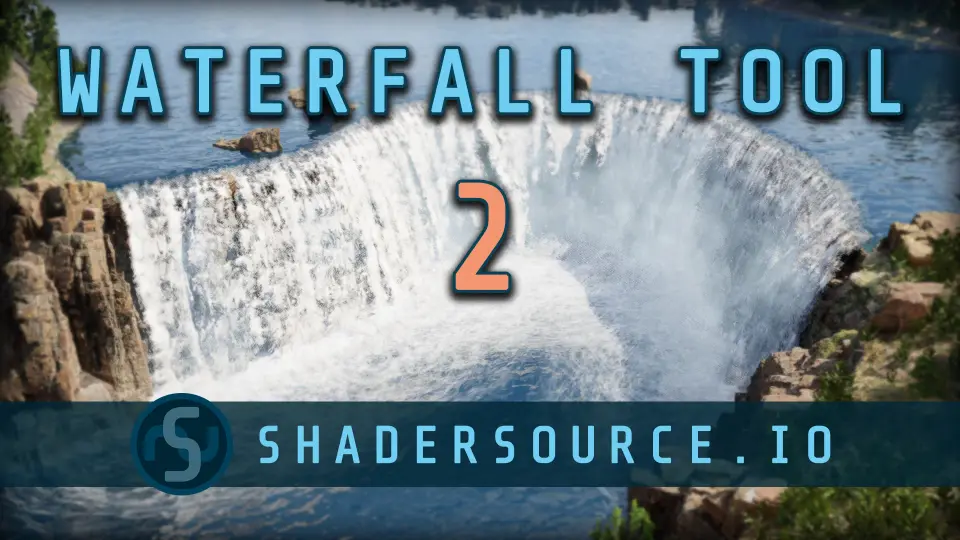
The SHADERSOURCE - Waterfall Tool 2 provides a streamlined solution for environment artists looking to add realistic water features to their levels. This tool introduces a dedicated Editor Mode designed specifically for fluid generation. Consequently, users can create complex waterfalls by simply dragging and dropping a Waterfall Actor into their scene and using the integrated generation buttons.
One of the most significant improvements in this version is the move toward high-fidelity realism. Unlike the previous iteration, which relied on simplistic spline mesh planes, this tool was built from the ground up to cater to modern environment demands. Therefore, the water geometry can bend and conform to the shape of a cliff-face rather than appearing as a flat surface. This results in a much more natural appearance for less-stylized environments.
Versatile Simple and Advanced Operating Modes
The developer has split the tool into two distinct operating levels: Simple Mode and Advanced Mode. Simple Mode allows for quick generation with minimal intervention, making it ideal for rapid prototyping. In contrast, Advanced Mode provides deep control over variables for those who need to tweak minor details of the paths and meshes. This flexibility ensures that the tool is accessible to users of various technical abilities.
On top of that, the SHADERSOURCE - Waterfall Tool 2 utilizes dynamic meshes and spline paths to build geometry from scratch. This approach allows for much more complex shapes and interactions with the environment geometry. Additionally, the tool includes a specialized UI that allows users to easily add or modify VFX and SFX components at any spline point along the waterfall path.
Integrated VFX, Audio, and Optimization
On top of that, the asset includes support for visual effects and audio components to enhance the atmosphere. It comes with Niagara System assets for global VFX and demonstration materials for every mesh type generated. However, it is important to note that while audio components are included, the actual sound effect assets are not provided. This is an Editor Mode tool rather than a landscaping asset pack.
For performance-conscious developers, the SHADERSOURCE - Waterfall Tool 2 includes an optimization feature to bake dynamic meshes into a single static mesh. This reduces the overhead in the final build while maintaining the visual quality of the water. Additionally, most variables are exposed to Blueprints and functions are virtual. As a result, developers have the possibility to extend the system or build custom functionality on top of the existing framework.
Best Fit
The SHADERSOURCE - Waterfall Tool 2 is a comprehensive utility for creating realistic, conforming water features. By combining dynamic mesh generation with an intuitive Editor Mode, it simplifies a complex environmental task. Whether you need a quick waterfall or a highly customized fluid path, this tool provides the necessary flexibility and optimization features for modern development workflows.
 Engine Tools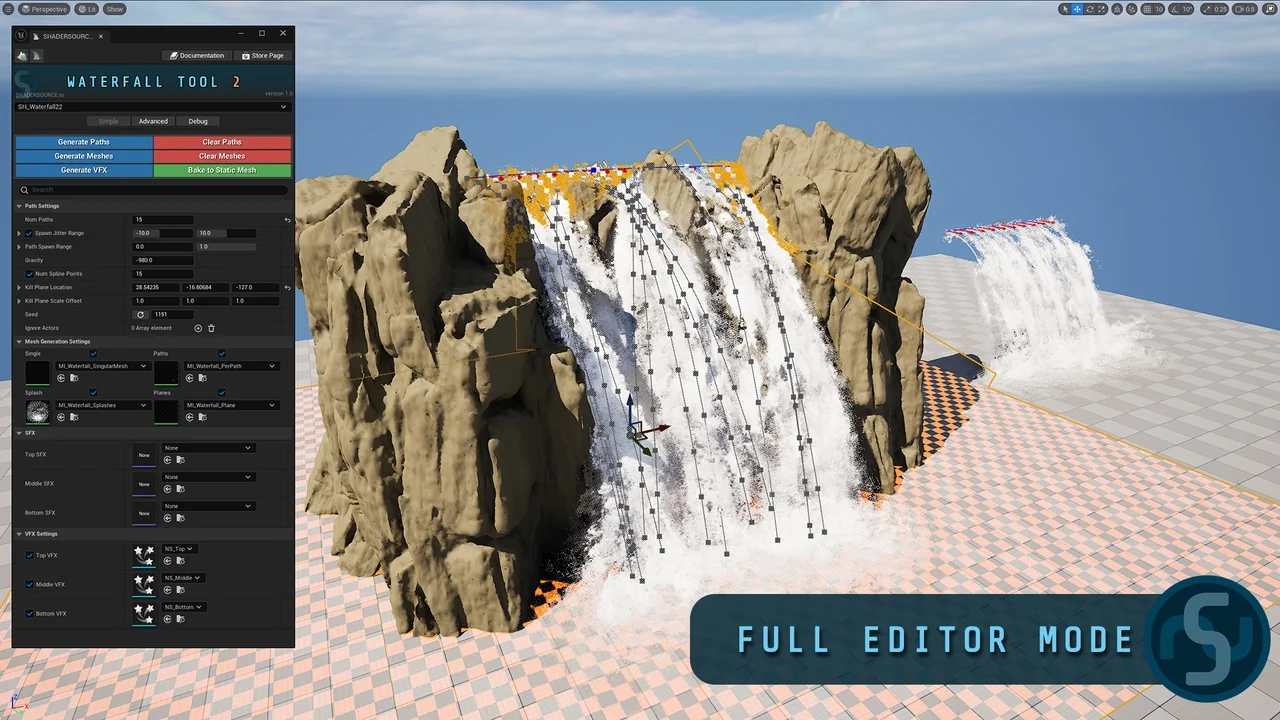
 Engine Tools
 Engine Tools
 Engine Tools