"4481da9c895ef786"{"id":"1000276","slug":"archvis-tools","title":"ArchVis Tools","category":"Engine Tools","engine":"5.4 - 5.7","assetVersion":"Asset Version: 1.6.0 - 1.6.6","engineVersion":"Engine Version: 5.4 - 5.7","tag":"Engine Tools","accent":"blue","visual":"mech","summary":"An Unreal Engine plugin featuring the ArchVisCineCamera for 2-point perspective correction, custom Movie Render Queue passes, and Dataprep operations.","platform":"Unreal Engine","publishedAt":"2026-07-02T18:05:33.151Z","updatedAt":"2026-10-03T17:43:32.771Z","sourceNotes":[],"fileContents":[],"compatibility":["Unreal Engine","Asset Version: 1.6.0 - 1.6.6","Engine Version: 5.4 - 5.7"],"featuredImage":{"alt":"ArchVis Tools","src":"/wp-content/uploads/published/2026/07/575ae2bd9d17-51fe82c5-872c-4b3c-8a56-5032ba205671-80d2a452df.webp"},"hasDownloadLink":true,"downloads":0,"terms":[{"taxonomy":"category","slug":"engine-tools-tools-and-plugins","name":"Engine Tools"}],"galleryImages":[{"src":"/wp-content/uploads/published/2026/07/7390fd32aee1-37f4f27d-f3c9-4cb9-b852-e5c6fa243ee1-6944a34c93.webp","alt":"ArchVis Tools"},{"src":"/wp-content/uploads/published/2026/07/4b119fb1a528-db4eeb54-cc23-4076-bcb8-3f5137cc5c5b-6aae4084bd.webp","alt":"ArchVis Tools"},{"src":"/wp-content/uploads/published/2026/07/6e1aba31dce4-c1e6a8d3-f509-417c-aa05-a48ec11679e9-95907a6f02.webp","alt":"ArchVis Tools"},{"src":"/wp-content/uploads/published/2026/07/07a346c03717-1cf6d852-ae76-4567-94db-b77f9bd97f06-71b6b48fd3.webp","alt":"ArchVis Tools"},{"src":"/wp-content/uploads/published/2026/07/872ab613e2dc-69debfbc-3a19-4308-97c6-ddfbf4e23b3c-c39083bdb5.webp","alt":"ArchVis Tools"},{"src":"/wp-content/uploads/published/2026/07/35e3e2bd97d9-7956ed01-cf70-4acb-bfcd-839977952e34-31cbe699b3.webp","alt":"ArchVis Tools"}],"accessPanel":{"kind":"resource","title":"Download this resource","eyebrow":"Free Download","message":"Log in or create a free account to start your download.","fileName":"ArchVis Tools.7z","safetyNote":"Resources are manually reviewed before listing to improve quality and reduce obvious risks.","actionLabel":"Download Free","resourceType":"Resource archive"},"contentHtml":"\u003cp\u003eArchVis Tools is an Unreal Engine plugin structured around specialized Camera Actors and rendering utilities built specifically for architectural visualization. At its core, the package introduces the ArchVisCineCamera, alongside custom Movie Render Queue passes and a suite of Dataprep Operations designed to streamline the handling of architectural geometry. Built to support Unreal Engine 4.27 as well as versions 5.0 through 5.8, the plugin targets the specific structural rendering requirements of architectural projects, where precise geometric alignment and camera control are critical.\u003c/p\u003e \u003ch2\u003eArchVisCineCamera Perspective Correction\u003c/h2\u003e \u003cp\u003eThe central component of the plugin is the ArchVisCineCamera, a specialized actor designed to address common distortion issues in standard architectural rendering. In traditional 3D rendering, tilting a camera up or down to capture tall structures results in converging vertical lines, creating a skewed perspective that is generally avoided in professional architectural photography. The ArchVisCineCamera automatically corrects the view to simulate a rigid 2-point perspective.\u003c/p\u003e \u003cp\u003eThrough this automatic correction, vertical lines remain truly vertical regardless of the camera's pitch, closely mimicking the physical tilt-shift lenses used by architectural photographers. The strength of this correction is not locked; it can be manually adjusted to suit the specific framing requirements of a shot. Because all of these camera properties are fully exposed to Unreal Engine's Blueprint visual scripting system, developers can build dynamic interactions or trigger perspective shifts during runtime. Additionally, these properties can be keyframed and animated directly within Sequencer, allowing for smooth cinematic fly-throughs where the perspective correction adapts seamlessly as the camera moves through an interior space or pans across an exterior facade.\u003c/p\u003e \u003cp\u003eBeyond standard cinematic rendering, the plugin also includes an experimental \u003ccode\u003eArchVisSceneCapture2D\u003c/code\u003e Component. This allows the unique perspective correction of the ArchVisCineCamera to be rendered directly to a texture, which can then be applied to materials within the scene, such as security monitor screens or reflective surfaces that require mathematically corrected architectural reflections.\u003c/p\u003e \u003ch2\u003eCustom Movie Render Queue Passes\u003c/h2\u003e \u003cp\u003eStandard Unreal Engine rendering passes often struggle to accurately capture modified camera projections without introducing visual artifacts. To ensure the unique features of the ArchVisCineCamera translate correctly into final rendered output, ArchVis Tools includes a dedicated set of Movie Render Queue (MRQ) passes. These custom passes are built directly upon the existing MRQ framework but are specifically calibrated for the plugin's perspective shifts.\u003c/p\u003e \u003cp\u003eThe included rendering passes cover a wide range of visualization needs, supporting both real-time workflows and high-fidelity ray tracing. The available passes include:\u003c/p\u003e \u003cul\u003e\n\u003cli\u003e[ArchVis] Deferred Rendering\u003c/li\u003e\n\u003cli\u003e[ArchVis] Deferred Rendering (Unlit)\u003c/li\u003e\n\u003cli\u003e[ArchVis] Deferred Rendering (Detail Lighting)\u003c/li\u003e\n\u003cli\u003e[ArchVis] Deferred Rendering (Lighting Only)\u003c/li\u003e\n\u003cli\u003e[ArchVis] Deferred Rendering (Reflections Only)\u003c/li\u003e\n\u003cli\u003e[ArchVis] Path Tracer\u003c/li\u003e\n\u003cli\u003e[ArchVis] Object Id (Limited)\u003c/li\u003e\n\u003c/ul\u003e \u003cp\u003eThese specific Deferred Rendering modes allow lighting artists to isolate different elements of the scene—such as evaluating scene illumination without material interference in Lighting Only mode, or checking specular responses in Reflections Only mode—while maintaining the precise 2-point perspective correction. The inclusion of the Path Tracer pass ensures that projects requiring physically accurate light bounces and photorealistic shadows can fully utilize the ArchVisCineCamera.\u003c/p\u003e \u003cp\u003eThere is a specific technical consideration regarding Object IDs when moving between different rendering frameworks in newer engine versions. For users utilizing the Movie Render Graph (MRG), the specific [ArchVis] Object ID node has been deprecated and will not function correctly in Unreal Engine 5.6. In these instances, utilizing the regular MRG Object ID node will yield the expected results. However, for those using the standard Movie Render Queue setup, the included [ArchVis] Object ID pass continues to function exactly as expected.\u003c/p\u003e \u003ch2\u003eDataprep Operations for Scene Management\u003c/h2\u003e \u003cp\u003eBeyond camera and rendering features, the plugin addresses the ingestion and organization of complex architectural models through a series of Custom Dataprep Operations. Architectural visualization projects often involve importing dense, unoptimized CAD or BIM data, and these operations provide targeted functionality for cleaning and preparing that data within Unreal Engine.\u003c/p\u003e \u003cp\u003eThe plugin expands the standard Dataprep toolset with several unique operations. The Simplify Hierarchy and Branch Merge operations assist in collapsing complex nested structures and combining related elements, which is vital for maintaining performance in heavily populated scenes. The Build Adjacency and Explode operations provide specific spatial manipulations, while the Debug Operations tool helps identify issues during the import process.\u003c/p\u003e \u003cp\u003eAlso, the suite includes a Material Name Filter for precise material assignment during Dataprep, as well as a Replace Camera operation, which can automatically swap standard imported scene cameras with the specialized ArchVisCineCamera actor. A Face Camera operation is also included, though it currently requires the component to be added manually when working within Unreal Engine 5 Preview builds.\u003c/p\u003e \u003ch2\u003eEngine Version Integration and Workflows\u003c/h2\u003e \u003cp\u003eBecause ArchVis Tools modifies core camera projections and interacts deeply with the Movie Render Queue, the underlying code is tightly coupled to the specific architecture of the Unreal Engine version it runs on. While the plugin broadly supports Unreal Engine 4.27 and the UE5 lifecycle from 5.0 up through 5.8, it generally requires a dedicated update following each major engine release. \u003c/p\u003e \u003cp\u003eThe package equips technical artists and visualization specialists with a focused set of tools that handle the specific demands of architectural projection, rendering, and data preparation without relying on external post-processing software to correct perspective distortion.\u003c/p\u003e\n\n\u003ch2\u003eContinue Browsing Similar Packs\u003c/h2\u003e\n\u003cul\u003e\n\u003cli\u003e\u003ca href=\"https://3dcghub.com/able-ability-system/\" title=\"Able Ability System\"\u003eAble Ability System\u003c/a\u003e\u003c/li\u003e\n\u003cli\u003e\u003ca href=\"https://3dcghub.com/edge-decal-tools-1-2/\" title=\"Edge Decal Tools 1.2\"\u003eEdge Decal Tools 1.2\u003c/a\u003e\u003c/li\u003e\n\u003cli\u003e\u003ca href=\"https://3dcghub.com/uasset-browser/\" title=\"UAsset Browser\"\u003eUAsset Browser\u003c/a\u003e\u003c/li\u003e\n\u003cli\u003e\u003ca href=\"https://3dcghub.com/msc-screen-camera-recorder/\" title=\"MSC Screen \u0026amp; Camera Recorder\"\u003eMSC Screen \u0026amp; Camera Recorder\u003c/a\u003e\u003c/li\u003e\n\u003cli\u003e\u003ca href=\"https://3dcghub.com/ultimate-level-art-tool-ulat-tools-plugin-plugins/\" title=\"Ultimate Level Art Tool - ULAT ( Tools / Plugin / Plugins )\"\u003eUltimate Level Art Tool - ULAT ( Tools / Plugin / Plugins )\u003c/a\u003e\u003c/li\u003e\n\u003c/ul\u003e","contentTextLength":6404,"navigation":{"current":1,"total":3269,"next":{"id":"1001331","slug":"ancient-mountain-temple-nanite","title":"Ancient Mountain Temple (Nanite)","category":"Historical","platform":"Unreal Engine","updatedAt":"2026-10-03T17:12:02.776Z"}},"relatedResources":[{"id":"1000407","slug":"ultimate-archvis-kit","title":"Ultimate Archvis Kit","category":"Procedural Systems","engine":"5.1+","assetVersion":"","engineVersion":"Engine Version: 5.1+","tag":"Procedural Systems","accent":"blue","visual":"mech","summary":"A comprehensive Blueprint toolkit for architectural visualization, featuring dynamic UI controls, material swapping, interactive lighting, and profile managemen","platform":"Unreal Engine","publishedAt":"2026-07-08T11:46:44.936Z","updatedAt":"2026-07-08T11:46:44.936Z","sourceNotes":[],"fileContents":[],"compatibility":["Unreal Engine","Engine Version: 5.1+"],"featuredImage":{"alt":"Ultimate Archvis Kit","src":"/wp-content/uploads/published/2026/07/060c703e9991-c4935242-c4ab-41df-bdd0-12d5f98e689c-b6473af33f.webp"},"hasDownloadLink":true,"downloads":0},{"id":"14331","slug":"pbl-database","title":"PBL Database","category":"Engine Tools","engine":"5.4 - 5.7","assetVersion":"Engine version: 5.4 - 5.7","engineVersion":"Asset Version:1.1","tag":"Engine Tools","accent":"blue","visual":"city","summary":"The PBL Database provides artists with a scientific approach to lighting within Unreal Engine. This toolbox offers physically accurate data and conversion tools to achieve professional-grade realism.","platform":"Unreal Engine","publishedAt":"2026-03-11T17:41:11.000Z","updatedAt":"2026-04-19T15:45:48.000Z","sourceNotes":[],"fileContents":[],"compatibility":["Unreal Engine","Engine version: 5.4 - 5.7","Asset Version: 1.1"],"featuredImage":{"alt":"PBL Database","src":"https://3dcghub.com/wp-content/uploads/2026/03/4e4940dd-91af-47c5-84c6-8977c500a1ca.webp"},"hasDownloadLink":true,"downloads":1},{"id":"1001313","slug":"nexxnote-sketch-and-note-for-blueprints","title":"NexxNote | Sketch \u0026 Note for Blueprints","category":"Engine Tools","engine":"5.4 - 5.7","assetVersion":"Asset Version: 1.0","engineVersion":"Engine Version: 5.4 - 5.7","tag":"Engine Tools","accent":"blue","visual":"mech","summary":"NexxNote brings freeform sketching and sticky notes directly into Unreal Engine's Blueprint editor, streamlining logic tracking and visual prototyping.","platform":"Unreal Engine","publishedAt":"2026-10-02T08:10:30.350Z","updatedAt":"2026-10-02T08:10:30.350Z","sourceNotes":[],"fileContents":[],"compatibility":["Unreal Engine","Asset Version: 1.0","Engine Version: 5.4 - 5.7"],"featuredImage":{"alt":"NexxNote | Sketch \u0026 Note for Blueprints","src":"/wp-content/uploads/published/2026/10/7b40d930f268-9572df08-865b-44d6-b44b-5c9d66b42bb6-f4ebf0ad43.webp"},"hasDownloadLink":true,"downloads":0}]}
Engine Tools
ArchVis Tools
An Unreal Engine plugin featuring the ArchVisCineCamera for 2-point perspective correction, custom Movie Render Queue passes, and Dataprep operations.
ArchVis Tools is an Unreal Engine plugin structured around specialized Camera Actors and rendering utilities built specifically for architectural visualization. At its core, the package introduces the ArchVisCineCamera, alongside custom Movie Render Queue passes and a suite of Dataprep Operations designed to streamline the handling of architectural geometry. Built to support Unreal Engine 4.27 as well as versions 5.0 through 5.8, the plugin targets the specific structural rendering requirements of architectural projects, where precise geometric alignment and camera control are critical.
ArchVisCineCamera Perspective Correction
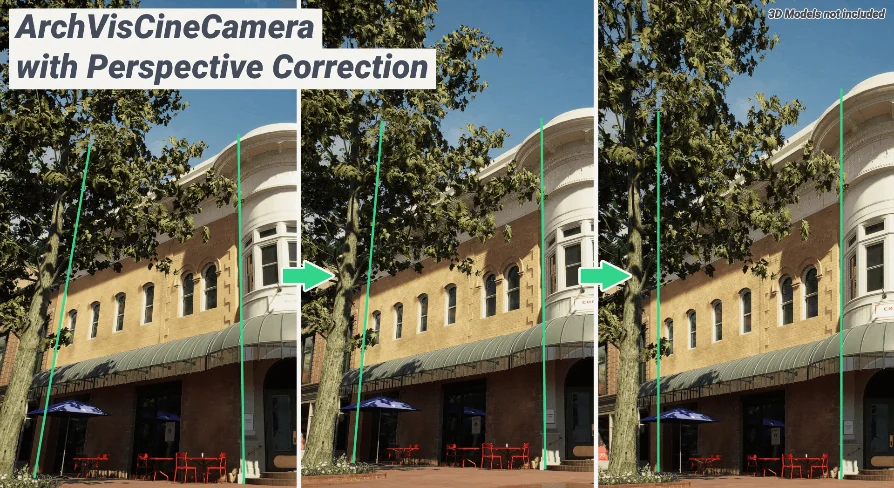
The central component of the plugin is the ArchVisCineCamera, a specialized actor designed to address common distortion issues in standard architectural rendering. In traditional 3D rendering, tilting a camera up or down to capture tall structures results in converging vertical lines, creating a skewed perspective that is generally avoided in professional architectural photography. The ArchVisCineCamera automatically corrects the view to simulate a rigid 2-point perspective.
Through this automatic correction, vertical lines remain truly vertical regardless of the camera's pitch, closely mimicking the physical tilt-shift lenses used by architectural photographers. The strength of this correction is not locked; it can be manually adjusted to suit the specific framing requirements of a shot. Because all of these camera properties are fully exposed to Unreal Engine's Blueprint visual scripting system, developers can build dynamic interactions or trigger perspective shifts during runtime. Additionally, these properties can be keyframed and animated directly within Sequencer, allowing for smooth cinematic fly-throughs where the perspective correction adapts seamlessly as the camera moves through an interior space or pans across an exterior facade.
Beyond standard cinematic rendering, the plugin also includes an experimental ArchVisSceneCapture2D Component. This allows the unique perspective correction of the ArchVisCineCamera to be rendered directly to a texture, which can then be applied to materials within the scene, such as security monitor screens or reflective surfaces that require mathematically corrected architectural reflections.
Custom Movie Render Queue Passes
Standard Unreal Engine rendering passes often struggle to accurately capture modified camera projections without introducing visual artifacts. To ensure the unique features of the ArchVisCineCamera translate correctly into final rendered output, ArchVis Tools includes a dedicated set of Movie Render Queue (MRQ) passes. These custom passes are built directly upon the existing MRQ framework but are specifically calibrated for the plugin's perspective shifts.
The included rendering passes cover a wide range of visualization needs, supporting both real-time workflows and high-fidelity ray tracing. The available passes include:
[ArchVis] Deferred Rendering
[ArchVis] Deferred Rendering (Unlit)
[ArchVis] Deferred Rendering (Detail Lighting)
[ArchVis] Deferred Rendering (Lighting Only)
[ArchVis] Deferred Rendering (Reflections Only)
[ArchVis] Path Tracer
[ArchVis] Object Id (Limited)
These specific Deferred Rendering modes allow lighting artists to isolate different elements of the scene—such as evaluating scene illumination without material interference in Lighting Only mode, or checking specular responses in Reflections Only mode—while maintaining the precise 2-point perspective correction. The inclusion of the Path Tracer pass ensures that projects requiring physically accurate light bounces and photorealistic shadows can fully utilize the ArchVisCineCamera.
There is a specific technical consideration regarding Object IDs when moving between different rendering frameworks in newer engine versions. For users utilizing the Movie Render Graph (MRG), the specific [ArchVis] Object ID node has been deprecated and will not function correctly in Unreal Engine 5.6. In these instances, utilizing the regular MRG Object ID node will yield the expected results. However, for those using the standard Movie Render Queue setup, the included [ArchVis] Object ID pass continues to function exactly as expected.
Dataprep Operations for Scene Management
Beyond camera and rendering features, the plugin addresses the ingestion and organization of complex architectural models through a series of Custom Dataprep Operations. Architectural visualization projects often involve importing dense, unoptimized CAD or BIM data, and these operations provide targeted functionality for cleaning and preparing that data within Unreal Engine.
The plugin expands the standard Dataprep toolset with several unique operations. The Simplify Hierarchy and Branch Merge operations assist in collapsing complex nested structures and combining related elements, which is vital for maintaining performance in heavily populated scenes. The Build Adjacency and Explode operations provide specific spatial manipulations, while the Debug Operations tool helps identify issues during the import process.
Also, the suite includes a Material Name Filter for precise material assignment during Dataprep, as well as a Replace Camera operation, which can automatically swap standard imported scene cameras with the specialized ArchVisCineCamera actor. A Face Camera operation is also included, though it currently requires the component to be added manually when working within Unreal Engine 5 Preview builds.
Engine Version Integration and Workflows
Because ArchVis Tools modifies core camera projections and interacts deeply with the Movie Render Queue, the underlying code is tightly coupled to the specific architecture of the Unreal Engine version it runs on. While the plugin broadly supports Unreal Engine 4.27 and the UE5 lifecycle from 5.0 up through 5.8, it generally requires a dedicated update following each major engine release.
The package equips technical artists and visualization specialists with a focused set of tools that handle the specific demands of architectural projection, rendering, and data preparation without relying on external post-processing software to correct perspective distortion.
 Engine Tools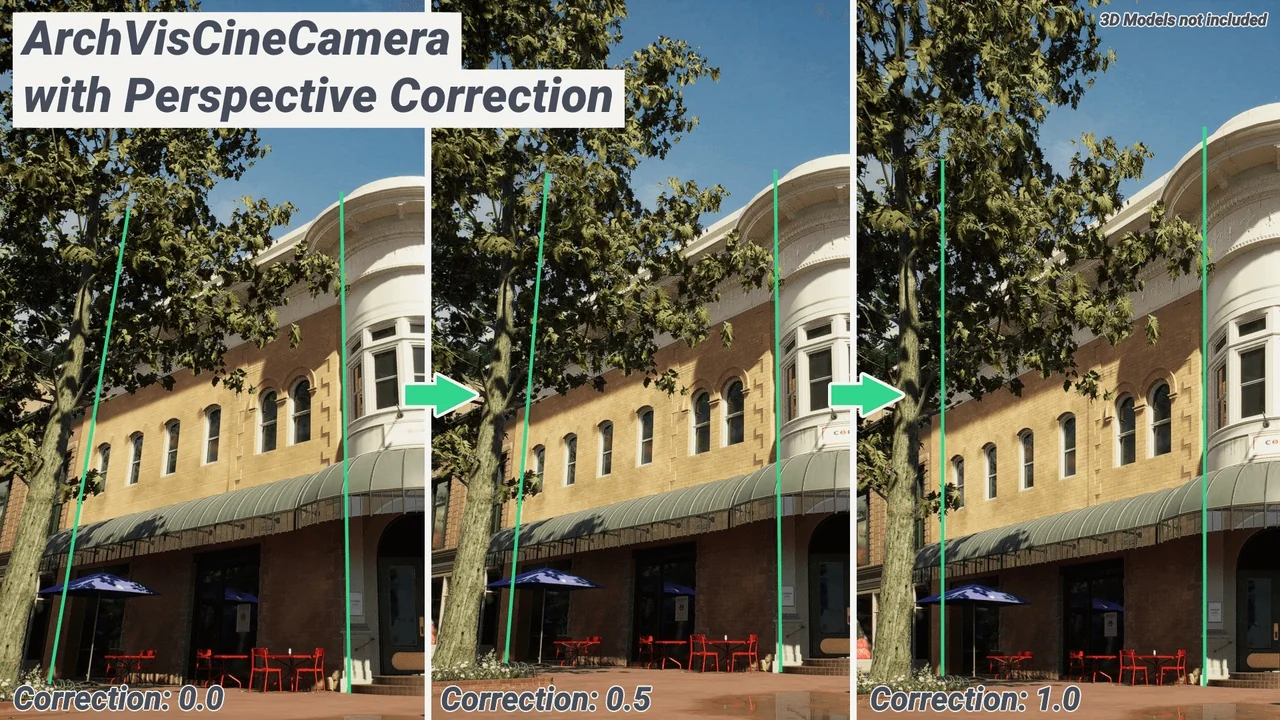
 Procedural Systems
 Engine Tools
 Engine Tools