"0341a2901a4ae9aa"{"id":"14687","slug":"uasset-browser","title":"UAsset Browser","category":"Engine Tools","engine":"5.6 - 5.7","assetVersion":"Engine version: 5.6 - 5.7","engineVersion":"Asset Version:1.3.4","tag":"Engine Tools","accent":"blue","visual":"luts","summary":"The UAsset Browser provides a streamlined way to manage external content by offering thumbnail previews, dependency graphs, and advanced metadata filtering for project assets.","platform":"Unreal Engine","publishedAt":"2026-03-11T19:00:50.000Z","updatedAt":"2026-04-19T15:45:42.000Z","sourceNotes":[],"fileContents":[],"compatibility":["Unreal Engine","Engine version: 5.6 - 5.7","Asset Version: 1.3.4"],"featuredImage":{"alt":"UAsset Browser","src":"https://3dcghub.com/wp-content/uploads/2026/03/26174904-e233-4509-9bed-c5b7cef34bf9.webp"},"hasDownloadLink":true,"downloads":1,"terms":[{"taxonomy":"category","slug":"engine-tools-tools-and-plugins","name":"Engine Tools"},{"taxonomy":"post_tag","slug":"audio","name":"Audio"},{"taxonomy":"post_tag","slug":"blueprint","name":"Blueprint"},{"taxonomy":"post_tag","slug":"plugins","name":"Plugins"},{"taxonomy":"post_tag","slug":"tools","name":"Tools"},{"taxonomy":"post_tag","slug":"ui","name":"UI"},{"taxonomy":"post_tag","slug":"unreal-engine-5","name":"Unreal Engine 5"}],"galleryImages":[{"src":"https://3dcghub.com/wp-content/uploads/2026/03/e55c4129e1d5_19d371a3-06aa-4ce9-8c61-9ae9452404d6.webp","alt":"UAsset Browser"},{"src":"https://3dcghub.com/wp-content/uploads/2026/03/cceb6b7b6616_c717d75d-466b-458b-9c6c-c7f3dc4e7d6f.webp","alt":"UAsset Browser"},{"src":"https://3dcghub.com/wp-content/uploads/2026/03/ff2f98b5bf62_5c48d5c6-cca6-494b-88f2-e7912e8d0448.webp","alt":"UAsset Browser"},{"src":"https://3dcghub.com/wp-content/uploads/2026/03/e0a6e7393211_d50d62e3-4897-48d1-a76d-c2f550b93f73.webp","alt":"UAsset Browser"},{"src":"https://3dcghub.com/wp-content/uploads/2026/03/8c3b93f0f185_f009a7ad-120e-42db-8afc-8b5153a32a24.webp","alt":"UAsset Browser"},{"src":"https://3dcghub.com/wp-content/uploads/2026/03/2e0d8c43d0c3_ae2b23bc-3d30-4c64-9efe-3d1eeaeea1b3.webp","alt":"UAsset Browser"},{"src":"https://3dcghub.com/wp-content/uploads/2026/03/1cbca75e4d8c_c2ba74c5-f78c-4ddf-9308-47c9ff5fe249.webp","alt":"UAsset Browser"},{"src":"https://3dcghub.com/wp-content/uploads/2026/03/9fb5d3dcc942_92809a14-c358-4c29-ba3e-1a504c8cc011.webp","alt":"UAsset Browser"},{"src":"https://3dcghub.com/wp-content/uploads/2026/03/44115779e8fe_ae2487a3-ce3d-43cb-aa91-aee26eaaf498.webp","alt":"UAsset Browser"}],"accessPanel":{"kind":"resource","title":"Access this resource","eyebrow":"Free Download","message":"Log in or create a free account to start your download.","fileName":"UAsset Browser 5.6 - 5.7,v1.3.4.7z","safetyNote":"All resources are 100% manually reviewed to eliminate all risks.","actionLabel":"Download Free","resourceType":"Resource archive"},"contentHtml":"\u003ch2\u003eEfficient External Asset Management\u003c/h2\u003e\n\u003cp\u003eThe \u003cstrong\u003eUAsset Browser\u003c/strong\u003e is a specialized tool designed to simplify how developers interact with external content. It functions as a comprehensive uasset file importer that bridges the gap between your active workspace and external project folders. Furthermore, it allows you to browse marketplace vault cache content directly from within your current project. This integration ensures that you can find and utilize resources without the need to switch between multiple application windows.\u003c/p\u003e\n\n\u003cp\u003eThe interface is designed to look and feel familiar to users of the standard Content Browser. However, the \u003cstrong\u003eUAsset Browser\u003c/strong\u003e focuses specifically on external content libraries. You can preview uasset thumbnails, search through files, and filter assets based on detailed metadata. This makes it much easier to locate specific resources in large external directories or plugin folders.\u003c/p\u003e\n\n\u003ch2\u003eDependency Tracking and Migration\u003c/h2\u003e\n\u003cp\u003eManaging file relationships is critical when moving assets between projects. The \u003cstrong\u003eUAsset Browser\u003c/strong\u003e automates this process by gathering all necessary dependencies during the import phase. Consequently, it identifies both hard and soft references to ensure that no files are missing after the transfer. This approach is a significant improvement over manual copying, which often results in broken links or missing textures.\u003c/p\u003e\n\n\u003cp\u003eOn top of that, this tool offers a superior alternative to the traditional Migrate Asset workflow. Instead of opening external projects to push assets to your current one, you can pull assets in while staying focused on your work. The developer has included a visual dependency graph to help users inspect recursive relationships before committing to an import. Therefore, you gain full transparency into how assets are connected.\u003c/p\u003e\n\n\u003ch2\u003eAdvanced Workflow Features\u003c/h2\u003e\n\u003cp\u003ePerformance and flexibility are central to the \u003cstrong\u003eUAsset Browser\u003c/strong\u003e experience. The tool supports various import methods, including drag-and-drop and a \"Flat Import\" option that consolidates files into a single folder. Additionally, version 1.2 introduced a Blueprint Function Library, which allows for scripted imports to automate repetitive tasks. For those who need speed, the \"Direct Copy\" mode can skip dependency checks entirely.\u003c/p\u003e\n\n\u003cp\u003eThe introduction of Cache Mode in version 1.3 provides a local database for instant, offline browsing. This feature ensures that you can navigate your asset library without waiting for slow disk scans. Furthermore, async operations for asset gathering and validation prevent the user interface from freezing during heavy tasks. These optimizations make the \u003cstrong\u003eUAsset Browser\u003c/strong\u003e a reliable choice for managing high-volume asset libraries.\u003c/p\u003e\n\n\u003ch2\u003eRecent Updates and Enhancements\u003c/h2\u003e\n\u003cp\u003eThe creator has consistently improved the tool with several meaningful updates. Version 1.5 introduced an audio preview feature, allowing users to play SoundWave assets directly without importing them first. Visual organization has also been enhanced with color-coded root folders that distinguish between project, vault, and plugin content. Moreover, status bar indicators now provide clear feedback during background scanning and revalidation processes.\u003c/p\u003e\n\n\u003cp\u003eIt is important to note that while the tool is highly versatile, it does not support cooked uasset files from packaged games. It is specifically built for development-ready assets within project environments. By centralizing the import process and providing deep visibility into file metadata, the \u003cstrong\u003eUAsset Browser\u003c/strong\u003e significantly reduces the friction of cross-project asset management.\u003c/p\u003e\n\n\u003ch2\u003eFinal Take\u003c/h2\u003e\n\u003cp\u003eTaken together, the \u003cstrong\u003eUAsset Browser\u003c/strong\u003e is an essential utility for anyone working with extensive external libraries or multiple project files. It combines powerful dependency tracking with a user-friendly interface to streamline the import process. By utilizing features like Cache Mode and async scanning, developers can maintain a fast and organized workflow. Ultimately, this tool saves time and prevents the common errors associated with manual file migration.\u003c/p\u003e\n\n\u003ch2\u003eMore From The Same Workflow\u003c/h2\u003e\n\u003cul\u003e\n\u003cli\u003e\u003ca href=\"https://3dcghub.com/extile-plus-ultimate-non-tiling-material-toolkit-for-unreal-engine-environments/\" title=\"EXTILE PLUS -Ultimate Non-Tiling Material Toolkit for Unreal Engine Environments\"\u003eEXTILE PLUS -Ultimate Non-Tiling Material Toolkit for Unreal Engine Environments\u003c/a\u003e\u003c/li\u003e\n\u003cli\u003e\u003ca href=\"https://3dcghub.com/ultimate-template-unrealengine-2d-dialogue-inventory-system-save/\" title=\"ULTIMATE Template UnrealEngine || 2D + Dialogue + Inventory system + Save | |\"\u003eULTIMATE Template UnrealEngine || 2D + Dialogue + Inventory system + Save | |\u003c/a\u003e\u003c/li\u003e\n\u003cli\u003e\u003ca href=\"https://3dcghub.com/daz-to-unreal/\" title=\"Daz To Unreal\"\u003eDaz To Unreal\u003c/a\u003e\u003c/li\u003e\n\u003cli\u003e\u003ca href=\"https://3dcghub.com/blueprint-generator-ai-kibibyte-labs-engine-assistant/\" title=\"Blueprint Generator Ai – Kibibyte Labs (Engine Assistant)\"\u003eBlueprint Generator Ai – Kibibyte Labs (Engine Assistant)\u003c/a\u003e\u003c/li\u003e\n\u003cli\u003e\u003ca href=\"https://3dcghub.com/sci-fi-environment-engine-room/\" title=\"Sci-fi Environment Engine Room\"\u003eSci-fi Environment Engine Room\u003c/a\u003e\u003c/li\u003e\n\u003c/ul\u003e","contentTextLength":4341,"navigation":{"current":3403,"total":4017,"previous":{"id":"14597","slug":"simple-instanced-spline-mesh","title":"Simple Instanced Spline Mesh","category":"Engine Tools","platform":"Unreal Engine","updatedAt":"2026-04-19T15:45:43.000Z"},"next":{"id":"14675","slug":"twitch-integrator","title":"Twitch Integrator","category":"Engine Tools","platform":"Unreal Engine","updatedAt":"2026-04-19T15:45:42.000Z"}},"relatedResources":[{"id":"13723","slug":"auto-settings","title":"Auto Settings","category":"Engine Tools","engine":"5.6","assetVersion":"Engine version: 5.6","engineVersion":"Asset Version:1.31.0","tag":"Engine Tools","accent":"blue","visual":"character","summary":"Auto Settings is a highly configurable toolkit for Unreal Engine designed to streamline the creation of game options and input binding menus without code.","platform":"Unreal Engine","publishedAt":"2026-03-11T09:48:29.000Z","updatedAt":"2026-04-19T15:46:23.000Z","sourceNotes":[],"fileContents":[],"compatibility":["Unreal Engine","Engine version: 5.6","Asset Version: 1.31.0"],"featuredImage":{"alt":"Auto Settings","src":"https://3dcghub.com/wp-content/uploads/2026/03/25a4d182-718a-444e-823a-6b7e680c21f2.webp"},"hasDownloadLink":true,"downloads":0},{"id":"13785","slug":"chunk-downloader-nodes","title":"Chunk Downloader Nodes","category":"Engine Tools","engine":"5.6","assetVersion":"Engine version: 5.6","engineVersion":"Asset Version:1.0","tag":"Engine Tools","accent":"blue","visual":"animation","summary":"Streamline your content delivery with Chunk Downloader Nodes, a professional Blueprint wrapper for Epic's official plugin. This tool enables efficient content streaming and PAK file management without C++ requirements.","platform":"Unreal Engine","publishedAt":"2026-03-11T10:02:01.000Z","updatedAt":"2026-04-19T15:46:22.000Z","sourceNotes":[],"fileContents":[],"compatibility":["Unreal Engine","Engine version: 5.6","Asset Version: 1.0"],"featuredImage":{"alt":"Chunk Downloader Nodes","src":"https://3dcghub.com/wp-content/uploads/2026/03/efb2c9d0-ead4-4949-8fda-f55747fa16fe-1.webp"},"hasDownloadLink":true,"downloads":0},{"id":"14592","slug":"shadersource-waterfall-tool-2","title":"SHADERSOURCE - Waterfall Tool 2","category":"Engine Tools","engine":"5.2 - 5.7","assetVersion":"Asset Version: 1.0a - 1.0d","engineVersion":"Engine Version: 5.2 - 5.7","tag":"Engine Tools","accent":"blue","visual":"animation","summary":"The SHADERSOURCE - Waterfall Tool 2 introduces a specialized Editor Mode for generating realistic waterfalls through dynamic meshes and spline paths. This tool offers both Simple and Advanced modes to provide full control over fluid paths and VFX generation.","platform":"Unreal Engine","publishedAt":"2026-03-11T18:36:22.000Z","updatedAt":"2026-10-04T08:27:42.401Z","sourceNotes":[],"fileContents":[],"compatibility":["Unreal Engine","Asset Version: 1.0a - 1.0d","Engine Version: 5.2 - 5.7"],"featuredImage":{"alt":"SHADERSOURCE - Waterfall Tool 2","src":"https://3dcghub.com/wp-content/uploads/2026/03/79d82bd8-c7cf-4877-9519-16f36c4a03c4.webp"},"hasDownloadLink":true,"downloads":1}]}
Engine Tools
UAsset Browser
The UAsset Browser provides a streamlined way to manage external content by offering thumbnail previews, dependency graphs, and advanced metadata filtering for project assets.
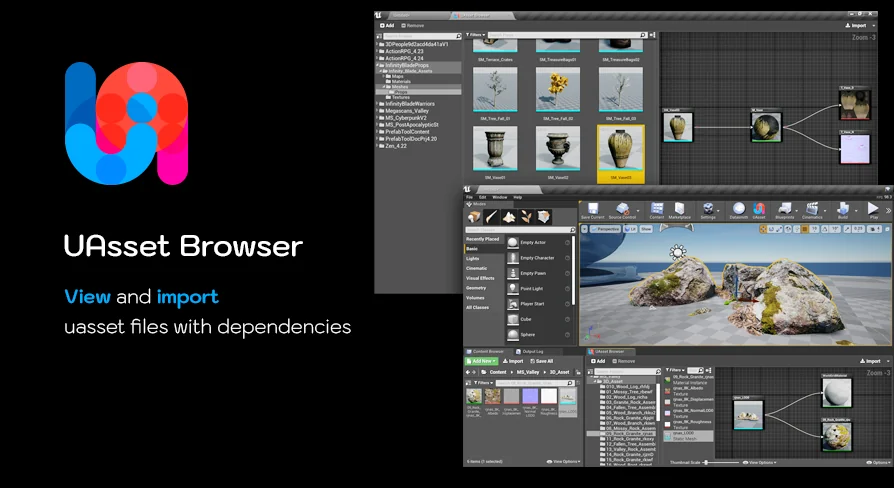
The UAsset Browser is a specialized tool designed to simplify how developers interact with external content. It functions as a comprehensive uasset file importer that bridges the gap between your active workspace and external project folders. Furthermore, it allows you to browse marketplace vault cache content directly from within your current project. This integration ensures that you can find and utilize resources without the need to switch between multiple application windows.
The interface is designed to look and feel familiar to users of the standard Content Browser. However, the UAsset Browser focuses specifically on external content libraries. You can preview uasset thumbnails, search through files, and filter assets based on detailed metadata. This makes it much easier to locate specific resources in large external directories or plugin folders.
Dependency Tracking and Migration
Managing file relationships is critical when moving assets between projects. The UAsset Browser automates this process by gathering all necessary dependencies during the import phase. Consequently, it identifies both hard and soft references to ensure that no files are missing after the transfer. This approach is a significant improvement over manual copying, which often results in broken links or missing textures.
On top of that, this tool offers a superior alternative to the traditional Migrate Asset workflow. Instead of opening external projects to push assets to your current one, you can pull assets in while staying focused on your work. The developer has included a visual dependency graph to help users inspect recursive relationships before committing to an import. Therefore, you gain full transparency into how assets are connected.
Advanced Workflow Features
Performance and flexibility are central to the UAsset Browser experience. The tool supports various import methods, including drag-and-drop and a "Flat Import" option that consolidates files into a single folder. Additionally, version 1.2 introduced a Blueprint Function Library, which allows for scripted imports to automate repetitive tasks. For those who need speed, the "Direct Copy" mode can skip dependency checks entirely.
The introduction of Cache Mode in version 1.3 provides a local database for instant, offline browsing. This feature ensures that you can navigate your asset library without waiting for slow disk scans. Furthermore, async operations for asset gathering and validation prevent the user interface from freezing during heavy tasks. These optimizations make the UAsset Browser a reliable choice for managing high-volume asset libraries.
Recent Updates and Enhancements
The creator has consistently improved the tool with several meaningful updates. Version 1.5 introduced an audio preview feature, allowing users to play SoundWave assets directly without importing them first. Visual organization has also been enhanced with color-coded root folders that distinguish between project, vault, and plugin content. Moreover, status bar indicators now provide clear feedback during background scanning and revalidation processes.
It is important to note that while the tool is highly versatile, it does not support cooked uasset files from packaged games. It is specifically built for development-ready assets within project environments. By centralizing the import process and providing deep visibility into file metadata, the UAsset Browser significantly reduces the friction of cross-project asset management.
Final Take
Taken together, the UAsset Browser is an essential utility for anyone working with extensive external libraries or multiple project files. It combines powerful dependency tracking with a user-friendly interface to streamline the import process. By utilizing features like Cache Mode and async scanning, developers can maintain a fast and organized workflow. Ultimately, this tool saves time and prevents the common errors associated with manual file migration.
 Engine Tools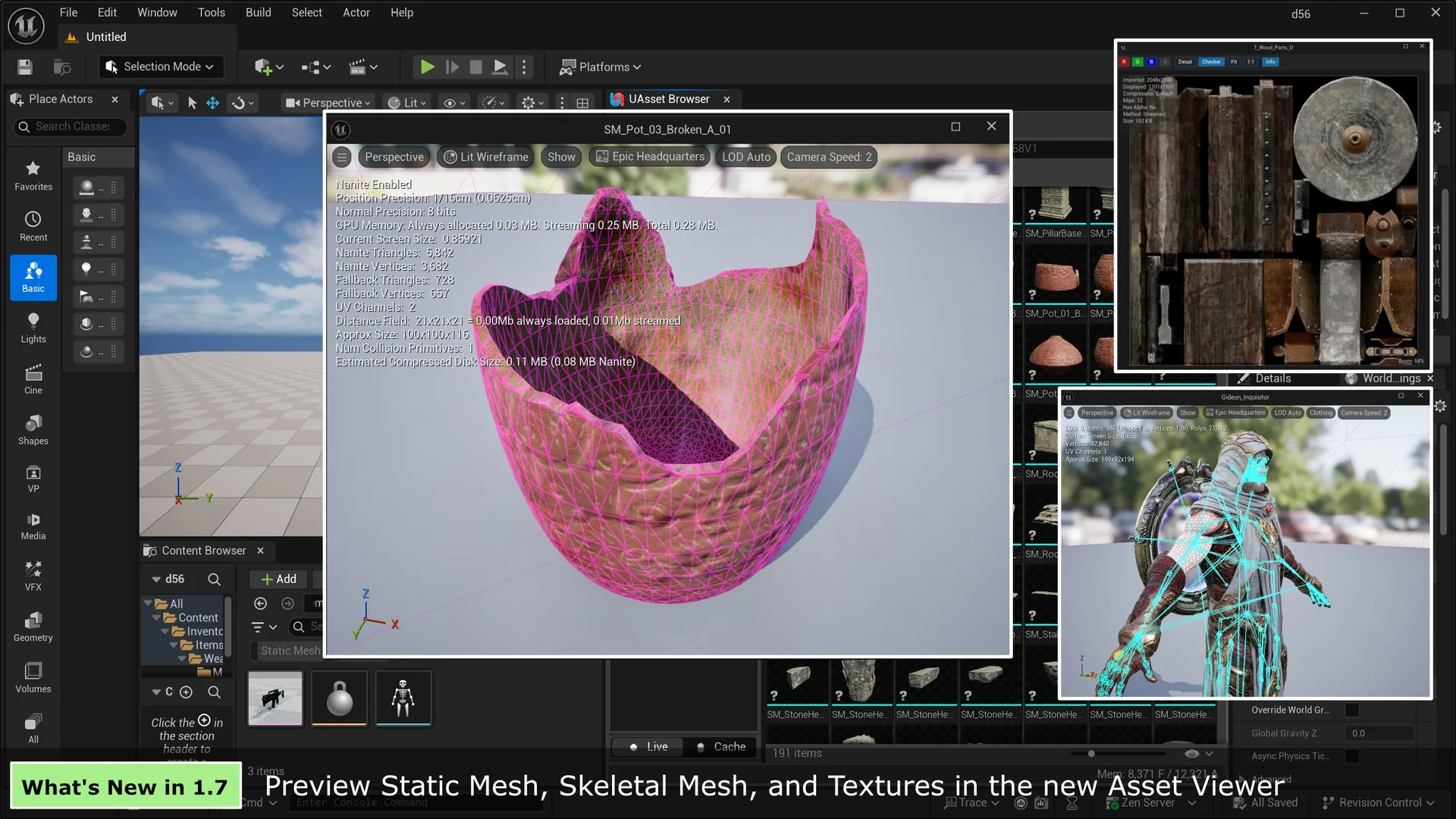
 Engine Tools
 Engine Tools
 Engine Tools