"0341a2901a4ae9aa"{"id":"14597","slug":"simple-instanced-spline-mesh","title":"Simple Instanced Spline Mesh","category":"Engine Tools","engine":"5.3","assetVersion":"Engine version: 5.3","engineVersion":"4.26","tag":"Engine Tools","accent":"blue","visual":"mech","summary":"The Simple Instanced Spline Mesh plugin offers a robust way to create HISM structures using splines. Designed for efficiency, it helps level designers iterate faster with specialized tools.","platform":"Unreal Engine","publishedAt":"2026-03-11T18:36:35.000Z","updatedAt":"2026-04-19T15:45:43.000Z","sourceNotes":[],"fileContents":[],"compatibility":["Unreal Engine","Engine version: 5.3"],"featuredImage":{"alt":"Simple Instanced Spline Mesh","src":"https://3dcghub.com/wp-content/uploads/2026/03/f2221001-9630-4b63-90f9-bcc63655709e.webp"},"hasDownloadLink":true,"downloads":0,"terms":[{"taxonomy":"category","slug":"engine-tools-tools-and-plugins","name":"Engine Tools"},{"taxonomy":"post_tag","slug":"environment","name":"Environment"},{"taxonomy":"post_tag","slug":"modular","name":"Modular"},{"taxonomy":"post_tag","slug":"plugins","name":"Plugins"},{"taxonomy":"post_tag","slug":"simple-instanced-spline-mesh","name":"Simple Instanced Spline Mesh"},{"taxonomy":"post_tag","slug":"tools","name":"Tools"},{"taxonomy":"post_tag","slug":"unreal-engine-5","name":"Unreal Engine 5"}],"galleryImages":[{"src":"https://3dcghub.com/wp-content/uploads/2026/03/7ddfd2c62a46_ddffcbb3-94b8-4bce-b916-6d180ffcad72.webp","alt":"Simple Instanced Spline Mesh"},{"src":"https://3dcghub.com/wp-content/uploads/2026/03/adb32d12a5e8_dfe2662b-b59d-449a-ba96-508ef7ebe2a9.webp","alt":"Simple Instanced Spline Mesh"}],"accessPanel":{"kind":"resource","title":"Access this resource","eyebrow":"Free Download","message":"Log in or create a free account to start your download.","fileName":"Simple Instanced Spline Mesh 5.3.7z","safetyNote":"All resources are 100% manually reviewed to eliminate all risks.","actionLabel":"Download Free","resourceType":"Resource archive"},"contentHtml":"\u003ch2\u003eIntroduction to Simple Instanced Spline Mesh\u003c/h2\u003e\n\u003cp\u003eSimple Instanced Spline Mesh is a powerful tool designed to streamline the creation of complex environments. It serves as a simple, lightweight, and robust solution for building Hierarchical Instanced Static Meshes (HISM) through the use of splines. By integrating these systems, the plugin allows users to manage large numbers of meshes efficiently. The creator developed this tool to ensure that performance remains high while maintaining ease of use.\u003c/p\u003e\n\n\u003cp\u003eOn top of that, the developer created this tool with the specific needs of level designers in mind. The primary goal is to make the design process smoother for everyone involved. Consequently, it helps professional creators achieve their vision without unnecessary technical hurdles. Therefore, the Simple Instanced Spline Mesh plugin is ideal for those who prioritize a clean and effective workflow.\u003c/p\u003e\n\n\u003ch2\u003eStreamlining Level Design Workflows\u003c/h2\u003e\n\u003cp\u003eThe plugin excels at making the lives of designers easier during the development phase. Because level design requires constant adjustments, having a tool that supports fast iterations is essential. Therefore, the Simple Instanced Spline Mesh plugin focuses on speed and flexibility. It allows for rapid changes to be made to environment layouts without wasting time.\u003c/p\u003e\n\n\u003cp\u003eDesigners often need to place repetitive elements along specific paths. This tool simplifies that process significantly. Whether you are working on walls or fences, the spline-based system ensures precision. Moreover, the alignment features help maintain a clean look across modular sets. As a result, the final output looks professional and well-organized.\u003c/p\u003e\n\n\u003ch2\u003eLightweight and Robust HISM Building\u003c/h2\u003e\n\u003cp\u003ePerformance is a critical factor in any project. The Simple Instanced Spline Mesh plugin provides a lightweight framework for handling HISM. Hierarchical Instanced Static Meshes are known for their efficiency in rendering. By using splines to generate these instances, the plugin combines ease of use with performance optimization. This makes it a robust choice for various project scales.\u003c/p\u003e\n\n\u003cp\u003eIn addition, the tool is described as highly reliable. It offers a variety of tools specifically related to meshes placed using splines. These tools provide the necessary control to refine modular layouts effectively. However, the plugin remains simple enough for new users to understand quickly. The developer has ensured that the tool remains accessible while providing deep functionality.\u003c/p\u003e\n\n\u003ch2\u003eFaster Iterations for Better Results\u003c/h2\u003e\n\u003cp\u003eIteration is the heart of great game design. The Simple Instanced Spline Mesh plugin enables faster changes to environment layouts. If a path needs to change, the spline can be adjusted quickly. As a result, the associated meshes update to reflect the new design immediately. This eliminates the need for manual placement of individual pieces.\u003c/p\u003e\n\n\u003cp\u003eThis flexibility allows for more experimentation during the building phase. Designers can test different configurations without rebuilding assets from scratch. Consequently, the overall quality of the level improves through constant refinement. The plugin ensures that the technical side of mesh placement does not slow down the creative process. Furthermore, the alignment tools ensure that every piece fits perfectly along the spline.\u003c/p\u003e\n\n\u003ch2\u003eClosing Notes\u003c/h2\u003e\n\u003cp\u003eIn practice, the Simple Instanced Spline Mesh plugin is an essential asset for modern level design. It provides a robust and lightweight method for managing HISM through splines. By focusing on the designer's workflow, it facilitates faster iterations and easier building of modular structures like walls and fences. This tool is a practical addition to any environment artist's toolkit, offering a variety of specialized tools to enhance productivity.\u003c/p\u003e\n\n\u003ch2\u003eExplore Similar Assets\u003c/h2\u003e\n\u003cul\u003e\n\u003cli\u003e\u003ca href=\"https://3dcghub.com/runtime-vertex-paint-detection-plugin/\" title=\"Runtime Vertex Paint \u0026amp;amp; Detection Plugin\"\u003eRuntime Vertex Paint \u0026amp; Detection Plugin\u003c/a\u003e\u003c/li\u003e\n\u003cli\u003e\u003ca href=\"https://3dcghub.com/ia-scatter/\" title=\"ia scatter\"\u003eia scatter\u003c/a\u003e\u003c/li\u003e\n\u003cli\u003e\u003ca href=\"https://3dcghub.com/advanced-light-pack/\" title=\"Advanced Light Pack\"\u003eAdvanced Light Pack\u003c/a\u003e\u003c/li\u003e\n\u003cli\u003e\u003ca href=\"https://3dcghub.com/extile-plus-ultimate-non-tiling-material-toolkit-for-unreal-engine-environments/\" title=\"EXTILE PLUS -Ultimate Non-Tiling Material Toolkit for Unreal Engine Environments\"\u003eEXTILE PLUS -Ultimate Non-Tiling Material Toolkit for Unreal Engine Environments\u003c/a\u003e\u003c/li\u003e\n\u003cli\u003e\u003ca href=\"https://3dcghub.com/ultimate-template-unrealengine-2d-dialogue-inventory-system-save/\" title=\"ULTIMATE Template UnrealEngine || 2D + Dialogue + Inventory system + Save | |\"\u003eULTIMATE Template UnrealEngine || 2D + Dialogue + Inventory system + Save | |\u003c/a\u003e\u003c/li\u003e\n\u003c/ul\u003e","contentTextLength":4055,"navigation":{"current":3402,"total":4017,"previous":{"id":"14638","slug":"sky-creator","title":"Sky Creator","category":"Engine Tools","platform":"Unreal Engine","updatedAt":"2026-04-19T15:45:43.000Z"},"next":{"id":"14687","slug":"uasset-browser","title":"UAsset Browser","category":"Engine Tools","platform":"Unreal Engine","updatedAt":"2026-04-19T15:45:42.000Z"}},"relatedResources":[{"id":"14592","slug":"shadersource-waterfall-tool-2","title":"SHADERSOURCE - Waterfall Tool 2","category":"Engine Tools","engine":"5.2 - 5.7","assetVersion":"Asset Version: 1.0a - 1.0d","engineVersion":"Engine Version: 5.2 - 5.7","tag":"Engine Tools","accent":"blue","visual":"animation","summary":"The SHADERSOURCE - Waterfall Tool 2 introduces a specialized Editor Mode for generating realistic waterfalls through dynamic meshes and spline paths. This tool offers both Simple and Advanced modes to provide full control over fluid paths and VFX generation.","platform":"Unreal Engine","publishedAt":"2026-03-11T18:36:22.000Z","updatedAt":"2026-10-04T08:27:42.401Z","sourceNotes":[],"fileContents":[],"compatibility":["Unreal Engine","Asset Version: 1.0a - 1.0d","Engine Version: 5.2 - 5.7"],"featuredImage":{"alt":"SHADERSOURCE - Waterfall Tool 2","src":"https://3dcghub.com/wp-content/uploads/2026/03/79d82bd8-c7cf-4877-9519-16f36c4a03c4.webp"},"hasDownloadLink":true,"downloads":1},{"id":"14610","slug":"simple-tree-generator","title":"Simple Tree Generator","category":"Engine Tools","engine":"5.6 - 5.8","assetVersion":"Asset Version: 1.1","engineVersion":"Engine version: 5.6 - 5.8","tag":"Engine Tools","accent":"blue","visual":"audio","summary":"Simple Tree Generator is a powerful tool designed specifically for Unreal Engine 5. It enables developers to procedurally create diverse trees and bushes with just a few clicks.","platform":"Unreal Engine","publishedAt":"2026-03-11T18:36:43.000Z","updatedAt":"2026-09-17T02:13:52.813Z","sourceNotes":[],"fileContents":[],"compatibility":["Unreal Engine","Asset Version: 1.1","Engine version: 5.6 - 5.8"],"featuredImage":{"alt":"Simple Tree Generator","src":"https://3dcghub.com/wp-content/uploads/2026/03/4e3b784d-7198-46b5-a343-a73957e40875.webp"},"hasDownloadLink":true,"downloads":0},{"id":"14450","slug":"rdsplinetools-rd-tools-pro","title":"rdSplineTools (rd Tools Pro)","category":"Engine Tools","engine":"5.5","assetVersion":"Engine version: 5.5","engineVersion":"Asset Version:1.2","tag":"Engine Tools","accent":"blue","visual":"city","summary":"rdSplineTools (rd Tools Pro) enhances the Unreal Engine editor by streamlining spline creation and management. This plugin offers advanced snapping, subdivision, and conversion tools for professional game development.","platform":"Unreal Engine","publishedAt":"2026-03-11T18:05:03.000Z","updatedAt":"2026-04-19T15:45:46.000Z","sourceNotes":[],"fileContents":[],"compatibility":["Unreal Engine","Engine version: 5.5","Asset Version: 1.2"],"featuredImage":{"alt":"rdSplineTools (rd Tools Pro)","src":"https://3dcghub.com/wp-content/uploads/2026/03/97c7dc16-acd1-4eb3-8b36-aa984f24c5a3.webp"},"hasDownloadLink":true,"downloads":0}]}
Engine Tools
Simple Instanced Spline Mesh
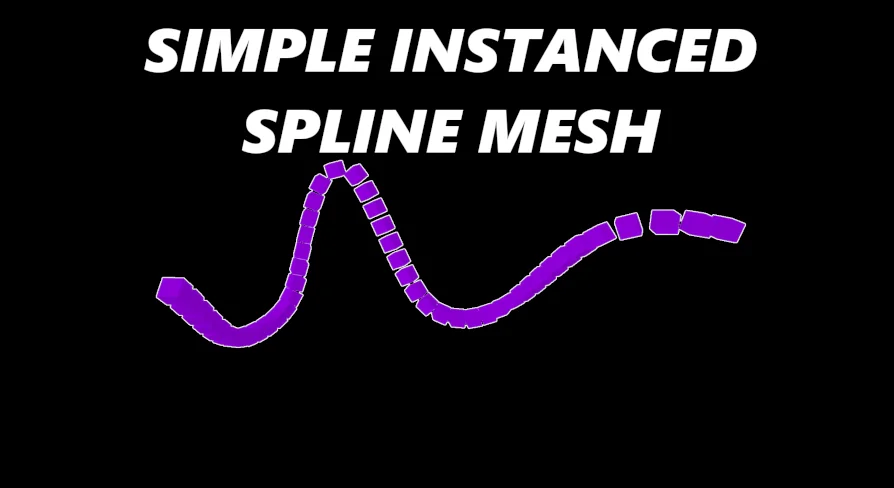
The Simple Instanced Spline Mesh plugin offers a robust way to create HISM structures using splines. Designed for efficiency, it helps level designers iterate faster with specialized tools.
Simple Instanced Spline Mesh is a powerful tool designed to streamline the creation of complex environments. It serves as a simple, lightweight, and robust solution for building Hierarchical Instanced Static Meshes (HISM) through the use of splines. By integrating these systems, the plugin allows users to manage large numbers of meshes efficiently. The creator developed this tool to ensure that performance remains high while maintaining ease of use.
On top of that, the developer created this tool with the specific needs of level designers in mind. The primary goal is to make the design process smoother for everyone involved. Consequently, it helps professional creators achieve their vision without unnecessary technical hurdles. Therefore, the Simple Instanced Spline Mesh plugin is ideal for those who prioritize a clean and effective workflow.
Streamlining Level Design Workflows
The plugin excels at making the lives of designers easier during the development phase. Because level design requires constant adjustments, having a tool that supports fast iterations is essential. Therefore, the Simple Instanced Spline Mesh plugin focuses on speed and flexibility. It allows for rapid changes to be made to environment layouts without wasting time.
Designers often need to place repetitive elements along specific paths. This tool simplifies that process significantly. Whether you are working on walls or fences, the spline-based system ensures precision. Moreover, the alignment features help maintain a clean look across modular sets. As a result, the final output looks professional and well-organized.
Lightweight and Robust HISM Building
Performance is a critical factor in any project. The Simple Instanced Spline Mesh plugin provides a lightweight framework for handling HISM. Hierarchical Instanced Static Meshes are known for their efficiency in rendering. By using splines to generate these instances, the plugin combines ease of use with performance optimization. This makes it a robust choice for various project scales.
In addition, the tool is described as highly reliable. It offers a variety of tools specifically related to meshes placed using splines. These tools provide the necessary control to refine modular layouts effectively. However, the plugin remains simple enough for new users to understand quickly. The developer has ensured that the tool remains accessible while providing deep functionality.
Faster Iterations for Better Results
Iteration is the heart of great game design. The Simple Instanced Spline Mesh plugin enables faster changes to environment layouts. If a path needs to change, the spline can be adjusted quickly. As a result, the associated meshes update to reflect the new design immediately. This eliminates the need for manual placement of individual pieces.
This flexibility allows for more experimentation during the building phase. Designers can test different configurations without rebuilding assets from scratch. Consequently, the overall quality of the level improves through constant refinement. The plugin ensures that the technical side of mesh placement does not slow down the creative process. Furthermore, the alignment tools ensure that every piece fits perfectly along the spline.
Closing Notes
In practice, the Simple Instanced Spline Mesh plugin is an essential asset for modern level design. It provides a robust and lightweight method for managing HISM through splines. By focusing on the designer's workflow, it facilitates faster iterations and easier building of modular structures like walls and fences. This tool is a practical addition to any environment artist's toolkit, offering a variety of specialized tools to enhance productivity.
 Engine Tools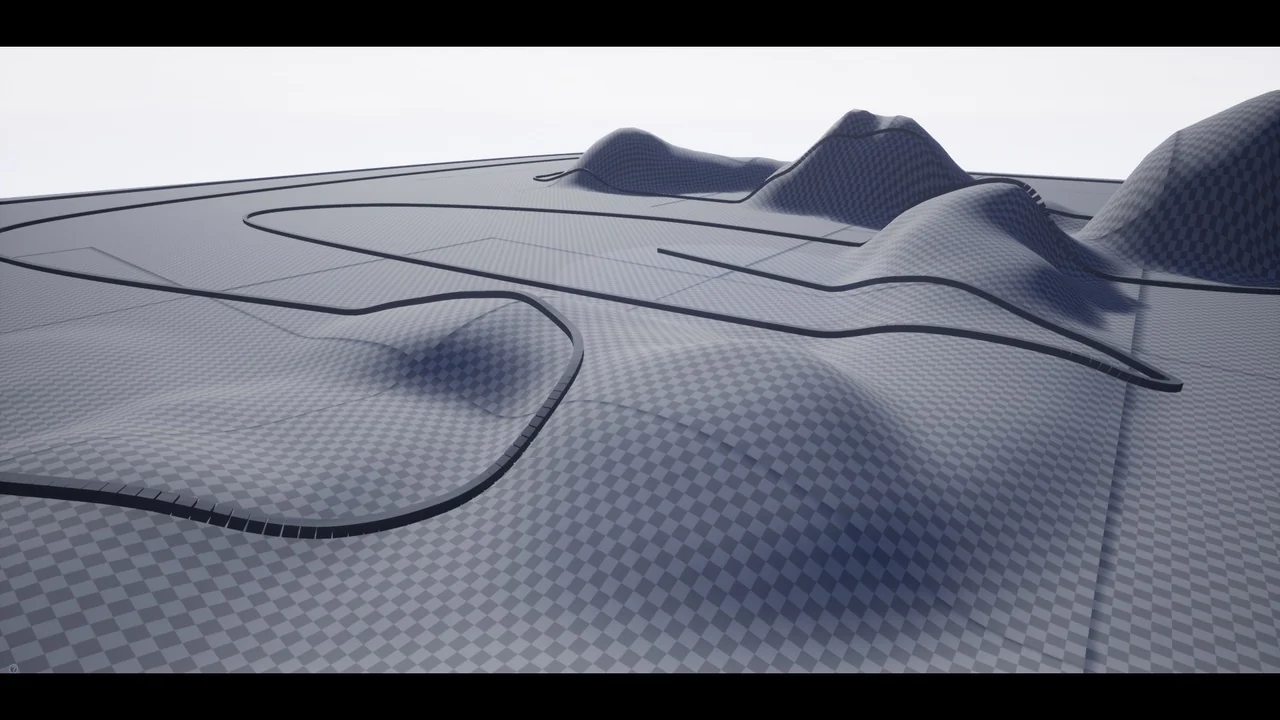
 Engine Tools
 Engine Tools
 Engine Tools