"1f00f67f9253451b"{"id":"10968","slug":"ia-scatter","title":"ia scatter","category":"Gameplay Features","engine":"4.27,5.0+","assetVersion":"Engine version: 4.27,5.0+","engineVersion":"4.27","tag":"Gameplay Features","accent":"blue","visual":"audio","summary":"Streamline your environment design with ia scatter, a comprehensive tool for Unreal Engine. This resource allows for fast, precise placement of meshes and blueprints across any surface.","platform":"Unreal Engine","publishedAt":"2026-03-03T16:35:17.000Z","updatedAt":"2026-04-19T15:49:53.000Z","sourceNotes":[],"fileContents":[],"compatibility":["Unreal Engine","Engine version: 4.27,5.0+"],"featuredImage":{"alt":"ia scatter","src":"https://3dcghub.com/wp-content/uploads/2026/03/8c75ac66-7685-4c77-9b45-caa4c86c6b65.webp"},"hasDownloadLink":true,"downloads":0,"terms":[{"taxonomy":"category","slug":"gameplay-features","name":"Gameplay Features"},{"taxonomy":"post_tag","slug":"blueprint-scattering","name":"blueprint scattering"},{"taxonomy":"post_tag","slug":"ia-scatter","name":"ia scatter"},{"taxonomy":"post_tag","slug":"procedural-placement","name":"procedural placement"},{"taxonomy":"post_tag","slug":"unreal-engine-scattering-tool","name":"Unreal Engine scattering tool"}],"galleryImages":[{"src":"https://3dcghub.com/wp-content/uploads/2026/03/6512d91ce15a_d2518b74-9a78-46c9-b2c5-6e29e822a768.webp","alt":"ia scatter"},{"src":"https://3dcghub.com/wp-content/uploads/2026/03/03bf5deae43f_599f4161-e709-4de0-890c-f6ff7459e5e1.webp","alt":"ia scatter"},{"src":"https://3dcghub.com/wp-content/uploads/2026/03/075664380153_55bc53da-fa4c-4172-9bee-ec6878a942ac.webp","alt":"ia scatter"},{"src":"https://3dcghub.com/wp-content/uploads/2026/03/ef7cc786a0dd_dd8d64b6-b4ac-4889-a5eb-8754d51bfcc8.webp","alt":"ia scatter"},{"src":"https://3dcghub.com/wp-content/uploads/2026/03/29c64ac56fd9_0ce36ec5-7460-4a71-ab34-8455b68df2c1.webp","alt":"ia scatter"},{"src":"https://3dcghub.com/wp-content/uploads/2026/03/e5fff7c71d04_522a7fcd-a23b-4a04-83f3-e856b4ab1fab.webp","alt":"ia scatter"},{"src":"https://3dcghub.com/wp-content/uploads/2026/03/ff6be959bad0_d9f2ae4b-dbdb-4f76-971e-b252c5b3fe6f.webp","alt":"ia scatter"},{"src":"https://3dcghub.com/wp-content/uploads/2026/03/3ddbb4690842_c8c02a9d-a2d6-4062-b31f-8deb4de1ba17.webp","alt":"ia scatter"},{"src":"https://3dcghub.com/wp-content/uploads/2026/03/1aec43fd958c_5e71ad28-df9e-4c91-8b12-fe6e8644389a.webp","alt":"ia scatter"},{"src":"https://3dcghub.com/wp-content/uploads/2026/03/d63b227db8f3_0ac4ba7f-81a1-4ef1-8fe4-470fce80a2d2.webp","alt":"ia scatter"},{"src":"https://3dcghub.com/wp-content/uploads/2026/03/7a389033e30b_39285c78-bc15-46f8-b27a-bf3dcfaca2e5.webp","alt":"ia scatter"},{"src":"https://3dcghub.com/wp-content/uploads/2026/03/0abc942765c1_0172f838-a58b-4cfc-a88a-f81c4b4335eb.webp","alt":"ia scatter"},{"src":"https://3dcghub.com/wp-content/uploads/2026/03/0294d99784ae_ba643e3e-9ce8-4070-beb7-3b24c70b2c28.webp","alt":"ia scatter"},{"src":"https://3dcghub.com/wp-content/uploads/2026/03/13a59d551fe8_3a2fe917-01c4-4cf1-ac01-afad70ba9036.webp","alt":"ia scatter"},{"src":"https://3dcghub.com/wp-content/uploads/2026/03/c265e6c637c3_29ff210b-3673-45b5-b07d-1f8541ee17d5.webp","alt":"ia scatter"},{"src":"https://3dcghub.com/wp-content/uploads/2026/03/3ad2810b1893_2076f135-1c04-4e27-8a25-948463d23e3f.webp","alt":"ia scatter"},{"src":"https://3dcghub.com/wp-content/uploads/2026/03/7d4e685fc090_ba0bd412-5208-4027-ba59-210cfce6015d.webp","alt":"ia scatter"},{"src":"https://3dcghub.com/wp-content/uploads/2026/03/c461797ad3b2_c0ea1bf4-084b-4d07-974f-3b94833cfe49.webp","alt":"ia scatter"},{"src":"https://3dcghub.com/wp-content/uploads/2026/03/a21b1dd564c7_9ef8a55b-7f58-4cb3-b363-f7a0c4c821bf.webp","alt":"ia scatter"},{"src":"https://3dcghub.com/wp-content/uploads/2026/03/0b58f7d46acd_a4a101a4-0058-42a6-9ce6-4009703fee02.webp","alt":"ia scatter"},{"src":"https://3dcghub.com/wp-content/uploads/2026/03/8e1a3b77aa0c_2ba4048c-5070-4465-8751-a1bffe92957d.webp","alt":"ia scatter"},{"src":"https://3dcghub.com/wp-content/uploads/2026/03/7fb05fc06278_ff6ad085-c635-4df0-83d2-af67addf998a.webp","alt":"ia scatter"},{"src":"https://3dcghub.com/wp-content/uploads/2026/03/5d0767969853_44ffd2db-2894-4c82-ac89-40500c54524e.webp","alt":"ia scatter"},{"src":"https://3dcghub.com/wp-content/uploads/2026/03/f9f246a962a9_52ff4138-972f-4b42-843f-177a6efd348f.webp","alt":"ia scatter"}],"accessPanel":{"kind":"resource","title":"Access this resource","eyebrow":"Free Download","message":"Log in or create a free account to start your download.","fileName":"ia scatter 4.27,5.0 .rar","safetyNote":"All resources are 100% manually reviewed to eliminate all risks.","actionLabel":"Download Free","resourceType":"Resource archive"},"contentHtml":"\u003ch2\u003eEfficient Environment Creation with IA Scatter\u003c/h2\u003e\n\u003cp\u003e\u003cstrong\u003eia scatter\u003c/strong\u003e is an easy, fast, and feature-rich scattering tool designed specifically for Unreal Engine. Whether you are building a massive open-world environment or a detailed indoor scene, this tool helps bring life to your project. It enables the seamless creation of natural and immersive scenes in just a few minutes. Consequently, developers can avoid tedious manual placement while retaining the flexibility to make changes on the fly.\u003c/p\u003e\n\n\u003cp\u003eThe tool is highly versatile and suitable for a wide range of assets. You can use it to scatter plants, rocks, and nature elements, or even technical details like antennas on buildings. Furthermore, it works perfectly for abstract designs and complex cityscapes. By using this tool, you can increase productivity and maintain complete control over your environment's look and feel.\u003c/p\u003e\n\n\u003ch2\u003eComprehensive Distribution and Tracing Features\u003c/h2\u003e\n\u003cp\u003eOne of the core strengths of \u003cstrong\u003eia scatter\u003c/strong\u003e is its variety of tracing and distribution options. Users can choose from area, spline, planar, linear, and point tracing methods. Additionally, the tool supports 1D and omnidirectional multiple actor voxelization distribution. For more artistic control, the developer included vertex color influenced scattering and texture map instance projection.\u003c/p\u003e\n\n\u003cp\u003eThe system is not limited to simple static meshes. It supports the instancing of several asset types, including:\u003c/p\u003e\n\u003cul\u003e\n \u003cli\u003eStatic meshes and skeletal meshes\u003c/li\u003e\n \u003cli\u003eBlueprint actors\u003c/li\u003e\n \u003cli\u003eNiagara systems\u003c/li\u003e\n \u003cli\u003eGeometry collections\u003c/li\u003e\n\u003c/ul\u003e\n\u003cp\u003eEach instance can be controlled with specific probability settings. Moreover, the tool includes a dedicated cable system and voxel geometry generation for advanced scene building.\u003c/p\u003e\n\n\u003ch2\u003eAdvanced Control and Customization\u003c/h2\u003e\n\u003cp\u003ePrecision is vital in environment design, and \u003cstrong\u003eia scatter\u003c/strong\u003e provides deep customization options. You can utilize scale falloff gradients with curve and ratio controls to create natural transitions. Similarly, look-at rotation options and 3D widget targets allow for specific orientations. The tool also features convex and concave detection modes, clustering, and proximity scaling based on multiple actors.\u003c/p\u003e\n\n\u003cp\u003eTo ensure a clean layout, the developer integrated three different methods to avoid overlapping. You can set a minimum distance between instances or use slope angle distribution to restrict placement. Furthermore, the scattering area itself can be rotated to face any direction, providing total spatial freedom. Location grid snapping and rotation snapping are also available for those requiring a more structured arrangement.\u003c/p\u003e\n\n\u003ch2\u003eStreamlined Workflow and Performance\u003c/h2\u003e\n\u003cp\u003eThe tool includes several features to speed up the development process. A built-in preset saving and loading system allows you to reuse your favorite configurations. Additionally, the control panel features an \"autoPopulate\" function to quickly append selected meshes or blueprints. If you need to finalize your scene, you can convert scattered instances into actual scene actors or instanced foliage actors with a single click.\u003c/p\u003e\n\n\u003cp\u003eTechnically, \u003cstrong\u003eia scatter\u003c/strong\u003e operates via both construction scripts and the event graph, supporting runtime execution. However, users should note that since version 1.98, the Geometry Script plugin must be enabled within Unreal Engine. While the tool is highly compatible, voxelization is not available for version 4.27 due to engine limitations. For the best results, the creator recommends enabling Nanite for all static meshes and using the \"preserve area\" setting for foliage assets.\u003c/p\u003e\n\n\u003ch2\u003eFinal Take\u003c/h2\u003e\n\u003cp\u003eTaken together, \u003cstrong\u003eia scatter\u003c/strong\u003e is a robust solution for any Unreal Engine developer looking to optimize their workflow. It combines ease of use with professional-grade features like voxelization, spline integration, and advanced collision selection. By reducing the time spent on manual asset placement, it allows creators to focus on the creative aspects of their project.\u003c/p\u003e\n\n\u003ch2\u003eContinue Browsing Similar Packs\u003c/h2\u003e\n\u003cul\u003e\n\u003cli\u003e\u003ca href=\"https://3dcghub.com/hierarchical-scatter-tool/\" title=\"Hierarchical Scatter Tool\"\u003eHierarchical Scatter Tool\u003c/a\u003e\u003c/li\u003e\n\u003cli\u003e\u003ca href=\"https://3dcghub.com/old-industrial-city-and-shipyard-industrial-interiors-industrial-town/\" title=\"Old Industrial City and Shipyard \u0026amp;amp; Industrial Interiors (Industrial Town)\"\u003eOld Industrial City and Shipyard \u0026amp; Industrial Interiors (Industrial Town)\u003c/a\u003e\u003c/li\u003e\n\u003cli\u003e\u003ca href=\"https://3dcghub.com/industrial-area-hangar/\" title=\"Industrial Area Hangar\"\u003eIndustrial Area Hangar\u003c/a\u003e\u003c/li\u003e\n\u003cli\u003e\u003ca href=\"https://3dcghub.com/foliage-pack/\" title=\"Foliage Pack\"\u003eFoliage Pack\u003c/a\u003e\u003c/li\u003e\n\u003cli\u003e\u003ca href=\"https://3dcghub.com/post-industrial-environment/\" title=\"Post-Industrial Environment\"\u003ePost-Industrial Environment\u003c/a\u003e\u003c/li\u003e\n\u003c/ul\u003e","contentTextLength":4121,"navigation":{"current":2374,"total":3222,"previous":{"id":"10977","slug":"instant-photo-camera","title":"Instant Photo Camera","category":"Gameplay Features","platform":"Unreal Engine","updatedAt":"2026-04-19T15:49:53.000Z"},"next":{"id":"10941","slug":"hyper-basic-pcg-forest-v2","title":"Hyper Basic PCG Forest v2","category":"Gameplay Features","platform":"Unreal Engine","updatedAt":"2026-04-19T15:49:53.000Z"}},"relatedResources":[{"id":"10916","slug":"hierarchical-scatter-tool","title":"Hierarchical Scatter Tool","category":"Gameplay Features","engine":"5.0+","assetVersion":"Engine version: 5.0+","engineVersion":"5.0","tag":"Gameplay Features","accent":"blue","visual":"mech","summary":"Quickly populate your scenes with the Hierarchical Scatter Tool. This Blueprint allows for realistic, collision-aware distribution of static meshes and includes a convenient baking utility.","platform":"Unreal Engine","publishedAt":"2026-03-03T16:30:07.000Z","updatedAt":"2026-04-19T15:49:54.000Z","sourceNotes":[],"fileContents":[],"compatibility":["Unreal Engine","Engine version: 5.0+"],"featuredImage":{"alt":"Hierarchical Scatter Tool","src":"https://3dcghub.com/wp-content/uploads/2026/03/83a662a0-60cd-49ab-8a85-3fa70cd893aa.webp"},"hasDownloadLink":true,"downloads":0},{"id":"24720","slug":"modular-staircase-blueprint","title":"Modular Staircase Blueprint","category":"Gameplay Features","engine":"4.26+,5.0+","assetVersion":"Engine version: 4.26+,5.0+","engineVersion":"","tag":"Gameplay Features","accent":"blue","visual":"city","summary":"This blueprint helps place stairs in a scene without treating every setup the same way. It exposes a wide range of variables, updates as you scale it, and includes a separate tool for checking asset size against its pivot and bounds. It fits naturally into...","platform":"Unreal Engine","publishedAt":"2026-04-16T15:46:19.000Z","updatedAt":"2026-04-20T06:12:39.000Z","sourceNotes":[],"fileContents":[],"compatibility":["Unreal Engine","Engine version: 4.26+,5.0+"],"featuredImage":{"alt":"Modular Staircase Blueprint","src":"https://3dcghub.com/wp-content/uploads/2026/04/253cf5903660_d8a8b49c-75fc-44c8-bc57-79a7ab1fc79b.webp"},"hasDownloadLink":true,"downloads":1},{"id":"10542","slug":"advanced-scope","title":"Advanced Scope","category":"Gameplay Features","engine":"4.26+,5.0+","assetVersion":"Engine version: 4.26+,5.0+","engineVersion":"4.25","tag":"Gameplay Features","accent":"blue","visual":"mech","summary":"Enhance your project with the Advanced Scope, a specialized resource designed for shooters and simulations. This blueprint-based system comes with comprehensive support and documentation for a safe and simple integration.","platform":"Unreal Engine","publishedAt":"2026-03-03T15:37:18.000Z","updatedAt":"2026-04-19T15:50:00.000Z","sourceNotes":[],"fileContents":[],"compatibility":["Unreal Engine","Engine version: 4.26+,5.0+"],"featuredImage":{"alt":"Advanced Scope","src":"https://3dcghub.com/wp-content/uploads/2026/03/e4f8f7c9-c605-4945-8483-957326679f90.webp"},"hasDownloadLink":true,"downloads":1}]}
Gameplay Features
ia scatter
Streamline your environment design with ia scatter, a comprehensive tool for Unreal Engine. This resource allows for fast, precise placement of meshes and blueprints across any surface.
ia scatter is an easy, fast, and feature-rich scattering tool designed specifically for Unreal Engine. Whether you are building a massive open-world environment or a detailed indoor scene, this tool helps bring life to your project. It enables the seamless creation of natural and immersive scenes in just a few minutes. Consequently, developers can avoid tedious manual placement while retaining the flexibility to make changes on the fly.
The tool is highly versatile and suitable for a wide range of assets. You can use it to scatter plants, rocks, and nature elements, or even technical details like antennas on buildings. Furthermore, it works perfectly for abstract designs and complex cityscapes. By using this tool, you can increase productivity and maintain complete control over your environment's look and feel.
Comprehensive Distribution and Tracing Features
One of the core strengths of ia scatter is its variety of tracing and distribution options. Users can choose from area, spline, planar, linear, and point tracing methods. Additionally, the tool supports 1D and omnidirectional multiple actor voxelization distribution. For more artistic control, the developer included vertex color influenced scattering and texture map instance projection.
The system is not limited to simple static meshes. It supports the instancing of several asset types, including:
Static meshes and skeletal meshes
Blueprint actors
Niagara systems
Geometry collections
Each instance can be controlled with specific probability settings. Moreover, the tool includes a dedicated cable system and voxel geometry generation for advanced scene building.
Advanced Control and Customization
Precision is vital in environment design, and ia scatter provides deep customization options. You can utilize scale falloff gradients with curve and ratio controls to create natural transitions. Similarly, look-at rotation options and 3D widget targets allow for specific orientations. The tool also features convex and concave detection modes, clustering, and proximity scaling based on multiple actors.
To ensure a clean layout, the developer integrated three different methods to avoid overlapping. You can set a minimum distance between instances or use slope angle distribution to restrict placement. Furthermore, the scattering area itself can be rotated to face any direction, providing total spatial freedom. Location grid snapping and rotation snapping are also available for those requiring a more structured arrangement.
Streamlined Workflow and Performance
The tool includes several features to speed up the development process. A built-in preset saving and loading system allows you to reuse your favorite configurations. Additionally, the control panel features an "autoPopulate" function to quickly append selected meshes or blueprints. If you need to finalize your scene, you can convert scattered instances into actual scene actors or instanced foliage actors with a single click.
Technically, ia scatter operates via both construction scripts and the event graph, supporting runtime execution. However, users should note that since version 1.98, the Geometry Script plugin must be enabled within Unreal Engine. While the tool is highly compatible, voxelization is not available for version 4.27 due to engine limitations. For the best results, the creator recommends enabling Nanite for all static meshes and using the "preserve area" setting for foliage assets.
Final Take
Taken together, ia scatter is a robust solution for any Unreal Engine developer looking to optimize their workflow. It combines ease of use with professional-grade features like voxelization, spline integration, and advanced collision selection. By reducing the time spent on manual asset placement, it allows creators to focus on the creative aspects of their project.
 Gameplay Features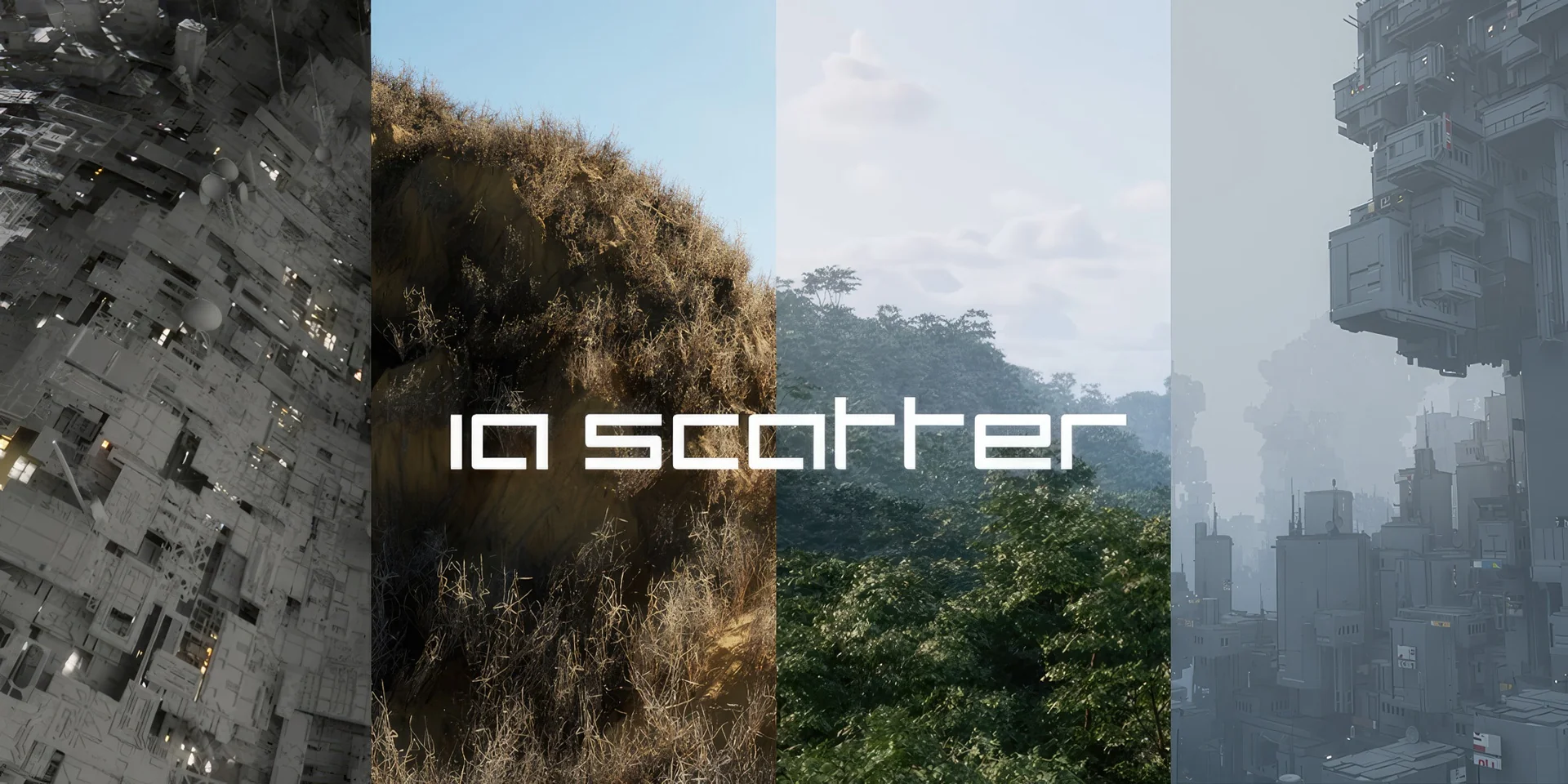
 Gameplay Features
 Gameplay Features
 Gameplay Features