"7066dd76da796369"{"id":"14675","slug":"twitch-integrator","title":"Twitch Integrator","category":"Engine Tools","engine":"4.26","assetVersion":"Engine version: 4.26","engineVersion":"Asset Version:1.5","tag":"Engine Tools","accent":"blue","visual":"animation","summary":"Twitch Integrator simplifies the process of connecting your project to Twitch. By using a node-based system, the developer ensures that every feature is accessible and easy to implement.","platform":"Unreal Engine","publishedAt":"2026-03-11T18:55:42.000Z","updatedAt":"2026-04-19T15:45:42.000Z","sourceNotes":[],"fileContents":[],"compatibility":["Unreal Engine","Engine version: 4.26","Asset Version: 1.5"],"featuredImage":{"alt":"Twitch Integrator","src":"https://3dcghub.com/wp-content/uploads/2026/03/6048ee5d-050a-4bc6-8ac8-da25d8c93c16.webp"},"hasDownloadLink":true,"downloads":0,"terms":[{"taxonomy":"category","slug":"engine-tools-tools-and-plugins","name":"Engine Tools"},{"taxonomy":"post_tag","slug":"blueprint","name":"Blueprint"},{"taxonomy":"post_tag","slug":"integration","name":"Integration"},{"taxonomy":"post_tag","slug":"plugins","name":"Plugins"},{"taxonomy":"post_tag","slug":"tools","name":"Tools"},{"taxonomy":"post_tag","slug":"twitch-integrator","name":"Twitch Integrator"},{"taxonomy":"post_tag","slug":"utilities","name":"Utilities"}],"galleryImages":[{"src":"https://3dcghub.com/wp-content/uploads/2026/03/edc2226eacc3_3e938dff-9fc0-4969-b3ee-473335822727.webp","alt":"Twitch Integrator"},{"src":"https://3dcghub.com/wp-content/uploads/2026/03/3be43d433b18_728e86b4-da0c-4bf3-bea9-88bc44a94de4.webp","alt":"Twitch Integrator"},{"src":"https://3dcghub.com/wp-content/uploads/2026/03/4e31c2ea23db_63541da1-c9e4-4e3b-b11c-10409078c293.webp","alt":"Twitch Integrator"},{"src":"https://3dcghub.com/wp-content/uploads/2026/03/b607745c2064_9b269a9a-0f2d-4fdf-bbe2-80bc7781a64d.webp","alt":"Twitch Integrator"},{"src":"https://3dcghub.com/wp-content/uploads/2026/03/33ce60613cbd_b4034e16-80f7-4872-bc60-05f39e177ff6.webp","alt":"Twitch Integrator"},{"src":"https://3dcghub.com/wp-content/uploads/2026/03/d66dc03f4dcc_e4b3703b-1dcd-48ee-b640-0b43a56cff09.webp","alt":"Twitch Integrator"}],"accessPanel":{"kind":"resource","title":"Access this resource","eyebrow":"Free Download","message":"Log in or create a free account to start your download.","fileName":"Twitch Integrator 4.26;V1.5.7z","safetyNote":"All resources are 100% manually reviewed to eliminate all risks.","actionLabel":"Download Free","resourceType":"Resource archive"},"contentHtml":"\u003ch2\u003eSimplified Twitch Integration\u003c/h2\u003e\n\u003cp\u003eTwitch Integrator is a specialized plugin designed to help creators connect their projects with the Twitch platform. The developer has built this tool with a primary focus on ease of use. Consequently, users can expect a straightforward setup process that minimizes technical barriers. This approach allows developers to integrate live streaming features without getting bogged down by complex backend requirements.\u003c/p\u003e\n\n\u003cp\u003eThe core philosophy of this tool is accessibility. Because the plugin prioritizes user experience, it serves as a bridge between your project and the streaming community. Therefore, it is an ideal choice for those who want a reliable and efficient way to handle live interactions.\u003c/p\u003e\n\n\u003ch2\u003eNode-Based Efficiency\u003c/h2\u003e\n\u003cp\u003eOne of the standout features of Twitch Integrator is its node-based architecture. Every feature within the plugin is exactly one node away. This design choice significantly reduces the time spent on implementation. Moreover, it ensures that even those with limited coding experience can navigate the integration process successfully.\u003c/p\u003e\n\n\u003cp\u003eBy using this streamlined system, you can focus more on the creative aspects of your project. You no longer need to worry about the intricate details of how the integration works. Instead, you can think about what you want to achieve with Twitch. However, the plugin still provides the necessary depth for advanced users who require precise control over their live features.\u003c/p\u003e\n\n\u003ch3\u003eKey Benefits of the Node System:\u003c/h3\u003e\n\u003cul\u003e\n \u003cli\u003eFast implementation of features.\u003c/li\u003e\n \u003cli\u003eReduced complexity in the development workflow.\u003c/li\u003e\n \u003cli\u003eDirect access to tools via a single node.\u003c/li\u003e\n \u003cli\u003eEnhanced focus on creative goals rather than technical hurdles.\u003c/li\u003e\n\u003c/ul\u003e\n\n\u003ch2\u003eComprehensive Chat and Blueprint Support\u003c/h2\u003e\n\u003cp\u003eTwitch Integrator includes support for essential elements like chat and blueprints. This versatility makes it a robust tool for various types of projects. Whether you are working with visual scripting or direct code, the plugin provides the necessary framework to succeed. Additionally, the inclusion of chat integration allows for direct communication between the project and the audience.\u003c/p\u003e\n\n\u003cp\u003eThe integration of code and blueprints ensures that the tool is flexible. Therefore, it can adapt to different development styles and requirements. The developer has ensured that the plugin remains powerful while maintaining its user-friendly nature. Consequently, it supports a wide range of interactive possibilities for streamers and developers alike.\u003c/p\u003e\n\n\u003ch2\u003eClosing Notes\u003c/h2\u003e\n\u003cp\u003eThe clearest takeaway is that Twitch Integrator is a highly efficient plugin that puts ease of use first. By making every feature accessible through a single node, it removes the friction often associated with platform integration. Developers can spend less time troubleshooting and more time building engaging experiences. Furthermore, with its support for chat and blueprints, it offers a complete solution for anyone looking to bridge the gap between their project and Twitch.\u003c/p\u003e\n\n\u003ch2\u003eExplore Similar Assets\u003c/h2\u003e\n\u003cul\u003e\n\u003cli\u003e\u003ca href=\"https://3dcghub.com/stereo-panoramic-player/\" title=\"Stereo Panoramic Player\"\u003eStereo Panoramic Player\u003c/a\u003e\u003c/li\u003e\n\u003cli\u003e\u003ca href=\"https://3dcghub.com/pbl-database/\" title=\"PBL Database\"\u003ePBL Database\u003c/a\u003e\u003c/li\u003e\n\u003cli\u003e\u003ca href=\"https://3dcghub.com/pak-creator-plugin/\" title=\"Pak Creator Plugin\"\u003ePak Creator Plugin\u003c/a\u003e\u003c/li\u003e\n\u003cli\u003e\u003ca href=\"https://3dcghub.com/narrative-tales-node-based-quests-and-dialogue/\" title=\"Narrative Tales – Node Based Quests and Dialogue\"\u003eNarrative Tales – Node Based Quests and Dialogue\u003c/a\u003e\u003c/li\u003e\n\u003cli\u003e\u003ca href=\"https://3dcghub.com/hypergrid/\" title=\"HyperGrid\"\u003eHyperGrid\u003c/a\u003e\u003c/li\u003e\n\u003c/ul\u003e","contentTextLength":3132,"navigation":{"current":3403,"total":4016,"previous":{"id":"14687","slug":"uasset-browser","title":"UAsset Browser","category":"Engine Tools","platform":"Unreal Engine","updatedAt":"2026-04-19T15:45:42.000Z"},"next":{"id":"14666","slug":"stereo-panoramic-player","title":"Stereo Panoramic Player","category":"Engine Tools","platform":"Unreal Engine","updatedAt":"2026-04-19T15:45:42.000Z"}},"relatedResources":[{"id":"14481","slug":"ripx","title":"RipX","category":"Engine Tools","engine":"4.27","assetVersion":"Engine version: 4.27","engineVersion":"4.27","tag":"Engine Tools","accent":"blue","visual":"city","summary":"Protect your game assets from unauthorized extraction using RipX. This tool is specifically designed to block programs that use DLL injection to dump data from memory.","platform":"Unreal Engine","publishedAt":"2026-03-11T18:12:32.000Z","updatedAt":"2026-04-19T15:45:45.000Z","sourceNotes":[],"fileContents":[],"compatibility":["Unreal Engine","Engine version: 4.27"],"featuredImage":{"alt":"RipX","src":"https://3dcghub.com/wp-content/uploads/2026/03/8ed03c7b-2583-4f98-aa17-aed72b1ad5db.webp"},"hasDownloadLink":true,"downloads":0},{"id":"13982","slug":"externaltextureplugin","title":"ExternalTexturePlugin","category":"Engine Tools","engine":"5.0 - 5.8","assetVersion":"Asset Version:1.0.1 - 1.0.2","engineVersion":"Engine version: 5.0 - 5.8","tag":"Engine Tools","accent":"blue","visual":"luts","summary":"The ExternalTexturePlugin provides a seamless way to integrate local and network-based images into your project at runtime using Blueprints. It supports standard formats like JPG, PNG, TGA, and BMP.","platform":"Unreal Engine","publishedAt":"2026-03-11T10:54:44.000Z","updatedAt":"2026-09-29T09:03:01.541Z","sourceNotes":[],"fileContents":[],"compatibility":["Unreal Engine","Asset Version:1.0.1 - 1.0.2","Engine version: 5.0 - 5.8"],"featuredImage":{"alt":"ExternalTexturePlugin","src":"https://3dcghub.com/wp-content/uploads/2026/03/cf5764e9-fff8-49cf-b24b-274e326c864f.webp"},"hasDownloadLink":true,"downloads":1},{"id":"14345","slug":"pdf-viewer","title":"PDF Viewer","category":"Engine Tools","engine":"5.0 - 5.3","assetVersion":"Engine version: 5.0 - 5.3","engineVersion":"5.0","tag":"Engine Tools","accent":"blue","visual":"mech","summary":"Integrate high-quality PDF documents into your Unreal Engine projects with ease. This plugin supports multiple platforms and offers both Blueprint and C++ compatibility for seamless workflow integration.","platform":"Unreal Engine","publishedAt":"2026-03-11T17:44:03.000Z","updatedAt":"2026-04-19T15:45:48.000Z","sourceNotes":[],"fileContents":[],"compatibility":["Unreal Engine","Engine version: 5.0 - 5.3"],"featuredImage":{"alt":"PDF Viewer","src":"https://3dcghub.com/wp-content/uploads/2026/03/089b9684-3e82-4832-b142-372a0d91ddd0.webp"},"hasDownloadLink":true,"downloads":0}]}
Engine Tools
Twitch Integrator
Twitch Integrator simplifies the process of connecting your project to Twitch. By using a node-based system, the developer ensures that every feature is accessible and easy to implement.
Twitch Integrator is a specialized plugin designed to help creators connect their projects with the Twitch platform. The developer has built this tool with a primary focus on ease of use. Consequently, users can expect a straightforward setup process that minimizes technical barriers. This approach allows developers to integrate live streaming features without getting bogged down by complex backend requirements.
The core philosophy of this tool is accessibility. Because the plugin prioritizes user experience, it serves as a bridge between your project and the streaming community. Therefore, it is an ideal choice for those who want a reliable and efficient way to handle live interactions.
Node-Based Efficiency
One of the standout features of Twitch Integrator is its node-based architecture. Every feature within the plugin is exactly one node away. This design choice significantly reduces the time spent on implementation. Moreover, it ensures that even those with limited coding experience can navigate the integration process successfully.
By using this streamlined system, you can focus more on the creative aspects of your project. You no longer need to worry about the intricate details of how the integration works. Instead, you can think about what you want to achieve with Twitch. However, the plugin still provides the necessary depth for advanced users who require precise control over their live features.
Key Benefits of the Node System:
Fast implementation of features.
Reduced complexity in the development workflow.
Direct access to tools via a single node.
Enhanced focus on creative goals rather than technical hurdles.
Comprehensive Chat and Blueprint Support
Twitch Integrator includes support for essential elements like chat and blueprints. This versatility makes it a robust tool for various types of projects. Whether you are working with visual scripting or direct code, the plugin provides the necessary framework to succeed. Additionally, the inclusion of chat integration allows for direct communication between the project and the audience.
The integration of code and blueprints ensures that the tool is flexible. Therefore, it can adapt to different development styles and requirements. The developer has ensured that the plugin remains powerful while maintaining its user-friendly nature. Consequently, it supports a wide range of interactive possibilities for streamers and developers alike.
Closing Notes
The clearest takeaway is that Twitch Integrator is a highly efficient plugin that puts ease of use first. By making every feature accessible through a single node, it removes the friction often associated with platform integration. Developers can spend less time troubleshooting and more time building engaging experiences. Furthermore, with its support for chat and blueprints, it offers a complete solution for anyone looking to bridge the gap between their project and Twitch.
 Engine Tools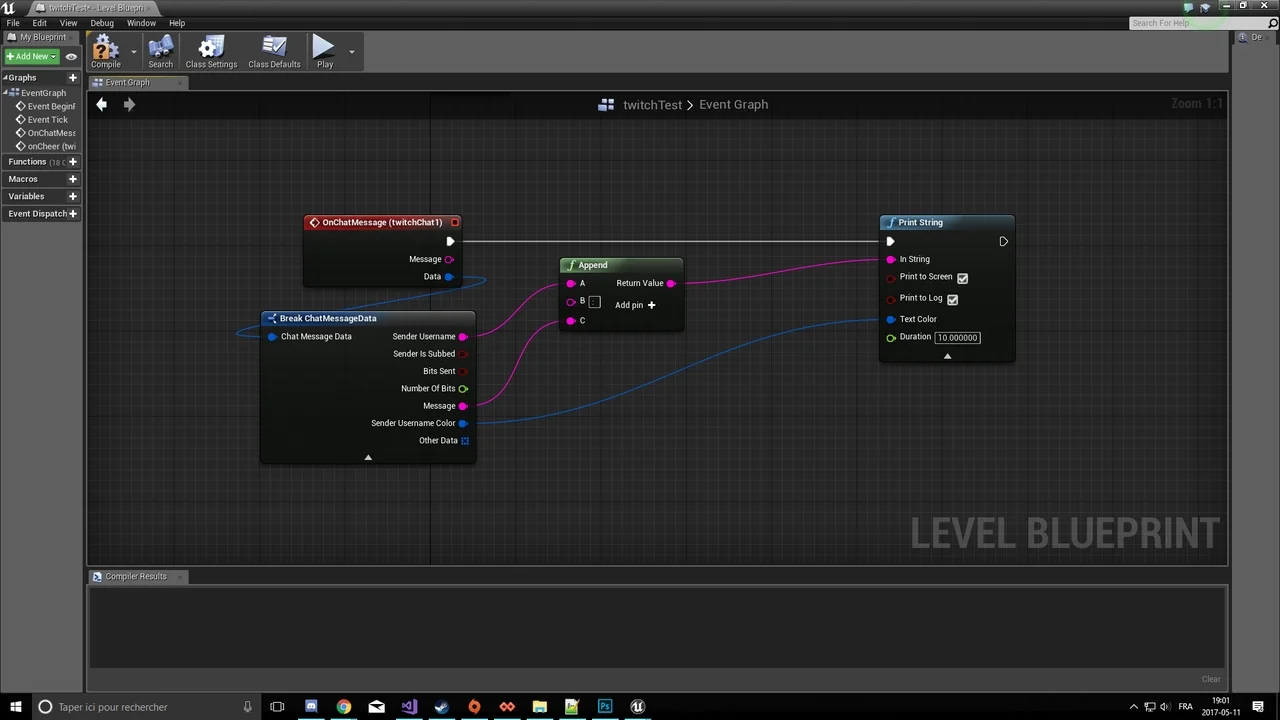
 Engine Tools
 Engine Tools
 Engine Tools