"1f00f67f9253451b"{"id":"14323","slug":"pak-creator-plugin","title":"Pak Creator Plugin","category":"Engine Tools","engine":"4.27,5.0 - 5.7","assetVersion":"Engine version: 4.27,5.0 - 5.7","engineVersion":"Asset Version:1.7.1","tag":"Engine Tools","accent":"blue","visual":"luts","summary":"The Pak Creator Plugin simplifies the process of creating independent .pak files from content plugins in Unreal Engine. It is an ideal solution for developers looking to distribute assets for modding or architectural visualization.","platform":"Unreal Engine","publishedAt":"2026-03-11T17:41:02.000Z","updatedAt":"2026-04-19T15:45:48.000Z","sourceNotes":[],"fileContents":[],"compatibility":["Unreal Engine","Engine version: 4.27,5.0 - 5.7","Asset Version: 1.7.1"],"featuredImage":{"alt":"Pak Creator Plugin","src":"https://3dcghub.com/wp-content/uploads/2026/03/791550ef-8520-4427-86de-d70ce899e2ee.webp"},"hasDownloadLink":true,"downloads":0,"terms":[{"taxonomy":"category","slug":"engine-tools-tools-and-plugins","name":"Engine Tools"},{"taxonomy":"post_tag","slug":"editor-utility","name":"Editor Utility"},{"taxonomy":"post_tag","slug":"pak-file-creation","name":"Pak File Creation"},{"taxonomy":"post_tag","slug":"plugins","name":"Plugins"},{"taxonomy":"post_tag","slug":"tools","name":"Tools"},{"taxonomy":"post_tag","slug":"ui","name":"UI"},{"taxonomy":"post_tag","slug":"unreal-engine-5","name":"Unreal Engine 5"}],"galleryImages":[{"src":"https://3dcghub.com/wp-content/uploads/2026/03/0ee6b22d4f04_cd25e247-d830-4f7a-b575-bd11c5840fe3.webp","alt":"Pak Creator Plugin"},{"src":"https://3dcghub.com/wp-content/uploads/2026/03/ab03a550e29a_1f5bfca6-3104-4bba-afa4-901edfab0f5e.webp","alt":"Pak Creator Plugin"}],"accessPanel":{"kind":"resource","title":"Access this resource","eyebrow":"Free Download","message":"Log in or create a free account to start your download.","fileName":"Pak Creator Plugin 4.27-5.7,v1.7.1.7z","safetyNote":"All resources are 100% manually reviewed to eliminate all risks.","actionLabel":"Download Free","resourceType":"Resource archive"},"contentHtml":"\u003ch2\u003eIntroduction to the Pak Creator Plugin\u003c/h2\u003e\n\u003cp\u003eThe Pak Creator Plugin is a specialized utility designed for use within the Unreal Editor to facilitate the creation of .pak files. This tool specifically generates independent .pak files from content plugins, which are plugins that exclusively contain assets. Consequently, this plugin serves as a valuable resource for developers who need an efficient way to package and distribute content to their users.\u003c/p\u003e\n\n\u003cp\u003eOn top of that, the Pak Creator Plugin acts as a convenience tool for those who prefer to bypass the standard Unreal project launcher. By integrating directly into the editor workflow, it provides a more direct path for asset packaging. This streamlined approach is particularly beneficial for professionals working in the architectural industry or those developing game modding capabilities.\u003c/p\u003e\n\n\u003ch2\u003eKey Features and Platform Support\u003c/h2\u003e\n\u003cp\u003eOne of the primary advantages of the Pak Creator Plugin is its user-friendly interface. It allows users to create .pak files from content plugins with just a single click. Furthermore, the tool supports the selection of multiple content plugins simultaneously, allowing for efficient batch processing of assets.\u003c/p\u003e\n\n\u003cp\u003eThe plugin supports several major target platforms, ensuring broad compatibility for distributed content. These platforms include:\u003c/p\u003e\n\u003cul\u003e\n \u003cli\u003eWindows\u003c/li\u003e\n \u003cli\u003eMac\u003c/li\u003e\n \u003cli\u003eLinux\u003c/li\u003e\n \u003cli\u003eAndroid\u003c/li\u003e\n\u003c/ul\u003e\n\u003cp\u003eHowever, users must ensure that the specific target platform is already installed in their engine via the Epic Games launcher options. Therefore, the availability of these platforms within the plugin depends on the current engine installation settings.\u003c/p\u003e\n\n\u003ch2\u003eTechnical Requirements and Setup\u003c/h2\u003e\n\u003cp\u003eTo ensure the Pak Creator Plugin functions correctly, certain project settings must be adjusted. Specifically, developers must disable the \"Use Io Store\" setting in their project settings to utilize traditional .pak files. Additionally, it is important to understand that this tool is strictly for the creation of files. To load and utilize the resulting .pak files, developers must use the engine's native pak functions or the PakLoader plugin.\u003c/p\u003e\n\n\u003cp\u003eBeyond that, the creator highlights an important technical requirement regarding the Unreal packaging process. If a generated .pak file appears unusually small or lacks assets, you should verify the presence of a map file. At least one map must exist within the /Game folder for Unreal to successfully create the .pak file. Even an empty map is sufficient to satisfy this requirement.\u003c/p\u003e\n\n\u003ch2\u003eFinal Take\u003c/h2\u003e\n\u003cp\u003eThe Pak Creator Plugin offers a simplified workflow for Unreal Engine developers focusing on asset distribution. By focusing on content plugins, it provides a clear path for sharing resources in modding and professional visualization contexts. Consequently, it remains a practical utility for those seeking an alternative to the traditional project launcher workflow. Detailed documentation is provided via Google Drive to assist users with implementation and troubleshooting.\u003c/p\u003e\n\n\u003ch2\u003eMore From The Same Workflow\u003c/h2\u003e\n\u003cul\u003e\n\u003cli\u003e\u003ca href=\"https://3dcghub.com/extile-plus-ultimate-non-tiling-material-toolkit-for-unreal-engine-environments/\" title=\"EXTILE PLUS -Ultimate Non-Tiling Material Toolkit for Unreal Engine Environments\"\u003eEXTILE PLUS -Ultimate Non-Tiling Material Toolkit for Unreal Engine Environments\u003c/a\u003e\u003c/li\u003e\n\u003cli\u003e\u003ca href=\"https://3dcghub.com/ultimate-template-unrealengine-2d-dialogue-inventory-system-save/\" title=\"ULTIMATE Template UnrealEngine || 2D + Dialogue + Inventory system + Save | |\"\u003eULTIMATE Template UnrealEngine || 2D + Dialogue + Inventory system + Save | |\u003c/a\u003e\u003c/li\u003e\n\u003cli\u003e\u003ca href=\"https://3dcghub.com/daz-to-unreal/\" title=\"Daz To Unreal\"\u003eDaz To Unreal\u003c/a\u003e\u003c/li\u003e\n\u003cli\u003e\u003ca href=\"https://3dcghub.com/blueprint-generator-ai-kibibyte-labs-engine-assistant/\" title=\"Blueprint Generator Ai – Kibibyte Labs (Engine Assistant)\"\u003eBlueprint Generator Ai – Kibibyte Labs (Engine Assistant)\u003c/a\u003e\u003c/li\u003e\n\u003cli\u003e\u003ca href=\"https://3dcghub.com/sci-fi-environment-engine-room/\" title=\"Sci-fi Environment Engine Room\"\u003eSci-fi Environment Engine Room\u003c/a\u003e\u003c/li\u003e\n\u003c/ul\u003e\n\n\u003ch2\u003eAsset Gallery\u003c/h2\u003e","contentTextLength":3270,"navigation":{"current":2589,"total":3222,"previous":{"id":"14331","slug":"pbl-database","title":"PBL Database","category":"Engine Tools","platform":"Unreal Engine","updatedAt":"2026-04-19T15:45:48.000Z"},"next":{"id":"14404","slug":"r-tune-vehicle-physics-2-0-vehicle-system-for-games-animation","title":"R-Tune Vehicle Physics 2.0 - Vehicle System for Games \u0026 Animation","category":"Engine Tools","platform":"Unreal Engine","updatedAt":"2026-04-19T15:45:47.000Z"}},"relatedResources":[{"id":"13785","slug":"chunk-downloader-nodes","title":"Chunk Downloader Nodes","category":"Engine Tools","engine":"5.6","assetVersion":"Engine version: 5.6","engineVersion":"Asset Version:1.0","tag":"Engine Tools","accent":"blue","visual":"animation","summary":"Streamline your content delivery with Chunk Downloader Nodes, a professional Blueprint wrapper for Epic's official plugin. This tool enables efficient content streaming and PAK file management without C++ requirements.","platform":"Unreal Engine","publishedAt":"2026-03-11T10:02:01.000Z","updatedAt":"2026-04-19T15:46:22.000Z","sourceNotes":[],"fileContents":[],"compatibility":["Unreal Engine","Engine version: 5.6","Asset Version: 1.0"],"featuredImage":{"alt":"Chunk Downloader Nodes","src":"https://3dcghub.com/wp-content/uploads/2026/03/efb2c9d0-ead4-4949-8fda-f55747fa16fe-1.webp"},"hasDownloadLink":true,"downloads":0},{"id":"14084","slug":"journeymans-minimap","title":"Journeyman's Minimap","category":"Engine Tools","engine":"4.15 - 5.8","assetVersion":"Asset Version: 1.2","engineVersion":"Engine version: 4.15 - 5.8","tag":"Engine Tools","accent":"blue","visual":"luts","summary":"Journeyman's Minimap offers a robust and flexible solution for creating professional navigation systems in Unreal Engine. It features deep icon customization, dynamic background rendering, and a versatile Fog of War system.","platform":"Unreal Engine","publishedAt":"2026-03-11T15:41:11.000Z","updatedAt":"2026-09-29T09:16:18.015Z","sourceNotes":[],"fileContents":[],"compatibility":["Unreal Engine","Asset Version: 1.2","Engine version: 4.15 - 5.8"],"featuredImage":{"alt":"Journeyman's Minimap","src":"https://3dcghub.com/wp-content/uploads/2026/03/15004687-fa86-47a7-8b1e-a6b4374fbeec.webp"},"hasDownloadLink":true,"downloads":2},{"id":"13834","slug":"darker-nodes","title":"Darker Nodes","category":"Engine Tools","engine":"4.26 - 5.8","assetVersion":"Asset Version:2.6 - 3.6","engineVersion":"Engine version: 4.26 - 5.8","tag":"Engine Tools","accent":"blue","visual":"city","summary":"Enhance your development environment with Darker Nodes, a comprehensive theme for the Unreal Editor. This tool optimizes interface brightness and simplifies complex layouts to improve your daily workflow.","platform":"Unreal Engine","publishedAt":"2026-03-11T10:16:04.000Z","updatedAt":"2026-08-27T11:17:12.825Z","sourceNotes":[],"fileContents":[],"compatibility":["Unreal Engine","Asset Version:2.6 - 3.6","Engine version: 4.26 - 5.8"],"featuredImage":{"alt":"Darker Nodes","src":"https://3dcghub.com/wp-content/uploads/2026/03/18fa5af4-6fba-42db-9e00-28fe14d01c2b.webp"},"hasDownloadLink":true,"downloads":2}]}
Engine Tools
Pak Creator Plugin
The Pak Creator Plugin simplifies the process of creating independent .pak files from content plugins in Unreal Engine. It is an ideal solution for developers looking to distribute assets for modding or architectural visualization.
The Pak Creator Plugin is a specialized utility designed for use within the Unreal Editor to facilitate the creation of .pak files. This tool specifically generates independent .pak files from content plugins, which are plugins that exclusively contain assets. Consequently, this plugin serves as a valuable resource for developers who need an efficient way to package and distribute content to their users.
On top of that, the Pak Creator Plugin acts as a convenience tool for those who prefer to bypass the standard Unreal project launcher. By integrating directly into the editor workflow, it provides a more direct path for asset packaging. This streamlined approach is particularly beneficial for professionals working in the architectural industry or those developing game modding capabilities.
Key Features and Platform Support
One of the primary advantages of the Pak Creator Plugin is its user-friendly interface. It allows users to create .pak files from content plugins with just a single click. Furthermore, the tool supports the selection of multiple content plugins simultaneously, allowing for efficient batch processing of assets.
The plugin supports several major target platforms, ensuring broad compatibility for distributed content. These platforms include:
Windows
Mac
Linux
Android
However, users must ensure that the specific target platform is already installed in their engine via the Epic Games launcher options. Therefore, the availability of these platforms within the plugin depends on the current engine installation settings.
Technical Requirements and Setup
To ensure the Pak Creator Plugin functions correctly, certain project settings must be adjusted. Specifically, developers must disable the "Use Io Store" setting in their project settings to utilize traditional .pak files. Additionally, it is important to understand that this tool is strictly for the creation of files. To load and utilize the resulting .pak files, developers must use the engine's native pak functions or the PakLoader plugin.
Beyond that, the creator highlights an important technical requirement regarding the Unreal packaging process. If a generated .pak file appears unusually small or lacks assets, you should verify the presence of a map file. At least one map must exist within the /Game folder for Unreal to successfully create the .pak file. Even an empty map is sufficient to satisfy this requirement.
Final Take
The Pak Creator Plugin offers a simplified workflow for Unreal Engine developers focusing on asset distribution. By focusing on content plugins, it provides a clear path for sharing resources in modding and professional visualization contexts. Consequently, it remains a practical utility for those seeking an alternative to the traditional project launcher workflow. Detailed documentation is provided via Google Drive to assist users with implementation and troubleshooting.
 Engine Tools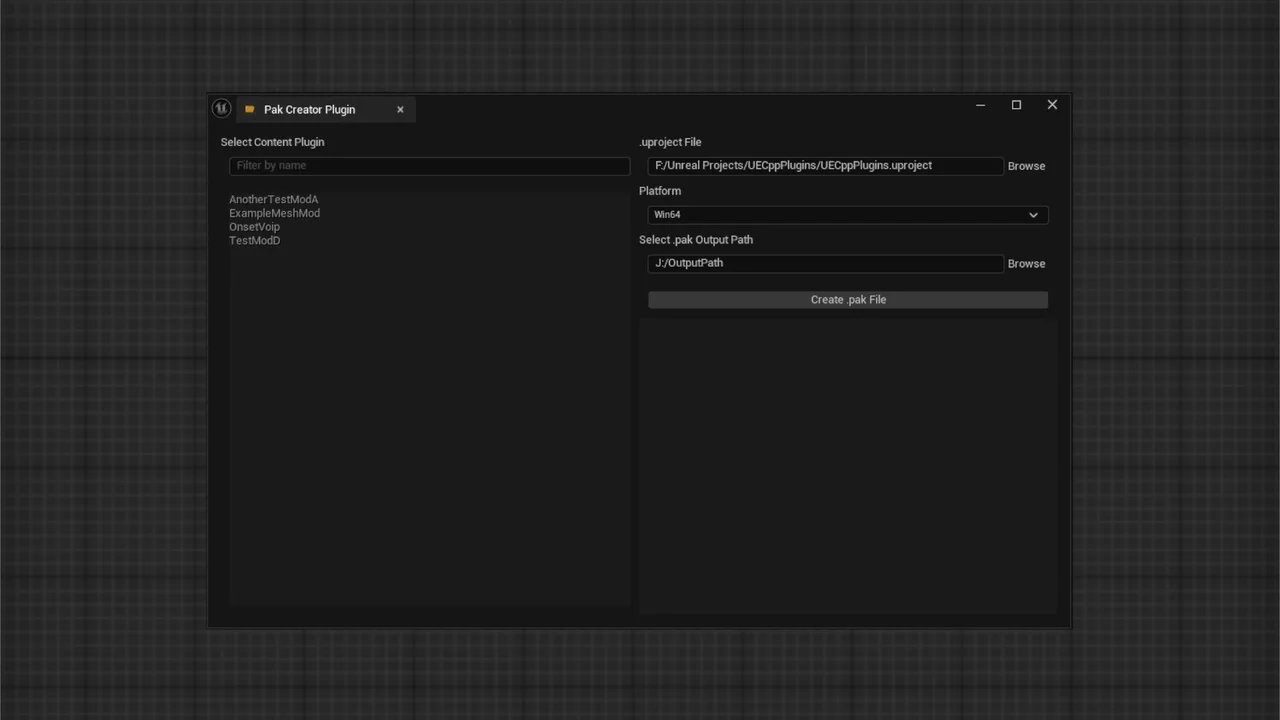
 Engine Tools
 Engine Tools
 Engine Tools