"7066dd76da796369"{"id":"14084","slug":"journeymans-minimap","title":"Journeyman's Minimap","category":"Engine Tools","engine":"4.15 - 5.8","assetVersion":"Asset Version: 1.2","engineVersion":"Engine version: 4.15 - 5.8","tag":"Engine Tools","accent":"blue","visual":"luts","summary":"Journeyman's Minimap offers a robust and flexible solution for creating professional navigation systems in Unreal Engine. It features deep icon customization, dynamic background rendering, and a versatile Fog of War system.","platform":"Unreal Engine","publishedAt":"2026-03-11T15:41:11.000Z","updatedAt":"2026-09-29T09:16:18.015Z","sourceNotes":[],"fileContents":[],"compatibility":["Unreal Engine","Asset Version: 1.2","Engine version: 4.15 - 5.8"],"featuredImage":{"alt":"Journeyman's Minimap","src":"https://3dcghub.com/wp-content/uploads/2026/03/15004687-fa86-47a7-8b1e-a6b4374fbeec.webp"},"hasDownloadLink":true,"downloads":2,"terms":[{"taxonomy":"category","slug":"engine-tools-tools-and-plugins","name":"Engine Tools"},{"taxonomy":"post_tag","slug":"environment","name":"Environment"},{"taxonomy":"post_tag","slug":"game-systems","name":"Game Systems"},{"taxonomy":"post_tag","slug":"plugins","name":"Plugins"},{"taxonomy":"post_tag","slug":"tools","name":"Tools"},{"taxonomy":"post_tag","slug":"ui","name":"UI"},{"taxonomy":"post_tag","slug":"unreal-engine-5","name":"Unreal Engine 5"}],"galleryImages":[{"src":"https://3dcghub.com/wp-content/uploads/2026/03/2473dbc89572_5310827f-8f59-467d-90a9-5735ed8f6f11.webp","alt":"Journeyman's Minimap"},{"src":"https://3dcghub.com/wp-content/uploads/2026/03/6527cb841105_04cd0109-d5d8-470a-8ad2-597e8f4092a5.webp","alt":"Journeyman's Minimap"},{"src":"https://3dcghub.com/wp-content/uploads/2026/03/50f7e158dcf8_f761d61b-6a1d-4878-8ca1-7bdfd0dbf698.webp","alt":"Journeyman's Minimap"},{"src":"https://3dcghub.com/wp-content/uploads/2026/03/8e4acf7cb8be_9ae571c7-f889-4a97-9982-ce3cbe050877.webp","alt":"Journeyman's Minimap"},{"src":"https://3dcghub.com/wp-content/uploads/2026/03/f561dc225a73_72a0c01e-c5c4-431b-9e72-bb02737ac13d.webp","alt":"Journeyman's Minimap"}],"accessPanel":{"kind":"resource","title":"Download this resource","eyebrow":"Free Download","message":"Log in or create a free account to start your download.","fileName":"Journeyman s Minimap.7z","safetyNote":"Resources are manually reviewed before listing to improve quality and reduce obvious risks.","actionLabel":"Download Free","resourceType":"Resource archive"},"contentHtml":"\u003ch2\u003eProfessional Navigation with Journeyman's Minimap\u003c/h2\u003e\n\u003cp\u003eJourneyman's Minimap is a comprehensive navigation solution designed for Unreal Engine developers. This plugin allows creators to integrate highly customizable maps into their projects with ease. Whether you are building a multiplayer battle royale or a single-player RPG, this tool provides the necessary infrastructure for clear player orientation.\u003c/p\u003e\n\n\u003cp\u003eThe system is designed to be versatile and user-friendly. It supports multiple Unreal Engine versions, including 4.25, 4.27, 5.3, and 5.4. Consequently, developers can implement these features across various project types and engine iterations.\u003c/p\u003e\n\n\u003ch2\u003eVersatile Map Customization\u003c/h2\u003e\n\u003cp\u003eThe core of the Journeyman's Minimap system lies in its flexibility. Developers can add one or multiple maps to their game interface. These maps support custom borders, various shapes, and adjustable transparency levels to fit any UI aesthetic.\u003c/p\u003e\n\n\u003cp\u003eOn top of that, the plugin is fully compatible with both C++ and Blueprints. This accessibility allows developers to hook gameplay logic directly to minimap UI events. Therefore, the map becomes a dynamic part of the user experience rather than a static element.\u003c/p\u003e\n\n\u003ch2\u003eAdvanced Icon Management\u003c/h2\u003e\n\u003cp\u003eIcons are a critical part of any navigation system. Journeyman's Minimap offers deep customization for these elements. You can adjust textures, rotation, and size in either screen or world units. Furthermore, the system supports animated materials driven by gameplay logic.\u003c/p\u003e\n\n\u003cp\u003eIf an icon moves outside the map area, it can automatically appear as an arrow at the edge. This ensures players never lose track of important objectives. Developers can also change any aspect of an icon's appearance during active gameplay via C++ or Blueprints.\u003c/p\u003e\n\n\u003ch2\u003eDynamic Background Rendering\u003c/h2\u003e\n\u003cp\u003ePreparing map backgrounds is intuitive with this plugin. The creator included a volume-based system that generates top-down renders of the game world. Consequently, you can simply drag a volume into the scene to create a background texture. This process can even include the navigation mesh for added detail.\u003c/p\u003e\n\n\u003cp\u003eThe system is particularly powerful for complex environments. It supports automatic background switching for multi-floor dungeons. Additionally, it handles transitions between indoor and outdoor areas seamlessly to maintain player immersion.\u003c/p\u003e\n\n\u003ch2\u003eImmersive Fog of War\u003c/h2\u003e\n\u003cp\u003eTo add suspense and strategy, Journeyman's Minimap includes a robust Fog of War feature. This system allows the map to start blacked out, requiring players to explore to reveal the terrain. It supports two primary modes:\u003c/p\u003e\n\u003cul\u003e\n \u003cli\u003e\u003cstrong\u003eTeam Vision:\u003c/strong\u003e Actors reveal areas temporarily, ideal for MOBA or RTS style gameplay.\u003c/li\u003e\n \u003cli\u003e\u003cstrong\u003ePermanent Discovery:\u003c/strong\u003e Visited areas remain revealed, which is perfect for Action RPG exploration.\u003c/li\u003e\n\u003c/ul\u003e\n\n\u003cp\u003eIcons can be configured to show or hide based on the current fog status. Furthermore, developers can query fog values for specific gameplay purposes. A post-process effect is also included to render the fog directly within the game world.\u003c/p\u003e\n\n\u003ch2\u003eReady for Production\u003c/h2\u003e\n\u003cp\u003eThe developer has ensured that Journeyman's Minimap is ready for professional use. It is fully multiplayer compatible and has been featured in shipped titles. To assist with implementation, the plugin comes with a comprehensive PDF guide and a series of video tutorials covering basics, Fog of War, and advanced backgrounds.\u003c/p\u003e\n\n\u003cp\u003eFor teams considering it, Journeyman's Minimap provides a high-quality, feature-rich toolkit for any project requiring sophisticated navigation. Its combination of ease of use and deep technical customization makes it a valuable asset for Unreal Engine developers.\u003c/p\u003e\n\n\u003ch2\u003eExplore Similar Assets\u003c/h2\u003e\n\u003cul\u003e\n\u003cli\u003e\u003ca href=\"https://3dcghub.com/extile-plus-ultimate-non-tiling-material-toolkit-for-unreal-engine-environments/\" title=\"EXTILE PLUS -Ultimate Non-Tiling Material Toolkit for Unreal Engine Environments\"\u003eEXTILE PLUS -Ultimate Non-Tiling Material Toolkit for Unreal Engine Environments\u003c/a\u003e\u003c/li\u003e\n\u003cli\u003e\u003ca href=\"https://3dcghub.com/ultimate-template-unrealengine-2d-dialogue-inventory-system-save/\" title=\"ULTIMATE Template UnrealEngine || 2D + Dialogue + Inventory system + Save | |\"\u003eULTIMATE Template UnrealEngine || 2D + Dialogue + Inventory system + Save | |\u003c/a\u003e\u003c/li\u003e\n\u003cli\u003e\u003ca href=\"https://3dcghub.com/daz-to-unreal/\" title=\"Daz To Unreal\"\u003eDaz To Unreal\u003c/a\u003e\u003c/li\u003e\n\u003cli\u003e\u003ca href=\"https://3dcghub.com/blueprint-generator-ai-kibibyte-labs-engine-assistant/\" title=\"Blueprint Generator Ai – Kibibyte Labs (Engine Assistant)\"\u003eBlueprint Generator Ai – Kibibyte Labs (Engine Assistant)\u003c/a\u003e\u003c/li\u003e\n\u003cli\u003e\u003ca href=\"https://3dcghub.com/sci-fi-environment-engine-room/\" title=\"Sci-fi Environment Engine Room\"\u003eSci-fi Environment Engine Room\u003c/a\u003e\u003c/li\u003e\n\u003c/ul\u003e","contentTextLength":3915,"navigation":{"current":875,"total":4016,"previous":{"id":"14100","slug":"le-http-request","title":"LE Http Request","category":"Engine Tools","platform":"Unreal Engine","updatedAt":"2026-09-29T09:21:47.996Z"},"next":{"id":"14060","slug":"http-and-json","title":"HTTP AND JSON","category":"Engine Tools","platform":"Unreal Engine","updatedAt":"2026-09-29T09:07:47.488Z"}},"relatedResources":[{"id":"13913","slug":"easy-multi-save","title":"Easy Multi Save","category":"Engine Tools","engine":"1.10 - 1.74","assetVersion":"Engine version: 4.25 - 5.7","engineVersion":"Asset Version:1.10 - 1.74","tag":"Engine Tools","accent":"blue","visual":"mech","summary":"Easy Multi Save provides a robust, streamlined solution for managing game data in Unreal Engine, supporting everything from simple variables to complex World Partition levels.","platform":"Unreal Engine","publishedAt":"2026-03-11T10:40:22.000Z","updatedAt":"2026-07-18T09:48:15.051Z","sourceNotes":[],"fileContents":[],"compatibility":["Unreal Engine","Engine version: 4.25 - 5.7","Asset Version:1.10 - 1.74"],"featuredImage":{"alt":"Easy Multi Save","src":"https://3dcghub.com/wp-content/uploads/2026/03/fab7f07b-78c6-4508-a4df-9cb7d78f90e0.webp"},"hasDownloadLink":true,"downloads":2},{"id":"13742","slug":"blockout-tools-plugin","title":"Blockout Tools Plugin","category":"Engine Tools","engine":"1.51 - 4.5.3","assetVersion":"Engine version: 4.26 - 5.7","engineVersion":"Asset Version:1.51 - 4.5.3","tag":"Engine Tools","accent":"blue","visual":"luts","summary":"Streamline your environment design with the Blockout Tools Plugin. This lightweight toolset features 15 primitive elements and triplanar grid materials for rapid level prototyping in Unreal Engine.","platform":"Unreal Engine","publishedAt":"2026-03-11T09:52:02.000Z","updatedAt":"2026-07-29T16:09:39.794Z","sourceNotes":[],"fileContents":[],"compatibility":["Unreal Engine","Engine version: 4.26 - 5.7","Asset Version:1.51 - 4.5.3"],"featuredImage":{"alt":"Blockout Tools Plugin","src":"https://3dcghub.com/wp-content/uploads/2026/03/2e655f33-dfec-4888-9b31-c0aaa5b72ba1.webp"},"hasDownloadLink":true,"downloads":2},{"id":"14243","slug":"multi-window","title":"Multi window","category":"Engine Tools","engine":"4.25 - 5.7","assetVersion":"Asset Version: 1.0","engineVersion":"Engine version: 4.25 - 5.7","tag":"Engine Tools","accent":"blue","visual":"character","summary":"The Multi window plugin enables developers to display multiple views simultaneously across different windows using simple Blueprint nodes. With support for advanced rendering and persistent cross-level windows, it is a versatile tool for complex UI and disp...","platform":"Unreal Engine","publishedAt":"2026-03-11T17:07:21.000Z","updatedAt":"2026-08-06T12:55:43.741Z","sourceNotes":[],"fileContents":[],"compatibility":["Unreal Engine","Asset Version: 1.0","Engine version: 4.25 - 5.7"],"featuredImage":{"alt":"Multi window","src":"https://3dcghub.com/wp-content/uploads/2026/03/2e68fe3f-2dca-47bc-80cc-c4bc96fea474.webp"},"hasDownloadLink":true,"downloads":0}]}
Engine Tools
Journeyman's Minimap
Journeyman's Minimap offers a robust and flexible solution for creating professional navigation systems in Unreal Engine. It features deep icon customization, dynamic background rendering, and a versatile Fog of War system.
Journeyman's Minimap is a comprehensive navigation solution designed for Unreal Engine developers. This plugin allows creators to integrate highly customizable maps into their projects with ease. Whether you are building a multiplayer battle royale or a single-player RPG, this tool provides the necessary infrastructure for clear player orientation.
The system is designed to be versatile and user-friendly. It supports multiple Unreal Engine versions, including 4.25, 4.27, 5.3, and 5.4. Consequently, developers can implement these features across various project types and engine iterations.
Versatile Map Customization
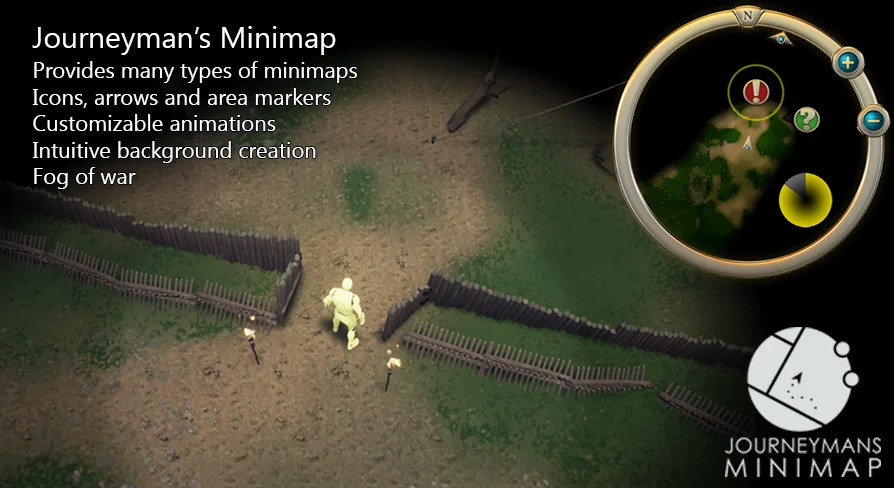
The core of the Journeyman's Minimap system lies in its flexibility. Developers can add one or multiple maps to their game interface. These maps support custom borders, various shapes, and adjustable transparency levels to fit any UI aesthetic.
On top of that, the plugin is fully compatible with both C++ and Blueprints. This accessibility allows developers to hook gameplay logic directly to minimap UI events. Therefore, the map becomes a dynamic part of the user experience rather than a static element.
Advanced Icon Management
Icons are a critical part of any navigation system. Journeyman's Minimap offers deep customization for these elements. You can adjust textures, rotation, and size in either screen or world units. Furthermore, the system supports animated materials driven by gameplay logic.
If an icon moves outside the map area, it can automatically appear as an arrow at the edge. This ensures players never lose track of important objectives. Developers can also change any aspect of an icon's appearance during active gameplay via C++ or Blueprints.
Dynamic Background Rendering
Preparing map backgrounds is intuitive with this plugin. The creator included a volume-based system that generates top-down renders of the game world. Consequently, you can simply drag a volume into the scene to create a background texture. This process can even include the navigation mesh for added detail.
The system is particularly powerful for complex environments. It supports automatic background switching for multi-floor dungeons. Additionally, it handles transitions between indoor and outdoor areas seamlessly to maintain player immersion.
Immersive Fog of War
To add suspense and strategy, Journeyman's Minimap includes a robust Fog of War feature. This system allows the map to start blacked out, requiring players to explore to reveal the terrain. It supports two primary modes:
Team Vision: Actors reveal areas temporarily, ideal for MOBA or RTS style gameplay.
Permanent Discovery: Visited areas remain revealed, which is perfect for Action RPG exploration.
Icons can be configured to show or hide based on the current fog status. Furthermore, developers can query fog values for specific gameplay purposes. A post-process effect is also included to render the fog directly within the game world.
Ready for Production
The developer has ensured that Journeyman's Minimap is ready for professional use. It is fully multiplayer compatible and has been featured in shipped titles. To assist with implementation, the plugin comes with a comprehensive PDF guide and a series of video tutorials covering basics, Fog of War, and advanced backgrounds.
For teams considering it, Journeyman's Minimap provides a high-quality, feature-rich toolkit for any project requiring sophisticated navigation. Its combination of ease of use and deep technical customization makes it a valuable asset for Unreal Engine developers.
 Engine Tools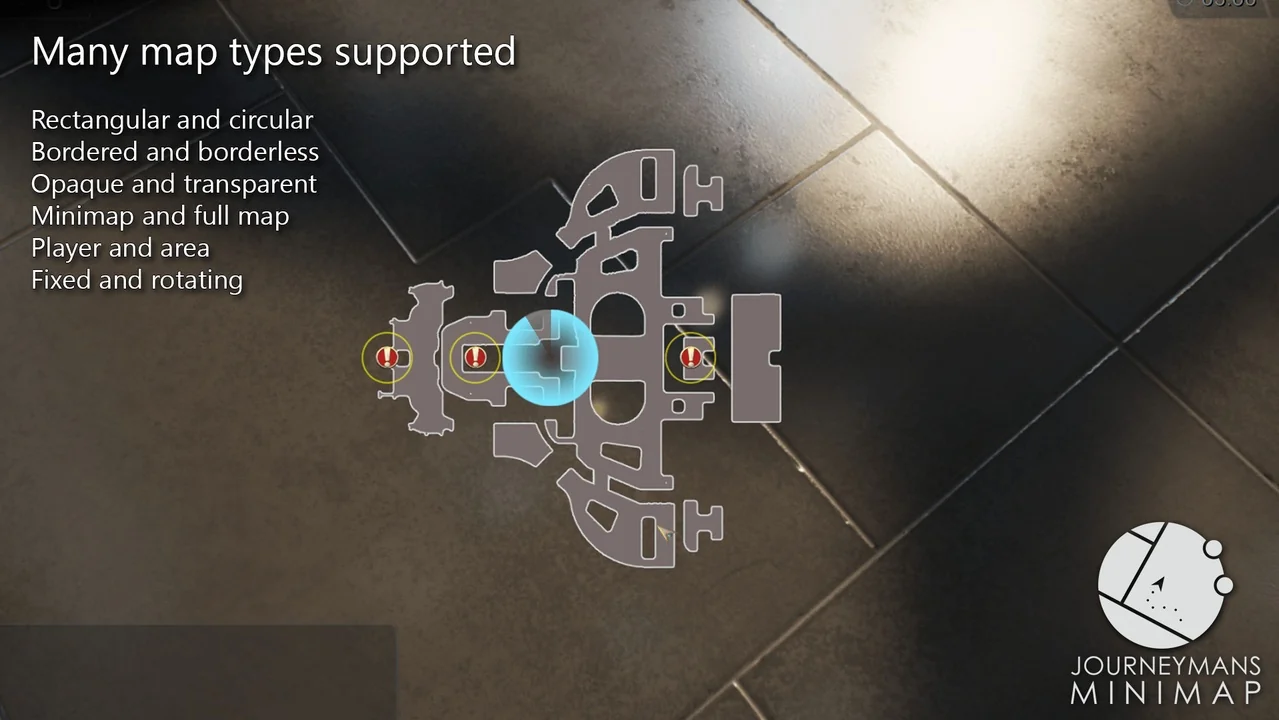
 Engine Tools
 Engine Tools
 Engine Tools