"0341a2901a4ae9aa"{"id":"13913","slug":"easy-multi-save","title":"Easy Multi Save","category":"Engine Tools","engine":"1.10 - 1.74","assetVersion":"Engine version: 4.25 - 5.7","engineVersion":"Asset Version:1.10 - 1.74","tag":"Engine Tools","accent":"blue","visual":"mech","summary":"Easy Multi Save provides a robust, streamlined solution for managing game data in Unreal Engine, supporting everything from simple variables to complex World Partition levels.","platform":"Unreal Engine","publishedAt":"2026-03-11T10:40:22.000Z","updatedAt":"2026-07-18T09:48:15.051Z","sourceNotes":[],"fileContents":[],"compatibility":["Unreal Engine","Engine version: 4.25 - 5.7","Asset Version:1.10 - 1.74"],"featuredImage":{"alt":"Easy Multi Save","src":"https://3dcghub.com/wp-content/uploads/2026/03/fab7f07b-78c6-4508-a4df-9cb7d78f90e0.webp"},"hasDownloadLink":true,"downloads":2,"terms":[{"taxonomy":"category","slug":"engine-tools-tools-and-plugins","name":"Engine Tools"},{"taxonomy":"post_tag","slug":"environment","name":"Environment"},{"taxonomy":"post_tag","slug":"game-systems","name":"Game Systems"},{"taxonomy":"post_tag","slug":"plugins","name":"Plugins"},{"taxonomy":"post_tag","slug":"tools","name":"Tools"},{"taxonomy":"post_tag","slug":"ui","name":"UI"},{"taxonomy":"post_tag","slug":"unreal-engine-5","name":"Unreal Engine 5"}],"galleryImages":[{"src":"https://3dcghub.com/wp-content/uploads/2026/03/05a8f84e7ab1_e80471d0-5b06-4fdc-b2d7-c0887c8e954c.webp","alt":"Easy Multi Save"},{"src":"https://3dcghub.com/wp-content/uploads/2026/03/623c7e6e661a_efd1a16c-02ec-42ba-a812-9fbfe337e27a.webp","alt":"Easy Multi Save"},{"src":"https://3dcghub.com/wp-content/uploads/2026/03/75f539a6ed0f_bcd00f4d-30fc-4c9e-9a0a-9739d3dee53f.webp","alt":"Easy Multi Save"},{"src":"https://3dcghub.com/wp-content/uploads/2026/03/45c6e1f57bea_e8fdcd6b-3753-4982-b8fe-b8cb93b10d3a.webp","alt":"Easy Multi Save"},{"src":"https://3dcghub.com/wp-content/uploads/2026/03/b2f979a6f884_b9368b2d-9585-47be-8c05-d9f00a69e960.webp","alt":"Easy Multi Save"},{"src":"https://3dcghub.com/wp-content/uploads/2026/03/114c5770849d_19ab4f36-80e9-452e-8901-d70cbe3822c7.webp","alt":"Easy Multi Save"},{"src":"https://3dcghub.com/wp-content/uploads/2026/03/5134b1ecabe8_504437ad-c7e6-4656-adc4-b3b0d1c094be.webp","alt":"Easy Multi Save"},{"src":"https://3dcghub.com/wp-content/uploads/2026/03/fb8292de7a55_eaa66a73-01ea-4edf-b0b5-cae734b45f89.webp","alt":"Easy Multi Save"},{"src":"https://3dcghub.com/wp-content/uploads/2026/03/53ee9d993ecf_915eed35-efc9-4c67-9071-399b8852c275.webp","alt":"Easy Multi Save"},{"src":"https://3dcghub.com/wp-content/uploads/2026/03/f117aa0e4421_8369faa0-d688-4b23-822e-a8496bc832d9.webp","alt":"Easy Multi Save"}],"accessPanel":{"kind":"resource","title":"Download this resource","eyebrow":"Free Download","message":"Log in or create a free account to start your download.","fileName":"Easy Multi Save.7z","safetyNote":"Resources are manually reviewed before listing to improve quality and reduce obvious risks.","actionLabel":"Download Free","resourceType":"Resource archive"},"contentHtml":"\u003ch2\u003eEfficient Save and Load Management\u003c/h2\u003e\n\u003cp\u003eEasy Multi Save is a comprehensive all-in-one save and load solution designed to save developers significant time. Consequently, it is suitable for both small and large projects. The system does not require any C++ knowledge. Therefore, it is a perfect fit for Blueprint-only and code projects alike. This tool streamlines the process of managing complex game data across various platforms.\u003c/p\u003e\n\n\u003cp\u003eThe system is built to be fast and user-friendly. Users can jump in right away even if they only know the basics of the engine. Moreover, the design is fully in-line with standard engine practices. This allows for maximum flexibility while encouraging developers to work smarter rather than harder. All saved data is compressed to ensure minimum file sizes.\u003c/p\u003e\n\n\u003ch2\u003eComprehensive Data Support\u003c/h2\u003e\n\u003cp\u003eEasy Multi Save allows you to save and load a wide variety of elements. This includes Level Actors, Level and Sub-Level Blueprints, and the Player character. Additionally, you can manage Inventory, Components, and Persistent Data or Settings. The system even supports one-click saving of complex Blueprint structures for any Actor. \u003c/p\u003e\n\n\u003cp\u003eKey features include:\u003c/p\u003e\n\u003cul\u003e\n \u003cli\u003eSupport for a single save game or infinite save slots with thumbnails.\u003c/li\u003e\n \u003cli\u003eAutomated saving and loading of persistent data like game progress.\u003c/li\u003e\n \u003cli\u003eIntegration with Components and Child Actors.\u003c/li\u003e\n \u003cli\u003eA dedicated 'Save Interface' for pre-save and loaded events.\u003c/li\u003e\n \u003cli\u003eData preservation between multiple Persistent Levels and Worlds.\u003c/li\u003e\n\u003c/ul\u003e\n\n\u003ch2\u003eAdvanced Technical Capabilities\u003c/h2\u003e\n\u003cp\u003eFor more complex needs, the system offers multi-thread and deferred loading. This is particularly useful when saving or loading many Actors at once. Furthermore, it supports automatic saving and loading of destroyed Actors. The system intelligently decides which Actors to update or respawn during the loading process.\u003c/p\u003e\n\n\u003cp\u003eEasy Multi Save is highly compatible with modern engine features. For instance, it provides fully automated saving for huge World Partition levels. It also works seamlessly with Level Streaming. In network environments, the tool supports saving only the client. Additionally, it offers multi-user game support and clean file structures for both desktop and console systems.\u003c/p\u003e\n\n\u003ch2\u003eReliability and Security\u003c/h2\u003e\n\u003cp\u003eThis solution is tried and tested in several commercial projects. Notable examples include Hydroneer, Forgive me Father, and Night of the Dead. Because it has been maintained since 2018, it receives ongoing support and updates. The tool ensures full save file compatibility across different engine and project builds.\u003c/p\u003e\n\n\u003cp\u003eSecurity and integrity are also prioritized. The system includes advanced file integrity protection and versioning. It also features automatic save data backup and recovery from those backups. Consequently, developers can rely on the system to protect player progress effectively. Custom Save Objects are also available for storing specialized data or settings.\u003c/p\u003e\n\n\u003ch2\u003eFinal Take\u003c/h2\u003e\n\u003cp\u003eEasy Multi Save offers a robust and flexible framework for any project's data needs. By providing a simple yet powerful interface, it removes the technical hurdles of data persistence. Whether you are building a small indie title or a large open-world game, this tool provides the features necessary for professional data management. It remains a reliable choice for developers looking for a production-ready save system.\u003c/p\u003e\n\n\u003ch2\u003eMore From The Same Workflow\u003c/h2\u003e\n\u003cul\u003e\n\u003cli\u003e\u003ca href=\"https://3dcghub.com/extile-plus-ultimate-non-tiling-material-toolkit-for-unreal-engine-environments/\" title=\"EXTILE PLUS -Ultimate Non-Tiling Material Toolkit for Unreal Engine Environments\"\u003eEXTILE PLUS -Ultimate Non-Tiling Material Toolkit for Unreal Engine Environments\u003c/a\u003e\u003c/li\u003e\n\u003cli\u003e\u003ca href=\"https://3dcghub.com/ultimate-template-unrealengine-2d-dialogue-inventory-system-save/\" title=\"ULTIMATE Template UnrealEngine || 2D + Dialogue + Inventory system + Save | |\"\u003eULTIMATE Template UnrealEngine || 2D + Dialogue + Inventory system + Save | |\u003c/a\u003e\u003c/li\u003e\n\u003cli\u003e\u003ca href=\"https://3dcghub.com/daz-to-unreal/\" title=\"Daz To Unreal\"\u003eDaz To Unreal\u003c/a\u003e\u003c/li\u003e\n\u003cli\u003e\u003ca href=\"https://3dcghub.com/blueprint-generator-ai-kibibyte-labs-engine-assistant/\" title=\"Blueprint Generator Ai – Kibibyte Labs (Engine Assistant)\"\u003eBlueprint Generator Ai – Kibibyte Labs (Engine Assistant)\u003c/a\u003e\u003c/li\u003e\n\u003cli\u003e\u003ca href=\"https://3dcghub.com/sci-fi-environment-engine-room/\" title=\"Sci-fi Environment Engine Room\"\u003eSci-fi Environment Engine Room\u003c/a\u003e\u003c/li\u003e\n\u003c/ul\u003e","contentTextLength":3662,"navigation":{"current":1572,"total":4017,"previous":{"id":"1000597","slug":"unreal-engine-5-blueprints-inventory-quests-and-char-stats","title":"Unreal Engine 5 Blueprints: Inventory, Quests and Char Stats","category":"Unreal Engine","platform":"Unreal Engine","updatedAt":"2026-07-18T10:52:04.415Z"},"next":{"id":"1000596","slug":"unreal-engine-5-all-in-one-ue5-master-blueprint","title":"Unreal Engine 5 : All in one UE5 master Blueprint","category":"Unreal Engine","platform":"Unreal Engine","updatedAt":"2026-07-17T17:35:41.823Z"}},"relatedResources":[{"id":"14243","slug":"multi-window","title":"Multi window","category":"Engine Tools","engine":"4.25 - 5.7","assetVersion":"Asset Version: 1.0","engineVersion":"Engine version: 4.25 - 5.7","tag":"Engine Tools","accent":"blue","visual":"character","summary":"The Multi window plugin enables developers to display multiple views simultaneously across different windows using simple Blueprint nodes. With support for advanced rendering and persistent cross-level windows, it is a versatile tool for complex UI and disp...","platform":"Unreal Engine","publishedAt":"2026-03-11T17:07:21.000Z","updatedAt":"2026-08-06T12:55:43.741Z","sourceNotes":[],"fileContents":[],"compatibility":["Unreal Engine","Asset Version: 1.0","Engine version: 4.25 - 5.7"],"featuredImage":{"alt":"Multi window","src":"https://3dcghub.com/wp-content/uploads/2026/03/2e68fe3f-2dca-47bc-80cc-c4bc96fea474.webp"},"hasDownloadLink":true,"downloads":0},{"id":"14084","slug":"journeymans-minimap","title":"Journeyman's Minimap","category":"Engine Tools","engine":"4.15 - 5.8","assetVersion":"Asset Version: 1.2","engineVersion":"Engine version: 4.15 - 5.8","tag":"Engine Tools","accent":"blue","visual":"luts","summary":"Journeyman's Minimap offers a robust and flexible solution for creating professional navigation systems in Unreal Engine. It features deep icon customization, dynamic background rendering, and a versatile Fog of War system.","platform":"Unreal Engine","publishedAt":"2026-03-11T15:41:11.000Z","updatedAt":"2026-09-29T09:16:18.015Z","sourceNotes":[],"fileContents":[],"compatibility":["Unreal Engine","Asset Version: 1.2","Engine version: 4.15 - 5.8"],"featuredImage":{"alt":"Journeyman's Minimap","src":"https://3dcghub.com/wp-content/uploads/2026/03/15004687-fa86-47a7-8b1e-a6b4374fbeec.webp"},"hasDownloadLink":true,"downloads":2},{"id":"13742","slug":"blockout-tools-plugin","title":"Blockout Tools Plugin","category":"Engine Tools","engine":"1.51 - 4.5.3","assetVersion":"Engine version: 4.26 - 5.7","engineVersion":"Asset Version:1.51 - 4.5.3","tag":"Engine Tools","accent":"blue","visual":"luts","summary":"Streamline your environment design with the Blockout Tools Plugin. This lightweight toolset features 15 primitive elements and triplanar grid materials for rapid level prototyping in Unreal Engine.","platform":"Unreal Engine","publishedAt":"2026-03-11T09:52:02.000Z","updatedAt":"2026-07-29T16:09:39.794Z","sourceNotes":[],"fileContents":[],"compatibility":["Unreal Engine","Engine version: 4.26 - 5.7","Asset Version:1.51 - 4.5.3"],"featuredImage":{"alt":"Blockout Tools Plugin","src":"https://3dcghub.com/wp-content/uploads/2026/03/2e655f33-dfec-4888-9b31-c0aaa5b72ba1.webp"},"hasDownloadLink":true,"downloads":2}]}
Engine Tools
Easy Multi Save
Easy Multi Save provides a robust, streamlined solution for managing game data in Unreal Engine, supporting everything from simple variables to complex World Partition levels.
Easy Multi Save is a comprehensive all-in-one save and load solution designed to save developers significant time. Consequently, it is suitable for both small and large projects. The system does not require any C++ knowledge. Therefore, it is a perfect fit for Blueprint-only and code projects alike. This tool streamlines the process of managing complex game data across various platforms.
The system is built to be fast and user-friendly. Users can jump in right away even if they only know the basics of the engine. Moreover, the design is fully in-line with standard engine practices. This allows for maximum flexibility while encouraging developers to work smarter rather than harder. All saved data is compressed to ensure minimum file sizes.
Comprehensive Data Support
Easy Multi Save allows you to save and load a wide variety of elements. This includes Level Actors, Level and Sub-Level Blueprints, and the Player character. Additionally, you can manage Inventory, Components, and Persistent Data or Settings. The system even supports one-click saving of complex Blueprint structures for any Actor.
Key features include:
Support for a single save game or infinite save slots with thumbnails.
Automated saving and loading of persistent data like game progress.
Integration with Components and Child Actors.
A dedicated 'Save Interface' for pre-save and loaded events.
Data preservation between multiple Persistent Levels and Worlds.
Advanced Technical Capabilities
For more complex needs, the system offers multi-thread and deferred loading. This is particularly useful when saving or loading many Actors at once. Furthermore, it supports automatic saving and loading of destroyed Actors. The system intelligently decides which Actors to update or respawn during the loading process.
Easy Multi Save is highly compatible with modern engine features. For instance, it provides fully automated saving for huge World Partition levels. It also works seamlessly with Level Streaming. In network environments, the tool supports saving only the client. Additionally, it offers multi-user game support and clean file structures for both desktop and console systems.
Reliability and Security
This solution is tried and tested in several commercial projects. Notable examples include Hydroneer, Forgive me Father, and Night of the Dead. Because it has been maintained since 2018, it receives ongoing support and updates. The tool ensures full save file compatibility across different engine and project builds.
Security and integrity are also prioritized. The system includes advanced file integrity protection and versioning. It also features automatic save data backup and recovery from those backups. Consequently, developers can rely on the system to protect player progress effectively. Custom Save Objects are also available for storing specialized data or settings.
Final Take
Easy Multi Save offers a robust and flexible framework for any project's data needs. By providing a simple yet powerful interface, it removes the technical hurdles of data persistence. Whether you are building a small indie title or a large open-world game, this tool provides the features necessary for professional data management. It remains a reliable choice for developers looking for a production-ready save system.
 Engine Tools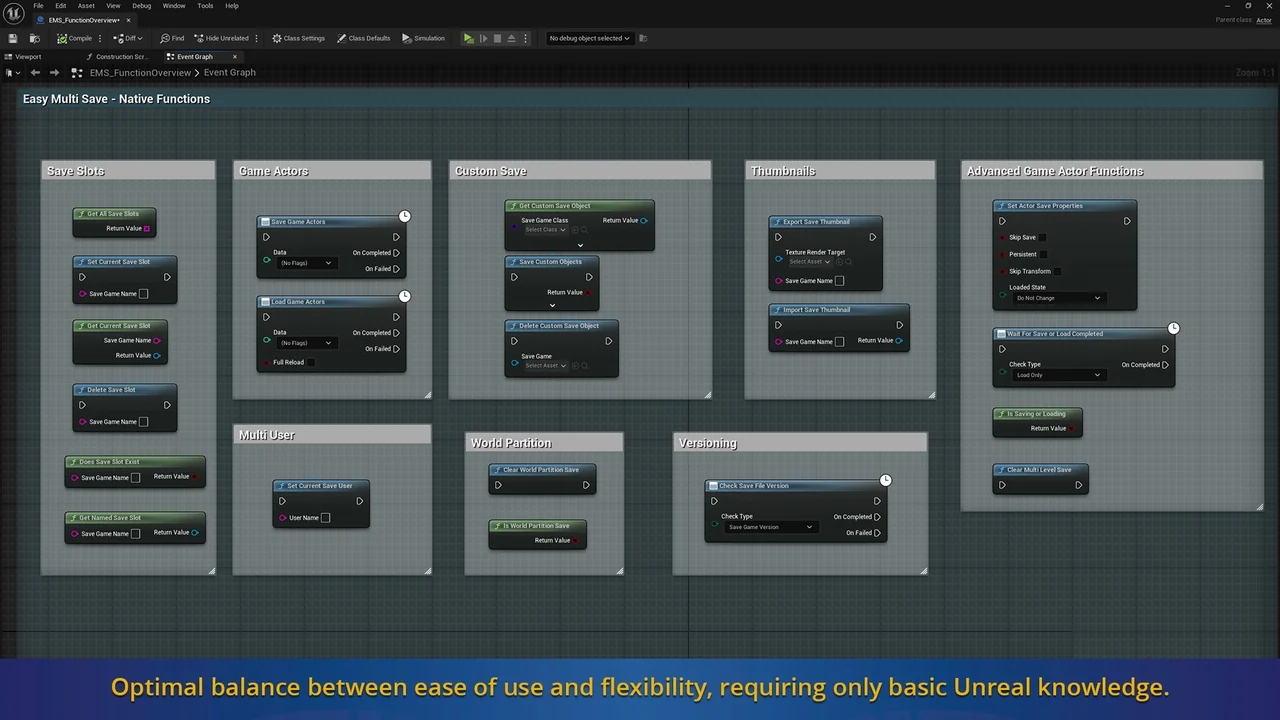
 Engine Tools
 Engine Tools
 Engine Tools