"7066dd76da796369"{"id":"14243","slug":"multi-window","title":"Multi window","category":"Engine Tools","engine":"4.25 - 5.7","assetVersion":"Asset Version: 1.0","engineVersion":"Engine version: 4.25 - 5.7","tag":"Engine Tools","accent":"blue","visual":"character","summary":"The Multi window plugin enables developers to display multiple views simultaneously across different windows using simple Blueprint nodes. With support for advanced rendering and persistent cross-level windows, it is a versatile tool for complex UI and disp...","platform":"Unreal Engine","publishedAt":"2026-03-11T17:07:21.000Z","updatedAt":"2026-08-06T12:55:43.741Z","sourceNotes":[],"fileContents":[],"compatibility":["Unreal Engine","Asset Version: 1.0","Engine version: 4.25 - 5.7"],"featuredImage":{"alt":"Multi window","src":"https://3dcghub.com/wp-content/uploads/2026/03/2e68fe3f-2dca-47bc-80cc-c4bc96fea474.webp"},"hasDownloadLink":true,"downloads":0,"terms":[{"taxonomy":"category","slug":"engine-tools-tools-and-plugins","name":"Engine Tools"},{"taxonomy":"post_tag","slug":"environment","name":"Environment"},{"taxonomy":"post_tag","slug":"plugins","name":"Plugins"},{"taxonomy":"post_tag","slug":"textures","name":"Textures"},{"taxonomy":"post_tag","slug":"tools","name":"Tools"},{"taxonomy":"post_tag","slug":"ui","name":"UI"},{"taxonomy":"post_tag","slug":"unreal-engine-5","name":"Unreal Engine 5"}],"galleryImages":[{"src":"https://3dcghub.com/wp-content/uploads/2026/03/ecab4ee3d6cd_459450c5-60d3-4430-9d65-71b60d46f628.webp","alt":"Multi window"},{"src":"https://3dcghub.com/wp-content/uploads/2026/03/39cae65e34bf_be9895d3-7b64-4f10-8110-1e7275432aa2.webp","alt":"Multi window"},{"src":"https://3dcghub.com/wp-content/uploads/2026/03/80c55333bc1b_d8d45338-7bd1-4517-a2c0-21d9a859ac2c.webp","alt":"Multi window"},{"src":"https://3dcghub.com/wp-content/uploads/2026/03/c2ad8d310759_06a98f4e-4382-42e4-a7d9-3a26b46c8d92.webp","alt":"Multi window"},{"src":"https://3dcghub.com/wp-content/uploads/2026/03/471728bcad54_9cca67f8-a990-4e04-80f3-dfe839bd0b63.webp","alt":"Multi window"},{"src":"https://3dcghub.com/wp-content/uploads/2026/03/cb0205e77aff_6aad4afe-b363-47d6-8ffd-925a782eef7f.webp","alt":"Multi window"}],"accessPanel":{"kind":"resource","title":"Download this resource","eyebrow":"Free Download","message":"Log in or create a free account to start your download.","fileName":"Multi window.7z","safetyNote":"Resources are manually reviewed before listing to improve quality and reduce obvious risks.","actionLabel":"Download Free","resourceType":"Resource archive"},"contentHtml":"\u003cp\u003eIn a project with a busy Heads-Up Display (HUD), a secondary camera, or a tool panel that needs to stay accessible, 1 single viewport can feel restrictive. \u003cem\u003eMulti Window\u003c/em\u003e is an Unreal Engine plugin that lets the runtime display multiple windows simultaneously, each 1 holding its own view. The entire system is exposed through Blueprint nodes, so setting up a 2nd window doesn't require dropping into C++.\u003c/p\u003e\n\n\u003ch2\u003eWhy a Blueprint-Driven Multi-View Window System\u003c/h2\u003e\n\n\u003cp\u003eThe plugin is based on a straightforward premise: different windows, different views, all running at the same time. Instead of writing custom native code to manage multiple viewports, developers can call Blueprint nodes that create and control new windows. The workflow centers on a small number of high-level functions, with the engine handling the heavy lifting behind rendering, input, and window placement. Because the plugin is Blueprint-first, it fits into projects where the team works primarily in the Editor rather than in an Integrated Development Environment (IDE).\u003c/p\u003e\n\n\u003ch2\u003eFinding Multi Window Content in the Content Browser\u003c/h2\u003e\n\n\u003cp\u003eGetting started is a matter of clicking through the \u003ccode\u003eContent Browser\u003c/code\u003e. In the upper right corner of the \u003ccode\u003eContent Browser\u003c/code\u003e, clicking the \u003ccode\u003eSettings\u003c/code\u003e button opens a menu for the current instance. Under the \u003ccode\u003eView\u003c/code\u003e category, checking \u003ccode\u003eShow Plugin Content\u003c/code\u003e makes the plugin's assets visible. The \u003ccode\u003eMulti Window \u003e Content \u003e Multi Window\u003c/code\u003e directory then contains sample Levels and related assets, giving developers a working reference to open and study.\u003c/p\u003e\n\n\u003ch2\u003eCamera-Based Multi Window Creation Paths\u003c/h2\u003e\n\n\u003cp\u003eThe February 2026 update adds 2 camera-driven functions for generating windows: \u003ccode\u003eCreateMultiWindowByCamera_Capture\u003c/code\u003e and \u003ccode\u003eCreateMultiWindowByCamera_Advanced\u003c/code\u003e. The Capture variant uses \u003ccode\u003eSceneCapture\u003c/code\u003e to render into a Texture, keeping the cost lower while limiting Post-Processing and quality. The Advanced variant runs through the engine's rendering pipeline, supporting richer Post-Processing and quality controls at a higher performance cost. Choosing between them depends on whether the secondary window needs to be lightweight or visually faithful.\u003c/p\u003e\n\n\u003ch2\u003eWindows That Persist Across Levels and Monitors\u003c/h2\u003e\n\n\u003cp\u003eThe \u003ccode\u003eCreateMultiWindowBySubsystem\u003c/code\u003e family introduces persistent, cross-Level windows that survive Level transitions. This is distinct from windows that are tied to a specific Level's lifecycle. In addition, the January 2024 update strengthened multi-monitor behavior with \u003ccode\u003eCreateRelativeMultiWindow\u003c/code\u003e, which calculates a window's coordinate position relative to a display based on a \u003ccode\u003eMonitorIndex\u003c/code\u003e parameter, and \u003ccode\u003eCreateMultiWindowByMonitor\u003c/code\u003e, which places a window directly on the selected monitor and sets it to full screen. \u003ccode\u003eGetMonitorCount\u003c/code\u003e and \u003ccode\u003eGetPrimaryMonitorIndex\u003c/code\u003e return the number of displays and the subscript of the primary display, while \u003ccode\u003ePrintToLog\u003c/code\u003e prints display information to help debug setups.\u003c/p\u003e\n\n\u003ch2\u003eInput, Focus, and the Window Title Bar\u003c/h2\u003e\n\n\u003cp\u003eWindow behavior has been refined through a series of updates. The \u003ccode\u003eOnWindowMoved\u003c/code\u003e callback fires when a window is moved, as of the July 2024 update. That same update added \u003ccode\u003eForceFocusToGameViewport\u003c/code\u003e, a parameter that pushes focus back to the main viewport; once enabled, keyboard events still work normally even when other windows are selected. For widgets inside windows, the April 2022 update enabled \u003ccode\u003eContentWidget\u003c/code\u003e to respond to key events including \u003ccode\u003eOnKeyChar\u003c/code\u003e, \u003ccode\u003eOnPreviewKeyDown\u003c/code\u003e, \u003ccode\u003eOnKeyDown\u003c/code\u003e, and \u003ccode\u003eOnKeyUp\u003c/code\u003e. Window position can be set and retrieved through the set/get window position functions added in the same update. The June 2023 update introduced an \u003ccode\u003eIsTopmostWindow\u003c/code\u003e parameter at window creation, plus a template with a customized title bar that allows a custom icon and shows button names inside the window. The May 2024 update replaced that custom title bar with a \u003ccode\u003eWindowTitleBarArea\u003c/code\u003e control, which makes the window smoother to drag. Later that year, the September 2024 update added \u003ccode\u003eSetWindowMode\u003c/code\u003e, with testing suggesting \u003ccode\u003eWindowedFullscreen\u003c/code\u003e is the more effective mode. The March 2024 update fixed a bug where the \u003ccode\u003eOnWindowClose\u003c/code\u003e callback event was not triggered when \u003ccode\u003eSetWindowClose\u003c/code\u003e was called manually.\u003c/p\u003e\n\n\u003ch2\u003eDPI Scaling, Window Info, and a Long Compatibility Trail\u003c/h2\u003e\n\n\u003cp\u003eThe plugin has grown to handle Dots Per Inch (DPI) changes over time. The original \u003ccode\u003eCreateMultiWindow\u003c/code\u003e function added a \u003ccode\u003ebIsAutoContentDPIScale\u003c/code\u003e parameter that automatically scales content according to DPI, defaulting to \u003ccode\u003eFalse\u003c/code\u003e. The January 2021 update included \u003ccode\u003eGetWindowSize\u003c/code\u003e and \u003ccode\u003eGetWindowDPI\u003c/code\u003e. In the May 2024 update, \u003ccode\u003eGetWindowDPI\u003c/code\u003e was replaced with \u003ccode\u003eGetDPIScaleFactor\u003c/code\u003e, and \u003ccode\u003eSetDPIScaleFactor\u003c/code\u003e was added so the scale can be adjusted after the DPI is calculated. The same update modified the underlying logic: after turning on \u003ccode\u003ebIsAutoContentDPIScale\u003c/code\u003e, the new \u003ccode\u003eSetDPIScaleFactor\u003c/code\u003e function is used after calculating the DPI. It also fixed an error message for sample Levels when packaging. \u003ccode\u003eGetWindowTitle\u003c/code\u003e retrieves the current title, and the display-information logger was renamed from \u003ccode\u003ePrintToLog\u003c/code\u003e to \u003ccode\u003eMW_PrintToLog\u003c/code\u003e.\u003c/p\u003e\n\n\u003cp\u003eThe Changelog tracks a long engine compatibility trail. Support began with Unreal Engine 4.26 (UE4.26) in late 2020, then expanded to UE5.0, UE5.1, UE5.2, UE5.3, and UE5.4 over the following updates. Linux support was increased in the July 2024 update, and macOS support was expanded in the March 2021 update. The February 2026 update brings the plugin to UE5.7, making it viable for projects that have moved to the latest engine release.\u003c/p\u003e","contentTextLength":5398,"navigation":{"current":1247,"total":4016,"previous":{"id":"1000910","slug":"unreal-blueprints-create-games-with-visual-scripting-in-unreal-5-6","title":"Unreal Blueprints: Create Games with Visual Scripting in Unreal 5.6","category":"Unreal Engine","platform":"Unreal Engine","updatedAt":"2026-08-06T13:20:33.760Z"},"next":{"id":"1000909","slug":"house-anim-pack","title":"House Anim Pack","category":"Variety","platform":"Unreal Engine","updatedAt":"2026-08-06T05:35:06.861Z"}},"relatedResources":[{"id":"13913","slug":"easy-multi-save","title":"Easy Multi Save","category":"Engine Tools","engine":"1.10 - 1.74","assetVersion":"Engine version: 4.25 - 5.7","engineVersion":"Asset Version:1.10 - 1.74","tag":"Engine Tools","accent":"blue","visual":"mech","summary":"Easy Multi Save provides a robust, streamlined solution for managing game data in Unreal Engine, supporting everything from simple variables to complex World Partition levels.","platform":"Unreal Engine","publishedAt":"2026-03-11T10:40:22.000Z","updatedAt":"2026-07-18T09:48:15.051Z","sourceNotes":[],"fileContents":[],"compatibility":["Unreal Engine","Engine version: 4.25 - 5.7","Asset Version:1.10 - 1.74"],"featuredImage":{"alt":"Easy Multi Save","src":"https://3dcghub.com/wp-content/uploads/2026/03/fab7f07b-78c6-4508-a4df-9cb7d78f90e0.webp"},"hasDownloadLink":true,"downloads":2},{"id":"14467","slug":"rdtextools-rd-tools-pro","title":"rdTexTools (rd Tools Pro)","category":"Engine Tools","engine":"4.26 - 5.8","assetVersion":"Asset Version: 1.0.3 - 1.4.0","engineVersion":"Engine version: 4.26 - 5.8","tag":"Engine Tools","accent":"blue","visual":"mech","summary":"rdTexTools (rd Tools Pro) is a powerful C++ plugin for Unreal Engine that simplifies texture analysis and optimization through a streamlined, integrated interface.","platform":"Unreal Engine","publishedAt":"2026-03-11T18:07:25.000Z","updatedAt":"2026-08-05T17:10:19.438Z","sourceNotes":[],"fileContents":[],"compatibility":["Unreal Engine","Asset Version: 1.0.3 - 1.4.0","Engine version: 4.26 - 5.8"],"featuredImage":{"alt":"rdTexTools (rd Tools Pro)","src":"https://3dcghub.com/wp-content/uploads/2026/03/ce4c6b29-272d-46de-b3e4-9f7b6457de50.webp"},"hasDownloadLink":true,"downloads":2},{"id":"13742","slug":"blockout-tools-plugin","title":"Blockout Tools Plugin","category":"Engine Tools","engine":"1.51 - 4.5.3","assetVersion":"Engine version: 4.26 - 5.7","engineVersion":"Asset Version:1.51 - 4.5.3","tag":"Engine Tools","accent":"blue","visual":"luts","summary":"Streamline your environment design with the Blockout Tools Plugin. This lightweight toolset features 15 primitive elements and triplanar grid materials for rapid level prototyping in Unreal Engine.","platform":"Unreal Engine","publishedAt":"2026-03-11T09:52:02.000Z","updatedAt":"2026-07-29T16:09:39.794Z","sourceNotes":[],"fileContents":[],"compatibility":["Unreal Engine","Engine version: 4.26 - 5.7","Asset Version:1.51 - 4.5.3"],"featuredImage":{"alt":"Blockout Tools Plugin","src":"https://3dcghub.com/wp-content/uploads/2026/03/2e655f33-dfec-4888-9b31-c0aaa5b72ba1.webp"},"hasDownloadLink":true,"downloads":2}]}
Engine Tools
Multi window
The Multi window plugin enables developers to display multiple views simultaneously across different windows using simple Blueprint nodes. With support for advanced rendering and persistent cross-level windows, it is a versatile tool for complex UI and disp...
Category:Unreal Engine,Engine ToolsPlatform: Unreal EngineAsset Version: 1.0Engine version: 4.25 - 5.7Published: Mar 11, 2026Updated: Aug 6, 2026
Engine Tools
Resource overview
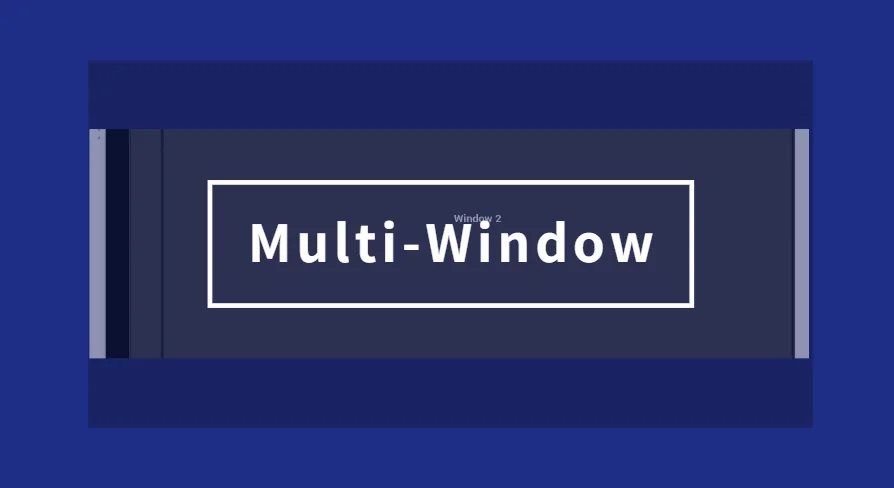
In a project with a busy Heads-Up Display (HUD), a secondary camera, or a tool panel that needs to stay accessible, 1 single viewport can feel restrictive. Multi Window is an Unreal Engine plugin that lets the runtime display multiple windows simultaneously, each 1 holding its own view. The entire system is exposed through Blueprint nodes, so setting up a 2nd window doesn't require dropping into C++.
Why a Blueprint-Driven Multi-View Window System
The plugin is based on a straightforward premise: different windows, different views, all running at the same time. Instead of writing custom native code to manage multiple viewports, developers can call Blueprint nodes that create and control new windows. The workflow centers on a small number of high-level functions, with the engine handling the heavy lifting behind rendering, input, and window placement. Because the plugin is Blueprint-first, it fits into projects where the team works primarily in the Editor rather than in an Integrated Development Environment (IDE).
Finding Multi Window Content in the Content Browser
Getting started is a matter of clicking through the Content Browser. In the upper right corner of the Content Browser, clicking the Settings button opens a menu for the current instance. Under the View category, checking Show Plugin Content makes the plugin's assets visible. The Multi Window > Content > Multi Window directory then contains sample Levels and related assets, giving developers a working reference to open and study.
Camera-Based Multi Window Creation Paths
The February 2026 update adds 2 camera-driven functions for generating windows: CreateMultiWindowByCamera_Capture and CreateMultiWindowByCamera_Advanced. The Capture variant uses SceneCapture to render into a Texture, keeping the cost lower while limiting Post-Processing and quality. The Advanced variant runs through the engine's rendering pipeline, supporting richer Post-Processing and quality controls at a higher performance cost. Choosing between them depends on whether the secondary window needs to be lightweight or visually faithful.
Windows That Persist Across Levels and Monitors
The CreateMultiWindowBySubsystem family introduces persistent, cross-Level windows that survive Level transitions. This is distinct from windows that are tied to a specific Level's lifecycle. In addition, the January 2024 update strengthened multi-monitor behavior with CreateRelativeMultiWindow, which calculates a window's coordinate position relative to a display based on a MonitorIndex parameter, and CreateMultiWindowByMonitor, which places a window directly on the selected monitor and sets it to full screen. GetMonitorCount and GetPrimaryMonitorIndex return the number of displays and the subscript of the primary display, while PrintToLog prints display information to help debug setups.
Input, Focus, and the Window Title Bar
Window behavior has been refined through a series of updates. The OnWindowMoved callback fires when a window is moved, as of the July 2024 update. That same update added ForceFocusToGameViewport, a parameter that pushes focus back to the main viewport; once enabled, keyboard events still work normally even when other windows are selected. For widgets inside windows, the April 2022 update enabled ContentWidget to respond to key events including OnKeyChar, OnPreviewKeyDown, OnKeyDown, and OnKeyUp. Window position can be set and retrieved through the set/get window position functions added in the same update. The June 2023 update introduced an IsTopmostWindow parameter at window creation, plus a template with a customized title bar that allows a custom icon and shows button names inside the window. The May 2024 update replaced that custom title bar with a WindowTitleBarArea control, which makes the window smoother to drag. Later that year, the September 2024 update added SetWindowMode, with testing suggesting WindowedFullscreen is the more effective mode. The March 2024 update fixed a bug where the OnWindowClose callback event was not triggered when SetWindowClose was called manually.
DPI Scaling, Window Info, and a Long Compatibility Trail
The plugin has grown to handle Dots Per Inch (DPI) changes over time. The original CreateMultiWindow function added a bIsAutoContentDPIScale parameter that automatically scales content according to DPI, defaulting to False. The January 2021 update included GetWindowSize and GetWindowDPI. In the May 2024 update, GetWindowDPI was replaced with GetDPIScaleFactor, and SetDPIScaleFactor was added so the scale can be adjusted after the DPI is calculated. The same update modified the underlying logic: after turning on bIsAutoContentDPIScale, the new SetDPIScaleFactor function is used after calculating the DPI. It also fixed an error message for sample Levels when packaging. GetWindowTitle retrieves the current title, and the display-information logger was renamed from PrintToLog to MW_PrintToLog.
The Changelog tracks a long engine compatibility trail. Support began with Unreal Engine 4.26 (UE4.26) in late 2020, then expanded to UE5.0, UE5.1, UE5.2, UE5.3, and UE5.4 over the following updates. Linux support was increased in the July 2024 update, and macOS support was expanded in the March 2021 update. The February 2026 update brings the plugin to UE5.7, making it viable for projects that have moved to the latest engine release.
Preview Gallery
Resource screenshots
6 curated preview images
1 / 6
Free Download
Download this resource
Log in or create a free account to start your download.
Resources are manually reviewed before listing to improve quality and reduce obvious risks.
 Engine Tools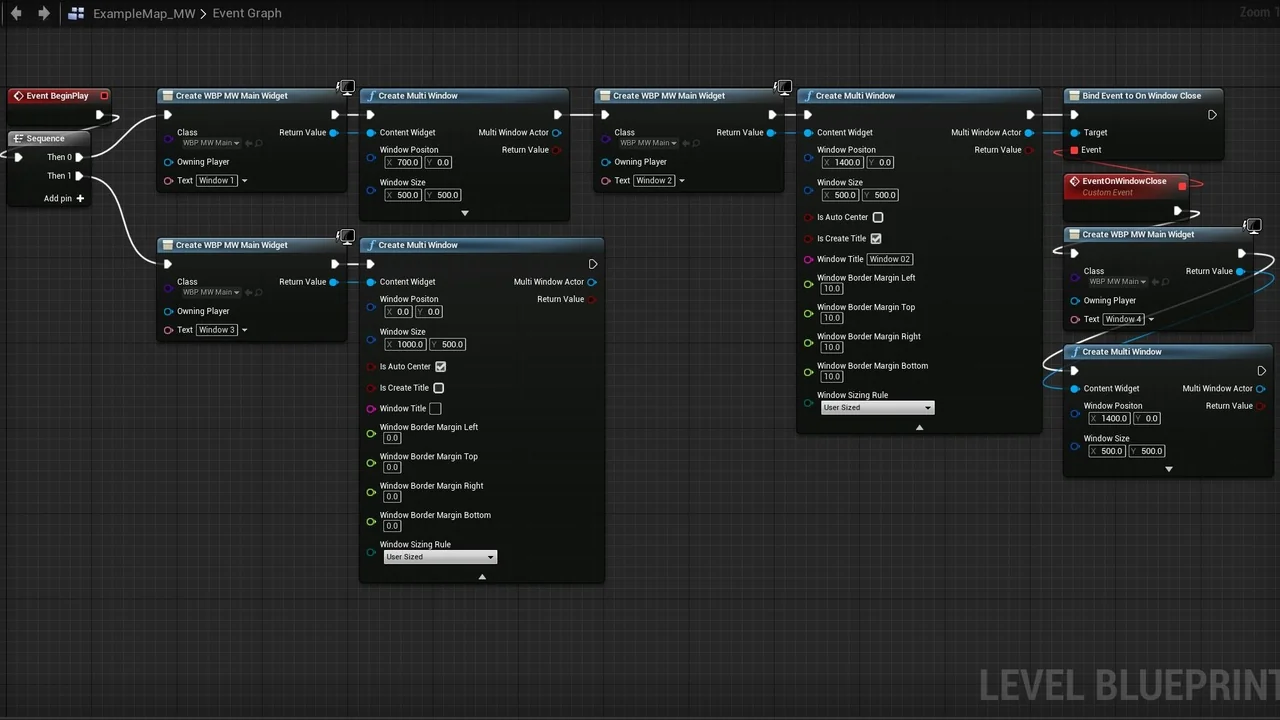
 Engine Tools
 Engine Tools
 Engine Tools