"95fdaf16012263fa"{"id":"1000909","slug":"house-anim-pack","title":"House Anim Pack","category":"Variety","engine":"4.26+,5.0+","assetVersion":"","engineVersion":"Engine Version: 4.26+,5.0+","tag":"Variety","accent":"blue","visual":"mech","summary":"House Anim Pack delivers 30 house animations for simulation games, built on a cartoon mannequin rig and compatible with Idle Animset Pack. Demo 3D models are no","platform":"Unreal Engine","indexPolicy":"index","publishedAt":"2026-08-06T05:35:06.861Z","updatedAt":"2026-08-06T05:35:06.861Z","sourceNotes":[],"fileContents":[],"compatibility":["Unreal Engine","Engine Version: 4.26+,5.0+"],"featuredImage":{"alt":"House Anim Pack","src":"/wp-content/uploads/published/2026/08/e325890c93c8-ebcc866e-4cde-4724-9502-a72083c52c84-d3cbd269a3.webp"},"hasDownloadLink":true,"downloads":1,"terms":[{"taxonomy":"category","slug":"variety-animations","name":"Variety"}],"galleryImages":[{"src":"/wp-content/uploads/published/2026/08/121dcd5a4c5c-c129dc24-2d90-405e-9239-9684abd58929-447b51f4bb.webp","alt":"House Anim Pack"},{"src":"/wp-content/uploads/published/2026/08/dd3b86c622fc-556e7aba-914e-41c5-b28f-dd0966069d0a-cc71af6b39.webp","alt":"House Anim Pack"},{"src":"/wp-content/uploads/published/2026/08/8975d00e0ec1-6a6c4f32-6761-4f17-9c78-b39e5116227d-2756794a62.webp","alt":"House Anim Pack"},{"src":"/wp-content/uploads/published/2026/08/20de21840765-a7e7f9ec-2df7-48b7-81c5-5661a8182288-0a716df6ff.webp","alt":"House Anim Pack"},{"src":"/wp-content/uploads/published/2026/08/6befeb4e375c-05883471-25a2-45d9-a71a-006152fc7db6-3a10afc0fa.webp","alt":"House Anim Pack"},{"src":"/wp-content/uploads/published/2026/08/e64c84fc39ac-e7381c6e-6a02-44f3-97b8-4e5ffdefbb6d-be2bdfe38e.webp","alt":"House Anim Pack"},{"src":"/wp-content/uploads/published/2026/08/a0100a04d4bf-bc57ba76-fbce-4800-82bc-c1c93aa822af-63d9558258.webp","alt":"House Anim Pack"},{"src":"/wp-content/uploads/published/2026/08/54786dec10e5-00430458-08b1-41ec-a4e3-d6669eef4e79-db074c6ad0.webp","alt":"House Anim Pack"},{"src":"/wp-content/uploads/published/2026/08/973d63c9f30d-259054cc-bbb8-4992-99ee-361bf2e4bf65-9b591819f4.webp","alt":"House Anim Pack"}],"accessPanel":{"kind":"resource","title":"Get this resource","eyebrow":"Free resource","message":"3DCGHUB is the service provider for this listing. Access is fulfilled through the official publisher channel.","fileName":"Content.7z","safetyNote":"Resources are manually reviewed before listing to improve quality and reduce obvious risks.","actionLabel":"Get this resource","resourceType":"Resource archive","versions":[]},"contentHtml":"\u003cp\u003e\u003cem\u003eHouse Anim Pack\u003c/em\u003e is a 30-animation resource for simulation games. The pack focuses on the kind of movements characters perform in a home setting. In a simulation title, these animations become the layer that makes a house feel occupied. Instead of relying on combat or locomotion clips, the developer can pull from a dedicated set of house actions.\u003c/p\u003e\n\n\u003cp\u003eThe pack is based on a Character Rig. Its own tags name \u003ccode\u003eMannequin\u003c/code\u003e, \u003ccode\u003eCartoon\u003c/code\u003e, \u003ccode\u003eRig\u003c/code\u003e, \u003ccode\u003ePack\u003c/code\u003e, and \u003ccode\u003eCharacter\u003c/code\u003e. That combination points to a humanoid, stylized character setup. A traditional Mannequin Rig is commonly used as the base Skeleton for animation, and the \u003ccode\u003eCartoon\u003c/code\u003e tag suggests the motion style leans toward expressive, readable poses rather than strict realism.\u003c/p\u003e\n\n\u003cp\u003eA YouTube demonstration shows the animations in motion. The 3D Meshes in that clip are only for demonstration purposes. They are not included in the pack. This separation between showing and shipping is worth knowing before you open the file: you are getting the animation data, not the demo models.\u003c/p\u003e\n\n\u003ch2\u003e30 House Animations for Simulation Games\u003c/h2\u003e\n\n\u003cp\u003eThe 30 house animations are the core of the pack. For a game that takes place inside a house, this number gives a team a working library of movements. A simulation game might need characters to move between rooms, interact with household objects, or perform daily routines. \u003cem\u003eHouse Anim Pack\u003c/em\u003e is a 1 single resource that addresses those needs in 1 import.\u003c/p\u003e\n\n\u003cp\u003eBecause the animations are Rig-based, they can be placed onto a character that matches the Skeleton. The pack's compatibility with the \u003cem\u003eIdle Animset Pack\u003c/em\u003e makes it even more useful in a simulation context. An Idle Animation set covers the moments when a character stands by without input. \u003cem\u003eHouse Anim Pack\u003c/em\u003e then adds the active movements. Together they create a full behavioral loop for a character in a house.\u003c/p\u003e\n\n\u003cp\u003eSimulation games often rely on animation packs to avoid a long, custom animation production. 30 clips may not cover every possible action, but the pack gives a solid base. From there, an animator can extend or blend the moves to fit the project's specific needs.\u003c/p\u003e\n\n\u003ch2\u003ePairing \u003cem\u003eHouse Anim Pack\u003c/em\u003e with \u003cem\u003eIdle Animset Pack\u003c/em\u003e\u003c/h2\u003e\n\n\u003cp\u003eCompatibility is a key detail. \u003cem\u003eHouse Anim Pack\u003c/em\u003e is listed as compatible with the \u003cem\u003eIdle Animset Pack\u003c/em\u003e. That means the 2 packs are designed to work in the same project without fighting over the same Rig. A developer can set up idle animations for the waiting state and use \u003cem\u003eHouse Anim Pack\u003c/em\u003e for the moving state.\u003c/p\u003e\n\n\u003cp\u003eThis pairing matters in a simulation game because characters are often observed for long stretches. A character who only has idle animations may feel static. Adding house-specific animations gives them a reason to move around. The compatible tag suggests that both packs share a consistent animation style, so blending between idle and house actions should not produce jarring jumps.\u003c/p\u003e\n\n\u003cp\u003eHaving a matching pair also cuts down on troubleshooting. If the animations come from different sources, you may need to adjust Root Motion, Bone Naming, or Retargeting settings. With \u003cem\u003eHouse Anim Pack\u003c/em\u003e and \u003cem\u003eIdle Animset Pack\u003c/em\u003e aligned, that setup is simpler. The exact technical details are not listed, but the compatibility note is a practical signal for a team planning its animation stack.\u003c/p\u003e\n\n\u003ch2\u003eThe Demonstration Video and the Missing 3D Models\u003c/h2\u003e\n\n\u003cp\u003eThe YouTube demonstration is the quickest way to see what the 30 animations look like. The video places the animations onto a character and shows them performing in a scene. However, the 3D Meshes in that video are not included in the pack. They exist only to show the motion clearly.\u003c/p\u003e\n\n\u003cp\u003eThis is a common arrangement for animation packs. The focus stays on the performance data. When you bring \u003cem\u003eHouse Anim Pack\u003c/em\u003e into your project, you supply your own Character Model. That way the animation fits the visual style of your game rather than relying on a generic demo model.\u003c/p\u003e\n\n\u003cp\u003eThe absence of 3D Meshes also means the download is smaller and easier to integrate. There are no external Meshes, Textures, or Materials to sort through. The pack's value is the 30 animations themselves, ready to be attached to a compatible Rig.\u003c/p\u003e\n\n\u003ch2\u003eThe Cartoon Mannequin Angle\u003c/h2\u003e\n\n\u003cp\u003eThe tags on \u003cem\u003eHouse Anim Pack\u003c/em\u003e include \u003ccode\u003eMannequin\u003c/code\u003e and \u003ccode\u003eCartoon\u003c/code\u003e. This is a useful hint about the intended character type. A Mannequin Rig is a neutral humanoid Skeleton often used for animation workflows. The \u003ccode\u003eCartoon\u003c/code\u003e tag suggests the movements are suited to characters with a stylized, exaggerated look rather than a realistic 1.\u003c/p\u003e\n\n\u003cp\u003eFor developers building a cartoon-style simulation game, this alignment is helpful. The animation poses will match the proportions of a Cartoon Mannequin. If you plan to use a different character shape, you may need to Retarget. But the Mannequin base gives you a starting point that many engines and modeling tools support.\u003c/p\u003e\n\n\u003cp\u003eCharacter animators can also use \u003cem\u003eHouse Anim Pack\u003c/em\u003e as a reference. Seeing how each movement is timed and posed can guide the creation of additional house actions. Because the pack is built for a Rig, the moves can be studied on the Skeleton itself, not just in a final rendered scene.\u003c/p\u003e\n\n\u003ch2\u003e\u003cem\u003eHouse Anim Pack\u003c/em\u003e in a Real Production Workflow\u003c/h2\u003e\n\n\u003cp\u003e\u003cem\u003eHouse Anim Pack\u003c/em\u003e fits between character setup and final integration. After you have a rigged character in your engine, the next step is feeding it movements. This pack provides 30 house-specific animations that can plug directly into that pipeline. The demo video shows the expected motion, so you can check whether the style fits before you integrate.\u003c/p\u003e\n\n\u003cp\u003eIn a small team, outsourcing or buying animation is a common choice. A pack like this saves the time of hand-keying every daily action. Instead, the team can focus on Level Design, scripting, and the interactions that make the simulation interesting. \u003cem\u003eHouse Anim Pack\u003c/em\u003e supplies the character motion layer without forcing a particular visual asset.\u003c/p\u003e\n\n\u003cp\u003eThe pack is not a full scene solution. It does not include the 3D Meshes, the environment, or the props seen in the demo. Those stay in the video as showing aids. What remains is a focused animation toolset: 30 house animations, rigged and ready for a Mannequin-style character, compatible with the \u003cem\u003eIdle Animset Pack\u003c/em\u003e. For a simulation game that needs a character to act at home, that is a direct and practical starting point.\u003c/p\u003e\n\n\u003ch2\u003eExplore Similar Assets\u003c/h2\u003e\n\u003cul\u003e\n\u003cli\u003e\u003ca href=\"https://3dcghub.com/ultimate-traversal-anims/\" rel=\"noopener noreferrer\"\u003eUltimate Traversal Anims\u003c/a\u003e\u003c/li\u003e\n\u003cli\u003e\u003ca href=\"https://3dcghub.com/script-wizard-anim-set/\" rel=\"noopener noreferrer\"\u003eScript Wizard Anim Set\u003c/a\u003e\u003c/li\u003e\n\u003cli\u003e\u003ca href=\"https://3dcghub.com/sword-and-shield-anims/\" rel=\"noopener noreferrer\"\u003eSword and Shield Anims\u003c/a\u003e\u003c/li\u003e\n\u003cli\u003e\u003ca href=\"https://3dcghub.com/ghost-creature-anims/\" rel=\"noopener noreferrer\"\u003eGhost Creature Anims\u003c/a\u003e\u003c/li\u003e\n\u003cli\u003e\u003ca href=\"https://3dcghub.com/succubus-anim-set/\" rel=\"noopener noreferrer\"\u003eSuccubus Anim Set\u003c/a\u003e\u003c/li\u003e\n\u003c/ul\u003e","contentTextLength":6332,"navigation":{"current":1526,"total":4291,"previous":{"id":"14243","slug":"multi-window","title":"Multi window","category":"Engine Tools","platform":"Unreal Engine","updatedAt":"2026-08-06T12:55:43.741Z"},"next":{"id":"1000908","slug":"magic-projectiles-vol-1-niagara","title":"Magic Projectiles Vol. 1 - Niagara","category":"Spells \u0026 Combat","platform":"Unreal Engine","updatedAt":"2026-08-06T05:30:40.447Z"}},"relatedResources":[{"id":"1002039","slug":"generic-npc-anim-pack","title":"Generic NPC Anim Pack","category":"Variety","engine":"4.26+,5.0+","assetVersion":"","engineVersion":"Engine Version: 4.26+,5.0+","tag":"Variety","accent":"blue","visual":"mech","summary":"Examine the Generic NPC Anim Pack featuring 69 mocap animations, FBX source files, and setup workflows for background characters and simulation scenes.","platform":"Unreal Engine","indexPolicy":"index","publishedAt":"2026-10-26T14:21:19.385Z","updatedAt":"2026-10-26T14:21:19.385Z","sourceNotes":[],"fileContents":[],"compatibility":["Unreal Engine","Engine Version: 4.26+,5.0+"],"featuredImage":{"alt":"Generic NPC Anim Pack","src":"/wp-content/uploads/published/2026/10/d5f39ab4aa10-a79505c1-7fd4-41b4-a34b-b3d6923dd61d-f2987aa84f.webp"},"hasDownloadLink":true,"downloads":3},{"id":"1002139","slug":"phoenyx-anim-pack-1","title":"Phoenyx Anim Pack 1","category":"Variety","engine":"4.26+,5.0+","assetVersion":"","engineVersion":"Engine Version: 4.26+,5.0+","tag":"Variety","accent":"blue","visual":"mech","summary":"Integrate Phoenyx Anim Pack 1 into Epic skeleton character pipelines with 24 in-place animations covering dives, dodges, prone crawling, throws, and melee.","platform":"Unreal Engine","indexPolicy":"index","publishedAt":"2026-10-29T09:40:57.660Z","updatedAt":"2026-10-29T09:40:57.660Z","sourceNotes":[],"fileContents":[],"compatibility":["Unreal Engine","Engine Version: 4.26+,5.0+"],"featuredImage":{"alt":"Phoenyx Anim Pack 1","src":"/wp-content/uploads/published/2026/10/39b7a99a8ec9-61dd53bd-7d4c-4749-8bbe-f99a3645d296-62566b7ccd.webp"},"hasDownloadLink":true,"downloads":0},{"id":"1002321","slug":"idle-animset-pack","title":"Idle Animset Pack","category":"Variety","engine":"4.23+,5.0+","assetVersion":"","engineVersion":"Engine Version: 4.23+,5.0+","tag":"Variety","accent":"blue","visual":"mech","summary":"Idle Animset Pack holds 36 character idle animations, split into 25 base idles and 11 mirror animations, suited to survival, fishing, and simulation games.","platform":"Unreal Engine","indexPolicy":"index","publishedAt":"2026-11-06T06:22:51.144Z","updatedAt":"2026-11-06T06:22:51.144Z","sourceNotes":[],"fileContents":[],"compatibility":["Unreal Engine","Engine Version: 4.23+,5.0+"],"featuredImage":{"alt":"Idle Animset Pack","src":"/wp-content/uploads/published/2026/11/48405b9eacf8-8380692b-cd0d-4232-bf32-845ba0545a30-5800898379.webp"},"hasDownloadLink":true,"downloads":0}]}
Variety
House Anim Pack
House Anim Pack delivers 30 house animations for simulation games, built on a cartoon mannequin rig and compatible with Idle Animset Pack. Demo 3D models are no
Category:Unreal Engine,VarietyPlatform: Unreal EngineEngine Version: 4.26+,5.0+Published: Aug 6, 2026
Variety
Resource overview
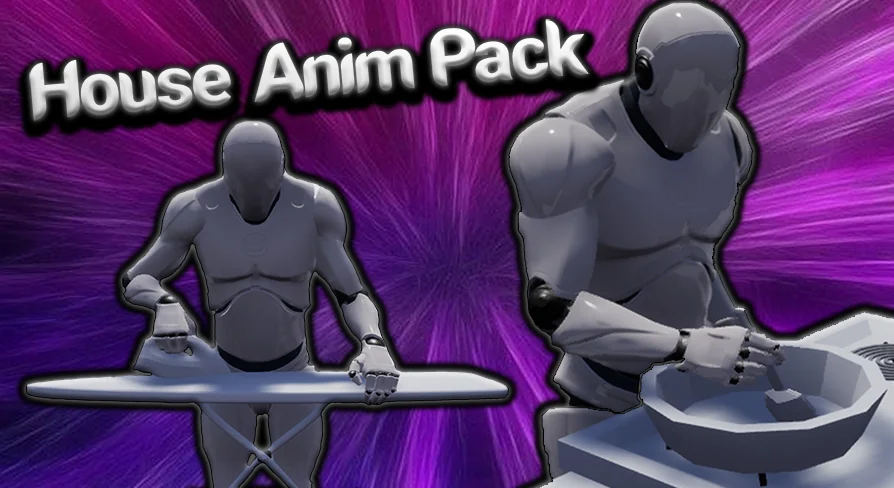
House Anim Pack is a 30-animation resource for simulation games. The pack focuses on the kind of movements characters perform in a home setting. In a simulation title, these animations become the layer that makes a house feel occupied. Instead of relying on combat or locomotion clips, the developer can pull from a dedicated set of house actions.
The pack is based on a Character Rig. Its own tags name Mannequin, Cartoon, Rig, Pack, and Character. That combination points to a humanoid, stylized character setup. A traditional Mannequin Rig is commonly used as the base Skeleton for animation, and the Cartoon tag suggests the motion style leans toward expressive, readable poses rather than strict realism.
A YouTube demonstration shows the animations in motion. The 3D Meshes in that clip are only for demonstration purposes. They are not included in the pack. This separation between showing and shipping is worth knowing before you open the file: you are getting the animation data, not the demo models.
30 House Animations for Simulation Games
The 30 house animations are the core of the pack. For a game that takes place inside a house, this number gives a team a working library of movements. A simulation game might need characters to move between rooms, interact with household objects, or perform daily routines. House Anim Pack is a 1 single resource that addresses those needs in 1 import.
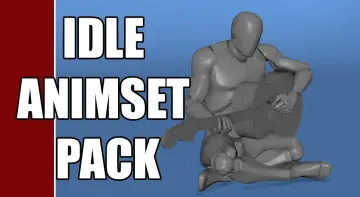
Because the animations are Rig-based, they can be placed onto a character that matches the Skeleton. The pack's compatibility with the Idle Animset Pack makes it even more useful in a simulation context. An Idle Animation set covers the moments when a character stands by without input. House Anim Pack then adds the active movements. Together they create a full behavioral loop for a character in a house.
Simulation games often rely on animation packs to avoid a long, custom animation production. 30 clips may not cover every possible action, but the pack gives a solid base. From there, an animator can extend or blend the moves to fit the project's specific needs.
Pairing House Anim Pack with Idle Animset Pack
Compatibility is a key detail. House Anim Pack is listed as compatible with the Idle Animset Pack. That means the 2 packs are designed to work in the same project without fighting over the same Rig. A developer can set up idle animations for the waiting state and use House Anim Pack for the moving state.
This pairing matters in a simulation game because characters are often observed for long stretches. A character who only has idle animations may feel static. Adding house-specific animations gives them a reason to move around. The compatible tag suggests that both packs share a consistent animation style, so blending between idle and house actions should not produce jarring jumps.
Having a matching pair also cuts down on troubleshooting. If the animations come from different sources, you may need to adjust Root Motion, Bone Naming, or Retargeting settings. With House Anim Pack and Idle Animset Pack aligned, that setup is simpler. The exact technical details are not listed, but the compatibility note is a practical signal for a team planning its animation stack.
The Demonstration Video and the Missing 3D Models
The YouTube demonstration is the quickest way to see what the 30 animations look like. The video places the animations onto a character and shows them performing in a scene. However, the 3D Meshes in that video are not included in the pack. They exist only to show the motion clearly.
This is a common arrangement for animation packs. The focus stays on the performance data. When you bring House Anim Pack into your project, you supply your own Character Model. That way the animation fits the visual style of your game rather than relying on a generic demo model.
The absence of 3D Meshes also means the download is smaller and easier to integrate. There are no external Meshes, Textures, or Materials to sort through. The pack's value is the 30 animations themselves, ready to be attached to a compatible Rig.
The Cartoon Mannequin Angle
The tags on House Anim Pack include Mannequin and Cartoon. This is a useful hint about the intended character type. A Mannequin Rig is a neutral humanoid Skeleton often used for animation workflows. The Cartoon tag suggests the movements are suited to characters with a stylized, exaggerated look rather than a realistic 1.
For developers building a cartoon-style simulation game, this alignment is helpful. The animation poses will match the proportions of a Cartoon Mannequin. If you plan to use a different character shape, you may need to Retarget. But the Mannequin base gives you a starting point that many engines and modeling tools support.
Character animators can also use House Anim Pack as a reference. Seeing how each movement is timed and posed can guide the creation of additional house actions. Because the pack is built for a Rig, the moves can be studied on the Skeleton itself, not just in a final rendered scene.
House Anim Pack in a Real Production Workflow
House Anim Pack fits between character setup and final integration. After you have a rigged character in your engine, the next step is feeding it movements. This pack provides 30 house-specific animations that can plug directly into that pipeline. The demo video shows the expected motion, so you can check whether the style fits before you integrate.
In a small team, outsourcing or buying animation is a common choice. A pack like this saves the time of hand-keying every daily action. Instead, the team can focus on Level Design, scripting, and the interactions that make the simulation interesting. House Anim Pack supplies the character motion layer without forcing a particular visual asset.
The pack is not a full scene solution. It does not include the 3D Meshes, the environment, or the props seen in the demo. Those stay in the video as showing aids. What remains is a focused animation toolset: 30 house animations, rigged and ready for a Mannequin-style character, compatible with the Idle Animset Pack. For a simulation game that needs a character to act at home, that is a direct and practical starting point.
 Variety
 Variety
 Variety
 Variety