"dcdab3159cf15695"{"id":"1002139","slug":"phoenyx-anim-pack-1","title":"Phoenyx Anim Pack 1","category":"Variety","engine":"4.26+,5.0+","assetVersion":"","engineVersion":"Engine Version: 4.26+,5.0+","tag":"Variety","accent":"blue","visual":"mech","summary":"Integrate Phoenyx Anim Pack 1 into Epic skeleton character pipelines with 24 in-place animations covering dives, dodges, prone crawling, throws, and melee.","platform":"Unreal Engine","publishedAt":"2026-10-29T09:40:57.660Z","updatedAt":"2026-10-29T09:40:57.660Z","sourceNotes":[],"fileContents":[],"compatibility":["Unreal Engine","Engine Version: 4.26+,5.0+"],"featuredImage":{"alt":"Phoenyx Anim Pack 1","src":"/wp-content/uploads/published/2026/10/39b7a99a8ec9-61dd53bd-7d4c-4749-8bbe-f99a3645d296-62566b7ccd.webp"},"hasDownloadLink":true,"downloads":0,"terms":[{"taxonomy":"category","slug":"variety-animations","name":"Variety"}],"galleryImages":[{"src":"/wp-content/uploads/published/2026/10/b9b977d6edff-a4460ead-0bb1-4479-aed3-12150d6543ca-f9c53baae0.webp","alt":"Phoenyx Anim Pack 1"},{"src":"/wp-content/uploads/published/2026/10/7a2873f23dcf-40f71614-a6c9-41b8-bfc0-35e072475b45-02c7825f0d.webp","alt":"Phoenyx Anim Pack 1"},{"src":"/wp-content/uploads/published/2026/10/50040c70ff58-3a97be70-aa42-4e87-a8b0-89a389663f2a-899a327d04.webp","alt":"Phoenyx Anim Pack 1"},{"src":"/wp-content/uploads/published/2026/10/a44b34059c76-d871cd17-1713-44ca-ad46-dc9e9f1b1081-5f4019d35e.webp","alt":"Phoenyx Anim Pack 1"}],"accessPanel":{"kind":"resource","title":"Download this resource","eyebrow":"Free Download","message":"Log in or create a free account to start your download.","fileName":"Content.7z","safetyNote":"Resources are manually reviewed before listing to improve quality and reduce obvious risks.","actionLabel":"Download Free","resourceType":"Resource archive"},"contentHtml":"\u003ch2\u003eSkeletal Setup and In-Place Motion Architecture\u003c/h2\u003e\u003cp\u003eIntegrating Phoenyx Anim Pack 1 begins directly inside the character animation blueprint by targeting the standard Epic skeleton hierarchy. Because the 24 animations in this collection use the Epic skeleton, bringing the clips into a standard character rig requires no complex bone retargeting or structural remapping. The asset collection is built strictly around character animation data, allowing character artists and technical animators to assign the sequences directly to any compatible skeletal mesh.\u003c/p\u003e\u003cp\u003eA defining technical aspect of the package is that all 24 animations are constructed as in-place motion. Rather than relying on root motion tracks that displace the character capsule through animation curve translation, in-place animation relies on the gameplay code or movement component to govern world-space translation. This architecture gives gameplay programmers exact control over velocity, friction, collision checks, and network replication. The collision capsule remains the single source of truth for location, while the animation sequences handle the visual presentation of dynamic shifts in posture and balance.\u003c/p\u003e\u003ch2\u003eDiving, Dodge Animations, and Prone Ground Transitions\u003c/h2\u003e\u003cp\u003eEvasive maneuvering forms a core functional pillar of Phoenyx Anim Pack 1, providing dedicated clips for quick ground clearance and rapid recovery. Diving and dodge animations allow characters to break vertical profile and evade incoming threats rapidly. Because the sequences operate in place, designers can tie the play rate of a dive or dodge directly to variable gameplay parameters, such as character stamina, encumbrance, or directional stick input, without worrying about root trajectory mismatches.\u003c/p\u003e\u003cp\u003eGround-level mobility continues smoothly into low-profile states through prone crawling and rolling sequences. Prone crawling provides the deliberate, low-elevation forward displacement needed for stealth maneuvers, low clearances, or pinned-down movement. Rolling animations complement the crawling state by offering rapid horizontal shifts while staying close to the ground plane. These clips translate cleanly into state machine transitions, letting a character drop from a dive directly into a prone roll or transition seamlessly from a stationary prone posture into forward crawling.\u003c/p\u003e\u003ch2\u003eMelee, Shoving, and Kicking Animations in Close Quarters\u003c/h2\u003e\u003cp\u003eClose-quarters combat in Phoenyx Anim Pack 1 is handled through three distinct physical interaction types: kicking animations, melee strikes, and shoving animations. Kicking motions give characters offensive extension through lower-body strikes, keeping the character grounded while extending the leg to create space or deliver impact. Melee animations address direct physical strikes, providing clean upper-body attacks that can function as standalone strikes or trigger damage colliders along hand sockets.\u003c/p\u003e\u003cp\u003eShoving animations complete the reactive melee palette by offering clear physical displacement moves. Rather than dealing lethal damage, shoving acts as an engagement breaker or crowd-management action, pushing opposing entities away to reset distance. When configured inside an animation montage, these melee, kicking, and shoving sequences can be blended across upper-body bone layers using cached pose blending, permitting a character to strike, shove, or kick while adjusting footing or maintaining movement input.\u003c/p\u003e\u003ch2\u003eObject and Grenade Throws alongside Object Pushing\u003c/h2\u003e\u003cp\u003eBeyond direct combat and evasion, Phoenyx Anim Pack 1 incorporates utility and environmental interaction clips that fit practical game mechanics. The pack includes distinct throwing sequences divided between grenade throws and general object throws. Grenade throws are timed for tactical items, providing the clean, recognizable arc motion required for launching explosives or small tactical equipment. Object throws cover heavier or varied environmental items, giving the character proper weight transfer and arm extension during the release phase.\u003c/p\u003e\u003cp\u003eComplementing these ballistic actions is the object pushing animation sequence. Pushing requires sustained forward effort and physical resistance, which the animation reflects through forward body lean and braced arm positioning. In a playable build, this sequence hooks directly into physical object manipulation systems, allowing characters to lean against crates, movable barriers, or heavy obstacles while environmental physics or script logic controls the actual object translation.\u003c/p\u003e\u003ch2\u003eExtending the Character State Tree with Phoenyx Anim Pack 3\u003c/h2\u003e\u003cp\u003eMaintaining visual and technical consistency across a project requires consistent skeletal structures and matching animation styles. Phoenyx Anim Pack 1 is designed to maintain direct compatibility with Phoenyx Anim Pack 3. Because both packs share the Epic skeleton standard and adhere to the same underlying motion rules, combining them allows developers to expand character capability without running into stylistic jarring or disparate rig constraints.\u003c/p\u003e\u003cp\u003eUsing Phoenyx Anim Pack 1 alongside Phoenyx Anim Pack 3 enables technical animators to build deeper state trees. The in-place diving, prone crawling, kicking, melee, throwing, and shoving actions from this pack form a grounded combat baseline that blends into the broader motion sets offered across the series, keeping implementation clean across all shared skeletal assets.\u003c/p\u003e\n\n\u003ch2\u003eMore From The Same Workflow\u003c/h2\u003e\n\u003cul\u003e\n\u003cli\u003e\u003ca href=\"https://3dcghub.com/generic-npc-anim-pack/\" title=\"Generic NPC Anim Pack\"\u003eGeneric NPC Anim Pack\u003c/a\u003e\u003c/li\u003e\n\u003cli\u003e\u003ca href=\"https://3dcghub.com/house-anim-pack/\" title=\"House Anim Pack\"\u003eHouse Anim Pack\u003c/a\u003e\u003c/li\u003e\n\u003cli\u003e\u003ca href=\"https://3dcghub.com/open-world-animset/\" title=\"Open World Animset\"\u003eOpen World Animset\u003c/a\u003e\u003c/li\u003e\n\u003cli\u003e\u003ca href=\"https://3dcghub.com/rolls-and-dodges-animation-set/\" title=\"Rolls and Dodges Animation Set\"\u003eRolls and Dodges Animation Set\u003c/a\u003e\u003c/li\u003e\n\u003cli\u003e\u003ca href=\"https://3dcghub.com/mining-animation/\" title=\"Mining Animation\"\u003eMining Animation\u003c/a\u003e\u003c/li\u003e\n\u003c/ul\u003e","contentTextLength":5530,"navigation":{"current":37,"total":4101,"previous":{"id":"1002140","slug":"physics-based-mesh-placement","title":"Physics Based Mesh Placement","category":"Gameplay Features","platform":"Unreal Engine","updatedAt":"2026-10-29T09:46:21.814Z"},"next":{"id":"1002138","slug":"particle-shockwave","title":"Particle ShockWave","category":"Spells \u0026 Combat","platform":"Unreal Engine","updatedAt":"2026-10-29T09:40:23.023Z"}},"relatedResources":[{"id":"1002039","slug":"generic-npc-anim-pack","title":"Generic NPC Anim Pack","category":"Variety","engine":"4.26+,5.0+","assetVersion":"","engineVersion":"Engine Version: 4.26+,5.0+","tag":"Variety","accent":"blue","visual":"mech","summary":"Examine the Generic NPC Anim Pack featuring 69 mocap animations, FBX source files, and setup workflows for background characters and simulation scenes.","platform":"Unreal Engine","publishedAt":"2026-10-26T14:21:19.385Z","updatedAt":"2026-10-26T14:21:19.385Z","sourceNotes":[],"fileContents":[],"compatibility":["Unreal Engine","Engine Version: 4.26+,5.0+"],"featuredImage":{"alt":"Generic NPC Anim Pack","src":"/wp-content/uploads/published/2026/10/d5f39ab4aa10-a79505c1-7fd4-41b4-a34b-b3d6923dd61d-f2987aa84f.webp"},"hasDownloadLink":true,"downloads":1},{"id":"1000909","slug":"house-anim-pack","title":"House Anim Pack","category":"Variety","engine":"4.26+,5.0+","assetVersion":"","engineVersion":"Engine Version: 4.26+,5.0+","tag":"Variety","accent":"blue","visual":"mech","summary":"House Anim Pack delivers 30 house animations for simulation games, built on a cartoon mannequin rig and compatible with Idle Animset Pack. Demo 3D models are no","platform":"Unreal Engine","publishedAt":"2026-08-06T05:35:06.861Z","updatedAt":"2026-08-06T05:35:06.861Z","sourceNotes":[],"fileContents":[],"compatibility":["Unreal Engine","Engine Version: 4.26+,5.0+"],"featuredImage":{"alt":"House Anim Pack","src":"/wp-content/uploads/published/2026/08/e325890c93c8-ebcc866e-4cde-4724-9502-a72083c52c84-d3cbd269a3.webp"},"hasDownloadLink":true,"downloads":1},{"id":"1001583","slug":"open-world-animset","title":"Open World Animset","category":"Variety","engine":"4.8+,5.0+","assetVersion":"","engineVersion":"Engine Version: 4.8+,5.0+","tag":"Variety","accent":"blue","visual":"mech","summary":"Over 500 motion capture animations for humanoid character movement, traversal, cover mechanics, firearm handling, and melee combat.","platform":"Unreal Engine","publishedAt":"2026-10-10T08:55:24.492Z","updatedAt":"2026-10-10T08:55:24.492Z","sourceNotes":[],"fileContents":[],"compatibility":["Unreal Engine","Engine Version: 4.8+,5.0+"],"featuredImage":{"alt":"Open World Animset","src":"/wp-content/uploads/published/2026/10/5316a1357041-5e3578f2-c647-450e-a63b-ea83d2aa1e89-94597b32fa.webp"},"hasDownloadLink":true,"downloads":2}]}
Variety
Phoenyx Anim Pack 1
Integrate Phoenyx Anim Pack 1 into Epic skeleton character pipelines with 24 in-place animations covering dives, dodges, prone crawling, throws, and melee.
Category:Unreal Engine,VarietyPlatform: Unreal EngineEngine Version: 4.26+,5.0+Published: Oct 29, 2026
Variety
Resource overview
Skeletal Setup and In-Place Motion Architecture
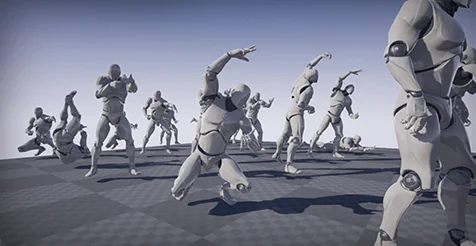
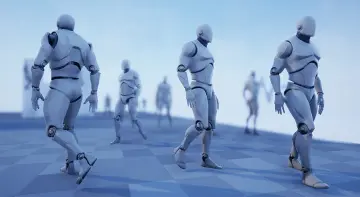
Integrating Phoenyx Anim Pack 1 begins directly inside the character animation blueprint by targeting the standard Epic skeleton hierarchy. Because the 24 animations in this collection use the Epic skeleton, bringing the clips into a standard character rig requires no complex bone retargeting or structural remapping. The asset collection is built strictly around character animation data, allowing character artists and technical animators to assign the sequences directly to any compatible skeletal mesh.
A defining technical aspect of the package is that all 24 animations are constructed as in-place motion. Rather than relying on root motion tracks that displace the character capsule through animation curve translation, in-place animation relies on the gameplay code or movement component to govern world-space translation. This architecture gives gameplay programmers exact control over velocity, friction, collision checks, and network replication. The collision capsule remains the single source of truth for location, while the animation sequences handle the visual presentation of dynamic shifts in posture and balance.
Diving, Dodge Animations, and Prone Ground Transitions
Evasive maneuvering forms a core functional pillar of Phoenyx Anim Pack 1, providing dedicated clips for quick ground clearance and rapid recovery. Diving and dodge animations allow characters to break vertical profile and evade incoming threats rapidly. Because the sequences operate in place, designers can tie the play rate of a dive or dodge directly to variable gameplay parameters, such as character stamina, encumbrance, or directional stick input, without worrying about root trajectory mismatches.
Ground-level mobility continues smoothly into low-profile states through prone crawling and rolling sequences. Prone crawling provides the deliberate, low-elevation forward displacement needed for stealth maneuvers, low clearances, or pinned-down movement. Rolling animations complement the crawling state by offering rapid horizontal shifts while staying close to the ground plane. These clips translate cleanly into state machine transitions, letting a character drop from a dive directly into a prone roll or transition seamlessly from a stationary prone posture into forward crawling.
Melee, Shoving, and Kicking Animations in Close Quarters
Close-quarters combat in Phoenyx Anim Pack 1 is handled through three distinct physical interaction types: kicking animations, melee strikes, and shoving animations. Kicking motions give characters offensive extension through lower-body strikes, keeping the character grounded while extending the leg to create space or deliver impact. Melee animations address direct physical strikes, providing clean upper-body attacks that can function as standalone strikes or trigger damage colliders along hand sockets.
Shoving animations complete the reactive melee palette by offering clear physical displacement moves. Rather than dealing lethal damage, shoving acts as an engagement breaker or crowd-management action, pushing opposing entities away to reset distance. When configured inside an animation montage, these melee, kicking, and shoving sequences can be blended across upper-body bone layers using cached pose blending, permitting a character to strike, shove, or kick while adjusting footing or maintaining movement input.
Object and Grenade Throws alongside Object Pushing
Beyond direct combat and evasion, Phoenyx Anim Pack 1 incorporates utility and environmental interaction clips that fit practical game mechanics. The pack includes distinct throwing sequences divided between grenade throws and general object throws. Grenade throws are timed for tactical items, providing the clean, recognizable arc motion required for launching explosives or small tactical equipment. Object throws cover heavier or varied environmental items, giving the character proper weight transfer and arm extension during the release phase.
Complementing these ballistic actions is the object pushing animation sequence. Pushing requires sustained forward effort and physical resistance, which the animation reflects through forward body lean and braced arm positioning. In a playable build, this sequence hooks directly into physical object manipulation systems, allowing characters to lean against crates, movable barriers, or heavy obstacles while environmental physics or script logic controls the actual object translation.
Extending the Character State Tree with Phoenyx Anim Pack 3
Maintaining visual and technical consistency across a project requires consistent skeletal structures and matching animation styles. Phoenyx Anim Pack 1 is designed to maintain direct compatibility with Phoenyx Anim Pack 3. Because both packs share the Epic skeleton standard and adhere to the same underlying motion rules, combining them allows developers to expand character capability without running into stylistic jarring or disparate rig constraints.
Using Phoenyx Anim Pack 1 alongside Phoenyx Anim Pack 3 enables technical animators to build deeper state trees. The in-place diving, prone crawling, kicking, melee, throwing, and shoving actions from this pack form a grounded combat baseline that blends into the broader motion sets offered across the series, keeping implementation clean across all shared skeletal assets.
 Variety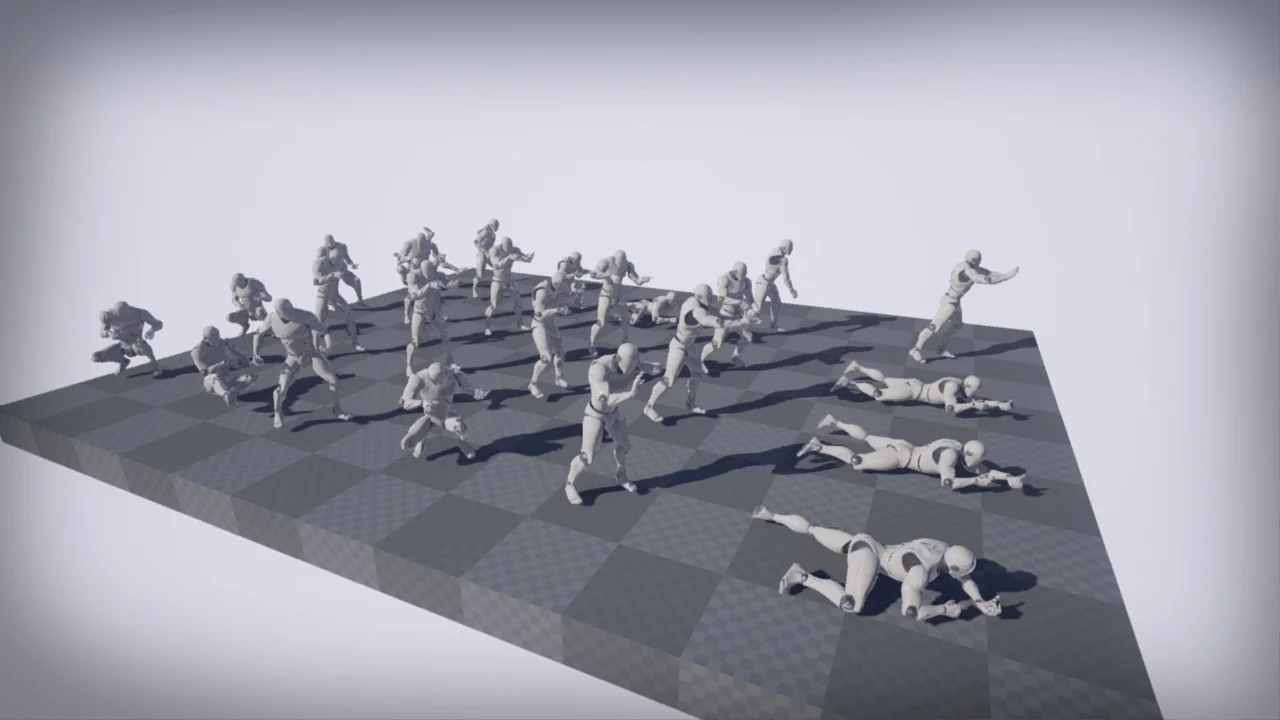
 Variety
 Variety
 Variety