"1f00f67f9253451b"{"id":"14060","slug":"http-and-json","title":"HTTP AND JSON","category":"Engine Tools","engine":"4.26 - 5.8","assetVersion":"Asset Version:1.1","engineVersion":"Engine version: 4.26 - 5.8","tag":"Engine Tools","accent":"blue","visual":"audio","summary":"Streamline your network workflows with the HTTP AND JSON plugin for Blueprints. This tool simplifies data analysis and interface docking by treating JSON data as manageable strings.","platform":"Unreal Engine","publishedAt":"2026-03-11T13:27:48.000Z","updatedAt":"2026-09-29T09:07:47.488Z","sourceNotes":[],"fileContents":[],"compatibility":["Unreal Engine","Asset Version:1.1","Engine version: 4.26 - 5.8"],"featuredImage":{"alt":"HTTP AND JSON","src":"https://3dcghub.com/wp-content/uploads/2026/03/b5285804-2d24-40c2-ab91-e872bc320095.webp"},"hasDownloadLink":true,"downloads":0,"terms":[{"taxonomy":"category","slug":"engine-tools-tools-and-plugins","name":"Engine Tools"},{"taxonomy":"post_tag","slug":"blueprint","name":"Blueprint"},{"taxonomy":"post_tag","slug":"blueprint-plugin","name":"Blueprint Plugin"},{"taxonomy":"post_tag","slug":"http-and-json","name":"Http AND Json"},{"taxonomy":"post_tag","slug":"json-parsing","name":"Json Parsing"},{"taxonomy":"post_tag","slug":"plugins","name":"Plugins"},{"taxonomy":"post_tag","slug":"ui","name":"UI"}],"galleryImages":[{"src":"https://3dcghub.com/wp-content/uploads/2026/03/a82a452b3ada_718492cf-263b-4cfa-a28e-1097eacfd740.webp","alt":"HTTP AND JSON"},{"src":"https://3dcghub.com/wp-content/uploads/2026/03/c454d9b2bcff_53d99dd7-ffd0-4aa7-80a4-0c3d8002c464.webp","alt":"HTTP AND JSON"},{"src":"https://3dcghub.com/wp-content/uploads/2026/03/2729c4bcf0c8_31a326a1-2305-4b72-9660-ad0f5c7d8c69.webp","alt":"HTTP AND JSON"},{"src":"https://3dcghub.com/wp-content/uploads/2026/03/10eed54fed3b_814e786f-9ed0-4baf-89db-183822143178.webp","alt":"HTTP AND JSON"},{"src":"https://3dcghub.com/wp-content/uploads/2026/03/4481ce044fcc_ce502f31-bcaa-41a1-8243-e77b939cd88f.webp","alt":"HTTP AND JSON"},{"src":"https://3dcghub.com/wp-content/uploads/2026/03/cbabe6d38d6b_b342dda9-8517-4c90-8421-a3fd5277fc0f.webp","alt":"HTTP AND JSON"},{"src":"https://3dcghub.com/wp-content/uploads/2026/03/fffb51494fab_5af6c47a-a477-497e-8900-3e30fd752fd4.webp","alt":"HTTP AND JSON"}],"accessPanel":{"kind":"free-resource","title":"Download this resource","eyebrow":"Free Download","message":"Log in or create a free account to start your download.","fileName":"HTTP AND JSON 4.26 - 5.8.zip","safetyNote":"Resources are manually reviewed before listing to improve quality and reduce obvious risks.","actionLabel":"Download Free","resourceType":"Resource archive"},"contentHtml":"\u003ch2\u003eEfficient Networking with HTTP AND JSON\u003c/h2\u003e\n\u003cp\u003eThe \u003cstrong\u003eHTTP AND JSON\u003c/strong\u003e plugin provides a simple and fast way to manage web communication within Blueprints. Specifically designed for network interface docking, it allows developers to handle data analysis with minimal friction. The creator focused on making complex networking tasks accessible to all users. Consequently, the tool is ideal for projects requiring straightforward connections to external web services.\u003c/p\u003e\n\n\u003ch2\u003eA Simplified String-Based Concept\u003c/h2\u003e\n\u003cp\u003eOne of the standout features of this plugin is its core philosophy. The developer chose to treat all JSON data as string operations. This approach makes the data much easier to use and understand within the Blueprint editor. Furthermore, the plugin only utilizes six essential functions. Although the number of nodes is small, they provide a comprehensive solution for most networking needs. Therefore, users can focus on their project logic rather than complex data types.\u003c/p\u003e\n\n\u003ch3\u003eAdvanced JSON Parsing and Analysis\u003c/h3\u003e\n\u003cp\u003eThe plugin includes two primary functions for handling incoming data. The \u003cstrong\u003eJson Analyze\u003c/strong\u003e node serves as the main processing function. Users can click 'Add Json Key' to define specific fields they wish to extract. Each field is then parsed directly into a string. However, if a field contains a nested JSON body, you simply apply the Analyze function again to go deeper.\u003c/p\u003e\n\n\u003cp\u003eIn addition, the \u003cstrong\u003eJson To Array\u003c/strong\u003e function handles structured lists. When a JSON body contains an array, this node converts it into a string array. Each individual entry within that array remains accessible for further processing. This makes handling lists of data remarkably efficient.\u003c/p\u003e\n\n\u003ch3\u003eCreating JSON Data with Ease\u003c/h3\u003e\n\u003cp\u003eGenerating data to send to a server is just as simple as parsing it. The \u003cstrong\u003eJson Create\u003c/strong\u003e function allows you to build a JSON data body that outputs as a string. By clicking 'Add Json Key,' you can add as many fields as your interface requires. For more complex data structures, the \u003cstrong\u003eJson Array Create\u003c/strong\u003e node is available. This function outputs a JSON array string. Users can easily manage the size of the array by using the 'Add Pin' or 'Remove' options.\u003c/p\u003e\n\n\u003ch3\u003eStreamlined HTTP Requests\u003c/h3\u003e\n\u003cp\u003eThe \u003cstrong\u003eHTTP AND JSON\u003c/strong\u003e plugin simplifies server communication through two dedicated nodes. The \u003cstrong\u003eHttp Get Request\u003c/strong\u003e node sends a request to a server and retrieves the returned data. This is perfect for simple data retrieval tasks. In contrast, the \u003cstrong\u003eHttp Post Request\u003c/strong\u003e is used for sending data to a server. This node is particularly useful because it features an encapsulated JSON data body for the sending process. Both functions are designed to be intuitive and fast to implement.\u003c/p\u003e\n\n\u003ch2\u003eClosing Notes\u003c/h2\u003e\n\u003cp\u003eUltimately, this plugin offers a streamlined workflow for anyone working with web interfaces. By reducing the complexity of JSON to simple string operations, it removes common barriers in network development. Whether you are performing simple data analysis or complex interface docking, these six functions provide the tools necessary for success. The inclusion of blueprint screenshots in the documentation further ensures that setup is a quick and easy process.\u003c/p\u003e\n\n\u003ch2\u003eContinue Browsing Similar Packs\u003c/h2\u003e\n\u003cul\u003e\n\u003cli\u003e\u003ca href=\"https://3dcghub.com/blueprintjson/\" title=\"BlueprintJSON\"\u003eBlueprintJSON\u003c/a\u003e\u003c/li\u003e\n\u003cli\u003e\u003ca href=\"https://3dcghub.com/file-system-library/\" title=\"File System Library\"\u003eFile System Library\u003c/a\u003e\u003c/li\u003e\n\u003cli\u003e\u003ca href=\"https://3dcghub.com/chunkcore-chunk-downloader/\" title=\"ChunkCore (Chunk Downloader)\"\u003eChunkCore (Chunk Downloader)\u003c/a\u003e\u003c/li\u003e\n\u003cli\u003e\u003ca href=\"https://3dcghub.com/chunk-downloader-nodes/\" title=\"Chunk Downloader Nodes\"\u003eChunk Downloader Nodes\u003c/a\u003e\u003c/li\u003e\n\u003cli\u003e\u003ca href=\"https://3dcghub.com/quiet-runtime-editor/\" title=\"Quiet Runtime Editor\"\u003eQuiet Runtime Editor\u003c/a\u003e\u003c/li\u003e\n\u003c/ul\u003e","contentTextLength":3270,"navigation":{"current":43,"total":3222,"previous":{"id":"14084","slug":"journeymans-minimap","title":"Journeyman's Minimap","category":"Engine Tools","platform":"Unreal Engine","updatedAt":"2026-09-29T09:16:18.015Z"},"next":{"id":"13982","slug":"externaltextureplugin","title":"ExternalTexturePlugin","category":"Engine Tools","platform":"Unreal Engine","updatedAt":"2026-09-29T09:03:01.541Z"}},"relatedResources":[{"id":"13767","slug":"blueprintjson","title":"BlueprintJSON","category":"Engine Tools","engine":"4.23 - 5.8","assetVersion":"Asset Version:1.0 - 1.0.6","engineVersion":"Engine version: 4.23 - 5.8","tag":"Engine Tools","accent":"blue","visual":"mech","summary":"BlueprintJSON is a comprehensive library designed to bring JSON functionality to Unreal Engine Blueprints. It enables developers to read, parse, edit, and save JSON data efficiently using asynchronous processing.","platform":"Unreal Engine","publishedAt":"2026-03-11T09:59:29.000Z","updatedAt":"2026-09-29T08:30:49.387Z","sourceNotes":[],"fileContents":[],"compatibility":["Unreal Engine","Asset Version:1.0 - 1.0.6","Engine version: 4.23 - 5.8"],"featuredImage":{"alt":"BlueprintJSON","src":"https://3dcghub.com/wp-content/uploads/2026/03/635658e0-64f1-431f-b6f4-59f2fe39da17.webp"},"hasDownloadLink":true,"downloads":1},{"id":"14108","slug":"le-json","title":"LE Json","category":"Engine Tools","engine":"4.26 - 5.4","assetVersion":"Engine version: 4.26 - 5.4","engineVersion":"Asset Version:5.3.0","tag":"Engine Tools","accent":"blue","visual":"luts","summary":"Simplify your data management with LE Json. This plugin offers dedicated Blueprint nodes for creating and parsing JSON strings within the Unreal Engine environment.","platform":"Unreal Engine","publishedAt":"2026-03-11T15:50:52.000Z","updatedAt":"2026-04-19T15:45:53.000Z","sourceNotes":[],"fileContents":[],"compatibility":["Unreal Engine","Engine version: 4.26 - 5.4","Asset Version: 5.3.0"],"featuredImage":{"alt":"LE Json","src":"https://3dcghub.com/wp-content/uploads/2026/03/80373996-08f5-4318-8e7d-557d24f41fd5.webp"},"hasDownloadLink":true,"downloads":0},{"id":"1001277","slug":"http-request","title":"Http Request","category":"Network \u0026 Multiplayer","engine":"4.27 - 5.8","assetVersion":"Asset Version: 1.1","engineVersion":"Engine Version: 4.27 - 5.8","tag":"Network","accent":"blue","visual":"mech","summary":"Implement HTTP request sending with GET, POST, PUT, and DELETE methods across JSON, XML, and form-urlencoded content types, compatible with Mqtt Client.","platform":"Unreal Engine","publishedAt":"2026-09-30T06:10:41.021Z","updatedAt":"2026-09-30T06:10:41.021Z","sourceNotes":[],"fileContents":[],"compatibility":["Unreal Engine","Asset Version: 1.1","Engine Version: 4.27 - 5.8"],"featuredImage":{"alt":"Http Request","src":"/wp-content/uploads/published/2026/09/45d2746b540e-4fbda408-4442-4c3f-8b23-18cb993992e5-cd6e3c4b58.webp"},"hasDownloadLink":true,"downloads":0}]}
Engine Tools
HTTP AND JSON
Streamline your network workflows with the HTTP AND JSON plugin for Blueprints. This tool simplifies data analysis and interface docking by treating JSON data as manageable strings.
The HTTP AND JSON plugin provides a simple and fast way to manage web communication within Blueprints. Specifically designed for network interface docking, it allows developers to handle data analysis with minimal friction. The creator focused on making complex networking tasks accessible to all users. Consequently, the tool is ideal for projects requiring straightforward connections to external web services.
A Simplified String-Based Concept
One of the standout features of this plugin is its core philosophy. The developer chose to treat all JSON data as string operations. This approach makes the data much easier to use and understand within the Blueprint editor. Furthermore, the plugin only utilizes six essential functions. Although the number of nodes is small, they provide a comprehensive solution for most networking needs. Therefore, users can focus on their project logic rather than complex data types.
Advanced JSON Parsing and Analysis
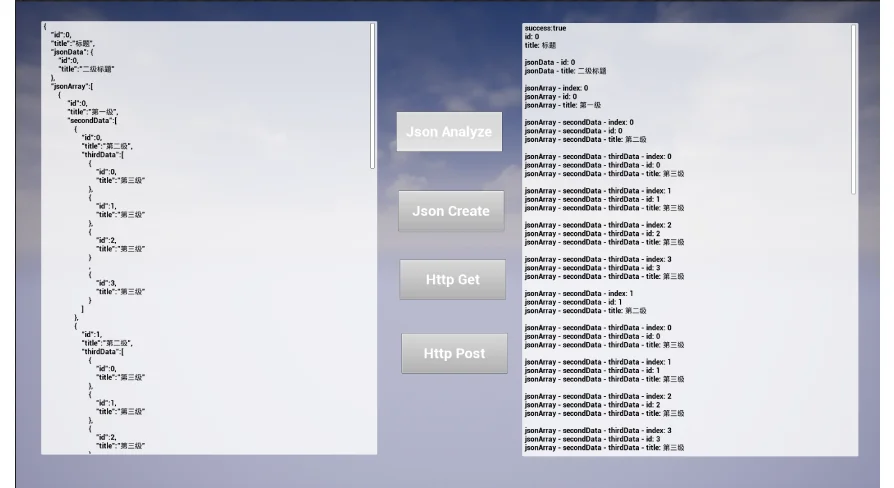
The plugin includes two primary functions for handling incoming data. The Json Analyze node serves as the main processing function. Users can click 'Add Json Key' to define specific fields they wish to extract. Each field is then parsed directly into a string. However, if a field contains a nested JSON body, you simply apply the Analyze function again to go deeper.
In addition, the Json To Array function handles structured lists. When a JSON body contains an array, this node converts it into a string array. Each individual entry within that array remains accessible for further processing. This makes handling lists of data remarkably efficient.
Creating JSON Data with Ease
Generating data to send to a server is just as simple as parsing it. The Json Create function allows you to build a JSON data body that outputs as a string. By clicking 'Add Json Key,' you can add as many fields as your interface requires. For more complex data structures, the Json Array Create node is available. This function outputs a JSON array string. Users can easily manage the size of the array by using the 'Add Pin' or 'Remove' options.
Streamlined HTTP Requests
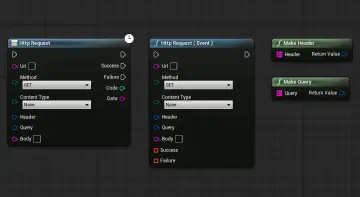
The HTTP AND JSON plugin simplifies server communication through two dedicated nodes. The Http Get Request node sends a request to a server and retrieves the returned data. This is perfect for simple data retrieval tasks. In contrast, the Http Post Request is used for sending data to a server. This node is particularly useful because it features an encapsulated JSON data body for the sending process. Both functions are designed to be intuitive and fast to implement.
Closing Notes
Ultimately, this plugin offers a streamlined workflow for anyone working with web interfaces. By reducing the complexity of JSON to simple string operations, it removes common barriers in network development. Whether you are performing simple data analysis or complex interface docking, these six functions provide the tools necessary for success. The inclusion of blueprint screenshots in the documentation further ensures that setup is a quick and easy process.
 Engine Tools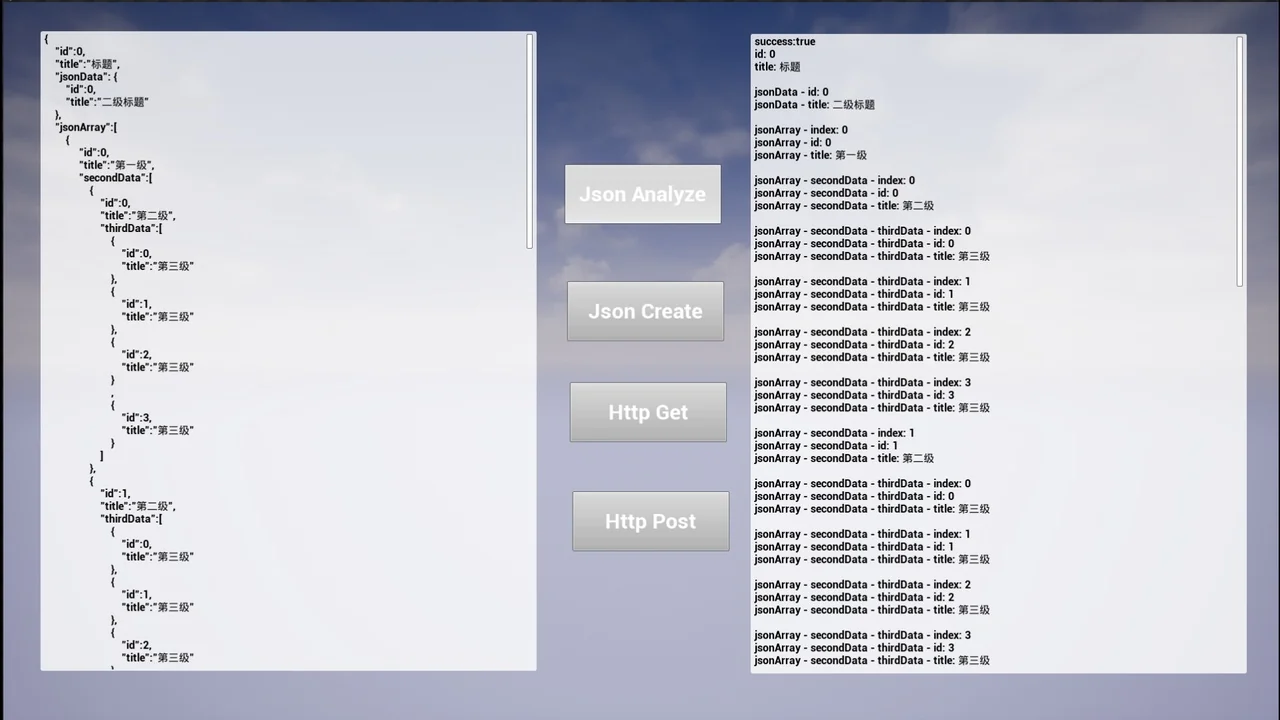
 Engine Tools
 Engine Tools
 Network