"a19e0535960bd083"{"id":"11061","slug":"quiet-runtime-editor","title":"Quiet Runtime Editor","category":"Gameplay Features","engine":"5.0+","assetVersion":"Engine version: 5.0+","engineVersion":"5.0","tag":"Gameplay Features","accent":"blue","visual":"audio","summary":"The Quiet Runtime Editor provides a robust framework for designing levels at runtime, featuring a powerful serialization system and a dedicated world outliner for seamless scene management.","platform":"Unreal Engine","publishedAt":"2026-03-03T16:51:06.000Z","updatedAt":"2026-04-19T15:49:51.000Z","sourceNotes":[],"fileContents":[],"compatibility":["Unreal Engine","Engine version: 5.0+"],"featuredImage":{"alt":"Quiet Runtime Editor","src":"https://3dcghub.com/wp-content/uploads/2026/03/4f21bf93-ddbf-408e-8712-94d012e09a9f.webp"},"hasDownloadLink":true,"downloads":0,"terms":[{"taxonomy":"category","slug":"gameplay-features","name":"Gameplay Features"},{"taxonomy":"post_tag","slug":"json-serialization","name":"JSON Serialization"},{"taxonomy":"post_tag","slug":"quiet-runtime-editor","name":"Quiet Runtime Editor"},{"taxonomy":"post_tag","slug":"runtime-datasmith-import","name":"Runtime Datasmith Import"},{"taxonomy":"post_tag","slug":"runtime-level-design","name":"Runtime Level Design"},{"taxonomy":"post_tag","slug":"unreal-engine-framework","name":"Unreal Engine Framework"}],"galleryImages":[{"src":"https://3dcghub.com/wp-content/uploads/2026/03/04c0bcd9105a_305ef721-a835-44f3-a0bc-e3b8bcdb7b45.webp","alt":"Quiet Runtime Editor"},{"src":"https://3dcghub.com/wp-content/uploads/2026/03/9c9e9fb53308_91ed166f-447c-4cc6-b800-2ba75b07545e.webp","alt":"Quiet Runtime Editor"},{"src":"https://3dcghub.com/wp-content/uploads/2026/03/b92e2fe6fb7f_75fca444-2b07-4d00-b9e0-9e72227e93c9.webp","alt":"Quiet Runtime Editor"},{"src":"https://3dcghub.com/wp-content/uploads/2026/03/3f47419c64f5_957122a2-c498-4b68-88ac-d413ed298820.webp","alt":"Quiet Runtime Editor"},{"src":"https://3dcghub.com/wp-content/uploads/2026/03/fa4cd6fcfe1c_d1ab2323-72f9-4b96-8756-db09583dde21.webp","alt":"Quiet Runtime Editor"}],"accessPanel":{"kind":"resource","title":"Access this resource","eyebrow":"Free Download","message":"Log in or create a free account to start your download.","fileName":"Quiet Runtime Editor 5.0 .7z","safetyNote":"All resources are 100% manually reviewed to eliminate all risks.","actionLabel":"Download Free","resourceType":"Resource archive"},"contentHtml":"\u003ch2\u003eIntroduction to Runtime Level Editing\u003c/h2\u003e\n\u003cp\u003eThe Quiet Runtime Editor is a framework project designed for comprehensive level creation and management. It provides a suite of runtime features that allow users to create, save, load, and edit levels dynamically. Therefore, developers can build complex environments without relying solely on the standard editor interface. The system functions through two primary modes: Edit Mode for designing scenes and Play Mode for testing those designs with a player character.\u003c/p\u003e\n\n\u003ch2\u003eCore Architecture and World Management\u003c/h2\u003e\n\u003cp\u003eThe foundation of this framework is the Runtime World Outliner. In the current version, the system relies on the BP_QuietTreeManager actor. This manager must be placed within the level to initialize the system at startup. Moreover, the manager stores the world tree, manages action history, and generates the user interface. It acts as a central hub, connecting every feature into a single working environment through its SerializerComponent, HistoryComponent, and Router.\u003c/p\u003e\n\n\u003ch2\u003eAdvanced Serialization and Communication\u003c/h2\u003e\n\u003cp\u003eThe Quiet Runtime Editor is built upon the ability to serialize objects to JSON. This functionality allows for property editing, copying, and saving data directly to the disk. Furthermore, the serialization pipeline supports a robust undo-redo system by keeping a history of user actions. Developers can also manually serialize desired classes using the provided tools. \u003c/p\u003e\n\n\u003cp\u003eCommunication between different editor components is handled by an intermediary object-router. This router registers objects using Gameplay Tags. Consequently, system parts can communicate independently without direct access to one another. Users can also wrap data or objects in JSON format to send them through this router effectively.\u003c/p\u003e\n\n\u003ch2\u003eKey Features for Scene Development\u003c/h2\u003e\n\u003cp\u003eThe framework includes several specialized widgets and tools to streamline the design process:\u003c/p\u003e\n\u003cul\u003e\n \u003cli\u003e\u003cstrong\u003eScene Save and Load:\u003c/strong\u003e Managed by the WBP_SceneManager, this system saves scenes as JSON files in a dedicated local folder.\u003c/li\u003e\n \u003cli\u003e\u003cstrong\u003eRuntime Content Browser:\u003c/strong\u003e The WBP_QuietContentBrowser allows users to add assets to a scene from the UserContent folder.\u003c/li\u003e\n \u003cli\u003e\u003cstrong\u003eRuntime Material Editor:\u003c/strong\u003e Using the WBP_QuietMaterialEditor, users can create and edit dynamic materials by dragging constants from the browser.\u003c/li\u003e\n \u003cli\u003e\u003cstrong\u003eActor Details:\u003c/strong\u003e The WBP_DetailsWidget enables the direct editing of serialized actor properties.\u003c/li\u003e\n\u003c/ul\u003e\n\n\u003ch2\u003eImporting and Transforming Assets\u003c/h2\u003e\n\u003cp\u003eFor external assets, the Quiet Runtime Editor supports Runtime Datasmith Import. This allows for the runtime integration of udatasmith, gltf, and glb files. To manipulate these objects, the system provides a Runtime Transformation Gizmo for real-time transform edits. Additionally, the framework includes tools to align and populate actors across the scene. A dedicated Color Wheel widget, WBP_ColorPickerWindow, is also available for precise color selection.\u003c/p\u003e\n\n\u003ch2\u003eClosing Notes\u003c/h2\u003e\n\u003cp\u003eBy integrating powerful JSON serialization with a modular communication system, the Quiet Runtime Editor offers a complete solution for in-game level design. It provides the necessary tools for importing, transforming, and saving complex scenes. Thus, it serves as a versatile framework for developers looking to implement runtime editing capabilities in their projects.\u003c/p\u003e\n\n\u003ch2\u003eRelated Resources Worth Checking\u003c/h2\u003e\n\u003cul\u003e\n\u003cli\u003e\u003ca href=\"https://3dcghub.com/runtime-spline-builder/\" title=\"Runtime Spline Builder\"\u003eRuntime Spline Builder\u003c/a\u003e\u003c/li\u003e\n\u003cli\u003e\u003ca href=\"https://3dcghub.com/path-tracer-toolkit/\" title=\"Path Tracer Toolkit\"\u003ePath Tracer Toolkit\u003c/a\u003e\u003c/li\u003e\n\u003cli\u003e\u003ca href=\"https://3dcghub.com/hudcallouttitles01/\" title=\"HUDCallOutTitles01\"\u003eHUDCallOutTitles01\u003c/a\u003e\u003c/li\u003e\n\u003cli\u003e\u003ca href=\"https://3dcghub.com/brushify-natural-roads-pack/\" title=\"Brushify – Natural Roads Pack\"\u003eBrushify – Natural Roads Pack\u003c/a\u003e\u003c/li\u003e\n\u003cli\u003e\u003ca href=\"https://3dcghub.com/stylized-dynamic-sky-weather-system/\" title=\"Stylized Dynamic Sky \u0026amp;amp; Weather System\"\u003eStylized Dynamic Sky \u0026amp; Weather System\u003c/a\u003e\u003c/li\u003e\n\u003c/ul\u003e\n\n\u003ch2\u003eAsset Gallery\u003c/h2\u003e","contentTextLength":3458,"navigation":{"current":3194,"total":4026,"previous":{"id":"11003","slug":"leveling-system-x","title":"Leveling System X","category":"Gameplay Features","platform":"Unreal Engine","updatedAt":"2026-04-19T15:49:52.000Z"},"next":{"id":"11053","slug":"quick-time-event-with-climbing","title":"Quick Time Event With Climbing","category":"Gameplay Features","platform":"Unreal Engine","updatedAt":"2026-04-19T15:49:51.000Z"}},"relatedResources":[{"id":"1001299","slug":"cine-cam","title":"Cine Cam","category":"Gameplay Features","engine":"5.0+","assetVersion":"","engineVersion":"Engine Version: 5.0+","tag":"Gameplay Features","accent":"blue","visual":"mech","summary":"Explore Cine Cam for Unreal Engine 5, a runtime virtual camera rig featuring four focus modes, aperture control, customizable keybindings, and smooth movement.","platform":"Unreal Engine","publishedAt":"2026-10-02T06:01:01.399Z","updatedAt":"2026-10-02T06:01:01.399Z","sourceNotes":[],"fileContents":[],"compatibility":["Unreal Engine","Engine Version: 5.0+"],"featuredImage":{"alt":"Cine Cam","src":"/wp-content/uploads/published/2026/10/a8f5ad26ef61-c8a95d6e-4c3e-4721-b9bf-9c2e603902c7-ed5f883bed.webp"},"hasDownloadLink":true,"downloads":0},{"id":"1000152","slug":"cine-designer","title":"Cine Designer","category":"Gameplay Features","engine":"5.1+","assetVersion":"","engineVersion":"Engine Version: 5.1+","tag":"Gameplay Features","accent":"blue","visual":"mech","summary":"Cine Designer brings film equipment Blueprints to Unreal Engine 5.0+ with Lumen-focused setup, editor use, and early-stage Sequencer limits.","platform":"Unreal Engine","publishedAt":"2026-06-18T21:34:47.079Z","updatedAt":"2026-06-18T21:34:47.079Z","sourceNotes":[],"fileContents":[],"compatibility":["Unreal Engine","Engine Version: 5.1+"],"featuredImage":{"alt":"Cine Designer","src":"/wp-content/uploads/published/2026/06/fc7cbf2364c6-1ee29469-9b31-45c2-82b7-7f7d83e12ace-3102e95060.webp"},"hasDownloadLink":true,"downloads":0},{"id":"11043","slug":"path-tracer-toolkit","title":"Path Tracer Toolkit","category":"Gameplay Features","engine":"4.27,5.0+","assetVersion":"Engine version: 4.27,5.0+","engineVersion":"4.27","tag":"Gameplay Features","accent":"blue","visual":"city","summary":"The Path Tracer Toolkit provides a comprehensive Blueprint solution for generating paths and borders manually or via runtime point arrays. It includes advanced customization, procedural materials, and performance-optimizing texture baking.","platform":"Unreal Engine","publishedAt":"2026-03-03T16:47:08.000Z","updatedAt":"2026-04-19T15:49:51.000Z","sourceNotes":[],"fileContents":[],"compatibility":["Unreal Engine","Engine version: 4.27,5.0+"],"featuredImage":{"alt":"Path Tracer Toolkit","src":"https://3dcghub.com/wp-content/uploads/2026/03/fd42f630-b95d-4396-bf4a-af676428ed24.webp"},"hasDownloadLink":true,"downloads":1}]}
Gameplay Features
Quiet Runtime Editor
The Quiet Runtime Editor provides a robust framework for designing levels at runtime, featuring a powerful serialization system and a dedicated world outliner for seamless scene management.
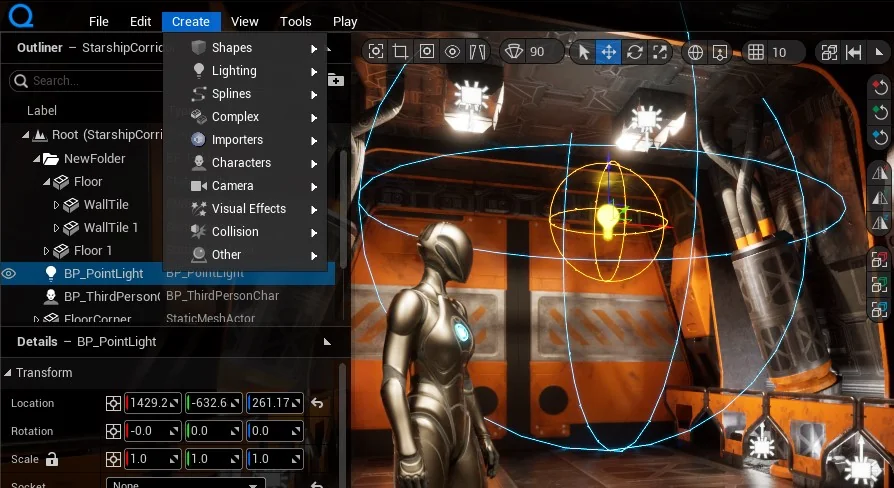
The Quiet Runtime Editor is a framework project designed for comprehensive level creation and management. It provides a suite of runtime features that allow users to create, save, load, and edit levels dynamically. Therefore, developers can build complex environments without relying solely on the standard editor interface. The system functions through two primary modes: Edit Mode for designing scenes and Play Mode for testing those designs with a player character.
Core Architecture and World Management
The foundation of this framework is the Runtime World Outliner. In the current version, the system relies on the BP_QuietTreeManager actor. This manager must be placed within the level to initialize the system at startup. Moreover, the manager stores the world tree, manages action history, and generates the user interface. It acts as a central hub, connecting every feature into a single working environment through its SerializerComponent, HistoryComponent, and Router.
Advanced Serialization and Communication
The Quiet Runtime Editor is built upon the ability to serialize objects to JSON. This functionality allows for property editing, copying, and saving data directly to the disk. Furthermore, the serialization pipeline supports a robust undo-redo system by keeping a history of user actions. Developers can also manually serialize desired classes using the provided tools.
Communication between different editor components is handled by an intermediary object-router. This router registers objects using Gameplay Tags. Consequently, system parts can communicate independently without direct access to one another. Users can also wrap data or objects in JSON format to send them through this router effectively.
Key Features for Scene Development
The framework includes several specialized widgets and tools to streamline the design process:
Scene Save and Load: Managed by the WBP_SceneManager, this system saves scenes as JSON files in a dedicated local folder.
Runtime Content Browser: The WBP_QuietContentBrowser allows users to add assets to a scene from the UserContent folder.
Runtime Material Editor: Using the WBP_QuietMaterialEditor, users can create and edit dynamic materials by dragging constants from the browser.
Actor Details: The WBP_DetailsWidget enables the direct editing of serialized actor properties.
Importing and Transforming Assets
For external assets, the Quiet Runtime Editor supports Runtime Datasmith Import. This allows for the runtime integration of udatasmith, gltf, and glb files. To manipulate these objects, the system provides a Runtime Transformation Gizmo for real-time transform edits. Additionally, the framework includes tools to align and populate actors across the scene. A dedicated Color Wheel widget, WBP_ColorPickerWindow, is also available for precise color selection.
Closing Notes
By integrating powerful JSON serialization with a modular communication system, the Quiet Runtime Editor offers a complete solution for in-game level design. It provides the necessary tools for importing, transforming, and saving complex scenes. Thus, it serves as a versatile framework for developers looking to implement runtime editing capabilities in their projects.
 Gameplay Features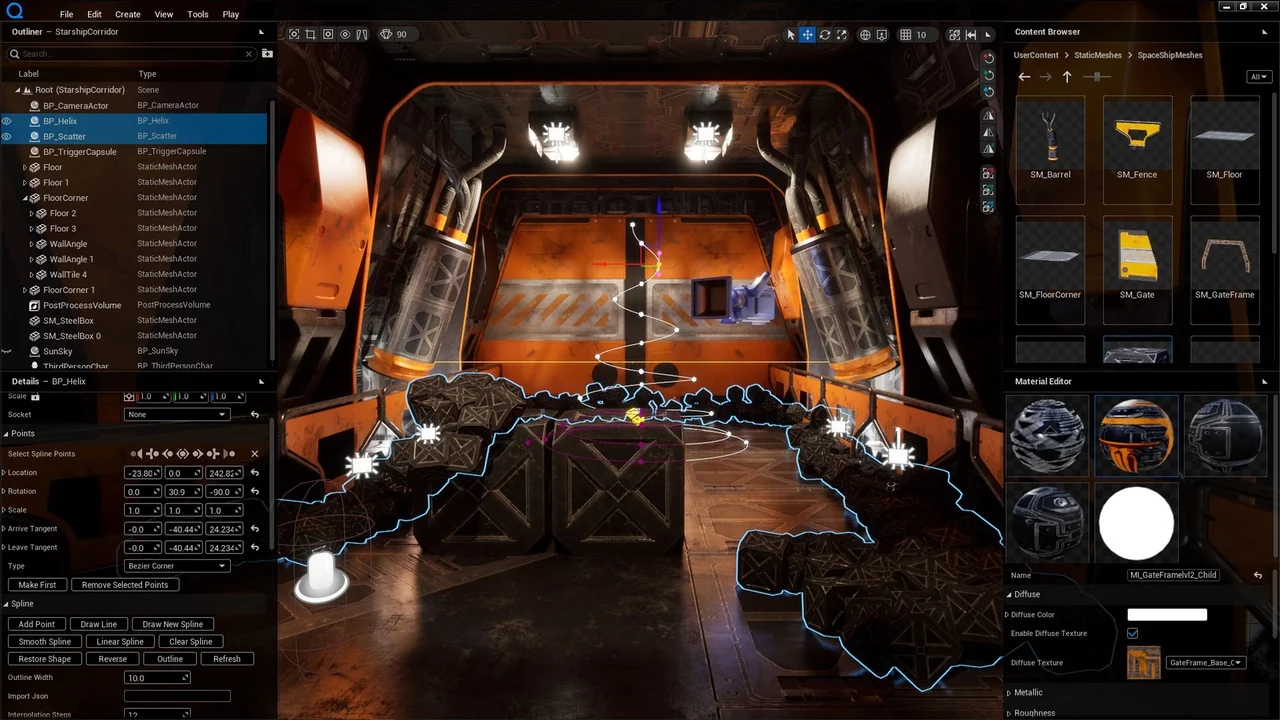
 Gameplay Features
 Gameplay Features
 Gameplay Features