"1a0e4ac4dc71d030"{"id":"1000152","slug":"cine-designer","title":"Cine Designer","category":"Gameplay Features","engine":"5.1+","assetVersion":"","engineVersion":"Engine Version: 5.1+","tag":"Gameplay Features","accent":"blue","visual":"mech","summary":"Cine Designer brings film equipment Blueprints to Unreal Engine 5.0+ with Lumen-focused setup, editor use, and early-stage Sequencer limits.","platform":"Unreal Engine","publishedAt":"2026-06-18T21:34:47.079Z","updatedAt":"2026-06-18T21:34:47.079Z","sourceNotes":[],"fileContents":[],"compatibility":["Unreal Engine","Engine Version: 5.1+"],"featuredImage":{"alt":"Cine Designer","src":"/wp-content/uploads/published/2026/06/fc7cbf2364c6-1ee29469-9b31-45c2-82b7-7f7d83e12ace-3102e95060.webp"},"hasDownloadLink":true,"downloads":0,"terms":[{"taxonomy":"category","slug":"gameplay-features","name":"Gameplay Features"}],"galleryImages":[{"src":"/wp-content/uploads/published/2026/06/72ebab818aa9-f5582b0b-d932-44df-a070-960e23bdbc69-cb0ab24650.webp","alt":"Cine Designer"},{"src":"/wp-content/uploads/published/2026/06/7ec69c0f2fe0-16dab01c-52fe-4e2b-b08c-6355bf07f952-e09bab1d0f.webp","alt":"Cine Designer"},{"src":"/wp-content/uploads/published/2026/06/9cf67b9410fd-f9c74cf3-19d4-4b9a-ad12-997aa36cf80e-037cd381eb.webp","alt":"Cine Designer"},{"src":"/wp-content/uploads/published/2026/06/8fb7475229b4-7c3133bb-e32c-474b-a836-25d971d1eb67-fd74f9b665.webp","alt":"Cine Designer"}],"accessPanel":{"kind":"resource","title":"Download this resource","eyebrow":"Free Download","message":"Log in or create a free account to start your download.","fileName":"Content.7z","safetyNote":"Resources are manually reviewed before listing to improve quality and reduce obvious risks.","actionLabel":"Download Free","resourceType":"Resource archive"},"contentHtml":"\u003cp\u003eCine Designer begins with a clear setup requirement rather than a broad promise. The Blueprints require Unreal Engine 5.0 or newer, and Lumen needs to be enabled. That requirement shapes the whole experience, because this collection is meant to work inside the Unreal Engine editor with a rendering workflow driven by high resolution screenshots and Movie Render Queue rather than static lighting pipelines or path-traced output.\u003c/p\u003e \u003cp\u003eThe collection itself is a growing set of film equipment Blueprints that closely match real-world film industry standards. That gives the project a practical focus. It is not presented as a general-purpose prop library or an all-in-one runtime system. Its current direction is much narrower: bringing film-oriented equipment into Unreal in a way that supports virtual cinematography, lighting, and production work inside the editor.\u003c/p\u003e \u003ch2\u003eGetting Cine Designer running in Unreal Engine 5.0+ with Lumen\u003c/h2\u003e\n\u003cp\u003eThe first implementation step is straightforward but non-optional. Cine Designer depends on Unreal Engine 5.0+ and expects Lumen to be active. The Blueprints are designed around that rendering environment, so the setup is less about choosing between multiple supported lighting models and more about committing to the one the collection was made for.\u003c/p\u003e \u003cp\u003eThat matters immediately for anyone planning a scene. The package is not suited to static or baked lighting, and the maps and assets are not optimized for light maps. In practice, this places Cine Designer on a modern dynamic-lighting path from the start. If a project pipeline still depends on baked results, light map optimization, or a static-lighting workflow, this collection is not positioned around that use case.\u003c/p\u003e \u003cp\u003eIt also is not suited to path tracing. That exclusion narrows the rendering expectations even further and helps define the intended production path: Lumen-enabled work inside Unreal Engine 5.0+ Editor. Instead of spreading across every rendering mode Unreal can offer, Cine Designer stays tied to one environment and builds its usefulness there.\u003c/p\u003e \u003ch2\u003eFilm equipment Blueprints aimed at editor-based production\u003c/h2\u003e\n\u003cp\u003eCine Designer is described as a growing collection, and that word is important because the current release is intentionally limited. Version 1.0 includes a very small equipment selection. The point of the initial release is not breadth. It is there to establish the class design, Editor Utility Widget functionality, Lumen integration, and compliance standards before more equipment is added.\u003c/p\u003e \u003cp\u003eThat early-stage scope says a lot about how the collection should be approached. This is not a finished catalog of every possible production tool. It is a foundation for a larger system, with emphasis on structure and workflow. The Blueprints are meant to resemble real-world film industry standards closely, so the practical value comes from using them as scene elements that fit cinematography and virtual production contexts rather than expecting a huge volume of gear from the start.\u003c/p\u003e \u003cp\u003eThe editor focus is also explicit. These Blueprints are suited to Unreal Engine Editor use, especially for high resolution screenshots and Movie Render Queue. That positions Cine Designer squarely in cinematic image-making and shot development. It supports a workflow where equipment can live inside the scene as part of the production design or visualization process, and where the final output is more about rendered frames and sequences than packaged gameplay systems.\u003c/p\u003e \u003ch2\u003eRuntime and Sequencer limits in Cine Designer\u003c/h2\u003e\n\u003cp\u003eCine Designer does function in runtime games and apps, but there is a notable limitation attached to that support: no framework is included to control or interact with the Blueprints during runtime. That means runtime use is possible in a technical sense, yet the collection does not arrive as a gameplay-ready interaction layer. Anyone considering it for an interactive project needs to read that line carefully. The objects may exist and function, but control logic is not supplied as a complete runtime framework.\u003c/p\u003e \u003cp\u003eSequencer support is also still constrained. The Blueprints have limited functionality with Sequencer, and that part is marked as in development. For cinematic teams working heavily with Sequencer, this sets expectations correctly. Cine Designer already sits in a filmmaking context, but its Sequencer integration is not presented as complete or feature-rich at this stage.\u003c/p\u003e \u003cp\u003eThese two limitations create a very specific implementation profile. In the editor, especially for staging, look development, and rendered output, the collection has a defined purpose. For fully interactive runtime systems or deeper timeline-driven control, the framework is not fully built out yet. That does not make the package contradictory; it simply means its strongest current role is inside editor-driven production work rather than broader tool coverage across every Unreal workflow.\u003c/p\u003e \u003ch2\u003eCameras, MetaHumans, and what is actually included\u003c/h2\u003e\n\u003cp\u003eCine Designer makes a few boundaries explicit, and those boundaries help avoid confusion during setup. MetaHumans visible in promotional imagery or video material are not included. The same goes for cameras in a broader asset sense: the cameras used are stock Unreal Engine Cine Cameras or rigs.\u003c/p\u003e \u003cp\u003eThis tells users where Cine Designer begins and ends. The product centers on film equipment Blueprints, not digital actors and not a custom camera system replacing Unreal’s built-in cinematic tools. Anyone building scenes around it will be working with the standard Unreal camera ecosystem while placing or rendering film equipment elements within that environment.\u003c/p\u003e \u003cp\u003eThat separation also reinforces the project’s practical intent. Instead of trying to bundle every part of a production scene into one package, Cine Designer focuses on a more specific layer of the filmmaking setup. It contributes equipment Blueprints that align with real-world standards and leaves the human performers and camera base systems outside its own scope.\u003c/p\u003e \u003ch2\u003eLumen-focused rendering for screenshots and Movie Render Queue\u003c/h2\u003e\n\u003cp\u003eThe rendering side of Cine Designer is one of its clearest strengths because it is described in direct terms. The Blueprints are made for Lumen in Unreal Engine 5.0+ Editor, and they are designed around high resolution screenshots and Movie Render Queue. That creates a concrete creative use case: editor-based scene building for cinematic stills and rendered sequences where dynamic lighting behavior through Lumen is part of the intended setup.\u003c/p\u003e \u003cp\u003eFrom a creative standpoint, this places Cine Designer close to virtual production, cinematography visualization, and production scene dressing. The associated tags point in that same direction: lighting, script, production, cinematography, movie, Blueprint, and virtual. These are not random labels. Together they frame the collection as part of a filmmaking workflow in Unreal rather than a generic asset pack with no clear production identity.\u003c/p\u003e \u003cp\u003eThe choice to exclude static and baked lighting optimization also shapes how the equipment will be used creatively. Scenes are expected to live in a Lumen-based context, where lighting decisions happen within that runtime-oriented global illumination system rather than being precomputed into light maps. For teams already using Lumen to preview, block, and render cinematic work, this keeps the workflow consistent. For teams based on baked scenes, it signals a mismatch before time is spent integrating the assets.\u003c/p\u003e \u003ch2\u003eVersion 1.0 as a framework-first release\u003c/h2\u003e\n\u003cp\u003eThe first release of Cine Designer is deliberately small in equipment count, and that limitation is tied to a larger goal. Version 1.0 exists to establish the class design, Editor Utility Widget functionality, Lumen integration, and compliance standards before more equipment is added. That makes this release feel less like a finished endpoint and more like the first stable layer of a broader film equipment system.\u003c/p\u003e \u003cp\u003eSeen from a production-readiness angle, that is useful information because it defines what can be relied on now. The foundation is being set in the editor, with Lumen support in place and a clear focus on cinematic rendering workflows. The tradeoff is that the selection is still narrow, Sequencer functionality remains limited, and runtime interaction does not come with a built-in framework.\u003c/p\u003e \u003cp\u003eFor practical use today, Cine Designer fits best when the goal is to place film-equipment Blueprints inside Unreal Engine 5.0+ scenes, keep Lumen enabled, and work toward editor-based outputs such as high resolution screenshots or Movie Render Queue renders. Its current release is less about quantity and more about establishing a production-oriented structure that can expand over time.\u003c/p\u003e\n\n\u003ch2\u003eContinue Browsing Similar Packs\u003c/h2\u003e\n\u003cul\u003e\n\u003cli\u003e\u003ca href=\"https://3dcghub.com/alchemist-starbase-rover/\" title=\"Alchemist Starbase: Rover\"\u003eAlchemist Starbase: Rover\u003c/a\u003e\u003c/li\u003e\n\u003cli\u003e\u003ca href=\"https://3dcghub.com/universal-shooting-game-template-and-framework/\" title=\"Universal Shooting Game Template and Framework\"\u003eUniversal Shooting Game Template and Framework\u003c/a\u003e\u003c/li\u003e\n\u003cli\u003e\u003ca href=\"https://3dcghub.com/vehicles-gravity-template-vgt/\" title=\"Vehicles Gravity Template - VGT\"\u003eVehicles Gravity Template - VGT\u003c/a\u003e\u003c/li\u003e\n\u003cli\u003e\u003ca href=\"https://3dcghub.com/customizable-bodycam-component/\" title=\"Customizable Bodycam Component\"\u003eCustomizable Bodycam Component\u003c/a\u003e\u003c/li\u003e\n\u003cli\u003e\u003ca href=\"https://3dcghub.com/vr-input-recorder/\" title=\"VR Input Recorder\"\u003eVR Input Recorder\u003c/a\u003e\u003c/li\u003e\n\u003c/ul\u003e","contentTextLength":8866,"navigation":{"current":1151,"total":3200,"previous":{"id":"1000153","slug":"cobwebs-spider-webs-pack","title":"Cobwebs / Spider Webs Pack","category":"Nature \u0026 Plants","platform":"Unreal Engine","updatedAt":"2026-06-18T21:37:04.478Z"},"next":{"id":"1000151","slug":"boatyard-vol-2-old-boats-nanite","title":"Boatyard VOL.2 - Old Boats (Nanite)","category":"Boats","platform":"Unreal Engine","updatedAt":"2026-06-18T21:31:42.047Z"}},"relatedResources":[{"id":"1000815","slug":"dynamic-grass-system","title":"Dynamic Grass System","category":"Gameplay Features","engine":"5.1+","assetVersion":"","engineVersion":"Engine Version: 5.1+","tag":"Gameplay Features","accent":"blue","visual":"mech","summary":"Blueprint-based Unreal Engine grass system with shockwaves, burning, fire propagation, cutting, growing, and Lumen compatibility. Spawn dynamically or use UE fo","platform":"Unreal Engine","publishedAt":"2026-07-31T11:15:55.604Z","updatedAt":"2026-07-31T11:15:55.604Z","sourceNotes":[],"fileContents":[],"compatibility":["Unreal Engine","Engine Version: 5.1+"],"featuredImage":{"alt":"Dynamic Grass System","src":"/wp-content/uploads/published/2026/07/2f8f16037fa7-f0b60d8c-d48f-479c-9af4-35dff0cbde20-0671a127a5.webp"},"hasDownloadLink":true,"downloads":1},{"id":"1001053","slug":"general-ai-framework","title":"General AI Framework","category":"Gameplay Features","engine":"5.1+","assetVersion":"","engineVersion":"Engine Version: 5.1+","tag":"Gameplay Features","accent":"blue","visual":"mech","summary":"A Blueprint-based behavior tree framework for Unreal Engine that lets you create different AI types and controllers by reusing and improving the provided trees.","platform":"Unreal Engine","publishedAt":"2026-08-30T13:43:01.611Z","updatedAt":"2026-08-30T13:43:01.611Z","sourceNotes":[],"fileContents":[],"compatibility":["Unreal Engine","Engine Version: 5.1+"],"featuredImage":{"alt":"General AI Framework","src":"/wp-content/uploads/published/2026/08/cd24555bec89-94932f98-7717-4639-99ff-b9756efb05f9-a53d62fd3a.webp"},"hasDownloadLink":true,"downloads":1},{"id":"1000551","slug":"traffic-ai-system","title":"Traffic AI System","category":"Gameplay Features","engine":"5.1+","assetVersion":"","engineVersion":"Engine Version: 5.1+","tag":"Gameplay Features","accent":"blue","visual":"mech","summary":"A Blueprint-based AI traffic system for Unreal Engine 5.1–5.7 using splines for road generation and distance-based vehicle spawning for automotive scenes.","platform":"Unreal Engine","publishedAt":"2026-07-15T06:39:21.636Z","updatedAt":"2026-07-15T06:39:21.636Z","sourceNotes":[],"fileContents":[],"compatibility":["Unreal Engine","Engine Version: 5.1+"],"featuredImage":{"alt":"Traffic AI System","src":"/wp-content/uploads/published/2026/07/e074d7d2d020-30e2fb25-5755-4221-9664-6f688036b241-00f296e3db.webp"},"hasDownloadLink":true,"downloads":7}]}
Gameplay Features
Cine Designer
Cine Designer brings film equipment Blueprints to Unreal Engine 5.0+ with Lumen-focused setup, editor use, and early-stage Sequencer limits.
Cine Designer begins with a clear setup requirement rather than a broad promise. The Blueprints require Unreal Engine 5.0 or newer, and Lumen needs to be enabled. That requirement shapes the whole experience, because this collection is meant to work inside the Unreal Engine editor with a rendering workflow driven by high resolution screenshots and Movie Render Queue rather than static lighting pipelines or path-traced output.
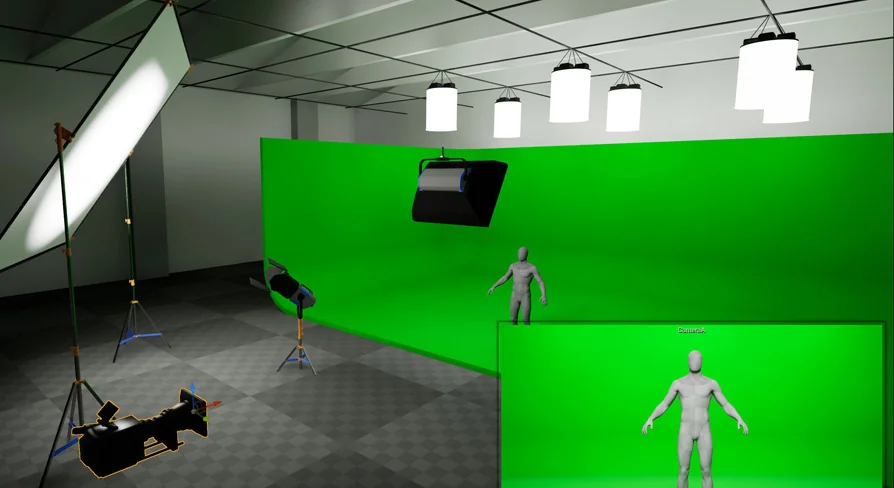
The collection itself is a growing set of film equipment Blueprints that closely match real-world film industry standards. That gives the project a practical focus. It is not presented as a general-purpose prop library or an all-in-one runtime system. Its current direction is much narrower: bringing film-oriented equipment into Unreal in a way that supports virtual cinematography, lighting, and production work inside the editor.
Getting Cine Designer running in Unreal Engine 5.0+ with Lumen
The first implementation step is straightforward but non-optional. Cine Designer depends on Unreal Engine 5.0+ and expects Lumen to be active. The Blueprints are designed around that rendering environment, so the setup is less about choosing between multiple supported lighting models and more about committing to the one the collection was made for.
That matters immediately for anyone planning a scene. The package is not suited to static or baked lighting, and the maps and assets are not optimized for light maps. In practice, this places Cine Designer on a modern dynamic-lighting path from the start. If a project pipeline still depends on baked results, light map optimization, or a static-lighting workflow, this collection is not positioned around that use case.
It also is not suited to path tracing. That exclusion narrows the rendering expectations even further and helps define the intended production path: Lumen-enabled work inside Unreal Engine 5.0+ Editor. Instead of spreading across every rendering mode Unreal can offer, Cine Designer stays tied to one environment and builds its usefulness there.
Film equipment Blueprints aimed at editor-based production
Cine Designer is described as a growing collection, and that word is important because the current release is intentionally limited. Version 1.0 includes a very small equipment selection. The point of the initial release is not breadth. It is there to establish the class design, Editor Utility Widget functionality, Lumen integration, and compliance standards before more equipment is added.
That early-stage scope says a lot about how the collection should be approached. This is not a finished catalog of every possible production tool. It is a foundation for a larger system, with emphasis on structure and workflow. The Blueprints are meant to resemble real-world film industry standards closely, so the practical value comes from using them as scene elements that fit cinematography and virtual production contexts rather than expecting a huge volume of gear from the start.
The editor focus is also explicit. These Blueprints are suited to Unreal Engine Editor use, especially for high resolution screenshots and Movie Render Queue. That positions Cine Designer squarely in cinematic image-making and shot development. It supports a workflow where equipment can live inside the scene as part of the production design or visualization process, and where the final output is more about rendered frames and sequences than packaged gameplay systems.
Runtime and Sequencer limits in Cine Designer
Cine Designer does function in runtime games and apps, but there is a notable limitation attached to that support: no framework is included to control or interact with the Blueprints during runtime. That means runtime use is possible in a technical sense, yet the collection does not arrive as a gameplay-ready interaction layer. Anyone considering it for an interactive project needs to read that line carefully. The objects may exist and function, but control logic is not supplied as a complete runtime framework.
Sequencer support is also still constrained. The Blueprints have limited functionality with Sequencer, and that part is marked as in development. For cinematic teams working heavily with Sequencer, this sets expectations correctly. Cine Designer already sits in a filmmaking context, but its Sequencer integration is not presented as complete or feature-rich at this stage.
These two limitations create a very specific implementation profile. In the editor, especially for staging, look development, and rendered output, the collection has a defined purpose. For fully interactive runtime systems or deeper timeline-driven control, the framework is not fully built out yet. That does not make the package contradictory; it simply means its strongest current role is inside editor-driven production work rather than broader tool coverage across every Unreal workflow.
Cameras, MetaHumans, and what is actually included
Cine Designer makes a few boundaries explicit, and those boundaries help avoid confusion during setup. MetaHumans visible in promotional imagery or video material are not included. The same goes for cameras in a broader asset sense: the cameras used are stock Unreal Engine Cine Cameras or rigs.
This tells users where Cine Designer begins and ends. The product centers on film equipment Blueprints, not digital actors and not a custom camera system replacing Unreal’s built-in cinematic tools. Anyone building scenes around it will be working with the standard Unreal camera ecosystem while placing or rendering film equipment elements within that environment.
That separation also reinforces the project’s practical intent. Instead of trying to bundle every part of a production scene into one package, Cine Designer focuses on a more specific layer of the filmmaking setup. It contributes equipment Blueprints that align with real-world standards and leaves the human performers and camera base systems outside its own scope.
Lumen-focused rendering for screenshots and Movie Render Queue
The rendering side of Cine Designer is one of its clearest strengths because it is described in direct terms. The Blueprints are made for Lumen in Unreal Engine 5.0+ Editor, and they are designed around high resolution screenshots and Movie Render Queue. That creates a concrete creative use case: editor-based scene building for cinematic stills and rendered sequences where dynamic lighting behavior through Lumen is part of the intended setup.
From a creative standpoint, this places Cine Designer close to virtual production, cinematography visualization, and production scene dressing. The associated tags point in that same direction: lighting, script, production, cinematography, movie, Blueprint, and virtual. These are not random labels. Together they frame the collection as part of a filmmaking workflow in Unreal rather than a generic asset pack with no clear production identity.
The choice to exclude static and baked lighting optimization also shapes how the equipment will be used creatively. Scenes are expected to live in a Lumen-based context, where lighting decisions happen within that runtime-oriented global illumination system rather than being precomputed into light maps. For teams already using Lumen to preview, block, and render cinematic work, this keeps the workflow consistent. For teams based on baked scenes, it signals a mismatch before time is spent integrating the assets.
Version 1.0 as a framework-first release
The first release of Cine Designer is deliberately small in equipment count, and that limitation is tied to a larger goal. Version 1.0 exists to establish the class design, Editor Utility Widget functionality, Lumen integration, and compliance standards before more equipment is added. That makes this release feel less like a finished endpoint and more like the first stable layer of a broader film equipment system.
Seen from a production-readiness angle, that is useful information because it defines what can be relied on now. The foundation is being set in the editor, with Lumen support in place and a clear focus on cinematic rendering workflows. The tradeoff is that the selection is still narrow, Sequencer functionality remains limited, and runtime interaction does not come with a built-in framework.
For practical use today, Cine Designer fits best when the goal is to place film-equipment Blueprints inside Unreal Engine 5.0+ scenes, keep Lumen enabled, and work toward editor-based outputs such as high resolution screenshots or Movie Render Queue renders. Its current release is less about quantity and more about establishing a production-oriented structure that can expand over time.
 Gameplay Features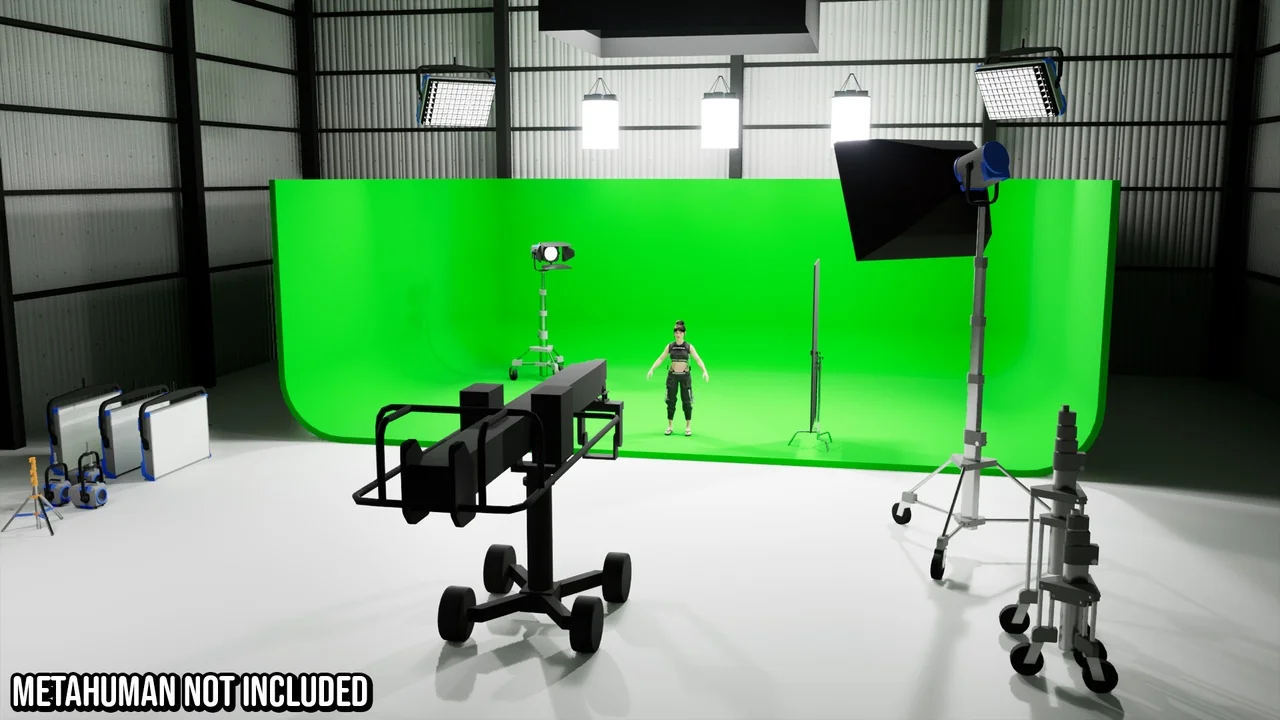
 Gameplay Features
 Gameplay Features
 Gameplay Features