"7066dd76da796369"{"id":"11209","slug":"vr-input-recorder","title":"VR Input Recorder","category":"Gameplay Features","engine":"5.1+","assetVersion":"Engine version: 5.1+","engineVersion":"5.1","tag":"Gameplay Features","accent":"blue","visual":"mech","summary":"Discover how the VR Input Recorder eliminates the need for constant headset swapping by emulating input actions and allowing for real-time debugging in Blueprints and C++.","platform":"Unreal Engine","publishedAt":"2026-03-03T17:08:00.000Z","updatedAt":"2026-04-19T15:48:14.000Z","sourceNotes":[],"fileContents":[],"compatibility":["Unreal Engine","Engine version: 5.1+"],"featuredImage":{"alt":"VR Input Recorder","src":"https://3dcghub.com/wp-content/uploads/2026/03/da5fe817-b784-4740-8e7b-20ef757cb731.webp"},"hasDownloadLink":true,"downloads":0,"terms":[{"taxonomy":"category","slug":"gameplay-features","name":"Gameplay Features"},{"taxonomy":"post_tag","slug":"enhanced-input-injection","name":"Enhanced Input Injection"},{"taxonomy":"post_tag","slug":"unreal-engine-vr","name":"Unreal Engine VR"},{"taxonomy":"post_tag","slug":"vr-development-tools","name":"VR development tools"},{"taxonomy":"post_tag","slug":"vr-input-recorder","name":"VR Input Recorder"},{"taxonomy":"post_tag","slug":"xr-debugging","name":"XR debugging"}],"galleryImages":[{"src":"https://3dcghub.com/wp-content/uploads/2026/03/1386fe38f498_6a131750-e167-46d4-ab90-124066817ec2.webp","alt":"VR Input Recorder"},{"src":"https://3dcghub.com/wp-content/uploads/2026/03/ae421272a062_3d7f8af7-8aa1-4170-a215-81caf38a72c3.webp","alt":"VR Input Recorder"},{"src":"https://3dcghub.com/wp-content/uploads/2026/03/3dc5c177275d_dc36a7f6-2c38-4207-b9f9-4ac972a79e88.webp","alt":"VR Input Recorder"},{"src":"https://3dcghub.com/wp-content/uploads/2026/03/02534be19308_b012f382-0848-4216-9421-249ac99ebab7.webp","alt":"VR Input Recorder"}],"accessPanel":{"kind":"resource","title":"Access this resource","eyebrow":"Free Download","message":"Log in or create a free account to start your download.","fileName":"Content.7z","safetyNote":"All resources are 100% manually reviewed to eliminate all risks.","actionLabel":"Download Free","resourceType":"Resource archive"},"contentHtml":"\u003ch2\u003eEfficient VR Development with VR Input Recorder\u003c/h2\u003e\n\u003cp\u003eVR Input Recorder is designed to address one of the most persistent frustrations in VR and XR development: the constant need to put on and take off the headset. By streamlining the testing process, this tool allows developers to focus more on their code and less on physical hardware adjustments. Consequently, it creates a much more efficient environment for building immersive experiences.\u003c/p\u003e\n\n\u003cp\u003eThe core functionality of the tool relies on Enhanced Input Injection. This technology emulates input actions at runtime, which allows the developer to playback recorded playthroughs. While these recordings run, developers can simultaneously debug code within Blueprints and C++. Therefore, you can observe how your game logic behaves without being tethered to the hardware during every single test.\u003c/p\u003e\n\n\u003ch3\u003eAdvanced Input Support and Debugging\u003c/h3\u003e\n\u003cp\u003eThe VR Input Recorder is versatile in its handling of data. It specifically supports Float, Boolean, and Vector2D Input Actions. This range ensures that most standard interactions within a VR environment can be captured and replayed accurately. Furthermore, game inputs remain functional even when the Play In Editor (PIE) window is not active, providing more flexibility during complex debugging sessions.\u003c/p\u003e\n\n\u003cp\u003eIteration becomes much faster with this tool. Because it allows for tweaking variables on the fly, developers can refine game design elements without jumping in and out of the headset for simple adjustments. This capability provides new ways of debugging that were previously cumbersome or time-consuming. Moreover, the tool includes sample code specifically for use with VRExpansion, making it easier to integrate into existing workflows.\u003c/p\u003e\n\n\u003ch3\u003eA Tool for Content Creators\u003c/h3\u003e\n\u003cp\u003eBeyond technical development, the VR Input Recorder serves as an excellent resource for content creators. It provides a unique way to capture high-quality gameplay footage. By recording a playthrough first, the developer can then use the editor to act as their own camera man. This allows for cinematic shots and better presentation of the game's features without the limitations of a first-person VR view.\u003c/p\u003e\n\n\u003ch3\u003eTechnical Requirements and Considerations\u003c/h3\u003e\n\u003cp\u003eIt is important to note that the VR Input Recorder is designed exclusively for projects utilizing the Enhanced Input system, such as the standard VRTemplate. While the tool provides significant benefits, there are some technical nuances to keep in mind. For instance, the system uses Tick to set positions. Consequently, there may be minor accuracy issues if performance fluctuates, meaning the playback might not be perfectly exact under heavy loads.\u003c/p\u003e\n\n\u003cp\u003eThe demo scene provided with the tool uses the Epic VRTemplate as its base. While the Epic template requires the OpenXR Plugin to be enabled, the VR Input Recorder itself generally does not have this requirement. This makes it a flexible addition to various project setups.\u003c/p\u003e\n\n\u003ch3\u003eBest Fit\u003c/h3\u003e\n\u003cp\u003eThe VR Input Recorder offers a practical solution to the physical demands of XR development. By enabling input emulation and playback, it allows for deeper debugging and faster design iterations. Whether you are a programmer refining C++ logic or a content creator seeking the perfect gameplay shot, this tool simplifies the bridge between the virtual world and the development environment.\u003c/p\u003e\n\n\u003ch2\u003eContinue Browsing Similar Packs\u003c/h2\u003e\n\u003cul\u003e\n\u003cli\u003e\u003ca href=\"https://3dcghub.com/sci-fi-screen-constructor/\" title=\"Sci-Fi Screen Constructor\"\u003eSci-Fi Screen Constructor\u003c/a\u003e\u003c/li\u003e\n\u003cli\u003e\u003ca href=\"https://3dcghub.com/sci-fi-environment-engine-room/\" title=\"Sci-fi Environment Engine Room\"\u003eSci-fi Environment Engine Room\u003c/a\u003e\u003c/li\u003e\n\u003cli\u003e\u003ca href=\"https://3dcghub.com/medieval-russian-village/\" title=\"Medieval Russian Village\"\u003eMedieval Russian Village\u003c/a\u003e\u003c/li\u003e\n\u003cli\u003e\u003ca href=\"https://3dcghub.com/stylized-tropical-beach-environment/\" title=\"Stylized tropical beach environment\"\u003eStylized tropical beach environment\u003c/a\u003e\u003c/li\u003e\n\u003cli\u003e\u003ca href=\"https://3dcghub.com/parking-garage/\" title=\"Parking Garage\"\u003eParking Garage\u003c/a\u003e\u003c/li\u003e\n\u003c/ul\u003e\n\n\u003ch2\u003eAsset Gallery\u003c/h2\u003e","contentTextLength":3524,"navigation":{"current":3204,"total":4016,"previous":{"id":"11221","slug":"wanted-system","title":"Wanted System","category":"Gameplay Features","platform":"Unreal Engine","updatedAt":"2026-04-19T15:48:14.000Z"},"next":{"id":"11384","slug":"edge-bevel-decals","title":"Edge Bevel Decals","category":"Procedural Systems","platform":"Unreal Engine","updatedAt":"2026-04-19T15:48:13.000Z"}},"relatedResources":[{"id":"1001581","slug":"interactive-cutscene","title":"Interactive Cutscene","category":"Gameplay Features","engine":"5.3+","assetVersion":"","engineVersion":"Engine Version: 5.3+","tag":"Gameplay Features","accent":"blue","visual":"mech","summary":"Build responsive Quick Time Events in Unreal Engine with Interactive Cutscene, featuring Sequencer sync, volume triggers, and multiplatform input.","platform":"Unreal Engine","publishedAt":"2026-10-10T08:53:30.443Z","updatedAt":"2026-10-10T08:53:30.443Z","sourceNotes":[],"fileContents":[],"compatibility":["Unreal Engine","Engine Version: 5.3+"],"featuredImage":{"alt":"Interactive Cutscene","src":"/wp-content/uploads/published/2026/10/b63507fb7743-cbc39278-253e-45ae-994b-c44935c36728-335d8b52f3.webp"},"hasDownloadLink":true,"downloads":0},{"id":"28394","slug":"advanced-framework-vr-mobile-desktop","title":"Advanced Framework - VR, Mobile \u0026 Desktop","category":"Gameplay Features","engine":"5.0+","assetVersion":"Engine version: 5.0+","engineVersion":"","tag":"Gameplay Features","accent":"blue","visual":"luts","summary":"Advanced Framework is a production-ready foundation for VR, desktop, and mobile applications. It combines first-person control setups, interaction systems, multiplayer replication, navigation modes, and adaptable UI tools in one package.","platform":"Unreal Engine","publishedAt":"2026-05-12T09:33:53.000Z","updatedAt":"2026-05-12T09:33:54.000Z","sourceNotes":[],"fileContents":[],"compatibility":["Unreal Engine","Engine version: 5.0+"],"featuredImage":{"alt":"Advanced Framework - VR, Mobile \u0026 Desktop","src":"https://3dcghub.com/wp-content/uploads/2026/05/98ecd66b1773_1af6d69e-fbe1-435d-abdf-cc772ef3b31f.webp"},"hasDownloadLink":true,"downloads":0},{"id":"14227","slug":"msc-screen-camera-recorder","title":"MSC Screen \u0026 Camera Recorder","category":"Engine Tools","engine":"5.5 - 5.7","assetVersion":"Engine version: 5.5 - 5.7","engineVersion":"4.26","tag":"Engine Tools","accent":"blue","visual":"luts","summary":"The MSC Screen \u0026 Camera Recorder is a versatile tool for capturing high-quality video content within Unreal Engine. It supports standard screen recording, VR perspectives, and immersive 360-degree renders.","platform":"Unreal Engine","publishedAt":"2026-03-11T17:01:22.000Z","updatedAt":"2026-04-19T15:45:51.000Z","sourceNotes":[],"fileContents":[],"compatibility":["Unreal Engine","Engine version: 5.5 - 5.7"],"featuredImage":{"alt":"MSC Screen \u0026 Camera Recorder","src":"https://3dcghub.com/wp-content/uploads/2026/03/909261f3-99f5-4f53-96ea-5ebe6ce89c8a.webp"},"hasDownloadLink":true,"downloads":0}]}
Gameplay Features
VR Input Recorder
Discover how the VR Input Recorder eliminates the need for constant headset swapping by emulating input actions and allowing for real-time debugging in Blueprints and C++.
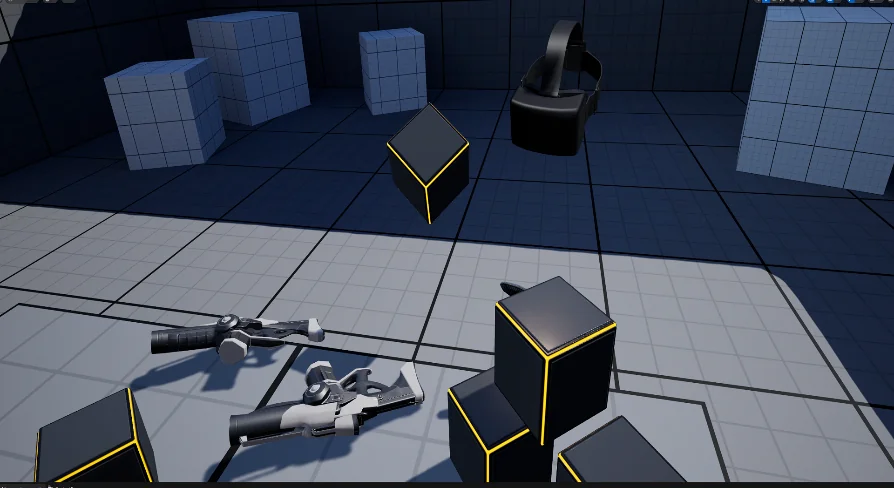
VR Input Recorder is designed to address one of the most persistent frustrations in VR and XR development: the constant need to put on and take off the headset. By streamlining the testing process, this tool allows developers to focus more on their code and less on physical hardware adjustments. Consequently, it creates a much more efficient environment for building immersive experiences.
The core functionality of the tool relies on Enhanced Input Injection. This technology emulates input actions at runtime, which allows the developer to playback recorded playthroughs. While these recordings run, developers can simultaneously debug code within Blueprints and C++. Therefore, you can observe how your game logic behaves without being tethered to the hardware during every single test.
Advanced Input Support and Debugging
The VR Input Recorder is versatile in its handling of data. It specifically supports Float, Boolean, and Vector2D Input Actions. This range ensures that most standard interactions within a VR environment can be captured and replayed accurately. Furthermore, game inputs remain functional even when the Play In Editor (PIE) window is not active, providing more flexibility during complex debugging sessions.
Iteration becomes much faster with this tool. Because it allows for tweaking variables on the fly, developers can refine game design elements without jumping in and out of the headset for simple adjustments. This capability provides new ways of debugging that were previously cumbersome or time-consuming. Moreover, the tool includes sample code specifically for use with VRExpansion, making it easier to integrate into existing workflows.
A Tool for Content Creators
Beyond technical development, the VR Input Recorder serves as an excellent resource for content creators. It provides a unique way to capture high-quality gameplay footage. By recording a playthrough first, the developer can then use the editor to act as their own camera man. This allows for cinematic shots and better presentation of the game's features without the limitations of a first-person VR view.
Technical Requirements and Considerations
It is important to note that the VR Input Recorder is designed exclusively for projects utilizing the Enhanced Input system, such as the standard VRTemplate. While the tool provides significant benefits, there are some technical nuances to keep in mind. For instance, the system uses Tick to set positions. Consequently, there may be minor accuracy issues if performance fluctuates, meaning the playback might not be perfectly exact under heavy loads.
The demo scene provided with the tool uses the Epic VRTemplate as its base. While the Epic template requires the OpenXR Plugin to be enabled, the VR Input Recorder itself generally does not have this requirement. This makes it a flexible addition to various project setups.
Best Fit
The VR Input Recorder offers a practical solution to the physical demands of XR development. By enabling input emulation and playback, it allows for deeper debugging and faster design iterations. Whether you are a programmer refining C++ logic or a content creator seeking the perfect gameplay shot, this tool simplifies the bridge between the virtual world and the development environment.
 Gameplay Features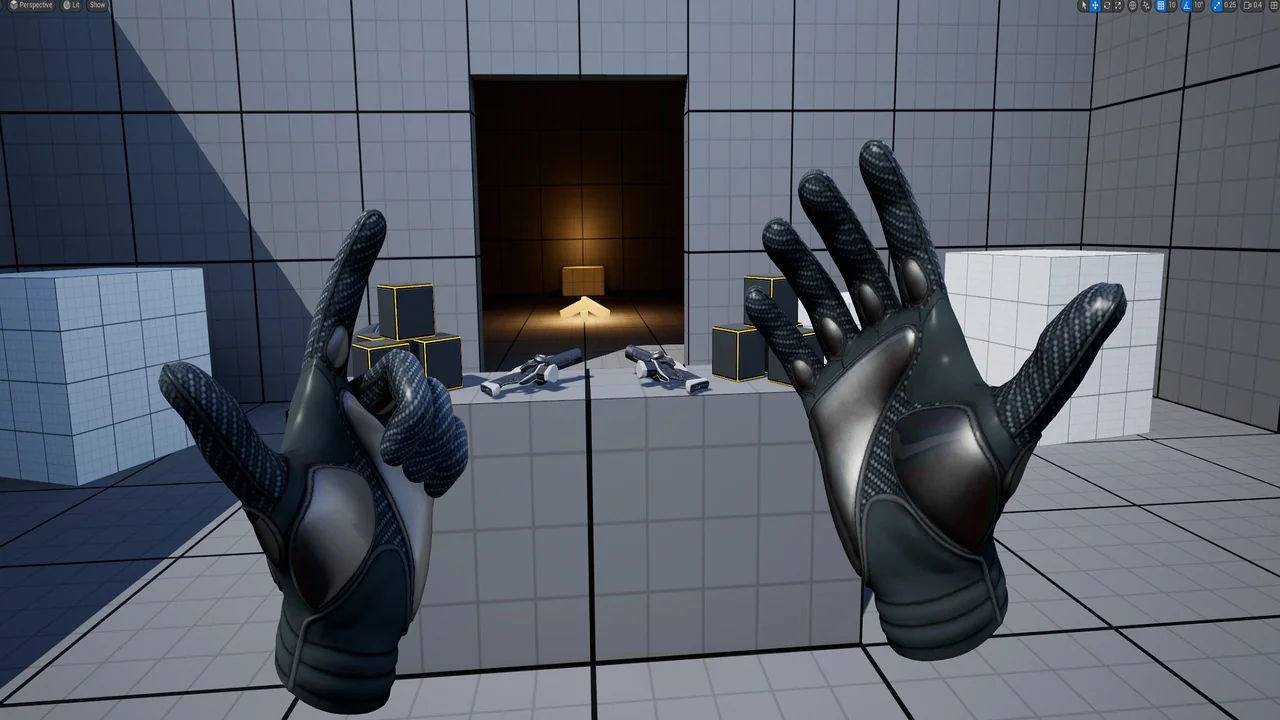
 Gameplay Features
 Gameplay Features
 Engine Tools