"1f00f67f9253451b"{"id":"28394","slug":"advanced-framework-vr-mobile-desktop","title":"Advanced Framework - VR, Mobile \u0026 Desktop","category":"Gameplay Features","engine":"5.0+","assetVersion":"Engine version: 5.0+","engineVersion":"","tag":"Gameplay Features","accent":"blue","visual":"luts","summary":"Advanced Framework is a production-ready foundation for VR, desktop, and mobile applications. It combines first-person control setups, interaction systems, multiplayer replication, navigation modes, and adaptable UI tools in one package.","platform":"Unreal Engine","publishedAt":"2026-05-12T09:33:53.000Z","updatedAt":"2026-05-12T09:33:54.000Z","sourceNotes":[],"fileContents":[],"compatibility":["Unreal Engine","Engine version: 5.0+"],"featuredImage":{"alt":"Advanced Framework - VR, Mobile \u0026 Desktop","src":"https://3dcghub.com/wp-content/uploads/2026/05/98ecd66b1773_1af6d69e-fbe1-435d-abdf-cc772ef3b31f.webp"},"hasDownloadLink":true,"downloads":0,"terms":[{"taxonomy":"category","slug":"gameplay-features","name":"Gameplay Features"},{"taxonomy":"post_tag","slug":"characters","name":"Characters"},{"taxonomy":"post_tag","slug":"game-systems","name":"Game Systems"},{"taxonomy":"post_tag","slug":"unreal-engine-5","name":"Unreal Engine 5"}],"galleryImages":[{"src":"https://3dcghub.com/wp-content/uploads/2026/05/c0eb0c67f30f_303285d8-4588-4bba-af1b-c3fc9946933e.webp","alt":"Advanced Framework - VR, Mobile \u0026 Desktop"},{"src":"https://3dcghub.com/wp-content/uploads/2026/05/a2193c60156e_1d34271f-973a-4c0b-a83f-629edcdef987.webp","alt":"Advanced Framework - VR, Mobile \u0026 Desktop"},{"src":"https://3dcghub.com/wp-content/uploads/2026/05/0477bb642b33_0fd2a3f3-a313-4f47-a395-a7a1081f90c4.webp","alt":"Advanced Framework - VR, Mobile \u0026 Desktop"},{"src":"https://3dcghub.com/wp-content/uploads/2026/05/925ebe99c651_7dde4870-2f9a-48ca-adc8-75f96688398b.webp","alt":"Advanced Framework - VR, Mobile \u0026 Desktop"},{"src":"https://3dcghub.com/wp-content/uploads/2026/05/f9ed2b5f3bb7_ed4e7b01-2554-4667-852c-0c5c6488e2ac.webp","alt":"Advanced Framework - VR, Mobile \u0026 Desktop"},{"src":"https://3dcghub.com/wp-content/uploads/2026/05/1473e1276347_6073631f-0d3c-4632-a498-83354df413ba.webp","alt":"Advanced Framework - VR, Mobile \u0026 Desktop"},{"src":"https://3dcghub.com/wp-content/uploads/2026/05/723ac9e16636_5e2e2d9e-ebe5-4d20-ac1f-054e6be0ba6c.webp","alt":"Advanced Framework - VR, Mobile \u0026 Desktop"},{"src":"https://3dcghub.com/wp-content/uploads/2026/05/202c23cb7b79_d41f723b-1a6b-4920-af4b-3b91d36a5834.webp","alt":"Advanced Framework - VR, Mobile \u0026 Desktop"},{"src":"https://3dcghub.com/wp-content/uploads/2026/05/53eb2e734928_df3d03e0-00eb-4c27-9665-d0802fb49944.webp","alt":"Advanced Framework - VR, Mobile \u0026 Desktop"},{"src":"https://3dcghub.com/wp-content/uploads/2026/05/095f93896cee_ff6b3e37-7a5f-48a4-924a-d8b620e51b62.webp","alt":"Advanced Framework - VR, Mobile \u0026 Desktop"}],"accessPanel":{"kind":"resource","title":"Access this resource","eyebrow":"Free Download","message":"Log in or create a free account to start your download.","fileName":"Advanced Framework.7z","safetyNote":"All resources are 100% manually reviewed to eliminate all risks.","actionLabel":"Download Free","resourceType":"Resource archive"},"contentHtml":"\u003cp\u003eProjects that need to move between VR, desktop, and mobile often run into the same problem early: core interaction and control systems have to be solved before any project-specific work can really begin. Advanced Framework sits in that stage of production. It is a framework intended to serve as a base for cross-platform applications, with dedicated setups for VR, desktop, and mobile, plus multiplayer, navigation, UI, and a range of supporting systems.\u003c/p\u003e\n\u003cp\u003eThe package includes the Advanced Framework Core together with all currently available extensions. It is also presented through separate builds for \u003cstrong\u003eAdvancedFramework - Universe Desktop\u003c/strong\u003e And \u003cstrong\u003eAdvancedFramework - Universe VR\u003c/strong\u003e, which makes its cross-platform focus very clear. Rather than targeting only one input style or one presentation mode, it is structured to support several ways of controlling and viewing the same kind of interactive experience.\u003c/p\u003e \u003ch2\u003eWhere Advanced Framework fits in VR, Desktop, and Mobile production\u003c/h2\u003e\n\u003cp\u003eThis framework is most useful when a team needs a common gameplay and interaction base across different devices. On the VR side, it provides a modular, highly configurable, component-based VR motion controller system. For desktop use, it includes a first-person character controlled through keyboard and mouse or gamepad. On mobile, it offers a first-person character with a fully functioning touch interface.\u003c/p\u003e\n\u003cp\u003eThat combination places it in a practical part of the workflow: the stage where input, character control, and interaction behavior need to be reliable before content production scales up. Instead of building separate control foundations for each platform from scratch, teams can start from a framework that already accounts for motion controllers, traditional desktop controls, and touch-based first-person interaction.\u003c/p\u003e\n\u003cp\u003eFor projects that expect to prototype across devices, or maintain a shared experience with platform-specific controls, that kind of structure can save a lot of early system work. It also makes sense for interactive training, exploration, multiplayer spaces, or gameplay prototypes where users may enter through different hardware setups but still need to interact with the same environment and objects.\u003c/p\u003e \u003ch2\u003eInteraction systems in Advanced Framework\u003c/h2\u003e\n\u003cp\u003eThe interaction feature set is one of the clearest indicators of how this framework is meant to be used in real scenes. It covers object handling, world interaction, and visual feedback rather than stopping at basic character movement. Grabbing includes pickup behavior, physics interaction, throwing, and object rotation. Dragging covers common environmental interactions such as pressing buttons and operating drawers, doors, levers, valves, and sliders.\u003c/p\u003e\n\u003cp\u003eThose tools fit naturally into first-person and VR production where scenes need to feel responsive at close range. Instead of treating interaction as a single generic action, the framework distinguishes between different kinds of object behavior. That is especially useful in environments where physical manipulation matters, whether the project is a simulation-style space, a puzzle environment, or a multiplayer interactive world.\u003c/p\u003e\n\u003cp\u003eAdvanced Framework also includes a snapping and anchor system, gaze view, teleporter functionality, and an object highlight system. The highlight system supports post process, mesh, and material-based approaches. In practice, this gives teams multiple ways to draw attention to interactive objects depending on the visual style and technical preference of the project.\u003c/p\u003e\n\u003cp\u003eThat flexibility matters in scenes with dense interaction, because visual communication often becomes as important as the interaction logic itself. A clear highlight pass can guide users toward usable objects, while teleportation and gaze-based support can improve usability in VR-focused experiences.\u003c/p\u003e \u003ch2\u003eCross-platform multiplayer with component-based replication\u003c/h2\u003e\n\u003cp\u003eAdvanced Framework is positioned not just as a local interaction toolkit, but as a base for cross-platform multiplayer experiences. Its multiplayer setup uses a component-based replication system intended to replicate actor states more easily. The framework also includes a ready-to-use multiplayer solution using the Epic Online Subsystem, along with EOSLink as an easy multiplayer backend.\u003c/p\u003e\n\u003cp\u003eIn a production workflow, this changes where the framework becomes valuable. It is not only about getting a player moving and interacting in a level. It is also about maintaining those interactions across networked sessions. When grabbing, object state changes, UI behavior, and movement systems are part of a multiplayer application, replication becomes a central concern rather than a later add-on.\u003c/p\u003e\n\u003cp\u003eA component-based replication approach suggests a framework meant to be extended and reused across different actors and systems. For teams building connected VR or first-person applications, that kind of structure is often more practical than handling every replicated state as a one-off solution. The framework’s multiplayer emphasis makes it suitable for projects where shared presence, synchronized interaction, and network-ready systems need to be part of the foundation from the start.\u003c/p\u003e \u003ch2\u003eNavigation, Highlight, and Dynamic User Interfaces\u003c/h2\u003e\n\u003cp\u003eMovement and readability are another major part of the package. Navigation includes a wide variety of combinable movement modes: walk, fly, teleportation, and ghost movement. Teleportation is supported in free, component, and NavMesh variants. That range is useful because different scene types often need different locomotion rules. A grounded first-person exploration setup may rely on walking, while a review or inspection scene may benefit from flying or ghost movement. VR projects may need teleportation to match comfort or layout requirements.\u003c/p\u003e\n\u003cp\u003eThe highlight tools extend the interaction systems with a flexible interactive object highlight setup that supports post process, mesh highlighting, and material highlighting. This gives teams different methods to identify usable or important objects in a way that can match the look of the environment.\u003c/p\u003e\n\u003cp\u003eUser interface support is equally broad. The framework includes a fully replicating UI system that is vector based and works across world, pawn, and HUD UI. It also covers UI elements such as scaffolds, overlays, messages, and keyboards, with hand, controller, and finger interaction. In workflow terms, this is significant because the interface layer often becomes fragmented across platforms. Here, the package treats UI as part of the same cross-platform interaction stack rather than as a separate problem to solve later.\u003c/p\u003e\n\u003cp\u003eThat makes it easier to picture the framework inside an actual production pipeline: gameplay interactions, feedback highlights, movement, and interface systems are all being handled as connected parts of the same foundation.\u003c/p\u003e \u003ch2\u003eAdvanced Framework extras for shared VR and desktop sessions\u003c/h2\u003e\n\u003cp\u003eSeveral additional systems help round out the package for real-world deployment and testing. The extras include a spectator and camera system that allows one person to be in VR while the avatar is controlled on PC. There is also a loading, transitions, and intro system, along with orbit view and mount view.\u003c/p\u003e\n\u003cp\u003eThese pieces may sound secondary next to character controls or multiplayer replication, but they often become important once a project moves beyond rough prototype stage. Spectator support can matter during demonstrations, collaborative testing, or experiences where one participant is immersed in VR while another remains at a desktop station. Loading and transition systems help connect scenes and states more cleanly, which is especially relevant in applications that need a more complete user flow rather than a single isolated interaction test.\u003c/p\u003e\n\u003cp\u003eTutorials and documentation are available as part of the broader framework ecosystem, which supports onboarding when teams need to understand the structure before adapting it to project-specific needs.\u003c/p\u003e\n\u003cp\u003eAdvanced Framework will be most useful to developers who need a reusable starting point for first-person and VR interaction across desktop, mobile, and multiplayer contexts. Its strongest role is as a base layer: controls, interaction, navigation, replication, UI, and viewing systems already in place so production can move faster into the specifics of the actual experience.\u003c/p\u003e\n\n\u003ch2\u003eMore From The Same Workflow\u003c/h2\u003e\n\u003cul\u003e\n\u003cli\u003e\u003ca href=\"https://3dcghub.com/1950s-characters-bundle-1950s-characters-bundle-1950-character-gangster-3d/\" title=\"1950s Characters Bundle ( 1950s Characters Bundle 1950 Character Gangster 3D )\"\u003e1950s Characters Bundle ( 1950s Characters Bundle 1950 Character Gangster 3D )\u003c/a\u003e\u003c/li\u003e\n\u003cli\u003e\u003ca href=\"https://3dcghub.com/character-rigged-npc-character-rigged-npc-rig-characters-animated-3d/\" title=\"Character / Rigged / NPC ( Character Rigged NPC Rig Characters Animated 3D )\"\u003eCharacter / Rigged / NPC ( Character Rigged NPC Rig Characters Animated 3D )\u003c/a\u003e\u003c/li\u003e\n\u003c/ul\u003e","contentTextLength":8527,"navigation":{"current":1373,"total":3222,"previous":{"id":"9369","slug":"brushify-volcano-pack","title":"Brushify Volcano Pack","category":"Mountain","platform":"Unreal Engine","updatedAt":"2026-05-15T09:57:00.000Z"},"next":{"id":"28369","slug":"maniac-towing-modular-5in1","title":"Maniac Towing Modular 5in1","category":"Characters \u0026 Creatures","platform":"Unreal Engine","updatedAt":"2026-05-07T10:11:08.000Z"}},"relatedResources":[{"id":"28091","slug":"project-sunrise-interaction-dialogue-quest-system","title":"Project Sunrise - Interaction, Dialogue \u0026 Quest System","category":"Gameplay Features","engine":"5.5+","assetVersion":"Engine version: 5.5+","engineVersion":"","tag":"Gameplay Features","accent":"blue","visual":"luts","summary":"Project Sunrise combines interaction, dialogue, and quest tools inside a blueprint-only project aimed at speeding up early gameplay setup. It also includes actor collection, save, and UI stack systems, plus an example map that shows how the pieces work in p...","platform":"Unreal Engine","publishedAt":"2026-05-04T08:15:01.000Z","updatedAt":"2026-05-04T08:15:03.000Z","sourceNotes":[],"fileContents":[],"compatibility":["Unreal Engine","Engine version: 5.5+"],"featuredImage":{"alt":"Project Sunrise - Interaction, Dialogue \u0026 Quest System","src":"https://3dcghub.com/wp-content/uploads/2026/05/ae19ba5e5924_45a421ec-6361-4baa-b5f8-5a7f889edc99.webp"},"hasDownloadLink":true,"downloads":0},{"id":"1000366","slug":"experience-system","title":"Experience System","category":"Gameplay Features","engine":"5.1+","assetVersion":"","engineVersion":"Engine Version: 5.1+","tag":"Gameplay Features","accent":"blue","visual":"mech","summary":"A comprehensive blueprint-based progression framework featuring multiple experience types, modular UI widgets, multiplayer replication, and level-blocking logic","platform":"Unreal Engine","publishedAt":"2026-07-06T08:20:00.610Z","updatedAt":"2026-07-06T08:20:00.610Z","sourceNotes":[],"fileContents":[],"compatibility":["Unreal Engine","Engine Version: 5.1+"],"featuredImage":{"alt":"Experience System","src":"/wp-content/uploads/published/2026/07/01a001477a74-92820b13-b6a6-432c-9c52-604b6a0cbd07-102ab4be2a.webp"},"hasDownloadLink":true,"downloads":0},{"id":"11176","slug":"universal-shooting-game-template-and-framework","title":"Universal Shooting Game Template and Framework","category":"Gameplay Features","engine":"5.1+","assetVersion":"Engine version: 5.1+","engineVersion":"5.1","tag":"Gameplay Features","accent":"blue","visual":"character","summary":"A comprehensive, blueprint-only framework designed for creating shooting games with independent modules and multiplayer support. It features integrated AI, weapon systems, and character customization tools.","platform":"Unreal Engine","publishedAt":"2026-03-03T17:04:56.000Z","updatedAt":"2026-04-19T15:48:15.000Z","sourceNotes":[],"fileContents":[],"compatibility":["Unreal Engine","Engine version: 5.1+"],"featuredImage":{"alt":"Universal Shooting Game Template and Framework","src":"https://3dcghub.com/wp-content/uploads/2026/03/809586c9-06d5-4b25-8d10-adc2975bbd96.webp"},"hasDownloadLink":true,"downloads":0}]}
Gameplay Features
Advanced Framework - VR, Mobile & Desktop
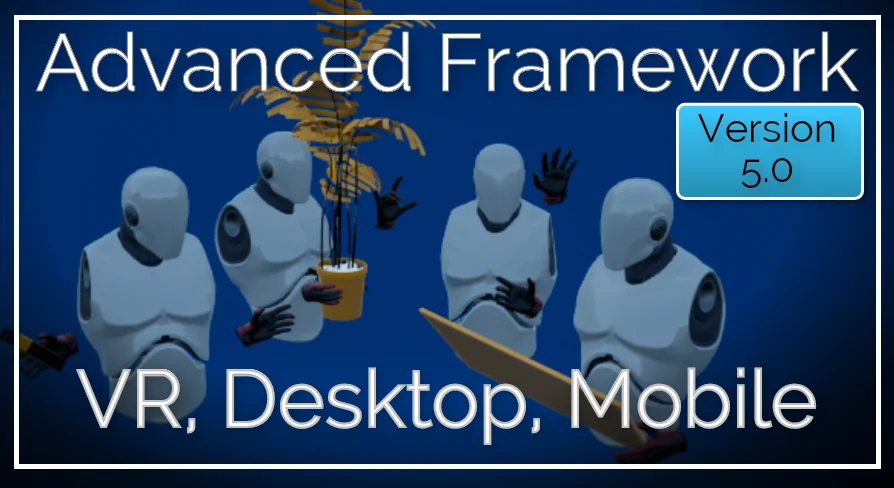
Advanced Framework is a production-ready foundation for VR, desktop, and mobile applications. It combines first-person control setups, interaction systems, multiplayer replication, navigation modes, and adaptable UI tools in one package.
Projects that need to move between VR, desktop, and mobile often run into the same problem early: core interaction and control systems have to be solved before any project-specific work can really begin. Advanced Framework sits in that stage of production. It is a framework intended to serve as a base for cross-platform applications, with dedicated setups for VR, desktop, and mobile, plus multiplayer, navigation, UI, and a range of supporting systems.
The package includes the Advanced Framework Core together with all currently available extensions. It is also presented through separate builds for AdvancedFramework - Universe Desktop And AdvancedFramework - Universe VR, which makes its cross-platform focus very clear. Rather than targeting only one input style or one presentation mode, it is structured to support several ways of controlling and viewing the same kind of interactive experience.
Where Advanced Framework fits in VR, Desktop, and Mobile production
This framework is most useful when a team needs a common gameplay and interaction base across different devices. On the VR side, it provides a modular, highly configurable, component-based VR motion controller system. For desktop use, it includes a first-person character controlled through keyboard and mouse or gamepad. On mobile, it offers a first-person character with a fully functioning touch interface.
That combination places it in a practical part of the workflow: the stage where input, character control, and interaction behavior need to be reliable before content production scales up. Instead of building separate control foundations for each platform from scratch, teams can start from a framework that already accounts for motion controllers, traditional desktop controls, and touch-based first-person interaction.
For projects that expect to prototype across devices, or maintain a shared experience with platform-specific controls, that kind of structure can save a lot of early system work. It also makes sense for interactive training, exploration, multiplayer spaces, or gameplay prototypes where users may enter through different hardware setups but still need to interact with the same environment and objects.
Interaction systems in Advanced Framework
The interaction feature set is one of the clearest indicators of how this framework is meant to be used in real scenes. It covers object handling, world interaction, and visual feedback rather than stopping at basic character movement. Grabbing includes pickup behavior, physics interaction, throwing, and object rotation. Dragging covers common environmental interactions such as pressing buttons and operating drawers, doors, levers, valves, and sliders.
Those tools fit naturally into first-person and VR production where scenes need to feel responsive at close range. Instead of treating interaction as a single generic action, the framework distinguishes between different kinds of object behavior. That is especially useful in environments where physical manipulation matters, whether the project is a simulation-style space, a puzzle environment, or a multiplayer interactive world.
Advanced Framework also includes a snapping and anchor system, gaze view, teleporter functionality, and an object highlight system. The highlight system supports post process, mesh, and material-based approaches. In practice, this gives teams multiple ways to draw attention to interactive objects depending on the visual style and technical preference of the project.
That flexibility matters in scenes with dense interaction, because visual communication often becomes as important as the interaction logic itself. A clear highlight pass can guide users toward usable objects, while teleportation and gaze-based support can improve usability in VR-focused experiences.
Cross-platform multiplayer with component-based replication
Advanced Framework is positioned not just as a local interaction toolkit, but as a base for cross-platform multiplayer experiences. Its multiplayer setup uses a component-based replication system intended to replicate actor states more easily. The framework also includes a ready-to-use multiplayer solution using the Epic Online Subsystem, along with EOSLink as an easy multiplayer backend.
In a production workflow, this changes where the framework becomes valuable. It is not only about getting a player moving and interacting in a level. It is also about maintaining those interactions across networked sessions. When grabbing, object state changes, UI behavior, and movement systems are part of a multiplayer application, replication becomes a central concern rather than a later add-on.
A component-based replication approach suggests a framework meant to be extended and reused across different actors and systems. For teams building connected VR or first-person applications, that kind of structure is often more practical than handling every replicated state as a one-off solution. The framework’s multiplayer emphasis makes it suitable for projects where shared presence, synchronized interaction, and network-ready systems need to be part of the foundation from the start.
Navigation, Highlight, and Dynamic User Interfaces
Movement and readability are another major part of the package. Navigation includes a wide variety of combinable movement modes: walk, fly, teleportation, and ghost movement. Teleportation is supported in free, component, and NavMesh variants. That range is useful because different scene types often need different locomotion rules. A grounded first-person exploration setup may rely on walking, while a review or inspection scene may benefit from flying or ghost movement. VR projects may need teleportation to match comfort or layout requirements.
The highlight tools extend the interaction systems with a flexible interactive object highlight setup that supports post process, mesh highlighting, and material highlighting. This gives teams different methods to identify usable or important objects in a way that can match the look of the environment.
User interface support is equally broad. The framework includes a fully replicating UI system that is vector based and works across world, pawn, and HUD UI. It also covers UI elements such as scaffolds, overlays, messages, and keyboards, with hand, controller, and finger interaction. In workflow terms, this is significant because the interface layer often becomes fragmented across platforms. Here, the package treats UI as part of the same cross-platform interaction stack rather than as a separate problem to solve later.
That makes it easier to picture the framework inside an actual production pipeline: gameplay interactions, feedback highlights, movement, and interface systems are all being handled as connected parts of the same foundation.
Advanced Framework extras for shared VR and desktop sessions
Several additional systems help round out the package for real-world deployment and testing. The extras include a spectator and camera system that allows one person to be in VR while the avatar is controlled on PC. There is also a loading, transitions, and intro system, along with orbit view and mount view.
These pieces may sound secondary next to character controls or multiplayer replication, but they often become important once a project moves beyond rough prototype stage. Spectator support can matter during demonstrations, collaborative testing, or experiences where one participant is immersed in VR while another remains at a desktop station. Loading and transition systems help connect scenes and states more cleanly, which is especially relevant in applications that need a more complete user flow rather than a single isolated interaction test.
Tutorials and documentation are available as part of the broader framework ecosystem, which supports onboarding when teams need to understand the structure before adapting it to project-specific needs.
Advanced Framework will be most useful to developers who need a reusable starting point for first-person and VR interaction across desktop, mobile, and multiplayer contexts. Its strongest role is as a base layer: controls, interaction, navigation, replication, UI, and viewing systems already in place so production can move faster into the specifics of the actual experience.
 Gameplay Features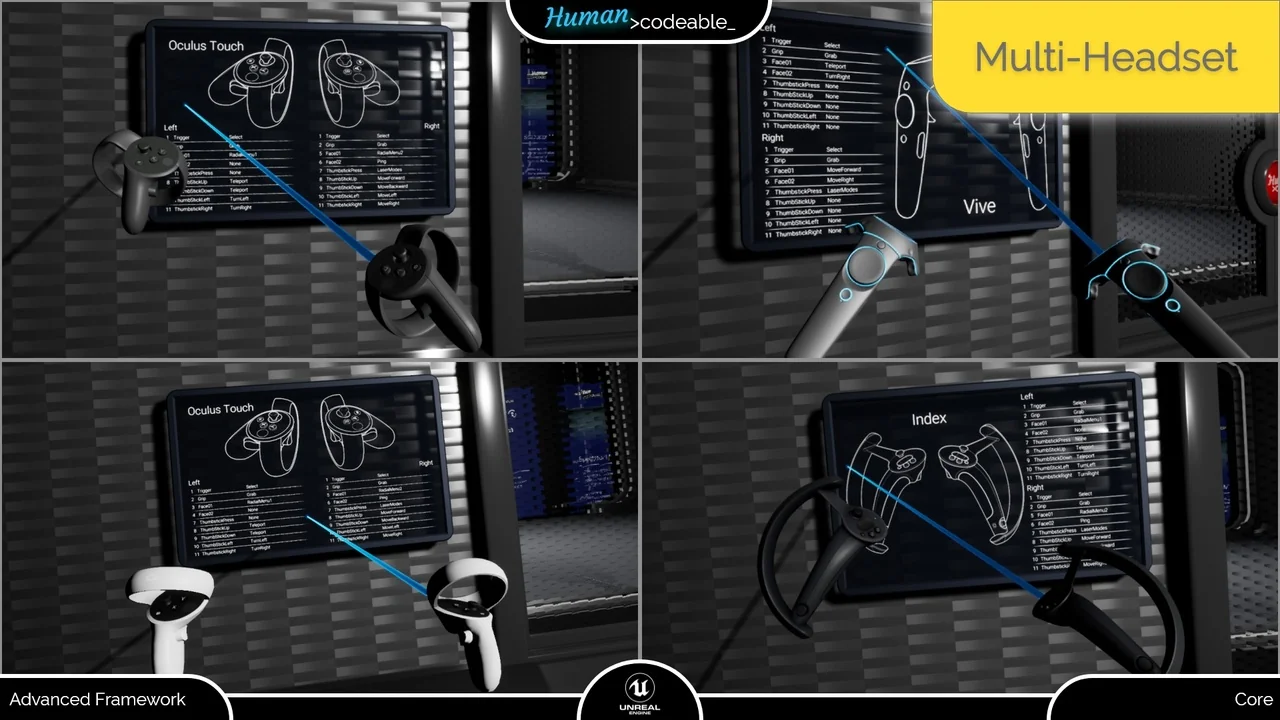
 Gameplay Features
 Gameplay Features
 Gameplay Features