"6ac84fdb0bd06614"{"id":"28091","slug":"project-sunrise-interaction-dialogue-quest-system","title":"Project Sunrise - Interaction, Dialogue \u0026 Quest System","category":"Gameplay Features","engine":"5.5+","assetVersion":"Engine version: 5.5+","engineVersion":"","tag":"Gameplay Features","accent":"blue","visual":"luts","summary":"Project Sunrise combines interaction, dialogue, and quest tools inside a blueprint-only project aimed at speeding up early gameplay setup. It also includes actor collection, save, and UI stack systems, plus an example map that shows how the pieces work in p...","platform":"Unreal Engine","publishedAt":"2026-05-04T08:15:01.000Z","updatedAt":"2026-05-04T08:15:03.000Z","sourceNotes":[],"fileContents":[],"compatibility":["Unreal Engine","Engine version: 5.5+"],"featuredImage":{"alt":"Project Sunrise - Interaction, Dialogue \u0026 Quest System","src":"https://3dcghub.com/wp-content/uploads/2026/05/ae19ba5e5924_45a421ec-6361-4baa-b5f8-5a7f889edc99.webp"},"hasDownloadLink":true,"downloads":0,"terms":[{"taxonomy":"category","slug":"gameplay-features","name":"Gameplay Features"},{"taxonomy":"post_tag","slug":"characters","name":"Characters"},{"taxonomy":"post_tag","slug":"game-systems","name":"Game Systems"},{"taxonomy":"post_tag","slug":"unreal-engine-5","name":"Unreal Engine 5"}],"galleryImages":[{"src":"https://3dcghub.com/wp-content/uploads/2026/05/3a44ecd70d93_c74f4d05-bd00-402d-9b69-b7dca97fa19a.webp","alt":"Project Sunrise - Interaction, Dialogue \u0026 Quest System"},{"src":"https://3dcghub.com/wp-content/uploads/2026/05/6e6bc78421cd_d9299ee7-afb3-43ff-8b2f-81038b00932f.webp","alt":"Project Sunrise - Interaction, Dialogue \u0026 Quest System"},{"src":"https://3dcghub.com/wp-content/uploads/2026/05/622fa344d192_ca18fedf-ea57-4bdb-9021-0739be3633d8.webp","alt":"Project Sunrise - Interaction, Dialogue \u0026 Quest System"},{"src":"https://3dcghub.com/wp-content/uploads/2026/05/f9fc99ccd951_00ab9e25-21ce-43bc-b871-197a525f5c42.webp","alt":"Project Sunrise - Interaction, Dialogue \u0026 Quest System"},{"src":"https://3dcghub.com/wp-content/uploads/2026/05/b2a1630d6787_532af1a6-f8d2-465b-bd64-6c5af45eb604.webp","alt":"Project Sunrise - Interaction, Dialogue \u0026 Quest System"}],"accessPanel":{"kind":"resource","title":"Access this resource","eyebrow":"Free Download","message":"Log in or create a free account to start your download.","fileName":"ProjectSunrise.7z","safetyNote":"All resources are 100% manually reviewed to eliminate all risks.","actionLabel":"Download Free","resourceType":"Resource archive"},"contentHtml":"\u003cp\u003eProject Sunrise brings together several gameplay-facing systems in one blueprint-only project: interaction, dialogue, quests, actor collection, actor registration, save handling, and UI stack management. An example map is included to show these systems in action and give a clear view of how they are set up.\u003c/p\u003e\u003cp\u003eThat blueprint-only structure is a practical part of where the project fits in production. Setup configurations stay visible, which makes it easier to inspect how things are wired and adjust base classes when necessary. At the same time, the project is set up with scalability in mind, so the usual path is to create child classes and override core functions rather than rebuilding the foundation.\u003c/p\u003e\u003ch2\u003eProject Sunrise as a blueprint-only gameplay foundation\u003c/h2\u003e\u003cp\u003eThis is not a single isolated feature pack. It reads more like a starting framework for projects that need multiple connected gameplay systems working together early on. Instead of treating interaction, conversation, and progression as separate problems, Project Sunrise places them side by side inside the same blueprint environment.\u003c/p\u003e\u003cp\u003eThat matters in a real workflow because initial gameplay setup often turns into repetitive groundwork: establishing how actors talk to each other, how players trigger events, how dialogue branches are selected, how quests advance, and how UI layers are managed during testing. Project Sunrise is aimed directly at that stage. The included example map supports that use by showing the systems operating in context rather than leaving them as abstract components.\u003c/p\u003e\u003ch2\u003eInteraction System, Signal Emitters \u0026amp; Receivers\u003c/h2\u003e\u003cp\u003eThe interaction system is highly configurable and can manage different interaction inputs on a single actor. That makes it suitable for scenes where one object needs to respond in more than one way instead of being locked to a single prompt or action path.\u003c/p\u003e\u003cp\u003eMovement support is part of the system as well. Characters can move to interactables or to specific locations referred to as Move to Marker. Interaction montages can also be played, which gives interactions a more directed presentation when an action needs animation support. An interaction camera system is included too, providing camera movement that complements the interaction itself.\u003c/p\u003e\u003cp\u003eThat same camera system carries over into dialogue, which helps the package feel connected rather than split into unrelated modules. In practice, that means interaction flow and conversation flow can share a visual language instead of requiring separate camera handling logic for each feature.\u003c/p\u003e\u003cp\u003eSignal emitters and receivers extend this setup into broader actor-to-actor communication. With those components, interactions and world events can be linked quickly. A receiver can handle multiple emitters and trigger different events as needed, which simplifies cases where one actor needs to react to several world states or several triggers. In production terms, this can reduce the amount of custom glue logic needed just to make unrelated actors respond to one another.\u003c/p\u003e\u003ch2\u003eDialogue System and Quest System\u003c/h2\u003e\u003cp\u003eThe dialogue system supports complex dialogue trees created entirely in blueprints. It includes audio playback, montage support, and use of the interaction camera system to shape conversations. Rather than treating dialogue as a basic text exchange, the system is structured to handle a more staged presentation with camera and playback elements folded in.\u003c/p\u003e\u003cp\u003eConversations are built through Dialogue Modules, and those modules can be changed at runtime. There is also a dialogue selection module that handles the logic used to decide which dialogue module should be used. Relevant dialogue data for each module can be saved by the system as well. Together, those parts point to a setup where dialogue is not just authored once and played back the same way every time, but selected and managed according to game logic.\u003c/p\u003e\u003cp\u003eThe example dialogue audio uses text-to-speech for demonstration purposes. That keeps the focus on how the system behaves rather than on bespoke recorded performances.\u003c/p\u003e\u003cp\u003eThe quest system follows a similarly modular approach. Quests are defined from a base Quest Object, where the initial Quest Task is established first. As tasks are completed, they determine which subsequent tasks are added next. This creates a chain of progression directly from task completion rather than requiring each step to be assembled as a disconnected event.\u003c/p\u003e\u003cp\u003eTask Listeners are attached to tasks and can be swapped easily to change the completion conditions. From a workflow standpoint, that is one of the clearer production-oriented details in the project. It suggests a quest structure where progression logic can be revised without needing to rebuild the task itself every time a completion rule changes.\u003c/p\u003e\u003ch2\u003eActor Collection System, Actor Manager, and Generic States Save Component\u003c/h2\u003e\u003cp\u003eProject Sunrise also includes support systems that help hold larger gameplay structures together. The actor collection system is used for registering and retrieving key actors inside collections. Those collections can be populated in the editor through an editor utility widget, without adding extra components to the actors involved.\u003c/p\u003e\u003cp\u003eActors in a collection can be registered by Name or by Gameplay Tag. Actors registered dynamically at runtime are automatically unregistered when they are destroyed or unloaded. That gives the system a practical role in scenes where actor availability changes over time and lookup needs to stay current without manual cleanup.\u003c/p\u003e\u003cp\u003eAn actor manager is included as well, though it is marked as depreciated. It also handles registration and retrieval of key actors and is noted as a particularly important component for the quest system. Even with the depreciated label, it still occupies a functional place in the project’s overall structure.\u003c/p\u003e\u003cp\u003eThe Generic States Save Component addresses persistence. By adding the component to an actor, implementing the relevant interface, and defining the data to save as a string, actor data saving can be set up more quickly. This is a focused utility rather than a broad save framework, but it fits naturally into projects where interaction state, dialogue state, or quest-related actor data needs to persist.\u003c/p\u003e\u003ch2\u003eUI Stack Container System and where Project Sunrise fits\u003c/h2\u003e\u003cp\u003eThe UI Stack Container System uses Common UI to streamline widget management. Widgets can be stacked while other widgets in the stack are hidden, and tagged slots can register specific UI containers to make widget placement easier. The system is also meant to support different UI layouts, with iteration during testing called out as a clear use case.\u003c/p\u003e\u003cp\u003eThat makes the package feel suited to teams or solo developers who want a playable gameplay layer in place early, with systems that can be inspected, extended, and swapped through blueprint work. The interaction system handles input and presentation, dialogue adds modular conversation logic, quests provide structured progression, actor collection and registration help world logic stay organized, the save component covers actor data persistence, and the UI stack gives the front end a manageable structure.\u003c/p\u003e\u003cp\u003eIn practical terms, Project Sunrise is set up to handle the stage where a project needs connected gameplay systems working together rather than isolated prototypes living on their own.\u003c/p\u003e\n\n\u003ch2\u003eContinue Browsing Similar Packs\u003c/h2\u003e\n\u003cul\u003e\n\u003cli\u003e\u003ca href=\"https://3dcghub.com/1950s-characters-bundle-1950s-characters-bundle-1950-character-gangster-3d/\" title=\"1950s Characters Bundle ( 1950s Characters Bundle 1950 Character Gangster 3D )\"\u003e1950s Characters Bundle ( 1950s Characters Bundle 1950 Character Gangster 3D )\u003c/a\u003e\u003c/li\u003e\n\u003cli\u003e\u003ca href=\"https://3dcghub.com/character-rigged-npc-character-rigged-npc-rig-characters-animated-3d/\" title=\"Character / Rigged / NPC ( Character Rigged NPC Rig Characters Animated 3D )\"\u003eCharacter / Rigged / NPC ( Character Rigged NPC Rig Characters Animated 3D )\u003c/a\u003e\u003c/li\u003e\n\u003c/ul\u003e","contentTextLength":7538,"navigation":{"current":1332,"total":3181,"previous":{"id":"28100","slug":"post-apocalyptic-melee-weapons-vol-2-post-apocalyptic-melee-weapons-weapon-old","title":"Post Apocalyptic Melee Weapons VOL.2 (Post Apocalyptic Melee Weapons Weapon Old)","category":"Weapons \u0026 Combat","platform":"Unreal Engine","updatedAt":"2026-05-04T08:21:40.000Z"},"next":{"id":"28083","slug":"realistic-post-apocalyptic-interior-environment","title":"Realistic Post-Apocalyptic Interior Environment","category":"Apocalyptic / Post-apocalyptic","platform":"Unreal Engine","updatedAt":"2026-05-04T08:14:54.000Z"}},"relatedResources":[{"id":"28394","slug":"advanced-framework-vr-mobile-desktop","title":"Advanced Framework - VR, Mobile \u0026 Desktop","category":"Gameplay Features","engine":"5.0+","assetVersion":"Engine version: 5.0+","engineVersion":"","tag":"Gameplay Features","accent":"blue","visual":"luts","summary":"Advanced Framework is a production-ready foundation for VR, desktop, and mobile applications. It combines first-person control setups, interaction systems, multiplayer replication, navigation modes, and adaptable UI tools in one package.","platform":"Unreal Engine","publishedAt":"2026-05-12T09:33:53.000Z","updatedAt":"2026-05-12T09:33:54.000Z","sourceNotes":[],"fileContents":[],"compatibility":["Unreal Engine","Engine version: 5.0+"],"featuredImage":{"alt":"Advanced Framework - VR, Mobile \u0026 Desktop","src":"https://3dcghub.com/wp-content/uploads/2026/05/98ecd66b1773_1af6d69e-fbe1-435d-abdf-cc772ef3b31f.webp"},"hasDownloadLink":true,"downloads":0},{"id":"14282","slug":"narrative-tales-node-based-quests-and-dialogue","title":"Narrative Tales - Node Based Quests and Dialogue","category":"Engine Tools","engine":"5.4 - 5.5","assetVersion":"Engine version: 5.4 - 5.5","engineVersion":"Asset Version:3.5 - 3.6","tag":"Engine Tools","accent":"blue","visual":"animation","summary":"Narrative Tales - Node Based Quests and Dialogue provides a professional, node-based solution for building complex story systems and cinematic interactions in Unreal Engine.","platform":"Unreal Engine","publishedAt":"2026-03-11T17:18:03.000Z","updatedAt":"2026-04-19T15:45:49.000Z","sourceNotes":[],"fileContents":[],"compatibility":["Unreal Engine","Engine version: 5.4 - 5.5","Asset Version: 3.5 - 3.6"],"featuredImage":{"alt":"Narrative Tales - Node Based Quests and Dialogue","src":"https://3dcghub.com/wp-content/uploads/2026/03/4704c395-9d69-4f9e-bb63-fc67d2198758.webp"},"hasDownloadLink":true,"downloads":2},{"id":"11138","slug":"story-framework-5-2-interactive-template","title":"Story Framework 5.2 - Interactive Template","category":"Gameplay Features","engine":"5.5+","assetVersion":"Engine version: 5.5+","engineVersion":"Asset Version:3.1","tag":"Gameplay Features","accent":"blue","visual":"city","summary":"Kickstart your narrative project with the Story Framework 5.2 - Interactive Template for Unreal Engine 5. This comprehensive toolset features interaction systems, dialogue frameworks, and saving/loading capabilities.","platform":"Unreal Engine","publishedAt":"2026-03-03T17:00:04.000Z","updatedAt":"2026-04-19T15:48:15.000Z","sourceNotes":[],"fileContents":[],"compatibility":["Unreal Engine","Engine version: 5.5+","Asset Version: 3.1"],"featuredImage":{"alt":"Story Framework 5.2 - Interactive Template","src":"https://3dcghub.com/wp-content/uploads/2026/03/8af5b69f-ef2a-49cc-b74e-7cadca705f20.webp"},"hasDownloadLink":true,"downloads":6}]}
Gameplay Features
Project Sunrise - Interaction, Dialogue & Quest System
Project Sunrise combines interaction, dialogue, and quest tools inside a blueprint-only project aimed at speeding up early gameplay setup. It also includes actor collection, save, and UI stack systems, plus an example map that shows how the pieces work in p...
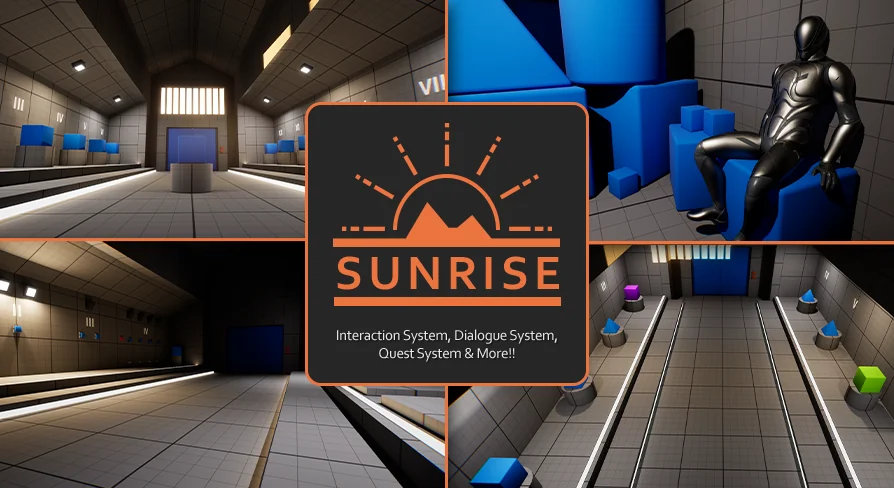
Project Sunrise brings together several gameplay-facing systems in one blueprint-only project: interaction, dialogue, quests, actor collection, actor registration, save handling, and UI stack management. An example map is included to show these systems in action and give a clear view of how they are set up.
That blueprint-only structure is a practical part of where the project fits in production. Setup configurations stay visible, which makes it easier to inspect how things are wired and adjust base classes when necessary. At the same time, the project is set up with scalability in mind, so the usual path is to create child classes and override core functions rather than rebuilding the foundation.
Project Sunrise as a blueprint-only gameplay foundation
This is not a single isolated feature pack. It reads more like a starting framework for projects that need multiple connected gameplay systems working together early on. Instead of treating interaction, conversation, and progression as separate problems, Project Sunrise places them side by side inside the same blueprint environment.
That matters in a real workflow because initial gameplay setup often turns into repetitive groundwork: establishing how actors talk to each other, how players trigger events, how dialogue branches are selected, how quests advance, and how UI layers are managed during testing. Project Sunrise is aimed directly at that stage. The included example map supports that use by showing the systems operating in context rather than leaving them as abstract components.
Interaction System, Signal Emitters & Receivers
The interaction system is highly configurable and can manage different interaction inputs on a single actor. That makes it suitable for scenes where one object needs to respond in more than one way instead of being locked to a single prompt or action path.
Movement support is part of the system as well. Characters can move to interactables or to specific locations referred to as Move to Marker. Interaction montages can also be played, which gives interactions a more directed presentation when an action needs animation support. An interaction camera system is included too, providing camera movement that complements the interaction itself.
That same camera system carries over into dialogue, which helps the package feel connected rather than split into unrelated modules. In practice, that means interaction flow and conversation flow can share a visual language instead of requiring separate camera handling logic for each feature.
Signal emitters and receivers extend this setup into broader actor-to-actor communication. With those components, interactions and world events can be linked quickly. A receiver can handle multiple emitters and trigger different events as needed, which simplifies cases where one actor needs to react to several world states or several triggers. In production terms, this can reduce the amount of custom glue logic needed just to make unrelated actors respond to one another.
Dialogue System and Quest System
The dialogue system supports complex dialogue trees created entirely in blueprints. It includes audio playback, montage support, and use of the interaction camera system to shape conversations. Rather than treating dialogue as a basic text exchange, the system is structured to handle a more staged presentation with camera and playback elements folded in.
Conversations are built through Dialogue Modules, and those modules can be changed at runtime. There is also a dialogue selection module that handles the logic used to decide which dialogue module should be used. Relevant dialogue data for each module can be saved by the system as well. Together, those parts point to a setup where dialogue is not just authored once and played back the same way every time, but selected and managed according to game logic.
The example dialogue audio uses text-to-speech for demonstration purposes. That keeps the focus on how the system behaves rather than on bespoke recorded performances.
The quest system follows a similarly modular approach. Quests are defined from a base Quest Object, where the initial Quest Task is established first. As tasks are completed, they determine which subsequent tasks are added next. This creates a chain of progression directly from task completion rather than requiring each step to be assembled as a disconnected event.
Task Listeners are attached to tasks and can be swapped easily to change the completion conditions. From a workflow standpoint, that is one of the clearer production-oriented details in the project. It suggests a quest structure where progression logic can be revised without needing to rebuild the task itself every time a completion rule changes.
Actor Collection System, Actor Manager, and Generic States Save Component
Project Sunrise also includes support systems that help hold larger gameplay structures together. The actor collection system is used for registering and retrieving key actors inside collections. Those collections can be populated in the editor through an editor utility widget, without adding extra components to the actors involved.
Actors in a collection can be registered by Name or by Gameplay Tag. Actors registered dynamically at runtime are automatically unregistered when they are destroyed or unloaded. That gives the system a practical role in scenes where actor availability changes over time and lookup needs to stay current without manual cleanup.
An actor manager is included as well, though it is marked as depreciated. It also handles registration and retrieval of key actors and is noted as a particularly important component for the quest system. Even with the depreciated label, it still occupies a functional place in the project’s overall structure.
The Generic States Save Component addresses persistence. By adding the component to an actor, implementing the relevant interface, and defining the data to save as a string, actor data saving can be set up more quickly. This is a focused utility rather than a broad save framework, but it fits naturally into projects where interaction state, dialogue state, or quest-related actor data needs to persist.
UI Stack Container System and where Project Sunrise fits
The UI Stack Container System uses Common UI to streamline widget management. Widgets can be stacked while other widgets in the stack are hidden, and tagged slots can register specific UI containers to make widget placement easier. The system is also meant to support different UI layouts, with iteration during testing called out as a clear use case.
That makes the package feel suited to teams or solo developers who want a playable gameplay layer in place early, with systems that can be inspected, extended, and swapped through blueprint work. The interaction system handles input and presentation, dialogue adds modular conversation logic, quests provide structured progression, actor collection and registration help world logic stay organized, the save component covers actor data persistence, and the UI stack gives the front end a manageable structure.
In practical terms, Project Sunrise is set up to handle the stage where a project needs connected gameplay systems working together rather than isolated prototypes living on their own.
 Gameplay Features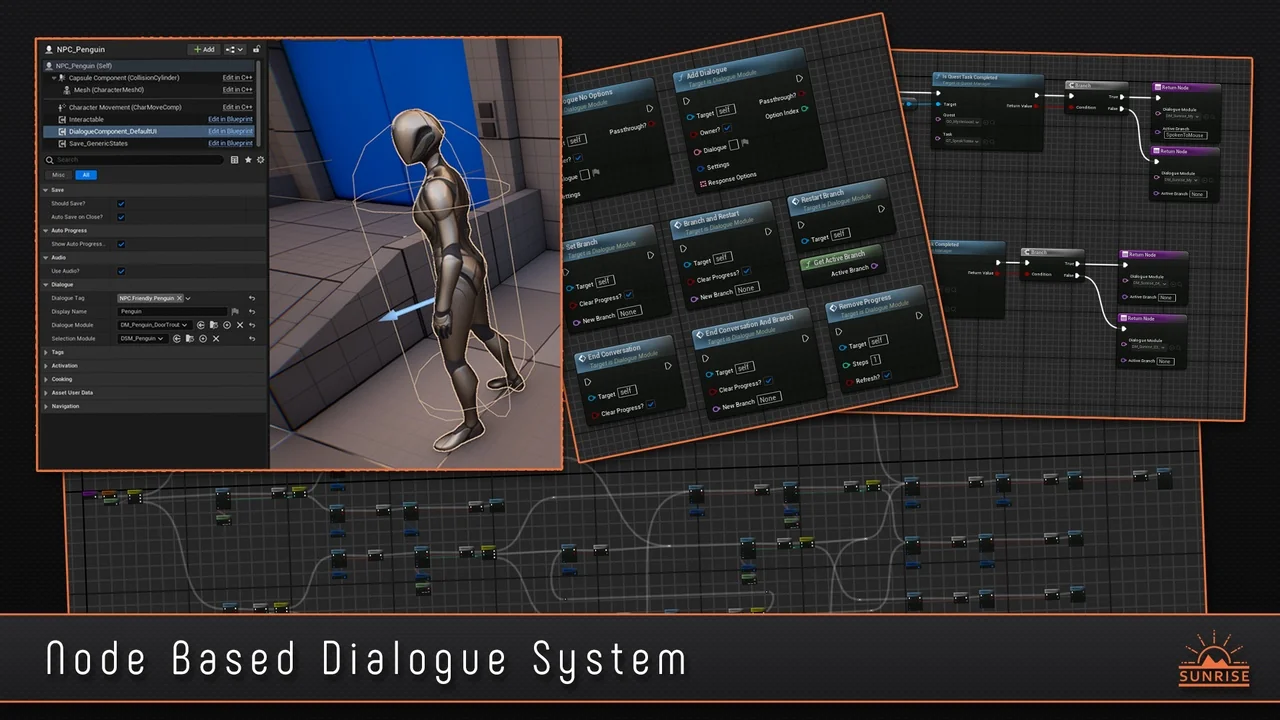
 Gameplay Features
 Engine Tools
 Gameplay Features