"7066dd76da796369"{"id":"11384","slug":"edge-bevel-decals","title":"Edge Bevel Decals","category":"Procedural Systems","engine":"4.27,5.0+","assetVersion":"Engine version: 4.27,5.0+","engineVersion":"4.20","tag":"Procedural Systems","accent":"blue","visual":"city","summary":"Edge Bevel Decals enable artists to apply beveled details to mesh edges using an editable spline system. This package features customizable materials, vertex painting for damage, and optimization tools.","platform":"Unreal Engine","publishedAt":"2026-03-05T17:11:24.000Z","updatedAt":"2026-04-19T15:48:13.000Z","sourceNotes":[],"fileContents":[],"compatibility":["Unreal Engine","Engine version: 4.27,5.0+"],"featuredImage":{"alt":"Edge Bevel Decals","src":"https://3dcghub.com/wp-content/uploads/2026/03/a1ca28b4-7853-47ca-b55b-b8dbf9d0391f.webp"},"hasDownloadLink":true,"downloads":3,"terms":[{"taxonomy":"category","slug":"procedural-systems","name":"Procedural Systems"},{"taxonomy":"post_tag","slug":"edge-bevel-decals","name":"Edge Bevel Decals"}],"galleryImages":[{"src":"https://3dcghub.com/wp-content/uploads/2026/03/4eb4bd52f1a3_e1e06bb0-4cc0-4d1e-917b-ff94db7124e7.webp","alt":"Edge Bevel Decals"},{"src":"https://3dcghub.com/wp-content/uploads/2026/03/37b1cd9a35ad_d0ef1307-f657-4f71-9fa8-8fe1d6d3b3e1.webp","alt":"Edge Bevel Decals"},{"src":"https://3dcghub.com/wp-content/uploads/2026/03/9facfabcf741_b8ca735e-e11b-4af5-81ed-18942c60cccb.webp","alt":"Edge Bevel Decals"},{"src":"https://3dcghub.com/wp-content/uploads/2026/03/70dd3a4877e1_6935ff78-90f7-4a17-8d32-8009bfef6d32.webp","alt":"Edge Bevel Decals"},{"src":"https://3dcghub.com/wp-content/uploads/2026/03/6f5250a36cdd_80a38f64-883f-4fbf-bc2a-8470c9adc69a.webp","alt":"Edge Bevel Decals"},{"src":"https://3dcghub.com/wp-content/uploads/2026/03/7cb8a02f58ee_d2cd7c1b-2f51-4bf8-b518-79091705b927.webp","alt":"Edge Bevel Decals"},{"src":"https://3dcghub.com/wp-content/uploads/2026/03/ac5b6e741f5b_6e18d6a1-1a9f-4f23-839d-62d7aa998969.webp","alt":"Edge Bevel Decals"},{"src":"https://3dcghub.com/wp-content/uploads/2026/03/fcb2a549f6b0_8e361162-52eb-4405-8e60-3547d66a9823.webp","alt":"Edge Bevel Decals"},{"src":"https://3dcghub.com/wp-content/uploads/2026/03/3d696e2ab73a_425b2644-8a82-4415-85be-09b285102f22.webp","alt":"Edge Bevel Decals"},{"src":"https://3dcghub.com/wp-content/uploads/2026/03/b20125073ff0_65ac5234-59de-4017-bf5c-a334b42e7e78.webp","alt":"Edge Bevel Decals"},{"src":"https://3dcghub.com/wp-content/uploads/2026/03/fdc167b3d512_e2c5cb97-398b-42a0-9b59-59d39d29de47.webp","alt":"Edge Bevel Decals"},{"src":"https://3dcghub.com/wp-content/uploads/2026/03/1ad50f67e7a3_564e18c9-38af-4cd2-a4f3-0025d48bb9fa.webp","alt":"Edge Bevel Decals"}],"accessPanel":{"kind":"resource","title":"Access this resource","eyebrow":"Free Download","message":"Log in or create a free account to start your download.","fileName":"Edge Bevel Decals v1.0.0 4.27,5.0 .7z","safetyNote":"All resources are 100% manually reviewed to eliminate all risks.","actionLabel":"Download Free","resourceType":"Resource archive"},"contentHtml":"\u003ch2\u003eIntroduction to Edge Bevel Decals\u003c/h2\u003e\n\u003cp\u003eEdge Bevel Decals provide a powerful solution for environment artists looking to enhance the realism of their 3D scenes. By applying specially designed decals to mesh edges, creators can achieve a convincing beveled appearance without complex modeling. This tool is particularly effective for adding detail to BSP brushes, urban environments, and modular mesh interiors.\u003c/p\u003e\n\n\u003ch2\u003eCustomizable Spline-Based Workflow\u003c/h2\u003e\n\u003cp\u003eThe core of this tool is an editable blueprint that utilizes splines. Consequently, artists can easily determine the length and shape of each decal element. This flexibility allows the decal to match the specific mesh or brush it is applied to. Furthermore, the system supports high levels of visual customization to match your project's aesthetic.\u003c/p\u003e\n\u003cul\u003e\n \u003cli\u003eChange base colors to match existing assets.\u003c/li\u003e\n \u003cli\u003eSwap detail textures for varied surfaces.\u003c/li\u003e\n \u003cli\u003eAdjust normal maps to control surface depth and detail.\u003c/li\u003e\n\u003c/ul\u003e\n\n\u003ch2\u003eDynamic Damage and Vertex Painting\u003c/h2\u003e\n\u003cp\u003eOne standout feature is the ability to paint damage directly onto every decal component. By using the editor's vertex painting tool, you can refine the look of wear and tear across your environment. Moreover, you can modify the color, tiling, and texture values of the damage to achieve a unique result. Version 2 introduces a layered damage material, which specifically simulates damage on painted surfaces.\u003c/p\u003e\n\n\u003ch2\u003eOptimization and Technical Considerations\u003c/h2\u003e\n\u003cp\u003ePerformance is a key focus for the creator of this package. Therefore, the system supports the editor's built-in merge tool. This allows you to combine multiple placed decals into a single static mesh, which effectively reduces draw calls. However, users should be aware of a specific vertex painting bug in Unreal Engine 5.2, 5.3, and 5.4. In these versions, you must merge spline meshes into a static mesh before you can paint damage on them.\u003c/p\u003e\n\n\u003ch2\u003eAdvanced Functionality in Recent Updates\u003c/h2\u003e\n\u003cp\u003eThe Edge Bevel Decals package has evolved significantly through version updates. While support was initially limited to rectilinear (90°) edges, Version 2.1 introduces additional mesh angles for greater versatility. Additionally, Version 2 includes a bonus material that allows you to pan and rotate detail textures. It also supports up to three different base textures to ensure a perfect match with your underlying meshes.\u003c/p\u003e\n\n\u003ch2\u003eClosing Notes\u003c/h2\u003e\n\u003cp\u003eEdge Bevel Decals offer a streamlined way to add high-quality edge details to modular environments. With its spline-based placement and robust damage system, it provides artists with both flexibility and visual depth. By utilizing the built-in optimization tools, you can maintain high performance while significantly increasing the detail of your 3D assets.\u003c/p\u003e\n\n\u003ch2\u003eContinue Browsing Similar Packs\u003c/h2\u003e\n\u003cul\u003e\n\u003cli\u003e\u003ca href=\"https://3dcghub.com/demonic-village-environment-demonic-medieval-village-village-medieval-3d-art/\" title=\"Demonic Village Environment ( Demonic Medieval Village Village Medieval 3D Art )\"\u003eDemonic Village Environment ( Demonic Medieval Village Village Medieval 3D Art )\u003c/a\u003e\u003c/li\u003e\n\u003cli\u003e\u003ca href=\"https://3dcghub.com/student-apartment-interior-student-apartment-interior-flat-environment-house/\" title=\"Student Apartment Interior ( Student Apartment Interior Flat Environment House )\"\u003eStudent Apartment Interior ( Student Apartment Interior Flat Environment House )\u003c/a\u003e\u003c/li\u003e\n\u003cli\u003e\u003ca href=\"https://3dcghub.com/smart-cable-connector/\" title=\"Smart Cable Connector\"\u003eSmart Cable Connector\u003c/a\u003e\u003c/li\u003e\n\u003cli\u003e\u003ca href=\"https://3dcghub.com/smart-ai/\" title=\"Smart AI\"\u003eSmart AI\u003c/a\u003e\u003c/li\u003e\n\u003cli\u003e\u003ca href=\"https://3dcghub.com/blockout-starter-pack/\" title=\"Blockout Starter Pack\"\u003eBlockout Starter Pack\u003c/a\u003e\u003c/li\u003e\n\u003c/ul\u003e","contentTextLength":2982,"navigation":{"current":3205,"total":4016,"previous":{"id":"11209","slug":"vr-input-recorder","title":"VR Input Recorder","category":"Gameplay Features","platform":"Unreal Engine","updatedAt":"2026-04-19T15:48:14.000Z"},"next":{"id":"11369","slug":"easy-rain","title":"Easy Rain","category":"Procedural Systems","platform":"Unreal Engine","updatedAt":"2026-04-19T15:48:13.000Z"}},"relatedResources":[{"id":"13961","slug":"edge-decal-tools-1-2","title":"Edge Decal Tools 1.2","category":"Engine Tools","engine":"5.6 - 5.7","assetVersion":"Engine version: 5.6 - 5.7","engineVersion":"Asset Version:1.2","tag":"Engine Tools","accent":"blue","visual":"character","summary":"Transform your environment detailing workflow with Edge Decal Tools 1.2. This script-based solution automates placement on complex geometry, ensuring high performance without the need for splines.","platform":"Unreal Engine","publishedAt":"2026-03-11T10:47:18.000Z","updatedAt":"2026-04-19T15:46:19.000Z","sourceNotes":[],"fileContents":[],"compatibility":["Unreal Engine","Engine version: 5.6 - 5.7","Asset Version: 1.2"],"featuredImage":{"alt":"Edge Decal Tools 1.2","src":"https://3dcghub.com/wp-content/uploads/2026/03/1e4e1085-5e0d-49f5-b659-ba804caa0bea.webp"},"hasDownloadLink":true,"downloads":0},{"id":"1002083","slug":"black-hole-creator","title":"Black Hole Creator","category":"Procedural Systems","engine":"4.27+,5.0+","assetVersion":"","engineVersion":"Engine Version: 4.27+,5.0+","tag":"Procedural Systems","accent":"blue","visual":"mech","summary":"Implement realistic gravitational lensing in Unreal with Black Hole Creator, using quaternion texture warping on skyboxes and cube render targets.","platform":"Unreal Engine","publishedAt":"2026-10-26T15:53:01.518Z","updatedAt":"2026-10-26T15:53:01.518Z","sourceNotes":[],"fileContents":[],"compatibility":["Unreal Engine","Engine Version: 4.27+,5.0+"],"featuredImage":{"alt":"Black Hole Creator","src":"/wp-content/uploads/published/2026/10/717b045c8602-534a731a-67c5-432d-aff8-8ddf63960422-0b2e6be61c.webp"},"hasDownloadLink":true,"downloads":0},{"id":"1000133","slug":"rain-thunder-system","title":"Rain Thunder System","category":"Procedural Systems","engine":"4.26+,5.0+","assetVersion":"","engineVersion":"Engine Version: 4.26+,5.0+","tag":"Procedural Systems","accent":"blue","visual":"mech","summary":"Rain Thunder System adds dynamic rain, thunder, mist, wetness changes, camera droplets, and a DemoMap, including a roof-edge dripping update.","platform":"Unreal Engine","publishedAt":"2026-06-11T16:58:22.935Z","updatedAt":"2026-06-11T16:58:22.935Z","sourceNotes":[],"fileContents":[],"compatibility":["Unreal Engine","Engine Version: 4.26+,5.0+"],"featuredImage":{"alt":"Rain Thunder System","src":"/wp-content/uploads/published/2026/06/38d9b7e2fff1-1123f071-2c08-4e84-8f38-544dc7f8cb69-f659ccd99a.webp"},"hasDownloadLink":true,"downloads":3}]}
Procedural Systems
Edge Bevel Decals
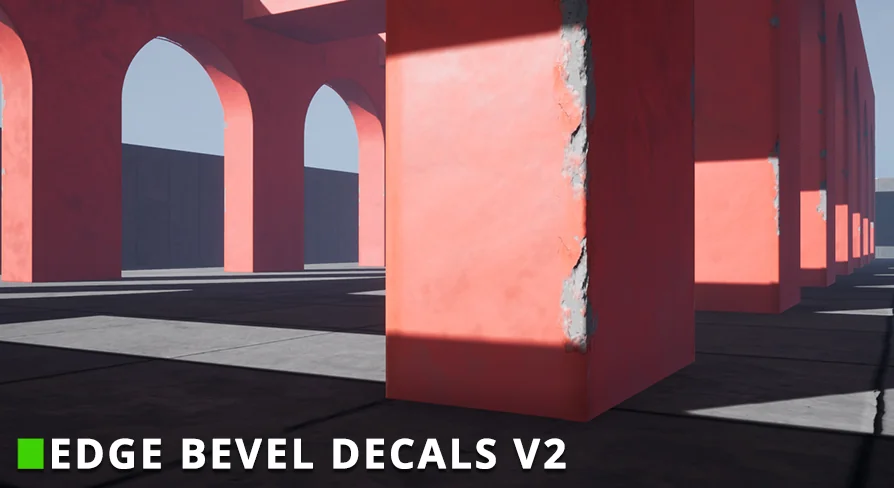
Edge Bevel Decals enable artists to apply beveled details to mesh edges using an editable spline system. This package features customizable materials, vertex painting for damage, and optimization tools.
Edge Bevel Decals provide a powerful solution for environment artists looking to enhance the realism of their 3D scenes. By applying specially designed decals to mesh edges, creators can achieve a convincing beveled appearance without complex modeling. This tool is particularly effective for adding detail to BSP brushes, urban environments, and modular mesh interiors.
Customizable Spline-Based Workflow
The core of this tool is an editable blueprint that utilizes splines. Consequently, artists can easily determine the length and shape of each decal element. This flexibility allows the decal to match the specific mesh or brush it is applied to. Furthermore, the system supports high levels of visual customization to match your project's aesthetic.
Change base colors to match existing assets.
Swap detail textures for varied surfaces.
Adjust normal maps to control surface depth and detail.
Dynamic Damage and Vertex Painting
One standout feature is the ability to paint damage directly onto every decal component. By using the editor's vertex painting tool, you can refine the look of wear and tear across your environment. Moreover, you can modify the color, tiling, and texture values of the damage to achieve a unique result. Version 2 introduces a layered damage material, which specifically simulates damage on painted surfaces.
Optimization and Technical Considerations
Performance is a key focus for the creator of this package. Therefore, the system supports the editor's built-in merge tool. This allows you to combine multiple placed decals into a single static mesh, which effectively reduces draw calls. However, users should be aware of a specific vertex painting bug in Unreal Engine 5.2, 5.3, and 5.4. In these versions, you must merge spline meshes into a static mesh before you can paint damage on them.
Advanced Functionality in Recent Updates
The Edge Bevel Decals package has evolved significantly through version updates. While support was initially limited to rectilinear (90°) edges, Version 2.1 introduces additional mesh angles for greater versatility. Additionally, Version 2 includes a bonus material that allows you to pan and rotate detail textures. It also supports up to three different base textures to ensure a perfect match with your underlying meshes.
Closing Notes
Edge Bevel Decals offer a streamlined way to add high-quality edge details to modular environments. With its spline-based placement and robust damage system, it provides artists with both flexibility and visual depth. By utilizing the built-in optimization tools, you can maintain high performance while significantly increasing the detail of your 3D assets.
 Procedural Systems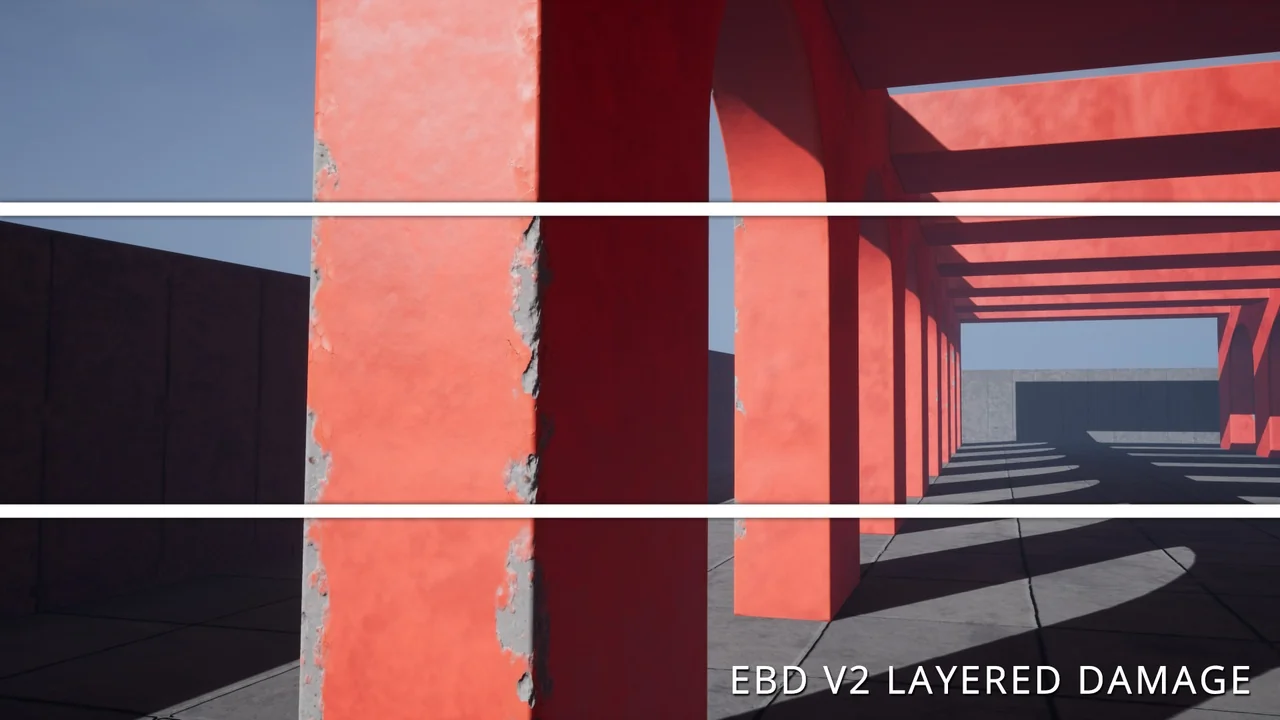
 Engine Tools
 Procedural Systems
 Procedural Systems