"7066dd76da796369"{"id":"1000133","slug":"rain-thunder-system","title":"Rain Thunder System","category":"Procedural Systems","engine":"4.26+,5.0+","assetVersion":"","engineVersion":"Engine Version: 4.26+,5.0+","tag":"Procedural Systems","accent":"blue","visual":"mech","summary":"Rain Thunder System adds dynamic rain, thunder, mist, wetness changes, camera droplets, and a DemoMap, including a roof-edge dripping update.","platform":"Unreal Engine","publishedAt":"2026-06-11T16:58:22.935Z","updatedAt":"2026-06-11T16:58:22.935Z","sourceNotes":[],"fileContents":[],"compatibility":["Unreal Engine","Engine Version: 4.26+,5.0+"],"featuredImage":{"alt":"Rain Thunder System","src":"/wp-content/uploads/published/2026/06/38d9b7e2fff1-1123f071-2c08-4e84-8f38-544dc7f8cb69-f659ccd99a.webp"},"hasDownloadLink":true,"downloads":3,"terms":[{"taxonomy":"category","slug":"procedural-systems","name":"Procedural Systems"}],"galleryImages":[{"src":"/wp-content/uploads/published/2026/06/b13ae0cdce50-e5d521ff-1bc9-4937-b0c7-cd624ae06fe9-8aa9e0ba55.webp","alt":"Rain Thunder System"},{"src":"/wp-content/uploads/published/2026/06/8aadb5bf76e0-2f0571da-67ef-4eeb-a641-868c960a626e-ec1758eb1c.webp","alt":"Rain Thunder System"},{"src":"/wp-content/uploads/published/2026/06/de73ab95ef8d-75e78859-786a-4943-a241-f03fc63f2e76-6d7c683499.webp","alt":"Rain Thunder System"},{"src":"/wp-content/uploads/published/2026/06/cda2e9e84aeb-fd17ad57-d630-4037-84f4-8b11f98d62e8-bd1c23164a.webp","alt":"Rain Thunder System"},{"src":"/wp-content/uploads/published/2026/06/7a227965083f-835ef479-b4a1-4fb5-84a5-ebf8548f2816-331bb90a6c.webp","alt":"Rain Thunder System"},{"src":"/wp-content/uploads/published/2026/06/cabe1df220c8-820aabc7-b622-4618-9015-dadd296e799e-60c004a7d5.webp","alt":"Rain Thunder System"},{"src":"/wp-content/uploads/published/2026/06/db22b77eac05-ba1b6831-7c48-46b7-b66c-6f32476e8520-b7b616a19f.webp","alt":"Rain Thunder System"},{"src":"/wp-content/uploads/published/2026/06/d87872383c4a-32fc3a8a-76f8-44a8-9b76-e758d72198b4-a21ff86bb5.webp","alt":"Rain Thunder System"},{"src":"/wp-content/uploads/published/2026/06/dd80373a2e7f-f5d57f6f-701b-4cbd-b362-7d2b762af4e4-cecf475242.webp","alt":"Rain Thunder System"},{"src":"/wp-content/uploads/published/2026/06/755244e1d48f-80756602-419e-4e72-85b6-9590b3a1b9a0-fad944cf1c.webp","alt":"Rain Thunder System"}],"accessPanel":{"kind":"resource","title":"Download this resource","eyebrow":"Free Download","message":"Log in or create a free account to start your download.","fileName":"Rain Thunder System.7z","safetyNote":"Resources are manually reviewed before listing to improve quality and reduce obvious risks.","actionLabel":"Download Free","resourceType":"Resource archive"},"contentHtml":"\u003cp\u003eGetting rain into a game often means dealing with more than a particle emitter. The useful part is how many surrounding effects respond at the same time: sound, atmosphere, screen interaction, and the look of the environment after the storm begins. Rain Thunder System approaches that workflow as a dynamic system, letting rain start, intensify, and stop while the world reacts along with it.\u003c/p\u003e \u003cp\u003eThe pack is presented as a way to implement a dynamic rain system in a game. When rain is activated, rain particles and sounds are activated as well, and world wetness gradually increases instead of changing all at once. When the rain ends, the environment dries again within a short period of time. That cycle gives the weather event a beginning, a visible active state, and a recovery phase rather than leaving the scene locked in one permanent condition.\u003c/p\u003e \u003ch2\u003eDynamic rain system setup in play\u003c/h2\u003e\n\u003cp\u003eThe most immediate implementation detail is that rain is not isolated from the rest of the presentation. Turning it on also turns on its supporting effects. Rain particles handle the visible fall of water, while sounds reinforce the weather event as part of the same change. The world wetness then ramps up gradually, which helps the environment move from dry to storm-affected in steps instead of a hard switch.\u003c/p\u003e \u003cp\u003eThat gradual wetness change matters because it makes the system feel like a weather state rather than a visual overlay. A scene can begin dry, move into active rainfall, and show the surfaces becoming wetter over time. Once rain stops, the environment does not remain frozen in the wet state. It dries within a short period, closing the loop and making repeated weather changes easier to stage.\u003c/p\u003e \u003cp\u003eThere is also an example DemoMap included. For implementation and testing, that kind of sample space gives a direct place to see how the weather cycle behaves when activated and when turned off again. A pack shaped by changing atmospheric conditions benefits from having a map that shows those transitions in motion, especially when wetness, mist, thunder, and screen effects all need to read together.\u003c/p\u003e \u003ch2\u003eHeavy/Light rain levels drive thunder and mist\u003c/h2\u003e\n\u003cp\u003eRain Thunder System does not treat every rainfall state the same way. Thunder and mist appear according to rain level, with Heavy and Light states explicitly mentioned. That means the system distinguishes between at least two intensities, and those intensities affect more than the amount of rain alone.\u003c/p\u003e \u003cp\u003eHeavy and Light rain levels create a practical control point for how the scene feels. A lighter state can support a softer weather moment, while a heavier state can push the atmosphere further through thunder and mist. Since those elements are tied to rain level, the system reads less like separate effects placed by hand and more like coordinated parts of the same weather logic.\u003c/p\u003e \u003cp\u003eThis also gives a clearer implementation path for anyone trying to create variation inside one environment. Instead of having only a single rain look, there are named levels that influence associated effects. Thunder and mist are not always on in the same way; they appear according to how strong the rain is meant to be. That makes the weather behavior more flexible without needing to describe it as a purely visual preset.\u003c/p\u003e \u003cp\u003eTwo demo views are noted as well: a demo with FX and a demo without FX. Even without extra technical explanation, that distinction suggests a way to compare the weather presentation with and without its additional effects in view. For a system that combines multiple atmospheric elements, seeing those states separately can help clarify what each layer contributes.\u003c/p\u003e \u003ch2\u003eWater droplets, leaks, and the player camera surface\u003c/h2\u003e\n\u003cp\u003eOne of the more specific details in the pack is how moisture reaches the player-facing view. Water droplets and leaks start to appear on the screen or on the surface of the player camera. That moves the effect beyond the environment and into the player’s immediate visual space.\u003c/p\u003e \u003cp\u003eIt is a small detail in wording, but it has a strong impact on usage. Rain outside the camera can establish weather, while droplets or leaks on the screen or camera surface make that weather feel closer and more physical. Instead of only watching rain in the distance, the player view shows signs of exposure to it.\u003c/p\u003e \u003cp\u003eThat kind of effect works naturally with the rest of the system’s timing. As rain becomes active and the world wetness increases, the camera-related moisture can reinforce that same transition. The rain is not only changing the map; it is also changing what the player sees through. When the environment dries after the weather stops, that larger sense of the storm passing can be read across multiple layers of the presentation.\u003c/p\u003e \u003cp\u003eBecause the camera droplets and leaks are mentioned alongside thunder, mist, rain particles, and wetness, they fit within the same weather event rather than standing apart as an unrelated post effect. The package then offers a more unified storm presentation, where atmosphere, surface response, and player-facing moisture all contribute to the same condition.\u003c/p\u003e \u003ch2\u003eSeptember 2023 roof edges update\u003c/h2\u003e\n\u003cp\u003eThe September 2023 update adds a rain dripping on roof edges function. That is a very concrete addition, and it says a lot about the direction of the system. The weather effects are not limited to rainfall in open space or broad environmental wetness. They also extend to how water behaves around architecture.\u003c/p\u003e \u003cp\u003eRoof-edge dripping helps bridge the gap between a rain effect and a scene reacting to rain. When water gathers and drips from roof edges, the environment starts to show location-specific behavior rather than only general storm coverage. That can make covered spaces, building exteriors, and transitions between sheltered and unsheltered areas feel more believable.\u003c/p\u003e \u003cp\u003eIn practical use, this function supports scenes where roofs are visually important parts of the environment. Even a simple structure can read differently when rain runoff is visible at the edge line. It is a focused feature rather than a broad rewrite of the system, but it strengthens the sense that the weather is interacting with the level rather than just passing through it.\u003c/p\u003e \u003cp\u003eThe fact that this function appears as an update also shows continued attention to the weather behavior after the original release. For anyone evaluating how complete the storm presentation feels, roof-edge dripping adds another environmental cue that works alongside wetness, mist, and the camera moisture effects.\u003c/p\u003e \u003ch2\u003eScript, Blueprint, Particle workflow and the included DemoMap\u003c/h2\u003e\n\u003cp\u003eThe pack is tagged with Script, Blueprint, and Particle. Those tags frame the kind of workflow it belongs to. This is not described as a single static effect dropped into a scene with no surrounding logic. The weather behavior includes scripted or blueprint-driven changes and particle-based visual elements working together.\u003c/p\u003e \u003cp\u003eThis helps because the system’s key behaviors are state changes over time. Rain starts. Particles and sounds activate. Wetness increases gradually. Thunder and mist respond to Heavy or Light rain levels. Droplets and leaks appear on the screen or camera surface. Then the environment dries after the rain stops. A script or blueprint-oriented setup makes sense for a pack where timing and response are central to the result.\u003c/p\u003e \u003cp\u003eThe included example DemoMap supports that workflow by giving a concrete place to inspect how those connected elements behave together. A weather system is easier to judge when it can be seen in operation rather than reduced to isolated parts. Demo material can help separate the core rain behavior from the optional viewing of extra effects, especially when both a demo with FX and a demo without FX are noted.\u003c/p\u003e \u003cp\u003eA preview and a tutorial are also mentioned. In a pack like this, those materials are useful because the system is about interaction between multiple weather layers rather than one isolated asset. Seeing how the rain, thunder, mist, wetness, and camera moisture come together can make setup and adaptation more straightforward.\u003c/p\u003e \u003cp\u003eRain Thunder System stays focused on a specific job: introducing a weather state that affects particles, sound, environmental wetness, atmospheric conditions, and the player view, then returning the scene to a drier state after the storm passes. The added roof-edge dripping function and the included DemoMap make it easier to see the pack as a working weather setup beyond one rain effect on its own.\u003c/p\u003e\n\n\u003ch2\u003eExplore Similar Assets\u003c/h2\u003e\n\u003cul\u003e\n\u003cli\u003e\u003ca href=\"https://3dcghub.com/easy-rain/\" title=\"Easy Rain\"\u003eEasy Rain\u003c/a\u003e\u003c/li\u003e\n\u003cli\u003e\u003ca href=\"https://3dcghub.com/water-interact-system/\" title=\"Water Interact System\"\u003eWater Interact System\u003c/a\u003e\u003c/li\u003e\n\u003cli\u003e\u003ca href=\"https://3dcghub.com/beefy-water-hole-water-system/\" title=\"Beefy Water Hole (Water System)\"\u003eBeefy Water Hole (Water System)\u003c/a\u003e\u003c/li\u003e\n\u003cli\u003e\u003ca href=\"https://3dcghub.com/shadersource-procedural-water-foliage-tool/\" title=\"SHADERSOURCE - Procedural Water Foliage Tool\"\u003eSHADERSOURCE - Procedural Water Foliage Tool\u003c/a\u003e\u003c/li\u003e\n\u003cli\u003e\u003ca href=\"https://3dcghub.com/fluid-flux/\" title=\"Fluid Flux\"\u003eFluid Flux\u003c/a\u003e\u003c/li\u003e\n\u003c/ul\u003e","contentTextLength":8562,"navigation":{"current":2034,"total":4016,"previous":{"id":"1000134","slug":"rain-effects","title":"Rain Effects","category":"Weather","platform":"Unreal Engine","updatedAt":"2026-06-12T07:28:51.718Z"},"next":{"id":"1000132","slug":"post-soviet-flat","title":"Post Soviet Flat","category":"Interior","platform":"Unreal Engine","updatedAt":"2026-06-11T16:53:42.437Z"}},"relatedResources":[{"id":"11369","slug":"easy-rain","title":"Easy Rain","category":"Procedural Systems","engine":"5.4+","assetVersion":"Engine version: 5.4+","engineVersion":"5.3","tag":"Procedural Systems","accent":"blue","visual":"luts","summary":"Easy Rain is a comprehensive Blueprint system that harnesses Niagara particles to create photorealistic weather effects. From light drizzles to stormy summer downpours, this tool offers high performance and deep customization for artists.","platform":"Unreal Engine","publishedAt":"2026-03-05T17:09:01.000Z","updatedAt":"2026-04-19T15:48:13.000Z","sourceNotes":[],"fileContents":[],"compatibility":["Unreal Engine","Engine version: 5.4+"],"featuredImage":{"alt":"Easy Rain","src":"https://3dcghub.com/wp-content/uploads/2026/03/fbfa88dc-7eef-45e3-867c-fad1aa6421d1.webp"},"hasDownloadLink":true,"downloads":5},{"id":"11632","slug":"water-interact-system","title":"Water Interact System","category":"Procedural Systems","engine":"5.5+","assetVersion":"Engine version: 5.5+","engineVersion":"4.27","tag":"Procedural Systems","accent":"blue","visual":"luts","summary":"Enhance your game environments with the Water Interact System, featuring three unique lakes and dynamic interactions for characters, boats, and rain.","platform":"Unreal Engine","publishedAt":"2026-03-05T18:04:35.000Z","updatedAt":"2026-04-19T15:48:09.000Z","sourceNotes":[],"fileContents":[],"compatibility":["Unreal Engine","Engine version: 5.5+"],"featuredImage":{"alt":"Water Interact System","src":"https://3dcghub.com/wp-content/uploads/2026/03/d2961b0e-ba1f-47b9-9345-b2b0cf2e681e.webp"},"hasDownloadLink":true,"downloads":2},{"id":"1000779","slug":"beefy-bass-niagara-fish-system","title":"Beefy Bass (Niagara Fish System)","category":"Procedural Systems","engine":"4.26+,5.0+","assetVersion":"","engineVersion":"Engine Version: 4.26+,5.0+","tag":"Procedural Systems","accent":"blue","visual":"mech","summary":"Unreal 5.2 Niagara fish system with five freshwater species, reusable stylized materials, and five flocking behavior modes for populating water environments.","platform":"Unreal Engine","publishedAt":"2026-07-29T15:47:27.384Z","updatedAt":"2026-07-29T15:47:27.384Z","sourceNotes":[],"fileContents":[],"compatibility":["Unreal Engine","Engine Version: 4.26+,5.0+"],"featuredImage":{"alt":"Beefy Bass (Niagara Fish System)","src":"/wp-content/uploads/published/2026/07/8b74a6c2ec35-48c0ff12-97e7-440c-86be-4f6286f215e3-dc328a73ef.webp"},"hasDownloadLink":true,"downloads":2}]}
Procedural Systems
Rain Thunder System
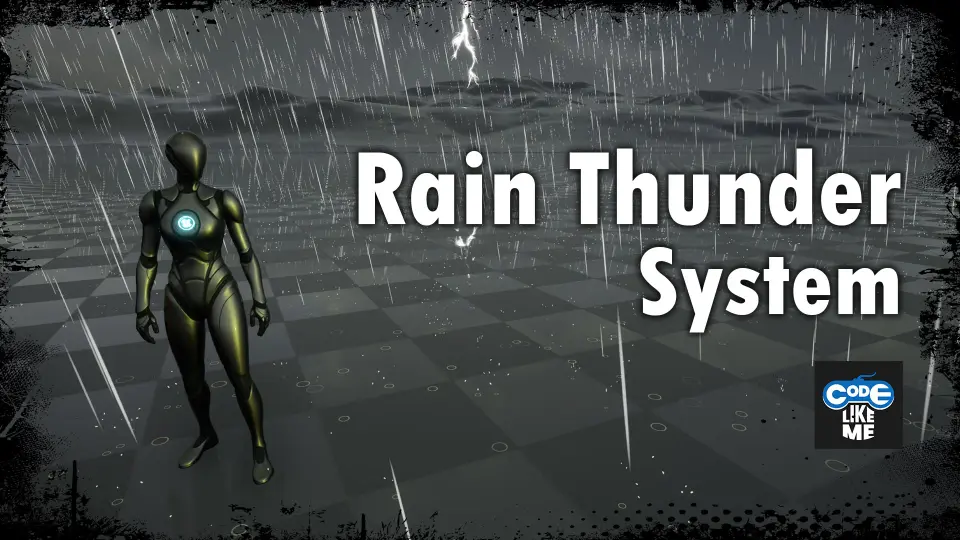
Rain Thunder System adds dynamic rain, thunder, mist, wetness changes, camera droplets, and a DemoMap, including a roof-edge dripping update.
Getting rain into a game often means dealing with more than a particle emitter. The useful part is how many surrounding effects respond at the same time: sound, atmosphere, screen interaction, and the look of the environment after the storm begins. Rain Thunder System approaches that workflow as a dynamic system, letting rain start, intensify, and stop while the world reacts along with it.
The pack is presented as a way to implement a dynamic rain system in a game. When rain is activated, rain particles and sounds are activated as well, and world wetness gradually increases instead of changing all at once. When the rain ends, the environment dries again within a short period of time. That cycle gives the weather event a beginning, a visible active state, and a recovery phase rather than leaving the scene locked in one permanent condition.
Dynamic rain system setup in play
The most immediate implementation detail is that rain is not isolated from the rest of the presentation. Turning it on also turns on its supporting effects. Rain particles handle the visible fall of water, while sounds reinforce the weather event as part of the same change. The world wetness then ramps up gradually, which helps the environment move from dry to storm-affected in steps instead of a hard switch.
That gradual wetness change matters because it makes the system feel like a weather state rather than a visual overlay. A scene can begin dry, move into active rainfall, and show the surfaces becoming wetter over time. Once rain stops, the environment does not remain frozen in the wet state. It dries within a short period, closing the loop and making repeated weather changes easier to stage.
There is also an example DemoMap included. For implementation and testing, that kind of sample space gives a direct place to see how the weather cycle behaves when activated and when turned off again. A pack shaped by changing atmospheric conditions benefits from having a map that shows those transitions in motion, especially when wetness, mist, thunder, and screen effects all need to read together.
Heavy/Light rain levels drive thunder and mist
Rain Thunder System does not treat every rainfall state the same way. Thunder and mist appear according to rain level, with Heavy and Light states explicitly mentioned. That means the system distinguishes between at least two intensities, and those intensities affect more than the amount of rain alone.
Heavy and Light rain levels create a practical control point for how the scene feels. A lighter state can support a softer weather moment, while a heavier state can push the atmosphere further through thunder and mist. Since those elements are tied to rain level, the system reads less like separate effects placed by hand and more like coordinated parts of the same weather logic.
This also gives a clearer implementation path for anyone trying to create variation inside one environment. Instead of having only a single rain look, there are named levels that influence associated effects. Thunder and mist are not always on in the same way; they appear according to how strong the rain is meant to be. That makes the weather behavior more flexible without needing to describe it as a purely visual preset.
Two demo views are noted as well: a demo with FX and a demo without FX. Even without extra technical explanation, that distinction suggests a way to compare the weather presentation with and without its additional effects in view. For a system that combines multiple atmospheric elements, seeing those states separately can help clarify what each layer contributes.
Water droplets, leaks, and the player camera surface
One of the more specific details in the pack is how moisture reaches the player-facing view. Water droplets and leaks start to appear on the screen or on the surface of the player camera. That moves the effect beyond the environment and into the player’s immediate visual space.
It is a small detail in wording, but it has a strong impact on usage. Rain outside the camera can establish weather, while droplets or leaks on the screen or camera surface make that weather feel closer and more physical. Instead of only watching rain in the distance, the player view shows signs of exposure to it.
That kind of effect works naturally with the rest of the system’s timing. As rain becomes active and the world wetness increases, the camera-related moisture can reinforce that same transition. The rain is not only changing the map; it is also changing what the player sees through. When the environment dries after the weather stops, that larger sense of the storm passing can be read across multiple layers of the presentation.
Because the camera droplets and leaks are mentioned alongside thunder, mist, rain particles, and wetness, they fit within the same weather event rather than standing apart as an unrelated post effect. The package then offers a more unified storm presentation, where atmosphere, surface response, and player-facing moisture all contribute to the same condition.
September 2023 roof edges update
The September 2023 update adds a rain dripping on roof edges function. That is a very concrete addition, and it says a lot about the direction of the system. The weather effects are not limited to rainfall in open space or broad environmental wetness. They also extend to how water behaves around architecture.
Roof-edge dripping helps bridge the gap between a rain effect and a scene reacting to rain. When water gathers and drips from roof edges, the environment starts to show location-specific behavior rather than only general storm coverage. That can make covered spaces, building exteriors, and transitions between sheltered and unsheltered areas feel more believable.
In practical use, this function supports scenes where roofs are visually important parts of the environment. Even a simple structure can read differently when rain runoff is visible at the edge line. It is a focused feature rather than a broad rewrite of the system, but it strengthens the sense that the weather is interacting with the level rather than just passing through it.
The fact that this function appears as an update also shows continued attention to the weather behavior after the original release. For anyone evaluating how complete the storm presentation feels, roof-edge dripping adds another environmental cue that works alongside wetness, mist, and the camera moisture effects.
Script, Blueprint, Particle workflow and the included DemoMap
The pack is tagged with Script, Blueprint, and Particle. Those tags frame the kind of workflow it belongs to. This is not described as a single static effect dropped into a scene with no surrounding logic. The weather behavior includes scripted or blueprint-driven changes and particle-based visual elements working together.
This helps because the system’s key behaviors are state changes over time. Rain starts. Particles and sounds activate. Wetness increases gradually. Thunder and mist respond to Heavy or Light rain levels. Droplets and leaks appear on the screen or camera surface. Then the environment dries after the rain stops. A script or blueprint-oriented setup makes sense for a pack where timing and response are central to the result.
The included example DemoMap supports that workflow by giving a concrete place to inspect how those connected elements behave together. A weather system is easier to judge when it can be seen in operation rather than reduced to isolated parts. Demo material can help separate the core rain behavior from the optional viewing of extra effects, especially when both a demo with FX and a demo without FX are noted.
A preview and a tutorial are also mentioned. In a pack like this, those materials are useful because the system is about interaction between multiple weather layers rather than one isolated asset. Seeing how the rain, thunder, mist, wetness, and camera moisture come together can make setup and adaptation more straightforward.
Rain Thunder System stays focused on a specific job: introducing a weather state that affects particles, sound, environmental wetness, atmospheric conditions, and the player view, then returning the scene to a drier state after the storm passes. The added roof-edge dripping function and the included DemoMap make it easier to see the pack as a working weather setup beyond one rain effect on its own.
 Procedural Systems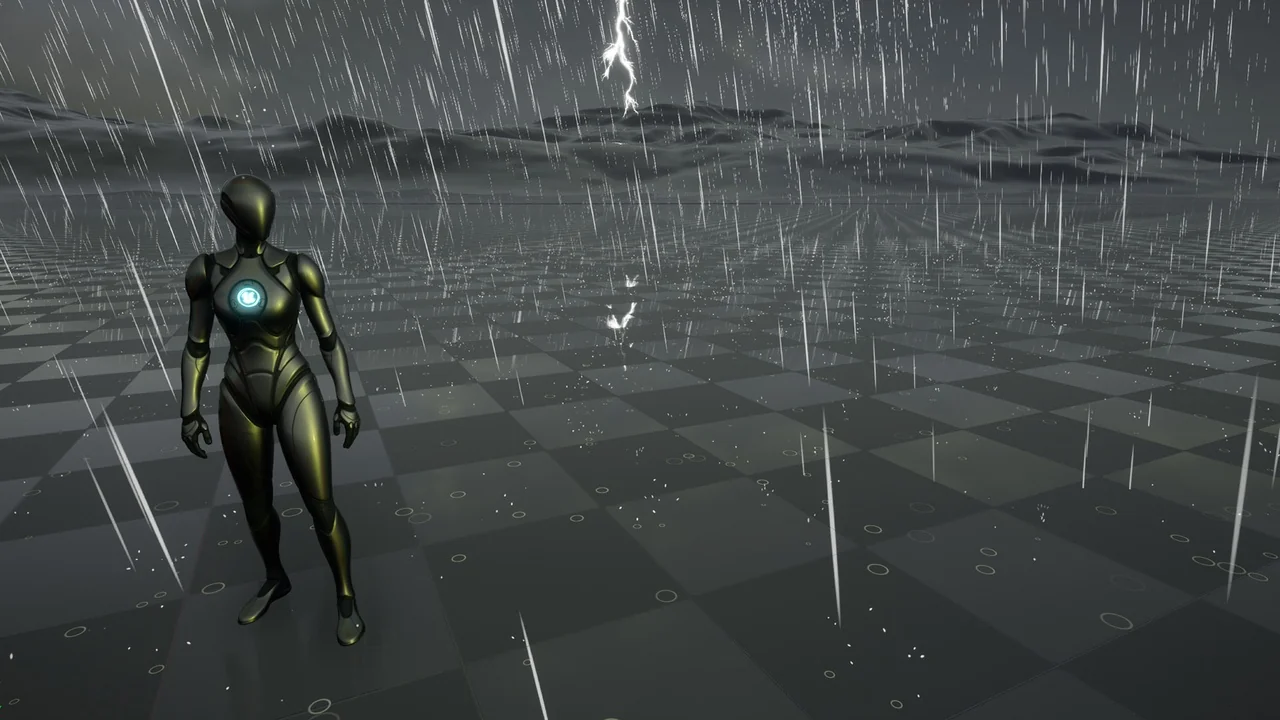
 Procedural Systems
 Procedural Systems
 Procedural Systems