"7066dd76da796369"{"id":"1000134","slug":"rain-effects","title":"Rain Effects","category":"Weather","engine":"4.26+,5.0+","assetVersion":"","engineVersion":"Engine Version: 4.26+,5.0+","tag":"Weather","accent":"blue","visual":"mech","summary":"Rain Effects for Unreal Engine simulates rain, surface and glass droplets, ground ripples, camera drops, and a small waterfall for games and archviz.","platform":"Unreal Engine","publishedAt":"2026-06-12T07:28:51.718Z","updatedAt":"2026-06-12T07:28:51.718Z","sourceNotes":[],"fileContents":[],"compatibility":["Unreal Engine","Engine Version: 4.26+,5.0+"],"featuredImage":{"alt":"Rain Effects","src":"/wp-content/uploads/published/2026/06/59452ed7ebcb-830af71b-bff3-4d1b-b821-a19853936e43-2dab9bd27d.webp"},"hasDownloadLink":true,"downloads":2,"terms":[{"taxonomy":"category","slug":"weather-vfx","name":"Weather"}],"galleryImages":[{"src":"/wp-content/uploads/published/2026/06/e4d4366fbbf8-4309e0dd-c7b0-4fd2-af7e-db86aa2072b3-e6e4abf505.webp","alt":"Rain Effects"},{"src":"/wp-content/uploads/published/2026/06/786e435133b1-c0efc8ae-2577-42b5-aa07-6a3db2da4d12-2b408e10fa.webp","alt":"Rain Effects"},{"src":"/wp-content/uploads/published/2026/06/1bd02a71b9f5-a4f1d661-cd42-422a-9982-e370be812647-74c753812e.webp","alt":"Rain Effects"},{"src":"/wp-content/uploads/published/2026/06/1b59f8182454-2585ee84-d598-4ce9-8b86-0028688d228e-74f716c321.webp","alt":"Rain Effects"},{"src":"/wp-content/uploads/published/2026/06/bf495cf512a2-efb611e4-e725-47d6-9424-cb924e6c7f7a-7e7709e229.webp","alt":"Rain Effects"},{"src":"/wp-content/uploads/published/2026/06/d4e8e7a0aac3-07db6842-f0ff-424f-ab0f-c2490d6a236a-87b6ba5213.webp","alt":"Rain Effects"},{"src":"/wp-content/uploads/published/2026/06/d493e1e4fd31-d53dfc01-fc8f-4e5e-a29f-03f8a844f6bb-1a83f5a8d0.webp","alt":"Rain Effects"},{"src":"/wp-content/uploads/published/2026/06/2e81592610ad-660bb831-3de3-4353-8998-132cca2483c6-22d6c8f57a.webp","alt":"Rain Effects"}],"accessPanel":{"kind":"resource","title":"Download this resource","eyebrow":"Free Download","message":"Log in or create a free account to start your download.","fileName":"Content.7z","safetyNote":"Resources are manually reviewed before listing to improve quality and reduce obvious risks.","actionLabel":"Download Free","resourceType":"Resource archive"},"contentHtml":"\u003cp\u003eRain in a scene rarely works as a single effect. It needs to fall through space, collect on surfaces, react on glass, disturb the ground with ripples, and sometimes hit the camera itself. Rain Effects approaches that broader problem inside Unreal Engine by treating rainfall as a set of connected tools rather than one isolated visual pass.\u003c/p\u003e\n\u003cp\u003eThe package is focused on simulating realistic rain effects in Unreal Engine. Its scope covers the main pieces that make wet weather feel present in motion: the rain effect itself, raindrops on surfaces and glass, ripple effects on the ground, raindrops on the camera, and a small waterfall. That combination makes it useful when a project needs weather to read at several distances at once, from wide environmental shots down to close views where droplets and impact details matter.\u003c/p\u003e\n\u003cp\u003eIts presentation is also fairly direct about what is and is not included. The trailer material is made with the Rain FX package, but the environment, character, and sound are not part of the package. That keeps the focus on the effects work itself rather than on surrounding scene assets.\u003c/p\u003e \u003ch2\u003eRain Effects across scene surfaces and camera views\u003c/h2\u003e\n\u003cp\u003eThe most practical way to understand this resource is by looking at where the rain appears. The core rain effect handles the weather in open space, but the package does not stop there. It also addresses the surfaces that sell the condition of a storm or steady rainfall once the drops begin interacting with the world.\u003c/p\u003e\n\u003cp\u003eRaindrops on the surface and on glass are both explicitly part of the set. Those two targets matter for different reasons. Surface droplets help exterior materials feel exposed to the weather, while glass droplets shift the effect toward windows, screens, and other transparent barriers where rain often becomes a foreground element. Ground ripple effects extend the same idea to horizontal areas, giving the weather a visible reaction where water impacts accumulate.\u003c/p\u003e\n\u003cp\u003eRaindrops on the camera push the effect one step closer to the viewer. In interactive scenes and cinematic framing alike, that layer changes the sense of proximity. Instead of rain staying in the background as an environmental condition, it becomes something the viewpoint is moving through. The inclusion of a small waterfall broadens the package from rainfall alone into a related water feature that can support wetter spaces and denser atmospheric setups.\u003c/p\u003e \u003ch2\u003eNiagara workflow and cinematic setup\u003c/h2\u003e\n\u003cp\u003eRain Effects includes a specific note for cinematic use. The stated workflow is simple: find and open the Niagara_Emitter system, then uncheck everything under Scalability. That instruction is narrow, but it is concrete, and it tells users exactly where the package expects an adjustment when the goal is a cinematic result.\u003c/p\u003e\n\u003cp\u003eThat detail says a lot about implementation. First, the effect is tied to a Niagara-based workflow, which fits the package tags and the setup note. Second, the cinematic guidance is not framed as a broad creative recommendation. It is a direct change inside the emitter settings, which makes it a practical step for teams testing shot quality and trying to understand why the effect may behave differently under different scalability conditions.\u003c/p\u003e\n\u003cp\u003eBecause the package emphasizes full control and ease of use, that cinematic note reads less like a hidden workaround and more like part of the expected setup path when moving from general scene use into more controlled rendering situations. Users evaluating the package for sequence work will likely pay close attention to that single instruction, since it is the one explicit operational step given for a specialized output context.\u003c/p\u003e \u003ch2\u003eReady for games and architectural visualization\u003c/h2\u003e\n\u003cp\u003eThe intended project range is clearly stated: Rain Effects is ready for games and architectural visualization. Those two areas often ask for different kinds of rain presentation, even when they share the same underlying weather logic.\u003c/p\u003e\n\u003cp\u003eIn a game context, the value is in stacking several readable rain cues without reducing the scene to only a falling particle pass. Camera raindrops, ground ripples, and droplets on glass can all help weather remain legible while the player moves through an area. The package’s focus on realistic, optimized, and easy-to-use effects also fits projects where rain must be present as part of an active scene rather than only as a still image element.\u003c/p\u003e\n\u003cp\u003eIn architectural visualization, the same tools support a different kind of viewing. Glass droplets and ripple effects can contribute strongly to exterior mood, window shots, and wet-surface atmosphere. A small waterfall also gives room for scenes where water features are part of the environment. Since the package is presented as realistic and offering full control, it aligns with workflows where visual adjustments need to be made to suit a specific space, weather intensity, or camera position.\u003c/p\u003e\n\u003cp\u003eThose use cases stay grounded in the same named effect set. Nothing here suggests a different product for different industries. Instead, the same rain behaviors are framed as suitable for both real-time game scenes and archviz presentation.\u003c/p\u003e \u003ch2\u003eRealistic, optimized, and easy to use\u003c/h2\u003e\n\u003cp\u003eThree qualities are called out directly: realistic, optimized, and easy to use. A fourth, full control, matters just as much because rain is rarely a one-size-fits-all element. Scenes vary widely in scale and in how visible weather should be. Some need rain to dominate the shot; others need it to stay subtle while still affecting glass, pavement, or the camera.\u003c/p\u003e\n\u003cp\u003e“Realistic” is supported here by the spread of included behaviors rather than by any unlisted technical metric. The package does not only simulate rainfall in the air. It also covers what rain does when it meets different surfaces and the viewer’s perspective. That is where much of the natural feel comes from.\u003c/p\u003e\n\u003cp\u003e“Optimized” and “easy to use” are presented as practical characteristics, not as a benchmark claim. No detailed performance figures are provided, so the safest reading is that the package is intended to be usable in production scenes without a complicated setup burden. The mention of full control reinforces that this is not a locked visual preset. Users are expected to work with the tools and adjust them for their own scenes.\u003c/p\u003e\n\u003cp\u003eThe package is also presented alongside water, rain, and waterfall effects as part of a complete set. Read narrowly, that complements the included small waterfall and keeps the focus on related wet-environment simulation rather than on unrelated effects categories.\u003c/p\u003e \u003ch2\u003eTechnical demos, updates, and one clear limitation\u003c/h2\u003e\n\u003cp\u003eRain Effects is accompanied by a trailer, a technical demo, a playable demo, a tutorial, and at least two named updates: Update01 and Update02. That mix suggests the package is not only shown visually but also demonstrated in more than one practical format. A technical demo points toward implementation visibility, a playable demo points toward scene interaction, and a tutorial gives users a path into setup and use.\u003c/p\u003e\n\u003cp\u003eThe most important compatibility note is also very specific: path tracing does not support it. That limitation should be read plainly. If a project depends on path tracing for its final output or look development, this package carries an explicit constraint. For teams comparing render paths or testing a weather solution across multiple pipelines, that single statement may be one of the first things to verify in their own environment.\u003c/p\u003e\n\u003cp\u003eThe presence of updates matters here as well, though only in a restrained way. The package has Update01 and Update02 identified by name, which indicates ongoing revision history without adding any undocumented claims about what changed. That is useful context for users who want to know whether the toolset has seen follow-up attention beyond its initial release materials.\u003c/p\u003e \u003ch2\u003eRain Effects as a scene-building tool\u003c/h2\u003e\n\u003cp\u003eThe strongest takeaway is that Rain Effects is not limited to a single visual trick. It covers rainfall, droplets on surfaces and glass, ripples on the ground, camera raindrops, and a small waterfall inside Unreal Engine, with a Niagara-based cinematic setup note and a clear warning that path tracing is not supported.\u003c/p\u003e\n\u003cp\u003eFor teams deciding whether it fits a production, the practical question is straightforward: if the project needs rain to interact with the world, the view, and wet-environment details rather than only fall through the air, this package addresses those exact areas while staying aimed at games and architectural visualization.\u003c/p\u003e\n\n\u003ch2\u003eContinue Browsing Similar Packs\u003c/h2\u003e\n\u003cul\u003e\n\u003cli\u003e\u003ca href=\"https://3dcghub.com/natural-and-insects-p1/\" title=\"Natural And Insects P1\"\u003eNatural And Insects P1\u003c/a\u003e\u003c/li\u003e\n\u003cli\u003e\u003ca href=\"https://3dcghub.com/lightning-electric-effect-alembics-pack/\" title=\"Lightning \u0026amp; Electric Effect Alembics Pack\"\u003eLightning \u0026amp; Electric Effect Alembics Pack\u003c/a\u003e\u003c/li\u003e\n\u003cli\u003e\u003ca href=\"https://3dcghub.com/desert-and-snow-vdb-collection/\" title=\"Desert \u0026amp; Snow VDB Collection\"\u003eDesert \u0026amp; Snow VDB Collection\u003c/a\u003e\u003c/li\u003e\n\u003cli\u003e\u003ca href=\"https://3dcghub.com/ambient-fx-in-unreal-engine/\" title=\"Ambient Fx in Unreal Engine\"\u003eAmbient Fx in Unreal Engine\u003c/a\u003e\u003c/li\u003e\n\u003cli\u003e\u003ca href=\"https://3dcghub.com/sand-vfx/\" title=\"Sand VFX\"\u003eSand VFX\u003c/a\u003e\u003c/li\u003e\n\u003c/ul\u003e","contentTextLength":8671,"navigation":{"current":2033,"total":4016,"previous":{"id":"1000135","slug":"rpg-monster-wave-2-polyart","title":"RPG Monster Wave 2 Polyart","category":"Creatures","platform":"Unity","updatedAt":"2026-06-12T07:35:29.720Z"},"next":{"id":"1000133","slug":"rain-thunder-system","title":"Rain Thunder System","category":"Procedural Systems","platform":"Unreal Engine","updatedAt":"2026-06-11T16:58:22.935Z"}},"relatedResources":[{"id":"1001731","slug":"good-fx-rain","title":"Good FX : Rain","category":"Weather","engine":"4.25+,5.0+","assetVersion":"","engineVersion":"Engine Version: 4.25+,5.0+","tag":"Weather","accent":"blue","visual":"mech","summary":"Good FX: Rain delivers a drag-and-drop Niagara rain and splash simulation with Blueprint controls for spawn rate, scale, color, and range.","platform":"Unreal Engine","publishedAt":"2026-10-20T02:37:07.841Z","updatedAt":"2026-10-20T02:37:07.841Z","sourceNotes":[],"fileContents":[],"compatibility":["Unreal Engine","Engine Version: 4.25+,5.0+"],"featuredImage":{"alt":"Good FX : Rain","src":"/wp-content/uploads/published/2026/10/8582e50667f8-77fae63e-f4e9-45c9-8e22-f2cb6c8749f0-441821f992.webp"},"hasDownloadLink":true,"downloads":1},{"id":"17639","slug":"natural-and-insects-p1","title":"Natural And Insects P1","category":"Weather","engine":"4.26+,5.0+","assetVersion":"Engine version: 4.26+,5.0+","engineVersion":"4.26","tag":"Weather","accent":"blue","visual":"audio","summary":"Enhance your digital environments with Natural And Insects P1, a collection featuring animated insects and dynamic Niagara effects. This pack includes everything from attacking bees to interactive autumn leaves for realistic nature scenes.","platform":"Unreal Engine","publishedAt":"2026-03-13T15:02:38.000Z","updatedAt":"2026-04-19T15:43:29.000Z","sourceNotes":[],"fileContents":[],"compatibility":["Unreal Engine","Engine version: 4.26+,5.0+"],"featuredImage":{"alt":"Natural And Insects P1","src":"https://3dcghub.com/wp-content/uploads/2026/03/1078180b-3406-4eb6-8e6b-e18b002a3002.webp"},"hasDownloadLink":true,"downloads":0},{"id":"1001710","slug":"tornado-fx-vdb","title":"Tornado FX VDB","category":"Weather","engine":"5.3+","assetVersion":"","engineVersion":"Engine Version: 5.3+","tag":"Weather","accent":"blue","visual":"mech","summary":"Explore Tornado FX VDB, featuring 12 Blueprint-wrapped volumetric tornado effects with customizable Material Instances, looping modes, and 700-frame cycles.","platform":"Unreal Engine","publishedAt":"2026-10-14T17:14:38.510Z","updatedAt":"2026-10-14T17:14:38.510Z","sourceNotes":[],"fileContents":[],"compatibility":["Unreal Engine","Engine Version: 5.3+"],"featuredImage":{"alt":"Tornado FX VDB","src":"/wp-content/uploads/published/2026/10/21e6b0bfae86-29875d9b-afa4-43e7-8989-1dcb5d3afde4-dd0cac842e.webp"},"hasDownloadLink":true,"downloads":3}]}
Weather
Rain Effects
Rain Effects for Unreal Engine simulates rain, surface and glass droplets, ground ripples, camera drops, and a small waterfall for games and archviz.
Category:Unreal Engine,WeatherPlatform: Unreal EngineEngine Version: 4.26+,5.0+Published: Jun 12, 2026
Weather
Resource overview
Rain in a scene rarely works as a single effect. It needs to fall through space, collect on surfaces, react on glass, disturb the ground with ripples, and sometimes hit the camera itself. Rain Effects approaches that broader problem inside Unreal Engine by treating rainfall as a set of connected tools rather than one isolated visual pass.
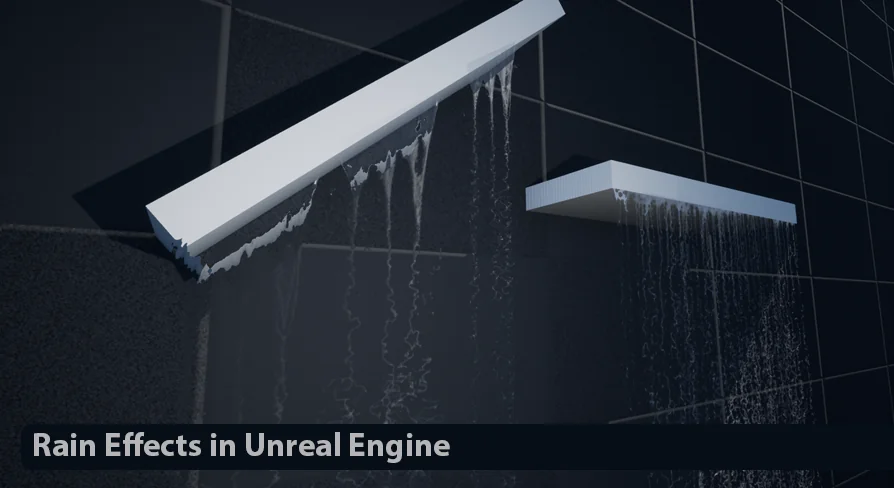
The package is focused on simulating realistic rain effects in Unreal Engine. Its scope covers the main pieces that make wet weather feel present in motion: the rain effect itself, raindrops on surfaces and glass, ripple effects on the ground, raindrops on the camera, and a small waterfall. That combination makes it useful when a project needs weather to read at several distances at once, from wide environmental shots down to close views where droplets and impact details matter.
Its presentation is also fairly direct about what is and is not included. The trailer material is made with the Rain FX package, but the environment, character, and sound are not part of the package. That keeps the focus on the effects work itself rather than on surrounding scene assets.
Rain Effects across scene surfaces and camera views
The most practical way to understand this resource is by looking at where the rain appears. The core rain effect handles the weather in open space, but the package does not stop there. It also addresses the surfaces that sell the condition of a storm or steady rainfall once the drops begin interacting with the world.
Raindrops on the surface and on glass are both explicitly part of the set. Those two targets matter for different reasons. Surface droplets help exterior materials feel exposed to the weather, while glass droplets shift the effect toward windows, screens, and other transparent barriers where rain often becomes a foreground element. Ground ripple effects extend the same idea to horizontal areas, giving the weather a visible reaction where water impacts accumulate.
Raindrops on the camera push the effect one step closer to the viewer. In interactive scenes and cinematic framing alike, that layer changes the sense of proximity. Instead of rain staying in the background as an environmental condition, it becomes something the viewpoint is moving through. The inclusion of a small waterfall broadens the package from rainfall alone into a related water feature that can support wetter spaces and denser atmospheric setups.
Niagara workflow and cinematic setup
Rain Effects includes a specific note for cinematic use. The stated workflow is simple: find and open the Niagara_Emitter system, then uncheck everything under Scalability. That instruction is narrow, but it is concrete, and it tells users exactly where the package expects an adjustment when the goal is a cinematic result.
That detail says a lot about implementation. First, the effect is tied to a Niagara-based workflow, which fits the package tags and the setup note. Second, the cinematic guidance is not framed as a broad creative recommendation. It is a direct change inside the emitter settings, which makes it a practical step for teams testing shot quality and trying to understand why the effect may behave differently under different scalability conditions.
Because the package emphasizes full control and ease of use, that cinematic note reads less like a hidden workaround and more like part of the expected setup path when moving from general scene use into more controlled rendering situations. Users evaluating the package for sequence work will likely pay close attention to that single instruction, since it is the one explicit operational step given for a specialized output context.
Ready for games and architectural visualization
The intended project range is clearly stated: Rain Effects is ready for games and architectural visualization. Those two areas often ask for different kinds of rain presentation, even when they share the same underlying weather logic.
In a game context, the value is in stacking several readable rain cues without reducing the scene to only a falling particle pass. Camera raindrops, ground ripples, and droplets on glass can all help weather remain legible while the player moves through an area. The package’s focus on realistic, optimized, and easy-to-use effects also fits projects where rain must be present as part of an active scene rather than only as a still image element.
In architectural visualization, the same tools support a different kind of viewing. Glass droplets and ripple effects can contribute strongly to exterior mood, window shots, and wet-surface atmosphere. A small waterfall also gives room for scenes where water features are part of the environment. Since the package is presented as realistic and offering full control, it aligns with workflows where visual adjustments need to be made to suit a specific space, weather intensity, or camera position.
Those use cases stay grounded in the same named effect set. Nothing here suggests a different product for different industries. Instead, the same rain behaviors are framed as suitable for both real-time game scenes and archviz presentation.
Realistic, optimized, and easy to use
Three qualities are called out directly: realistic, optimized, and easy to use. A fourth, full control, matters just as much because rain is rarely a one-size-fits-all element. Scenes vary widely in scale and in how visible weather should be. Some need rain to dominate the shot; others need it to stay subtle while still affecting glass, pavement, or the camera.
“Realistic” is supported here by the spread of included behaviors rather than by any unlisted technical metric. The package does not only simulate rainfall in the air. It also covers what rain does when it meets different surfaces and the viewer’s perspective. That is where much of the natural feel comes from.
“Optimized” and “easy to use” are presented as practical characteristics, not as a benchmark claim. No detailed performance figures are provided, so the safest reading is that the package is intended to be usable in production scenes without a complicated setup burden. The mention of full control reinforces that this is not a locked visual preset. Users are expected to work with the tools and adjust them for their own scenes.
The package is also presented alongside water, rain, and waterfall effects as part of a complete set. Read narrowly, that complements the included small waterfall and keeps the focus on related wet-environment simulation rather than on unrelated effects categories.
Technical demos, updates, and one clear limitation
Rain Effects is accompanied by a trailer, a technical demo, a playable demo, a tutorial, and at least two named updates: Update01 and Update02. That mix suggests the package is not only shown visually but also demonstrated in more than one practical format. A technical demo points toward implementation visibility, a playable demo points toward scene interaction, and a tutorial gives users a path into setup and use.
The most important compatibility note is also very specific: path tracing does not support it. That limitation should be read plainly. If a project depends on path tracing for its final output or look development, this package carries an explicit constraint. For teams comparing render paths or testing a weather solution across multiple pipelines, that single statement may be one of the first things to verify in their own environment.
The presence of updates matters here as well, though only in a restrained way. The package has Update01 and Update02 identified by name, which indicates ongoing revision history without adding any undocumented claims about what changed. That is useful context for users who want to know whether the toolset has seen follow-up attention beyond its initial release materials.
Rain Effects as a scene-building tool
The strongest takeaway is that Rain Effects is not limited to a single visual trick. It covers rainfall, droplets on surfaces and glass, ripples on the ground, camera raindrops, and a small waterfall inside Unreal Engine, with a Niagara-based cinematic setup note and a clear warning that path tracing is not supported.
For teams deciding whether it fits a production, the practical question is straightforward: if the project needs rain to interact with the world, the view, and wet-environment details rather than only fall through the air, this package addresses those exact areas while staying aimed at games and architectural visualization.
 Weather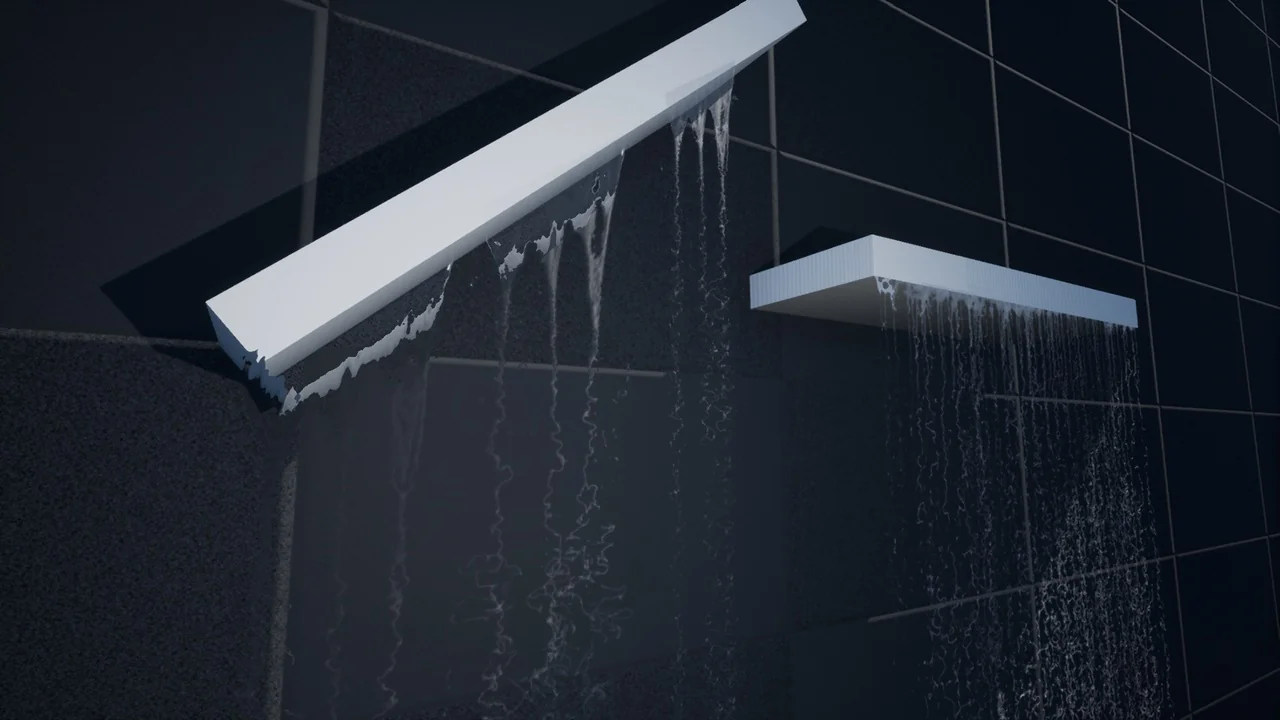
 Weather
 Weather
 Weather