"0341a2901a4ae9aa"{"id":"10448","slug":"runtime-spline-builder","title":"Runtime Spline Builder","category":"Game Mechanics","engine":"4.26+,5.0+","assetVersion":"Engine version: 4.26+,5.0+","engineVersion":"4.26","tag":"Game Mechanics","accent":"blue","visual":"audio","summary":"Runtime Spline Builder is a beginner-friendly tool designed for creating and editing spline meshes during gameplay. It is ideal for RTS projects requiring dynamic walls, paths, or fences.","platform":"Unreal Engine","publishedAt":"2026-03-03T15:24:38.000Z","updatedAt":"2026-04-19T15:50:01.000Z","sourceNotes":[],"fileContents":[],"compatibility":["Unreal Engine","Engine version: 4.26+,5.0+"],"featuredImage":{"alt":"Runtime Spline Builder","src":"https://3dcghub.com/wp-content/uploads/2026/03/f2d685a1-a9e1-4e2b-8048-d82429d9ae87.webp"},"hasDownloadLink":true,"downloads":0,"terms":[{"taxonomy":"category","slug":"game-mechanics","name":"Game Mechanics"},{"taxonomy":"post_tag","slug":"blueprint-spline-tool","name":"blueprint spline tool"},{"taxonomy":"post_tag","slug":"real-time-mesh-creation","name":"real-time mesh creation"},{"taxonomy":"post_tag","slug":"rts-game-development","name":"RTS game development"},{"taxonomy":"post_tag","slug":"runtime-spline-builder","name":"Runtime Spline Builder"},{"taxonomy":"post_tag","slug":"spline-mesh-tool","name":"spline mesh tool"}],"galleryImages":[{"src":"https://3dcghub.com/wp-content/uploads/2026/03/a2554b514079_c859bc1a-fdb5-407f-8957-33fa6a527e6a.webp","alt":"Runtime Spline Builder"},{"src":"https://3dcghub.com/wp-content/uploads/2026/03/d1315406bcbc_c5befc2d-1976-4c08-9354-b1be8ec09011.webp","alt":"Runtime Spline Builder"},{"src":"https://3dcghub.com/wp-content/uploads/2026/03/2f2546da256e_9c025870-b8fc-4970-bd94-cf1919afd8f2.webp","alt":"Runtime Spline Builder"}],"accessPanel":{"kind":"resource","title":"Access this resource","eyebrow":"Free Download","message":"Log in or create a free account to start your download.","fileName":"Runtime Spline Builder.7z","safetyNote":"All resources are 100% manually reviewed to eliminate all risks.","actionLabel":"Download Free","resourceType":"Resource archive"},"contentHtml":"\u003ch2\u003eIntroduction to Runtime Spline Builder\u003c/h2\u003e\n\u003cp\u003eRuntime Spline Builder is a specialized tool designed to create spline meshes while your game is actively running. This resource is particularly useful for developers who need to place walls, paths, or fences during gameplay. However, it is important to note that this tool is intended for runtime use rather than editor purposes. Consequently, it serves as an excellent starting point for beginners learning to use splines in a live environment. The developer has designed this system to be easily extended and improved for specific project needs.\u003c/p\u003e\n\n\u003ch2\u003eCore Features and Customization\u003c/h2\u003e\n\u003cp\u003eThe tool provides several features to streamline the creation of dynamic environments. Moreover, it offers two different calculations for determining Spline-Mesh length. Users can also replace meshes with ease to fit their visual style. Additionally, spline meshes can be fixed directly to the surface for better alignment. Therefore, the system uses the \"visibility\" Line Trace Channel by default, though this can be replaced by a custom Collision Channel if needed.\u003c/p\u003e\n\n\u003cp\u003eFlexibility is a key benefit of this tool. For instance, the \"Closed Loop\" function can be toggled on and off at any time. Furthermore, developers can change placed spline points afterwards using the built-in Edit Mode. If a mistake occurs, spline meshes can be deleted entirely. Because the position of each new spline point is determined by the mouse, placement feels intuitive for the player.\u003c/p\u003e\n\n\u003ch2\u003eTechnical Implementation and Workflow\u003c/h2\u003e\n\u003cp\u003eThe developer has included extensively commented blueprints to assist with the setup process. To begin, you should open the Runtime Spline Builder project and explore the \"TestArea\" level. This area allows you to get a feel for the tool's capabilities. Afterward, you can migrate the \"Exovision\" folder to your own project. You must then add the \"SplineBuilderComponent\" to your specific character blueprint.\u003c/p\u003e\n\n\u003cp\u003eDetailed instructions are located within the \"ExampleCharacter\" blueprint. Specifically, this is where you will find all available events for the component. For those working on strategy titles, the developer provides an RTS Example Widget to study. All secondary functions are triggered by calling the corresponding events within the system.\u003c/p\u003e\n\n\u003ch2\u003eImportant Optimization for Packed Games\u003c/h2\u003e\n\u003cp\u003eIn order for materials and collisions to function correctly in a packed game, certain steps are required. First, you must open every material intended for use with your meshes. Under the \"Usage\" section in the Details window, set \"Used with Spline Meshes\" to true. Similarly, you must open each Static Mesh and locate the \"Allow CPU Access\" option. This setting must also be set to true for the system to work properly. Consequently, skipping these steps may result in visual or physical issues in the final build.\u003c/p\u003e\n\n\u003ch2\u003eClosing Notes\u003c/h2\u003e\n\u003cp\u003eTaken together, the Runtime Spline Builder is a versatile and accessible tool for real-time mesh generation. It provides a solid foundation for RTS games and other projects requiring dynamic pathing or barriers. While it is a basic tool, its extensible nature allows for significant customization. Therefore, it is a valuable asset for any developer looking to master runtime splines.\u003c/p\u003e\n\n\u003ch2\u003eExplore Similar Assets\u003c/h2\u003e\n\u003cul\u003e\n\u003cli\u003e\u003ca href=\"https://3dcghub.com/mobile-game-3/\" title=\"Mobile Game 3\"\u003eMobile Game 3\u003c/a\u003e\u003c/li\u003e\n\u003cli\u003e\u003ca href=\"https://3dcghub.com/bowling-pool-darts-pub-games-pack/\" title=\"Bowling, Pool \u0026amp;amp; Darts – Pub Games Pack\"\u003eBowling, Pool \u0026amp; Darts – Pub Games Pack\u003c/a\u003e\u003c/li\u003e\n\u003cli\u003e\u003ca href=\"https://3dcghub.com/death-male-body-parts-collection-vol-vii/\" title=\"Death Male Body Parts Collection VOL.VII\"\u003eDeath Male Body Parts Collection VOL.VII\u003c/a\u003e\u003c/li\u003e\n\u003cli\u003e\u003ca href=\"https://3dcghub.com/zombie-02-game-assets-extra/\" title=\"Zombie 02 – Game Assets + Extra\"\u003eZombie 02 – Game Assets + Extra\u003c/a\u003e\u003c/li\u003e\n\u003cli\u003e\u003ca href=\"https://3dcghub.com/parasite-zombie-04-game-assets-extra/\" title=\"Parasite Zombie 04 – Game Assets + Extra\"\u003eParasite Zombie 04 – Game Assets + Extra\u003c/a\u003e\u003c/li\u003e\n\u003c/ul\u003e\n\n\u003ch2\u003eAsset Gallery\u003c/h2\u003e","contentTextLength":3454,"navigation":{"current":3145,"total":4017,"previous":{"id":"10458","slug":"scratch-card-lottery-system","title":"Scratch Card Lottery System","category":"Game Mechanics","platform":"Unreal Engine","updatedAt":"2026-04-19T15:50:01.000Z"},"next":{"id":"10542","slug":"advanced-scope","title":"Advanced Scope","category":"Gameplay Features","platform":"Unreal Engine","updatedAt":"2026-04-19T15:50:00.000Z"}},"relatedResources":[{"id":"1001850","slug":"scifi-kitbash-level-builder-vol-2","title":"SciFi Kitbash Level Builder Vol.2","category":"Industrial","engine":"4.19+,5.0+","assetVersion":"","engineVersion":"Engine Version: 4.19+,5.0+","tag":"Industrial","accent":"blue","visual":"mech","summary":"Build industrial sci-fi and cyberpunk interiors using modular kitbash modules, PBR textures, lowpoly assets, and garage warehouse props.","platform":"Unreal Engine","publishedAt":"2026-10-21T08:43:34.987Z","updatedAt":"2026-10-21T08:43:34.987Z","sourceNotes":[],"fileContents":[],"compatibility":["Unreal Engine","Engine Version: 4.19+,5.0+"],"featuredImage":{"alt":"SciFi Kitbash Level Builder Vol.2","src":"/wp-content/uploads/published/2026/10/fbffd7fc0c39-16a26e0b-f2fc-4a71-85db-ab35adf42c0e-7d0b0a4a8d.webp"},"hasDownloadLink":true,"downloads":0},{"id":"14519","slug":"runtime-speech-recognizer-real-time-offline-ai","title":"Runtime Speech Recognizer (Real-Time, Offline, AI)","category":"Engine Tools","engine":"4.27 - 5.8","assetVersion":"Asset Version:1.0","engineVersion":"Engine version: 4.27 - 5.8","tag":"Engine Tools","accent":"blue","visual":"city","summary":"Enhance your project with Runtime Speech Recognizer (Real-Time, Offline, AI), a plugin that enables high-performance voice commands and speech-to-text without an internet connection. Powered by OpenAI Whisper, it supports over 95 languages and features GPU...","platform":"Unreal Engine","publishedAt":"2026-03-11T18:21:42.000Z","updatedAt":"2026-09-30T02:57:30.475Z","sourceNotes":[],"fileContents":[],"compatibility":["Unreal Engine","Asset Version:1.0","Engine version: 4.27 - 5.8"],"featuredImage":{"alt":"Runtime Speech Recognizer (Real-Time, Offline, AI)","src":"https://3dcghub.com/wp-content/uploads/2026/03/865b5e7a-61c2-4de8-83da-c2cc3aa6c0a4.webp"},"hasDownloadLink":true,"downloads":1},{"id":"14504","slug":"runtime-archiver-zip-oodle-tar-lz4-gzip","title":"Runtime Archiver (Zip, Oodle, Tar, LZ4, GZip)","category":"Engine Tools","engine":"4.26 - 5.8","assetVersion":"Asset Version:1.0","engineVersion":"Engine version: 4.26 - 5.8","tag":"Engine Tools","accent":"blue","visual":"audio","summary":"Streamline your Unreal Engine project with Runtime Archiver, a powerful tool for managing archives during runtime. Support for ZIP, Oodle, and more ensures efficient data handling for games and applications.","platform":"Unreal Engine","publishedAt":"2026-03-11T18:17:59.000Z","updatedAt":"2026-09-30T02:30:38.193Z","sourceNotes":[],"fileContents":[],"compatibility":["Unreal Engine","Asset Version:1.0","Engine version: 4.26 - 5.8"],"featuredImage":{"alt":"Runtime Archiver (Zip, Oodle, Tar, LZ4, GZip)","src":"https://3dcghub.com/wp-content/uploads/2026/03/60dae966-e9dc-4605-9cd3-6a2c4d1cf0bf.webp"},"hasDownloadLink":true,"downloads":1}]}
Game Mechanics
Runtime Spline Builder
Runtime Spline Builder is a beginner-friendly tool designed for creating and editing spline meshes during gameplay. It is ideal for RTS projects requiring dynamic walls, paths, or fences.
Runtime Spline Builder is a specialized tool designed to create spline meshes while your game is actively running. This resource is particularly useful for developers who need to place walls, paths, or fences during gameplay. However, it is important to note that this tool is intended for runtime use rather than editor purposes. Consequently, it serves as an excellent starting point for beginners learning to use splines in a live environment. The developer has designed this system to be easily extended and improved for specific project needs.
Core Features and Customization
The tool provides several features to streamline the creation of dynamic environments. Moreover, it offers two different calculations for determining Spline-Mesh length. Users can also replace meshes with ease to fit their visual style. Additionally, spline meshes can be fixed directly to the surface for better alignment. Therefore, the system uses the "visibility" Line Trace Channel by default, though this can be replaced by a custom Collision Channel if needed.
Flexibility is a key benefit of this tool. For instance, the "Closed Loop" function can be toggled on and off at any time. Furthermore, developers can change placed spline points afterwards using the built-in Edit Mode. If a mistake occurs, spline meshes can be deleted entirely. Because the position of each new spline point is determined by the mouse, placement feels intuitive for the player.
Technical Implementation and Workflow
The developer has included extensively commented blueprints to assist with the setup process. To begin, you should open the Runtime Spline Builder project and explore the "TestArea" level. This area allows you to get a feel for the tool's capabilities. Afterward, you can migrate the "Exovision" folder to your own project. You must then add the "SplineBuilderComponent" to your specific character blueprint.
Detailed instructions are located within the "ExampleCharacter" blueprint. Specifically, this is where you will find all available events for the component. For those working on strategy titles, the developer provides an RTS Example Widget to study. All secondary functions are triggered by calling the corresponding events within the system.
Important Optimization for Packed Games
In order for materials and collisions to function correctly in a packed game, certain steps are required. First, you must open every material intended for use with your meshes. Under the "Usage" section in the Details window, set "Used with Spline Meshes" to true. Similarly, you must open each Static Mesh and locate the "Allow CPU Access" option. This setting must also be set to true for the system to work properly. Consequently, skipping these steps may result in visual or physical issues in the final build.
Closing Notes
Taken together, the Runtime Spline Builder is a versatile and accessible tool for real-time mesh generation. It provides a solid foundation for RTS games and other projects requiring dynamic pathing or barriers. While it is a basic tool, its extensible nature allows for significant customization. Therefore, it is a valuable asset for any developer looking to master runtime splines.
 Game Mechanics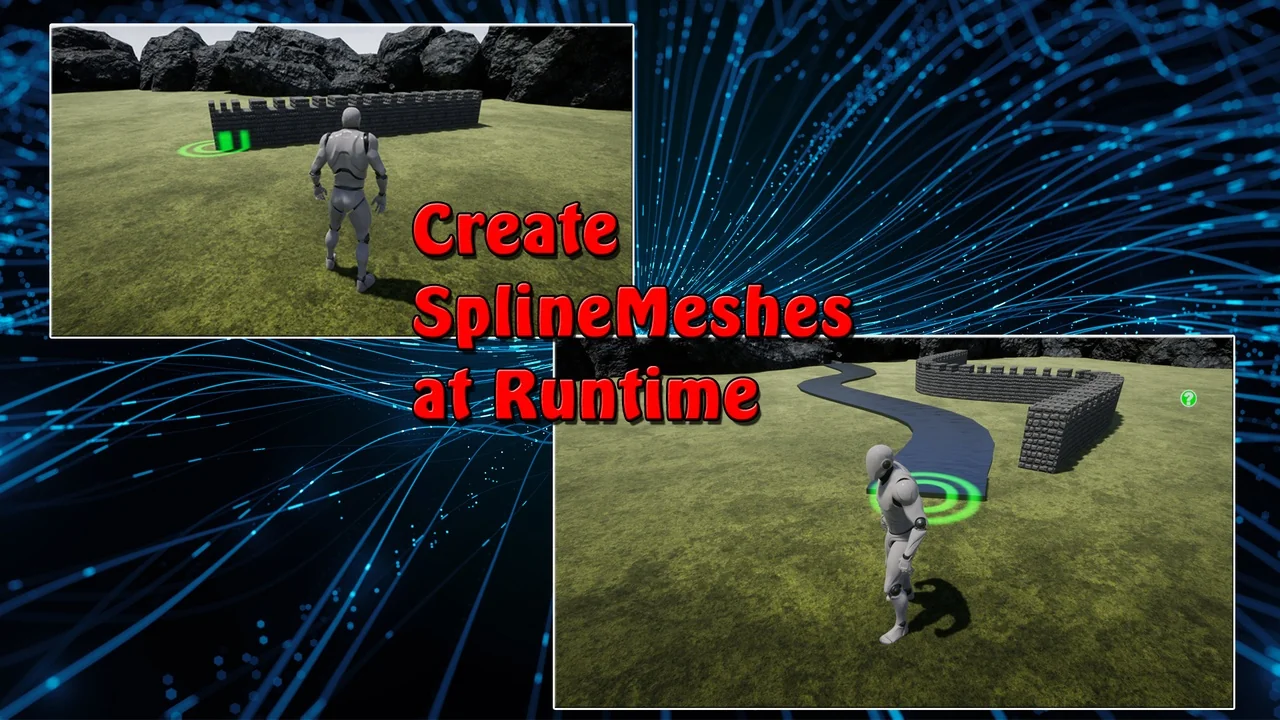
 Industrial
 Engine Tools
 Engine Tools