"0341a2901a4ae9aa"{"id":"11043","slug":"path-tracer-toolkit","title":"Path Tracer Toolkit","category":"Gameplay Features","engine":"4.27,5.0+","assetVersion":"Engine version: 4.27,5.0+","engineVersion":"4.27","tag":"Gameplay Features","accent":"blue","visual":"city","summary":"The Path Tracer Toolkit provides a comprehensive Blueprint solution for generating paths and borders manually or via runtime point arrays. It includes advanced customization, procedural materials, and performance-optimizing texture baking.","platform":"Unreal Engine","publishedAt":"2026-03-03T16:47:08.000Z","updatedAt":"2026-04-19T15:49:51.000Z","sourceNotes":[],"fileContents":[],"compatibility":["Unreal Engine","Engine version: 4.27,5.0+"],"featuredImage":{"alt":"Path Tracer Toolkit","src":"https://3dcghub.com/wp-content/uploads/2026/03/fd42f630-b95d-4396-bf4a-af676428ed24.webp"},"hasDownloadLink":true,"downloads":1,"terms":[{"taxonomy":"category","slug":"gameplay-features","name":"Gameplay Features"},{"taxonomy":"post_tag","slug":"game-development-paths","name":"game development paths"},{"taxonomy":"post_tag","slug":"path-tracer-toolkit","name":"Path Tracer Toolkit"},{"taxonomy":"post_tag","slug":"procedural-border-tool","name":"procedural border tool"},{"taxonomy":"post_tag","slug":"runtime-path-generation","name":"runtime path generation"}],"galleryImages":[{"src":"https://3dcghub.com/wp-content/uploads/2026/03/512b036c14a2_c951c0d6-4748-445f-9772-bbd6e7fd6939.webp","alt":"Path Tracer Toolkit"},{"src":"https://3dcghub.com/wp-content/uploads/2026/03/18c2a16ed01b_62f6a2a3-5e2c-4127-ab92-ba79058f1782.webp","alt":"Path Tracer Toolkit"},{"src":"https://3dcghub.com/wp-content/uploads/2026/03/3b88fb3c03ed_fb417318-8c09-4c86-8332-4fa3d4f32d56.webp","alt":"Path Tracer Toolkit"},{"src":"https://3dcghub.com/wp-content/uploads/2026/03/cf0600aa3be8_17ca80de-d9de-4c59-b099-ece97465789a.webp","alt":"Path Tracer Toolkit"},{"src":"https://3dcghub.com/wp-content/uploads/2026/03/b6d3573136de_f1b6b2fe-f4b5-460b-9751-abc23325dfa9.webp","alt":"Path Tracer Toolkit"},{"src":"https://3dcghub.com/wp-content/uploads/2026/03/ccbe1d7f5cc2_6db5cf3f-1037-4259-a711-932274243dbe.webp","alt":"Path Tracer Toolkit"}],"accessPanel":{"kind":"resource","title":"Access this resource","eyebrow":"Free Download","message":"Log in or create a free account to start your download.","fileName":"PathTracerToolkit.7z","safetyNote":"All resources are 100% manually reviewed to eliminate all risks.","actionLabel":"Download Free","resourceType":"Resource archive"},"contentHtml":"\u003ch2\u003eVersatile Path and Border Generation\u003c/h2\u003e\n\u003cp\u003eThe \u003cstrong\u003ePath Tracer Toolkit\u003c/strong\u003e offers a robust solution for developers looking to implement paths and borders within their projects. This Blueprint-based toolkit allows for manual creation using splines or automated generation via point arrays. Consequently, it serves as a versatile asset for both editor-side design and runtime logic. Users can easily draw paths through specific points by calling a single function. Moreover, the tool supports both manual editing in the editor and dynamic generation during gameplay. This flexibility ensures that the toolkit fits various project requirements, from RTS navigation to RPG markers.\u003c/p\u003e\n\n\u003ch2\u003eExtensive Customization and Visual Effects\u003c/h2\u003e\n\u003cp\u003eThe \u003cstrong\u003ePath Tracer Toolkit\u003c/strong\u003e provides extensive customization options to match your game's specific aesthetic. You can adjust settings like color, translucency, scaling, and looping. Additionally, the tool features automatic corner rounding with multiple styles and customizable markers for the beginning and end of paths. Developers can also implement dashed line effects or ground offsets to improve visual clarity. One standout feature is the ability to manage visibility for parts of paths obstructed by objects. Therefore, players can always track their progress even through complex environmental geometry.\u003c/p\u003e\n\n\u003ch2\u003eRapid Prototyping and Performance Tools\u003c/h2\u003e\n\u003cp\u003eBeyond that, the toolkit includes procedural circle and square materials for rapid prototyping directly in-engine. Specifically, these materials allow for quick iterations without the constant need for external graphics editors. To optimize performance, the creator included a texture baker within the package. This tool lets you bake textures to increase efficiency once your procedural materials are finalized. In addition, procedural drop shadow effects are available for marker textures to improve readability against various backgrounds.\u003c/p\u003e\n\n\u003ch2\u003ePractical Examples and Game Logic\u003c/h2\u003e\n\u003cp\u003eThe package comes with three demo levels that showcase logic built entirely in Blueprints. These examples include a basic turn-based game setup featuring a grid actor and a movement area actor. Additionally, a global map example demonstrates colored paths where you can specify section counts and lengths. An info widget is also provided to display text near the cursor for better user interaction. Finally, the ability to use your own meshes and materials ensures the toolkit integrates seamlessly into any art style.\u003c/p\u003e\n\n\u003ch2\u003eBest Fit\u003c/h2\u003e\n\u003cp\u003eThe \u003cstrong\u003ePath Tracer Toolkit\u003c/strong\u003e is a comprehensive resource for any developer needing dynamic pathing solutions. By combining ease of use with deep customization, it simplifies the process of creating complex visual indicators. Whether you are building a turn-based strategy game or a simple navigation system, this toolkit provides the necessary tools to succeed.\u003c/p\u003e\n\n\u003ch2\u003eContinue Browsing Similar Packs\u003c/h2\u003e\n\u003cul\u003e\n\u003cli\u003e\u003ca href=\"https://3dcghub.com/advanced-spline-mesh-analysis-tool/\" title=\"Advanced Spline Mesh Analysis Tool\"\u003eAdvanced Spline Mesh Analysis Tool\u003c/a\u003e\u003c/li\u003e\n\u003cli\u003e\u003ca href=\"https://3dcghub.com/runtime-spline-builder/\" title=\"Runtime Spline Builder\"\u003eRuntime Spline Builder\u003c/a\u003e\u003c/li\u003e\n\u003cli\u003e\u003ca href=\"https://3dcghub.com/ia-scatter/\" title=\"ia scatter\"\u003eia scatter\u003c/a\u003e\u003c/li\u003e\n\u003cli\u003e\u003ca href=\"https://3dcghub.com/flag-generator/\" title=\"Flag Generator\"\u003eFlag Generator\u003c/a\u003e\u003c/li\u003e\n\u003cli\u003e\u003ca href=\"https://3dcghub.com/city-traffic-pro/\" title=\"City Traffic Pro\"\u003eCity Traffic Pro\u003c/a\u003e\u003c/li\u003e\n\u003c/ul\u003e","contentTextLength":2983,"navigation":{"current":3188,"total":4017,"previous":{"id":"11053","slug":"quick-time-event-with-climbing","title":"Quick Time Event With Climbing","category":"Gameplay Features","platform":"Unreal Engine","updatedAt":"2026-04-19T15:49:51.000Z"},"next":{"id":"11034","slug":"open-world-ai-spawn-system","title":"Open World AI Spawn System","category":"Gameplay Features","platform":"Unreal Engine","updatedAt":"2026-04-19T15:49:51.000Z"}},"relatedResources":[{"id":"11094","slug":"sci-fi-screen-constructor","title":"Sci-Fi Screen Constructor","category":"Gameplay Features","engine":"4.26+,5.0+","assetVersion":"Engine version: 4.26+,5.0+","engineVersion":"4.18","tag":"Gameplay Features","accent":"blue","visual":"animation","summary":"Enhance your digital environments with the Sci-Fi Screen Constructor. This toolkit provides customizable materials and scripts to build realistic futuristic monitors and displays.","platform":"Unreal Engine","publishedAt":"2026-03-03T16:55:36.000Z","updatedAt":"2026-04-19T15:49:50.000Z","sourceNotes":[],"fileContents":[],"compatibility":["Unreal Engine","Engine version: 4.26+,5.0+"],"featuredImage":{"alt":"Sci-Fi Screen Constructor","src":"https://3dcghub.com/wp-content/uploads/2026/03/1397736e-47c2-4162-895b-1e21f8b38e6b.webp"},"hasDownloadLink":true,"downloads":1},{"id":"1001995","slug":"daforma-vertex-shader-based-3d-deformation-effectors","title":"daforma - Vertex Shader based 3D Deformation Effectors","category":"Gameplay Features","engine":"5.0+","assetVersion":"","engineVersion":"Engine Version: 5.0+","tag":"Gameplay Features","accent":"blue","visual":"mech","summary":"Explore daforma, an interactive vertex shader deformation toolkit using Advanced BP Effect actors and HISM grids for real-time ripple, warp, and Lumen effects.","platform":"Unreal Engine","publishedAt":"2026-10-26T12:14:03.022Z","updatedAt":"2026-10-26T12:14:03.022Z","sourceNotes":[],"fileContents":[],"compatibility":["Unreal Engine","Engine Version: 5.0+"],"featuredImage":{"alt":"daforma - Vertex Shader based 3D Deformation Effectors","src":"/wp-content/uploads/published/2026/10/a22ce2a73410-5d0fe4d5-eb06-4722-a1ae-0083113c6806-3acb7f20fe.webp"},"hasDownloadLink":true,"downloads":0},{"id":"1001004","slug":"next-gen-destruction-toolkit","title":"Next Gen Destruction Toolkit","category":"Gameplay Features","engine":"5.3+","assetVersion":"","engineVersion":"Engine Version: 5.3+","tag":"Gameplay Features","accent":"blue","visual":"mech","summary":"A UE5 Chaos Destruction framework using data assets, surface-driven VFX and sound, with 15 Blueprints and 14 Niagara systems. Built for Nanite/Lumen.","platform":"Unreal Engine","publishedAt":"2026-08-22T10:54:47.045Z","updatedAt":"2026-08-22T10:54:47.045Z","sourceNotes":[],"fileContents":[],"compatibility":["Unreal Engine","Engine Version: 5.3+"],"featuredImage":{"alt":"Next Gen Destruction Toolkit","src":"/wp-content/uploads/published/2026/08/ae98b282cc03-ed3bc7a2-1533-4764-9cea-bf9d64a790d8-8eb923473f.webp"},"hasDownloadLink":true,"downloads":5}]}
Gameplay Features
Path Tracer Toolkit
The Path Tracer Toolkit provides a comprehensive Blueprint solution for generating paths and borders manually or via runtime point arrays. It includes advanced customization, procedural materials, and performance-optimizing texture baking.
The Path Tracer Toolkit offers a robust solution for developers looking to implement paths and borders within their projects. This Blueprint-based toolkit allows for manual creation using splines or automated generation via point arrays. Consequently, it serves as a versatile asset for both editor-side design and runtime logic. Users can easily draw paths through specific points by calling a single function. Moreover, the tool supports both manual editing in the editor and dynamic generation during gameplay. This flexibility ensures that the toolkit fits various project requirements, from RTS navigation to RPG markers.
Extensive Customization and Visual Effects
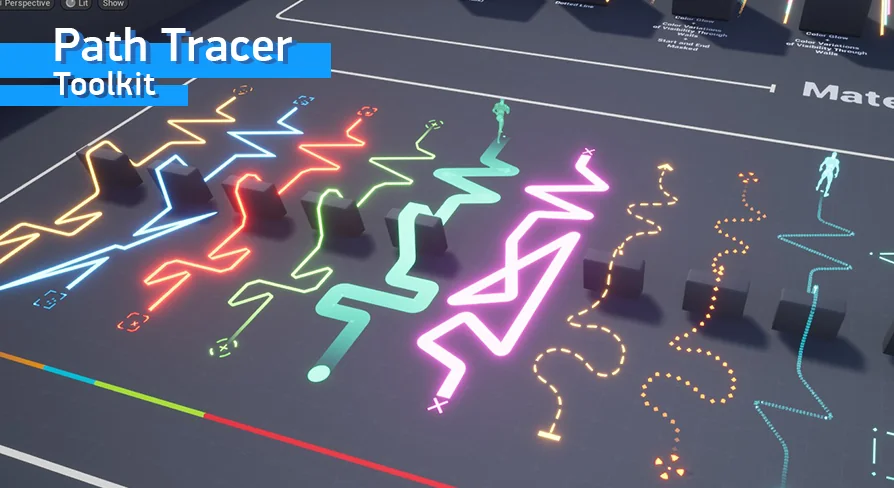
The Path Tracer Toolkit provides extensive customization options to match your game's specific aesthetic. You can adjust settings like color, translucency, scaling, and looping. Additionally, the tool features automatic corner rounding with multiple styles and customizable markers for the beginning and end of paths. Developers can also implement dashed line effects or ground offsets to improve visual clarity. One standout feature is the ability to manage visibility for parts of paths obstructed by objects. Therefore, players can always track their progress even through complex environmental geometry.
Rapid Prototyping and Performance Tools
Beyond that, the toolkit includes procedural circle and square materials for rapid prototyping directly in-engine. Specifically, these materials allow for quick iterations without the constant need for external graphics editors. To optimize performance, the creator included a texture baker within the package. This tool lets you bake textures to increase efficiency once your procedural materials are finalized. In addition, procedural drop shadow effects are available for marker textures to improve readability against various backgrounds.
Practical Examples and Game Logic
The package comes with three demo levels that showcase logic built entirely in Blueprints. These examples include a basic turn-based game setup featuring a grid actor and a movement area actor. Additionally, a global map example demonstrates colored paths where you can specify section counts and lengths. An info widget is also provided to display text near the cursor for better user interaction. Finally, the ability to use your own meshes and materials ensures the toolkit integrates seamlessly into any art style.
Best Fit
The Path Tracer Toolkit is a comprehensive resource for any developer needing dynamic pathing solutions. By combining ease of use with deep customization, it simplifies the process of creating complex visual indicators. Whether you are building a turn-based strategy game or a simple navigation system, this toolkit provides the necessary tools to succeed.
 Gameplay Features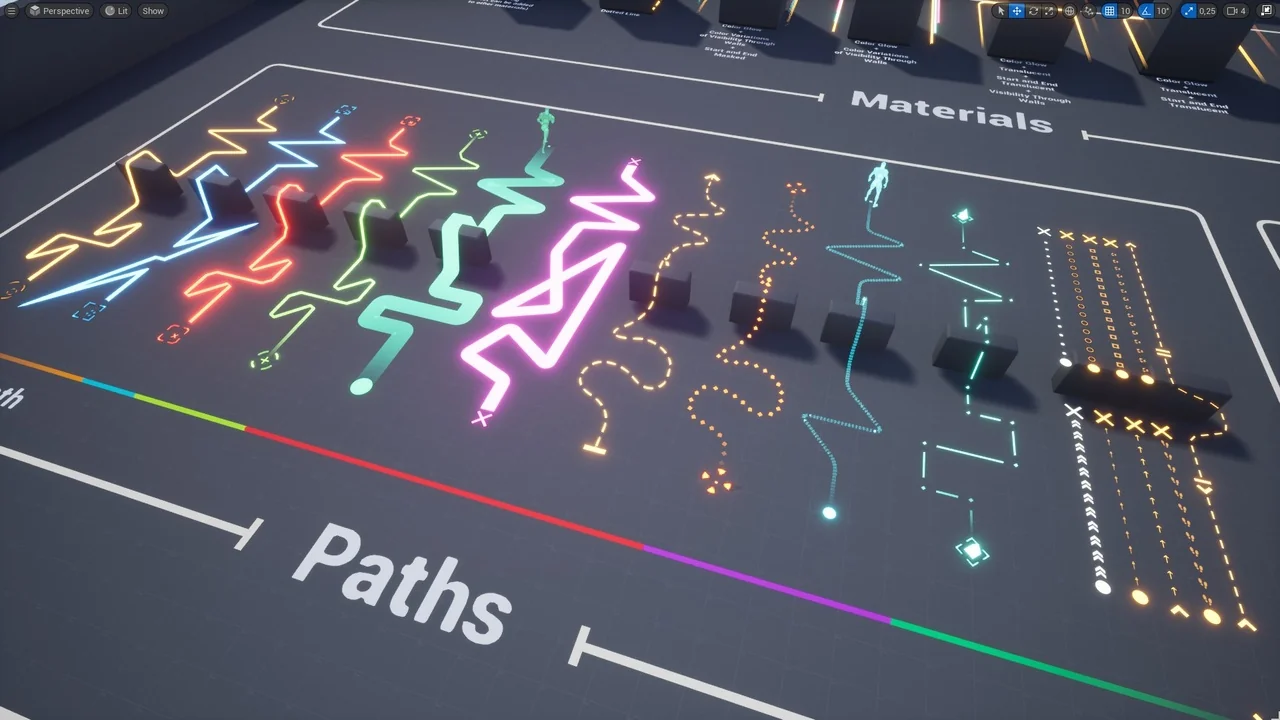
 Gameplay Features
 Gameplay Features
 Gameplay Features