"a19e0535960bd083"{"id":"10834","slug":"flag-generator","title":"Flag Generator","category":"Gameplay Features","engine":"4.26+,5.0+","assetVersion":"Engine version: 4.26+,5.0+","engineVersion":"4.24","tag":"Gameplay Features","accent":"blue","visual":"animation","summary":"Originally developed for the Medieval Village Megapack, this standalone Flag Generator blueprint automates the creation of catenary-shaped flags between surfaces using advanced ray tracing.","platform":"Unreal Engine","publishedAt":"2026-03-03T16:22:04.000Z","updatedAt":"2026-04-19T15:49:55.000Z","sourceNotes":[],"fileContents":[],"compatibility":["Unreal Engine","Engine version: 4.26+,5.0+"],"featuredImage":{"alt":"Flag Generator","src":"https://3dcghub.com/wp-content/uploads/2026/03/65ae707b-07b4-4ff1-b37c-ef387ebcdb5f.webp"},"hasDownloadLink":true,"downloads":0,"terms":[{"taxonomy":"category","slug":"gameplay-features","name":"Gameplay Features"},{"taxonomy":"post_tag","slug":"catenary-flags","name":"Catenary Flags"},{"taxonomy":"post_tag","slug":"flag-generator","name":"Flag Generator"}],"galleryImages":[{"src":"https://3dcghub.com/wp-content/uploads/2026/03/b1b1c20011bc_cc8fd31e-fbd5-4bc3-aa50-7479f22591a5.webp","alt":"Flag Generator"},{"src":"https://3dcghub.com/wp-content/uploads/2026/03/2a5eecb00cd9_26be6b80-98f1-46d1-8b31-d522123e84a3.webp","alt":"Flag Generator"},{"src":"https://3dcghub.com/wp-content/uploads/2026/03/25e521143020_72a2cf94-3099-49f6-9c78-e65c955eaa08.webp","alt":"Flag Generator"},{"src":"https://3dcghub.com/wp-content/uploads/2026/03/ed7a970ffcc4_83b94e0e-d866-4e14-aecb-27adddd04cdd.webp","alt":"Flag Generator"},{"src":"https://3dcghub.com/wp-content/uploads/2026/03/c85e20da18fd_860f24e9-cce1-4711-8144-2c17ca1dada6.webp","alt":"Flag Generator"},{"src":"https://3dcghub.com/wp-content/uploads/2026/03/536fb0cb1fe9_ec3615a4-182d-43a0-a89f-c8afdca9c163.webp","alt":"Flag Generator"},{"src":"https://3dcghub.com/wp-content/uploads/2026/03/584895a7d143_146cf241-6c40-48a7-8e6f-1aeae8698699.webp","alt":"Flag Generator"},{"src":"https://3dcghub.com/wp-content/uploads/2026/03/2898354b2034_a775c033-0472-4a90-a688-92d59073b993.webp","alt":"Flag Generator"},{"src":"https://3dcghub.com/wp-content/uploads/2026/03/e09c8e84bdf9_2d3f714c-9fa3-4d43-98a8-ab1ed36af4f5.webp","alt":"Flag Generator"},{"src":"https://3dcghub.com/wp-content/uploads/2026/03/9274baee4404_1e935315-1147-48a9-952c-f4678b6db2bb.webp","alt":"Flag Generator"},{"src":"https://3dcghub.com/wp-content/uploads/2026/03/85bf383522df_fda6cf6c-423d-4c53-9b2a-e3318209b6ce.webp","alt":"Flag Generator"}],"accessPanel":{"kind":"resource","title":"Access this resource","eyebrow":"Free Download","message":"Log in or create a free account to start your download.","fileName":"Flag Generator 4.26 ,5.0 .7z","safetyNote":"All resources are 100% manually reviewed to eliminate all risks.","actionLabel":"Download Free","resourceType":"Resource archive"},"contentHtml":"\u003ch2\u003eEfficient Flag Generation for Unreal Engine\u003c/h2\u003e\n\u003cp\u003eThe Flag Generator is a specialized tool built to streamline the creation of catenary-shaped flags within Unreal Engine environments. This blueprint was originally developed for the Medieval Village Megapack but is now available as a standalone resource. Consequently, level designers can use this tool to speed up their workflow and populate scenes with realistic details. It provides a variety of features to help you generate assets between surfaces extremely easily.\u003c/p\u003e\n\n\u003ch2\u003eAdvanced Ray Tracing and Manual Controls\u003c/h2\u003e\n\u003cp\u003eOne of the standout features of the Flag Generator is its automatic ray trace functionality. This system determines the exact distance and arc required to generate a flag between two surfaces. Therefore, you do not need to perform manual calculations for every placement. However, the creator also included a manual mode for users who require more precision. In this mode, you can adjust the spline points yourself to achieve a specific look.\u003c/p\u003e\n\n\u003ch3\u003eDeep Customization Options\u003c/h3\u003e\n\u003cp\u003eThe tool is highly scalable and allows users to add their own flags and functions quickly. Furthermore, you can customize the output using several built-in variables. These features include:\u003c/p\u003e\n\u003cul\u003e\n \u003cli\u003e\u003cstrong\u003eScale and Rotation:\u003c/strong\u003e Adjust the size and orientation of your flags.\u003c/li\u003e\n \u003cli\u003e\u003cstrong\u003eWind Effects:\u003c/strong\u003e Apply movement to simulate environmental conditions.\u003c/li\u003e\n \u003cli\u003e\u003cstrong\u003eColor Selection:\u003c/strong\u003e Change the appearance to match your project's palette.\u003c/li\u003e\n \u003cli\u003e\u003cstrong\u003eSpacing:\u003c/strong\u003e Control how flags are distributed across the spline.\u003c/li\u003e\n\u003c/ul\u003e\n\n\u003ch2\u003eTechnical Requirements and Updates\u003c/h2\u003e\n\u003cp\u003eThe developer has ensured the tool remains functional with recent engine updates. Specifically, a bug fix was recently implemented for version 5.4.2 to improve performance. Additionally, users working with Unreal Engine 5.3 must follow a specific setup step to enable Nanite for spline meshes. You need to add \"r.Nanite.AllowSplineMeshes=1\" under the renderer settings in your DefaultEngine.ini file.\u003c/p\u003e\n\n\u003ch2\u003eFinal Take\u003c/h2\u003e\n\u003cp\u003eThe Flag Generator offers a robust solution for developers looking to enhance their 3D environments with dynamic, catenary-shaped flags. By combining automatic ray tracing with manual spline controls, it provides both speed and flexibility. Whether you are building a medieval village or a modern setting, this blueprint simplifies complex level design tasks.\u003c/p\u003e\n\n\u003ch2\u003eExplore Similar Assets\u003c/h2\u003e\n\u003cul\u003e\n\u003cli\u003e\u003ca href=\"https://3dcghub.com/dynamic-flight-with-blueprints/\" title=\"Dynamic Flight with Blueprints\"\u003eDynamic Flight with Blueprints\u003c/a\u003e\u003c/li\u003e\n\u003cli\u003e\u003ca href=\"https://3dcghub.com/footsteps-sounds-with-blueprint-setup/\" title=\"Footsteps Sounds with Blueprint Setup\"\u003eFootsteps Sounds with Blueprint Setup\u003c/a\u003e\u003c/li\u003e\n\u003cli\u003e\u003ca href=\"https://3dcghub.com/26-zombie-animations-starter-pack-with-blueprints/\" title=\"26 Zombie Animations Starter Pack With Blueprints\"\u003e26 Zombie Animations Starter Pack With Blueprints\u003c/a\u003e\u003c/li\u003e\n\u003cli\u003e\u003ca href=\"https://3dcghub.com/dynamic-combat-system-archery/\" title=\"Dynamic Combat System – Archery\"\u003eDynamic Combat System – Archery\u003c/a\u003e\u003c/li\u003e\n\u003cli\u003e\u003ca href=\"https://3dcghub.com/city-traffic-pro/\" title=\"City Traffic Pro\"\u003eCity Traffic Pro\u003c/a\u003e\u003c/li\u003e\n\u003c/ul\u003e","contentTextLength":2516,"navigation":{"current":3180,"total":4026,"previous":{"id":"10844","slug":"fluid-pumping-hose-system","title":"Fluid Pumping \u0026 Hose System","category":"Gameplay Features","platform":"Unreal Engine","updatedAt":"2026-04-19T15:49:55.000Z"},"next":{"id":"10820","slug":"enhanced-locomotion-system-replication","title":"Enhanced Locomotion System (Replication)","category":"Gameplay Features","platform":"Unreal Engine","updatedAt":"2026-04-19T15:49:55.000Z"}},"relatedResources":[{"id":"1000033","slug":"working-night-vision-goggles","title":"Working Night Vision Goggles","category":"Gameplay Features","engine":"4.27,5.0+","assetVersion":"","engineVersion":"4.27,5.0+","tag":"Gameplay Features","accent":"blue","visual":"mech","summary":"Working Night Vision Goggles combines night, thermal, and FLIR vision with a laser designator, plus a tactical helmet and country flags.","platform":"Unreal Engine","publishedAt":"2026-05-21T09:41:07.954Z","updatedAt":"2026-05-21T09:41:07.954Z","sourceNotes":[],"fileContents":[],"compatibility":["Unreal Engine","Engine version: 4.27,5.0+"],"featuredImage":{"alt":"Working Night Vision Goggles","src":"/wp-content/uploads/published/2026/05/e1148ed3e237-51eeb853-a558-47a4-b347-132365f9c162-7b512e67c6.webp"},"hasDownloadLink":true,"downloads":0},{"id":"10628","slug":"book-generator","title":"Book Generator","category":"Gameplay Features","engine":"4.26+,5.0+","assetVersion":"Engine version: 4.26+,5.0+","engineVersion":"4.24","tag":"Gameplay Features","accent":"blue","visual":"character","summary":"Speed up your level design with the Book Generator, a versatile blueprint tool for creating realistic book arrangements. Customize colors, scale, and placement modes to build detailed libraries and interiors with ease.","platform":"Unreal Engine","publishedAt":"2026-03-03T15:50:23.000Z","updatedAt":"2026-04-19T15:49:58.000Z","sourceNotes":[],"fileContents":[],"compatibility":["Unreal Engine","Engine version: 4.26+,5.0+"],"featuredImage":{"alt":"Book Generator","src":"https://3dcghub.com/wp-content/uploads/2026/03/c771ab39-5a63-44a9-89f1-92d651b3e8f6.webp"},"hasDownloadLink":true,"downloads":0},{"id":"1001297","slug":"advanced-grid-inventory-system","title":"Advanced Grid Inventory System","category":"Gameplay Features","engine":"5.3+","assetVersion":"","engineVersion":"Engine Version: 5.3+","tag":"Gameplay Features","accent":"blue","visual":"mech","summary":"Explore the Advanced Grid Inventory System, featuring replicated online Blueprint architecture, AGIS_Concepts documentation, and thumbnail generator support.","platform":"Unreal Engine","publishedAt":"2026-10-02T05:59:13.116Z","updatedAt":"2026-10-02T05:59:13.116Z","sourceNotes":[],"fileContents":[],"compatibility":["Unreal Engine","Engine Version: 5.3+"],"featuredImage":{"alt":"Advanced Grid Inventory System","src":"/wp-content/uploads/published/2026/10/bcf827f64dee-dfe1d14a-861c-486b-b4dd-df1ea83de3a7-865c48df7f.webp"},"hasDownloadLink":true,"downloads":0}]}
Gameplay Features
Flag Generator
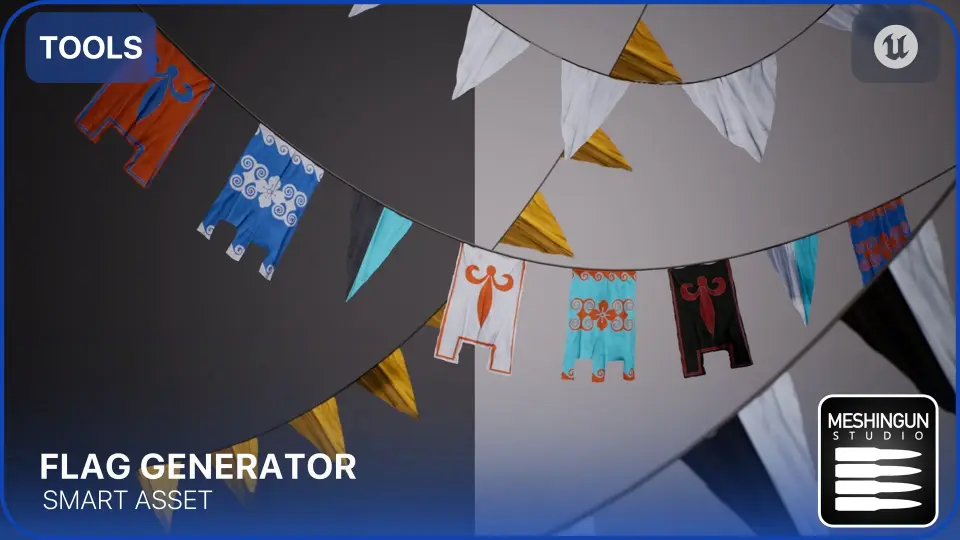
Originally developed for the Medieval Village Megapack, this standalone Flag Generator blueprint automates the creation of catenary-shaped flags between surfaces using advanced ray tracing.
The Flag Generator is a specialized tool built to streamline the creation of catenary-shaped flags within Unreal Engine environments. This blueprint was originally developed for the Medieval Village Megapack but is now available as a standalone resource. Consequently, level designers can use this tool to speed up their workflow and populate scenes with realistic details. It provides a variety of features to help you generate assets between surfaces extremely easily.
Advanced Ray Tracing and Manual Controls
One of the standout features of the Flag Generator is its automatic ray trace functionality. This system determines the exact distance and arc required to generate a flag between two surfaces. Therefore, you do not need to perform manual calculations for every placement. However, the creator also included a manual mode for users who require more precision. In this mode, you can adjust the spline points yourself to achieve a specific look.
Deep Customization Options
The tool is highly scalable and allows users to add their own flags and functions quickly. Furthermore, you can customize the output using several built-in variables. These features include:
Scale and Rotation: Adjust the size and orientation of your flags.
Wind Effects: Apply movement to simulate environmental conditions.
Color Selection: Change the appearance to match your project's palette.
Spacing: Control how flags are distributed across the spline.
Technical Requirements and Updates
The developer has ensured the tool remains functional with recent engine updates. Specifically, a bug fix was recently implemented for version 5.4.2 to improve performance. Additionally, users working with Unreal Engine 5.3 must follow a specific setup step to enable Nanite for spline meshes. You need to add "r.Nanite.AllowSplineMeshes=1" under the renderer settings in your DefaultEngine.ini file.
Final Take
The Flag Generator offers a robust solution for developers looking to enhance their 3D environments with dynamic, catenary-shaped flags. By combining automatic ray tracing with manual spline controls, it provides both speed and flexibility. Whether you are building a medieval village or a modern setting, this blueprint simplifies complex level design tasks.
 Gameplay Features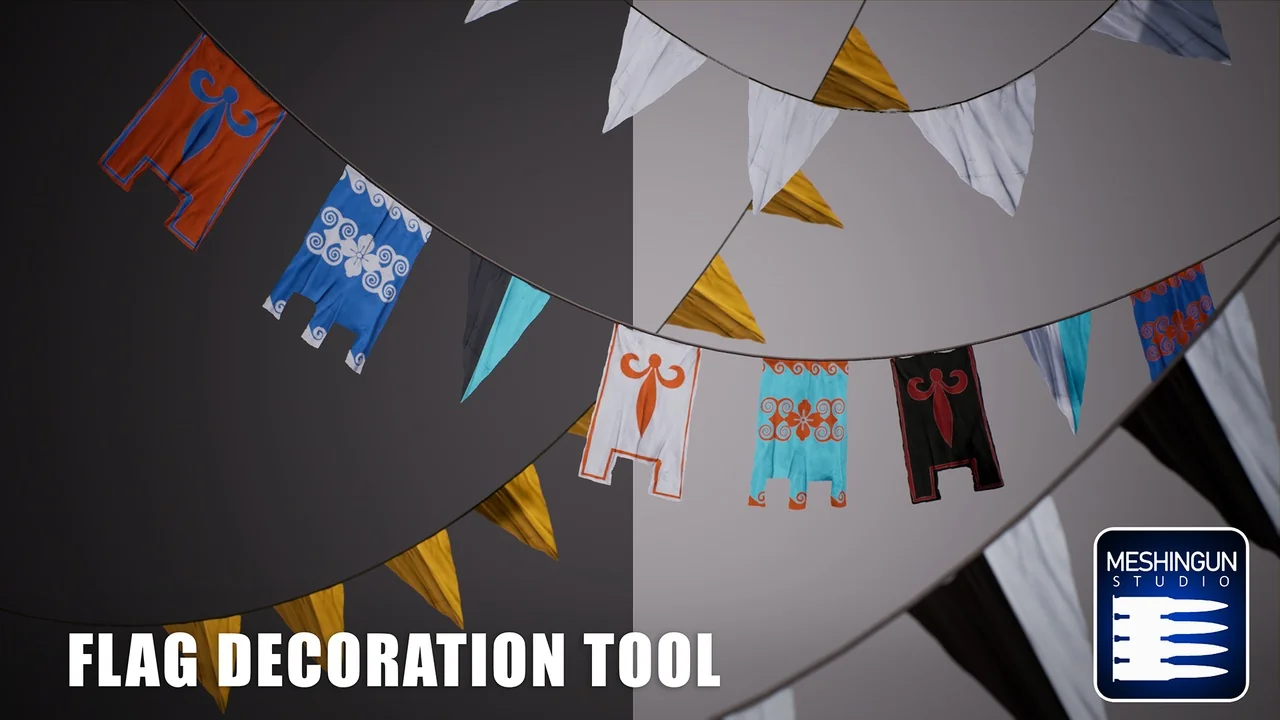
 Gameplay Features
 Gameplay Features
 Gameplay Features