"7066dd76da796369"{"id":"14108","slug":"le-json","title":"LE Json","category":"Engine Tools","engine":"4.26 - 5.4","assetVersion":"Engine version: 4.26 - 5.4","engineVersion":"Asset Version:5.3.0","tag":"Engine Tools","accent":"blue","visual":"luts","summary":"Simplify your data management with LE Json. This plugin offers dedicated Blueprint nodes for creating and parsing JSON strings within the Unreal Engine environment.","platform":"Unreal Engine","publishedAt":"2026-03-11T15:50:52.000Z","updatedAt":"2026-04-19T15:45:53.000Z","sourceNotes":[],"fileContents":[],"compatibility":["Unreal Engine","Engine version: 4.26 - 5.4","Asset Version: 5.3.0"],"featuredImage":{"alt":"LE Json","src":"https://3dcghub.com/wp-content/uploads/2026/03/80373996-08f5-4318-8e7d-557d24f41fd5.webp"},"hasDownloadLink":true,"downloads":0,"terms":[{"taxonomy":"category","slug":"engine-tools-tools-and-plugins","name":"Engine Tools"},{"taxonomy":"post_tag","slug":"blueprint","name":"Blueprint"},{"taxonomy":"post_tag","slug":"json-creation","name":"Json Creation"},{"taxonomy":"post_tag","slug":"json-parsing","name":"Json Parsing"},{"taxonomy":"post_tag","slug":"le-json","name":"LE Json"},{"taxonomy":"post_tag","slug":"plugins","name":"Plugins"},{"taxonomy":"post_tag","slug":"unreal-engine-5","name":"Unreal Engine 5"}],"galleryImages":[{"src":"https://3dcghub.com/wp-content/uploads/2026/03/0b61374782ef_3dd412d3-e85b-464f-91c5-bc0c7a82af18.webp","alt":"LE Json"},{"src":"https://3dcghub.com/wp-content/uploads/2026/03/102e31d1f5df_3db4067b-2bb8-405c-8ae4-11dd70486a45.webp","alt":"LE Json"},{"src":"https://3dcghub.com/wp-content/uploads/2026/03/e13f18bff8e0_3377dfaf-f573-4a61-9f29-f922140d922b.webp","alt":"LE Json"},{"src":"https://3dcghub.com/wp-content/uploads/2026/03/7be0e8f3e02e_c1f59d83-666f-47fc-88ca-ab3e298f2f16.webp","alt":"LE Json"},{"src":"https://3dcghub.com/wp-content/uploads/2026/03/403c524ee3f7_7ce9afc1-39e6-4140-9a23-601249195759.webp","alt":"LE Json"}],"accessPanel":{"kind":"resource","title":"Access this resource","eyebrow":"Free Download","message":"Log in or create a free account to start your download.","fileName":"LE Json 4.26-5.4 V5.3.0 r1.7z","safetyNote":"All resources are 100% manually reviewed to eliminate all risks.","actionLabel":"Download Free","resourceType":"Resource archive"},"contentHtml":"\u003ch2\u003eStreamlined Data Management with LE Json\u003c/h2\u003e\n\u003cp\u003eLE Json is a specialized plugin designed to simplify the way developers handle data within Unreal Engine. This tool focuses on providing accessible Blueprints for managing JSON strings. By using these nodes, creators can integrate data-driven logic into their projects more efficiently. Consequently, the plugin serves as a vital bridge between raw data formats and the visual scripting system.\u003c/p\u003e\n\n\u003cp\u003eThe primary goal of the tool is to remove the complexity of data serialization. Developers often need a reliable way to organize information. LE Json offers a direct solution through its Blueprint integration. Therefore, users can focus on gameplay logic rather than low-level string formatting.\u003c/p\u003e\n\n\u003ch2\u003eCore Features for Creating and Parsing\u003c/h2\u003e\n\u003cp\u003eOne of the primary functions of LE Json is the ability to create JSON strings. This feature allows developers to format information into a structured layout. Furthermore, the process is handled entirely within the Blueprint editor. This means that users do not need to write complex C++ code to generate valid JSON data. It provides a visual way to construct data objects for various project needs.\u003c/p\u003e\n\n\u003cp\u003eIn addition to creation, the plugin offers robust tools for parsing JSON strings. Parsing is essential when a project needs to read and interpret data from external sources. LE Json simplifies this by breaking down strings into components that Blueprints can understand. Consequently, developers can quickly extract specific values for their gameplay mechanics. This functionality ensures that data remains usable and organized throughout the project.\u003c/p\u003e\n\n\u003ch2\u003eIntegration and Extended Utility\u003c/h2\u003e\n\u003cp\u003eThe creator also highlights the compatibility between this tool and the LE Extended Standard Library. While LE Json handles the core string logic, the library provides additional utility. For instance, it allows for the conversion of bytes to and from strings. This additional functionality is available through a separate free plugin. Together, these tools create a comprehensive workflow for data manipulation.\u003c/p\u003e\n\n\u003cp\u003eUsing LE Json ensures that data remains accessible throughout the development cycle. Because the plugin relies on Blueprints, it is particularly useful for rapid prototyping. Developers can test different data structures without leaving the visual editor. Moreover, the streamlined nature of the tool helps maintain a clean and efficient workspace. This approach reduces the time spent on manual data entry and formatting errors.\u003c/p\u003e\n\n\u003ch2\u003eFinal Take\u003c/h2\u003e\n\u003cp\u003eTaken together, LE Json provides the fundamental building blocks for JSON manipulation in Unreal Engine. It covers both the creation and parsing of strings, making it a versatile asset. By utilizing these Blueprint nodes, you can handle data more effectively. This leads to a more organized and professional development process. Whether you are managing simple variables or complex data sets, this plugin offers the necessary tools for success.\u003c/p\u003e\n\n\u003ch2\u003eMore From The Same Workflow\u003c/h2\u003e\n\u003cul\u003e\n\u003cli\u003e\u003ca href=\"https://3dcghub.com/le-http-request/\" title=\"LE Http Request\"\u003eLE Http Request\u003c/a\u003e\u003c/li\u003e\n\u003cli\u003e\u003ca href=\"https://3dcghub.com/le-encryption/\" title=\"LE Encryption\"\u003eLE Encryption\u003c/a\u003e\u003c/li\u003e\n\u003cli\u003e\u003ca href=\"https://3dcghub.com/http-and-json/\" title=\"HTTP AND JSON\"\u003eHTTP AND JSON\u003c/a\u003e\u003c/li\u003e\n\u003cli\u003e\u003ca href=\"https://3dcghub.com/file-system-library/\" title=\"File System Library\"\u003eFile System Library\u003c/a\u003e\u003c/li\u003e\n\u003cli\u003e\u003ca href=\"https://3dcghub.com/blueprintjson/\" title=\"BlueprintJSON\"\u003eBlueprintJSON\u003c/a\u003e\u003c/li\u003e\n\u003c/ul\u003e\n\n\u003ch2\u003eAsset Gallery\u003c/h2\u003e","contentTextLength":3092,"navigation":{"current":3373,"total":4016,"previous":{"id":"14050","slug":"hand-tracking-plugin","title":"Hand Tracking Plugin","category":"Engine Tools","platform":"Unreal Engine","updatedAt":"2026-04-19T15:45:54.000Z"},"next":{"id":"14092","slug":"le-encryption","title":"LE Encryption","category":"Engine Tools","platform":"Unreal Engine","updatedAt":"2026-04-19T15:45:53.000Z"}},"relatedResources":[{"id":"13767","slug":"blueprintjson","title":"BlueprintJSON","category":"Engine Tools","engine":"4.23 - 5.8","assetVersion":"Asset Version:1.0 - 1.0.6","engineVersion":"Engine version: 4.23 - 5.8","tag":"Engine Tools","accent":"blue","visual":"mech","summary":"BlueprintJSON is a comprehensive library designed to bring JSON functionality to Unreal Engine Blueprints. It enables developers to read, parse, edit, and save JSON data efficiently using asynchronous processing.","platform":"Unreal Engine","publishedAt":"2026-03-11T09:59:29.000Z","updatedAt":"2026-09-29T08:30:49.387Z","sourceNotes":[],"fileContents":[],"compatibility":["Unreal Engine","Asset Version:1.0 - 1.0.6","Engine version: 4.23 - 5.8"],"featuredImage":{"alt":"BlueprintJSON","src":"https://3dcghub.com/wp-content/uploads/2026/03/635658e0-64f1-431f-b6f4-59f2fe39da17.webp"},"hasDownloadLink":true,"downloads":1},{"id":"14060","slug":"http-and-json","title":"HTTP AND JSON","category":"Engine Tools","engine":"4.26 - 5.8","assetVersion":"Asset Version:1.1","engineVersion":"Engine version: 4.26 - 5.8","tag":"Engine Tools","accent":"blue","visual":"audio","summary":"Streamline your network workflows with the HTTP AND JSON plugin for Blueprints. This tool simplifies data analysis and interface docking by treating JSON data as manageable strings.","platform":"Unreal Engine","publishedAt":"2026-03-11T13:27:48.000Z","updatedAt":"2026-09-29T09:07:47.488Z","sourceNotes":[],"fileContents":[],"compatibility":["Unreal Engine","Asset Version:1.1","Engine version: 4.26 - 5.8"],"featuredImage":{"alt":"HTTP AND JSON","src":"https://3dcghub.com/wp-content/uploads/2026/03/b5285804-2d24-40c2-ab91-e872bc320095.webp"},"hasDownloadLink":true,"downloads":0},{"id":"14100","slug":"le-http-request","title":"LE Http Request","category":"Engine Tools","engine":"4.9 - 5.8","assetVersion":"Asset Version: 1.0 - 5.8.0 r0","engineVersion":"Engine version: 4.9 - 5.8","tag":"Engine Tools","accent":"blue","visual":"animation","summary":"LE Http Request offers a dedicated solution for developers looking to handle web communication through Blueprints. This tool simplifies the process of making HTTP requests and managing data conversion.","platform":"Unreal Engine","publishedAt":"2026-03-11T15:48:06.000Z","updatedAt":"2026-09-29T09:21:47.996Z","sourceNotes":[],"fileContents":[],"compatibility":["Unreal Engine","Asset Version: 1.0 - 5.8.0 r0","Engine version: 4.9 - 5.8"],"featuredImage":{"alt":"LE Http Request","src":"https://3dcghub.com/wp-content/uploads/2026/03/a6caa89e-79d6-45ee-ba89-12b99dac3021.webp"},"hasDownloadLink":true,"downloads":0}]}
Engine Tools
LE Json
Simplify your data management with LE Json. This plugin offers dedicated Blueprint nodes for creating and parsing JSON strings within the Unreal Engine environment.
LE Json is a specialized plugin designed to simplify the way developers handle data within Unreal Engine. This tool focuses on providing accessible Blueprints for managing JSON strings. By using these nodes, creators can integrate data-driven logic into their projects more efficiently. Consequently, the plugin serves as a vital bridge between raw data formats and the visual scripting system.
The primary goal of the tool is to remove the complexity of data serialization. Developers often need a reliable way to organize information. LE Json offers a direct solution through its Blueprint integration. Therefore, users can focus on gameplay logic rather than low-level string formatting.
Core Features for Creating and Parsing
One of the primary functions of LE Json is the ability to create JSON strings. This feature allows developers to format information into a structured layout. Furthermore, the process is handled entirely within the Blueprint editor. This means that users do not need to write complex C++ code to generate valid JSON data. It provides a visual way to construct data objects for various project needs.
In addition to creation, the plugin offers robust tools for parsing JSON strings. Parsing is essential when a project needs to read and interpret data from external sources. LE Json simplifies this by breaking down strings into components that Blueprints can understand. Consequently, developers can quickly extract specific values for their gameplay mechanics. This functionality ensures that data remains usable and organized throughout the project.
Integration and Extended Utility
The creator also highlights the compatibility between this tool and the LE Extended Standard Library. While LE Json handles the core string logic, the library provides additional utility. For instance, it allows for the conversion of bytes to and from strings. This additional functionality is available through a separate free plugin. Together, these tools create a comprehensive workflow for data manipulation.
Using LE Json ensures that data remains accessible throughout the development cycle. Because the plugin relies on Blueprints, it is particularly useful for rapid prototyping. Developers can test different data structures without leaving the visual editor. Moreover, the streamlined nature of the tool helps maintain a clean and efficient workspace. This approach reduces the time spent on manual data entry and formatting errors.
Final Take
Taken together, LE Json provides the fundamental building blocks for JSON manipulation in Unreal Engine. It covers both the creation and parsing of strings, making it a versatile asset. By utilizing these Blueprint nodes, you can handle data more effectively. This leads to a more organized and professional development process. Whether you are managing simple variables or complex data sets, this plugin offers the necessary tools for success.
 Engine Tools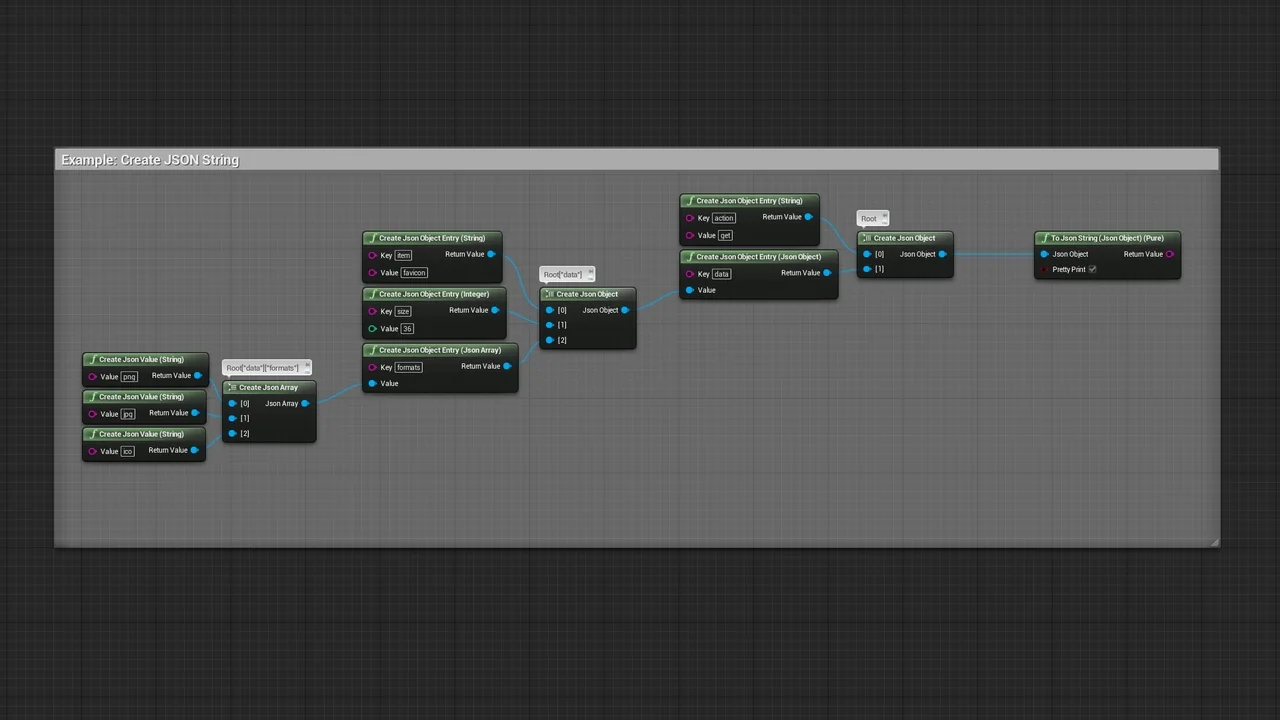
 Engine Tools
 Engine Tools
 Engine Tools