"7066dd76da796369"{"id":"13990","slug":"file-system-library","title":"File System Library","category":"Engine Tools","engine":"4.23,4.25 - 5.6","assetVersion":"Engine version: 4.23,4.25 - 5.6","engineVersion":"Asset Version:1.0","tag":"Engine Tools","accent":"blue","visual":"animation","summary":"Manage files and folders directly within Unreal Engine using the File System Library. This cross-platform blueprint tool simplifies complex file operations like moving, copying, and renaming.","platform":"Unreal Engine","publishedAt":"2026-03-11T13:08:00.000Z","updatedAt":"2026-04-19T15:45:56.000Z","sourceNotes":[],"fileContents":[],"compatibility":["Unreal Engine","Engine version: 4.23,4.25 - 5.6","Asset Version: 1.0"],"featuredImage":{"alt":"File System Library","src":"https://3dcghub.com/wp-content/uploads/2026/03/2e340444-d53a-4e1e-bd77-d11ee600a9d4.webp"},"hasDownloadLink":true,"downloads":0,"terms":[{"taxonomy":"category","slug":"engine-tools-tools-and-plugins","name":"Engine Tools"},{"taxonomy":"post_tag","slug":"blueprint","name":"Blueprint"},{"taxonomy":"post_tag","slug":"file-system-library","name":"File System Library"},{"taxonomy":"post_tag","slug":"game-systems","name":"Game Systems"},{"taxonomy":"post_tag","slug":"plugins","name":"Plugins"},{"taxonomy":"post_tag","slug":"tools","name":"Tools"},{"taxonomy":"post_tag","slug":"unreal-engine-5","name":"Unreal Engine 5"}],"galleryImages":[{"src":"https://3dcghub.com/wp-content/uploads/2026/03/0ec4a7db8be1_65250053-e56f-4b50-81b6-5550f012aa58.webp","alt":"File System Library"},{"src":"https://3dcghub.com/wp-content/uploads/2026/03/770db093ea95_efe49398-67d7-49e6-b333-77b514d81cf6.webp","alt":"File System Library"},{"src":"https://3dcghub.com/wp-content/uploads/2026/03/73edea4710f0_2131f366-2783-4622-b602-782ec18fb5d8.webp","alt":"File System Library"},{"src":"https://3dcghub.com/wp-content/uploads/2026/03/ba17db822f7f_21b1baf1-5f49-4296-9b0c-8eb3282758cc.webp","alt":"File System Library"},{"src":"https://3dcghub.com/wp-content/uploads/2026/03/60b38e9aa26f_08ff3f1b-f12d-4340-8a05-9bb1a7662ebe.webp","alt":"File System Library"}],"accessPanel":{"kind":"resource","title":"Access this resource","eyebrow":"Free Download","message":"Log in or create a free account to start your download.","fileName":"File System Library 4.23,4.25 - 5.6;V1.0.7z","safetyNote":"All resources are 100% manually reviewed to eliminate all risks.","actionLabel":"Download Free","resourceType":"Resource archive"},"contentHtml":"\u003ch2\u003eEfficient File Management with File System Library\u003c/h2\u003e\n\u003cp\u003eThe \u003cstrong\u003eFile System Library\u003c/strong\u003e provides a comprehensive, cross-platform blueprint solution for developers who need to interact with files and directories directly within their projects. Consequently, it eliminates the need for complex C++ code when performing standard file operations. This library is designed to be user-friendly, allowing creators to manage their data structures with ease. By utilizing the \u003cstrong\u003eFile System Library\u003c/strong\u003e, you can streamline your development workflow and enhance the functionality of your application.\u003c/p\u003e\n\n\u003ch2\u003eEssential File and Directory Operations\u003c/h2\u003e\n\u003cp\u003eManaging assets and data requires a robust set of tools. The developer has included all the basic features necessary for effective file handling. Specifically, the library allows you to perform copy, move, delete, and rename operations. These functions are available for both individual files and entire directories. Moreover, the inclusion of File String I/O features means you can load and create files on the go directly from strings. This functionality is particularly useful for saving dynamic data or generating configuration files during runtime.\u003c/p\u003e\n\n\u003ch2\u003eNative Operating System Integration\u003c/h2\u003e\n\u003cp\u003eOne of the standout features of the \u003cstrong\u003eFile System Library\u003c/strong\u003e is its ability to utilize native operating system dialogs. This allows your application to prompt the user to save or select a file using the default windows they are already familiar with. Furthermore, these dialogs can be called from any blueprint class, making the integration process seamless. Because it uses the OS defaults, the user experience remains consistent with the platform they are using, whether it is Windows or Mac.\u003c/p\u003e\n\n\u003ch3\u003eSupport for Packaged Builds and Editor Workflows\u003c/h3\u003e\n\u003cp\u003eCompatibility is a core strength of this plugin. It is designed to work efficiently in both the editor environment and in various packaged build configurations. Therefore, whether you are working on a development, debug, or shipping build, the \u003cstrong\u003eFile System Library\u003c/strong\u003e remains fully functional. This ensures that the file management logic you build during the development phase will translate perfectly to the final product delivered to users.\u003c/p\u003e\n\n\u003ch3\u003eCross-Platform Compatibility and Mac Support\u003c/h3\u003e\n\u003cp\u003eThe library is built for cross-platform use and has been specifically tested on Windows and Mac (specifically Mac OS 10.7 BigSur). For developers working on the Mac platform, the creator provides specific instructions to ensure smooth packaging. If you encounter issues during the packaging process on Mac, you should move the plugin from the engine marketplace folder to your specific project's plugin directory. This level of detail ensures that developers can overcome platform-specific hurdles quickly.\u003c/p\u003e\n\n\u003ch2\u003eFinal Take\u003c/h2\u003e\n\u003cp\u003eFor teams considering it, the \u003cstrong\u003eFile System Library\u003c/strong\u003e is a versatile tool for any developer looking to simplify file and folder interactions. It combines essential file operations with native OS dialog support and string-based I/O. Additionally, its support for multiple build types and cross-platform environments makes it a reliable choice for modern game development. By integrating this library, you gain powerful control over the file system without leaving the blueprint editor.\u003c/p\u003e\n\n\u003ch2\u003eRelated Resources Worth Checking\u003c/h2\u003e\n\u003cul\u003e\n\u003cli\u003e\u003ca href=\"https://3dcghub.com/chunk-downloader-nodes/\" title=\"Chunk Downloader Nodes\"\u003eChunk Downloader Nodes\u003c/a\u003e\u003c/li\u003e\n\u003cli\u003e\u003ca href=\"https://3dcghub.com/blueprintjson/\" title=\"BlueprintJSON\"\u003eBlueprintJSON\u003c/a\u003e\u003c/li\u003e\n\u003cli\u003e\u003ca href=\"https://3dcghub.com/fantasy-rpg-icons-500-fantasy-fantasy-rpg-icon-icon-symbol-symbol-rpg/\" title=\"Fantasy RPG Icons (500+) ( Fantasy Fantasy Rpg Icon Icon Symbol Symbol Rpg )\"\u003eFantasy RPG Icons (500+) ( Fantasy Fantasy Rpg Icon Icon Symbol Symbol Rpg )\u003c/a\u003e\u003c/li\u003e\n\u003cli\u003e\u003ca href=\"https://3dcghub.com/destruction-decal-bp/\" title=\"Destruction Decal BP\"\u003eDestruction Decal BP\u003c/a\u003e\u003c/li\u003e\n\u003cli\u003e\u003ca href=\"https://3dcghub.com/234-advanced-light-function/\" title=\"234 Advanced Light Function\"\u003e234 Advanced Light Function\u003c/a\u003e\u003c/li\u003e\n\u003c/ul\u003e","contentTextLength":3453,"navigation":{"current":3366,"total":4016,"previous":{"id":"13900","slug":"easy-localization-translation","title":"Easy Localization Translation","category":"Engine Tools","platform":"Unreal Engine","updatedAt":"2026-04-19T15:46:19.000Z"},"next":{"id":"14035","slug":"groom-export","title":"Groom Export","category":"Engine Tools","platform":"Unreal Engine","updatedAt":"2026-04-19T15:45:55.000Z"}},"relatedResources":[{"id":"14510","slug":"runtime-files-downloader","title":"Runtime Files Downloader","category":"Engine Tools","engine":"4.26 - 4.27,5.0 - 5.7","assetVersion":"Engine version: 4.26 - 4.27,5.0 - 5.7","engineVersion":"Asset Version:1.0","tag":"Engine Tools","accent":"blue","visual":"character","summary":"The Runtime Files Downloader enables fast and reliable HTTP/HTTPS file downloads directly in your game. It supports files larger than 2GB and offers flexible storage or memory-based loading options.","platform":"Unreal Engine","publishedAt":"2026-03-11T18:18:40.000Z","updatedAt":"2026-09-30T02:39:01.992Z","sourceNotes":[],"fileContents":[],"compatibility":["Unreal Engine","Engine version: 4.26 - 4.27,5.0 - 5.7","Asset Version: 1.0"],"featuredImage":{"alt":"Runtime Files Downloader","src":"https://3dcghub.com/wp-content/uploads/2026/03/963fe789-cb5a-46bf-be0d-8da8e6b16591.webp"},"hasDownloadLink":true,"downloads":0},{"id":"13785","slug":"chunk-downloader-nodes","title":"Chunk Downloader Nodes","category":"Engine Tools","engine":"5.6","assetVersion":"Engine version: 5.6","engineVersion":"Asset Version:1.0","tag":"Engine Tools","accent":"blue","visual":"animation","summary":"Streamline your content delivery with Chunk Downloader Nodes, a professional Blueprint wrapper for Epic's official plugin. This tool enables efficient content streaming and PAK file management without C++ requirements.","platform":"Unreal Engine","publishedAt":"2026-03-11T10:02:01.000Z","updatedAt":"2026-04-19T15:46:22.000Z","sourceNotes":[],"fileContents":[],"compatibility":["Unreal Engine","Engine version: 5.6","Asset Version: 1.0"],"featuredImage":{"alt":"Chunk Downloader Nodes","src":"https://3dcghub.com/wp-content/uploads/2026/03/efb2c9d0-ead4-4949-8fda-f55747fa16fe-1.webp"},"hasDownloadLink":true,"downloads":0},{"id":"14164","slug":"map-function-library","title":"Map Function Library","category":"Engine Tools","engine":"5.2 - 5.4","assetVersion":"Engine version: 5.2 - 5.4","engineVersion":"5.4","tag":"Engine Tools","accent":"blue","visual":"audio","summary":"The Map Function Library plugin introduces specialized nodes to streamline map operations in Unreal Engine. It offers tools for easier iteration, index-based interaction, and efficient data merging.","platform":"Unreal Engine","publishedAt":"2026-03-11T16:02:19.000Z","updatedAt":"2026-04-19T15:45:52.000Z","sourceNotes":[],"fileContents":[],"compatibility":["Unreal Engine","Engine version: 5.2 - 5.4"],"featuredImage":{"alt":"Map Function Library","src":"https://3dcghub.com/wp-content/uploads/2026/03/8886ea98-8340-4a7c-b79c-39a8d9a5ce48.webp"},"hasDownloadLink":true,"downloads":0}]}
Engine Tools
File System Library
Manage files and folders directly within Unreal Engine using the File System Library. This cross-platform blueprint tool simplifies complex file operations like moving, copying, and renaming.
Efficient File Management with File System Library
The File System Library provides a comprehensive, cross-platform blueprint solution for developers who need to interact with files and directories directly within their projects. Consequently, it eliminates the need for complex C++ code when performing standard file operations. This library is designed to be user-friendly, allowing creators to manage their data structures with ease. By utilizing the File System Library, you can streamline your development workflow and enhance the functionality of your application.
Essential File and Directory Operations
Managing assets and data requires a robust set of tools. The developer has included all the basic features necessary for effective file handling. Specifically, the library allows you to perform copy, move, delete, and rename operations. These functions are available for both individual files and entire directories. Moreover, the inclusion of File String I/O features means you can load and create files on the go directly from strings. This functionality is particularly useful for saving dynamic data or generating configuration files during runtime.
Native Operating System Integration
One of the standout features of the File System Library is its ability to utilize native operating system dialogs. This allows your application to prompt the user to save or select a file using the default windows they are already familiar with. Furthermore, these dialogs can be called from any blueprint class, making the integration process seamless. Because it uses the OS defaults, the user experience remains consistent with the platform they are using, whether it is Windows or Mac.
Support for Packaged Builds and Editor Workflows
Compatibility is a core strength of this plugin. It is designed to work efficiently in both the editor environment and in various packaged build configurations. Therefore, whether you are working on a development, debug, or shipping build, the File System Library remains fully functional. This ensures that the file management logic you build during the development phase will translate perfectly to the final product delivered to users.
Cross-Platform Compatibility and Mac Support
The library is built for cross-platform use and has been specifically tested on Windows and Mac (specifically Mac OS 10.7 BigSur). For developers working on the Mac platform, the creator provides specific instructions to ensure smooth packaging. If you encounter issues during the packaging process on Mac, you should move the plugin from the engine marketplace folder to your specific project's plugin directory. This level of detail ensures that developers can overcome platform-specific hurdles quickly.
Final Take
For teams considering it, the File System Library is a versatile tool for any developer looking to simplify file and folder interactions. It combines essential file operations with native OS dialog support and string-based I/O. Additionally, its support for multiple build types and cross-platform environments makes it a reliable choice for modern game development. By integrating this library, you gain powerful control over the file system without leaving the blueprint editor.
 Engine Tools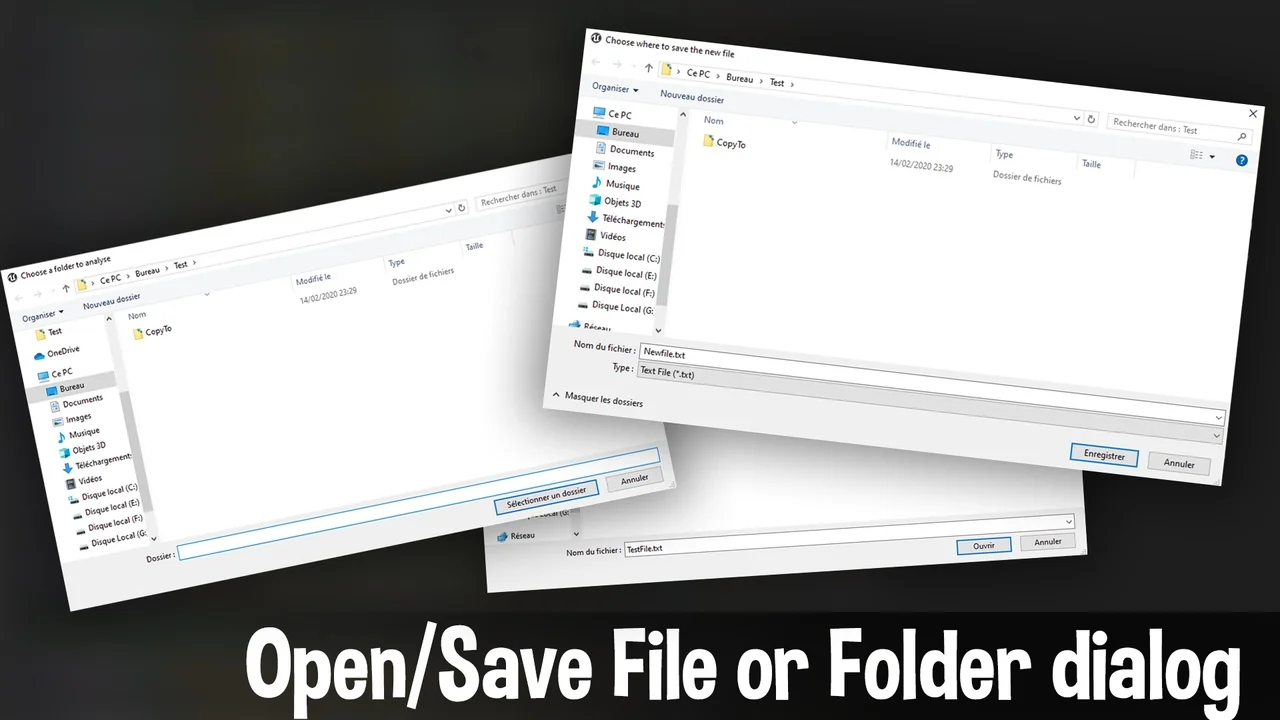
 Engine Tools
 Engine Tools
 Engine Tools