"7066dd76da796369"{"id":"14164","slug":"map-function-library","title":"Map Function Library","category":"Engine Tools","engine":"5.2 - 5.4","assetVersion":"Engine version: 5.2 - 5.4","engineVersion":"5.4","tag":"Engine Tools","accent":"blue","visual":"audio","summary":"The Map Function Library plugin introduces specialized nodes to streamline map operations in Unreal Engine. It offers tools for easier iteration, index-based interaction, and efficient data merging.","platform":"Unreal Engine","publishedAt":"2026-03-11T16:02:19.000Z","updatedAt":"2026-04-19T15:45:52.000Z","sourceNotes":[],"fileContents":[],"compatibility":["Unreal Engine","Engine version: 5.2 - 5.4"],"featuredImage":{"alt":"Map Function Library","src":"https://3dcghub.com/wp-content/uploads/2026/03/8886ea98-8340-4a7c-b79c-39a8d9a5ce48.webp"},"hasDownloadLink":true,"downloads":0,"terms":[{"taxonomy":"category","slug":"engine-tools-tools-and-plugins","name":"Engine Tools"},{"taxonomy":"post_tag","slug":"blueprint","name":"Blueprint"},{"taxonomy":"post_tag","slug":"blueprint-nodes","name":"Blueprint Nodes"},{"taxonomy":"post_tag","slug":"map-function-library","name":"Map Function Library"},{"taxonomy":"post_tag","slug":"plugins","name":"Plugins"},{"taxonomy":"post_tag","slug":"tools","name":"Tools"},{"taxonomy":"post_tag","slug":"unreal-engine-5","name":"Unreal Engine 5"}],"galleryImages":[{"src":"https://3dcghub.com/wp-content/uploads/2026/03/b1d2523d08eb_b99f5396-6f27-4929-b8ce-6a4c5cba2f53.webp","alt":"Map Function Library"},{"src":"https://3dcghub.com/wp-content/uploads/2026/03/786f34ea1b64_7d38e75d-5173-48d3-96ed-004aa0137927.webp","alt":"Map Function Library"},{"src":"https://3dcghub.com/wp-content/uploads/2026/03/d49dc2e416d7_2e2b1f2c-35a2-4737-bf41-b9f3855fda3d.webp","alt":"Map Function Library"},{"src":"https://3dcghub.com/wp-content/uploads/2026/03/07d44a91f3eb_e0b6399f-1a75-4ebb-a8f4-6e8c90a0c253.webp","alt":"Map Function Library"},{"src":"https://3dcghub.com/wp-content/uploads/2026/03/66944d966fb3_6749a917-f1f4-4fb0-b7a3-b51f52d5a58c.webp","alt":"Map Function Library"},{"src":"https://3dcghub.com/wp-content/uploads/2026/03/453f73043005_87f9d48a-8b24-4ab7-a99f-bbe9854d4576.webp","alt":"Map Function Library"},{"src":"https://3dcghub.com/wp-content/uploads/2026/03/b8e62a5305b5_17122fb0-4fe3-41f4-9691-b79e76851b5d.webp","alt":"Map Function Library"},{"src":"https://3dcghub.com/wp-content/uploads/2026/03/3f882121118b_230ed790-cecb-46d5-8a5a-32db98a08b51.webp","alt":"Map Function Library"},{"src":"https://3dcghub.com/wp-content/uploads/2026/03/b532c982557f_0bb21569-32a5-4d7e-8dd6-26b859b094bd.webp","alt":"Map Function Library"},{"src":"https://3dcghub.com/wp-content/uploads/2026/03/2e6e459aae9e_f79cf6aa-5620-47d8-973e-81950be20a1f.webp","alt":"Map Function Library"},{"src":"https://3dcghub.com/wp-content/uploads/2026/03/b72c0b121061_1c62a7b6-912c-4878-9538-41461092b2bd.webp","alt":"Map Function Library"},{"src":"https://3dcghub.com/wp-content/uploads/2026/03/218e6d3a4023_84c9d809-5d1f-4ef0-af96-3da10fc65154.webp","alt":"Map Function Library"},{"src":"https://3dcghub.com/wp-content/uploads/2026/03/68488e892a0f_6e846cd6-c2d3-48d8-a37e-c58f45bf16ac.webp","alt":"Map Function Library"},{"src":"https://3dcghub.com/wp-content/uploads/2026/03/150681131339_633f2db4-b59f-444f-84e7-5ee83da885d0.webp","alt":"Map Function Library"}],"accessPanel":{"kind":"resource","title":"Access this resource","eyebrow":"Free Download","message":"Log in or create a free account to start your download.","fileName":"Map Function Library 5.2-5.4.7z","safetyNote":"All resources are 100% manually reviewed to eliminate all risks.","actionLabel":"Download Free","resourceType":"Resource archive"},"contentHtml":"\u003cp\u003eThe \u003cstrong\u003eMap Function Library\u003c/strong\u003e plugin introduces several powerful new nodes designed to significantly improve how you work with maps in Unreal Engine. These nodes streamline common map operations, saving you time and simplifying your blueprints. By integrating these tools, the creator ensures that developers can handle complex data structures with greater ease.\u003c/p\u003e\n\n\u003ch2\u003eEnhanced Iteration and Control\u003c/h2\u003e\n\u003cp\u003eWorking with data loops is more efficient thanks to the For Each (Map) node. This node allows you to iterate through all key/value pairs in a map seamlessly. Furthermore, it provides the index of the current pair for better tracking. This is a significant improvement for complex data management tasks.\u003c/p\u003e\n\n\u003cp\u003eIf you need more control over your loops, the developer included a second version of this node. This version features a break pin, which allows you to exit the loop whenever necessary. Therefore, you can stop processing data once a specific condition is met. This added control helps keep your logic efficient and responsive.\u003c/p\u003e\n\n\u003ch2\u003eEffortless Map Comparison\u003c/h2\u003e\n\u003cp\u003eComparing data sets is a frequent task in game development. The Identical node provides a direct way to compare two maps within the \u003cstrong\u003eMap Function Library\u003c/strong\u003e. It checks if they are exactly identical without extra steps. Consequently, you do not need to convert keys and values into arrays for simple comparisons. This makes your logic much cleaner and more performant.\u003c/p\u003e\n\n\u003ch2\u003eIndex-Based Interaction\u003c/h2\u003e\n\u003cp\u003eThe plugin adds several nodes for interacting with maps using indices. You can now use Set Value At, Get Value, and Get Key nodes to target specific data points. These tools offer a new level of precision when managing map contents. As a result, developers have more flexibility in how they access and modify their data without relying on keys alone.\u003c/p\u003e\n\n\u003ch2\u003eSimple Merging and Randomization\u003c/h2\u003e\n\u003cp\u003eCombining data sets is now incredibly easy with the Append node. This function allows you to quickly merge one map into another. Moreover, the \u003cstrong\u003eMap Function Library\u003c/strong\u003e simplifies the process of retrieving random data from your collections.\u003c/p\u003e\n\n\u003cp\u003eYou can fetch a random item from any map using a single node. The plugin offers two options: Random Map Item or Random Map Item From Stream. This is particularly useful for mechanics that require variety or procedural generation. Consequently, adding randomness to your systems requires much less setup.\u003c/p\u003e\n\n\u003ch2\u003eOptimized Data Management\u003c/h2\u003e\n\u003cp\u003eChecking for specific data is faster with the Contains Value node. This allows you to determine if a map contains a particular value with a simple check. Additionally, the Get Keys and Get Values nodes are now pure functions. This change contributes to cleaner code and more readable blueprints. As a result, your graph remains organized.\u003c/p\u003e\n\n\u003cp\u003eFor batch operations, the Remove Entries node is highly effective. It allows you to remove an entire array of entries from a map with a single call. Therefore, you can manage large-scale data changes without repetitive logic. This tool is essential for maintaining clean data structures.\u003c/p\u003e\n\n\u003ch2\u003eBest Fit\u003c/h2\u003e\n\u003cp\u003eThe \u003cstrong\u003eMap Function Library\u003c/strong\u003e is a comprehensive solution for Unreal Engine developers. It replaces tedious manual processes with streamlined, efficient nodes. By improving iteration, comparison, and data retrieval, this plugin enhances the overall blueprint experience. It is a valuable addition to any developer's toolkit for managing complex map data.\u003c/p\u003e\n\n\u003ch2\u003eMore From The Same Workflow\u003c/h2\u003e\n\u003cul\u003e\n\u003cli\u003e\u003ca href=\"https://3dcghub.com/destruction-decal-bp/\" title=\"Destruction Decal BP\"\u003eDestruction Decal BP\u003c/a\u003e\u003c/li\u003e\n\u003cli\u003e\u003ca href=\"https://3dcghub.com/56-fabric-textile-materials-4k-pbr-collection/\" title=\"56 Fabric \u0026amp;amp; Textile Materials (4K PBR Collection)\"\u003e56 Fabric \u0026amp; Textile Materials (4K PBR Collection)\u003c/a\u003e\u003c/li\u003e\n\u003cli\u003e\u003ca href=\"https://3dcghub.com/68-hdri-space-nebula-8k/\" title=\"68 HDRI Space Nebula – 8k\"\u003e68 HDRI Space Nebula – 8k\u003c/a\u003e\u003c/li\u003e\n\u003cli\u003e\u003ca href=\"https://3dcghub.com/advanced-light-pack/\" title=\"Advanced Light Pack\"\u003eAdvanced Light Pack\u003c/a\u003e\u003c/li\u003e\n\u003cli\u003e\u003ca href=\"https://3dcghub.com/amazing-sci-fi-vol-2-se/\" title=\"Amazing Sci-Fi Vol.2 “SE”\"\u003eAmazing Sci-Fi Vol.2 “SE”\u003c/a\u003e\u003c/li\u003e\n\u003c/ul\u003e\n\n\u003ch2\u003eAsset Gallery\u003c/h2\u003e","contentTextLength":3576,"navigation":{"current":3375,"total":4016,"previous":{"id":"14092","slug":"le-encryption","title":"LE Encryption","category":"Engine Tools","platform":"Unreal Engine","updatedAt":"2026-04-19T15:45:53.000Z"},"next":{"id":"14147","slug":"make-modular-skeletal-mesh","title":"Make Modular Skeletal Mesh","category":"Engine Tools","platform":"Unreal Engine","updatedAt":"2026-04-19T15:45:52.000Z"}},"relatedResources":[{"id":"1000166","slug":"variable-access-library","title":"Variable Access Library","category":"Engine Tools","engine":"4.26 - 4.27,5.0+","assetVersion":"Asset Version: 1.7","engineVersion":"Engine Version: 4.26 - 4.27,5.0+","tag":"Engine Tools","accent":"blue","visual":"mech","summary":"Variable Access Library streamlines Unreal Engine Blueprint and C++ workflows with soft-reference variable access, debugging tools, and function execution by na","platform":"Unreal Engine","publishedAt":"2026-06-19T12:56:26.115Z","updatedAt":"2026-06-19T12:56:26.115Z","sourceNotes":[],"fileContents":[],"compatibility":["Unreal Engine","Asset Version: 1.7","Engine Version: 4.26 - 4.27,5.0+"],"featuredImage":{"alt":"Variable Access Library","src":"/wp-content/uploads/published/2026/06/f453c951f82b-cbcb73ba-9b12-4d02-8add-8c62c18fd259-7e5f71f8b5.webp"},"hasDownloadLink":true,"downloads":0},{"id":"13990","slug":"file-system-library","title":"File System Library","category":"Engine Tools","engine":"4.23,4.25 - 5.6","assetVersion":"Engine version: 4.23,4.25 - 5.6","engineVersion":"Asset Version:1.0","tag":"Engine Tools","accent":"blue","visual":"animation","summary":"Manage files and folders directly within Unreal Engine using the File System Library. This cross-platform blueprint tool simplifies complex file operations like moving, copying, and renaming.","platform":"Unreal Engine","publishedAt":"2026-03-11T13:08:00.000Z","updatedAt":"2026-04-19T15:45:56.000Z","sourceNotes":[],"fileContents":[],"compatibility":["Unreal Engine","Engine version: 4.23,4.25 - 5.6","Asset Version: 1.0"],"featuredImage":{"alt":"File System Library","src":"https://3dcghub.com/wp-content/uploads/2026/03/2e340444-d53a-4e1e-bd77-d11ee600a9d4.webp"},"hasDownloadLink":true,"downloads":0},{"id":"13658","slug":"advanced-control-flow","title":"Advanced Control Flow","category":"Engine Tools","engine":"5.6","assetVersion":"Engine version: 5.6","engineVersion":"Asset Version:1.7.0","tag":"Engine Tools","accent":"blue","visual":"mech","summary":"Streamline your Unreal Engine logic with Advanced Control Flow. This plugin replaces messy stacked branch nodes with a single, efficient MultiBranch solution for complex if-elseif-else statements.","platform":"Unreal Engine","publishedAt":"2026-03-11T09:31:18.000Z","updatedAt":"2026-04-19T15:46:24.000Z","sourceNotes":[],"fileContents":[],"compatibility":["Unreal Engine","Engine version: 5.6","Asset Version: 1.7.0"],"featuredImage":{"alt":"Advanced Control Flow","src":"https://3dcghub.com/wp-content/uploads/2026/03/4349d5b2-d0f2-440c-afc3-b634c52c02a9.webp"},"hasDownloadLink":true,"downloads":0}]}
Engine Tools
Map Function Library
The Map Function Library plugin introduces specialized nodes to streamline map operations in Unreal Engine. It offers tools for easier iteration, index-based interaction, and efficient data merging.
The Map Function Library plugin introduces several powerful new nodes designed to significantly improve how you work with maps in Unreal Engine. These nodes streamline common map operations, saving you time and simplifying your blueprints. By integrating these tools, the creator ensures that developers can handle complex data structures with greater ease.
Enhanced Iteration and Control
Working with data loops is more efficient thanks to the For Each (Map) node. This node allows you to iterate through all key/value pairs in a map seamlessly. Furthermore, it provides the index of the current pair for better tracking. This is a significant improvement for complex data management tasks.
If you need more control over your loops, the developer included a second version of this node. This version features a break pin, which allows you to exit the loop whenever necessary. Therefore, you can stop processing data once a specific condition is met. This added control helps keep your logic efficient and responsive.
Effortless Map Comparison
Comparing data sets is a frequent task in game development. The Identical node provides a direct way to compare two maps within the Map Function Library. It checks if they are exactly identical without extra steps. Consequently, you do not need to convert keys and values into arrays for simple comparisons. This makes your logic much cleaner and more performant.
Index-Based Interaction
The plugin adds several nodes for interacting with maps using indices. You can now use Set Value At, Get Value, and Get Key nodes to target specific data points. These tools offer a new level of precision when managing map contents. As a result, developers have more flexibility in how they access and modify their data without relying on keys alone.
Simple Merging and Randomization
Combining data sets is now incredibly easy with the Append node. This function allows you to quickly merge one map into another. Moreover, the Map Function Library simplifies the process of retrieving random data from your collections.
You can fetch a random item from any map using a single node. The plugin offers two options: Random Map Item or Random Map Item From Stream. This is particularly useful for mechanics that require variety or procedural generation. Consequently, adding randomness to your systems requires much less setup.
Optimized Data Management
Checking for specific data is faster with the Contains Value node. This allows you to determine if a map contains a particular value with a simple check. Additionally, the Get Keys and Get Values nodes are now pure functions. This change contributes to cleaner code and more readable blueprints. As a result, your graph remains organized.
For batch operations, the Remove Entries node is highly effective. It allows you to remove an entire array of entries from a map with a single call. Therefore, you can manage large-scale data changes without repetitive logic. This tool is essential for maintaining clean data structures.
Best Fit
The Map Function Library is a comprehensive solution for Unreal Engine developers. It replaces tedious manual processes with streamlined, efficient nodes. By improving iteration, comparison, and data retrieval, this plugin enhances the overall blueprint experience. It is a valuable addition to any developer's toolkit for managing complex map data.
 Engine Tools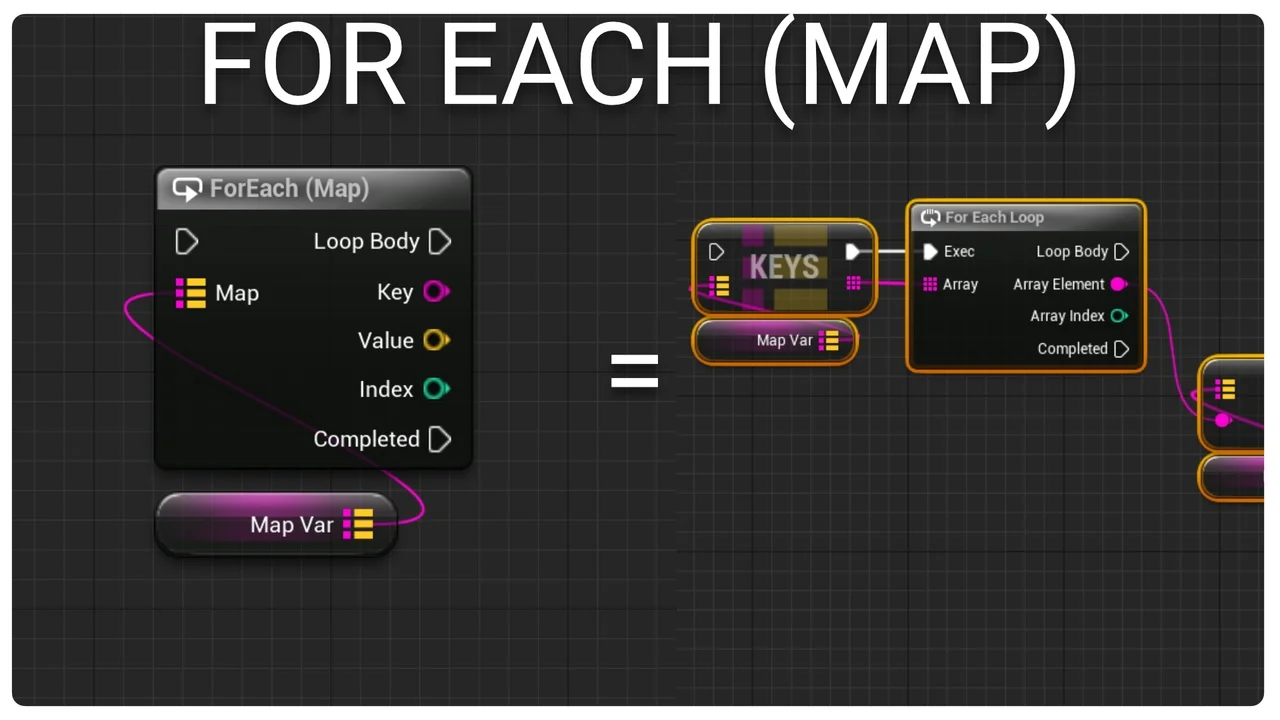
 Engine Tools
 Engine Tools
 Engine Tools