"1f00f67f9253451b"{"id":"1000166","slug":"variable-access-library","title":"Variable Access Library","category":"Engine Tools","engine":"4.26 - 4.27,5.0+","assetVersion":"Asset Version: 1.7","engineVersion":"Engine Version: 4.26 - 4.27,5.0+","tag":"Engine Tools","accent":"blue","visual":"mech","summary":"Variable Access Library streamlines Unreal Engine Blueprint and C++ workflows with soft-reference variable access, debugging tools, and function execution by na","platform":"Unreal Engine","publishedAt":"2026-06-19T12:56:26.115Z","updatedAt":"2026-06-19T12:56:26.115Z","sourceNotes":[],"fileContents":[],"compatibility":["Unreal Engine","Asset Version: 1.7","Engine Version: 4.26 - 4.27,5.0+"],"featuredImage":{"alt":"Variable Access Library","src":"/wp-content/uploads/published/2026/06/f453c951f82b-cbcb73ba-9b12-4d02-8add-8c62c18fd259-7e5f71f8b5.webp"},"hasDownloadLink":true,"downloads":0,"terms":[{"taxonomy":"category","slug":"engine-tools-tools-and-plugins","name":"Engine Tools"}],"galleryImages":[{"src":"/wp-content/uploads/published/2026/06/efcd2b883d00-bca05c14-ea7c-4fc3-be39-b1118a31ed4d-69b72512e0.webp","alt":"Variable Access Library"},{"src":"/wp-content/uploads/published/2026/06/1f3915c2eb27-08dde517-2b88-4316-ae89-ea0cfa907cd2-a13bc1a7c0.webp","alt":"Variable Access Library"},{"src":"/wp-content/uploads/published/2026/06/364e271a63aa-613970bb-7896-481e-9d33-9a3361151d87-0ef93c46d8.webp","alt":"Variable Access Library"},{"src":"/wp-content/uploads/published/2026/06/4653540b7fb7-3c28f593-cd11-431c-9c3b-72506f115ec6-80fc0fe5a8.webp","alt":"Variable Access Library"},{"src":"/wp-content/uploads/published/2026/06/2fe8730cec7d-70c24e04-e09a-49a8-ab23-bb2bb1537263-506aeb0c6e.webp","alt":"Variable Access Library"}],"accessPanel":{"kind":"resource","title":"Download this resource","eyebrow":"Free Download","message":"Log in or create a free account to start your download.","fileName":"Variable Access Library.7z","safetyNote":"Resources are manually reviewed before listing to improve quality and reduce obvious risks.","actionLabel":"Download Free","resourceType":"Resource archive"},"contentHtml":"\u003cp\u003eProjects with lots of Blueprint communication, repeated \u003cem\u003eCast To\u003c/em\u003e Calls, and sprawling object references tend to become harder to manage as they grow. Variable Access Library targets that situation directly. It aims to improve blueprinting workflow by making code more modular, reducing the amount of code needed, and helping graphs look cleaner and more organized.\u003c/p\u003e\n\u003cp\u003eThe plugin approaches this by replacing hard reference calls via \u003cem\u003eCast To\u003c/em\u003e With soft references. That shift is presented as a performance improvement, with lower RAM usage and shorter level load times than hard references. Instead of wiring everything through direct hard-linked access patterns, the library centers on getting and setting supported variable types on any object simply by name through a soft reference workflow. It also extends beyond variable access into target inspection and named function execution, which gives it a broader role in how a project is structured.\u003c/p\u003e \u003ch2\u003eWhen Variable Access Library fits best\u003c/h2\u003e\n\u003cp\u003eThis is most useful in projects where communication between objects starts to overwhelm readability. If a setup relies on many direct casts, custom classes, or repeated graph logic just to reach a value, the library offers a way to consolidate that work into reusable access functions. The stated goal is a widely modular coding structure, so the plugin is not just a bundle of isolated helpers. It is meant to change how variable access is handled across a project.\u003c/p\u003e\n\u003cp\u003eThat modularity also reaches beyond Blueprint-only work. The functions are accessible in both C++ and Blueprint, and the plugin supports replicated variables and RPC events. That matters in mixed-code projects where utility functions need to remain available across scripting and native code without splitting the workflow into separate toolsets.\u003c/p\u003e\n\u003cp\u003eThe library’s function set is described as evergrowing, and the existing feature list already covers several common pain points: getting and setting supported variables by name, gathering all variable names from a target, and executing functions by name. Those capabilities make it suitable for projects that need more flexible runtime access patterns than direct hard-linked references usually allow.\u003c/p\u003e \u003ch2\u003eSoft references instead of Cast To chains\u003c/h2\u003e\n\u003cp\u003eThe clearest implementation angle is the replacement of hard reference calls via \u003cem\u003eCast To\u003c/em\u003e. Variable Access Library presents soft references as the central alternative, with the reported benefits of more performant code, lower RAM usage, and much shorter level load times. For production work, the plugin is aimed at reducing the dependency chain that builds up when Blueprints repeatedly cast to reach data or trigger behavior.\u003c/p\u003e\n\u003cp\u003eIts variable access model is based on names. For supported types, you can get or set variables on any object simply by name through a soft reference. That makes the plugin particularly relevant when object relationships are known, but direct hard reference coupling is something you want to reduce. The same pattern extends into broader introspection-style functions as well. The library includes the ability to get all variable names of a target, and later updates added function-oriented tools such as getting all functions by target and executing a function by name.\u003c/p\u003e\n\u003cp\u003eVersion 1.7 expanded that function side further with \u003cstrong\u003eGet Defined Object, Actor \u0026amp; Widget by Name\u003c/strong\u003e, specifically allowing access to a variable value of custom classes with a class reference. That addition places the plugin somewhere between a variable utility library and a more generalized naming-based access layer for Blueprint and C++ work.\u003c/p\u003e \u003ch2\u003eDebugging with Plugin Settings and PrintLog/PrintScreen\u003c/h2\u003e\n\u003cp\u003eNamed access can save time, but it also creates situations where a typo or missing reference needs to be found quickly. The debugging tools included here are meant to deal with exactly that. The plugin can print error messages to the log and or screen, and those outputs can be toggled in the project settings. The intent is straightforward: missing references should be easier to identify without building separate debug scaffolding around every call.\u003c/p\u003e\n\u003cp\u003eVersion 1.3 added plugin settings under the project settings area for VariableAccess and introduced two booleans to enable or disable print-to-log and print-to-screen behavior for all functions. The same update also added \u003cstrong\u003ePrintLog\u003c/strong\u003e And \u003cstrong\u003ePrintScreen\u003c/strong\u003e Functions for easier debugging. Those messages can display the actor the function is triggered from and or the name of the variable that could not be found.\u003c/p\u003e\n\u003cp\u003eThat is a small but practical detail. A utility library like this becomes much easier to trust in a larger project when it does not fail silently. The debugging layer is not framed as a separate add-on; it is part of the plugin’s workflow and helps support the more dynamic access style the library encourages.\u003c/p\u003e \u003ch2\u003eGet All Variable Names, wildcard arrays, maps, and supported types\u003c/h2\u003e\n\u003cp\u003eThe plugin has been expanded over time through updates that fill out the kinds of data and utility patterns it can handle. Version 1.6 added \u003cstrong\u003eGet All Variable Names\u003c/strong\u003e, which complements the plugin’s name-based variable access approach. The same update also introduced easy transform functions for setting location, rotation, and scale of a transform, while adding DataTable support and removing an unused function library class.\u003c/p\u003e\n\u003cp\u003eArray and map handling have also been part of that growth. Version 1.4 added get and set wildcard array support for all common variable types, with structs excluded and requiring their own function. The update notes also state that remove and add functions were not included because they may not be required and can be accessed with the get function. Version 1.5 then added wildcard map support and an impure getter function, while reorganizing the code into four classes: Getters, Setters, General, and Impure. That restructuring was specifically done for a cleaner code structure and easier additions.\u003c/p\u003e\n\u003cp\u003eThe supported variable landscape expanded in earlier updates as well. Version 1.1 introduced 12 new functions for Name, Text, String, Rotator, Transform, and LinearColor. Version 1.2 added 10 new functions supporting Int64, Objects, Vector 2d, IntPoint, and IntVector, while also updating the API for 4.25+ to remove warnings if compiled by source. Taken together, those changes show a plugin that has steadily broadened the number of practical cases it can cover rather than staying locked to a narrow set of variable types.\u003c/p\u003e \u003ch2\u003eUE5.1, UE5.2, Gameplay Tags, and the coming V 1.8 workflow update\u003c/h2\u003e\n\u003cp\u003eThe later update history is anchored in engine maintenance and workflow expansion. Version 1.7.1, marked as the UE5.1 update and released on December 6, 2022, fixed UE5 float support because UE5 floats are now double and required an update to function again. That same release added Gameplay Tag and Gameplay Tag Container support, cleaned up the impure C++ script so it inherits all functions from the Getters C++ file, and updated the API to remove compile warnings.\u003c/p\u003e\n\u003cp\u003eVersion 1.7.2 is identified as the UE5.2 update and was released on June 29, 2023. No further feature breakdown is given there, but its presence shows the plugin continuing forward into newer Unreal Engine versions. Earlier compatibility notes also include support for 4.27 in the version 1.4 wildcard array update.\u003c/p\u003e\n\u003cp\u003eThe planned version 1.8 workflow update is focused on expanding how the library can be searched and applied. The listed additions include:\u003c/p\u003e\n\u003cul\u003e\n\u003cli\u003eFind Variable by Name, with output auto-determined based on the found type\u003c/li\u003e\n\u003cli\u003eUMG variable type support, including widget elements and textures\u003c/li\u003e\n\u003cli\u003eImproved array and map support through new functions\u003c/li\u003e\n\u003cli\u003eGet All Variables Name of Type\u003c/li\u003e\n\u003cli\u003eExtended macro library\u003c/li\u003e\n\u003cli\u003eFind Material or Static Mesh by Name in the Content Browser\u003c/li\u003e\n\u003cli\u003eData Asset support\u003c/li\u003e\n\u003cli\u003eSeveral bug fixes\u003c/li\u003e\n\u003c/ul\u003e\n\u003cp\u003eThose planned items point in the same direction as the existing feature set: less manual graph setup, broader coverage of object and asset-related lookups, and more ways to work from names and supported types instead of tightly bound hard references.\u003c/p\u003e \u003ch2\u003eWho gets the most from this Blueprint and C++ utility library\u003c/h2\u003e\n\u003cp\u003eVariable Access Library is most relevant for developers who want cleaner Blueprint graphs, fewer hard reference chains, and a more modular way to access variables and call functions across a project. It is especially suited to teams or solo developers working across Blueprint and C++ at the same time, since the functions are available in both and also support replicated variables and RPC events.\u003c/p\u003e\n\u003cp\u003eThe strongest practical case is not a single standout function but the combination: soft-reference variable access by name, named function execution, target inspection tools, debugging output controls, and a steadily expanding set of supported variable types. For projects where direct casts have started to clutter logic or slow down iteration, this library offers a more organized way to handle that communication while keeping debugging visible when something goes missing.\u003c/p\u003e\n\n\u003ch2\u003eRelated Resources Worth Checking\u003c/h2\u003e\n\u003cul\u003e\n\u003cli\u003e\u003ca href=\"https://3dcghub.com/file-system-library/\" title=\"File System Library\"\u003eFile System Library\u003c/a\u003e\u003c/li\u003e\n\u003cli\u003e\u003ca href=\"https://3dcghub.com/map-function-library/\" title=\"Map Function Library\"\u003eMap Function Library\u003c/a\u003e\u003c/li\u003e\n\u003cli\u003e\u003ca href=\"https://3dcghub.com/kickstart-blueprint-library/\" title=\"Kickstart Blueprint Library\"\u003eKickstart Blueprint Library\u003c/a\u003e\u003c/li\u003e\n\u003cli\u003e\u003ca href=\"https://3dcghub.com/web-socket-client/\" title=\"Web Socket Client\"\u003eWeb Socket Client\u003c/a\u003e\u003c/li\u003e\n\u003cli\u003e\u003ca href=\"https://3dcghub.com/blueprintjson/\" title=\"BlueprintJSON\"\u003eBlueprintJSON\u003c/a\u003e\u003c/li\u003e\n\u003c/ul\u003e","contentTextLength":9091,"navigation":{"current":1183,"total":3222,"previous":{"id":"1000167","slug":"unreal-shader-megascans-assets","title":"Unreal Shader : Megascans Assets","category":"Unreal Engine","platform":"Unreal Engine","updatedAt":"2026-06-19T13:46:14.677Z"},"next":{"id":"1000165","slug":"ar-navigation","title":"AR Navigation","category":"Characters \u0026 Creatures","platform":"Unreal Engine","updatedAt":"2026-06-18T23:57:25.352Z"}},"relatedResources":[{"id":"13990","slug":"file-system-library","title":"File System Library","category":"Engine Tools","engine":"4.23,4.25 - 5.6","assetVersion":"Engine version: 4.23,4.25 - 5.6","engineVersion":"Asset Version:1.0","tag":"Engine Tools","accent":"blue","visual":"animation","summary":"Manage files and folders directly within Unreal Engine using the File System Library. This cross-platform blueprint tool simplifies complex file operations like moving, copying, and renaming.","platform":"Unreal Engine","publishedAt":"2026-03-11T13:08:00.000Z","updatedAt":"2026-04-19T15:45:56.000Z","sourceNotes":[],"fileContents":[],"compatibility":["Unreal Engine","Engine version: 4.23,4.25 - 5.6","Asset Version: 1.0"],"featuredImage":{"alt":"File System Library","src":"https://3dcghub.com/wp-content/uploads/2026/03/2e340444-d53a-4e1e-bd77-d11ee600a9d4.webp"},"hasDownloadLink":true,"downloads":0},{"id":"1000122","slug":"kickstart-blueprint-library","title":"Kickstart Blueprint Library","category":"Engine Tools","engine":"5.1","assetVersion":"Asset Version: 3.6","engineVersion":"Engine Version: 5.1","tag":"Engine Tools","accent":"blue","visual":"mech","summary":"A continuous Blueprint plugin exposing hidden C++ APIs to visual scripting, offering single-node solutions for actor duplication, data handling, and state contr","platform":"Unreal Engine","publishedAt":"2026-06-11T09:28:29.080Z","updatedAt":"2026-06-11T09:28:29.080Z","sourceNotes":[],"fileContents":[],"compatibility":["Unreal Engine","Asset Version: 3.6","Engine Version: 5.1"],"featuredImage":{"alt":"Kickstart Blueprint Library","src":"/wp-content/uploads/published/2026/06/cddab1e4a2ea-2d8a1da1-18a4-4b0a-8b15-6682c77e3c15-eae731b153.webp"},"hasDownloadLink":true,"downloads":0},{"id":"14164","slug":"map-function-library","title":"Map Function Library","category":"Engine Tools","engine":"5.2 - 5.4","assetVersion":"Engine version: 5.2 - 5.4","engineVersion":"5.4","tag":"Engine Tools","accent":"blue","visual":"audio","summary":"The Map Function Library plugin introduces specialized nodes to streamline map operations in Unreal Engine. It offers tools for easier iteration, index-based interaction, and efficient data merging.","platform":"Unreal Engine","publishedAt":"2026-03-11T16:02:19.000Z","updatedAt":"2026-04-19T15:45:52.000Z","sourceNotes":[],"fileContents":[],"compatibility":["Unreal Engine","Engine version: 5.2 - 5.4"],"featuredImage":{"alt":"Map Function Library","src":"https://3dcghub.com/wp-content/uploads/2026/03/8886ea98-8340-4a7c-b79c-39a8d9a5ce48.webp"},"hasDownloadLink":true,"downloads":0}]}
Engine Tools
Variable Access Library
Variable Access Library streamlines Unreal Engine Blueprint and C++ workflows with soft-reference variable access, debugging tools, and function execution by na
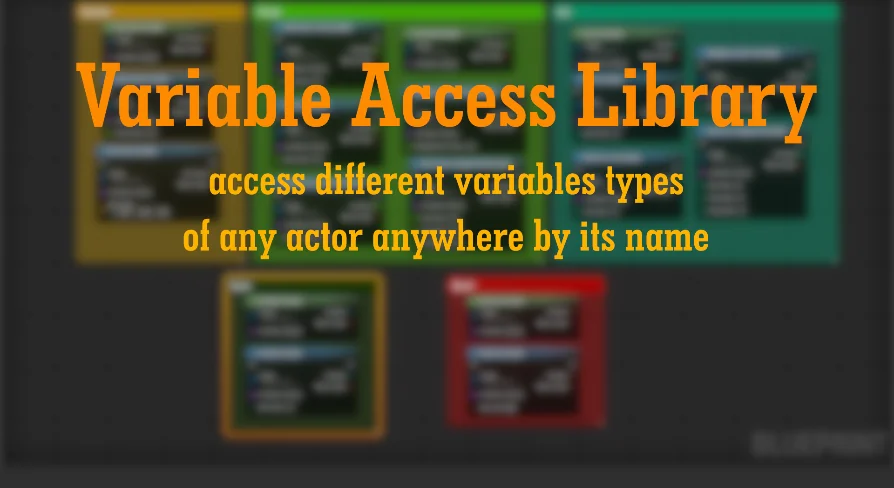
Projects with lots of Blueprint communication, repeated Cast To Calls, and sprawling object references tend to become harder to manage as they grow. Variable Access Library targets that situation directly. It aims to improve blueprinting workflow by making code more modular, reducing the amount of code needed, and helping graphs look cleaner and more organized.
The plugin approaches this by replacing hard reference calls via Cast To With soft references. That shift is presented as a performance improvement, with lower RAM usage and shorter level load times than hard references. Instead of wiring everything through direct hard-linked access patterns, the library centers on getting and setting supported variable types on any object simply by name through a soft reference workflow. It also extends beyond variable access into target inspection and named function execution, which gives it a broader role in how a project is structured.
When Variable Access Library fits best
This is most useful in projects where communication between objects starts to overwhelm readability. If a setup relies on many direct casts, custom classes, or repeated graph logic just to reach a value, the library offers a way to consolidate that work into reusable access functions. The stated goal is a widely modular coding structure, so the plugin is not just a bundle of isolated helpers. It is meant to change how variable access is handled across a project.
That modularity also reaches beyond Blueprint-only work. The functions are accessible in both C++ and Blueprint, and the plugin supports replicated variables and RPC events. That matters in mixed-code projects where utility functions need to remain available across scripting and native code without splitting the workflow into separate toolsets.
The library’s function set is described as evergrowing, and the existing feature list already covers several common pain points: getting and setting supported variables by name, gathering all variable names from a target, and executing functions by name. Those capabilities make it suitable for projects that need more flexible runtime access patterns than direct hard-linked references usually allow.
Soft references instead of Cast To chains
The clearest implementation angle is the replacement of hard reference calls via Cast To. Variable Access Library presents soft references as the central alternative, with the reported benefits of more performant code, lower RAM usage, and much shorter level load times. For production work, the plugin is aimed at reducing the dependency chain that builds up when Blueprints repeatedly cast to reach data or trigger behavior.
Its variable access model is based on names. For supported types, you can get or set variables on any object simply by name through a soft reference. That makes the plugin particularly relevant when object relationships are known, but direct hard reference coupling is something you want to reduce. The same pattern extends into broader introspection-style functions as well. The library includes the ability to get all variable names of a target, and later updates added function-oriented tools such as getting all functions by target and executing a function by name.
Version 1.7 expanded that function side further with Get Defined Object, Actor & Widget by Name, specifically allowing access to a variable value of custom classes with a class reference. That addition places the plugin somewhere between a variable utility library and a more generalized naming-based access layer for Blueprint and C++ work.
Debugging with Plugin Settings and PrintLog/PrintScreen
Named access can save time, but it also creates situations where a typo or missing reference needs to be found quickly. The debugging tools included here are meant to deal with exactly that. The plugin can print error messages to the log and or screen, and those outputs can be toggled in the project settings. The intent is straightforward: missing references should be easier to identify without building separate debug scaffolding around every call.
Version 1.3 added plugin settings under the project settings area for VariableAccess and introduced two booleans to enable or disable print-to-log and print-to-screen behavior for all functions. The same update also added PrintLog And PrintScreen Functions for easier debugging. Those messages can display the actor the function is triggered from and or the name of the variable that could not be found.
That is a small but practical detail. A utility library like this becomes much easier to trust in a larger project when it does not fail silently. The debugging layer is not framed as a separate add-on; it is part of the plugin’s workflow and helps support the more dynamic access style the library encourages.
Get All Variable Names, wildcard arrays, maps, and supported types
The plugin has been expanded over time through updates that fill out the kinds of data and utility patterns it can handle. Version 1.6 added Get All Variable Names, which complements the plugin’s name-based variable access approach. The same update also introduced easy transform functions for setting location, rotation, and scale of a transform, while adding DataTable support and removing an unused function library class.
Array and map handling have also been part of that growth. Version 1.4 added get and set wildcard array support for all common variable types, with structs excluded and requiring their own function. The update notes also state that remove and add functions were not included because they may not be required and can be accessed with the get function. Version 1.5 then added wildcard map support and an impure getter function, while reorganizing the code into four classes: Getters, Setters, General, and Impure. That restructuring was specifically done for a cleaner code structure and easier additions.
The supported variable landscape expanded in earlier updates as well. Version 1.1 introduced 12 new functions for Name, Text, String, Rotator, Transform, and LinearColor. Version 1.2 added 10 new functions supporting Int64, Objects, Vector 2d, IntPoint, and IntVector, while also updating the API for 4.25+ to remove warnings if compiled by source. Taken together, those changes show a plugin that has steadily broadened the number of practical cases it can cover rather than staying locked to a narrow set of variable types.
UE5.1, UE5.2, Gameplay Tags, and the coming V 1.8 workflow update
The later update history is anchored in engine maintenance and workflow expansion. Version 1.7.1, marked as the UE5.1 update and released on December 6, 2022, fixed UE5 float support because UE5 floats are now double and required an update to function again. That same release added Gameplay Tag and Gameplay Tag Container support, cleaned up the impure C++ script so it inherits all functions from the Getters C++ file, and updated the API to remove compile warnings.
Version 1.7.2 is identified as the UE5.2 update and was released on June 29, 2023. No further feature breakdown is given there, but its presence shows the plugin continuing forward into newer Unreal Engine versions. Earlier compatibility notes also include support for 4.27 in the version 1.4 wildcard array update.
The planned version 1.8 workflow update is focused on expanding how the library can be searched and applied. The listed additions include:
Find Variable by Name, with output auto-determined based on the found type
UMG variable type support, including widget elements and textures
Improved array and map support through new functions
Get All Variables Name of Type
Extended macro library
Find Material or Static Mesh by Name in the Content Browser
Data Asset support
Several bug fixes
Those planned items point in the same direction as the existing feature set: less manual graph setup, broader coverage of object and asset-related lookups, and more ways to work from names and supported types instead of tightly bound hard references.
Who gets the most from this Blueprint and C++ utility library
Variable Access Library is most relevant for developers who want cleaner Blueprint graphs, fewer hard reference chains, and a more modular way to access variables and call functions across a project. It is especially suited to teams or solo developers working across Blueprint and C++ at the same time, since the functions are available in both and also support replicated variables and RPC events.
The strongest practical case is not a single standout function but the combination: soft-reference variable access by name, named function execution, target inspection tools, debugging output controls, and a steadily expanding set of supported variable types. For projects where direct casts have started to clutter logic or slow down iteration, this library offers a more organized way to handle that communication while keeping debugging visible when something goes missing.
 Engine Tools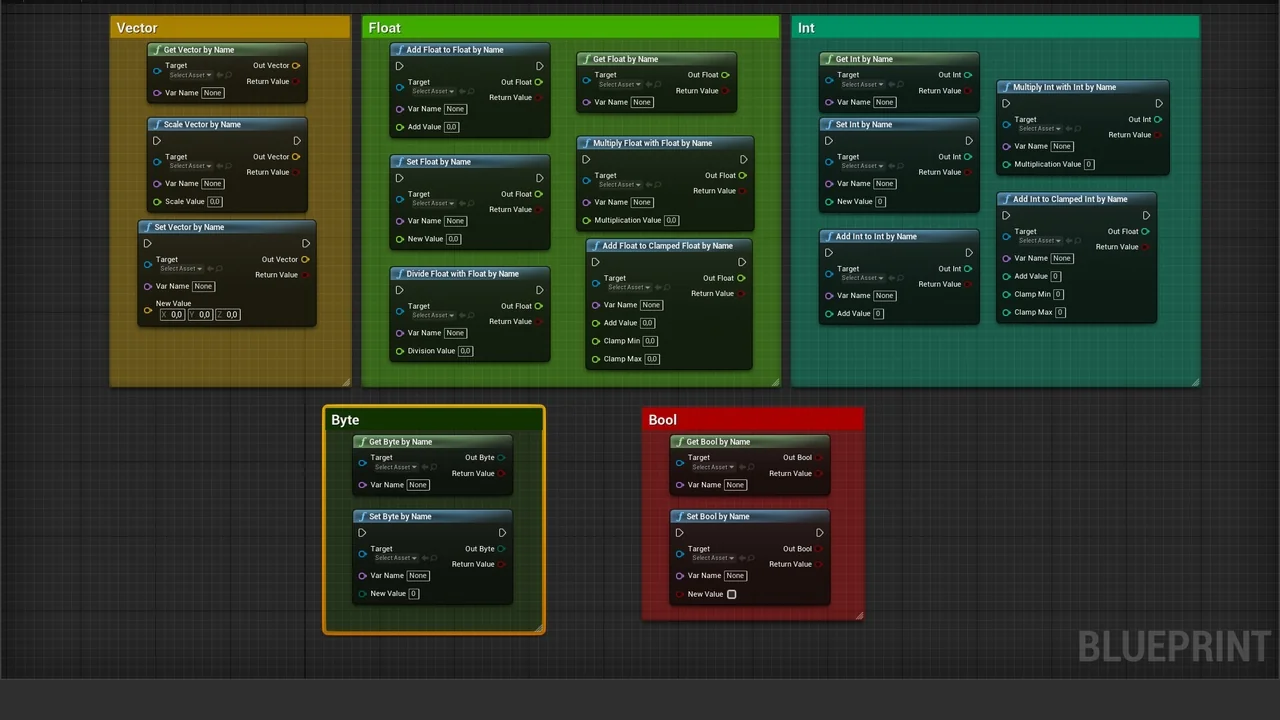
 Engine Tools
 Engine Tools
 Engine Tools