"0341a2901a4ae9aa"{"id":"14819","slug":"web-socket-client","title":"Web Socket Client","category":"Engine Tools","engine":"4.26 - 5.8","assetVersion":"Asset Version:1.0","engineVersion":"Engine version: 4.26 - 5.8","tag":"Engine Tools","accent":"blue","visual":"mech","summary":"The Web Socket Client is a powerful tool designed for developers who need to integrate real-time web communication into their projects. It offers direct Blueprint access to manage connections and server messages efficiently.","platform":"Unreal Engine","publishedAt":"2026-03-11T19:28:46.000Z","updatedAt":"2026-09-30T03:51:54.722Z","sourceNotes":[],"fileContents":[],"compatibility":["Unreal Engine","Asset Version:1.0","Engine version: 4.26 - 5.8"],"featuredImage":{"alt":"Web Socket Client","src":"https://3dcghub.com/wp-content/uploads/2026/03/1a5d3f40-1afd-4e96-a5d6-c29f47d562bd.webp"},"hasDownloadLink":true,"downloads":0,"terms":[{"taxonomy":"category","slug":"engine-tools-tools-and-plugins","name":"Engine Tools"},{"taxonomy":"post_tag","slug":"blueprint","name":"Blueprint"},{"taxonomy":"post_tag","slug":"network-client","name":"Network Client"},{"taxonomy":"post_tag","slug":"networking","name":"Networking"},{"taxonomy":"post_tag","slug":"plugins","name":"Plugins"},{"taxonomy":"post_tag","slug":"unreal-engine-5","name":"Unreal Engine 5"},{"taxonomy":"post_tag","slug":"websocket","name":"Websocket"}],"galleryImages":[{"src":"https://3dcghub.com/wp-content/uploads/2026/03/ea38fd563fa2_f786f71f-46c9-46b5-b739-c9ff606ed35c.webp","alt":"Web Socket Client"},{"src":"https://3dcghub.com/wp-content/uploads/2026/03/3a4119616ff2_94492ba4-8628-49de-83df-f7000a4db7c5.webp","alt":"Web Socket Client"}],"accessPanel":{"kind":"resource","title":"Download this resource","eyebrow":"Free Download","message":"Log in or create a free account to start your download.","fileName":"Web Socket Client.7z","safetyNote":"Resources are manually reviewed before listing to improve quality and reduce obvious risks.","actionLabel":"Download Free","resourceType":"Resource archive"},"contentHtml":"\u003cp\u003eThe \u003cstrong\u003eWeb Socket Client\u003c/strong\u003e is a specialized tool designed to facilitate real-time communication within a development environment. This resource allows for direct integration through Blueprints, which simplifies the networking process for creators. By utilizing the \u003cstrong\u003eWeb Socket Client\u003c/strong\u003e, developers can manage complex data transfers without leaving the visual scripting interface.\u003c/p\u003e\n\n\u003ch2\u003eStreamlined Blueprint Integration\u003c/h2\u003e\n\u003cp\u003eThe developer focused on making the tool as accessible as possible. Because it is designed for Blueprints, it fits naturally into standard development workflows. Users do not need to write extensive custom code to begin communicating with a server. Instead, they can use the provided nodes to manage their web socket needs. This approach saves time and reduces the potential for errors during the setup phase.\u003c/p\u003e\n\n\u003ch2\u003eComprehensive Connection Monitoring\u003c/h2\u003e\n\u003cp\u003eOne of the standout features of this tool is its ability to monitor various connection states. Specifically, the client can detect when a connection success occurs. This allows the system to trigger subsequent actions immediately after a link is established. Moreover, the tool also monitors for connection failure. This is critical for implementing robust error-handling routines in any project.\u003c/p\u003e\n\n\u003cp\u003eAlso, the \u003cstrong\u003eWeb Socket Client\u003c/strong\u003e tracks server disconnections. Understanding when a server drops a connection is essential for maintaining a smooth user experience. Therefore, developers can use this information to attempt reconnections or notify the user of a status change. These monitoring capabilities provide a high level of control over the networking lifecycle.\u003c/p\u003e\n\n\u003ch2\u003eEfficient Message Handling\u003c/h2\u003e\n\u003cp\u003eCommunication is a two-way street, and this tool handles both incoming and outgoing data. The client can listen for server messages, allowing the project to process data as soon as it arrives. Consequently, this real-time feedback loop is vital for applications that require instant updates.\u003c/p\u003e\n\n\u003cp\u003eAlso, the tool provides the functionality to send messages back to the server. Because this is accessible via Blueprints, it can be tied to any logic within the project. For example, a developer might send a message when a specific event is triggered. This direct communication path ensures that the server remains synchronized with the client state at all times.\u003c/p\u003e\n\n\u003ch2\u003eMultilingual Support and Documentation\u003c/h2\u003e\n\u003cp\u003eTo assist with the implementation process, the creator has included detailed documentation. This documentation is available in both English and Chinese. Having access to clear instructions in multiple languages helps bridge the gap for global development teams. It ensures that the technical nuances of the tool are understood by a broad audience. Moreover, it allows users to troubleshoot connection issues or message handling with ease.\u003c/p\u003e\n\n\u003ch2\u003eFinal Take\u003c/h2\u003e\n\u003cp\u003eIn practice, the \u003cstrong\u003eWeb Socket Client\u003c/strong\u003e is a practical solution for Blueprint-based networking. It provides essential monitoring for connection success, failure, and server messages. By focusing on these core functionalities, the tool helps developers build more connected and responsive projects without manual coding. Consequently, it is a valuable asset for any project requiring real-time web socket communication.\u003c/p\u003e\n\n\u003ch2\u003eContinue Browsing Similar Packs\u003c/h2\u003e\n\u003cul\u003e\n\u003cli\u003e\u003ca href=\"https://3dcghub.com/udp-socket-server-and-client/\" title=\"UDP Socket Server And Client\"\u003eUDP Socket Server And Client\u003c/a\u003e\u003c/li\u003e\n\u003cli\u003e\u003ca href=\"https://3dcghub.com/r-tune-vehicle-physics-2-0-vehicle-system-for-games-animation/\" title=\"R-Tune Vehicle Physics 2.0 – Vehicle System for Games \u0026amp;amp; Animation\"\u003eR-Tune Vehicle Physics 2.0 – Vehicle System for Games \u0026amp; Animation\u003c/a\u003e\u003c/li\u003e\n\u003cli\u003e\u003ca href=\"https://3dcghub.com/narrative-tales-node-based-quests-and-dialogue/\" title=\"Narrative Tales – Node Based Quests and Dialogue\"\u003eNarrative Tales – Node Based Quests and Dialogue\u003c/a\u003e\u003c/li\u003e\n\u003cli\u003e\u003ca href=\"https://3dcghub.com/le-encryption/\" title=\"LE Encryption\"\u003eLE Encryption\u003c/a\u003e\u003c/li\u003e\n\u003cli\u003e\u003ca href=\"https://3dcghub.com/easy-multi-save/\" title=\"Easy Multi Save\"\u003eEasy Multi Save\u003c/a\u003e\u003c/li\u003e\n\u003c/ul\u003e","contentTextLength":3445,"navigation":{"current":866,"total":4017,"previous":{"id":"14974","slug":"advanced-flock-system-multithreaded-fish-ai-and-reactive-school-behavior","title":"Advanced Flock System – Multithreaded Fish AI and Reactive School Behavior","category":"Gameplay Features","platform":"Unreal Engine","updatedAt":"2026-09-30T03:55:08.761Z"},"next":{"id":"14695","slug":"udp-socket-server-and-client","title":"UDP Socket Server And Client","category":"Engine Tools","platform":"Unreal Engine","updatedAt":"2026-09-30T03:08:35.970Z"}},"relatedResources":[{"id":"14695","slug":"udp-socket-server-and-client","title":"UDP Socket Server And Client","category":"Engine Tools","engine":"4.26 - 5.8","assetVersion":"Asset Version:1.1 - 2.0","engineVersion":"Engine version: 4.26 - 5.8","tag":"Engine Tools","accent":"blue","visual":"city","summary":"UDP Socket Server And Client is an Unreal Engine plugin for Blueprint-facing UDP data communication, combining server and client components for sending and receiving messages.","platform":"Unreal Engine","publishedAt":"2026-03-11T19:00:59.000Z","updatedAt":"2026-09-30T03:08:35.970Z","sourceNotes":[],"fileContents":[],"compatibility":["Unreal Engine","Asset Version:1.1 - 2.0","Engine version: 4.26 - 5.8"],"featuredImage":{"alt":"UDP Socket Server And Client","src":"https://3dcghub.com/wp-content/uploads/2026/03/476d920b-e32b-4bbc-b437-2a91aca5e181.webp"},"hasDownloadLink":true,"downloads":1},{"id":"14100","slug":"le-http-request","title":"LE Http Request","category":"Engine Tools","engine":"4.9 - 5.8","assetVersion":"Asset Version: 1.0 - 5.8.0 r0","engineVersion":"Engine version: 4.9 - 5.8","tag":"Engine Tools","accent":"blue","visual":"animation","summary":"LE Http Request offers a dedicated solution for developers looking to handle web communication through Blueprints. This tool simplifies the process of making HTTP requests and managing data conversion.","platform":"Unreal Engine","publishedAt":"2026-03-11T15:48:06.000Z","updatedAt":"2026-09-29T09:21:47.996Z","sourceNotes":[],"fileContents":[],"compatibility":["Unreal Engine","Asset Version: 1.0 - 5.8.0 r0","Engine version: 4.9 - 5.8"],"featuredImage":{"alt":"LE Http Request","src":"https://3dcghub.com/wp-content/uploads/2026/03/a6caa89e-79d6-45ee-ba89-12b99dac3021.webp"},"hasDownloadLink":true,"downloads":0},{"id":"14092","slug":"le-encryption","title":"LE Encryption","category":"Engine Tools","engine":"4.26 - 5.3","assetVersion":"Engine version: 4.26 - 5.3","engineVersion":"4.11","tag":"Engine Tools","accent":"blue","visual":"character","summary":"LE Encryption is a specialized plugin that allows developers to encrypt bytes via Blueprints. It is specifically designed to bridge the gap between game clients and Java-based backend servers.","platform":"Unreal Engine","publishedAt":"2026-03-11T15:47:47.000Z","updatedAt":"2026-04-19T15:45:53.000Z","sourceNotes":[],"fileContents":[],"compatibility":["Unreal Engine","Engine version: 4.26 - 5.3"],"featuredImage":{"alt":"LE Encryption","src":"https://3dcghub.com/wp-content/uploads/2026/03/592df0d2-2231-4892-b688-69d9fb08f700.webp"},"hasDownloadLink":true,"downloads":0}]}
Engine Tools
Web Socket Client
The Web Socket Client is a powerful tool designed for developers who need to integrate real-time web communication into their projects. It offers direct Blueprint access to manage connections and server messages efficiently.
The Web Socket Client is a specialized tool designed to facilitate real-time communication within a development environment. This resource allows for direct integration through Blueprints, which simplifies the networking process for creators. By utilizing the Web Socket Client, developers can manage complex data transfers without leaving the visual scripting interface.
Streamlined Blueprint Integration
The developer focused on making the tool as accessible as possible. Because it is designed for Blueprints, it fits naturally into standard development workflows. Users do not need to write extensive custom code to begin communicating with a server. Instead, they can use the provided nodes to manage their web socket needs. This approach saves time and reduces the potential for errors during the setup phase.
Comprehensive Connection Monitoring
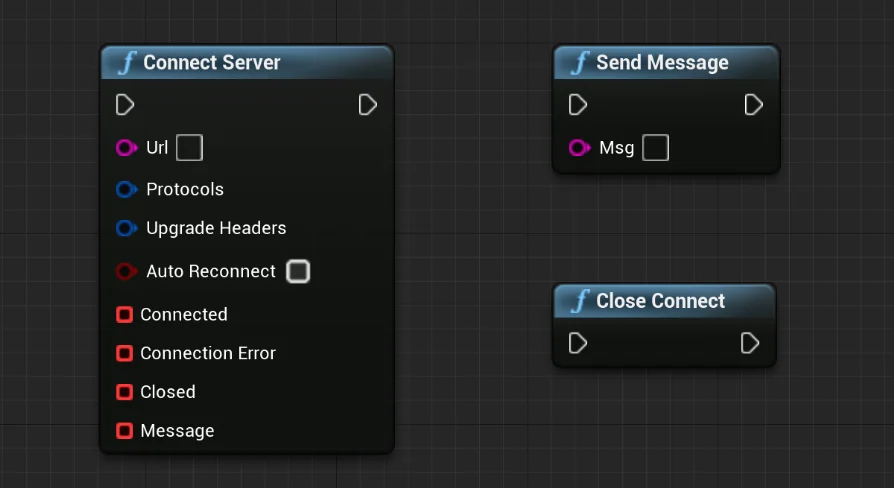
One of the standout features of this tool is its ability to monitor various connection states. Specifically, the client can detect when a connection success occurs. This allows the system to trigger subsequent actions immediately after a link is established. Moreover, the tool also monitors for connection failure. This is critical for implementing robust error-handling routines in any project.
Also, the Web Socket Client tracks server disconnections. Understanding when a server drops a connection is essential for maintaining a smooth user experience. Therefore, developers can use this information to attempt reconnections or notify the user of a status change. These monitoring capabilities provide a high level of control over the networking lifecycle.
Efficient Message Handling
Communication is a two-way street, and this tool handles both incoming and outgoing data. The client can listen for server messages, allowing the project to process data as soon as it arrives. Consequently, this real-time feedback loop is vital for applications that require instant updates.
Also, the tool provides the functionality to send messages back to the server. Because this is accessible via Blueprints, it can be tied to any logic within the project. For example, a developer might send a message when a specific event is triggered. This direct communication path ensures that the server remains synchronized with the client state at all times.
Multilingual Support and Documentation
To assist with the implementation process, the creator has included detailed documentation. This documentation is available in both English and Chinese. Having access to clear instructions in multiple languages helps bridge the gap for global development teams. It ensures that the technical nuances of the tool are understood by a broad audience. Moreover, it allows users to troubleshoot connection issues or message handling with ease.
Final Take
In practice, the Web Socket Client is a practical solution for Blueprint-based networking. It provides essential monitoring for connection success, failure, and server messages. By focusing on these core functionalities, the tool helps developers build more connected and responsive projects without manual coding. Consequently, it is a valuable asset for any project requiring real-time web socket communication.
 Engine Tools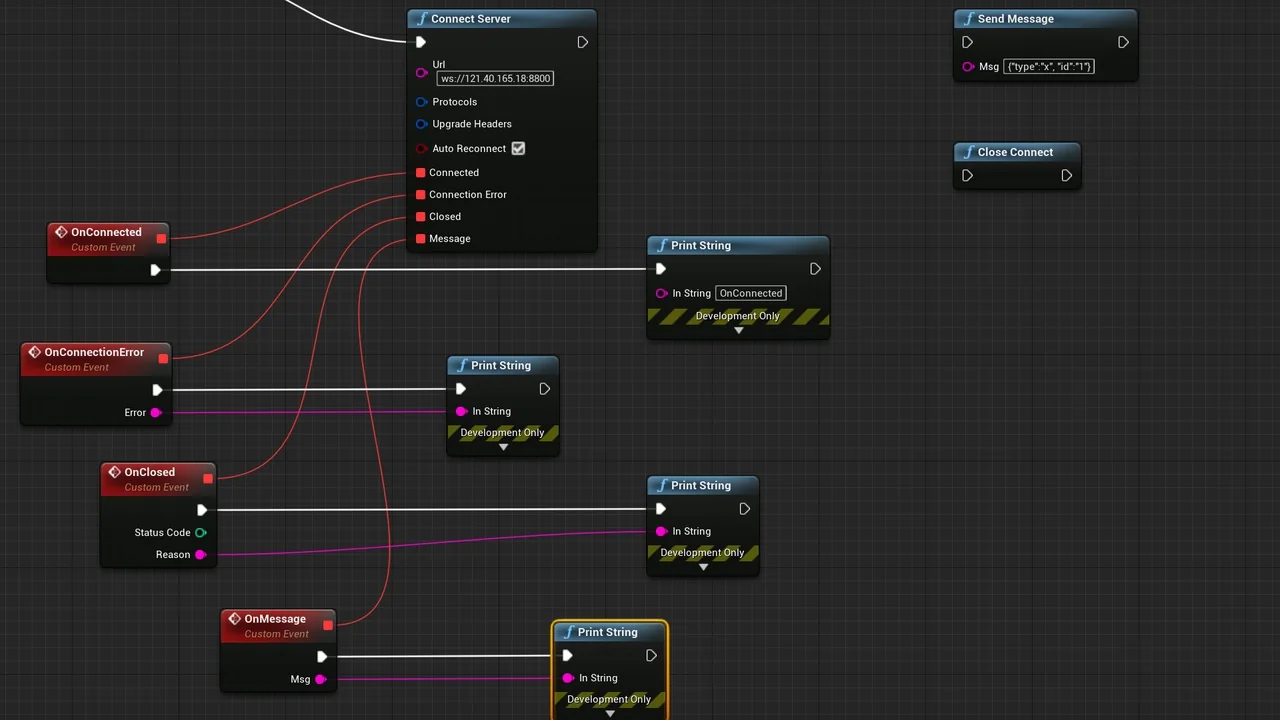
 Engine Tools
 Engine Tools
 Engine Tools