"1f00f67f9253451b"{"id":"1000165","slug":"ar-navigation","title":"AR Navigation","category":"Characters \u0026 Creatures","engine":"5.0+","assetVersion":"","engineVersion":"Engine Version: 5.0+","tag":"Characters","accent":"blue","visual":"character","summary":"AR Navigation combines route calculation, a dynamic 3D minimap, destination UI, floating POI icons, surface-snapped markers, and QRCode detection.","platform":"Unreal Engine","publishedAt":"2026-06-18T23:57:25.352Z","updatedAt":"2026-06-18T23:57:25.352Z","sourceNotes":[],"fileContents":[],"compatibility":["Unreal Engine","Engine Version: 5.0+"],"featuredImage":{"alt":"AR Navigation","src":"/wp-content/uploads/published/2026/06/5ac94a1bc661-70c0c4e3-194e-4d2d-b853-561258b283a9-e8c66a7ca2.webp"},"hasDownloadLink":true,"downloads":0,"terms":[{"taxonomy":"category","slug":"characters-and-creatures","name":"Characters \u0026 Creatures"}],"galleryImages":[{"src":"/wp-content/uploads/published/2026/06/21e58015ff4d-8ca30ecb-58e8-473c-b504-663f7357a761-f10c397432.webp","alt":"AR Navigation"},{"src":"/wp-content/uploads/published/2026/06/d4d99e9181b3-5f767766-2b63-4e41-8ff3-4a55c22adfce-aba1da5fe2.webp","alt":"AR Navigation"},{"src":"/wp-content/uploads/published/2026/06/09345297d0a8-4052dc47-e021-400c-a27a-ba090fbb797e-9085e10965.webp","alt":"AR Navigation"},{"src":"/wp-content/uploads/published/2026/06/13b1534954d6-99cebcd1-ad72-4548-a354-73a701841ebc-c66dcf2e11.webp","alt":"AR Navigation"}],"accessPanel":{"kind":"resource","title":"Download this resource","eyebrow":"Free Download","message":"Log in or create a free account to start your download.","fileName":"ARNavigation.7z","safetyNote":"Resources are manually reviewed before listing to improve quality and reduce obvious risks.","actionLabel":"Download Free","resourceType":"Resource archive"},"contentHtml":"\u003cp\u003eMovement guidance is the first thing this package brings into a scene. Instead of treating navigation as a background system, AR Navigation presents it directly to the user through route calculation, an on-screen destination display, a dynamic 3D minimap, and visual markers that help orient movement in real time. This gives a package that sits between interface work, path logic, and AR scene interaction rather than existing as only a pathfinding tool or only a UI layer.\u003c/p\u003e\n\u003cp\u003eIts feature set makes that role clear. AR Navigation includes automatic calculation of the optimal route using two types of algorithms, a dynamic 3D minimap that shows the user’s current location and rotation, an intuitive UI with destination and remaining distance, quick buttons for predefined destinations, floating icons for possible points of interest, custom markers that can snap to a detected surface, and QRCode detection. The associated tags place it in a mobile and Android-oriented workflow with interface, script, path, navigation, Blueprint, and Animation Blueprint relevance.\u003c/p\u003e \u003ch2\u003eAR Navigation as a scene-facing guidance system\u003c/h2\u003e\n\u003cp\u003eWhat stands out here is how many parts of the navigation experience are visible to the end user. The package is not limited to calculating a route somewhere behind the scenes. It also communicates that route through a minimap, interface readouts, and markers placed in the AR experience itself.\u003c/p\u003e\n\u003cp\u003eThat makes it easier to place AR Navigation within production. It fits where a project needs users to understand where they are, where they are going, and how far remains, without shifting to a separate map screen or relying on text alone. The dynamic 3D minimap handles spatial orientation by showing both current location and rotation. In practice, that means the map is not just a static reference panel. It reflects direction as well as position, which is especially important when navigation needs to feel responsive to how a user is actually holding and moving through the device-driven view.\u003c/p\u003e\n\u003cp\u003eThe route system complements that visual orientation layer. Automatic calculation of the optimal route using two algorithms suggests a navigation setup that can adapt route finding through more than one method rather than depending on a single approach. Even without extra technical detail, that alone signals a package concerned with route quality and navigation behavior, not just simple point-to-point indication.\u003c/p\u003e \u003ch2\u003eDynamic 3D minimap and remained distance in the user interface\u003c/h2\u003e\n\u003cp\u003eThe interface side of AR Navigation is specific enough to understand its practical role. The UI shows the user destination and remained distance, and it also includes a list of quick buttons for predefined destinations. That combination covers both active guidance and faster destination selection.\u003c/p\u003e\n\u003cp\u003eShowing remained distance gives the navigation flow a measurable sense of progress. A user can see not only the target but also how much travel is left. In an AR setting, this matters because movement happens in physical space while the interface must keep orientation simple. A distance readout helps anchor the route in straightforward terms when spatial visuals alone may not be enough.\u003c/p\u003e\n\u003cp\u003eThe quick-button list for predefined destinations points to another production use: scenes where destinations are known ahead of time and need to be selected quickly. Rather than requiring manual input, the package supports a direct choice from prepared locations. In a project workflow, that can reduce setup around destination entry and focus the scene on guiding the user once a target has been chosen.\u003c/p\u003e\n\u003cp\u003eThe dynamic 3D minimap adds another layer to that same UI logic. Because it shows current location and rotation, it can work alongside the destination and distance display instead of duplicating them. The map helps users understand direction and orientation, while the destination label and remained distance translate that movement into a more explicit goal state.\u003c/p\u003e \u003ch2\u003eOptimal route calculation with two algorithms\u003c/h2\u003e\n\u003cp\u003eRoute calculation is one of the package’s core behaviors, and the wording around it is important: AR Navigation automatically calculates the optimal route using two types of algorithms. That tells teams evaluating it that route generation is a built-in feature rather than something that must be assembled externally before the package becomes useful.\u003c/p\u003e\n\u003cp\u003eThe mention of two algorithm types also suggests flexibility in how route logic is approached inside the package. No deeper implementation detail is stated, so the safe takeaway is simply that route finding is not limited to one fixed method. For production planning, that is useful because route generation often determines whether navigation feels dependable or fragile. Here, route calculation is clearly central, not an afterthought added around the UI.\u003c/p\u003e\n\u003cp\u003ePlaced next to the path and navigation tags, this feature makes AR Navigation relevant wherever scene movement needs to be directed rather than merely indicated. It is not just a decorative AR overlay. The navigation path is computed, then surfaced to the user through the package’s other visual systems.\u003c/p\u003e \u003ch2\u003eFloating icons, custom markers, and detected surfaces\u003c/h2\u003e\n\u003cp\u003eAR Navigation also addresses the problem of where to place attention inside the scene. Floating icons highlight possible points of interest, while custom markers can snap to a detected surface. Those two features serve different but related purposes.\u003c/p\u003e\n\u003cp\u003eFloating icons are useful when the scene needs to call out selectable or notable locations. Their role is less about detailed route geometry and more about legibility. They help users notice where attention should go, especially in a view where AR content shares space with the live camera perspective.\u003c/p\u003e\n\u003cp\u003eCustom markers move the package deeper into AR interaction. The ability to snap them to a detected surface means markers are not only screen graphics layered over the camera feed. They can be attached in relation to recognized surfaces, which gives teams a more grounded way to place navigational or positional cues inside the AR scene. That is a meaningful distinction in workflow terms. It means marker placement is part of the spatial experience, not just the interface.\u003c/p\u003e\n\u003cp\u003eTogether, floating icons and surface-snapped markers broaden how navigation can be communicated. One feature highlights possible points of interest. The other anchors custom markers onto detected surfaces. Both support a scene where users need directional help and contextual cues at the same time.\u003c/p\u003e \u003ch2\u003eQRCode detection in a mobile and Android workflow\u003c/h2\u003e\n\u003cp\u003eQRCode detection adds another concrete interaction point. Within the package’s broader feature set, it stands out as a mechanism that can connect navigation behavior to recognized codes. No extra behavior beyond detection is stated, so the key fact is that QRCode detection is included as part of the system rather than needing to be sourced separately.\u003c/p\u003e\n\u003cp\u003eThis is also where the mobile and Android tags help place AR Navigation in a real production pipeline. The package belongs in mobile-oriented AR work where interface behavior, navigation logic, and scene interaction need to coexist on a handheld device. The Android tag makes that platform context explicit. The interface and user tags reinforce that this is not only about internal path logic; it is about what the user sees and how the user moves through the experience.\u003c/p\u003e\n\u003cp\u003eThe Blueprint and Animation Blueprint tags place it in a workflow that intersects scripting and visual systems. The script tag supports that same view from another angle. Without adding claims about implementation details that are not stated, those tags still help frame the package as part of a production environment where navigation behavior, interface presentation, and mobile AR interaction are assembled as working scene systems rather than isolated components.\u003c/p\u003e \u003ch2\u003eWhere AR Navigation fits when teams are scoping a project\u003c/h2\u003e\n\u003cp\u003eAR Navigation fits best where a project needs several navigation-facing pieces working together: route calculation, visible orientation, destination selection, spatial markers, and QRCode detection. Its strength is not any single isolated feature. It is the way these features cover the full user-facing path from choosing or identifying a destination to following guidance through the scene.\u003c/p\u003e\n\u003cp\u003eFor teams scoping work, that makes the package easy to position. It belongs in mobile AR projects that need a guided user journey rather than only decorative AR placement. The minimap handles orientation. The UI communicates destination and remaining distance. The quick buttons support predefined targets. Floating icons and custom markers shape attention in the scene. QRCode detection adds another entry point for interaction. The route calculation system ties those parts together with automatic path generation.\u003c/p\u003e\n\u003cp\u003eThe strongest practical takeaway is simple: AR Navigation is most useful when navigation must be both computed and clearly shown to the user inside a mobile AR experience, not hidden away as background logic.\u003c/p\u003e\n\n\u003ch2\u003eMore From The Same Workflow\u003c/h2\u003e\n\u003cul\u003e\n\u003cli\u003e\u003ca href=\"https://3dcghub.com/cosmo-trooper/\" title=\"Cosmo Trooper\"\u003eCosmo Trooper\u003c/a\u003e\u003c/li\u003e\n\u003cli\u003e\u003ca href=\"https://3dcghub.com/stylized-male-and-female-characters-with-assets-and-ui/\" title=\"Stylized Male and Female characters, with assets and UI\"\u003eStylized Male and Female characters, with assets and UI\u003c/a\u003e\u003c/li\u003e\n\u003cli\u003e\u003ca href=\"https://3dcghub.com/ascent-ui-tools-gamepad-navigation-ui-framework/\" title=\"Ascent UI Tools - Gamepad Navigation \u0026amp; UI Framework\"\u003eAscent UI Tools - Gamepad Navigation \u0026amp; UI Framework\u003c/a\u003e\u003c/li\u003e\n\u003cli\u003e\u003ca href=\"https://3dcghub.com/ue5-rigged-npc-creator/\" title=\"UE5 Rigged NPC Creator\"\u003eUE5 Rigged NPC Creator\u003c/a\u003e\u003c/li\u003e\n\u003cli\u003e\u003ca href=\"https://3dcghub.com/special-ops-modular-character-bundle/\" title=\"Special Ops - Modular Character Bundle\"\u003eSpecial Ops - Modular Character Bundle\u003c/a\u003e\u003c/li\u003e\n\u003c/ul\u003e","contentTextLength":9228,"navigation":{"current":1184,"total":3222,"previous":{"id":"1000166","slug":"variable-access-library","title":"Variable Access Library","category":"Engine Tools","platform":"Unreal Engine","updatedAt":"2026-06-19T12:56:26.115Z"},"next":{"id":"1000164","slug":"black-kit-modular","title":"Black Kit Modular","category":"Characters \u0026 Creatures","platform":"Unreal Engine","updatedAt":"2026-06-18T23:09:52.033Z"}},"relatedResources":[{"id":"1969","slug":"cosmo-trooper","title":"Cosmo Trooper","category":"Characters \u0026 Creatures","engine":"5.0+","assetVersion":"Engine version: 5.0+","engineVersion":"4.18","tag":"Characters","accent":"blue","visual":"character","summary":"Enhance your project with the Cosmo Trooper, a low-poly 3D character rigged to the Epic Skeleton. Perfect for VR, AR, and sci-fi games with 4K PBR textures.","platform":"Unreal Engine","publishedAt":"2026-02-06T22:39:58.000Z","updatedAt":"2026-04-19T15:58:26.000Z","sourceNotes":[],"fileContents":[],"compatibility":["Unreal Engine","Engine version: 5.0+"],"featuredImage":{"alt":"Cosmo Trooper","src":"https://3dcghub.com/wp-content/uploads/2026/02/0162ca18-5998-4850-937f-32efa841f552.webp"},"hasDownloadLink":true,"downloads":0},{"id":"1000904","slug":"visai-companion-modern-ai-framework","title":"VisAI - Companion - Modern AI Framework","category":"Characters \u0026 Creatures","engine":"4.26+,5.0+","assetVersion":"","engineVersion":"Engine Version: 4.26+,5.0+","tag":"Characters","accent":"blue","visual":"character","summary":"Modern multiplayer-ready AI framework for RPGs with relationship-driven companion behavior, command UI, interaction system, and detailed example map.","platform":"Unreal Engine","publishedAt":"2026-08-06T05:14:19.512Z","updatedAt":"2026-08-06T05:14:19.512Z","sourceNotes":[],"fileContents":[],"compatibility":["Unreal Engine","Engine Version: 4.26+,5.0+"],"featuredImage":{"alt":"VisAI - Companion - Modern AI Framework","src":"/wp-content/uploads/published/2026/08/f36621fe8598-3cb25636-0a21-4666-aa5a-30c1a53d8a4a-1dee5f108d.webp"},"hasDownloadLink":true,"downloads":0},{"id":"1000104","slug":"stylized-male-and-female-characters-with-assets-and-ui","title":"Stylized Male and Female characters, with assets and UI","category":"Characters \u0026 Creatures","engine":"Engine Version: 4.27,5.0+","assetVersion":"Engine Version: 4.27,5.0+","engineVersion":"","tag":"Characters","accent":"blue","visual":"character","summary":"A stylized modular character bundle for Unreal projects with nine body variants, Epic skeleton support, improved third-person animations, and UI demos.","platform":"Unreal Engine","publishedAt":"2026-06-07T16:04:14.141Z","updatedAt":"2026-06-07T16:04:14.141Z","sourceNotes":[],"fileContents":[],"compatibility":["Unreal Engine","Engine Version: 4.27,5.0+"],"featuredImage":{"alt":"Stylized Male and Female characters, with assets and UI","src":"/wp-content/uploads/published/2026/06/669af5bdf8c7-56aa6c7b-9504-4541-9f15-538e3992fe82-234ddb292c.webp"},"hasDownloadLink":true,"downloads":0}]}
Characters
AR Navigation
AR Navigation combines route calculation, a dynamic 3D minimap, destination UI, floating POI icons, surface-snapped markers, and QRCode detection.
Movement guidance is the first thing this package brings into a scene. Instead of treating navigation as a background system, AR Navigation presents it directly to the user through route calculation, an on-screen destination display, a dynamic 3D minimap, and visual markers that help orient movement in real time. This gives a package that sits between interface work, path logic, and AR scene interaction rather than existing as only a pathfinding tool or only a UI layer.
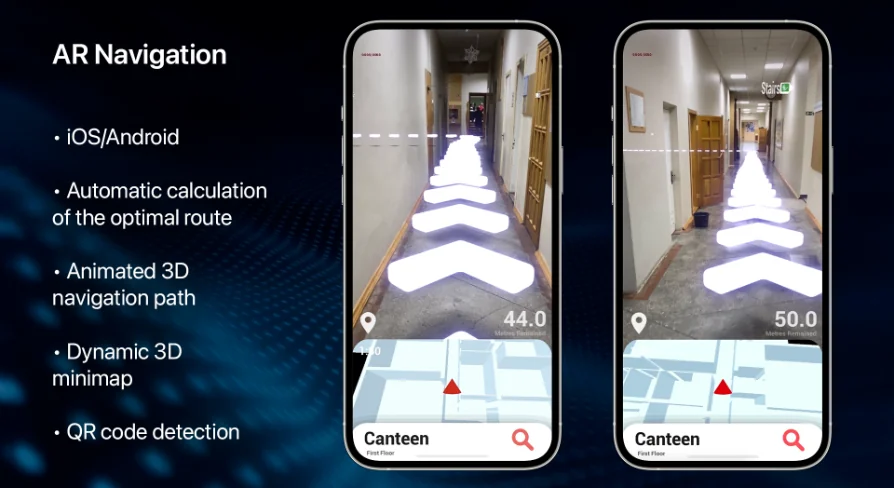
Its feature set makes that role clear. AR Navigation includes automatic calculation of the optimal route using two types of algorithms, a dynamic 3D minimap that shows the user’s current location and rotation, an intuitive UI with destination and remaining distance, quick buttons for predefined destinations, floating icons for possible points of interest, custom markers that can snap to a detected surface, and QRCode detection. The associated tags place it in a mobile and Android-oriented workflow with interface, script, path, navigation, Blueprint, and Animation Blueprint relevance.
AR Navigation as a scene-facing guidance system
What stands out here is how many parts of the navigation experience are visible to the end user. The package is not limited to calculating a route somewhere behind the scenes. It also communicates that route through a minimap, interface readouts, and markers placed in the AR experience itself.
That makes it easier to place AR Navigation within production. It fits where a project needs users to understand where they are, where they are going, and how far remains, without shifting to a separate map screen or relying on text alone. The dynamic 3D minimap handles spatial orientation by showing both current location and rotation. In practice, that means the map is not just a static reference panel. It reflects direction as well as position, which is especially important when navigation needs to feel responsive to how a user is actually holding and moving through the device-driven view.
The route system complements that visual orientation layer. Automatic calculation of the optimal route using two algorithms suggests a navigation setup that can adapt route finding through more than one method rather than depending on a single approach. Even without extra technical detail, that alone signals a package concerned with route quality and navigation behavior, not just simple point-to-point indication.
Dynamic 3D minimap and remained distance in the user interface
The interface side of AR Navigation is specific enough to understand its practical role. The UI shows the user destination and remained distance, and it also includes a list of quick buttons for predefined destinations. That combination covers both active guidance and faster destination selection.
Showing remained distance gives the navigation flow a measurable sense of progress. A user can see not only the target but also how much travel is left. In an AR setting, this matters because movement happens in physical space while the interface must keep orientation simple. A distance readout helps anchor the route in straightforward terms when spatial visuals alone may not be enough.
The quick-button list for predefined destinations points to another production use: scenes where destinations are known ahead of time and need to be selected quickly. Rather than requiring manual input, the package supports a direct choice from prepared locations. In a project workflow, that can reduce setup around destination entry and focus the scene on guiding the user once a target has been chosen.
The dynamic 3D minimap adds another layer to that same UI logic. Because it shows current location and rotation, it can work alongside the destination and distance display instead of duplicating them. The map helps users understand direction and orientation, while the destination label and remained distance translate that movement into a more explicit goal state.
Optimal route calculation with two algorithms
Route calculation is one of the package’s core behaviors, and the wording around it is important: AR Navigation automatically calculates the optimal route using two types of algorithms. That tells teams evaluating it that route generation is a built-in feature rather than something that must be assembled externally before the package becomes useful.
The mention of two algorithm types also suggests flexibility in how route logic is approached inside the package. No deeper implementation detail is stated, so the safe takeaway is simply that route finding is not limited to one fixed method. For production planning, that is useful because route generation often determines whether navigation feels dependable or fragile. Here, route calculation is clearly central, not an afterthought added around the UI.
Placed next to the path and navigation tags, this feature makes AR Navigation relevant wherever scene movement needs to be directed rather than merely indicated. It is not just a decorative AR overlay. The navigation path is computed, then surfaced to the user through the package’s other visual systems.
Floating icons, custom markers, and detected surfaces
AR Navigation also addresses the problem of where to place attention inside the scene. Floating icons highlight possible points of interest, while custom markers can snap to a detected surface. Those two features serve different but related purposes.
Floating icons are useful when the scene needs to call out selectable or notable locations. Their role is less about detailed route geometry and more about legibility. They help users notice where attention should go, especially in a view where AR content shares space with the live camera perspective.
Custom markers move the package deeper into AR interaction. The ability to snap them to a detected surface means markers are not only screen graphics layered over the camera feed. They can be attached in relation to recognized surfaces, which gives teams a more grounded way to place navigational or positional cues inside the AR scene. That is a meaningful distinction in workflow terms. It means marker placement is part of the spatial experience, not just the interface.
Together, floating icons and surface-snapped markers broaden how navigation can be communicated. One feature highlights possible points of interest. The other anchors custom markers onto detected surfaces. Both support a scene where users need directional help and contextual cues at the same time.
QRCode detection in a mobile and Android workflow
QRCode detection adds another concrete interaction point. Within the package’s broader feature set, it stands out as a mechanism that can connect navigation behavior to recognized codes. No extra behavior beyond detection is stated, so the key fact is that QRCode detection is included as part of the system rather than needing to be sourced separately.
This is also where the mobile and Android tags help place AR Navigation in a real production pipeline. The package belongs in mobile-oriented AR work where interface behavior, navigation logic, and scene interaction need to coexist on a handheld device. The Android tag makes that platform context explicit. The interface and user tags reinforce that this is not only about internal path logic; it is about what the user sees and how the user moves through the experience.
The Blueprint and Animation Blueprint tags place it in a workflow that intersects scripting and visual systems. The script tag supports that same view from another angle. Without adding claims about implementation details that are not stated, those tags still help frame the package as part of a production environment where navigation behavior, interface presentation, and mobile AR interaction are assembled as working scene systems rather than isolated components.
Where AR Navigation fits when teams are scoping a project
AR Navigation fits best where a project needs several navigation-facing pieces working together: route calculation, visible orientation, destination selection, spatial markers, and QRCode detection. Its strength is not any single isolated feature. It is the way these features cover the full user-facing path from choosing or identifying a destination to following guidance through the scene.
For teams scoping work, that makes the package easy to position. It belongs in mobile AR projects that need a guided user journey rather than only decorative AR placement. The minimap handles orientation. The UI communicates destination and remaining distance. The quick buttons support predefined targets. Floating icons and custom markers shape attention in the scene. QRCode detection adds another entry point for interaction. The route calculation system ties those parts together with automatic path generation.
The strongest practical takeaway is simple: AR Navigation is most useful when navigation must be both computed and clearly shown to the user inside a mobile AR experience, not hidden away as background logic.
 Characters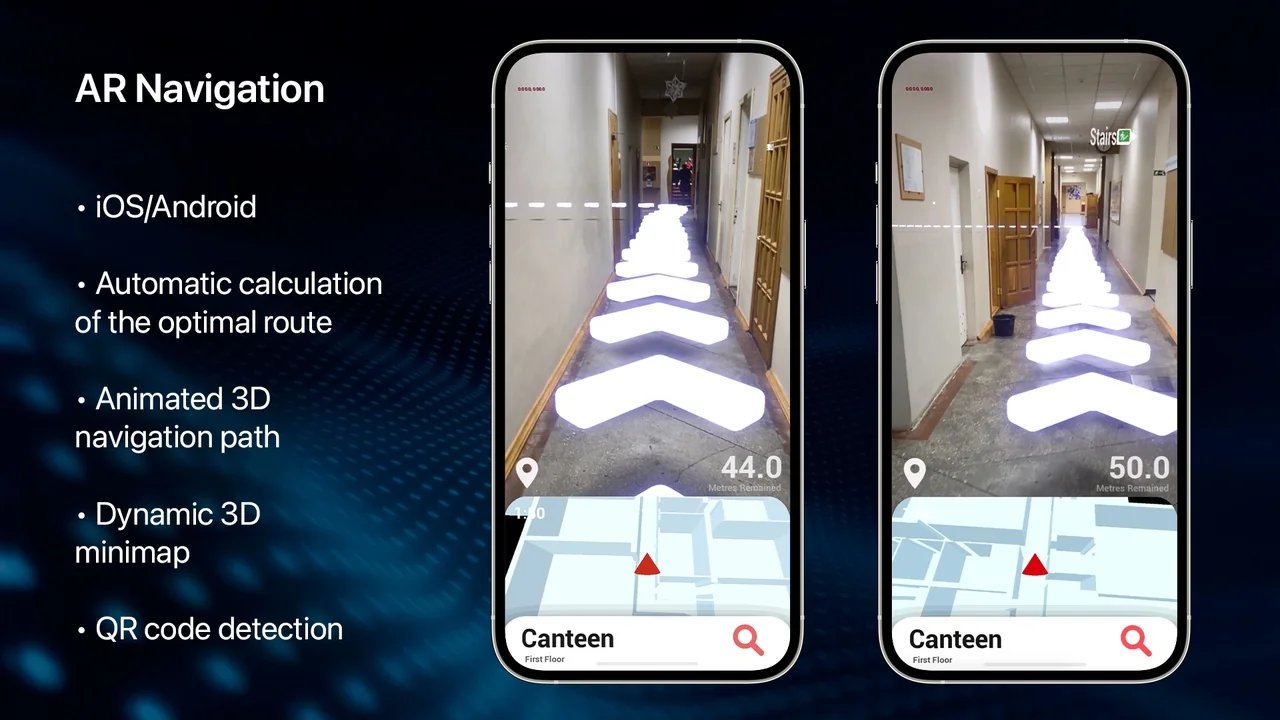
 Characters
 Characters
 Characters