"7066dd76da796369"{"id":"1000122","slug":"kickstart-blueprint-library","title":"Kickstart Blueprint Library","category":"Engine Tools","engine":"5.1","assetVersion":"Asset Version: 3.6","engineVersion":"Engine Version: 5.1","tag":"Engine Tools","accent":"blue","visual":"mech","summary":"A continuous Blueprint plugin exposing hidden C++ APIs to visual scripting, offering single-node solutions for actor duplication, data handling, and state contr","platform":"Unreal Engine","publishedAt":"2026-06-11T09:28:29.080Z","updatedAt":"2026-06-11T09:28:29.080Z","sourceNotes":[],"fileContents":[],"compatibility":["Unreal Engine","Asset Version: 3.6","Engine Version: 5.1"],"featuredImage":{"alt":"Kickstart Blueprint Library","src":"/wp-content/uploads/published/2026/06/cddab1e4a2ea-2d8a1da1-18a4-4b0a-8b15-6682c77e3c15-eae731b153.webp"},"hasDownloadLink":true,"downloads":0,"terms":[{"taxonomy":"category","slug":"engine-tools-tools-and-plugins","name":"Engine Tools"}],"galleryImages":[{"src":"/wp-content/uploads/published/2026/06/4f99ff4b4845-bc59607b-2985-4858-8aaf-64b3c27000e3-4d32d8dfde.webp","alt":"Kickstart Blueprint Library"},{"src":"/wp-content/uploads/published/2026/06/361c5f064852-8128bb1e-7d19-4a96-89e2-19a086150c30-fa8b1baa9b.webp","alt":"Kickstart Blueprint Library"},{"src":"/wp-content/uploads/published/2026/06/648b5c0cca10-e7d2b19b-61c1-4810-bb86-7391d896a977-708afeff6b.webp","alt":"Kickstart Blueprint Library"},{"src":"/wp-content/uploads/published/2026/06/03ca1292a63c-f48b75b0-bb63-4098-b2d1-776ef21c089c-b00fbe4655.webp","alt":"Kickstart Blueprint Library"},{"src":"/wp-content/uploads/published/2026/06/30f3054620a0-f88b94c0-442a-44ff-a714-2f0dfb2e6f77-eca5c330fd.webp","alt":"Kickstart Blueprint Library"},{"src":"/wp-content/uploads/published/2026/06/da5912108410-28ffb344-22f8-493c-923d-76ec3eaa017a-5896c4d123.webp","alt":"Kickstart Blueprint Library"}],"accessPanel":{"kind":"resource","title":"Access this resource","eyebrow":"Free Download","message":"Log in or create a free account to start your download.","fileName":"Plugins.7z","safetyNote":"Resources are manually reviewed before listing to improve quality and reduce obvious risks.","actionLabel":"Download Free","resourceType":"Resource archive"},"contentHtml":"\u003ch2\u003eBypassing Complex Code with Single-Node Workflows\u003c/h2\u003e\n\u003cp\u003eImplementing logic in Unreal Engine often requires stringing together multiple nodes or writing custom scripts to achieve basic functionality. The Kickstart Blueprint Library addresses this friction by condensing complex operations into single, drop-in Blueprint nodes. Designed primarily as a setup and workflow accelerator, the library allows non-technical users, 3D artists, students, and developers transitioning from Unity to implement required logic without touching raw code. By placing a single node, users can execute entire functions that would otherwise demand deeper technical knowledge or extensive visual scripting networks. The asset focuses on providing immediate, friendly access to essential operations right out of the box, keeping the visual scripting graph clean and manageable for beginners.\u003c/p\u003e \u003ch2\u003eExposing Hidden C++ APIs to Visual Scripting\u003c/h2\u003e\n\u003cp\u003eUnreal Engine possesses a vast and powerful C++ API, but not all of its native capabilities are exposed to the visual scripting environment by default. This creates functional gaps—operations that the engine is fully capable of performing, but which Blueprint users cannot access without writing custom C++ wrappers. This library specifically targets these blind spots. It functions as a hole-filling plugin, bridging the divide between the engine’s core programming capabilities and the user-facing Blueprint system. By surfacing these previously hidden APIs, the library expands the toolset available to visual scripters, allowing them to leverage deeper engine functions without needing to compile C++ projects, understand the underlying syntax, or rely on external programmers to expose necessary functions.\u003c/p\u003e \u003ch2\u003eRuntime Actor Duplication and Data Retention\u003c/h2\u003e\n\u003cp\u003eManaging active elements in a level frequently requires precise control over actor states and their underlying data. One of the central tools provided in this library is the ability to clone or duplicate an actor entirely during runtime. Instead of merely spawning a fresh, default instance of an actor class, this single Blueprint node replicates the entity by copying every piece of runtime data from the old actor directly into the new one. This ensures that the newly duplicated actor inherits the exact state, modifications, and active variables of the original at the exact moment of cloning. This single-node solution bypasses the need to manually script the transfer of individual variables, transforms, and component states from one entity to another during active gameplay.\u003c/p\u003e \u003ch2\u003eFamiliar State Controls for Unity Transplants\u003c/h2\u003e\n\u003cp\u003eFor developers and artists migrating to Unreal Engine from environments like Unity, certain foundational workflows regarding object visibility and state management can feel structurally different. The Kickstart Blueprint Library provides dedicated nodes for setting an actor's active state and enabling or disabling specific components directly. These Set Actor Active and Set Component Enable nodes offer a familiar, direct method for managing level actors and their attached components. Instead of navigating Unreal's native combination of visibility toggles, collision settings, and tick enablers to achieve a simple active/inactive state, users can rely on these dedicated nodes to manage entity behavior through a single, straightforward execution path.\u003c/p\u003e \u003ch2\u003eStreamlining Arrays and Project Data\u003c/h2\u003e\n\u003cp\u003eBeyond actor management, the Kickstart Blueprint Library simplifies the handling of various data types, strings, and debugging processes that normally bloat a visual scripting graph. It includes a dedicated Print Array node, which streamlines the process of outputting array contents for debugging or logging purposes. This eliminates the need to manually construct loops and format text just to read the data stored within an array. For project administration, UI implementation, and version control display, the Get Project Version node allows users to directly pull the current build version into their Blueprints without writing custom extraction logic. The library also features a Random String generator, providing a quick, single-node solution for populating text fields, generating unique identification tags, or randomizing text-based data entries during runtime.\u003c/p\u003e \u003ch2\u003eManaging Color Conversions and Extended Structures\u003c/h2\u003e\n\u003cp\u003eVisual and structural data manipulation is another area where single-node solutions significantly reduce graph complexity. The library grants users access to Color Convert nodes for managing and translating color data between different formats or spaces. This is particularly useful for artists and UI designers who need to manipulate color values dynamically without building complex mathematical conversions in the Blueprint graph. Additionally, the plugin includes Structure Extended nodes to facilitate the handling and manipulation of structural data within the visual scripting environment, ensuring that complex data types can be modified and accessed efficiently.\u003c/p\u003e \u003ch2\u003eLibrary Maintenance and Bundle Integration\u003c/h2\u003e\n\u003cp\u003eThe infrastructure of the Kickstart Blueprint Library relies on continuous updates and ongoing expansion. The developer actively maintains the plugin, with future iterations planned to introduce even more functional nodes to the visual scripting library. This ongoing development is shaped directly by user feedback, as feature requests are welcomed and evaluated for future integration into the toolset. Historically showcased between September 20th and October 4th, 2022, the library is also integrated into a larger 4-in-1 Kickstart Bundle, grouping it with other foundational tools aimed at accelerating the initial setup phase for new developers and non-technical artists.\u003c/p\u003e\n\n\u003ch2\u003eRelated Resources Worth Checking\u003c/h2\u003e\n\u003cul\u003e\n\u003cli\u003e\u003ca href=\"https://3dcghub.com/map-function-library/\" title=\"Map Function Library\"\u003eMap Function Library\u003c/a\u003e\u003c/li\u003e\n\u003cli\u003e\u003ca href=\"https://3dcghub.com/file-system-library/\" title=\"File System Library\"\u003eFile System Library\u003c/a\u003e\u003c/li\u003e\n\u003cli\u003e\u003ca href=\"https://3dcghub.com/blueprintjson/\" title=\"BlueprintJSON\"\u003eBlueprintJSON\u003c/a\u003e\u003c/li\u003e\n\u003cli\u003e\u003ca href=\"https://3dcghub.com/advanced-control-flow/\" title=\"Advanced Control Flow\"\u003eAdvanced Control Flow\u003c/a\u003e\u003c/li\u003e\n\u003cli\u003e\u003ca href=\"https://3dcghub.com/async-blueprints-extension/\" title=\"Async Blueprints Extension\"\u003eAsync Blueprints Extension\u003c/a\u003e\u003c/li\u003e\n\u003c/ul\u003e","contentTextLength":5845,"navigation":{"current":2043,"total":4016,"previous":{"id":"1000123","slug":"lens-flares","title":"Lens Flares","category":"Shaders","platform":"Unreal Engine","updatedAt":"2026-06-11T09:42:24.762Z"},"next":{"id":"1000121","slug":"interior-props","title":"Interior Props","category":"Tools, Objects \u0026 Decor","platform":"Unreal Engine","updatedAt":"2026-06-09T15:24:05.523Z"}},"relatedResources":[{"id":"1001311","slug":"library-generic-indie","title":"LIBRARY - GENERIC - INDIE","category":"Engine Tools","engine":"5.2 - 5.3","assetVersion":"Asset Version: 1.1.2","engineVersion":"Engine Version: 5.2 - 5.3","tag":"Engine Tools","accent":"blue","visual":"mech","summary":"Explore LIBRARY - GENERIC - INDIE, featuring Blueprint and C++ tools, aerodynamics, space-flight dynamics, the MUSL shader compiler, and UE4 bug fixes.","platform":"Unreal Engine","publishedAt":"2026-10-02T08:09:31.345Z","updatedAt":"2026-10-02T08:09:31.345Z","sourceNotes":[],"fileContents":[],"compatibility":["Unreal Engine","Asset Version: 1.1.2","Engine Version: 5.2 - 5.3"],"featuredImage":{"alt":"LIBRARY - GENERIC - INDIE","src":"/wp-content/uploads/published/2026/10/387ca5d05d5b-238b8413-258b-41d8-85a6-279dfc6855a3-246c7925ef.webp"},"hasDownloadLink":true,"downloads":0},{"id":"14164","slug":"map-function-library","title":"Map Function Library","category":"Engine Tools","engine":"5.2 - 5.4","assetVersion":"Engine version: 5.2 - 5.4","engineVersion":"5.4","tag":"Engine Tools","accent":"blue","visual":"audio","summary":"The Map Function Library plugin introduces specialized nodes to streamline map operations in Unreal Engine. It offers tools for easier iteration, index-based interaction, and efficient data merging.","platform":"Unreal Engine","publishedAt":"2026-03-11T16:02:19.000Z","updatedAt":"2026-04-19T15:45:52.000Z","sourceNotes":[],"fileContents":[],"compatibility":["Unreal Engine","Engine version: 5.2 - 5.4"],"featuredImage":{"alt":"Map Function Library","src":"https://3dcghub.com/wp-content/uploads/2026/03/8886ea98-8340-4a7c-b79c-39a8d9a5ce48.webp"},"hasDownloadLink":true,"downloads":0},{"id":"1000166","slug":"variable-access-library","title":"Variable Access Library","category":"Engine Tools","engine":"4.26 - 4.27,5.0+","assetVersion":"Asset Version: 1.7","engineVersion":"Engine Version: 4.26 - 4.27,5.0+","tag":"Engine Tools","accent":"blue","visual":"mech","summary":"Variable Access Library streamlines Unreal Engine Blueprint and C++ workflows with soft-reference variable access, debugging tools, and function execution by na","platform":"Unreal Engine","publishedAt":"2026-06-19T12:56:26.115Z","updatedAt":"2026-06-19T12:56:26.115Z","sourceNotes":[],"fileContents":[],"compatibility":["Unreal Engine","Asset Version: 1.7","Engine Version: 4.26 - 4.27,5.0+"],"featuredImage":{"alt":"Variable Access Library","src":"/wp-content/uploads/published/2026/06/f453c951f82b-cbcb73ba-9b12-4d02-8add-8c62c18fd259-7e5f71f8b5.webp"},"hasDownloadLink":true,"downloads":0}]}
Engine Tools
Kickstart Blueprint Library
A continuous Blueprint plugin exposing hidden C++ APIs to visual scripting, offering single-node solutions for actor duplication, data handling, and state contr
Implementing logic in Unreal Engine often requires stringing together multiple nodes or writing custom scripts to achieve basic functionality. The Kickstart Blueprint Library addresses this friction by condensing complex operations into single, drop-in Blueprint nodes. Designed primarily as a setup and workflow accelerator, the library allows non-technical users, 3D artists, students, and developers transitioning from Unity to implement required logic without touching raw code. By placing a single node, users can execute entire functions that would otherwise demand deeper technical knowledge or extensive visual scripting networks. The asset focuses on providing immediate, friendly access to essential operations right out of the box, keeping the visual scripting graph clean and manageable for beginners.
Exposing Hidden C++ APIs to Visual Scripting
Unreal Engine possesses a vast and powerful C++ API, but not all of its native capabilities are exposed to the visual scripting environment by default. This creates functional gaps—operations that the engine is fully capable of performing, but which Blueprint users cannot access without writing custom C++ wrappers. This library specifically targets these blind spots. It functions as a hole-filling plugin, bridging the divide between the engine’s core programming capabilities and the user-facing Blueprint system. By surfacing these previously hidden APIs, the library expands the toolset available to visual scripters, allowing them to leverage deeper engine functions without needing to compile C++ projects, understand the underlying syntax, or rely on external programmers to expose necessary functions.
Runtime Actor Duplication and Data Retention
Managing active elements in a level frequently requires precise control over actor states and their underlying data. One of the central tools provided in this library is the ability to clone or duplicate an actor entirely during runtime. Instead of merely spawning a fresh, default instance of an actor class, this single Blueprint node replicates the entity by copying every piece of runtime data from the old actor directly into the new one. This ensures that the newly duplicated actor inherits the exact state, modifications, and active variables of the original at the exact moment of cloning. This single-node solution bypasses the need to manually script the transfer of individual variables, transforms, and component states from one entity to another during active gameplay.
Familiar State Controls for Unity Transplants
For developers and artists migrating to Unreal Engine from environments like Unity, certain foundational workflows regarding object visibility and state management can feel structurally different. The Kickstart Blueprint Library provides dedicated nodes for setting an actor's active state and enabling or disabling specific components directly. These Set Actor Active and Set Component Enable nodes offer a familiar, direct method for managing level actors and their attached components. Instead of navigating Unreal's native combination of visibility toggles, collision settings, and tick enablers to achieve a simple active/inactive state, users can rely on these dedicated nodes to manage entity behavior through a single, straightforward execution path.
Streamlining Arrays and Project Data
Beyond actor management, the Kickstart Blueprint Library simplifies the handling of various data types, strings, and debugging processes that normally bloat a visual scripting graph. It includes a dedicated Print Array node, which streamlines the process of outputting array contents for debugging or logging purposes. This eliminates the need to manually construct loops and format text just to read the data stored within an array. For project administration, UI implementation, and version control display, the Get Project Version node allows users to directly pull the current build version into their Blueprints without writing custom extraction logic. The library also features a Random String generator, providing a quick, single-node solution for populating text fields, generating unique identification tags, or randomizing text-based data entries during runtime.
Managing Color Conversions and Extended Structures
Visual and structural data manipulation is another area where single-node solutions significantly reduce graph complexity. The library grants users access to Color Convert nodes for managing and translating color data between different formats or spaces. This is particularly useful for artists and UI designers who need to manipulate color values dynamically without building complex mathematical conversions in the Blueprint graph. Additionally, the plugin includes Structure Extended nodes to facilitate the handling and manipulation of structural data within the visual scripting environment, ensuring that complex data types can be modified and accessed efficiently.
Library Maintenance and Bundle Integration
The infrastructure of the Kickstart Blueprint Library relies on continuous updates and ongoing expansion. The developer actively maintains the plugin, with future iterations planned to introduce even more functional nodes to the visual scripting library. This ongoing development is shaped directly by user feedback, as feature requests are welcomed and evaluated for future integration into the toolset. Historically showcased between September 20th and October 4th, 2022, the library is also integrated into a larger 4-in-1 Kickstart Bundle, grouping it with other foundational tools aimed at accelerating the initial setup phase for new developers and non-technical artists.
 Engine Tools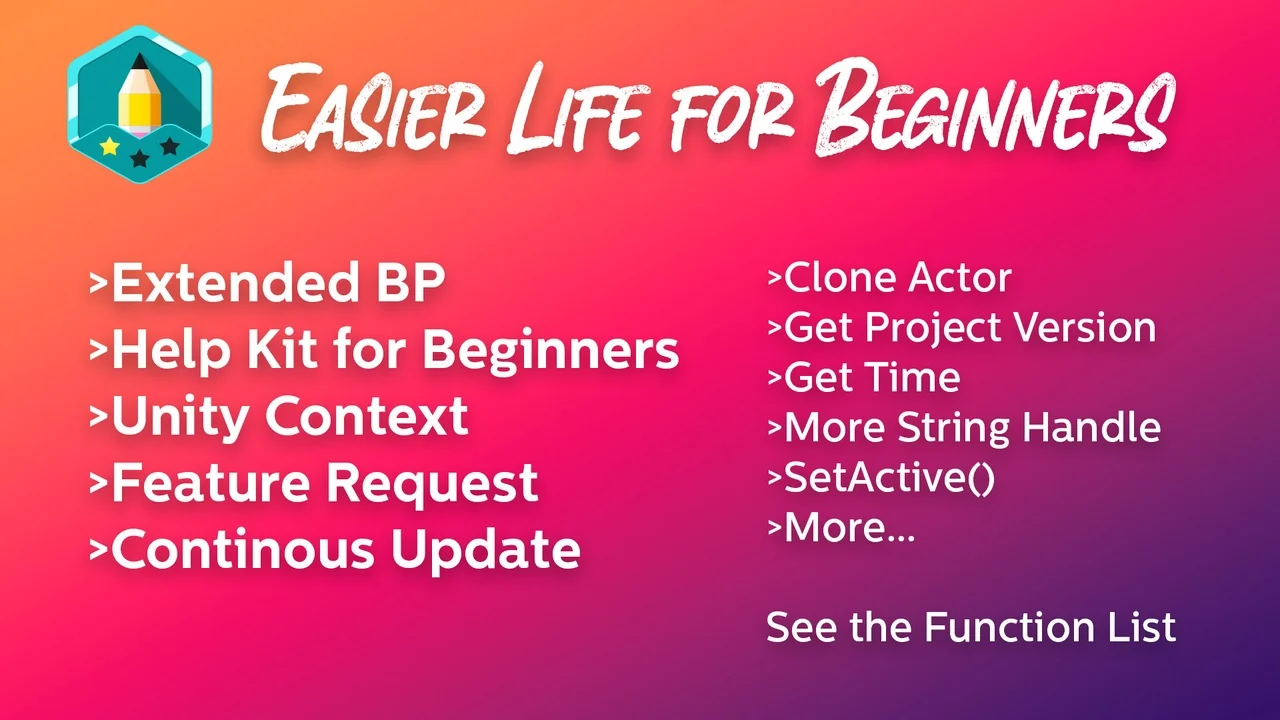
 Engine Tools
 Engine Tools
 Engine Tools