"c68a05d5e51405b3"{"id":"1000587","slug":"dlc-in-blueprints","title":"DLC in Blueprints","category":"Engine Tools","engine":"4.25 - 5.7","assetVersion":"Asset Version: 1.0 - 3.2","engineVersion":"Engine Version: 4.25 - 5.7","tag":"Engine Tools","accent":"blue","visual":"mech","summary":"A Blueprint-native node library exposing Steam and Epic Games Store commerce APIs as event-driven nodes for DLC, microtransactions, and content unlocks in Unrea","platform":"Unreal Engine","publishedAt":"2026-07-17T00:14:24.763Z","updatedAt":"2026-09-30T05:45:19.996Z","sourceNotes":[],"fileContents":[],"compatibility":["Unreal Engine","Asset Version: 1.0 - 3.2","Engine Version: 4.25 - 5.7"],"featuredImage":{"alt":"DLC in Blueprints","src":"/wp-content/uploads/published/2026/07/f29eff68126f-5bc8d78a-e0cb-4c93-8b50-3d38b175418f-e6ec42f6e0.webp"},"hasDownloadLink":true,"downloads":0,"terms":[{"taxonomy":"category","slug":"engine-tools-tools-and-plugins","name":"Engine Tools"}],"galleryImages":[{"src":"/wp-content/uploads/published/2026/07/4094f1b0fa70-a839e243-f85f-49ec-8de9-2cf8984bc0b7-252306f39f.webp","alt":"DLC in Blueprints"},{"src":"/wp-content/uploads/published/2026/07/99dde87670fc-7ace4667-5bf8-4ba8-b641-c4c6da68b850-7c5debe85d.webp","alt":"DLC in Blueprints"},{"src":"/wp-content/uploads/published/2026/07/f0d36460a8d9-36547c74-5d8b-4506-979a-b50478554048-c9676d0501.webp","alt":"DLC in Blueprints"},{"src":"/wp-content/uploads/published/2026/07/42d1bf66ce8f-8748c8fa-f73f-4b6f-bb99-d3140ada089a-231536d953.webp","alt":"DLC in Blueprints"}],"accessPanel":{"kind":"resource","title":"Download this resource","eyebrow":"Free Download","message":"Log in or create a free account to start your download.","fileName":"DLC in Blueprints.7z","safetyNote":"Resources are manually reviewed before listing to improve quality and reduce obvious risks.","actionLabel":"Download Free","resourceType":"Resource archive"},"contentHtml":"\u003cp\u003eWhen a player clicks purchase on a storefront item inside an Unreal Engine project, the monetization logic behind that click usually lives in Blueprint. The problem arrives one layer down. Checking whether that player actually owns the DLC, triggering the purchase flow on Steam or the Epic Games Store, and enumerating available downloadable content means reaching into platform-specific commerce APIs that are sparsely documented and built with C++ SDKs in mind. DLC in Blueprints closes that gap by exposing those commerce APIs directly as native Blueprint nodes.\u003c/p\u003e \u003ch2\u003eCommerce APIs Without C++ Bridging\u003c/h2\u003e \u003cp\u003eThe core premise of the library is that monetization logic should not force a developer out of Blueprint and into C++ just to interact with a platform's commerce system. Steam and the Epic Games Store both provide SDKs for handling DLC and microtransactions, but those SDKs are not built for quick access from Unreal's visual scripting environment. The usual path involves wrestling with platform subsystems, network calls, plugin compilation, and header files before a single ownership check can execute.\u003c/p\u003e \u003cp\u003eDLC in Blueprints replaces that path with a set of event-driven graph nodes. The library wraps three primary commerce operations: ownership checks, purchase flows, and DLC enumeration. An ownership check answers whether a given player has already purchased or unlocked a specific piece of content. A purchase flow initiates the platform storefront transaction for a new acquisition. DLC enumeration surfaces the list of available downloadable content associated with the game on that platform. Each of these is available directly in the Blueprint graph as a node that slots into existing UI and progression systems.\u003c/p\u003e \u003cp\u003eBecause the nodes are event-driven, they integrate cleanly with delegate-based UI flows. A purchase node fires an event when the transaction completes. An ownership check returns a result that can drive branching logic in a progression graph. There is no need to manually poll a platform subsystem or manage async callbacks through C++ wrappers. The node does what it is expected to do and returns control to the Blueprint logic that called it.\u003c/p\u003e \u003ch2\u003eShipping Microtransactions, Season Passes, and Content Unlocks\u003c/h2\u003e \u003cp\u003eThe practical monetization scenarios the library targets are concrete. A microtransaction for a single in-game item, a season pass that gates access to rotating content over time, and a DLC pack that unlocks a new map or character set all depend on the same underlying commerce operations: enumerate what is available, check what the player owns, and execute a purchase when the player decides to buy.\u003c/p\u003e \u003cp\u003eThe library applies the same node-based approach to all three. The same set of Blueprint nodes handles a one-dollar cosmetic purchase and a $20 expansion pack. The difference is in how the Blueprint logic wires the nodes to the game's progression and content systems, not in any special handling the library imposes.\u003c/p\u003e \u003cp\u003eThe line \"Stop bridging C++ just to sell a hat\" captures the library's reason for existing. Situations where a project's monetization logic already lives in Blueprint but needs to reach into platform commerce APIs are where this tool fits. The tool keeps that logic in the Blueprint graph instead of forcing a detour into native code.\u003c/p\u003e \u003ch2\u003eDual Platform Coverage for Steam and Epic Games Store\u003c/h2\u003e \u003cp\u003eThe library supports both Steam and the Epic Games Store, and the same Blueprint nodes work across both platforms. This is a deliberate design choice. Commerce APIs differ between the two storefronts, and writing separate integration code for each platform is a common source of friction when a project targets both. DLC in Blueprints abstracts those differences behind a shared set of nodes, so the Blueprint graph that checks ownership or triggers a purchase does not need separate branches for Steam versus Epic.\u003c/p\u003e \u003cp\u003eThis does not mean the underlying platform differences disappear. Each storefront has its own SDK, its own ownership models, and its own edge cases. The library handles those edge cases internally — situations that the official documentation for either platform may skip over or leave to the developer to discover through testing. The \"battle-tested\" description refers to that internal handling. The nodes are built to account for the platform-specific edge cases that surface during real commerce integration work, rather than exposing a thin wrapper that breaks the first time it encounters a scenario not covered in the SDK reference.\u003c/p\u003e \u003ch2\u003eWhere DLC in Blueprints Fits in a Production Workflow\u003c/h2\u003e \u003cp\u003eThe library targets a specific part of the Unreal Engine pipeline: the commerce and DLC layer. The creator identifies this as one of the least documented corners of the engine. Platform commerce sits outside the core gameplay, rendering, and audio systems that most Unreal documentation covers. A team building monetization features often finds itself reading platform SDK references rather than Unreal documentation, which makes the process feel disconnected from the rest of the project's Blueprint-based development.\u003c/p\u003e \u003cp\u003eDLC in Blueprints sits between the raw platform commerce SDK and the game's Blueprint logic layer. The platform handles the actual transaction on its backend. The library translates the communication with that backend into Blueprint nodes. The game's UI calls those nodes. The progression system listens for their events. The flow is: player clicks purchase in the UMG widget, the widget fires a DLC in Blueprints purchase node, the node communicates with the platform commerce API, the platform processes the transaction, the node fires an event back into the Blueprint graph, and the progression system unlocks the content.\u003c/p\u003e \u003cp\u003eThe library does not replace the storefront itself. Steam and the Epic Games Store remain the systems of record for what content exists, what it costs, and who owns it. The library provides the read and write access to those systems from within Blueprint, not a substitute storefront or a custom backend.\u003c/p\u003e \u003ch2\u003eGenre-Agnostic Integration\u003c/h2\u003e \u003cp\u003eThe library's node-based approach to commerce operations does not assume a specific genre or game structure. The creator lists MMO RPGs, first-person shooters, and other game types as valid use cases. The underlying commerce operations are the same regardless of genre: check ownership, trigger purchase, enumerate DLC. A season pass in a shooter and a content unlock in an RPG both reduce to the same three operations beneath the library's nodes.\u003c/p\u003e \u003cp\u003eFor an MMO RPG, DLC enumeration nodes surface the list of available expansions or item packs. Ownership checks gate access to areas or features tied to those expansions. Purchase nodes handle the storefront transaction when a player buys access. For a first-person shooter, the same nodes handle weapon skins, map packs, or battle pass tiers. The Blueprint logic that connects the nodes to the game's specific content systems differs, but the commerce layer the library exposes does not change.\u003c/p\u003e \u003cp\u003eThe same dual-platform approach applies regardless of genre. A project shipping on both Steam and the Epic Games Store uses the same nodes for both storefronts. The need to maintain separate commerce integration code per platform is removed.\u003c/p\u003e \u003ch3\u003eKeeping Backend, Gameplay, and UI Logic Current\u003c/h3\u003e \u003cp\u003ePlatform commerce systems change. Steam updates its SDK. The Epic Games Store adjusts how it handles online services. Changes that affect how ownership is verified or how purchases are initiated can surface without warning and break integration code that was working the week before. The library is positioned as a layer that absorbs those changes so the game's Blueprint logic does not have to.\u003c/p\u003e \u003cp\u003eThe game's backend logic, gameplay progression, and UI can persist in Blueprint while the library handles updates to the underlying platform APIs. The developer does not track platform changes manually. When a commerce SDK shifts how it handles a purchase callback or an ownership query, the expectation is that the library's nodes continue to expose the same Blueprint interface and handle the new platform behavior internally.\u003c/p\u003e \u003ch2\u003eEngine Compatibility and Onboarding\u003c/h2\u003e \u003cp\u003eDLC in Blueprints is compatible with Unreal Engine 4.25 through 4.27, covering the later versions of UE4. It also supports the full UE5 range, from 5.0 through 5.7. This spans the transition point from Unreal Engine 4 to Unreal Engine 5, so projects that have not yet migrated forward and projects already on the latest UE5 releases can both use the library.\u003c/p\u003e \u003cp\u003eNo C++ is required to use the library. The nodes are blueprint-native, meaning setup involves wiring DLC checks and purchases directly in existing Blueprint graphs. There is no plugin compilation step, no need to locate or include header files, and no manual handling of C++ SDK integration. The library handles the connection to the platform commerce systems behind the node interface.\u003c/p\u003e \u003cp\u003eDocumentation is available on GitBook, covering setup and integration. A YouTube tutorial series walks through integrating the system with a project's existing assets. Community support and one-on-one help are available through Discord, and support questions or refund requests can be directed through email. The creator positions this as direct support rather than a queue-based ticket system.\u003c/p\u003e \u003cp\u003eFor teams already building monetization logic in Blueprint on Steam or the Epic Games Store, the library replaces the raw platform commerce API work with nodes that handle ownership checks, purchase flows, and DLC enumeration without forcing a move into C++ or navigation through sparse SDK documentation.\u003c/p\u003e\n\n\u003ch2\u003eExplore Similar Assets\u003c/h2\u003e\n\u003cul\u003e\n\u003cli\u003e\u003ca href=\"https://3dcghub.com/kickstart-blueprint-library/\" title=\"Kickstart Blueprint Library\"\u003eKickstart Blueprint Library\u003c/a\u003e\u003c/li\u003e\n\u003cli\u003e\u003ca href=\"https://3dcghub.com/advanced-control-flow/\" title=\"Advanced Control Flow\"\u003eAdvanced Control Flow\u003c/a\u003e\u003c/li\u003e\n\u003cli\u003e\u003ca href=\"https://3dcghub.com/map-function-library/\" title=\"Map Function Library\"\u003eMap Function Library\u003c/a\u003e\u003c/li\u003e\n\u003cli\u003e\u003ca href=\"https://3dcghub.com/blueprint-generator-ai-kibibyte-labs-engine-assistant/\" title=\"AI Engine Assistant - Kibibyte Labs (Blueprint Generator \u0026amp; More!)\"\u003eAI Engine Assistant - Kibibyte Labs (Blueprint Generator \u0026amp; More!)\u003c/a\u003e\u003c/li\u003e\n\u003cli\u003e\u003ca href=\"https://3dcghub.com/chunk-downloader-nodes/\" title=\"Chunk Downloader Nodes\"\u003eChunk Downloader Nodes\u003c/a\u003e\u003c/li\u003e\n\u003c/ul\u003e","contentTextLength":9754,"navigation":{"current":683,"total":3860,"previous":{"id":"1001266","slug":"editor-interface-size","title":"Editor Interface Size","category":"Engine Tools","platform":"Unreal Engine","updatedAt":"2026-09-30T05:47:01.584Z"},"next":{"id":"1001265","slug":"collision-settings-debugger","title":"Collision Settings Debugger","category":"Engine Tools","platform":"Unreal Engine","updatedAt":"2026-09-30T05:43:51.525Z"}},"relatedResources":[{"id":"1001262","slug":"blueprint-array-helper","title":"[Blueprint] Array Helper","category":"Engine Tools","engine":"4.25 - 5.8","assetVersion":"Asset Version: 2.1 - 7.0","engineVersion":"Engine Version: 4.25 - 5.8","tag":"Engine Tools","accent":"blue","visual":"mech","summary":"Blueprint Array Helper delivers Blueprint functions for array handling, predicate sorting, RegEx matching, math operations, and spatial proximity queries.","platform":"Unreal Engine","publishedAt":"2026-09-30T05:34:08.385Z","updatedAt":"2026-09-30T05:34:08.385Z","sourceNotes":[],"fileContents":[],"compatibility":["Unreal Engine","Asset Version: 2.1 - 7.0","Engine Version: 4.25 - 5.8"],"featuredImage":{"alt":"[Blueprint] Array Helper","src":"/wp-content/uploads/published/2026/09/daddf320f3ff-792c793b-7370-4acc-8a76-0df91da7fbb8-0a679d7094.webp"},"hasDownloadLink":true,"downloads":0},{"id":"13749","slug":"blueprint-assist","title":"Blueprint Assist","category":"Engine Tools","engine":"4.27,5.0 - 5.8","assetVersion":"Asset Version: 4.1.1 - 4.9.1","engineVersion":"Engine version: 4.27,5.0 - 5.8","tag":"Engine Tools","accent":"blue","visual":"audio","summary":"Blueprint Assist is an essential tool for developers looking to automate graph organization. It features intelligent node formatting and extensive keyboard shortcuts to speed up the development process.","platform":"Unreal Engine","publishedAt":"2026-03-11T09:54:18.000Z","updatedAt":"2026-08-07T05:30:40.385Z","sourceNotes":[],"fileContents":[],"compatibility":["Unreal Engine","Asset Version: 4.1.1 - 4.9.1","Engine version: 4.27,5.0 - 5.8"],"featuredImage":{"alt":"Blueprint Assist","src":"https://3dcghub.com/wp-content/uploads/2026/03/4593d1db-d94e-4828-8f72-f7b9be85ae8c.webp"},"hasDownloadLink":true,"downloads":5},{"id":"14314","slug":"object-pool-plugin","title":"Object Pool Plugin","category":"Engine Tools","engine":"4.25 - 4.27,5.0 - 5.3,5. 6 - 5.7","assetVersion":"Engine version: 4.25 - 4.27,5.0 - 5.3,5. 6 - 5.7","engineVersion":"Asset Version:2.4.0","tag":"Engine Tools","accent":"blue","visual":"city","summary":"Improve your game's efficiency with the Object Pool Plugin, a tool designed to handle thousands of actors while maintaining physics and unique materials.","platform":"Unreal Engine","publishedAt":"2026-03-11T17:32:30.000Z","updatedAt":"2026-04-19T15:45:49.000Z","sourceNotes":[],"fileContents":[],"compatibility":["Unreal Engine","Engine version: 4.25 - 4.27,5.0 - 5.3,5. 6 - 5.7","Asset Version: 2.4.0"],"featuredImage":{"alt":"Object Pool Plugin","src":"https://3dcghub.com/wp-content/uploads/2026/03/46b63e34-82ad-4cd0-8801-0e63ab3bcade.webp"},"hasDownloadLink":true,"downloads":2}]}
Engine Tools
DLC in Blueprints
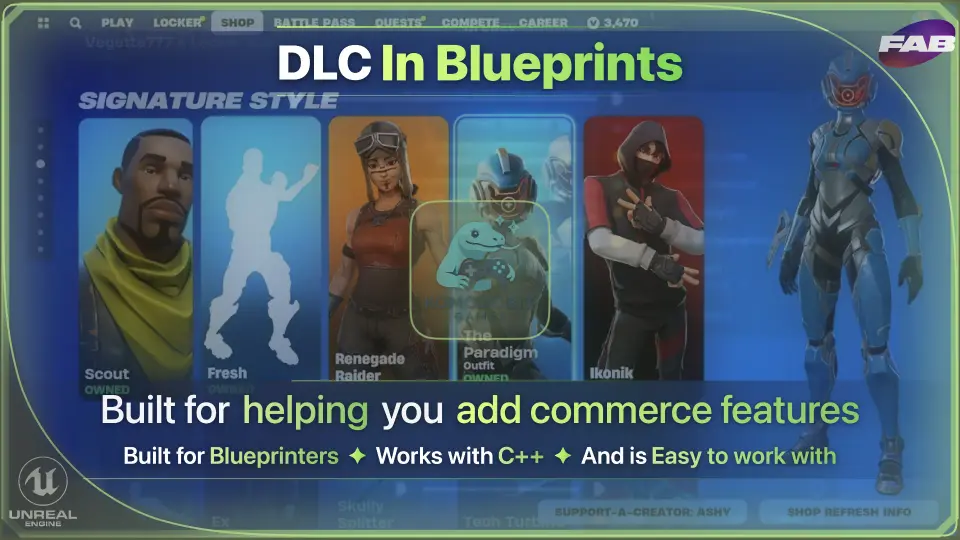
A Blueprint-native node library exposing Steam and Epic Games Store commerce APIs as event-driven nodes for DLC, microtransactions, and content unlocks in Unrea
When a player clicks purchase on a storefront item inside an Unreal Engine project, the monetization logic behind that click usually lives in Blueprint. The problem arrives one layer down. Checking whether that player actually owns the DLC, triggering the purchase flow on Steam or the Epic Games Store, and enumerating available downloadable content means reaching into platform-specific commerce APIs that are sparsely documented and built with C++ SDKs in mind. DLC in Blueprints closes that gap by exposing those commerce APIs directly as native Blueprint nodes.
Commerce APIs Without C++ Bridging
The core premise of the library is that monetization logic should not force a developer out of Blueprint and into C++ just to interact with a platform's commerce system. Steam and the Epic Games Store both provide SDKs for handling DLC and microtransactions, but those SDKs are not built for quick access from Unreal's visual scripting environment. The usual path involves wrestling with platform subsystems, network calls, plugin compilation, and header files before a single ownership check can execute.
DLC in Blueprints replaces that path with a set of event-driven graph nodes. The library wraps three primary commerce operations: ownership checks, purchase flows, and DLC enumeration. An ownership check answers whether a given player has already purchased or unlocked a specific piece of content. A purchase flow initiates the platform storefront transaction for a new acquisition. DLC enumeration surfaces the list of available downloadable content associated with the game on that platform. Each of these is available directly in the Blueprint graph as a node that slots into existing UI and progression systems.
Because the nodes are event-driven, they integrate cleanly with delegate-based UI flows. A purchase node fires an event when the transaction completes. An ownership check returns a result that can drive branching logic in a progression graph. There is no need to manually poll a platform subsystem or manage async callbacks through C++ wrappers. The node does what it is expected to do and returns control to the Blueprint logic that called it.
Shipping Microtransactions, Season Passes, and Content Unlocks
The practical monetization scenarios the library targets are concrete. A microtransaction for a single in-game item, a season pass that gates access to rotating content over time, and a DLC pack that unlocks a new map or character set all depend on the same underlying commerce operations: enumerate what is available, check what the player owns, and execute a purchase when the player decides to buy.
The library applies the same node-based approach to all three. The same set of Blueprint nodes handles a one-dollar cosmetic purchase and a $20 expansion pack. The difference is in how the Blueprint logic wires the nodes to the game's progression and content systems, not in any special handling the library imposes.
The line "Stop bridging C++ just to sell a hat" captures the library's reason for existing. Situations where a project's monetization logic already lives in Blueprint but needs to reach into platform commerce APIs are where this tool fits. The tool keeps that logic in the Blueprint graph instead of forcing a detour into native code.
Dual Platform Coverage for Steam and Epic Games Store
The library supports both Steam and the Epic Games Store, and the same Blueprint nodes work across both platforms. This is a deliberate design choice. Commerce APIs differ between the two storefronts, and writing separate integration code for each platform is a common source of friction when a project targets both. DLC in Blueprints abstracts those differences behind a shared set of nodes, so the Blueprint graph that checks ownership or triggers a purchase does not need separate branches for Steam versus Epic.
This does not mean the underlying platform differences disappear. Each storefront has its own SDK, its own ownership models, and its own edge cases. The library handles those edge cases internally — situations that the official documentation for either platform may skip over or leave to the developer to discover through testing. The "battle-tested" description refers to that internal handling. The nodes are built to account for the platform-specific edge cases that surface during real commerce integration work, rather than exposing a thin wrapper that breaks the first time it encounters a scenario not covered in the SDK reference.
Where DLC in Blueprints Fits in a Production Workflow
The library targets a specific part of the Unreal Engine pipeline: the commerce and DLC layer. The creator identifies this as one of the least documented corners of the engine. Platform commerce sits outside the core gameplay, rendering, and audio systems that most Unreal documentation covers. A team building monetization features often finds itself reading platform SDK references rather than Unreal documentation, which makes the process feel disconnected from the rest of the project's Blueprint-based development.
DLC in Blueprints sits between the raw platform commerce SDK and the game's Blueprint logic layer. The platform handles the actual transaction on its backend. The library translates the communication with that backend into Blueprint nodes. The game's UI calls those nodes. The progression system listens for their events. The flow is: player clicks purchase in the UMG widget, the widget fires a DLC in Blueprints purchase node, the node communicates with the platform commerce API, the platform processes the transaction, the node fires an event back into the Blueprint graph, and the progression system unlocks the content.
The library does not replace the storefront itself. Steam and the Epic Games Store remain the systems of record for what content exists, what it costs, and who owns it. The library provides the read and write access to those systems from within Blueprint, not a substitute storefront or a custom backend.
Genre-Agnostic Integration
The library's node-based approach to commerce operations does not assume a specific genre or game structure. The creator lists MMO RPGs, first-person shooters, and other game types as valid use cases. The underlying commerce operations are the same regardless of genre: check ownership, trigger purchase, enumerate DLC. A season pass in a shooter and a content unlock in an RPG both reduce to the same three operations beneath the library's nodes.
For an MMO RPG, DLC enumeration nodes surface the list of available expansions or item packs. Ownership checks gate access to areas or features tied to those expansions. Purchase nodes handle the storefront transaction when a player buys access. For a first-person shooter, the same nodes handle weapon skins, map packs, or battle pass tiers. The Blueprint logic that connects the nodes to the game's specific content systems differs, but the commerce layer the library exposes does not change.
The same dual-platform approach applies regardless of genre. A project shipping on both Steam and the Epic Games Store uses the same nodes for both storefronts. The need to maintain separate commerce integration code per platform is removed.
Keeping Backend, Gameplay, and UI Logic Current
Platform commerce systems change. Steam updates its SDK. The Epic Games Store adjusts how it handles online services. Changes that affect how ownership is verified or how purchases are initiated can surface without warning and break integration code that was working the week before. The library is positioned as a layer that absorbs those changes so the game's Blueprint logic does not have to.
The game's backend logic, gameplay progression, and UI can persist in Blueprint while the library handles updates to the underlying platform APIs. The developer does not track platform changes manually. When a commerce SDK shifts how it handles a purchase callback or an ownership query, the expectation is that the library's nodes continue to expose the same Blueprint interface and handle the new platform behavior internally.
Engine Compatibility and Onboarding
DLC in Blueprints is compatible with Unreal Engine 4.25 through 4.27, covering the later versions of UE4. It also supports the full UE5 range, from 5.0 through 5.7. This spans the transition point from Unreal Engine 4 to Unreal Engine 5, so projects that have not yet migrated forward and projects already on the latest UE5 releases can both use the library.
No C++ is required to use the library. The nodes are blueprint-native, meaning setup involves wiring DLC checks and purchases directly in existing Blueprint graphs. There is no plugin compilation step, no need to locate or include header files, and no manual handling of C++ SDK integration. The library handles the connection to the platform commerce systems behind the node interface.
Documentation is available on GitBook, covering setup and integration. A YouTube tutorial series walks through integrating the system with a project's existing assets. Community support and one-on-one help are available through Discord, and support questions or refund requests can be directed through email. The creator positions this as direct support rather than a queue-based ticket system.
For teams already building monetization logic in Blueprint on Steam or the Epic Games Store, the library replaces the raw platform commerce API work with nodes that handle ownership checks, purchase flows, and DLC enumeration without forcing a move into C++ or navigation through sparse SDK documentation.
 Engine Tools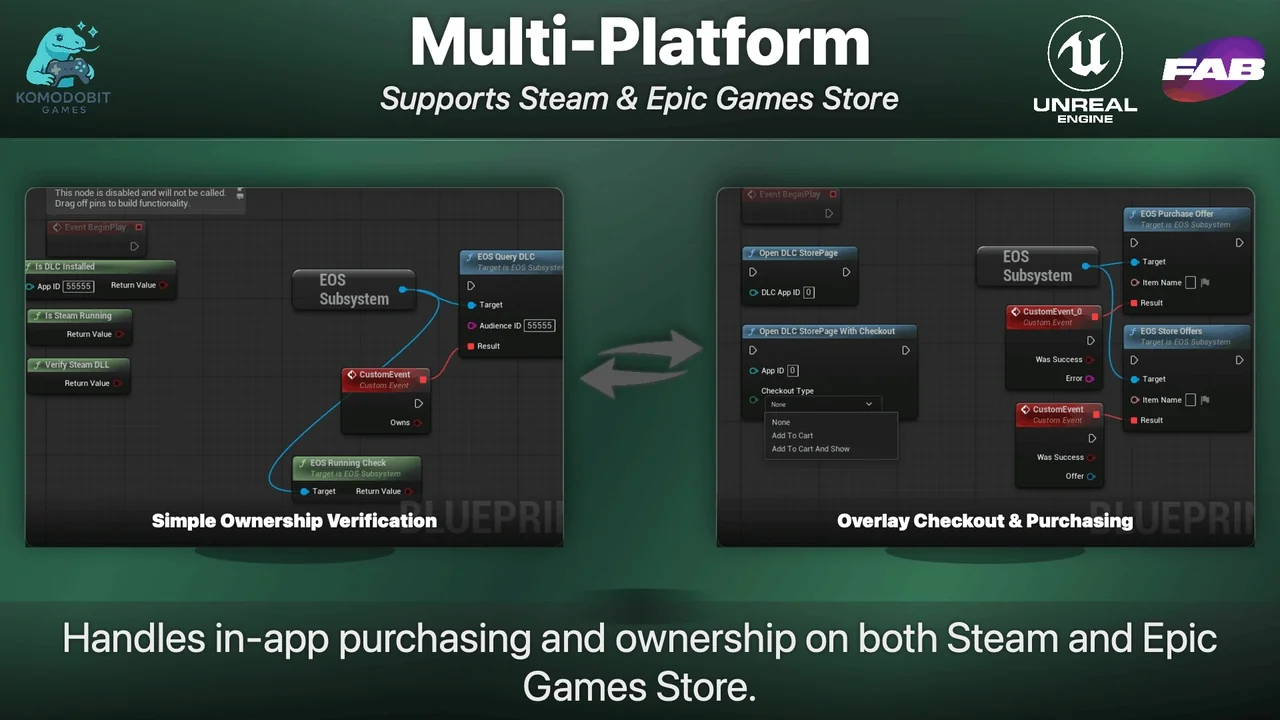
![[Blueprint] Array Helper](/_img/360/wp-content/uploads/published/2026/09/daddf320f3ff-792c793b-7370-4acc-8a76-0df91da7fbb8-0a679d7094.webp) Engine Tools
Engine Tools Engine Tools
 Engine Tools