"0341a2901a4ae9aa"{"id":"14147","slug":"make-modular-skeletal-mesh","title":"Make Modular Skeletal Mesh","category":"Engine Tools","engine":"5.3 - 5.4","assetVersion":"Engine version: 5.3 - 5.4","engineVersion":"5.3","tag":"Engine Tools","accent":"blue","visual":"mech","summary":"Enhance your asset creation process with the Make Modular Skeletal Mesh subsystem. This tool enables developers to modify and combine skeletal mesh parts directly within the UE editor.","platform":"Unreal Engine","publishedAt":"2026-03-11T16:00:04.000Z","updatedAt":"2026-04-19T15:45:52.000Z","sourceNotes":[],"fileContents":[],"compatibility":["Unreal Engine","Engine version: 5.3 - 5.4"],"featuredImage":{"alt":"Make Modular Skeletal Mesh","src":"https://3dcghub.com/wp-content/uploads/2026/03/8090ef9f-f5d3-428e-940c-ad1f4ed77720.webp"},"hasDownloadLink":true,"downloads":1,"terms":[{"taxonomy":"category","slug":"engine-tools-tools-and-plugins","name":"Engine Tools"},{"taxonomy":"post_tag","slug":"characters","name":"Characters"},{"taxonomy":"post_tag","slug":"environment","name":"Environment"},{"taxonomy":"post_tag","slug":"game-systems","name":"Game Systems"},{"taxonomy":"post_tag","slug":"tools","name":"Tools"},{"taxonomy":"post_tag","slug":"ui","name":"UI"},{"taxonomy":"post_tag","slug":"unreal-engine-5","name":"Unreal Engine 5"}],"galleryImages":[{"src":"https://3dcghub.com/wp-content/uploads/2026/03/c6513f1d2026_ef16449b-1b5d-45a8-8974-cbace42798b8.webp","alt":"Make Modular Skeletal Mesh"},{"src":"https://3dcghub.com/wp-content/uploads/2026/03/16f7161a7c4c_eda8a3ba-827e-4d3d-81f5-ad98892f8f99.webp","alt":"Make Modular Skeletal Mesh"},{"src":"https://3dcghub.com/wp-content/uploads/2026/03/c31bc63ae8fd_b393c7a0-d6c8-4149-a74f-6487b3a877ff.webp","alt":"Make Modular Skeletal Mesh"},{"src":"https://3dcghub.com/wp-content/uploads/2026/03/396bd40967b2_0557a06c-2a37-4930-8a3c-764ae9d70ddf.webp","alt":"Make Modular Skeletal Mesh"},{"src":"https://3dcghub.com/wp-content/uploads/2026/03/9136af558c1b_45efa7b4-db45-4fc2-9101-abd836e0736a.webp","alt":"Make Modular Skeletal Mesh"},{"src":"https://3dcghub.com/wp-content/uploads/2026/03/c2fbfaca1111_0c6bf485-4038-47c1-8d39-ad0b8f5add43.webp","alt":"Make Modular Skeletal Mesh"},{"src":"https://3dcghub.com/wp-content/uploads/2026/03/1eafaeb8cf29_4b20a56b-81f4-4d6e-bd41-5b55adc192cf.webp","alt":"Make Modular Skeletal Mesh"},{"src":"https://3dcghub.com/wp-content/uploads/2026/03/1604877b0f1c_51b5d27f-2d18-44a3-ba13-337cb938d523.webp","alt":"Make Modular Skeletal Mesh"},{"src":"https://3dcghub.com/wp-content/uploads/2026/03/67a8cd8609b0_8acd190d-b82c-4884-a1eb-a1352e9aa42f.webp","alt":"Make Modular Skeletal Mesh"},{"src":"https://3dcghub.com/wp-content/uploads/2026/03/28524c18b2c9_b793a77d-f85b-4e8c-9370-27c1d9735f6e.webp","alt":"Make Modular Skeletal Mesh"},{"src":"https://3dcghub.com/wp-content/uploads/2026/03/957c5f70a033_36c8a92f-082d-49ad-a7c0-1cf850150cdc.webp","alt":"Make Modular Skeletal Mesh"},{"src":"https://3dcghub.com/wp-content/uploads/2026/03/2cd99b7828d2_8b539277-08fb-441c-8e60-81553d429f5a.webp","alt":"Make Modular Skeletal Mesh"},{"src":"https://3dcghub.com/wp-content/uploads/2026/03/ddcc26f875e5_69622377-2a26-415f-8f0a-8c37d7ef51bd.webp","alt":"Make Modular Skeletal Mesh"},{"src":"https://3dcghub.com/wp-content/uploads/2026/03/b4ed10c95cc1_000b0b34-15ab-47aa-b5cd-0def06a524bc.webp","alt":"Make Modular Skeletal Mesh"},{"src":"https://3dcghub.com/wp-content/uploads/2026/03/9380a854ec13_859ded89-78d6-4b5a-8538-f8c6630363f1.webp","alt":"Make Modular Skeletal Mesh"},{"src":"https://3dcghub.com/wp-content/uploads/2026/03/ba140655f339_d16273f9-650a-4e01-87b6-00dba7985e1d.webp","alt":"Make Modular Skeletal Mesh"},{"src":"https://3dcghub.com/wp-content/uploads/2026/03/ba1a5a618ae3_3ef6025f-37f4-42ac-bb81-db7d64c47614.webp","alt":"Make Modular Skeletal Mesh"}],"accessPanel":{"kind":"resource","title":"Access this resource","eyebrow":"Free Download","message":"Log in or create a free account to start your download.","fileName":"Make Modular Skeletal Mesh 5.3-5.4.7z","safetyNote":"All resources are 100% manually reviewed to eliminate all risks.","actionLabel":"Download Free","resourceType":"Resource archive"},"contentHtml":"\u003ch2\u003eOverview of the Subsystem\u003c/h2\u003e\n\u003cp\u003eMake Modular Skeletal Mesh provides a specialized subsystem designed to enhance character development within the Unreal Engine environment. This tool allows users to manage complex assets efficiently. Consequently, developers can focus more on the creative aspects of their projects. This resource is built specifically for the UE editor to simplify skeletal data management.\u003c/p\u003e\n\n\u003ch2\u003eModular Mesh Manipulation\u003c/h2\u003e\n\u003cp\u003eThe core functionality of the tool revolves around the ability to modify skeletal meshes directly. Users can extract specific components or combine different parts to create unique variations. Moreover, these actions take place entirely within the UE editor interface. This eliminates the need for external software for basic mesh adjustments.\u003c/p\u003e\n\u003cp\u003eBy using the Make Modular Skeletal Mesh subsystem, you can effortlessly handle various skeletal parts. Whether you need to isolate a specific segment or merge multiple elements, the tool provides the necessary utility. Therefore, the transition from raw assets to finished characters becomes much faster and more intuitive for the developer.\u003c/p\u003e\n\n\u003ch2\u003eStreamlining the Creative Process\u003c/h2\u003e\n\u003cp\u003eThis modular approach significantly streamlines the asset creation process for developers. It allows for a more flexible workflow when building character variations. Furthermore, the tool is designed to unleash new levels of creativity by removing technical barriers. It focuses on providing a seamless experience for those working on modular designs.\u003c/p\u003e\n\u003cp\u003eThe subsystem acts as a bridge between raw skeletal data and a modular character system. Because the tool is integrated directly into the editor, updates happen efficiently. Consequently, users can see the results of their modifications immediately without leaving the development environment. This real-time feedback is essential for high-quality character production.\u003c/p\u003e\n\n\u003ch2\u003eEditor Integration and Tools\u003c/h2\u003e\n\u003cp\u003eThe system functions as an editor widget, providing a user-friendly way to interact with skeletal data. It is specifically designed to handle modular character requirements through a dedicated toolset. This makes the Make Modular Skeletal Mesh subsystem a powerful addition to any character artist's toolkit. The integration ensures that the tools feel native to the engine.\u003c/p\u003e\n\u003cp\u003eThe creator has included various resources to assist with the implementation of this system. Additionally, users can access a video demo and comprehensive 5.7 documentation to understand the workflow. These resources ensure that the modular tools are used to their full potential within the editor. The documentation provides a clear path for mastering the subsystem features.\u003c/p\u003e\n\n\u003ch2\u003eFinal Take\u003c/h2\u003e\n\u003cp\u003eFor teams considering it, the Make Modular Skeletal Mesh subsystem is a versatile solution for modern game development. It empowers creators to simplify mesh manipulation and improve asset management. Thus, it remains an essential tool for those working with modular skeletal assets in Unreal Engine.\u003c/p\u003e\n\n\u003ch2\u003eExplore Similar Assets\u003c/h2\u003e\n\u003cul\u003e\n\u003cli\u003e\u003ca href=\"https://3dcghub.com/extile-plus-ultimate-non-tiling-material-toolkit-for-unreal-engine-environments/\" title=\"EXTILE PLUS -Ultimate Non-Tiling Material Toolkit for Unreal Engine Environments\"\u003eEXTILE PLUS -Ultimate Non-Tiling Material Toolkit for Unreal Engine Environments\u003c/a\u003e\u003c/li\u003e\n\u003cli\u003e\u003ca href=\"https://3dcghub.com/ultimate-template-unrealengine-2d-dialogue-inventory-system-save/\" title=\"ULTIMATE Template UnrealEngine || 2D + Dialogue + Inventory system + Save | |\"\u003eULTIMATE Template UnrealEngine || 2D + Dialogue + Inventory system + Save | |\u003c/a\u003e\u003c/li\u003e\n\u003cli\u003e\u003ca href=\"https://3dcghub.com/daz-to-unreal/\" title=\"Daz To Unreal\"\u003eDaz To Unreal\u003c/a\u003e\u003c/li\u003e\n\u003cli\u003e\u003ca href=\"https://3dcghub.com/blueprint-generator-ai-kibibyte-labs-engine-assistant/\" title=\"Blueprint Generator Ai – Kibibyte Labs (Engine Assistant)\"\u003eBlueprint Generator Ai – Kibibyte Labs (Engine Assistant)\u003c/a\u003e\u003c/li\u003e\n\u003cli\u003e\u003ca href=\"https://3dcghub.com/sci-fi-environment-engine-room/\" title=\"Sci-fi Environment Engine Room\"\u003eSci-fi Environment Engine Room\u003c/a\u003e\u003c/li\u003e\n\u003c/ul\u003e\n\n\u003ch2\u003eAsset Gallery\u003c/h2\u003e","contentTextLength":3280,"navigation":{"current":3377,"total":4017,"previous":{"id":"14164","slug":"map-function-library","title":"Map Function Library","category":"Engine Tools","platform":"Unreal Engine","updatedAt":"2026-04-19T15:45:52.000Z"},"next":{"id":"14227","slug":"msc-screen-camera-recorder","title":"MSC Screen \u0026 Camera Recorder","category":"Engine Tools","platform":"Unreal Engine","updatedAt":"2026-04-19T15:45:51.000Z"}},"relatedResources":[{"id":"14185","slug":"meshblend-next-generation-mesh-blending-without-rvt","title":"MeshBlend - Next generation mesh blending without RVT","category":"Engine Tools","engine":"5.5 - 5.7","assetVersion":"Engine version: 5.5 - 5.7","engineVersion":"Asset Version:2.1","tag":"Engine Tools","accent":"blue","visual":"mech","summary":"MeshBlend provides a powerful alternative to RVT for blending meshes and landscapes in Unreal Engine. This battle-tested tool supports Nanite, skeletal meshes, and high-performance workflows for indie and AAA projects alike.","platform":"Unreal Engine","publishedAt":"2026-03-11T16:07:49.000Z","updatedAt":"2026-04-19T15:45:51.000Z","sourceNotes":[],"fileContents":[],"compatibility":["Unreal Engine","Engine version: 5.5 - 5.7","Asset Version: 2.1"],"featuredImage":{"alt":"MeshBlend - Next generation mesh blending without RVT","src":"https://3dcghub.com/wp-content/uploads/2026/03/27abd930-9ae5-4b08-b6d7-1482b1ebf68a.webp"},"hasDownloadLink":true,"downloads":1},{"id":"14259","slug":"narrative-navigator-maps-compasses-waypoints","title":"Narrative Navigator - Maps, Compasses, Waypoints","category":"Engine Tools","engine":"5.4 - 5.5","assetVersion":"Engine version: 5.4 - 5.5","engineVersion":"Asset Version:1.1 - 1.1.2","tag":"Engine Tools","accent":"blue","visual":"luts","summary":"Narrative Navigator is a professional navigation system now available for free. It features world maps, compasses, and 3D markers designed for easy integration into any project.","platform":"Unreal Engine","publishedAt":"2026-03-11T17:10:23.000Z","updatedAt":"2026-04-19T15:45:50.000Z","sourceNotes":[],"fileContents":[],"compatibility":["Unreal Engine","Engine version: 5.4 - 5.5","Asset Version: 1.1 - 1.1.2"],"featuredImage":{"alt":"Narrative Navigator - Maps, Compasses, Waypoints","src":"https://3dcghub.com/wp-content/uploads/2026/03/76f10091-ac35-4cf1-8096-6187252a1a76.webp"},"hasDownloadLink":true,"downloads":0},{"id":"14379","slug":"quick-merge-skeletal-mesh","title":"Quick Merge Skeletal Mesh","category":"Engine Tools","engine":"5.4 - 5.8","assetVersion":"Asset Version:1.0","engineVersion":"Engine version: 5.4 - 5.8","tag":"Engine Tools","accent":"blue","visual":"character","summary":"Streamline your Unreal Engine 5 workflow by combining multiple skeletal meshes into a single asset. This tool ensures efficient asset management while maintaining skeleton consistency across your project.","platform":"Unreal Engine","publishedAt":"2026-03-11T17:51:53.000Z","updatedAt":"2026-09-07T14:11:56.503Z","sourceNotes":[],"fileContents":[],"compatibility":["Unreal Engine","Asset Version:1.0","Engine version: 5.4 - 5.8"],"featuredImage":{"alt":"Quick Merge Skeletal Mesh","src":"https://3dcghub.com/wp-content/uploads/2026/03/8b1e8a33-5fdf-4566-af9c-54f93949ddf6.webp"},"hasDownloadLink":true,"downloads":2}]}
Engine Tools
Make Modular Skeletal Mesh
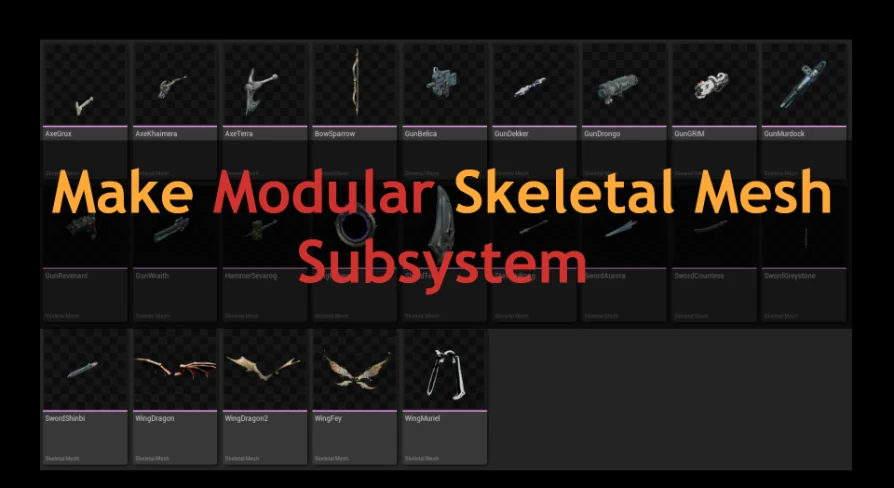
Enhance your asset creation process with the Make Modular Skeletal Mesh subsystem. This tool enables developers to modify and combine skeletal mesh parts directly within the UE editor.
Make Modular Skeletal Mesh provides a specialized subsystem designed to enhance character development within the Unreal Engine environment. This tool allows users to manage complex assets efficiently. Consequently, developers can focus more on the creative aspects of their projects. This resource is built specifically for the UE editor to simplify skeletal data management.
Modular Mesh Manipulation
The core functionality of the tool revolves around the ability to modify skeletal meshes directly. Users can extract specific components or combine different parts to create unique variations. Moreover, these actions take place entirely within the UE editor interface. This eliminates the need for external software for basic mesh adjustments.
By using the Make Modular Skeletal Mesh subsystem, you can effortlessly handle various skeletal parts. Whether you need to isolate a specific segment or merge multiple elements, the tool provides the necessary utility. Therefore, the transition from raw assets to finished characters becomes much faster and more intuitive for the developer.
Streamlining the Creative Process
This modular approach significantly streamlines the asset creation process for developers. It allows for a more flexible workflow when building character variations. Furthermore, the tool is designed to unleash new levels of creativity by removing technical barriers. It focuses on providing a seamless experience for those working on modular designs.
The subsystem acts as a bridge between raw skeletal data and a modular character system. Because the tool is integrated directly into the editor, updates happen efficiently. Consequently, users can see the results of their modifications immediately without leaving the development environment. This real-time feedback is essential for high-quality character production.
Editor Integration and Tools
The system functions as an editor widget, providing a user-friendly way to interact with skeletal data. It is specifically designed to handle modular character requirements through a dedicated toolset. This makes the Make Modular Skeletal Mesh subsystem a powerful addition to any character artist's toolkit. The integration ensures that the tools feel native to the engine.
The creator has included various resources to assist with the implementation of this system. Additionally, users can access a video demo and comprehensive 5.7 documentation to understand the workflow. These resources ensure that the modular tools are used to their full potential within the editor. The documentation provides a clear path for mastering the subsystem features.
Final Take
For teams considering it, the Make Modular Skeletal Mesh subsystem is a versatile solution for modern game development. It empowers creators to simplify mesh manipulation and improve asset management. Thus, it remains an essential tool for those working with modular skeletal assets in Unreal Engine.
 Engine Tools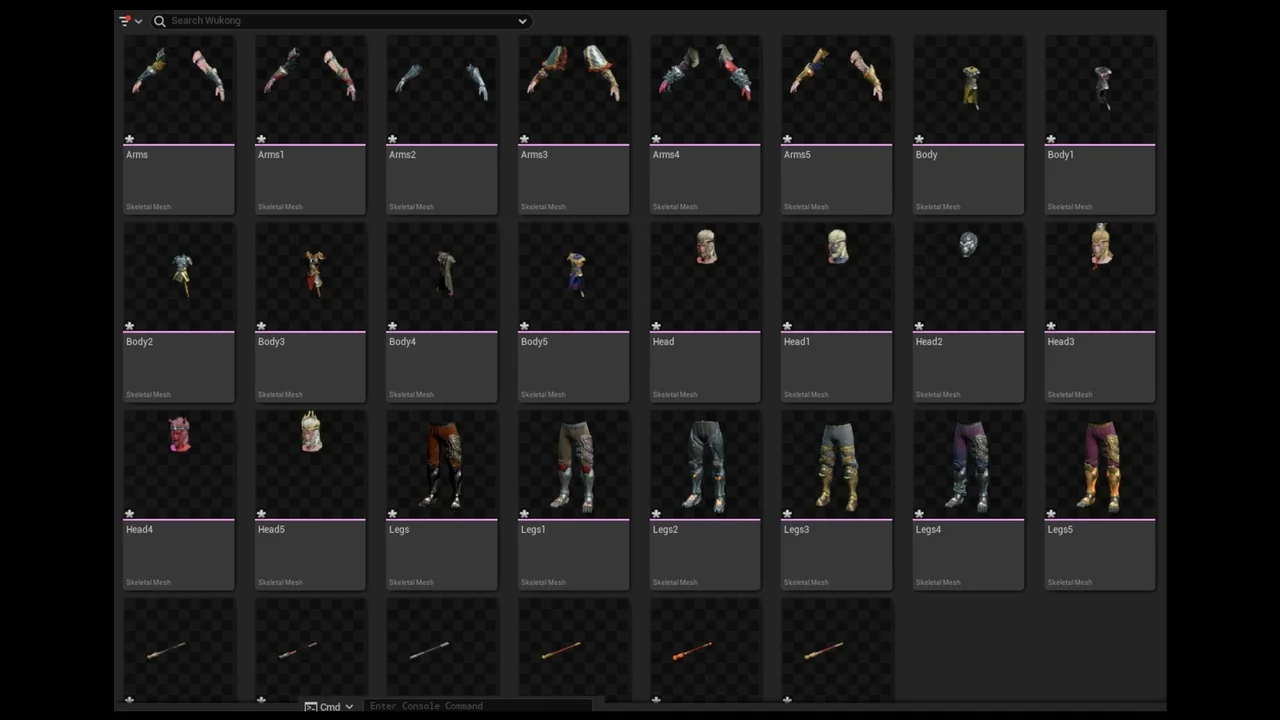
 Engine Tools
 Engine Tools
 Engine Tools