"7066dd76da796369"{"id":"14035","slug":"groom-export","title":"Groom Export","category":"Engine Tools","engine":"5.5","assetVersion":"Engine version: 5.5","engineVersion":"Asset Version:1.0","tag":"Engine Tools","accent":"blue","visual":"character","summary":"Groom Export provides a streamlined way to convert engine-based groom files into the abc format. This tool ensures compatibility across different engine versions and resolves previous import issues with Maya.","platform":"Unreal Engine","publishedAt":"2026-03-11T13:17:17.000Z","updatedAt":"2026-04-19T15:45:55.000Z","sourceNotes":[],"fileContents":[],"compatibility":["Unreal Engine","Engine version: 5.5","Asset Version: 1.0"],"featuredImage":{"alt":"Groom Export","src":"https://3dcghub.com/wp-content/uploads/2026/03/49a11aab-3f78-47ba-88a3-2edc105cc12e.webp"},"hasDownloadLink":true,"downloads":0,"terms":[{"taxonomy":"category","slug":"engine-tools-tools-and-plugins","name":"Engine Tools"},{"taxonomy":"post_tag","slug":"abc-format","name":"ABC Format"},{"taxonomy":"post_tag","slug":"alembic-export","name":"Alembic Export"},{"taxonomy":"post_tag","slug":"groom-export","name":"Groom Export"},{"taxonomy":"post_tag","slug":"groom-import","name":"Groom Import"},{"taxonomy":"post_tag","slug":"tools","name":"Tools"},{"taxonomy":"post_tag","slug":"utilities","name":"Utilities"}],"galleryImages":[{"src":"https://3dcghub.com/wp-content/uploads/2026/03/a04f5ccd4b1a_e2f135db-a12e-4429-9b4a-3b325251df1e.webp","alt":"Groom Export"},{"src":"https://3dcghub.com/wp-content/uploads/2026/03/1846bbd7ffec_11ec7acf-a425-4cf5-8c62-1c0582df9ff5.webp","alt":"Groom Export"},{"src":"https://3dcghub.com/wp-content/uploads/2026/03/e88c186900c0_c0cb76bc-18c1-4df7-b926-ce9e8fcb0340.webp","alt":"Groom Export"}],"accessPanel":{"kind":"resource","title":"Access this resource","eyebrow":"Free Download","message":"Log in or create a free account to start your download.","fileName":"Groom Export 5.5;V1.0.7z","safetyNote":"All resources are 100% manually reviewed to eliminate all risks.","actionLabel":"Download Free","resourceType":"Resource archive"},"contentHtml":"\u003ch2\u003eSeamless Groom Export Workflow\u003c/h2\u003e\n\u003cp\u003eGroom Export is a specialized tool designed to facilitate the transition of groom data from within the engine. Specifically, it allows users to export the Groom file into the abc format. This functionality is crucial for developers who need to manage hair and fur assets outside of the native engine environment. By using this tool, the developer ensures that your assets are portable and ready for various production needs.\u003c/p\u003e\n\n\u003ch2\u003eEfficient Groom Conversion to ABC\u003c/h2\u003e\n\u003cp\u003eThe primary function of Groom Export is the reliable conversion of groom data. By utilizing the abc format, the creator provides a standard way to handle complex groom information. Consequently, this tool simplifies the workflow for artists who need to move their work between different stages of production. The export process is designed to be straightforward and effective for all users.\u003c/p\u003e\n\u003cp\u003eWhen you use Groom Export, the engine-specific groom files are transformed into a more portable state. This transition is handled carefully to ensure that the data remains usable. Therefore, users can rely on this tool for consistent asset management. It eliminates the need for complex manual workarounds when handling hair and fur data.\u003c/p\u003e\n\n\u003ch2\u003eEnhanced Compatibility and Version Support\u003c/h2\u003e\n\u003cp\u003eOne of the most significant benefits of Groom Export is its support for different engine versions. The developer notes that users should not worry about version mismatches during the process. Because the abc file serves as an intermediary, it can be re-imported into various engine versions of the groom. This flexibility is a major advantage for teams working across different software iterations.\u003c/p\u003e\n\u003cp\u003eAlso, this feature is particularly useful for long-term projects. For instance, if a project moves to a different version of the engine, the groom data remains accessible. Moreover, this cross-version compatibility ensures that your assets are not locked into a single version. This makes the tool a valuable asset for maintaining a flexible development pipeline.\u003c/p\u003e\n\n\u003ch2\u003eResolved Maya Import Issues\u003c/h2\u003e\n\u003cp\u003eThe developer has also focused on resolving specific technical hurdles to improve the user experience. In a recent update, a fix was implemented specifically for Maya users. Previously, some users encountered difficulties when trying to import groom data into that software. However, the latest version of Groom Export has addressed the \"Cant Import Maya\" error directly.\u003c/p\u003e\n\u003cp\u003eThis improvement allows for a more reliable pipeline between the engine and external DCC tools. Consequently, artists can now move their groom assets into Maya without the frustration of import failures. By fixing these compatibility issues, the creator has made the tool more robust for professional environments.\u003c/p\u003e\n\n\u003ch2\u003eFinal Take\u003c/h2\u003e\n\u003cp\u003eGroom Export provides a necessary bridge for groom asset management. By enabling exports to the abc format, it ensures that hair and fur data remains portable and versatile. Additionally, the tool offers peace of mind through its cross-version compatibility and specific fixes for Maya. Whether you are moving assets between engine versions or into external software, this tool streamlines the entire process efficiently.\u003c/p\u003e\n\n\u003ch2\u003eContinue Browsing Similar Packs\u003c/h2\u003e\n\u003cul\u003e\n\u003cli\u003e\u003ca href=\"https://3dcghub.com/landscaping-vines-1/\" title=\"Livingroom Vol. 1 by Unimodels\"\u003eLivingroom Vol. 1 by Unimodels\u003c/a\u003e\u003c/li\u003e\n\u003cli\u003e\u003ca href=\"https://3dcghub.com/astronaut-soldier/\" title=\"Astronaut Soldier\"\u003eAstronaut Soldier\u003c/a\u003e\u003c/li\u003e\n\u003cli\u003e\u003ca href=\"https://3dcghub.com/ancient-undead-pack/\" title=\"Ancient Undead Pack\"\u003eAncient Undead Pack\u003c/a\u003e\u003c/li\u003e\n\u003cli\u003e\u003ca href=\"https://3dcghub.com/edge-decal-tools-1-2/\" title=\"Edge Decal Tools 1.2\"\u003eEdge Decal Tools 1.2\u003c/a\u003e\u003c/li\u003e\n\u003cli\u003e\u003ca href=\"https://3dcghub.com/blockout-tools-plugin/\" title=\"Blockout Tools Plugin\"\u003eBlockout Tools Plugin\u003c/a\u003e\u003c/li\u003e\n\u003c/ul\u003e","contentTextLength":3351,"navigation":{"current":3367,"total":4016,"previous":{"id":"13990","slug":"file-system-library","title":"File System Library","category":"Engine Tools","platform":"Unreal Engine","updatedAt":"2026-04-19T15:45:56.000Z"},"next":{"id":"14029","slug":"gas-companion","title":"GAS Companion","category":"Engine Tools","platform":"Unreal Engine","updatedAt":"2026-04-19T15:45:55.000Z"}},"relatedResources":[{"id":"14476","slug":"realtime-import-export-plugin","title":"RealTime Import/Export Plugin","category":"Engine Tools","engine":"4.25 - 4.27,5.0 - 5.7","assetVersion":"Engine version: 4.25 - 4.27,5.0 - 5.7","engineVersion":"Asset Version:3.4 - 3.65","tag":"Engine Tools","accent":"blue","visual":"luts","summary":"Enhance your project with the RealTime Import/Export Plugin, a tool designed to handle assets during runtime. It supports various formats including FBX, OBJ, and WAV without requiring the Unreal Editor.","platform":"Unreal Engine","publishedAt":"2026-03-11T18:10:35.000Z","updatedAt":"2026-04-19T15:45:45.000Z","sourceNotes":[],"fileContents":[],"compatibility":["Unreal Engine","Engine version: 4.25 - 4.27,5.0 - 5.7","Asset Version: 3.4 - 3.65"],"featuredImage":{"alt":"RealTime Import/Export Plugin","src":"https://3dcghub.com/wp-content/uploads/2026/03/11b2685a-4966-4c69-9bbc-89d8f2fdc881.webp"},"hasDownloadLink":true,"downloads":0},{"id":"13982","slug":"externaltextureplugin","title":"ExternalTexturePlugin","category":"Engine Tools","engine":"5.0 - 5.8","assetVersion":"Asset Version:1.0.1 - 1.0.2","engineVersion":"Engine version: 5.0 - 5.8","tag":"Engine Tools","accent":"blue","visual":"luts","summary":"The ExternalTexturePlugin provides a seamless way to integrate local and network-based images into your project at runtime using Blueprints. It supports standard formats like JPG, PNG, TGA, and BMP.","platform":"Unreal Engine","publishedAt":"2026-03-11T10:54:44.000Z","updatedAt":"2026-09-29T09:03:01.541Z","sourceNotes":[],"fileContents":[],"compatibility":["Unreal Engine","Asset Version:1.0.1 - 1.0.2","Engine version: 5.0 - 5.8"],"featuredImage":{"alt":"ExternalTexturePlugin","src":"https://3dcghub.com/wp-content/uploads/2026/03/cf5764e9-fff8-49cf-b24b-274e326c864f.webp"},"hasDownloadLink":true,"downloads":1},{"id":"14379","slug":"quick-merge-skeletal-mesh","title":"Quick Merge Skeletal Mesh","category":"Engine Tools","engine":"5.4 - 5.8","assetVersion":"Asset Version:1.0","engineVersion":"Engine version: 5.4 - 5.8","tag":"Engine Tools","accent":"blue","visual":"character","summary":"Streamline your Unreal Engine 5 workflow by combining multiple skeletal meshes into a single asset. This tool ensures efficient asset management while maintaining skeleton consistency across your project.","platform":"Unreal Engine","publishedAt":"2026-03-11T17:51:53.000Z","updatedAt":"2026-09-07T14:11:56.503Z","sourceNotes":[],"fileContents":[],"compatibility":["Unreal Engine","Asset Version:1.0","Engine version: 5.4 - 5.8"],"featuredImage":{"alt":"Quick Merge Skeletal Mesh","src":"https://3dcghub.com/wp-content/uploads/2026/03/8b1e8a33-5fdf-4566-af9c-54f93949ddf6.webp"},"hasDownloadLink":true,"downloads":2}]}
Engine Tools
Groom Export
Groom Export provides a streamlined way to convert engine-based groom files into the abc format. This tool ensures compatibility across different engine versions and resolves previous import issues with Maya.
Groom Export is a specialized tool designed to facilitate the transition of groom data from within the engine. Specifically, it allows users to export the Groom file into the abc format. This functionality is crucial for developers who need to manage hair and fur assets outside of the native engine environment. By using this tool, the developer ensures that your assets are portable and ready for various production needs.
Efficient Groom Conversion to ABC
The primary function of Groom Export is the reliable conversion of groom data. By utilizing the abc format, the creator provides a standard way to handle complex groom information. Consequently, this tool simplifies the workflow for artists who need to move their work between different stages of production. The export process is designed to be straightforward and effective for all users.
When you use Groom Export, the engine-specific groom files are transformed into a more portable state. This transition is handled carefully to ensure that the data remains usable. Therefore, users can rely on this tool for consistent asset management. It eliminates the need for complex manual workarounds when handling hair and fur data.
Enhanced Compatibility and Version Support
One of the most significant benefits of Groom Export is its support for different engine versions. The developer notes that users should not worry about version mismatches during the process. Because the abc file serves as an intermediary, it can be re-imported into various engine versions of the groom. This flexibility is a major advantage for teams working across different software iterations.
Also, this feature is particularly useful for long-term projects. For instance, if a project moves to a different version of the engine, the groom data remains accessible. Moreover, this cross-version compatibility ensures that your assets are not locked into a single version. This makes the tool a valuable asset for maintaining a flexible development pipeline.
Resolved Maya Import Issues
The developer has also focused on resolving specific technical hurdles to improve the user experience. In a recent update, a fix was implemented specifically for Maya users. Previously, some users encountered difficulties when trying to import groom data into that software. However, the latest version of Groom Export has addressed the "Cant Import Maya" error directly.
This improvement allows for a more reliable pipeline between the engine and external DCC tools. Consequently, artists can now move their groom assets into Maya without the frustration of import failures. By fixing these compatibility issues, the creator has made the tool more robust for professional environments.
Final Take
Groom Export provides a necessary bridge for groom asset management. By enabling exports to the abc format, it ensures that hair and fur data remains portable and versatile. Additionally, the tool offers peace of mind through its cross-version compatibility and specific fixes for Maya. Whether you are moving assets between engine versions or into external software, this tool streamlines the entire process efficiently.
 Engine Tools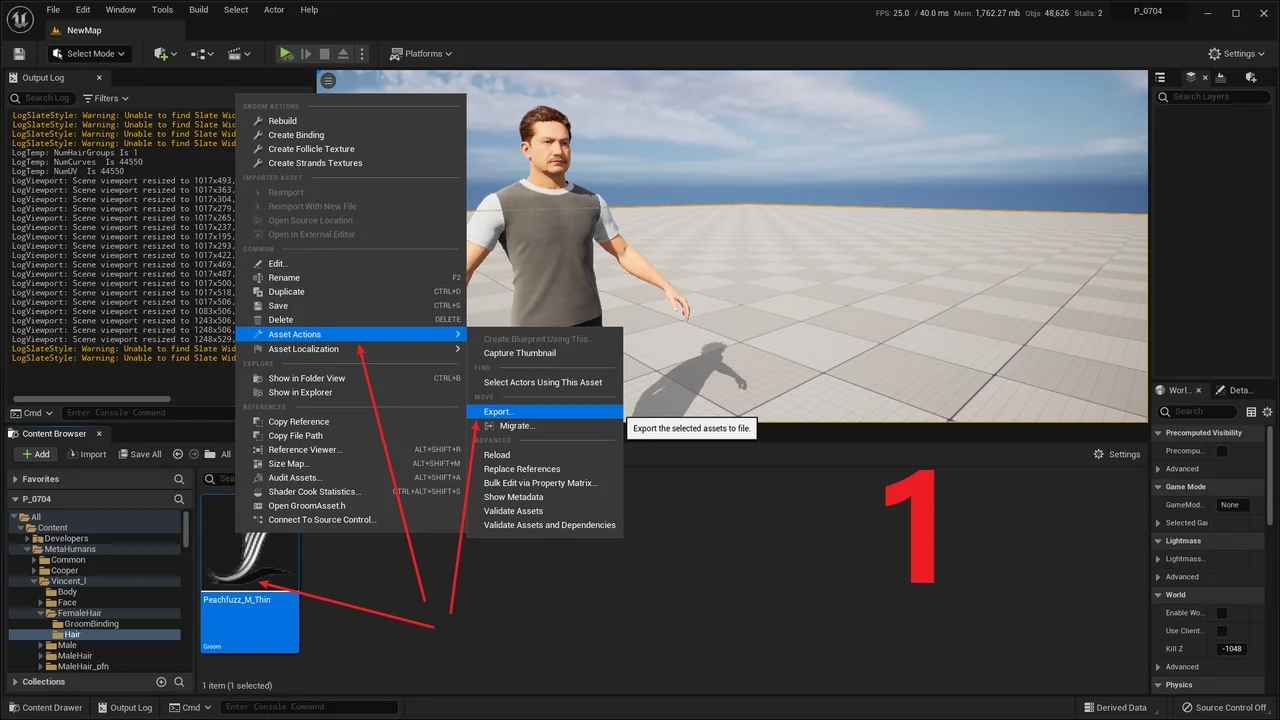
 Engine Tools
 Engine Tools
 Engine Tools