"7066dd76da796369"{"id":"14476","slug":"realtime-import-export-plugin","title":"RealTime Import/Export Plugin","category":"Engine Tools","engine":"4.25 - 4.27,5.0 - 5.7","assetVersion":"Engine version: 4.25 - 4.27,5.0 - 5.7","engineVersion":"Asset Version:3.4 - 3.65","tag":"Engine Tools","accent":"blue","visual":"luts","summary":"Enhance your project with the RealTime Import/Export Plugin, a tool designed to handle assets during runtime. It supports various formats including FBX, OBJ, and WAV without requiring the Unreal Editor.","platform":"Unreal Engine","publishedAt":"2026-03-11T18:10:35.000Z","updatedAt":"2026-04-19T15:45:45.000Z","sourceNotes":[],"fileContents":[],"compatibility":["Unreal Engine","Engine version: 4.25 - 4.27,5.0 - 5.7","Asset Version: 3.4 - 3.65"],"featuredImage":{"alt":"RealTime Import/Export Plugin","src":"https://3dcghub.com/wp-content/uploads/2026/03/11b2685a-4966-4c69-9bbc-89d8f2fdc881.webp"},"hasDownloadLink":true,"downloads":0,"terms":[{"taxonomy":"category","slug":"engine-tools-tools-and-plugins","name":"Engine Tools"},{"taxonomy":"post_tag","slug":"audio","name":"Audio"},{"taxonomy":"post_tag","slug":"blender","name":"Blender"},{"taxonomy":"post_tag","slug":"plugins","name":"Plugins"},{"taxonomy":"post_tag","slug":"textures","name":"Textures"},{"taxonomy":"post_tag","slug":"tools","name":"Tools"},{"taxonomy":"post_tag","slug":"unreal-engine-5","name":"Unreal Engine 5"}],"galleryImages":[{"src":"https://3dcghub.com/wp-content/uploads/2026/03/e84dfbdfcaa9_bbaba775-17b0-41a8-a2fa-576754edadc6.webp","alt":"RealTime Import/Export Plugin"},{"src":"https://3dcghub.com/wp-content/uploads/2026/03/642a62d40253_47b74e2a-40ff-482d-b001-c598a8d6671c.webp","alt":"RealTime Import/Export Plugin"},{"src":"https://3dcghub.com/wp-content/uploads/2026/03/77284d9e55a1_d3dbef57-0d08-4d29-a9c3-505cc01273cc.webp","alt":"RealTime Import/Export Plugin"},{"src":"https://3dcghub.com/wp-content/uploads/2026/03/284867741ee1_78b96e69-0312-4add-8e25-96cf666a6f1a.webp","alt":"RealTime Import/Export Plugin"},{"src":"https://3dcghub.com/wp-content/uploads/2026/03/4cff43473569_62f84950-ef7a-4e69-b1d8-9abbecbbbc36.webp","alt":"RealTime Import/Export Plugin"},{"src":"https://3dcghub.com/wp-content/uploads/2026/03/cde8dd848e12_88fb4a97-6473-4386-975f-c8e479dab7a6.webp","alt":"RealTime Import/Export Plugin"}],"accessPanel":{"kind":"resource","title":"Access this resource","eyebrow":"Free Download","message":"Log in or create a free account to start your download.","fileName":"Real Time ImportExport 4.25-5.7 V3.4-3.65.7z","safetyNote":"All resources are 100% manually reviewed to eliminate all risks.","actionLabel":"Download Free","resourceType":"Resource archive"},"contentHtml":"\u003ch2\u003eSeamless Asset Management During Gameplay\u003c/h2\u003e\n\u003cp\u003eThe RealTime Import/Export Plugin provides a robust solution for developers who need to handle external files while a game is running. This tool allows for the direct import of assets without requiring the Unreal Engine editor. Consequently, developers can create more dynamic experiences where users interact with their own files in real-time. To maintain high performance, the plugin caches all imported textures and sounds directly in RAM.\u003c/p\u003e\n\n\u003ch2\u003eSupported File Formats for Import\u003c/h2\u003e\n\u003cp\u003eThe plugin supports a wide variety of industry-standard formats. For audio, users can import WAV and OGG files seamlessly. Image support is extensive, covering PNG, JPG, BMP, TGA, and TIFF formats. However, it is important to note that TGA and TIFF support is available starting with Unreal Engine 5. Additionally, the developer has implemented a color depth check for images to prevent crashes in newer engine versions.\u003c/p\u003e\n\n\u003cp\u003eMesh importation is equally versatile. The plugin currently supports the following formats:\u003c/p\u003e\n\u003cul\u003e\n \u003cli\u003eOBJ (including vertex color support)\u003c/li\u003e\n \u003cli\u003eFBX (with improved compatibility and speed)\u003c/li\u003e\n \u003cli\u003eSTL (with crash-prevention fixes)\u003c/li\u003e\n \u003cli\u003eglTF and GLB (available in recent versions)\u003c/li\u003e\n\u003c/ul\u003e\n\n\u003ch2\u003eAdvanced Runtime Export Capabilities\u003c/h2\u003e\n\u003cp\u003eBeyond importing, the RealTime Import/Export Plugin offers essential export functions. Developers can export TextureRenderTarget2d data into byte formats such as BMP, PNG, and JPEG. Furthermore, procedural meshes can be exported as OBJ files. The creator has also added the ability to export textures, specifically supporting diffuse and normal maps. These features allow for greater flexibility in how data is saved and shared from within the application.\u003c/p\u003e\n\n\u003ch2\u003eTechnical Performance and Compatibility\u003c/h2\u003e\n\u003cp\u003eThis plugin is built for efficiency and ease of use. It does not utilize any third-party libraries, which eliminates potential licensing or installation issues. For Windows users, the \"Open File Dialog\" function allows for easy selection of files and directories. Moreover, the plugin supports asynchronous loading with progress displays, ensuring the user interface remains responsive during large file imports.\u003c/p\u003e\n\n\u003cp\u003eCompatibility extends across multiple platforms and engine versions. The plugin supports Windows, Android, and iOS. While it works across various versions of Unreal Engine 4 and 5, the developer recommends disabling nativization in UE4 Blueprints to avoid potential conflicts. Recent updates have also drastically increased import speeds for large FBX meshes and optimized tangent calculations from minutes to milliseconds.\u003c/p\u003e\n\n\u003ch2\u003eClosing Notes\u003c/h2\u003e\n\u003cp\u003eThe RealTime Import/Export Plugin is a comprehensive tool for runtime asset management. By offering support for diverse file types and providing stable export functions, it empowers creators to build interactive, file-driven applications. Whether you are working on a desktop or mobile project, this plugin simplifies the process of handling external content without the need for the editor environment.\u003c/p\u003e\n\n\u003ch2\u003eContinue Browsing Similar Packs\u003c/h2\u003e\n\u003cul\u003e\n\u003cli\u003e\u003ca href=\"https://3dcghub.com/extile-plus-ultimate-non-tiling-material-toolkit-for-unreal-engine-environments/\" title=\"EXTILE PLUS -Ultimate Non-Tiling Material Toolkit for Unreal Engine Environments\"\u003eEXTILE PLUS -Ultimate Non-Tiling Material Toolkit for Unreal Engine Environments\u003c/a\u003e\u003c/li\u003e\n\u003cli\u003e\u003ca href=\"https://3dcghub.com/ultimate-template-unrealengine-2d-dialogue-inventory-system-save/\" title=\"ULTIMATE Template UnrealEngine || 2D + Dialogue + Inventory system + Save | |\"\u003eULTIMATE Template UnrealEngine || 2D + Dialogue + Inventory system + Save | |\u003c/a\u003e\u003c/li\u003e\n\u003cli\u003e\u003ca href=\"https://3dcghub.com/daz-to-unreal/\" title=\"Daz To Unreal\"\u003eDaz To Unreal\u003c/a\u003e\u003c/li\u003e\n\u003cli\u003e\u003ca href=\"https://3dcghub.com/blueprint-generator-ai-kibibyte-labs-engine-assistant/\" title=\"Blueprint Generator Ai – Kibibyte Labs (Engine Assistant)\"\u003eBlueprint Generator Ai – Kibibyte Labs (Engine Assistant)\u003c/a\u003e\u003c/li\u003e\n\u003cli\u003e\u003ca href=\"https://3dcghub.com/sci-fi-environment-engine-room/\" title=\"Sci-fi Environment Engine Room\"\u003eSci-fi Environment Engine Room\u003c/a\u003e\u003c/li\u003e\n\u003c/ul\u003e\n\n\u003ch2\u003eAsset Gallery\u003c/h2\u003e","contentTextLength":3306,"navigation":{"current":3395,"total":4016,"previous":{"id":"14481","slug":"ripx","title":"RipX","category":"Engine Tools","platform":"Unreal Engine","updatedAt":"2026-04-19T15:45:45.000Z"},"next":{"id":"14579","slug":"shader-world-plugin-procedural-terrain-oceans-foliage-gpu-accelerated","title":"Shader World Plugin : Procedural Terrain, Oceans, Foliage, GPU-accelerated","category":"Engine Tools","platform":"Unreal Engine","updatedAt":"2026-04-19T15:45:44.000Z"}},"relatedResources":[{"id":"13732","slug":"blend-file-importer","title":"Blend File Importer","category":"Engine Tools","engine":"4.27 - 5.8","assetVersion":"Asset Version: 1.5 - 1.9.4","engineVersion":"Engine version: 4.27 - 5.8","tag":"Engine Tools","accent":"blue","visual":"animation","summary":"The Blend File Importer plugin enables a seamless connection between Blender and Unreal Engine. By allowing direct .blend file imports and automatic re-importing, it significantly speeds up the 3D asset pipeline.","platform":"Unreal Engine","publishedAt":"2026-03-11T09:51:51.000Z","updatedAt":"2026-07-30T10:55:24.261Z","sourceNotes":[],"fileContents":[],"compatibility":["Unreal Engine","Asset Version: 1.5 - 1.9.4","Engine version: 4.27 - 5.8"],"featuredImage":{"alt":"Blend File Importer","src":"https://3dcghub.com/wp-content/uploads/2026/03/800a0491-1743-4f2e-bd98-be5a1b0d2cae.webp"},"hasDownloadLink":true,"downloads":2},{"id":"14243","slug":"multi-window","title":"Multi window","category":"Engine Tools","engine":"4.25 - 5.7","assetVersion":"Asset Version: 1.0","engineVersion":"Engine version: 4.25 - 5.7","tag":"Engine Tools","accent":"blue","visual":"character","summary":"The Multi window plugin enables developers to display multiple views simultaneously across different windows using simple Blueprint nodes. With support for advanced rendering and persistent cross-level windows, it is a versatile tool for complex UI and disp...","platform":"Unreal Engine","publishedAt":"2026-03-11T17:07:21.000Z","updatedAt":"2026-08-06T12:55:43.741Z","sourceNotes":[],"fileContents":[],"compatibility":["Unreal Engine","Asset Version: 1.0","Engine version: 4.25 - 5.7"],"featuredImage":{"alt":"Multi window","src":"https://3dcghub.com/wp-content/uploads/2026/03/2e68fe3f-2dca-47bc-80cc-c4bc96fea474.webp"},"hasDownloadLink":true,"downloads":0},{"id":"14777","slug":"voxel-plugin-pro-legacy","title":"Voxel Plugin Pro Legacy","category":"Engine Tools","engine":"4.22 -4.27, 5.0 - 5.7","assetVersion":"Engine version: 4.22 -4.27, 5.0 - 5.7","engineVersion":"Asset Version:1.0 - 2.0.8","tag":"Engine Tools","accent":"blue","visual":"animation","summary":"Create infinite, fully volumetric landscapes in Unreal Engine with Voxel Plugin Pro Legacy. This tool offers runtime editing, procedural generation, and surface sculpting for advanced environment design.","platform":"Unreal Engine","publishedAt":"2026-03-11T19:24:08.000Z","updatedAt":"2026-04-19T15:45:40.000Z","sourceNotes":[],"fileContents":[],"compatibility":["Unreal Engine","Engine version: 4.22 -4.27, 5.0 - 5.7","Asset Version: 1.0 - 2.0.8"],"featuredImage":{"alt":"Voxel Plugin Pro Legacy","src":"https://3dcghub.com/wp-content/uploads/2026/03/96bf1d13-25ff-4c47-a02e-8e0d855c1fd8.webp"},"hasDownloadLink":true,"downloads":4}]}
Engine Tools
RealTime Import/Export Plugin
Enhance your project with the RealTime Import/Export Plugin, a tool designed to handle assets during runtime. It supports various formats including FBX, OBJ, and WAV without requiring the Unreal Editor.
The RealTime Import/Export Plugin provides a robust solution for developers who need to handle external files while a game is running. This tool allows for the direct import of assets without requiring the Unreal Engine editor. Consequently, developers can create more dynamic experiences where users interact with their own files in real-time. To maintain high performance, the plugin caches all imported textures and sounds directly in RAM.
Supported File Formats for Import
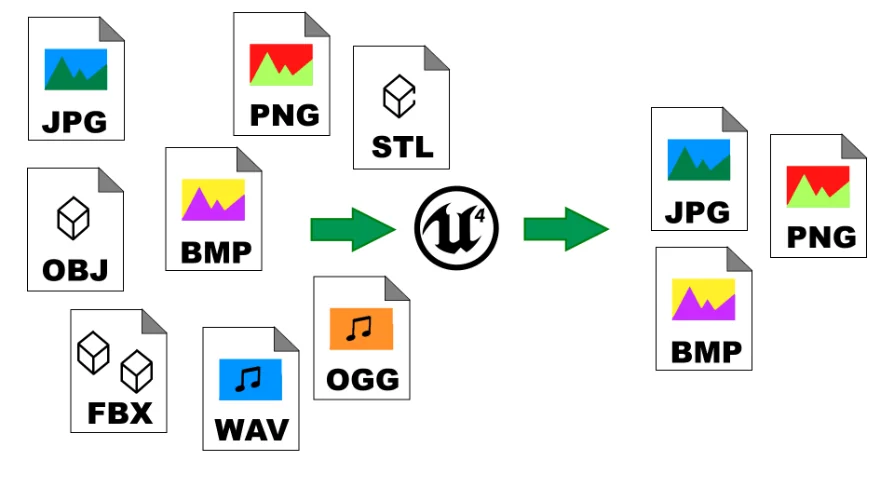
The plugin supports a wide variety of industry-standard formats. For audio, users can import WAV and OGG files seamlessly. Image support is extensive, covering PNG, JPG, BMP, TGA, and TIFF formats. However, it is important to note that TGA and TIFF support is available starting with Unreal Engine 5. Additionally, the developer has implemented a color depth check for images to prevent crashes in newer engine versions.
Mesh importation is equally versatile. The plugin currently supports the following formats:
OBJ (including vertex color support)
FBX (with improved compatibility and speed)
STL (with crash-prevention fixes)
glTF and GLB (available in recent versions)
Advanced Runtime Export Capabilities
Beyond importing, the RealTime Import/Export Plugin offers essential export functions. Developers can export TextureRenderTarget2d data into byte formats such as BMP, PNG, and JPEG. Furthermore, procedural meshes can be exported as OBJ files. The creator has also added the ability to export textures, specifically supporting diffuse and normal maps. These features allow for greater flexibility in how data is saved and shared from within the application.
Technical Performance and Compatibility
This plugin is built for efficiency and ease of use. It does not utilize any third-party libraries, which eliminates potential licensing or installation issues. For Windows users, the "Open File Dialog" function allows for easy selection of files and directories. Moreover, the plugin supports asynchronous loading with progress displays, ensuring the user interface remains responsive during large file imports.
Compatibility extends across multiple platforms and engine versions. The plugin supports Windows, Android, and iOS. While it works across various versions of Unreal Engine 4 and 5, the developer recommends disabling nativization in UE4 Blueprints to avoid potential conflicts. Recent updates have also drastically increased import speeds for large FBX meshes and optimized tangent calculations from minutes to milliseconds.
Closing Notes
The RealTime Import/Export Plugin is a comprehensive tool for runtime asset management. By offering support for diverse file types and providing stable export functions, it empowers creators to build interactive, file-driven applications. Whether you are working on a desktop or mobile project, this plugin simplifies the process of handling external content without the need for the editor environment.
 Engine Tools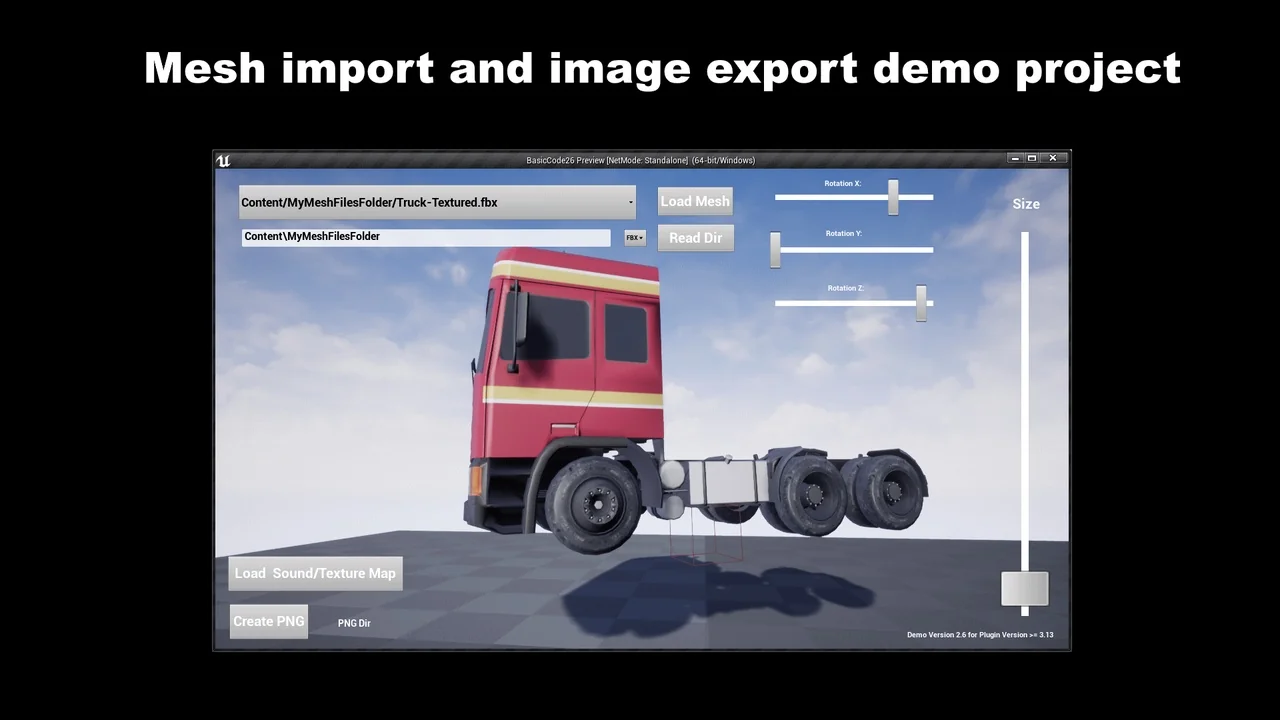
 Engine Tools
 Engine Tools
 Engine Tools