"0341a2901a4ae9aa"{"id":"13732","slug":"blend-file-importer","title":"Blend File Importer","category":"Engine Tools","engine":"4.27 - 5.8","assetVersion":"Asset Version: 1.5 - 1.9.4","engineVersion":"Engine version: 4.27 - 5.8","tag":"Engine Tools","accent":"blue","visual":"animation","summary":"The Blend File Importer plugin enables a seamless connection between Blender and Unreal Engine. By allowing direct .blend file imports and automatic re-importing, it significantly speeds up the 3D asset pipeline.","platform":"Unreal Engine","publishedAt":"2026-03-11T09:51:51.000Z","updatedAt":"2026-07-30T10:55:24.261Z","sourceNotes":[],"fileContents":[],"compatibility":["Unreal Engine","Asset Version: 1.5 - 1.9.4","Engine version: 4.27 - 5.8"],"featuredImage":{"alt":"Blend File Importer","src":"https://3dcghub.com/wp-content/uploads/2026/03/800a0491-1743-4f2e-bd98-be5a1b0d2cae.webp"},"hasDownloadLink":true,"downloads":2,"terms":[{"taxonomy":"category","slug":"engine-tools-tools-and-plugins","name":"Engine Tools"},{"taxonomy":"post_tag","slug":"blender","name":"Blender"},{"taxonomy":"post_tag","slug":"materials","name":"Materials"},{"taxonomy":"post_tag","slug":"plugins","name":"Plugins"},{"taxonomy":"post_tag","slug":"tools","name":"Tools"},{"taxonomy":"post_tag","slug":"ui","name":"UI"},{"taxonomy":"post_tag","slug":"unreal-engine-5","name":"Unreal Engine 5"}],"galleryImages":[{"src":"https://3dcghub.com/wp-content/uploads/2026/03/a4a258a8bf65_c2c72080-cf32-4fda-8009-cc4026ec3f5a.webp","alt":"Blend File Importer"},{"src":"https://3dcghub.com/wp-content/uploads/2026/03/2837a6dfe019_d530f099-bc84-4050-8d05-00a062da4699.webp","alt":"Blend File Importer"},{"src":"https://3dcghub.com/wp-content/uploads/2026/03/deb65b34271e_6c8ceff9-bcf6-4208-8a74-01e333c929af.webp","alt":"Blend File Importer"},{"src":"https://3dcghub.com/wp-content/uploads/2026/03/bff921822ed6_3e1653ed-04fe-4279-98b9-96a1e1c8edec.webp","alt":"Blend File Importer"},{"src":"https://3dcghub.com/wp-content/uploads/2026/03/8cce8693ac5c_25c21534-f1bc-4962-8672-976ed9a8498b.webp","alt":"Blend File Importer"},{"src":"https://3dcghub.com/wp-content/uploads/2026/03/23aabe13b8fa_8738abfe-288d-4a7c-b3f7-79e3c57bf906.webp","alt":"Blend File Importer"}],"accessPanel":{"kind":"resource","title":"Download this resource","eyebrow":"Free Download","message":"Log in or create a free account to start your download.","fileName":"Blend File Importer.7z","safetyNote":"Resources are manually reviewed before listing to improve quality and reduce obvious risks.","actionLabel":"Download Free","resourceType":"Resource archive"},"contentHtml":"\u003cp\u003eMoving 3D content from Blender into Unreal Engine has long meant manually exporting \u003ccode\u003e.blend\u003c/code\u003e files to FBX, importing them, and repeating that cycle every time a model changes. \u003cem\u003eBlend File Importer\u003c/em\u003e removes several steps from that loop by letting the editor treat native Blender files as importable assets. You bring your \u003ccode\u003e.blend\u003c/code\u003e files into the Content Browser the same way you would bring in an FBX, and the plugin handles the conversion behind the scenes.\u003c/p\u003e\n\n\u003cp\u003eThe goal is straightforward: cut down the friction of round-tripping between two applications so artists can iterate faster on meshes, props, environment pieces, and other 3D content without maintaining a separate export folder or remembering to re-export before each import.\u003c/p\u003e\n\n\u003ch2\u003eImporting \u003ccode\u003e.blend\u003c/code\u003e Files into the Content Browser\u003c/h2\u003e\n\u003cp\u003e\u003cem\u003eBlend File Importer\u003c/em\u003e integrates with Unreal's standard FBX model import pipeline. When you import a \u003ccode\u003e.blend\u003c/code\u003e file, the plugin routes it through the same import path that Unreal already uses for FBX models. That means the file should follow the regular guidelines and is subject to the same restrictions that apply any time FBX is brought into Unreal.\u003c/p\u003e\n\n\u003cp\u003eYou do not need to learn a separate import dialog. The workflow mirrors a normal FBX import: select your \u003ccode\u003e.blend\u003c/code\u003e file, bring it into the Content Browser, and let the standard pipeline process the geometry and data it supports. Familiarity with how Unreal handles FBX carries over directly.\u003c/p\u003e\n\n\u003ch2\u003eRight-Click Context Menu and Blender Round-Tripping\u003c/h2\u003e\n\u003cp\u003eOnce a \u003ccode\u003e.blend\u003c/code\u003e file is imported, the plugin adds a right-click context menu entry that lets you open the source file directly in Blender. This is where the workflow speedup becomes most visible. Instead of hunting through folders to find the original Blender scene, you right-click the asset, open it in Blender, make your edits, and save.\u003c/p\u003e\n\n\u003cp\u003eBecause the link between the Unreal asset and the Blender source file is preserved, you can stay inside the editor for most of the day-to-day work and jump out to Blender only when geometry or modeling changes are needed. The context menu keeps the Blender file one click away at all times.\u003c/p\u003e\n\n\u003ch2\u003eAutomatic Re-Import for Iteration Speed\u003c/h2\u003e\n\u003cp\u003eAfter saving changes in Blender, the plugin's support for automatic re-import brings the updated model back into Unreal without a manual import step. That combination—right-click to open, edit and save in Blender, automatic re-import—creates a tight loop suited to quickly iterating on 3D assets.\u003c/p\u003e\n\n\u003cp\u003eThis fits production scenarios where a prop, environment piece, or character mesh needs frequent adjustment. You can sculpt, adjust topology, reposition UVs, or tweak a silhouette in Blender, save, and see the result in Unreal shortly after.\u003c/p\u003e\n\n\u003ch2\u003eRestrictions from the FBX Model Import Pipeline\u003c/h2\u003e\n\u003cp\u003eBecause the plugin uses Unreal's standard FBX model import pipeline, your \u003ccode\u003e.blend\u003c/code\u003e file faces the same limitations as a regular FBX import. Complex node-based materials will not come through, and cameras will not import. These are not plugin-specific restrictions—they are inherited from how Unreal's FBX pipeline handles certain data types.\u003c/p\u003e\n\n\u003cp\u003eBe prepared to rebuild materials in Unreal after import. The plugin does not translate Blender's shader setup into Unreal's Material system; it focuses on geometry and the data the FBX pipeline already understands. Plan your material work with the expectation that shading, textures, and parameter setup will be recreated inside Unreal.\u003c/p\u003e\n\n\u003ch3\u003eWhat Will and Will Not Come Through\u003c/h3\u003e\n\u003cp\u003eGeometry that follows the regular FBX import guidelines should arrive as expected. Anything outside that scope—node-based materials, cameras, and any other data the FBX pipeline excludes—will not. Keeping your \u003ccode\u003e.blend\u003c/code\u003e file within normal FBX-friendly conventions is the practical approach here.\u003c/p\u003e\n\n\u003ch2\u003eRelease Cadence and UE 5.8 Support\u003c/h2\u003e\n\u003cp\u003eVersion 1.9.5, dated June 24, 2026, adds support for Unreal Engine 5.8. The update is tagged as an improvement rather than a feature expansion, indicating that existing functionality is being carried forward to the newer engine version rather than changing scope.\u003c/p\u003e\n\n\u003cp\u003eDocumentation, a troubleshooting FAQ, and a full changelog are available alongside the plugin, giving users a path to resolve issues and track what each version changes.\u003c/p\u003e\n\n\u003ch2\u003eWhere It Fits in a Production Pipeline\u003c/h2\u003e\n\u003cp\u003e\u003cem\u003eBlend File Importer\u003c/em\u003e sits at the point where an artist's modeling tool meets the game engine. It does not replace Unreal's Material Editor, Blender's modeling toolset, or the FBX pipeline itself. What it does is remove the manual export step and keep a live link between the Blender source file and the Unreal asset.\u003c/p\u003e\n\n\u003cp\u003eFor teams and solo developers who model in Blender and build scenes in Unreal, the practical gain is iteration speed. Editing a mesh in Blender and seeing it update in Unreal through automatic re-import means fewer interruptions to the creative flow and less time spent managing intermediate files. The need to rebuild materials remains, so the sweet spot is early-to-mid stage asset work where geometry is still changing and materials have not yet been finalized.\u003c/p\u003e","contentTextLength":5016,"navigation":{"current":1379,"total":4017,"previous":{"id":"1000782","slug":"advanced-riding-locomotion-system-riding-system","title":"Advanced Riding Locomotion System (Riding System)","category":"Gameplay Features","platform":"Unreal Engine","updatedAt":"2026-07-30T11:16:41.169Z"},"next":{"id":"1000781","slug":"advanced-vehicle-system-replicated-modular-vehicle-physics","title":"Advanced Vehicle System - [Replicated Modular Vehicle Physics]","category":"Engine Tools","platform":"Unreal Engine","updatedAt":"2026-07-30T10:29:04.441Z"}},"relatedResources":[{"id":"13682","slug":"ase-importer","title":"Ase Importer","category":"Engine Tools","engine":"5.1,5.3 - 5.5","assetVersion":"Asset Version: 1.0","engineVersion":"Engine version: 5.1,5.3 - 5.5","tag":"Engine Tools","accent":"blue","visual":"character","summary":"The Ase Importer plugin streamlines the process of bringing pixel art into your project. It automatically converts .aseprite files into texture atlases and PaperFlipbooks with a simple drag-and-drop action.","platform":"Unreal Engine","publishedAt":"2026-03-11T09:35:57.000Z","updatedAt":"2026-09-30T05:37:33.311Z","sourceNotes":[],"fileContents":[],"compatibility":["Unreal Engine","Asset Version: 1.0","Engine version: 5.1,5.3 - 5.5"],"featuredImage":{"alt":"Ase Importer","src":"https://3dcghub.com/wp-content/uploads/2026/03/c4b21ae8-3546-46af-9639-02081461927a.webp"},"hasDownloadLink":true,"downloads":1},{"id":"14467","slug":"rdtextools-rd-tools-pro","title":"rdTexTools (rd Tools Pro)","category":"Engine Tools","engine":"4.26 - 5.8","assetVersion":"Asset Version: 1.0.3 - 1.4.0","engineVersion":"Engine version: 4.26 - 5.8","tag":"Engine Tools","accent":"blue","visual":"mech","summary":"rdTexTools (rd Tools Pro) is a powerful C++ plugin for Unreal Engine that simplifies texture analysis and optimization through a streamlined, integrated interface.","platform":"Unreal Engine","publishedAt":"2026-03-11T18:07:25.000Z","updatedAt":"2026-08-05T17:10:19.438Z","sourceNotes":[],"fileContents":[],"compatibility":["Unreal Engine","Asset Version: 1.0.3 - 1.4.0","Engine version: 4.26 - 5.8"],"featuredImage":{"alt":"rdTexTools (rd Tools Pro)","src":"https://3dcghub.com/wp-content/uploads/2026/03/ce4c6b29-272d-46de-b3e4-9f7b6457de50.webp"},"hasDownloadLink":true,"downloads":2},{"id":"13742","slug":"blockout-tools-plugin","title":"Blockout Tools Plugin","category":"Engine Tools","engine":"1.51 - 4.5.3","assetVersion":"Engine version: 4.26 - 5.7","engineVersion":"Asset Version:1.51 - 4.5.3","tag":"Engine Tools","accent":"blue","visual":"luts","summary":"Streamline your environment design with the Blockout Tools Plugin. This lightweight toolset features 15 primitive elements and triplanar grid materials for rapid level prototyping in Unreal Engine.","platform":"Unreal Engine","publishedAt":"2026-03-11T09:52:02.000Z","updatedAt":"2026-07-29T16:09:39.794Z","sourceNotes":[],"fileContents":[],"compatibility":["Unreal Engine","Engine version: 4.26 - 5.7","Asset Version:1.51 - 4.5.3"],"featuredImage":{"alt":"Blockout Tools Plugin","src":"https://3dcghub.com/wp-content/uploads/2026/03/2e655f33-dfec-4888-9b31-c0aaa5b72ba1.webp"},"hasDownloadLink":true,"downloads":2}]}
Engine Tools
Blend File Importer
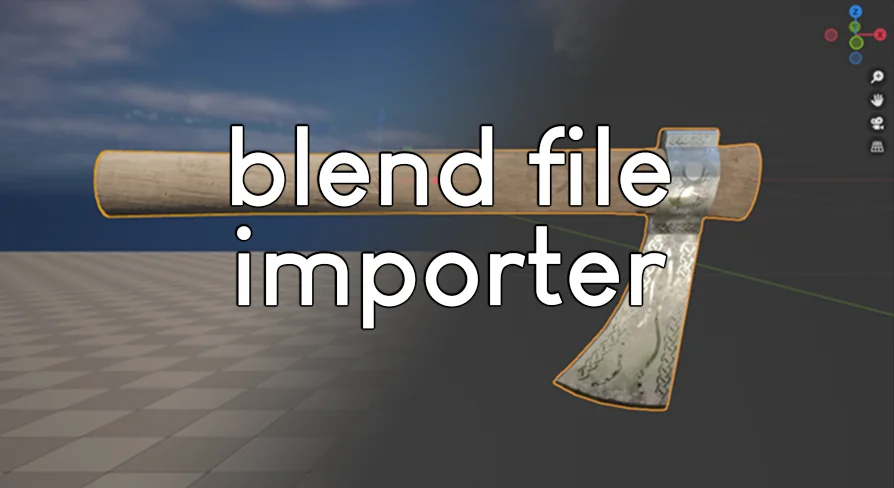
The Blend File Importer plugin enables a seamless connection between Blender and Unreal Engine. By allowing direct .blend file imports and automatic re-importing, it significantly speeds up the 3D asset pipeline.
Moving 3D content from Blender into Unreal Engine has long meant manually exporting .blend files to FBX, importing them, and repeating that cycle every time a model changes. Blend File Importer removes several steps from that loop by letting the editor treat native Blender files as importable assets. You bring your .blend files into the Content Browser the same way you would bring in an FBX, and the plugin handles the conversion behind the scenes.
The goal is straightforward: cut down the friction of round-tripping between two applications so artists can iterate faster on meshes, props, environment pieces, and other 3D content without maintaining a separate export folder or remembering to re-export before each import.
Importing .blend Files into the Content Browser
Blend File Importer integrates with Unreal's standard FBX model import pipeline. When you import a .blend file, the plugin routes it through the same import path that Unreal already uses for FBX models. That means the file should follow the regular guidelines and is subject to the same restrictions that apply any time FBX is brought into Unreal.
You do not need to learn a separate import dialog. The workflow mirrors a normal FBX import: select your .blend file, bring it into the Content Browser, and let the standard pipeline process the geometry and data it supports. Familiarity with how Unreal handles FBX carries over directly.
Right-Click Context Menu and Blender Round-Tripping
Once a .blend file is imported, the plugin adds a right-click context menu entry that lets you open the source file directly in Blender. This is where the workflow speedup becomes most visible. Instead of hunting through folders to find the original Blender scene, you right-click the asset, open it in Blender, make your edits, and save.
Because the link between the Unreal asset and the Blender source file is preserved, you can stay inside the editor for most of the day-to-day work and jump out to Blender only when geometry or modeling changes are needed. The context menu keeps the Blender file one click away at all times.
Automatic Re-Import for Iteration Speed
After saving changes in Blender, the plugin's support for automatic re-import brings the updated model back into Unreal without a manual import step. That combination—right-click to open, edit and save in Blender, automatic re-import—creates a tight loop suited to quickly iterating on 3D assets.
This fits production scenarios where a prop, environment piece, or character mesh needs frequent adjustment. You can sculpt, adjust topology, reposition UVs, or tweak a silhouette in Blender, save, and see the result in Unreal shortly after.
Restrictions from the FBX Model Import Pipeline
Because the plugin uses Unreal's standard FBX model import pipeline, your .blend file faces the same limitations as a regular FBX import. Complex node-based materials will not come through, and cameras will not import. These are not plugin-specific restrictions—they are inherited from how Unreal's FBX pipeline handles certain data types.
Be prepared to rebuild materials in Unreal after import. The plugin does not translate Blender's shader setup into Unreal's Material system; it focuses on geometry and the data the FBX pipeline already understands. Plan your material work with the expectation that shading, textures, and parameter setup will be recreated inside Unreal.
What Will and Will Not Come Through
Geometry that follows the regular FBX import guidelines should arrive as expected. Anything outside that scope—node-based materials, cameras, and any other data the FBX pipeline excludes—will not. Keeping your .blend file within normal FBX-friendly conventions is the practical approach here.
Release Cadence and UE 5.8 Support
Version 1.9.5, dated June 24, 2026, adds support for Unreal Engine 5.8. The update is tagged as an improvement rather than a feature expansion, indicating that existing functionality is being carried forward to the newer engine version rather than changing scope.
Documentation, a troubleshooting FAQ, and a full changelog are available alongside the plugin, giving users a path to resolve issues and track what each version changes.
Where It Fits in a Production Pipeline
Blend File Importer sits at the point where an artist's modeling tool meets the game engine. It does not replace Unreal's Material Editor, Blender's modeling toolset, or the FBX pipeline itself. What it does is remove the manual export step and keep a live link between the Blender source file and the Unreal asset.
For teams and solo developers who model in Blender and build scenes in Unreal, the practical gain is iteration speed. Editing a mesh in Blender and seeing it update in Unreal through automatic re-import means fewer interruptions to the creative flow and less time spent managing intermediate files. The need to rebuild materials remains, so the sweet spot is early-to-mid stage asset work where geometry is still changing and materials have not yet been finalized.
Preview Gallery
Resource screenshots
6 curated preview images
1 / 6
Free Download
Download this resource
Log in or create a free account to start your download.
Resources are manually reviewed before listing to improve quality and reduce obvious risks.
 Engine Tools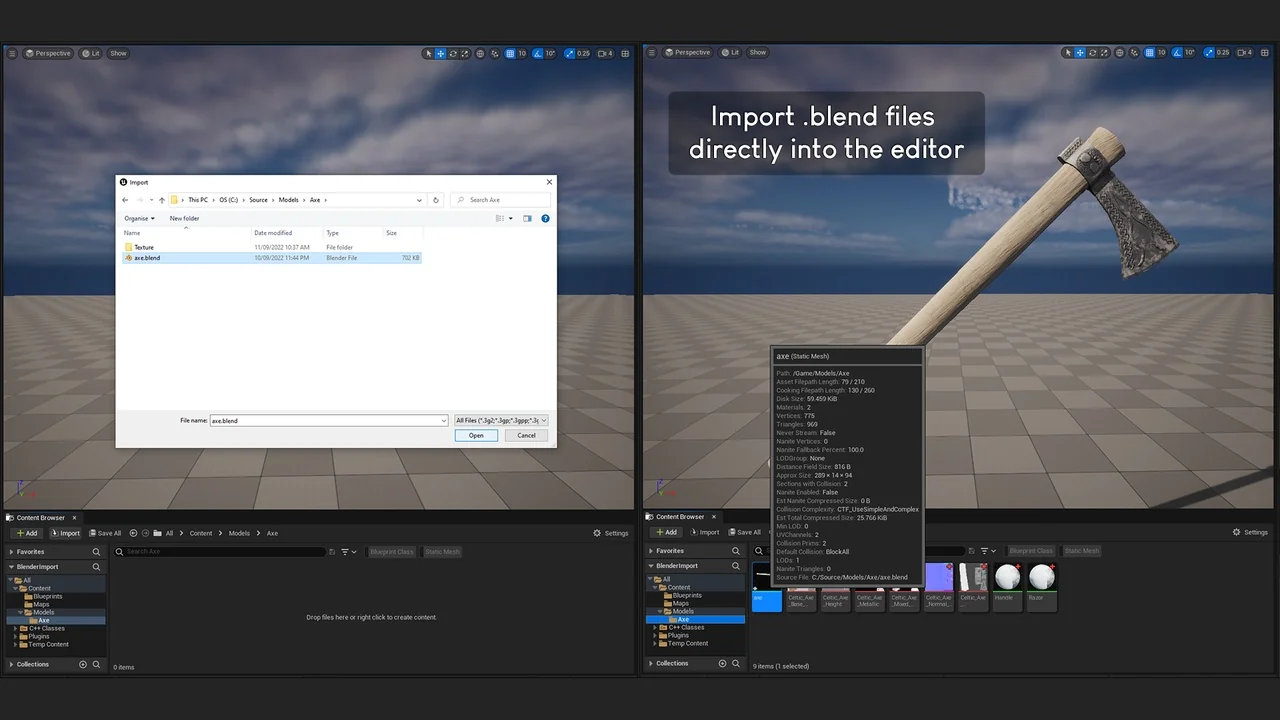
 Engine Tools
 Engine Tools
 Engine Tools