"0341a2901a4ae9aa"{"id":"13682","slug":"ase-importer","title":"Ase Importer","category":"Engine Tools","engine":"5.1,5.3 - 5.5","assetVersion":"Asset Version: 1.0","engineVersion":"Engine version: 5.1,5.3 - 5.5","tag":"Engine Tools","accent":"blue","visual":"character","summary":"The Ase Importer plugin streamlines the process of bringing pixel art into your project. It automatically converts .aseprite files into texture atlases and PaperFlipbooks with a simple drag-and-drop action.","platform":"Unreal Engine","publishedAt":"2026-03-11T09:35:57.000Z","updatedAt":"2026-09-30T05:37:33.311Z","sourceNotes":[],"fileContents":[],"compatibility":["Unreal Engine","Asset Version: 1.0","Engine version: 5.1,5.3 - 5.5"],"featuredImage":{"alt":"Ase Importer","src":"https://3dcghub.com/wp-content/uploads/2026/03/c4b21ae8-3546-46af-9639-02081461927a.webp"},"hasDownloadLink":true,"downloads":1,"terms":[{"taxonomy":"category","slug":"engine-tools-tools-and-plugins","name":"Engine Tools"},{"taxonomy":"post_tag","slug":"animation","name":"Animation"},{"taxonomy":"post_tag","slug":"ase-importer","name":"Ase Importer"},{"taxonomy":"post_tag","slug":"plugins","name":"Plugins"},{"taxonomy":"post_tag","slug":"textures","name":"Textures"},{"taxonomy":"post_tag","slug":"tools","name":"Tools"},{"taxonomy":"post_tag","slug":"unreal-engine-5","name":"Unreal Engine 5"}],"galleryImages":[{"src":"https://3dcghub.com/wp-content/uploads/2026/03/bdb84a55f3de_5e8bb58c-5255-4f3d-9cf3-9ea00c5af131.webp","alt":"Ase Importer"},{"src":"https://3dcghub.com/wp-content/uploads/2026/03/842ff0deb77b_94c61883-56c1-46fa-bbb9-0ce4b4ae6724.webp","alt":"Ase Importer"},{"src":"https://3dcghub.com/wp-content/uploads/2026/03/708b4404bfa5_808d9641-6e26-4806-a1c6-72700d8772c9.webp","alt":"Ase Importer"}],"accessPanel":{"kind":"resource","title":"Download this resource","eyebrow":"Free Download","message":"Log in or create a free account to start your download.","fileName":"Ase Importer.7z","safetyNote":"Resources are manually reviewed before listing to improve quality and reduce obvious risks.","actionLabel":"Download Free","resourceType":"Resource archive"},"contentHtml":"\u003ch2\u003eEfficient Animation Importing with Ase Importer\u003c/h2\u003e\n\u003cp\u003eAse Importer is a specialized plugin designed to bridge the gap between Aseprite and your game development environment. This tool allows you to import and automatically generate your animations, including textures, sprites, and flipbooks, directly from an .aseprite save file. Consequently, the developer can focus more on creation and less on manual asset setup.\u003c/p\u003e\n\n\u003cp\u003eThe workflow is built for speed and simplicity. To get started, you just drag and drop an .aseprite file into the content browser. The plugin then generates texture atlases for all frames automatically. Furthermore, for each tag found in the source file, the plugin creates a PaperFlipbook animation containing all relevant PaperSprites.\u003c/p\u003e\n\n\u003ch2\u003eFlexible Operation Modes\u003c/h2\u003e\n\u003cp\u003eThe Ase Importer offers two distinct modes of operation based on how your source file is organized. If you use Aseprite tags, the tool creates a separate flipbook animation for every individual tag it identifies. This makes managing complex character states much more efficient.\u003c/p\u003e\n\n\u003cp\u003eAlternatively, if your file contains no tags, the plugin treats the entire sequence as a single animation. In this case, it creates one PaperFlipbook that includes every frame from the file. Therefore, you have full control over how your assets are partitioned during the import process.\u003c/p\u003e\n\n\u003ch2\u003eTechnical Handling and Reimporting\u003c/h2\u003e\n\u003cp\u003eManaging animation speed is handled through specific logic within the Ase Importer. Since some environments do not support per-frame durations, the importer sets the flipbook speed based on the duration of the first frame in each tag. This ensures your timing remains consistent with your original work.\u003c/p\u003e\n\n\u003cp\u003eIn addition, the plugin supports a non-destructive reimport workflow. You can update your assets by dragging the updated .aseprite file into the editor again. If the tags are unchanged, the importer modifies existing assets rather than creating new ones. This allows you to maintain your flipbook references throughout the editor without interruption.\u003c/p\u003e\n\n\u003ch2\u003eBest Fit\u003c/h2\u003e\n\u003cp\u003eThe Ase Importer provides an essential utility for pixel artists and developers. By automating the creation of texture atlases and PaperFlipbooks, it removes the tedious steps of manual sprite configuration. Whether you are working with complex tagged animations or simple sequences, this tool ensures a smooth transition from Aseprite to your final project.\u003c/p\u003e\n\n\u003ch2\u003eContinue Browsing Similar Packs\u003c/h2\u003e\n\u003cul\u003e\n\u003cli\u003e\u003ca href=\"https://3dcghub.com/runtime-ai-chatbot-integrator-tts/\" title=\"Runtime AI Chatbot Integrator (+TTS)\"\u003eRuntime AI Chatbot Integrator (+TTS)\u003c/a\u003e\u003c/li\u003e\n\u003cli\u003e\u003ca href=\"https://3dcghub.com/runtime-metahuman-lip-sync-ai-for-npcs-cc4-genesis-arkit-and-more/\" title=\"Runtime MetaHuman Lip Sync (AI for NPCs) (+ CC4, Genesis, ARKit, and more)\"\u003eRuntime MetaHuman Lip Sync (AI for NPCs) (+ CC4, Genesis, ARKit, and more)\u003c/a\u003e\u003c/li\u003e\n\u003cli\u003e\u003ca href=\"https://3dcghub.com/virtual-animation-tools-v6/\" title=\"Virtual Animation Tools V6\"\u003eVirtual Animation Tools V6\u003c/a\u003e\u003c/li\u003e\n\u003cli\u003e\u003ca href=\"https://3dcghub.com/root-motion-fix-tool-mocap-animations-root-motion-cleaner-and-fixer/\" title=\"Root Motion Fix Tool | Mocap animations root motion cleaner and fixer\"\u003eRoot Motion Fix Tool | Mocap animations root motion cleaner and fixer\u003c/a\u003e\u003c/li\u003e\n\u003cli\u003e\u003ca href=\"https://3dcghub.com/mixamo-animation-retargeting-2/\" title=\"Mixamo Animation Retargeting 2\"\u003eMixamo Animation Retargeting 2\u003c/a\u003e\u003c/li\u003e\n\u003c/ul\u003e","contentTextLength":2708,"navigation":{"current":855,"total":4017,"previous":{"id":"13695","slug":"assets-cleaner-project-cleaning-tool","title":"Assets Cleaner - Project Cleaning Tool","category":"Engine Tools","platform":"Unreal Engine","updatedAt":"2026-09-30T05:39:00.782Z"},"next":{"id":"1001262","slug":"blueprint-array-helper","title":"[Blueprint] Array Helper","category":"Engine Tools","platform":"Unreal Engine","updatedAt":"2026-09-30T05:34:08.385Z"}},"relatedResources":[{"id":"13732","slug":"blend-file-importer","title":"Blend File Importer","category":"Engine Tools","engine":"4.27 - 5.8","assetVersion":"Asset Version: 1.5 - 1.9.4","engineVersion":"Engine version: 4.27 - 5.8","tag":"Engine Tools","accent":"blue","visual":"animation","summary":"The Blend File Importer plugin enables a seamless connection between Blender and Unreal Engine. By allowing direct .blend file imports and automatic re-importing, it significantly speeds up the 3D asset pipeline.","platform":"Unreal Engine","publishedAt":"2026-03-11T09:51:51.000Z","updatedAt":"2026-07-30T10:55:24.261Z","sourceNotes":[],"fileContents":[],"compatibility":["Unreal Engine","Asset Version: 1.5 - 1.9.4","Engine version: 4.27 - 5.8"],"featuredImage":{"alt":"Blend File Importer","src":"https://3dcghub.com/wp-content/uploads/2026/03/800a0491-1743-4f2e-bd98-be5a1b0d2cae.webp"},"hasDownloadLink":true,"downloads":2},{"id":"14738","slug":"ultimate-level-art-tool-ulat-tools-plugin-plugins","title":"Ultimate Level Art Tool - ULAT ( Tools / Plugin / Plugins )","category":"Engine Tools","engine":"5.0 - 5.7","assetVersion":"Engine version: 5.0 - 5.7","engineVersion":"Asset Version:1.3 - 1.3.1","tag":"Engine Tools","accent":"blue","visual":"character","summary":"Optimize your environment design workflow with the Ultimate Level Art Tool. This Unreal Engine plugin offers modular building features, one-click automation, and advanced mesh management.","platform":"Unreal Engine","publishedAt":"2026-03-11T19:16:44.000Z","updatedAt":"2026-05-31T13:00:16.112Z","sourceNotes":[],"fileContents":[],"compatibility":["Unreal Engine","Engine version: 5.0 - 5.7","Asset Version: 1.3 - 1.3.1"],"featuredImage":{"alt":"Ultimate Level Art Tool - ULAT ( Tools / Plugin / Plugins )","src":"https://3dcghub.com/wp-content/uploads/2026/03/06dfb4ec-9574-4b27-8363-21090a467eb4.webp"},"hasDownloadLink":true,"downloads":1},{"id":"14845","slug":"worldscape-plugin-making-real-planets-and-endless-worlds","title":"WorldScape Plugin - Making real planets and Endless worlds","category":"Engine Tools","engine":"5.0,5.2 - 5.3","assetVersion":"Engine version: 5.0,5.2 - 5.3","engineVersion":"4.26","tag":"Engine Tools","accent":"blue","visual":"animation","summary":"Build endless, optimized worlds with the WorldScape Plugin. Featuring 64-bit precision and procedural foliage, this tool enables seamless planetary exploration in Unreal Engine.","platform":"Unreal Engine","publishedAt":"2026-03-11T19:31:28.000Z","updatedAt":"2026-04-19T15:45:39.000Z","sourceNotes":[],"fileContents":[],"compatibility":["Unreal Engine","Engine version: 5.0,5.2 - 5.3"],"featuredImage":{"alt":"WorldScape Plugin - Making real planets and Endless worlds","src":"https://3dcghub.com/wp-content/uploads/2026/03/61a35f8d-6545-4175-8834-ff592783a1c4.webp"},"hasDownloadLink":true,"downloads":2}]}
Engine Tools
Ase Importer
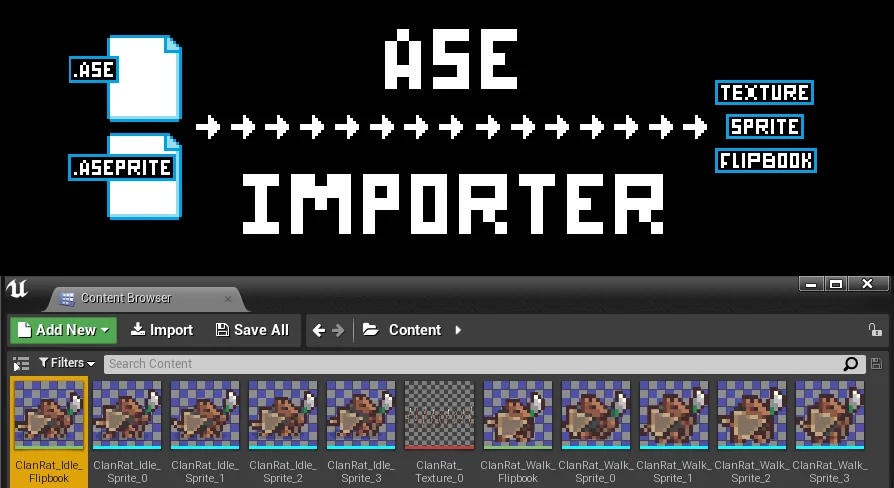
The Ase Importer plugin streamlines the process of bringing pixel art into your project. It automatically converts .aseprite files into texture atlases and PaperFlipbooks with a simple drag-and-drop action.
Ase Importer is a specialized plugin designed to bridge the gap between Aseprite and your game development environment. This tool allows you to import and automatically generate your animations, including textures, sprites, and flipbooks, directly from an .aseprite save file. Consequently, the developer can focus more on creation and less on manual asset setup.
The workflow is built for speed and simplicity. To get started, you just drag and drop an .aseprite file into the content browser. The plugin then generates texture atlases for all frames automatically. Furthermore, for each tag found in the source file, the plugin creates a PaperFlipbook animation containing all relevant PaperSprites.
Flexible Operation Modes
The Ase Importer offers two distinct modes of operation based on how your source file is organized. If you use Aseprite tags, the tool creates a separate flipbook animation for every individual tag it identifies. This makes managing complex character states much more efficient.
Alternatively, if your file contains no tags, the plugin treats the entire sequence as a single animation. In this case, it creates one PaperFlipbook that includes every frame from the file. Therefore, you have full control over how your assets are partitioned during the import process.
Technical Handling and Reimporting
Managing animation speed is handled through specific logic within the Ase Importer. Since some environments do not support per-frame durations, the importer sets the flipbook speed based on the duration of the first frame in each tag. This ensures your timing remains consistent with your original work.
In addition, the plugin supports a non-destructive reimport workflow. You can update your assets by dragging the updated .aseprite file into the editor again. If the tags are unchanged, the importer modifies existing assets rather than creating new ones. This allows you to maintain your flipbook references throughout the editor without interruption.
Best Fit
The Ase Importer provides an essential utility for pixel artists and developers. By automating the creation of texture atlases and PaperFlipbooks, it removes the tedious steps of manual sprite configuration. Whether you are working with complex tagged animations or simple sequences, this tool ensures a smooth transition from Aseprite to your final project.
 Engine Tools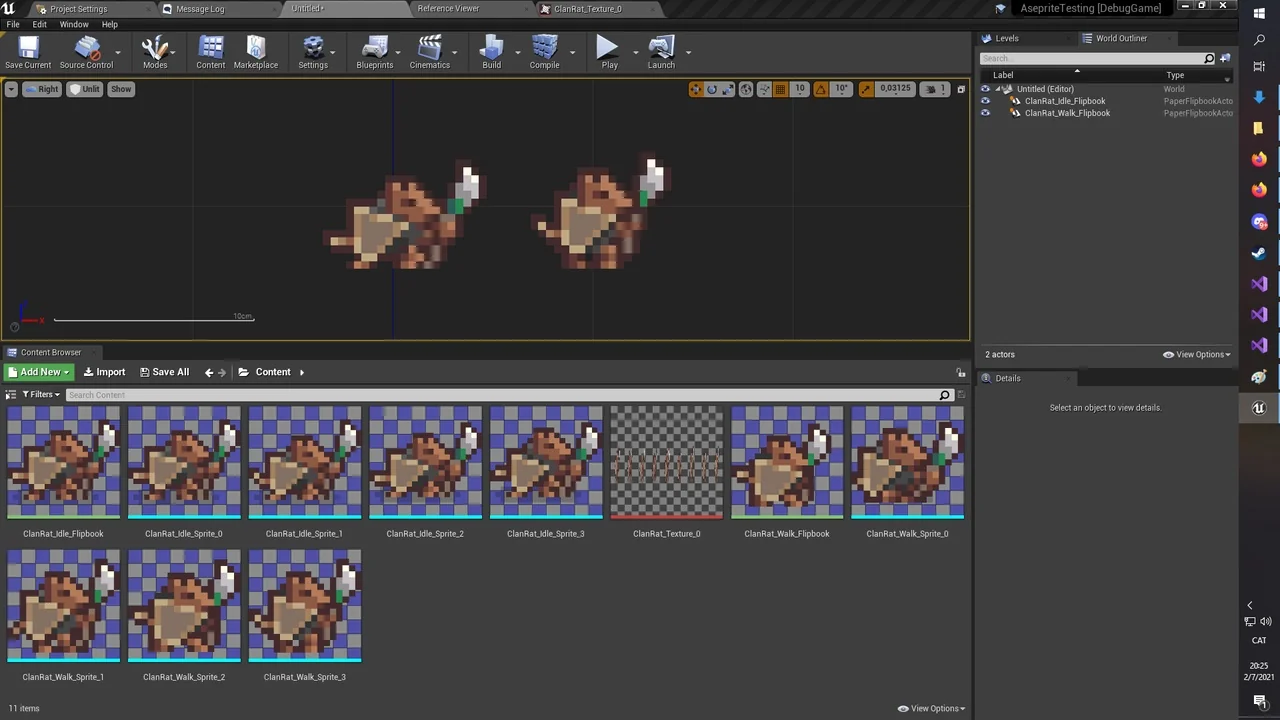
 Engine Tools
 Engine Tools
 Engine Tools