"0341a2901a4ae9aa"{"id":"13695","slug":"assets-cleaner-project-cleaning-tool","title":"Assets Cleaner - Project Cleaning Tool","category":"Engine Tools","engine":"4.23 - 5.8","assetVersion":"Asset Version: 1.07 - 2.85","engineVersion":"Engine version: 4.23 - 5.8","tag":"Engine Tools","accent":"blue","visual":"city","summary":"Assets Cleaner - Project Cleaning Tool is a streamlined utility designed to identify and manage unused assets, ensuring your project remains lean and efficient.","platform":"Unreal Engine","publishedAt":"2026-03-11T09:40:58.000Z","updatedAt":"2026-09-30T05:39:00.782Z","sourceNotes":[],"fileContents":[],"compatibility":["Unreal Engine","Asset Version: 1.07 - 2.85","Engine version: 4.23 - 5.8"],"featuredImage":{"alt":"Assets Cleaner - Project Cleaning Tool","src":"https://3dcghub.com/wp-content/uploads/2026/03/312b782f-7c4e-4cc7-ad23-d82ce4ea68fd.webp"},"hasDownloadLink":true,"downloads":1,"terms":[{"taxonomy":"category","slug":"engine-tools-tools-and-plugins","name":"Engine Tools"},{"taxonomy":"post_tag","slug":"plugins","name":"Plugins"},{"taxonomy":"post_tag","slug":"project-cleaner","name":"Project Cleaner"},{"taxonomy":"post_tag","slug":"project-optimization","name":"Project Optimization"},{"taxonomy":"post_tag","slug":"tools","name":"Tools"},{"taxonomy":"post_tag","slug":"unreal-engine-5","name":"Unreal Engine 5"},{"taxonomy":"post_tag","slug":"workflow-tool","name":"Workflow Tool"}],"galleryImages":[{"src":"https://3dcghub.com/wp-content/uploads/2026/03/c86b1e187a4c_e984c141-f29e-47a9-ba99-903f3143c7d4.webp","alt":"Assets Cleaner - Project Cleaning Tool"},{"src":"https://3dcghub.com/wp-content/uploads/2026/03/ac95ddc97864_c44169d6-d267-4555-a6a3-38942d3bf392.webp","alt":"Assets Cleaner - Project Cleaning Tool"},{"src":"https://3dcghub.com/wp-content/uploads/2026/03/6b8faedda250_39d16ede-2c10-40f9-b42d-64b912f15722.webp","alt":"Assets Cleaner - Project Cleaning Tool"}],"accessPanel":{"kind":"resource","title":"Download this resource","eyebrow":"Free Download","message":"Log in or create a free account to start your download.","fileName":"Assets Cleaner - Project Cleaning Tool.7z","safetyNote":"Resources are manually reviewed before listing to improve quality and reduce obvious risks.","actionLabel":"Download Free","resourceType":"Resource archive"},"contentHtml":"\u003ch2\u003eClearing Asset Bloat After Long Prototyping Phases\u003c/h2\u003e\n\u003cp\u003eWhen a project has been in development for an extended period, or after a heavy round of prototyping, projects accumulate assets that are no longer referenced or used. This accumulation happens naturally as iterations proceed, mechanics change, and older visual tests are abandoned. The unused files remain in the project directory, quietly consuming disk space.\u003c/p\u003e\n\n\u003cp\u003eBeyond just storage footprint, leftover assets introduce tangible friction into the development pipeline. They slow down the editor by forcing the engine to process content that is never actually called during runtime. Compile and build times increase because the project size is artificially inflated with dead data.\u003c/p\u003e\n\n\u003cp\u003eThe traditional manual workaround involves migrating needed assets to a brand new project to leave the dead files behind. This is a tedious and error-prone process. \u003cem\u003eAssets Cleaner\u003c/em\u003e automates the cleanup phase entirely from within the editor environment.\u003c/p\u003e\n\n\u003ch2\u003eScanning and Inventorying Unused Assets\u003c/h2\u003e\n\u003cp\u003eThe core function of \u003cem\u003eAssets Cleaner\u003c/em\u003e is to scan the active project and generate a comprehensive list of unused assets. Instead of manually hunting through folders to guess what might be safe to remove, the tool surfaces exactly what is taking up space without contributing to the current project state.\u003c/p\u003e\n\n\u003cp\u003eThe scan results are presented in a column view mode. This layout is critical because it exposes the disk size of each individual asset directly within the list. Developers can immediately see the file weight of every unused item, allowing them to prioritize the removal of bulky textures, heavy meshes, or large sequences over smaller, insignificant files.\u003c/p\u003e\n\n\u003ch3\u003eFiltering Behavior and Plugin Content Integration\u003c/h3\u003e\n\u003cp\u003eWorking with a long list of unused files requires robust navigation. The tool allows users to view, filter, and search through the listed unused assets using the same interaction logic found in the standard Unreal Engine Content Browser. This means filtering by asset type, searching by name, or sorting by the provided disk size columns functions exactly as a developer would expect from the native editor environment.\u003c/p\u003e\n\n\u003cp\u003eThe scan functionality also now includes content from plugins. Previous iterations might have missed or ignored plugin-associated files, leaving blind spots in the cleanup process. By pulling plugin content into the scanning scope, the tool ensures a much more thorough audit of what is actually sitting in the project.\u003c/p\u003e\n\n\u003ch2\u003eDirect Asset Management and Empty Folder Handling\u003c/h2\u003e\n\u003cp\u003eFinding unused files is only half the workflow; safely removing them is the other half. \u003cem\u003eAssets Cleaner\u003c/em\u003e enables direct management of the listed items straight from the tool interface. Users do not have to jump back and forth between the custom panel and the standard browser windows.\u003c/p\u003e\n\n\u003cp\u003eThe available direct actions include:\u003c/p\u003e\n\n\u003cul\u003e\n \u003cli\u003e\u003cstrong\u003eFind in Content Browser:\u003c/strong\u003e Highlights the asset in the native Content Browser to verify its location.\u003c/li\u003e\n \u003cli\u003e\u003cstrong\u003eFind on Disk:\u003c/strong\u003e Opens the operating system file explorer directly to the asset's physical location.\u003c/li\u003e\n \u003cli\u003e\u003cstrong\u003eEdit Assets:\u003c/strong\u003e Opens the asset for direct modification without leaving the tool's context.\u003c/li\u003e\n \u003cli\u003e\u003cstrong\u003eDelete Assets:\u003c/strong\u003e Triggers the editor's native Delete Assets window to ensure standard engine safety checks and dependency warnings are respected during removal.\u003c/li\u003e\n \u003cli\u003e\u003cstrong\u003eMove Assets:\u003c/strong\u003e Relocates unused items to organized holding folders if immediate deletion is not desired.\u003c/li\u003e\n\u003c/ul\u003e\n\n\u003cp\u003eWhen deletions are finalized, the tool automatically deletes the empty folders left behind. This prevents the common issue where removing files manually leaves a scattered web of blank directories in the project tree, keeping the folder structure as lean as the asset inventory.\u003c/p\u003e\n\n\u003ch2\u003eLeveraging Native Editor Inspection Tools\u003c/h2\u003e\n\u003cp\u003eBefore deleting an asset, developers often need to verify its dependencies or understand why it exists. \u003cem\u003eAssets Cleaner\u003c/em\u003e provides quick access buttons to the Unreal Engine editor's built-in asset inspection tools directly from its interface.\u003c/p\u003e\n\n\u003cp\u003eThe \u003cstrong\u003eReference Viewer\u003c/strong\u003e can be launched to visually map which other assets an item uses, and conversely, what might be referencing it. This is a crucial step before deletion to ensure a seemingly unused file is not quietly feeding into an active Material or Blueprint node. The \u003cstrong\u003eSize Map\u003c/strong\u003e tool is also accessible, providing a quick visual representation of asset sizes throughout the project tree.\u003c/p\u003e\n\n\u003cp\u003eA newly integrated option is the \u003cstrong\u003eAudit Tool\u003c/strong\u003e. This feature provides more detailed information specific to individual asset types. Instead of just seeing a file name and a byte count, the Audit Tool breaks down the deeper metadata or configuration details relevant to the specific asset class being inspected.\u003c/p\u003e\n\n\u003ch2\u003eVersion Support and Workflow Positioning\u003c/h2\u003e\n\u003cp\u003e\u003cem\u003eAssets Cleaner\u003c/em\u003e operates through Blueprints and integrates into the recent editor menus. It was highlighted as the Monthly Unreal Engine Sponsored Content product for November 2021, cementing its position as a recognized utility within the engine's ecosystem.\u003c/p\u003e\n\n\u003cp\u003eDue to marketplace policies restricting developers from updating files for Unreal Engine versions older than the three most recent releases, updates for version 4.25 and older have ceased. These older engine versions will continue to use the legacy \u003cem\u003eAssets Cleaner 1.0\u003c/em\u003e files. The creator notes that updated files are prepared for these older engines but cannot be deployed due to the platform's update limitations.\u003c/p\u003e\n\n\u003cp\u003eFor developers working on long-term Unreal Engine projects, maintaining a clean directory structure is an ongoing battle. This tool serves teams and solo developers who want to automate the tedious process of auditing, filtering, and purging surplus content, ensuring editor responsiveness and build efficiency remain high across the development lifecycle.\u003c/p\u003e","contentTextLength":5728,"navigation":{"current":854,"total":4017,"previous":{"id":"1001263","slug":"audio-analysis-tools-beat-detection","title":"Audio Analysis Tools (Beat Detection)","category":"Engine Tools","platform":"Unreal Engine","updatedAt":"2026-09-30T05:40:53.094Z"},"next":{"id":"13682","slug":"ase-importer","title":"Ase Importer","category":"Engine Tools","platform":"Unreal Engine","updatedAt":"2026-09-30T05:37:33.311Z"}},"relatedResources":[{"id":"1000589","slug":"duplicate-cleaner","title":"Duplicate Cleaner","category":"Engine Tools","engine":"5.6","assetVersion":"Asset Version: 1.0","engineVersion":"Engine Version: 5.6","tag":"Engine Tools","accent":"blue","visual":"mech","summary":"Duplicate Cleaner is an Unreal Engine plugin for identifying, managing, and removing duplicate assets across textures, meshes, sounds, animations, and data tabl","platform":"Unreal Engine","publishedAt":"2026-07-17T00:30:21.679Z","updatedAt":"2026-07-17T00:30:21.679Z","sourceNotes":[],"fileContents":[],"compatibility":["Unreal Engine","Asset Version: 1.0","Engine Version: 5.6"],"featuredImage":{"alt":"Duplicate Cleaner","src":"/wp-content/uploads/published/2026/07/a0f2fdb5beea-2cf548bc-146e-4253-8957-97855f944fd5-d6d50904af.webp"},"hasDownloadLink":true,"downloads":0},{"id":"14293","slug":"npc-optimizator-automatic-optimize-npc-for-you-game","title":"NPC Optimizator - automatic optimize NPC for you game","category":"Engine Tools","engine":"4.25 - 5.7","assetVersion":"Version: 1.5.7 - 1.6.6","engineVersion":"Engine version: 4.25 - 5.7","tag":"Engine Tools","accent":"blue","visual":"luts","summary":"Boost your game's performance with NPC Optimizator, a flexible plugin designed to handle large numbers of NPCs automatically. Learn how to balance quality and speed using customizable optimization components.","platform":"Unreal Engine","publishedAt":"2026-03-11T17:23:11.000Z","updatedAt":"2026-09-29T09:33:30.254Z","sourceNotes":[],"fileContents":[],"compatibility":["Unreal Engine","Version: 1.5.7 - 1.6.6","Engine version: 4.25 - 5.7"],"featuredImage":{"alt":"NPC Optimizator - automatic optimize NPC for you game","src":"https://3dcghub.com/wp-content/uploads/2026/03/c3aeaac7-93f3-4396-abb7-320b16f85363.webp"},"hasDownloadLink":true,"downloads":0},{"id":"14467","slug":"rdtextools-rd-tools-pro","title":"rdTexTools (rd Tools Pro)","category":"Engine Tools","engine":"4.26 - 5.8","assetVersion":"Asset Version: 1.0.3 - 1.4.0","engineVersion":"Engine version: 4.26 - 5.8","tag":"Engine Tools","accent":"blue","visual":"mech","summary":"rdTexTools (rd Tools Pro) is a powerful C++ plugin for Unreal Engine that simplifies texture analysis and optimization through a streamlined, integrated interface.","platform":"Unreal Engine","publishedAt":"2026-03-11T18:07:25.000Z","updatedAt":"2026-08-05T17:10:19.438Z","sourceNotes":[],"fileContents":[],"compatibility":["Unreal Engine","Asset Version: 1.0.3 - 1.4.0","Engine version: 4.26 - 5.8"],"featuredImage":{"alt":"rdTexTools (rd Tools Pro)","src":"https://3dcghub.com/wp-content/uploads/2026/03/ce4c6b29-272d-46de-b3e4-9f7b6457de50.webp"},"hasDownloadLink":true,"downloads":2}]}
Engine Tools
Assets Cleaner - Project Cleaning Tool
Assets Cleaner - Project Cleaning Tool is a streamlined utility designed to identify and manage unused assets, ensuring your project remains lean and efficient.
Clearing Asset Bloat After Long Prototyping Phases
When a project has been in development for an extended period, or after a heavy round of prototyping, projects accumulate assets that are no longer referenced or used. This accumulation happens naturally as iterations proceed, mechanics change, and older visual tests are abandoned. The unused files remain in the project directory, quietly consuming disk space.
Beyond just storage footprint, leftover assets introduce tangible friction into the development pipeline. They slow down the editor by forcing the engine to process content that is never actually called during runtime. Compile and build times increase because the project size is artificially inflated with dead data.
The traditional manual workaround involves migrating needed assets to a brand new project to leave the dead files behind. This is a tedious and error-prone process. Assets Cleaner automates the cleanup phase entirely from within the editor environment.
Scanning and Inventorying Unused Assets
The core function of Assets Cleaner is to scan the active project and generate a comprehensive list of unused assets. Instead of manually hunting through folders to guess what might be safe to remove, the tool surfaces exactly what is taking up space without contributing to the current project state.
The scan results are presented in a column view mode. This layout is critical because it exposes the disk size of each individual asset directly within the list. Developers can immediately see the file weight of every unused item, allowing them to prioritize the removal of bulky textures, heavy meshes, or large sequences over smaller, insignificant files.
Filtering Behavior and Plugin Content Integration
Working with a long list of unused files requires robust navigation. The tool allows users to view, filter, and search through the listed unused assets using the same interaction logic found in the standard Unreal Engine Content Browser. This means filtering by asset type, searching by name, or sorting by the provided disk size columns functions exactly as a developer would expect from the native editor environment.
The scan functionality also now includes content from plugins. Previous iterations might have missed or ignored plugin-associated files, leaving blind spots in the cleanup process. By pulling plugin content into the scanning scope, the tool ensures a much more thorough audit of what is actually sitting in the project.
Direct Asset Management and Empty Folder Handling
Finding unused files is only half the workflow; safely removing them is the other half. Assets Cleaner enables direct management of the listed items straight from the tool interface. Users do not have to jump back and forth between the custom panel and the standard browser windows.
The available direct actions include:
Find in Content Browser: Highlights the asset in the native Content Browser to verify its location.
Find on Disk: Opens the operating system file explorer directly to the asset's physical location.
Edit Assets: Opens the asset for direct modification without leaving the tool's context.
Delete Assets: Triggers the editor's native Delete Assets window to ensure standard engine safety checks and dependency warnings are respected during removal.
Move Assets: Relocates unused items to organized holding folders if immediate deletion is not desired.
When deletions are finalized, the tool automatically deletes the empty folders left behind. This prevents the common issue where removing files manually leaves a scattered web of blank directories in the project tree, keeping the folder structure as lean as the asset inventory.
Leveraging Native Editor Inspection Tools
Before deleting an asset, developers often need to verify its dependencies or understand why it exists. Assets Cleaner provides quick access buttons to the Unreal Engine editor's built-in asset inspection tools directly from its interface.
The Reference Viewer can be launched to visually map which other assets an item uses, and conversely, what might be referencing it. This is a crucial step before deletion to ensure a seemingly unused file is not quietly feeding into an active Material or Blueprint node. The Size Map tool is also accessible, providing a quick visual representation of asset sizes throughout the project tree.
A newly integrated option is the Audit Tool. This feature provides more detailed information specific to individual asset types. Instead of just seeing a file name and a byte count, the Audit Tool breaks down the deeper metadata or configuration details relevant to the specific asset class being inspected.
Version Support and Workflow Positioning
Assets Cleaner operates through Blueprints and integrates into the recent editor menus. It was highlighted as the Monthly Unreal Engine Sponsored Content product for November 2021, cementing its position as a recognized utility within the engine's ecosystem.
Due to marketplace policies restricting developers from updating files for Unreal Engine versions older than the three most recent releases, updates for version 4.25 and older have ceased. These older engine versions will continue to use the legacy Assets Cleaner 1.0 files. The creator notes that updated files are prepared for these older engines but cannot be deployed due to the platform's update limitations.
For developers working on long-term Unreal Engine projects, maintaining a clean directory structure is an ongoing battle. This tool serves teams and solo developers who want to automate the tedious process of auditing, filtering, and purging surplus content, ensuring editor responsiveness and build efficiency remain high across the development lifecycle.
Preview Gallery
Resource screenshots
3 curated preview images
1 / 3
Free Download
Download this resource
Log in or create a free account to start your download.
Resources are manually reviewed before listing to improve quality and reduce obvious risks.
 Engine Tools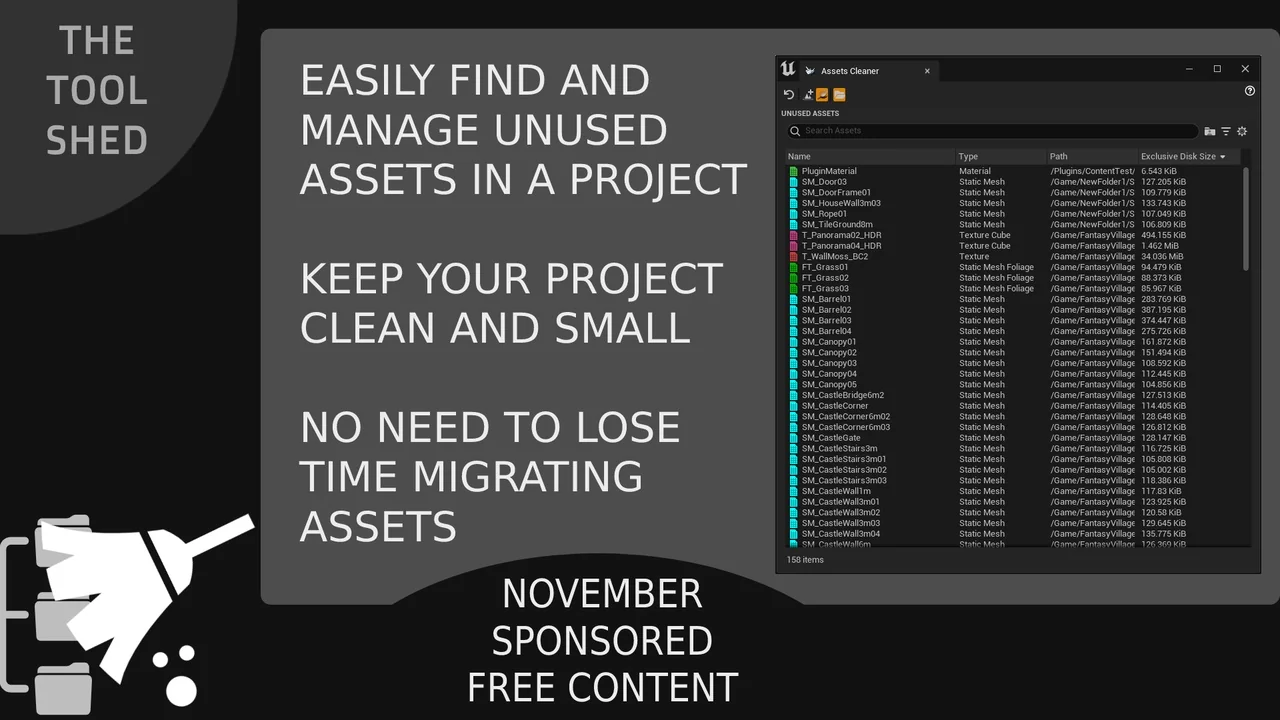
 Engine Tools
 Engine Tools
 Engine Tools