"0341a2901a4ae9aa"{"id":"14293","slug":"npc-optimizator-automatic-optimize-npc-for-you-game","title":"NPC Optimizator - automatic optimize NPC for you game","category":"Engine Tools","engine":"4.25 - 5.7","assetVersion":"Version: 1.5.7 - 1.6.6","engineVersion":"Engine version: 4.25 - 5.7","tag":"Engine Tools","accent":"blue","visual":"luts","summary":"Boost your game's performance with NPC Optimizator, a flexible plugin designed to handle large numbers of NPCs automatically. Learn how to balance quality and speed using customizable optimization components.","platform":"Unreal Engine","publishedAt":"2026-03-11T17:23:11.000Z","updatedAt":"2026-09-29T09:33:30.254Z","sourceNotes":[],"fileContents":[],"compatibility":["Unreal Engine","Version: 1.5.7 - 1.6.6","Engine version: 4.25 - 5.7"],"featuredImage":{"alt":"NPC Optimizator - automatic optimize NPC for you game","src":"https://3dcghub.com/wp-content/uploads/2026/03/c3aeaac7-93f3-4396-abb7-320b16f85363.webp"},"hasDownloadLink":true,"downloads":0,"terms":[{"taxonomy":"category","slug":"engine-tools-tools-and-plugins","name":"Engine Tools"},{"taxonomy":"post_tag","slug":"characters","name":"Characters"},{"taxonomy":"post_tag","slug":"game-performance-boost","name":"Game Performance Boost"},{"taxonomy":"post_tag","slug":"game-systems","name":"Game Systems"},{"taxonomy":"post_tag","slug":"npc-optimization","name":"NPC Optimization"},{"taxonomy":"post_tag","slug":"plugins","name":"Plugins"},{"taxonomy":"post_tag","slug":"tools","name":"Tools"}],"galleryImages":[{"src":"https://3dcghub.com/wp-content/uploads/2026/03/6fd69bc79f30_5b6aabe1-cb78-44ae-8826-814422d92ef4.webp","alt":"NPC Optimizator - automatic optimize NPC for you game"},{"src":"https://3dcghub.com/wp-content/uploads/2026/03/2eae140f1323_d2d9bdf9-99d4-42b4-90c2-c614f368718a.webp","alt":"NPC Optimizator - automatic optimize NPC for you game"},{"src":"https://3dcghub.com/wp-content/uploads/2026/03/05443d352f69_190c6e07-dafc-4cd5-8fcd-2c4e885586a6.webp","alt":"NPC Optimizator - automatic optimize NPC for you game"},{"src":"https://3dcghub.com/wp-content/uploads/2026/03/231c6f158552_aa0a240f-1779-4ba2-82d1-48c9e4b957bd.webp","alt":"NPC Optimizator - automatic optimize NPC for you game"},{"src":"https://3dcghub.com/wp-content/uploads/2026/03/db06cb4a09ab_d439ef51-4d92-4118-a410-989a0ba2f6dd.webp","alt":"NPC Optimizator - automatic optimize NPC for you game"},{"src":"https://3dcghub.com/wp-content/uploads/2026/03/562686dc6bb8_8d448d22-4ab5-4a47-b2c5-b3da696069c8.webp","alt":"NPC Optimizator - automatic optimize NPC for you game"},{"src":"https://3dcghub.com/wp-content/uploads/2026/03/7b0c8a8662d2_05706e2f-301e-480d-ad8b-6592b94bf56d.webp","alt":"NPC Optimizator - automatic optimize NPC for you game"},{"src":"https://3dcghub.com/wp-content/uploads/2026/03/74600947ad3d_8009155d-aac2-4d5c-a730-ea40d5801aee.webp","alt":"NPC Optimizator - automatic optimize NPC for you game"}],"accessPanel":{"kind":"free-resource","title":"Download this resource","eyebrow":"Free Download","message":"Log in or create a free account to start your download.","fileName":"NPC Optimizator - automatic optimize NPC for you game.7z","safetyNote":"Resources are manually reviewed before listing to improve quality and reduce obvious risks.","actionLabel":"Download Free","resourceType":"Resource archive"},"contentHtml":"\u003ch2\u003eStreamlining Game Performance with NPC Optimizator\u003c/h2\u003e\n\u003cp\u003e\u003cstrong\u003eNPC Optimizator - automatic optimize NPC for you game\u003c/strong\u003e is a powerful plugin designed to provide flexible and automatic optimization for your project. Many developers face significant challenges when trying to include a large number of NPCs in a single frame. Standard solutions often lead to performance drops that can ruin the player experience. However, this plugin offers a streamlined way to overcome these hurdles without complex manual setups.\u003c/p\u003e\n\n\u003cp\u003eBy using the \u003cstrong\u003eNPC Optimizator - automatic optimize NPC for you game\u003c/strong\u003e tool, you can maintain high frame rates even in crowded environments. The system is built to handle the heavy lifting of AI management automatically. Therefore, you can focus more on game design and less on technical bottlenecks. This makes it an essential asset for industrial simulations and complex game worlds.\u003c/p\u003e\n\n\u003ch2\u003eEffortless Integration and Immediate Results\u003c/h2\u003e\n\u003cp\u003eThe integration process for this plugin is remarkably straightforward. The creator has developed an optimization component that can be added directly to your existing NPCs. Once the component is attached, you simply run the game to see the results. Consequently, you will notice a huge performance boost almost immediately. This plug-and-play approach ensures that you do not have to rewrite your entire AI system to gain efficiency.\u003c/p\u003e\n\n\u003cp\u003eOn top of that, the \u003cstrong\u003eNPC Optimizator - automatic optimize NPC for you game\u003c/strong\u003e system is designed to be user-friendly for developers of all skill levels. Because the optimization is automatic, it reduces the need for extensive debugging of performance issues. However, the plugin still offers enough flexibility for those who want more control over their game's behavior.\u003c/p\u003e\n\n\u003ch2\u003eBalancing Visual Quality and Processing Speed\u003c/h2\u003e\n\u003cp\u003eOne of the standout features of this tool is its flexibility. If you wish to fine-tune your project, you can adjust the optimization for each wave of NPCs separately. This allows you to create a perfect balance between visual quality and processing speed. For example, you might want higher quality for NPCs close to the player and faster performance for those in the distance.\u003c/p\u003e\n\n\u003cp\u003eAs a result, the \u003cstrong\u003eNPC Optimizator - automatic optimize NPC for you game\u003c/strong\u003e plugin provides a granular level of control. You are not forced to choose between a good-looking game and a fast-running one. Instead, you can optimize different segments of your NPC population to suit the specific needs of each scene or level.\u003c/p\u003e\n\n\u003ch2\u003eComprehensive Resources and Developer Support\u003c/h2\u003e\n\u003cp\u003eThe developer provides a wealth of resources to help you get started. A detailed documentation guide is available to walk you through the setup and advanced features. Additionally, you can explore a demo project to see the plugin in action before implementing it in your own work. There is also an example project specifically for owners to help them understand best practices.\u003c/p\u003e\n\n\u003cp\u003eAlso, the creator maintains a transparent development process. You can access a changelog to see recent updates and a roadmap to view planned features. If you encounter any issues, an issue tracker is available for reporting problems. The developer encourages users to use the provided communication channels and support groups for assistance. This ensures that any technical difficulties are addressed quickly and efficiently.\u003c/p\u003e\n\n\u003ch2\u003eFinal Take\u003c/h2\u003e\n\u003cp\u003eTaken together, this plugin is an excellent choice for anyone needing to manage many NPCs without sacrificing performance. It offers a flexible, automatic solution that is easy to integrate. By balancing quality and speed, you can create immersive environments that run smoothly on a variety of hardware. With extensive documentation and active support, this tool is a reliable addition to any developer's toolkit.\u003c/p\u003e\n\n\u003ch2\u003eMore From The Same Workflow\u003c/h2\u003e\n\u003cul\u003e\n\u003cli\u003e\u003ca href=\"https://3dcghub.com/modular-gameplay-blueprint-systems/\" title=\"Modular Gameplay Blueprint Systems\"\u003eModular Gameplay Blueprint Systems\u003c/a\u003e\u003c/li\u003e\n\u003cli\u003e\u003ca href=\"https://3dcghub.com/narrative-pro-2-complete-game-framework/\" title=\"Narrative Pro 2 – Complete Game Framework\"\u003eNarrative Pro 2 – Complete Game Framework\u003c/a\u003e\u003c/li\u003e\n\u003cli\u003e\u003ca href=\"https://3dcghub.com/survival-game-kit-v2/\" title=\"Survival Game Kit V2\"\u003eSurvival Game Kit V2\u003c/a\u003e\u003c/li\u003e\n\u003cli\u003e\u003ca href=\"https://3dcghub.com/fps-game-starter-kit/\" title=\"FPS Game Starter Kit\"\u003eFPS Game Starter Kit\u003c/a\u003e\u003c/li\u003e\n\u003cli\u003e\u003ca href=\"https://3dcghub.com/universal-shooting-game-template-and-framework/\" title=\"Universal Shooting Game Template and Framework\"\u003eUniversal Shooting Game Template and Framework\u003c/a\u003e\u003c/li\u003e\n\u003c/ul\u003e","contentTextLength":3973,"navigation":{"current":873,"total":4017,"previous":{"id":"14499","slug":"roadmap-navigation","title":"Roadmap Navigation","category":"Engine Tools","platform":"Unreal Engine","updatedAt":"2026-09-30T02:26:26.897Z"},"next":{"id":"14114","slug":"light-explorer","title":"Light Explorer","category":"Engine Tools","platform":"Unreal Engine","updatedAt":"2026-09-29T09:25:45.289Z"}},"relatedResources":[{"id":"13862","slug":"dynamic-ai-system","title":"Dynamic AI System","category":"Engine Tools","engine":"4.26 - 5.8","assetVersion":"Asset Version: 1.0","engineVersion":"Engine version: 4.26 - 5.8","tag":"Engine Tools","accent":"blue","visual":"city","summary":"Enhance your game with the Dynamic AI System, a scalable solution for managing complex NPC behaviors and movement paths. This tool allows characters to react to world changes and perform specific actions effortlessly.","platform":"Unreal Engine","publishedAt":"2026-03-11T10:28:11.000Z","updatedAt":"2026-08-27T11:07:36.100Z","sourceNotes":[],"fileContents":[],"compatibility":["Unreal Engine","Asset Version: 1.0","Engine version: 4.26 - 5.8"],"featuredImage":{"alt":"Dynamic AI System","src":"https://3dcghub.com/wp-content/uploads/2026/03/2aac77c2-7e98-497e-8922-45b7233bb3c1.webp"},"hasDownloadLink":true,"downloads":2},{"id":"14029","slug":"gas-companion","title":"GAS Companion","category":"Engine Tools","engine":"5.7","assetVersion":"Engine version: 5.7","engineVersion":"Asset Version:6.2.1","tag":"Engine Tools","accent":"blue","visual":"audio","summary":"GAS Companion serves as a versatile foundation for projects using Epic's Gameplay Ability System, offering essential C++ setup and Blueprint-friendly tools. It simplifies complex tasks like attribute generation and ability queuing without forcing specific g...","platform":"Unreal Engine","publishedAt":"2026-03-11T13:15:21.000Z","updatedAt":"2026-04-19T15:45:55.000Z","sourceNotes":[],"fileContents":[],"compatibility":["Unreal Engine","Engine version: 5.7","Asset Version: 6.2.1"],"featuredImage":{"alt":"GAS Companion","src":"https://3dcghub.com/wp-content/uploads/2026/03/f7aded12-e01e-4dc6-ab3f-99cb784d3a77.webp"},"hasDownloadLink":true,"downloads":0},{"id":"13791","slug":"chunkcore-chunk-downloader","title":"ChunkCore (Chunk Downloader)","category":"Engine Tools","engine":"5.7","assetVersion":"Engine version: 5.7","engineVersion":"Asset Version:1.0.6","tag":"Engine Tools","accent":"blue","visual":"luts","summary":"ChunkCore (Chunk Downloader) allows Unreal Engine developers to integrate Epic's official patching system directly into Blueprints. This tool enables dynamic asset streaming and modular content delivery without requiring C++ code.","platform":"Unreal Engine","publishedAt":"2026-03-11T10:04:38.000Z","updatedAt":"2026-04-19T15:46:22.000Z","sourceNotes":[],"fileContents":[],"compatibility":["Unreal Engine","Engine version: 5.7","Asset Version: 1.0.6"],"featuredImage":{"alt":"ChunkCore (Chunk Downloader)","src":"https://3dcghub.com/wp-content/uploads/2026/03/63154208-fd10-4508-b537-52511aed4aff.webp"},"hasDownloadLink":true,"downloads":0}]}
Engine Tools
NPC Optimizator - automatic optimize NPC for you game
Boost your game's performance with NPC Optimizator, a flexible plugin designed to handle large numbers of NPCs automatically. Learn how to balance quality and speed using customizable optimization components.
Streamlining Game Performance with NPC Optimizator
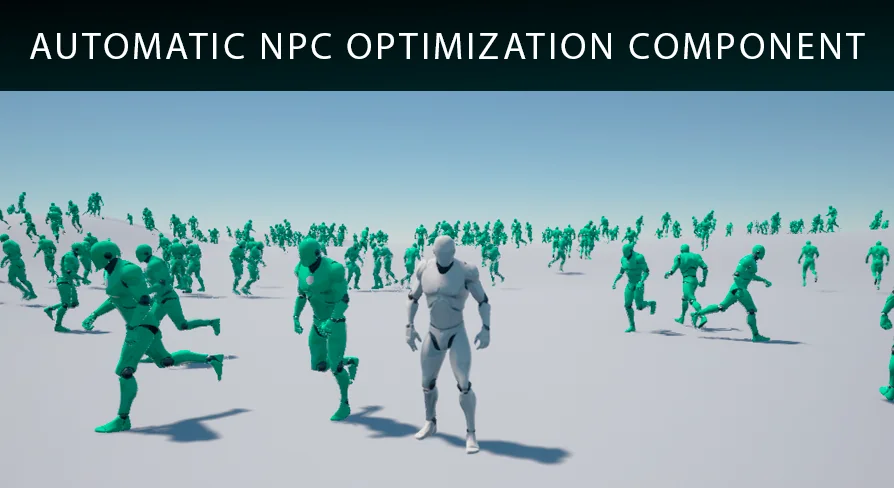
NPC Optimizator - automatic optimize NPC for you game is a powerful plugin designed to provide flexible and automatic optimization for your project. Many developers face significant challenges when trying to include a large number of NPCs in a single frame. Standard solutions often lead to performance drops that can ruin the player experience. However, this plugin offers a streamlined way to overcome these hurdles without complex manual setups.
By using the NPC Optimizator - automatic optimize NPC for you game tool, you can maintain high frame rates even in crowded environments. The system is built to handle the heavy lifting of AI management automatically. Therefore, you can focus more on game design and less on technical bottlenecks. This makes it an essential asset for industrial simulations and complex game worlds.
Effortless Integration and Immediate Results
The integration process for this plugin is remarkably straightforward. The creator has developed an optimization component that can be added directly to your existing NPCs. Once the component is attached, you simply run the game to see the results. Consequently, you will notice a huge performance boost almost immediately. This plug-and-play approach ensures that you do not have to rewrite your entire AI system to gain efficiency.
On top of that, the NPC Optimizator - automatic optimize NPC for you game system is designed to be user-friendly for developers of all skill levels. Because the optimization is automatic, it reduces the need for extensive debugging of performance issues. However, the plugin still offers enough flexibility for those who want more control over their game's behavior.
Balancing Visual Quality and Processing Speed
One of the standout features of this tool is its flexibility. If you wish to fine-tune your project, you can adjust the optimization for each wave of NPCs separately. This allows you to create a perfect balance between visual quality and processing speed. For example, you might want higher quality for NPCs close to the player and faster performance for those in the distance.
As a result, the NPC Optimizator - automatic optimize NPC for you game plugin provides a granular level of control. You are not forced to choose between a good-looking game and a fast-running one. Instead, you can optimize different segments of your NPC population to suit the specific needs of each scene or level.
Comprehensive Resources and Developer Support
The developer provides a wealth of resources to help you get started. A detailed documentation guide is available to walk you through the setup and advanced features. Additionally, you can explore a demo project to see the plugin in action before implementing it in your own work. There is also an example project specifically for owners to help them understand best practices.
Also, the creator maintains a transparent development process. You can access a changelog to see recent updates and a roadmap to view planned features. If you encounter any issues, an issue tracker is available for reporting problems. The developer encourages users to use the provided communication channels and support groups for assistance. This ensures that any technical difficulties are addressed quickly and efficiently.
Final Take
Taken together, this plugin is an excellent choice for anyone needing to manage many NPCs without sacrificing performance. It offers a flexible, automatic solution that is easy to integrate. By balancing quality and speed, you can create immersive environments that run smoothly on a variety of hardware. With extensive documentation and active support, this tool is a reliable addition to any developer's toolkit.
 Engine Tools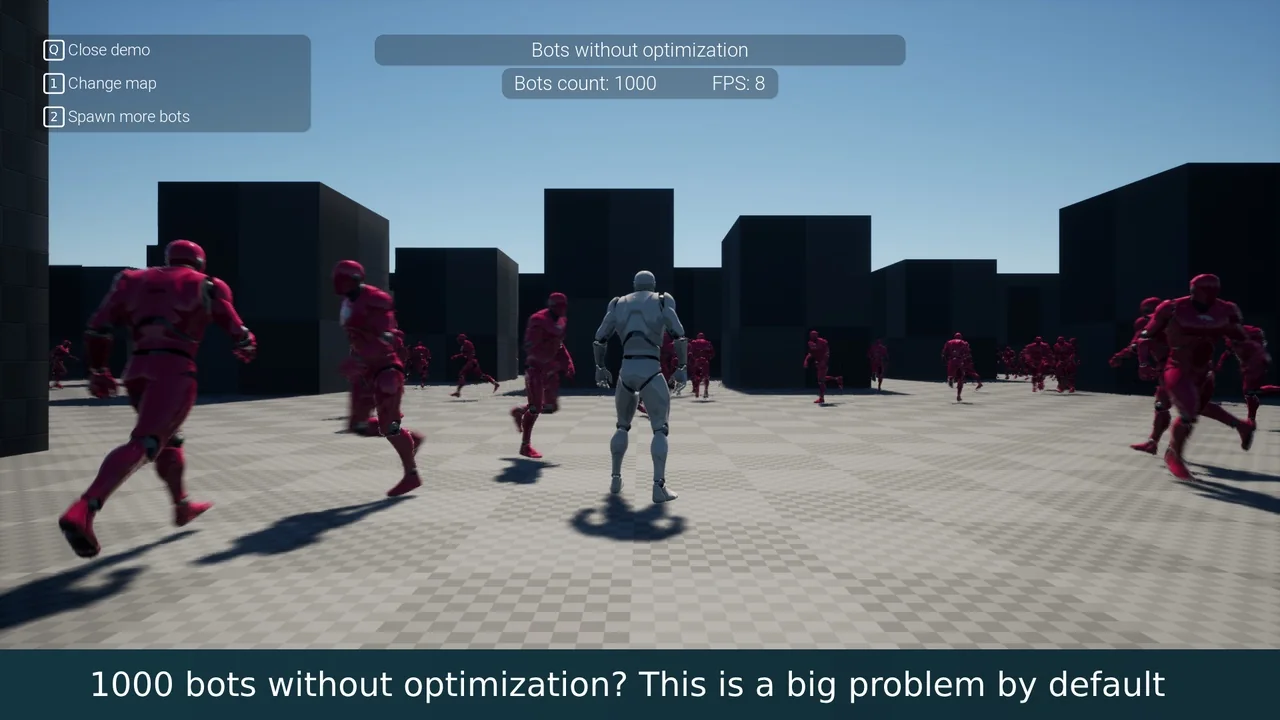
 Engine Tools
 Engine Tools
 Engine Tools