"7066dd76da796369"{"id":"14114","slug":"light-explorer","title":"Light Explorer","category":"Engine Tools","engine":"4.24 - 5.8","assetVersion":"Asset Version: 1.0.3 - 1.0.5","engineVersion":"Engine version: 4.24 - 5.8","tag":"Engine Tools","accent":"blue","visual":"city","summary":"Improve your scene management with Light Explorer, a dedicated tool for Unreal Editor. This resource allows developers to locate and edit light sources quickly within complex environments.","platform":"Unreal Engine","publishedAt":"2026-03-11T15:53:53.000Z","updatedAt":"2026-09-29T09:25:45.289Z","sourceNotes":[],"fileContents":[],"compatibility":["Unreal Engine","Asset Version: 1.0.3 - 1.0.5","Engine version: 4.24 - 5.8"],"featuredImage":{"alt":"Light Explorer","src":"https://3dcghub.com/wp-content/uploads/2026/03/22cb5752-76c8-4b46-8262-d60368bddf7c.webp"},"hasDownloadLink":true,"downloads":0,"terms":[{"taxonomy":"category","slug":"engine-tools-tools-and-plugins","name":"Engine Tools"},{"taxonomy":"post_tag","slug":"editor-utility","name":"Editor Utility"},{"taxonomy":"post_tag","slug":"environment","name":"Environment"},{"taxonomy":"post_tag","slug":"light-explorer","name":"Light Explorer"},{"taxonomy":"post_tag","slug":"tools","name":"Tools"},{"taxonomy":"post_tag","slug":"unreal-editor-tool","name":"Unreal Editor Tool"},{"taxonomy":"post_tag","slug":"unreal-engine-5","name":"Unreal Engine 5"}],"galleryImages":[{"src":"https://3dcghub.com/wp-content/uploads/2026/03/b8d8d1b5e258_6fb332f8-cd74-457d-a67f-3bb08f568d5a.webp","alt":"Light Explorer"},{"src":"https://3dcghub.com/wp-content/uploads/2026/03/8e7e4d8a05e4_ae63c37a-6e9e-48ac-a341-33f2c5a2bc14.webp","alt":"Light Explorer"},{"src":"https://3dcghub.com/wp-content/uploads/2026/03/76dd3ecdfaf7_579f3a06-6baf-45f4-a4da-0f8c62a7f857.webp","alt":"Light Explorer"}],"accessPanel":{"kind":"resource","title":"Download this resource","eyebrow":"Free Download","message":"Log in or create a free account to start your download.","fileName":"Light Explorer.7z","safetyNote":"Resources are manually reviewed before listing to improve quality and reduce obvious risks.","actionLabel":"Download Free","resourceType":"Resource archive"},"contentHtml":"\u003ch2\u003eIntroduction to Light Explorer\u003c/h2\u003e\n\u003cp\u003eLight Explorer is a simple tool created specifically for the Unreal Editor environment. It serves as a dedicated utility to help developers navigate, locate, and edit light sources with increased speed. Consequently, this tool is highly effective for those managing complex scenes. It streamlines the often tedious process of finding specific lights within a busy hierarchy.\u003c/p\u003e\n\n\u003ch2\u003eOptimizing Large Project Workflows\u003c/h2\u003e\n\u003cp\u003eManaging lighting in expansive environments can be challenging. Light Explorer addresses this by providing a quicker way to handle light sources on larger projects. Because large scenes contain numerous actors, finding a single light can take time. Therefore, the developer focused on making the location process as efficient as possible. This tool ensures that lighting adjustments do not slow down the overall development cycle.\u003c/p\u003e\n\n\u003ch3\u003eStreamlined Navigation Features\u003c/h3\u003e\n\u003cp\u003eThe core functionality of Light Explorer revolves around a centralized list of light items. When a user interacts with this list, the tool provides immediate feedback. Specifically, clicking a light item from the list automatically navigates the viewport to that selected light source. This automation removes the need for manual searching within the 3D space. Moreover, it allows for a more fluid transition between different areas of a level.\u003c/p\u003e\n\n\u003ch3\u003eEfficient Editing and Locating\u003c/h3\u003e\n\u003cp\u003eBeyond simple navigation, the tool assists in the locating and editing phases of production. By organizing light sources into an accessible list, it simplifies the identification of specific assets. Furthermore, the ability to jump directly to a light's position makes editing much faster. Developers can evaluate the impact of a light source instantly. As a result, the iterative process of lighting a scene becomes much more manageable.\u003c/p\u003e\n\n\u003ch2\u003eEnhanced Editor Utility\u003c/h2\u003e\n\u003cp\u003eAs an editor tool, Light Explorer integrates into the existing Unreal Editor workflow. It does not overcomplicate the interface but rather adds a layer of necessary organization. Additionally, the tool is designed to be intuitive for any developer familiar with the platform. By focusing on the specific task of light management, it provides a clear benefit to level designers. Consequently, users can spend less time searching and more time refining their visuals.\u003c/p\u003e\n\n\u003ch2\u003eFinal Take\u003c/h2\u003e\n\u003cp\u003eLight Explorer is a practical solution for anyone working with lighting in Unreal Editor. It provides a simple yet powerful way to navigate and edit light sources in larger projects. By using the automated viewport navigation, developers can save significant time during the production process. Ultimately, this tool enhances the efficiency of scene management and lighting design.\u003c/p\u003e\n\n\u003ch2\u003eMore From The Same Workflow\u003c/h2\u003e\n\u003cul\u003e\n\u003cli\u003e\u003ca href=\"https://3dcghub.com/astronaut-soldier/\" title=\"Astronaut Soldier\"\u003eAstronaut Soldier\u003c/a\u003e\u003c/li\u003e\n\u003cli\u003e\u003ca href=\"https://3dcghub.com/cosmo-trooper/\" title=\"Cosmo Trooper\"\u003eCosmo Trooper\u003c/a\u003e\u003c/li\u003e\n\u003cli\u003e\u003ca href=\"https://3dcghub.com/extile-plus-ultimate-non-tiling-material-toolkit-for-unreal-engine-environments/\" title=\"EXTILE PLUS -Ultimate Non-Tiling Material Toolkit for Unreal Engine Environments\"\u003eEXTILE PLUS -Ultimate Non-Tiling Material Toolkit for Unreal Engine Environments\u003c/a\u003e\u003c/li\u003e\n\u003cli\u003e\u003ca href=\"https://3dcghub.com/ultimate-template-unrealengine-2d-dialogue-inventory-system-save/\" title=\"ULTIMATE Template UnrealEngine || 2D + Dialogue + Inventory system + Save | |\"\u003eULTIMATE Template UnrealEngine || 2D + Dialogue + Inventory system + Save | |\u003c/a\u003e\u003c/li\u003e\n\u003cli\u003e\u003ca href=\"https://3dcghub.com/daz-to-unreal/\" title=\"Daz To Unreal\"\u003eDaz To Unreal\u003c/a\u003e\u003c/li\u003e\n\u003c/ul\u003e\n\n\u003ch2\u003eAsset Gallery\u003c/h2\u003e","contentTextLength":2967,"navigation":{"current":873,"total":4016,"previous":{"id":"14293","slug":"npc-optimizator-automatic-optimize-npc-for-you-game","title":"NPC Optimizator - automatic optimize NPC for you game","category":"Engine Tools","platform":"Unreal Engine","updatedAt":"2026-09-29T09:33:30.254Z"},"next":{"id":"14100","slug":"le-http-request","title":"LE Http Request","category":"Engine Tools","platform":"Unreal Engine","updatedAt":"2026-09-29T09:21:47.996Z"}},"relatedResources":[{"id":"1001312","slug":"lxr-light-detection","title":"LXR - Light Detection","category":"Engine Tools","engine":"4.26 - 5.8","assetVersion":"Asset Version: 1.3.1 - 26 - 2.5.2 - 58","engineVersion":"Engine Version: 4.26 - 5.8","tag":"Engine Tools","accent":"blue","visual":"mech","summary":"Explore LXR for Unreal Engine, featuring direct and indirect light detection, silhouette awareness, volume sensing, and full EQS support for AI perception.","platform":"Unreal Engine","publishedAt":"2026-10-02T08:09:58.214Z","updatedAt":"2026-10-02T08:09:58.214Z","sourceNotes":[],"fileContents":[],"compatibility":["Unreal Engine","Asset Version: 1.3.1 - 26 - 2.5.2 - 58","Engine Version: 4.26 - 5.8"],"featuredImage":{"alt":"LXR - Light Detection","src":"/wp-content/uploads/published/2026/10/475d7d493195-0deccf1b-a41f-4da7-88e6-7c79d734873a-ba3745fd1b.webp"},"hasDownloadLink":true,"downloads":0},{"id":"14323","slug":"pak-creator-plugin","title":"Pak Creator Plugin","category":"Engine Tools","engine":"4.27,5.0 - 5.7","assetVersion":"Engine version: 4.27,5.0 - 5.7","engineVersion":"Asset Version:1.7.1","tag":"Engine Tools","accent":"blue","visual":"luts","summary":"The Pak Creator Plugin simplifies the process of creating independent .pak files from content plugins in Unreal Engine. It is an ideal solution for developers looking to distribute assets for modding or architectural visualization.","platform":"Unreal Engine","publishedAt":"2026-03-11T17:41:02.000Z","updatedAt":"2026-04-19T15:45:48.000Z","sourceNotes":[],"fileContents":[],"compatibility":["Unreal Engine","Engine version: 4.27,5.0 - 5.7","Asset Version: 1.7.1"],"featuredImage":{"alt":"Pak Creator Plugin","src":"https://3dcghub.com/wp-content/uploads/2026/03/791550ef-8520-4427-86de-d70ce899e2ee.webp"},"hasDownloadLink":true,"downloads":0},{"id":"14481","slug":"ripx","title":"RipX","category":"Engine Tools","engine":"4.27","assetVersion":"Engine version: 4.27","engineVersion":"4.27","tag":"Engine Tools","accent":"blue","visual":"city","summary":"Protect your game assets from unauthorized extraction using RipX. This tool is specifically designed to block programs that use DLL injection to dump data from memory.","platform":"Unreal Engine","publishedAt":"2026-03-11T18:12:32.000Z","updatedAt":"2026-04-19T15:45:45.000Z","sourceNotes":[],"fileContents":[],"compatibility":["Unreal Engine","Engine version: 4.27"],"featuredImage":{"alt":"RipX","src":"https://3dcghub.com/wp-content/uploads/2026/03/8ed03c7b-2583-4f98-aa17-aed72b1ad5db.webp"},"hasDownloadLink":true,"downloads":0}]}
Engine Tools
Light Explorer
Improve your scene management with Light Explorer, a dedicated tool for Unreal Editor. This resource allows developers to locate and edit light sources quickly within complex environments.
Light Explorer is a simple tool created specifically for the Unreal Editor environment. It serves as a dedicated utility to help developers navigate, locate, and edit light sources with increased speed. Consequently, this tool is highly effective for those managing complex scenes. It streamlines the often tedious process of finding specific lights within a busy hierarchy.
Optimizing Large Project Workflows
Managing lighting in expansive environments can be challenging. Light Explorer addresses this by providing a quicker way to handle light sources on larger projects. Because large scenes contain numerous actors, finding a single light can take time. Therefore, the developer focused on making the location process as efficient as possible. This tool ensures that lighting adjustments do not slow down the overall development cycle.
Streamlined Navigation Features
The core functionality of Light Explorer revolves around a centralized list of light items. When a user interacts with this list, the tool provides immediate feedback. Specifically, clicking a light item from the list automatically navigates the viewport to that selected light source. This automation removes the need for manual searching within the 3D space. Moreover, it allows for a more fluid transition between different areas of a level.
Efficient Editing and Locating
Beyond simple navigation, the tool assists in the locating and editing phases of production. By organizing light sources into an accessible list, it simplifies the identification of specific assets. Furthermore, the ability to jump directly to a light's position makes editing much faster. Developers can evaluate the impact of a light source instantly. As a result, the iterative process of lighting a scene becomes much more manageable.
Enhanced Editor Utility
As an editor tool, Light Explorer integrates into the existing Unreal Editor workflow. It does not overcomplicate the interface but rather adds a layer of necessary organization. Additionally, the tool is designed to be intuitive for any developer familiar with the platform. By focusing on the specific task of light management, it provides a clear benefit to level designers. Consequently, users can spend less time searching and more time refining their visuals.
Final Take
Light Explorer is a practical solution for anyone working with lighting in Unreal Editor. It provides a simple yet powerful way to navigate and edit light sources in larger projects. By using the automated viewport navigation, developers can save significant time during the production process. Ultimately, this tool enhances the efficiency of scene management and lighting design.
 Engine Tools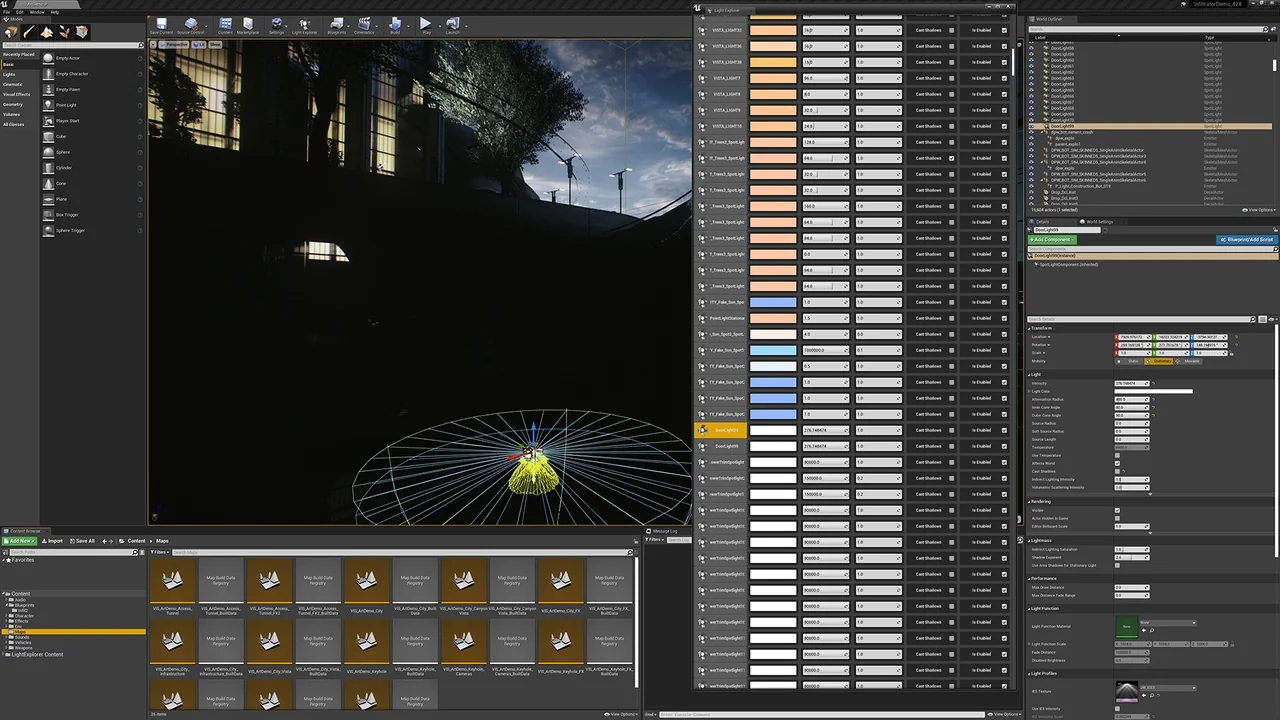
 Engine Tools
 Engine Tools
 Engine Tools