"4481da9c895ef786"{"id":"1001312","slug":"lxr-light-detection","title":"LXR - Light Detection","category":"Engine Tools","engine":"4.26 - 5.8","assetVersion":"Asset Version: 1.3.1 - 26 - 2.5.2 - 58","engineVersion":"Engine Version: 4.26 - 5.8","tag":"Engine Tools","accent":"blue","visual":"mech","summary":"Explore LXR for Unreal Engine, featuring direct and indirect light detection, silhouette awareness, volume sensing, and full EQS support for AI perception.","platform":"Unreal Engine","publishedAt":"2026-10-02T08:09:58.214Z","updatedAt":"2026-10-02T08:09:58.214Z","sourceNotes":[],"fileContents":[],"compatibility":["Unreal Engine","Asset Version: 1.3.1 - 26 - 2.5.2 - 58","Engine Version: 4.26 - 5.8"],"featuredImage":{"alt":"LXR - Light Detection","src":"/wp-content/uploads/published/2026/10/475d7d493195-0deccf1b-a41f-4da7-88e6-7c79d734873a-ba3745fd1b.webp"},"hasDownloadLink":true,"downloads":0,"terms":[{"taxonomy":"category","slug":"engine-tools-tools-and-plugins","name":"Engine Tools"}],"galleryImages":[{"src":"/wp-content/uploads/published/2026/10/55b1eb1baed4-8c293bec-538d-42e6-a229-57e449c8cad5-9f9aab9bb2.webp","alt":"LXR - Light Detection"},{"src":"/wp-content/uploads/published/2026/10/a419844b7b32-267c5388-f1da-45ee-97ea-1cf5774817ea-2a61b0c4a6.webp","alt":"LXR - Light Detection"},{"src":"/wp-content/uploads/published/2026/10/1504ef4f1052-859ea4bc-8cb6-4236-9f5c-99a73c9b4d03-79f31e2917.webp","alt":"LXR - Light Detection"},{"src":"/wp-content/uploads/published/2026/10/cc14435c9639-041c0e98-49bf-4c29-9e80-14cc7541177b-124a867928.webp","alt":"LXR - Light Detection"},{"src":"/wp-content/uploads/published/2026/10/cb667fe6357d-29a42ce2-ac7d-404a-b141-878f4c3ae740-0be4b642df.webp","alt":"LXR - Light Detection"}],"accessPanel":{"kind":"resource","title":"Download this resource","eyebrow":"Free Download","message":"Log in or create a free account to start your download.","fileName":"LXR - Light Detection.7z","safetyNote":"Resources are manually reviewed before listing to improve quality and reduce obvious risks.","actionLabel":"Download Free","resourceType":"Resource archive"},"contentHtml":"\u003ch2\u003eDirect Light Detection and the LXRFluxComponent Setup\u003c/h2\u003e\u003cp\u003eStealth design and dynamic visual mechanics frequently depend on whether an actor is concealed within shadow or exposed to ambient luminance. Conventional line-of-sight checks fail to address whether an actor is partially illuminated or standing near an active fixture. LXR functions as a lighting detection and perception plugin for Unreal Engine, providing a framework for measuring how much light an actor receives while supplying a broader suite of environmental awareness tools for artificial intelligence.\u003c/p\u003e\u003cp\u003eImplementing direct light evaluation requires pairing two specific elements across your scene. The actor whose illumination needs measuring receives a Detection Component, while any scene actors containing Light Components require Source Components. This configuration enables precise tracking of direct rays between specific fixtures and the evaluated character. In contrast, indirect light detection demands far less preparation. Actors evaluate bounced or ambient illumination simply by attaching an LXRFluxComponent, which operates with no additional scene configuration. The indirect lighting calculation system used by the plugin is open source on GitHub, allowing developers to inspect or integrate the flux calculations into their own rendering workflows.\u003c/p\u003e\u003ch2\u003eLight Volume Detection Through the Sense Component\u003c/h2\u003e\u003cp\u003eTraditional vision cones force artificial intelligence to look directly at an actor or light source before registering its presence in the environment.\u003c/p\u003e\u003cp\u003eThe Sense Component bypasses that limitation by allowing AI actors to perceive and react to light sources strictly through light volumes. Instead of requiring a direct visual trajectory to a mesh or light fixture, the AI detects the volume of illumination cast into the surrounding area. This mechanic proves critical in enclosed spaces, such as an L-shaped corridor where a player character is hidden behind a wall while projecting a flashlight beam onto the floor or opposite surface. The AI identifies the visible light volume spilling around the corner and can respond to the intrusion long before the player steps into direct view.\u003c/p\u003e\u003ch2\u003eEvaluating Backlight Contrast with the Silhouette Component\u003c/h2\u003e\u003cp\u003eStealth games often suffer from an oversimplified calculation where standing in darkness confers complete invisibility regardless of the backdrop.\u003c/p\u003e\u003cp\u003eThe Silhouette Component resolves this common stealth-game issue by enabling detection of character silhouettes against bright backgrounds. When an actor stands in a dark corridor with a lit doorway or illuminated room positioned directly behind them, raw luminance sensors treat the character as completely hidden because no direct light strikes their mesh. The Silhouette Component shifts the evaluation criteria from absolute light levels to outline visibility, ensuring AI agents recognize when a darkened character is framed against a bright space and react to the contrasting silhouette accordingly.\u003c/p\u003e\u003ch2\u003eTracking State Changes Using the Memory Component\u003c/h2\u003e\u003cp\u003eDynamic stealth environments require non-player characters to understand when the environment has been altered in their absence.\u003c/p\u003e\u003cp\u003eThe Memory Component enables AI actors to remember light states even after leaving and returning to a patrol area. When a player turns lights on or off to create cover or navigate a room, AI characters equipped with this component identify the discrepancy upon returning. This state recognition functions through two separate pathways depending on the setup. An agent can detect alterations via the Detection Component if the actor physically enters the altered light volume, or through the Sense Component, where the agent simply needs visual contact with the light volume to notice that the lighting state was modified.\u003c/p\u003e\u003ch2\u003eAsynchronous Queries and EQS Support for AI Navigation\u003c/h2\u003e\u003cp\u003eComplex environmental queries often require retrieving illumination data at arbitrary spatial points without attaching physical detection components to dummy actors.\u003c/p\u003e\u003cp\u003eLXR integrates full support for Unreal Engine's Environment Query System (EQS), allowing behavior trees to factor lighting values directly into point generation, cover selection, and pathfinding tests. For tasks outside standard EQS runs, the plugin provides the QueryLXRAsyncTask. This asynchronous task lets blueprints and gameplay code query the precise light amount at any coordinate in the game world, making it possible to sample scene illumination on demand without burdening the main gameplay thread. Comprehensive documentation covers standard implementation patterns, backed by direct developer support on Discord for specific integration questions.\u003c/p\u003e\n\n\u003ch2\u003eContinue Browsing Similar Packs\u003c/h2\u003e\n\u003cul\u003e\n\u003cli\u003e\u003ca href=\"https://3dcghub.com/audio-analysis-tools-beat-detection/\" title=\"Audio Analysis Tools (Beat Detection)\"\u003eAudio Analysis Tools (Beat Detection)\u003c/a\u003e\u003c/li\u003e\n\u003cli\u003e\u003ca href=\"https://3dcghub.com/light-explorer/\" title=\"Light Explorer\"\u003eLight Explorer\u003c/a\u003e\u003c/li\u003e\n\u003cli\u003e\u003ca href=\"https://3dcghub.com/did-it-hit-trace-detection-plugin/\" title=\"Did it hit - Trace Detection Plugin\"\u003eDid it hit - Trace Detection Plugin\u003c/a\u003e\u003c/li\u003e\n\u003cli\u003e\u003ca href=\"https://3dcghub.com/runtime-vertex-paint-detection-plugin/\" title=\"Runtime Vertex Paint \u0026amp; Detection Plugin\"\u003eRuntime Vertex Paint \u0026amp; Detection Plugin\u003c/a\u003e\u003c/li\u003e\n\u003cli\u003e\u003ca href=\"https://3dcghub.com/npc-eyes-sight-system-pro-accurate-npc-vision-with-light-shadow-body-points/\" title=\"NPC Eyes Sight System PRO – Accurate NPC Vision with Light, Shadow, Body Points\"\u003eNPC Eyes Sight System PRO – Accurate NPC Vision with Light, Shadow, Body Points\u003c/a\u003e\u003c/li\u003e\n\u003c/ul\u003e","contentTextLength":4909,"navigation":{"current":26,"total":3269,"previous":{"id":"1001313","slug":"nexxnote-sketch-and-note-for-blueprints","title":"NexxNote | Sketch \u0026 Note for Blueprints","category":"Engine Tools","platform":"Unreal Engine","updatedAt":"2026-10-02T08:10:30.350Z"},"next":{"id":"1001311","slug":"library-generic-indie","title":"LIBRARY - GENERIC - INDIE","category":"Engine Tools","platform":"Unreal Engine","updatedAt":"2026-10-02T08:09:31.345Z"}},"relatedResources":[{"id":"1001263","slug":"audio-analysis-tools-beat-detection","title":"Audio Analysis Tools (Beat Detection)","category":"Engine Tools","engine":"4.26 - 5.8","assetVersion":"Asset Version: 1.0","engineVersion":"Engine Version: 4.26 - 5.8","tag":"Engine Tools","accent":"blue","visual":"audio","summary":"Run real-time FFT audio analysis, beat tracking, and spectral evaluation across all Unreal Engine platforms with Audio Analysis Tools.","platform":"Unreal Engine","publishedAt":"2026-09-30T05:40:53.094Z","updatedAt":"2026-09-30T05:40:53.094Z","sourceNotes":[],"fileContents":[],"compatibility":["Unreal Engine","Asset Version: 1.0","Engine Version: 4.26 - 5.8"],"featuredImage":{"alt":"Audio Analysis Tools (Beat Detection)","src":"/wp-content/uploads/published/2026/09/c0fd3709a5eb-9fa60615-c929-4bd5-96ce-ce1efad85174-5b1eb79cba.webp"},"hasDownloadLink":true,"downloads":0},{"id":"14114","slug":"light-explorer","title":"Light Explorer","category":"Engine Tools","engine":"4.24 - 5.8","assetVersion":"Asset Version: 1.0.3 - 1.0.5","engineVersion":"Engine version: 4.24 - 5.8","tag":"Engine Tools","accent":"blue","visual":"city","summary":"Improve your scene management with Light Explorer, a dedicated tool for Unreal Editor. This resource allows developers to locate and edit light sources quickly within complex environments.","platform":"Unreal Engine","publishedAt":"2026-03-11T15:53:53.000Z","updatedAt":"2026-09-29T09:25:45.289Z","sourceNotes":[],"fileContents":[],"compatibility":["Unreal Engine","Asset Version: 1.0.3 - 1.0.5","Engine version: 4.24 - 5.8"],"featuredImage":{"alt":"Light Explorer","src":"https://3dcghub.com/wp-content/uploads/2026/03/22cb5752-76c8-4b46-8262-d60368bddf7c.webp"},"hasDownloadLink":true,"downloads":0},{"id":"13853","slug":"did-it-hit-trace-detection-plugin","title":"Did it hit - Trace Detection Plugin","category":"Engine Tools","engine":"4.25 - 5.8","assetVersion":"Asset Version:1.1.0 - 1.5","engineVersion":"Engine version: 4.25 - 5.8","tag":"Engine Tools","accent":"blue","visual":"luts","summary":"Solve the issue of skipped collisions in fast-paced games. This plugin provides a high-performance tracing system for bullets and weapon swings that standard colliders might miss.","platform":"Unreal Engine","publishedAt":"2026-03-11T10:23:29.000Z","updatedAt":"2026-09-29T08:41:33.282Z","sourceNotes":[],"fileContents":[],"compatibility":["Unreal Engine","Asset Version:1.1.0 - 1.5","Engine version: 4.25 - 5.8"],"featuredImage":{"alt":"Did it hit - Trace Detection Plugin","src":"https://3dcghub.com/wp-content/uploads/2026/03/bd3e4c0f-52b7-4c26-a033-df949ae21c94.webp"},"hasDownloadLink":true,"downloads":0}]}
Engine Tools
LXR - Light Detection
Explore LXR for Unreal Engine, featuring direct and indirect light detection, silhouette awareness, volume sensing, and full EQS support for AI perception.
Direct Light Detection and the LXRFluxComponent Setup
Stealth design and dynamic visual mechanics frequently depend on whether an actor is concealed within shadow or exposed to ambient luminance. Conventional line-of-sight checks fail to address whether an actor is partially illuminated or standing near an active fixture. LXR functions as a lighting detection and perception plugin for Unreal Engine, providing a framework for measuring how much light an actor receives while supplying a broader suite of environmental awareness tools for artificial intelligence.
Implementing direct light evaluation requires pairing two specific elements across your scene. The actor whose illumination needs measuring receives a Detection Component, while any scene actors containing Light Components require Source Components. This configuration enables precise tracking of direct rays between specific fixtures and the evaluated character. In contrast, indirect light detection demands far less preparation. Actors evaluate bounced or ambient illumination simply by attaching an LXRFluxComponent, which operates with no additional scene configuration. The indirect lighting calculation system used by the plugin is open source on GitHub, allowing developers to inspect or integrate the flux calculations into their own rendering workflows.
Light Volume Detection Through the Sense Component
Traditional vision cones force artificial intelligence to look directly at an actor or light source before registering its presence in the environment.
The Sense Component bypasses that limitation by allowing AI actors to perceive and react to light sources strictly through light volumes. Instead of requiring a direct visual trajectory to a mesh or light fixture, the AI detects the volume of illumination cast into the surrounding area. This mechanic proves critical in enclosed spaces, such as an L-shaped corridor where a player character is hidden behind a wall while projecting a flashlight beam onto the floor or opposite surface. The AI identifies the visible light volume spilling around the corner and can respond to the intrusion long before the player steps into direct view.
Evaluating Backlight Contrast with the Silhouette Component
Stealth games often suffer from an oversimplified calculation where standing in darkness confers complete invisibility regardless of the backdrop.
The Silhouette Component resolves this common stealth-game issue by enabling detection of character silhouettes against bright backgrounds. When an actor stands in a dark corridor with a lit doorway or illuminated room positioned directly behind them, raw luminance sensors treat the character as completely hidden because no direct light strikes their mesh. The Silhouette Component shifts the evaluation criteria from absolute light levels to outline visibility, ensuring AI agents recognize when a darkened character is framed against a bright space and react to the contrasting silhouette accordingly.
Tracking State Changes Using the Memory Component
Dynamic stealth environments require non-player characters to understand when the environment has been altered in their absence.
The Memory Component enables AI actors to remember light states even after leaving and returning to a patrol area. When a player turns lights on or off to create cover or navigate a room, AI characters equipped with this component identify the discrepancy upon returning. This state recognition functions through two separate pathways depending on the setup. An agent can detect alterations via the Detection Component if the actor physically enters the altered light volume, or through the Sense Component, where the agent simply needs visual contact with the light volume to notice that the lighting state was modified.
Asynchronous Queries and EQS Support for AI Navigation
Complex environmental queries often require retrieving illumination data at arbitrary spatial points without attaching physical detection components to dummy actors.
LXR integrates full support for Unreal Engine's Environment Query System (EQS), allowing behavior trees to factor lighting values directly into point generation, cover selection, and pathfinding tests. For tasks outside standard EQS runs, the plugin provides the QueryLXRAsyncTask. This asynchronous task lets blueprints and gameplay code query the precise light amount at any coordinate in the game world, making it possible to sample scene illumination on demand without burdening the main gameplay thread. Comprehensive documentation covers standard implementation patterns, backed by direct developer support on Discord for specific integration questions.
 Engine Tools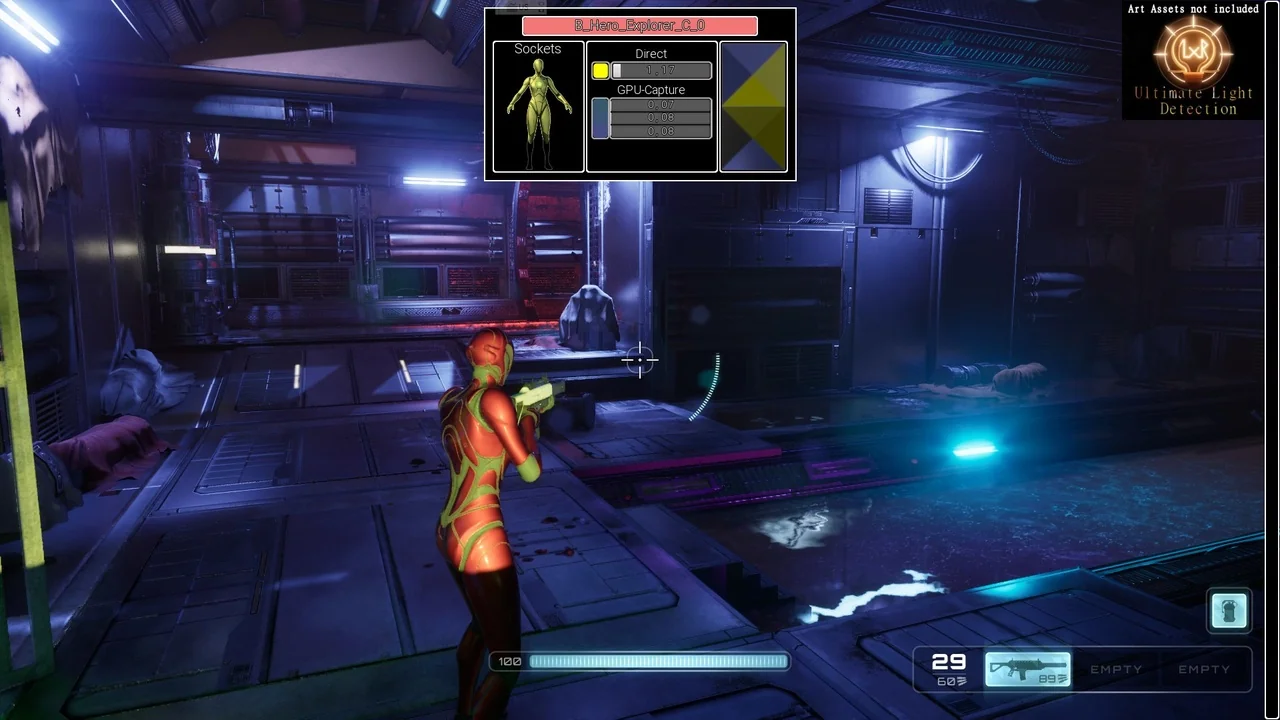
 Engine Tools
 Engine Tools
 Engine Tools