"4481da9c895ef786"{"id":"1001313","slug":"nexxnote-sketch-and-note-for-blueprints","title":"NexxNote | Sketch \u0026 Note for Blueprints","category":"Engine Tools","engine":"5.4 - 5.7","assetVersion":"Asset Version: 1.0","engineVersion":"Engine Version: 5.4 - 5.7","tag":"Engine Tools","accent":"blue","visual":"mech","summary":"NexxNote brings freeform sketching and sticky notes directly into Unreal Engine's Blueprint editor, streamlining logic tracking and visual prototyping.","platform":"Unreal Engine","publishedAt":"2026-10-02T08:10:30.350Z","updatedAt":"2026-10-02T08:10:30.350Z","sourceNotes":[],"fileContents":[],"compatibility":["Unreal Engine","Asset Version: 1.0","Engine Version: 5.4 - 5.7"],"featuredImage":{"alt":"NexxNote | Sketch \u0026 Note for Blueprints","src":"/wp-content/uploads/published/2026/10/7b40d930f268-9572df08-865b-44d6-b44b-5c9d66b42bb6-f4ebf0ad43.webp"},"hasDownloadLink":true,"downloads":0,"terms":[{"taxonomy":"category","slug":"engine-tools-tools-and-plugins","name":"Engine Tools"}],"galleryImages":[{"src":"/wp-content/uploads/published/2026/10/11be3b8cda5f-0532f27b-c245-4377-ab60-e8939e729253-d45e89f985.webp","alt":"NexxNote | Sketch \u0026 Note for Blueprints"},{"src":"/wp-content/uploads/published/2026/10/1cd2c28ea87f-b9c19983-98e7-4677-b856-403680e2b2ab-25fd716d95.webp","alt":"NexxNote | Sketch \u0026 Note for Blueprints"},{"src":"/wp-content/uploads/published/2026/10/5cb67d329909-e4981ac6-4826-4c68-81ce-da27c12837b7-cfefa87153.webp","alt":"NexxNote | Sketch \u0026 Note for Blueprints"},{"src":"/wp-content/uploads/published/2026/10/0e4b62f20000-446347a7-3679-4c8a-a374-3ecbe42ec0cd-19e7f514f8.webp","alt":"NexxNote | Sketch \u0026 Note for Blueprints"},{"src":"/wp-content/uploads/published/2026/10/db223e06355a-f77ac330-ff3a-4a02-b1e4-2a814df78236-694b8e859c.webp","alt":"NexxNote | Sketch \u0026 Note for Blueprints"}],"accessPanel":{"kind":"resource","title":"Download this resource","eyebrow":"Free Download","message":"Log in or create a free account to start your download.","fileName":"NexxNote Sketch \u0026 Note for Blueprints.7z","safetyNote":"Resources are manually reviewed before listing to improve quality and reduce obvious risks.","actionLabel":"Download Free","resourceType":"Resource archive"},"contentHtml":"\u003cp\u003ePrototyping gameplay mechanics and untangling deep node networks frequently involves a disconnect between conceptual planning and practical implementation. When laying out complex systems, game developers often find themselves toggling between secondary flowchart tools, external whiteboard applications, or scattered text documents simply to map out execution flow. NexxNote addresses this friction by embedding visual ideation tools directly inside the Blueprint canvas, turning the graph itself into an interactive whiteboard.\u003c/p\u003e \u003ch2\u003eSketching Directly on the Blueprint Canvas\u003c/h2\u003e\n\u003cp\u003eThe core functionality of NexxNote centers on the ability to draw freely across the Blueprint graph. Instead of relying solely on standard node comment boxes to indicate flow, users can sketch custom shapes, draw directional arrows, and mark out freeform symbols right around their logic structures. This allows developers to circle problematic branches, draw connection paths between disparate sections of code, and map out rough architectural diagrams without leaving the editor.\u003c/p\u003e \u003cp\u003eBecause the sketching system is freeform, it accommodates whatever shorthand or visual language a team already uses. The plugin does not ship with pre-made drawing assets; every line, outline, and shape depends entirely on what the user chooses to draw. Whether sketching a quick diagram to outline branch conditions or drawing an arrow pointing from a function call to an event dispatcher, the canvas responds to spontaneous visual notation.\u003c/p\u003e \u003ch2\u003eDocumenting Node Logic with Sticky Notes\u003c/h2\u003e\n\u003cp\u003eBeyond hand-drawn markup, NexxNote includes sticky notes designed to attach directly to individual Blueprint nodes. Large graphs often suffer from ambiguity when nodes execute non-obvious math, manage state transitions, or interface with external interfaces. Attaching a sticky note directly to the target node anchors explanation to execution, ensuring that critical logic descriptions remain pinned where they are needed most.\u003c/p\u003e \u003cp\u003eThis method helps developers document algorithmic intentions, leave reminders for future revisions, or clarify why specific overrides were chosen. By coupling notes directly with their corresponding nodes, context is preserved even when graphs undergo reorganization, node repositioning, or iterative refactoring during prototyping phases.\u003c/p\u003e \u003ch2\u003eCustomizing Visual Hierarchy with Colors and Line Thickness\u003c/h2\u003e\n\u003cp\u003eCluttered graphs can quickly become unreadable if visual markers blend into the grid. NexxNote provides customizable colors and stroke thickness settings for both sketches and sticky notes. Adjusting line weight makes it possible to distinguish between primary execution pathways and secondary debug traces, while custom colors allow distinct functional systems to be color-coded on sight.\u003c/p\u003e \u003cp\u003eFor visual thinkers, the ability to personalize color palettes transforms standard node layouts into intuitive maps. Highlighting critical control paths in bold tones or leaving low-contrast informational sketches in background sections keeps the working environment tidy while still communicating essential system relationships at a glance.\u003c/p\u003e \u003ch2\u003eEditor Integration, Persistence, and Performance\u003c/h2\u003e\n\u003cp\u003eA frequent concern with visual editor enhancements is overhead and asset instability. NexxNote is constructed to be lightweight and fast, adding zero unnecessary bloat to the host project. It functions entirely within the Blueprint editor environment, requiring no C++ programming or technical setup to begin drawing and taking notes.\u003c/p\u003e \u003cp\u003eData permanence is handled natively within the assets themselves. Every sketch, line stroke, and attached sticky note is saved directly inside the Blueprint file. When the editor closes or the project restarts, the visual annotations reload seamlessly alongside the graph logic, ensuring that visual documentation does not vanish or desynchronize across development sessions. The tool also operates alongside companion workflow utilities like NexxBatch for variable management without graph conflict.\u003c/p\u003e \u003ch2\u003eTarget Workflows Across Design and Education\u003c/h2\u003e\n\u003cp\u003eThe practical utility of in-editor drawing appeals across several distinct development roles. Game designers engaging in rapid ideation can outline state machines, puzzle steps, and interaction logic directly on the canvas before committing to formal node structures. Programmers working through intricate conditional chains can place precise sticky notes to keep track of variables, execution priorities, and edge cases.\u003c/p\u003e \u003cp\u003eVisual learners gain an immediate benefit from replacing abstract text blocks with clear, color-coded diagrams that trace logic paths intuitively. In classroom settings and technical tutorials, educators can use the freeform drawing tools to visually guide students through Blueprint mechanics, circling relevant execution pins and drawing explanatory diagrams directly over live code.\u003c/p\u003e\n\n\u003ch2\u003eRelated Resources Worth Checking\u003c/h2\u003e\n\u003cul\u003e\n\u003cli\u003e\u003ca href=\"https://3dcghub.com/basic-interaction-widgets-and-notes/\" title=\"Basic Interaction, Widgets \u0026amp; Notes\"\u003eBasic Interaction, Widgets \u0026amp; Notes\u003c/a\u003e\u003c/li\u003e\n\u003cli\u003e\u003ca href=\"https://3dcghub.com/blueprint-mesh-extractor/\" title=\"Blueprint Mesh Extractor\"\u003eBlueprint Mesh Extractor\u003c/a\u003e\u003c/li\u003e\n\u003cli\u003e\u003ca href=\"https://3dcghub.com/skmodular-plugin-blueprint/\" title=\"SKModular Plugin [Blueprint]\"\u003eSKModular Plugin [Blueprint]\u003c/a\u003e\u003c/li\u003e\n\u003cli\u003e\u003ca href=\"https://3dcghub.com/logic-driver-pro-blueprint-editor-for-dialogue-quest-combat-and-fsm-systems/\" title=\"Logic Driver Pro - Blueprint Editor for Dialogue, Quest, Combat \u0026amp; FSM Systems\"\u003eLogic Driver Pro - Blueprint Editor for Dialogue, Quest, Combat \u0026amp; FSM Systems\u003c/a\u003e\u003c/li\u003e\n\u003cli\u003e\u003ca href=\"https://3dcghub.com/blueprint-generator-ai-kibibyte-labs-engine-assistant/\" title=\"AI Engine Assistant - Kibibyte Labs (Blueprint Generator \u0026amp; More!)\"\u003eAI Engine Assistant - Kibibyte Labs (Blueprint Generator \u0026amp; More!)\u003c/a\u003e\u003c/li\u003e\n\u003c/ul\u003e","contentTextLength":5115,"navigation":{"current":25,"total":3269,"previous":{"id":"1001314","slug":"sentry","title":"Sentry","category":"Engine Tools","platform":"Unreal Engine","updatedAt":"2026-10-02T08:12:05.147Z"},"next":{"id":"1001312","slug":"lxr-light-detection","title":"LXR - Light Detection","category":"Engine Tools","platform":"Unreal Engine","updatedAt":"2026-10-02T08:09:58.214Z"}},"relatedResources":[{"id":"1000726","slug":"basic-interaction-widgets-and-notes","title":"Basic Interaction, Widgets \u0026 Notes","category":"Gameplay Features","engine":"5.0+","assetVersion":"","engineVersion":"Engine Version: 5.0+","tag":"Gameplay Features","accent":"blue","visual":"mech","summary":"A blueprint-based Unreal Engine interaction system with press and hold widgets, example actors, and network replication for gameplay scenes.","platform":"Unreal Engine","publishedAt":"2026-07-26T15:33:40.078Z","updatedAt":"2026-07-26T15:33:40.078Z","sourceNotes":[],"fileContents":[],"compatibility":["Unreal Engine","Engine Version: 5.0+"],"featuredImage":{"alt":"Basic Interaction, Widgets \u0026 Notes","src":"/wp-content/uploads/published/2026/07/a7232b4177d4-876727ec-4e15-4101-936f-eea050f73e2e-c57e0b2af6.webp"},"hasDownloadLink":true,"downloads":0},{"id":"1000796","slug":"blueprint-mesh-extractor","title":"Blueprint Mesh Extractor","category":"Engine Tools","engine":"5.7","assetVersion":"Asset Version: 1.0","engineVersion":"Engine Version: 5.7","tag":"Engine Tools","accent":"blue","visual":"mech","summary":"Blueprint Mesh Extractor breaks Blueprint Actors into separate Static Mesh Actors, preserving transforms, materials, and child actors, with bulk extraction from","platform":"Unreal Engine","publishedAt":"2026-07-30T14:29:11.117Z","updatedAt":"2026-07-30T14:29:11.117Z","sourceNotes":[],"fileContents":[],"compatibility":["Unreal Engine","Asset Version: 1.0","Engine Version: 5.7"],"featuredImage":{"alt":"Blueprint Mesh Extractor","src":"/wp-content/uploads/published/2026/07/4565c5f72c93-3a93b647-ac5f-43a0-8e2d-6754dccb9d34-aa8b0957a6.webp"},"hasDownloadLink":true,"downloads":2},{"id":"1000883","slug":"skmodular-plugin-blueprint","title":"SKModular Plugin [Blueprint]","category":"Engine Tools","engine":"5.7","assetVersion":"Asset Version:1.1.0","engineVersion":"Engine Version: 5.7","tag":"Engine Tools","accent":"blue","visual":"mech","summary":"Blueprint plugin that merges modular skeletal meshes into a single mesh, reducing drawcalls and boosting GPU performance in Unreal Engine projects.","platform":"Unreal Engine","publishedAt":"2026-08-05T16:17:14.210Z","updatedAt":"2026-08-05T16:17:14.210Z","sourceNotes":[],"fileContents":[],"compatibility":["Unreal Engine","Asset Version:1.1.0","Engine Version: 5.7"],"featuredImage":{"alt":"SKModular Plugin [Blueprint]","src":"/wp-content/uploads/published/2026/08/cc5057bed94d-9d0b791d-8f34-4202-bd64-b7e021485f20-2f33dab909.webp"},"hasDownloadLink":true,"downloads":3}]}
Engine Tools
NexxNote | Sketch & Note for Blueprints
NexxNote brings freeform sketching and sticky notes directly into Unreal Engine's Blueprint editor, streamlining logic tracking and visual prototyping.
Prototyping gameplay mechanics and untangling deep node networks frequently involves a disconnect between conceptual planning and practical implementation. When laying out complex systems, game developers often find themselves toggling between secondary flowchart tools, external whiteboard applications, or scattered text documents simply to map out execution flow. NexxNote addresses this friction by embedding visual ideation tools directly inside the Blueprint canvas, turning the graph itself into an interactive whiteboard.
Sketching Directly on the Blueprint Canvas
The core functionality of NexxNote centers on the ability to draw freely across the Blueprint graph. Instead of relying solely on standard node comment boxes to indicate flow, users can sketch custom shapes, draw directional arrows, and mark out freeform symbols right around their logic structures. This allows developers to circle problematic branches, draw connection paths between disparate sections of code, and map out rough architectural diagrams without leaving the editor.
Because the sketching system is freeform, it accommodates whatever shorthand or visual language a team already uses. The plugin does not ship with pre-made drawing assets; every line, outline, and shape depends entirely on what the user chooses to draw. Whether sketching a quick diagram to outline branch conditions or drawing an arrow pointing from a function call to an event dispatcher, the canvas responds to spontaneous visual notation.
Documenting Node Logic with Sticky Notes
Beyond hand-drawn markup, NexxNote includes sticky notes designed to attach directly to individual Blueprint nodes. Large graphs often suffer from ambiguity when nodes execute non-obvious math, manage state transitions, or interface with external interfaces. Attaching a sticky note directly to the target node anchors explanation to execution, ensuring that critical logic descriptions remain pinned where they are needed most.
This method helps developers document algorithmic intentions, leave reminders for future revisions, or clarify why specific overrides were chosen. By coupling notes directly with their corresponding nodes, context is preserved even when graphs undergo reorganization, node repositioning, or iterative refactoring during prototyping phases.
Customizing Visual Hierarchy with Colors and Line Thickness
Cluttered graphs can quickly become unreadable if visual markers blend into the grid. NexxNote provides customizable colors and stroke thickness settings for both sketches and sticky notes. Adjusting line weight makes it possible to distinguish between primary execution pathways and secondary debug traces, while custom colors allow distinct functional systems to be color-coded on sight.
For visual thinkers, the ability to personalize color palettes transforms standard node layouts into intuitive maps. Highlighting critical control paths in bold tones or leaving low-contrast informational sketches in background sections keeps the working environment tidy while still communicating essential system relationships at a glance.
Editor Integration, Persistence, and Performance
A frequent concern with visual editor enhancements is overhead and asset instability. NexxNote is constructed to be lightweight and fast, adding zero unnecessary bloat to the host project. It functions entirely within the Blueprint editor environment, requiring no C++ programming or technical setup to begin drawing and taking notes.
Data permanence is handled natively within the assets themselves. Every sketch, line stroke, and attached sticky note is saved directly inside the Blueprint file. When the editor closes or the project restarts, the visual annotations reload seamlessly alongside the graph logic, ensuring that visual documentation does not vanish or desynchronize across development sessions. The tool also operates alongside companion workflow utilities like NexxBatch for variable management without graph conflict.
Target Workflows Across Design and Education
The practical utility of in-editor drawing appeals across several distinct development roles. Game designers engaging in rapid ideation can outline state machines, puzzle steps, and interaction logic directly on the canvas before committing to formal node structures. Programmers working through intricate conditional chains can place precise sticky notes to keep track of variables, execution priorities, and edge cases.
Visual learners gain an immediate benefit from replacing abstract text blocks with clear, color-coded diagrams that trace logic paths intuitively. In classroom settings and technical tutorials, educators can use the freeform drawing tools to visually guide students through Blueprint mechanics, circling relevant execution pins and drawing explanatory diagrams directly over live code.
 Engine Tools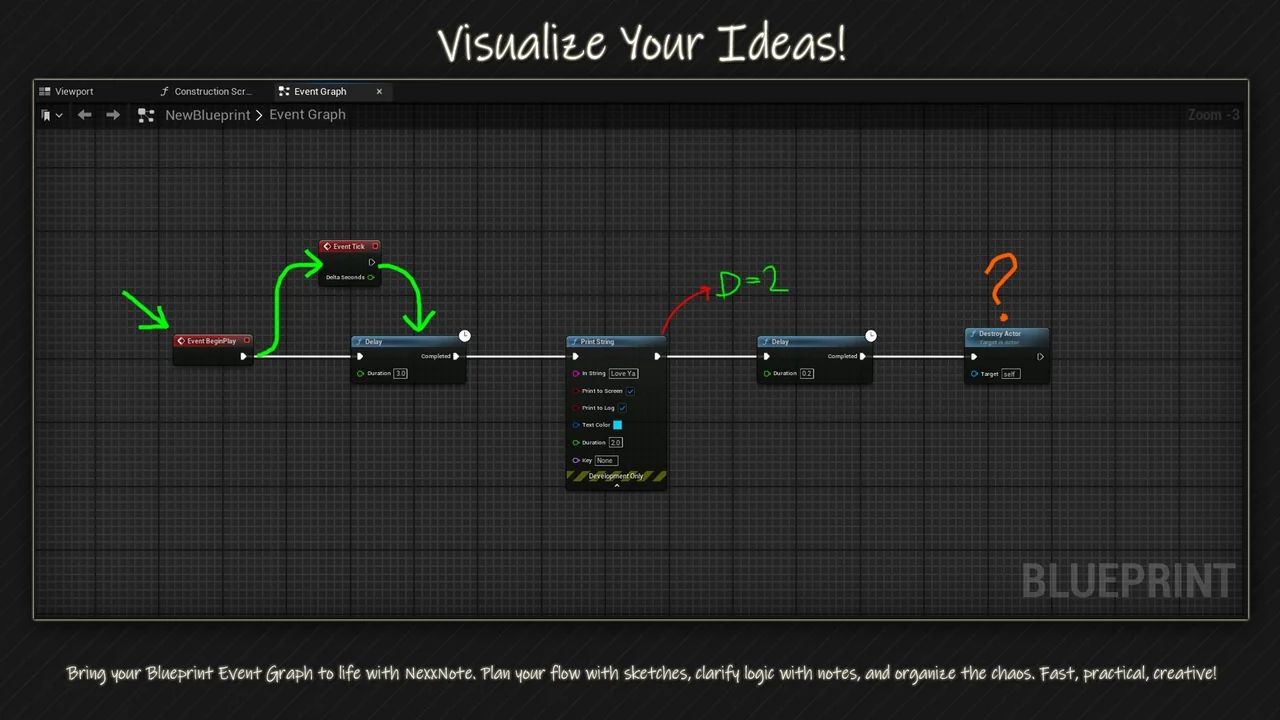
 Gameplay Features
 Engine Tools
![SKModular Plugin [Blueprint]](/_img/360/wp-content/uploads/published/2026/08/cc5057bed94d-9d0b791d-8f34-4202-bd64-b7e021485f20-2f33dab909.webp) Engine Tools
Engine Tools