"7066dd76da796369"{"id":"1000734","slug":"unreal-mcp-server-370-ai-tools-for-ue5-editor-automation-via-mcp","title":"Unreal MCP Server — 370+ AI Tools for UE5 Editor Automation via MCP","category":"Engine Tools","engine":"5.7","assetVersion":"Asset Version: 2.0.2","engineVersion":"Engine Version: 5.7","tag":"Engine Tools","accent":"blue","visual":"mech","summary":"Unreal MCP Server v4 connects AI agents like Claude Code and Cursor to Unreal Engine 5.7 via 378 tools. Features multi-step transactions, Blueprint editing, and","platform":"Unreal Engine","publishedAt":"2026-07-26T16:27:55.382Z","updatedAt":"2026-07-26T16:27:55.382Z","sourceNotes":[],"fileContents":[],"compatibility":["Unreal Engine","Asset Version: 2.0.2","Engine Version: 5.7"],"featuredImage":{"alt":"Unreal MCP Server — 370+ AI Tools for UE5 Editor Automation via MCP","src":"/wp-content/uploads/published/2026/07/329b4f864b95-dead06b5-972c-4ff4-be8e-bfa97f905c83-ae0e4f86af.webp"},"hasDownloadLink":true,"downloads":8,"terms":[{"taxonomy":"category","slug":"engine-tools-tools-and-plugins","name":"Engine Tools"}],"galleryImages":[{"src":"/wp-content/uploads/published/2026/07/853d29048e86-30fe0c9e-505f-4721-9400-55dba6f0f307-e7c52e8efd.webp","alt":"Unreal MCP Server — 370+ AI Tools for UE5 Editor Automation via MCP"},{"src":"/wp-content/uploads/published/2026/07/008006ed31c2-76705ff1-514d-456a-aad4-1b8bf15b35e1-c59616a404.webp","alt":"Unreal MCP Server — 370+ AI Tools for UE5 Editor Automation via MCP"},{"src":"/wp-content/uploads/published/2026/07/8a486bb8c326-730ae9ad-23ea-4118-a1c5-d1818eef2022-265d5cbfb6.webp","alt":"Unreal MCP Server — 370+ AI Tools for UE5 Editor Automation via MCP"},{"src":"/wp-content/uploads/published/2026/07/3e42bf0d3e49-542ad107-4787-449c-a994-290a4cf38998-4ec8151dfd.webp","alt":"Unreal MCP Server — 370+ AI Tools for UE5 Editor Automation via MCP"},{"src":"/wp-content/uploads/published/2026/07/0b12741ac40b-73303b6b-a326-4055-91ab-97e8dc9343bf-500e172e14.webp","alt":"Unreal MCP Server — 370+ AI Tools for UE5 Editor Automation via MCP"},{"src":"/wp-content/uploads/published/2026/07/ce3ca5689e51-d167bb28-bc5f-4759-9c5f-884854f326f3-1ab50de3e8.webp","alt":"Unreal MCP Server — 370+ AI Tools for UE5 Editor Automation via MCP"}],"accessPanel":{"kind":"resource","title":"Download this resource","eyebrow":"Free Download","message":"Log in or create a free account to start your download.","fileName":"5.7.7z","safetyNote":"Resources are manually reviewed before listing to improve quality and reduce obvious risks.","actionLabel":"Download Free","resourceType":"Resource archive"},"contentHtml":"\u003cp\u003eBridging an AI coding assistant to a complex game engine often means juggling fragile scripts or burning through token limits just to enumerate available commands. Unreal MCP Server v4 attacks this friction head-on, connecting MCP-compatible agents directly to the Unreal Engine 5.7 Editor.\u003c/p\u003e\n\n\u003cp\u003eThe server ships 378 editor tools across 54 categories alongside 15 context resources and 14 workflow prompts. It communicates via JSON-RPC 2.0 over Streamable HTTP, turning environments like Claude Code, Cursor, Windsurf, Claude Desktop, VS Code (Copilot), Antigravity, and OpenCode into functional co-developers for level building, gameplay scripting, cinematics, VFX, audio, networking, and animation.\u003c/p\u003e\n\n\u003ch2\u003eCatalog Mode and AI Context Management\u003c/h2\u003e\n\u003cp\u003ePassing the schemas for 378 tools to an AI model at startup consumes roughly 60,000 tokens. The v4 release defaults to Catalog mode, a progressive tool disclosure system that trims a fresh session's tool-definition cost by roughly 95%.\u003c/p\u003e\n\n\u003cp\u003eIn Catalog mode, the \u003ccode\u003etools/list\u003c/code\u003e endpoint returns four discovery meta-tools and around 30 core tools totaling about 3,000 tokens. Agents discover the remaining tools on demand using \u003ccode\u003esearch_tools\u003c/code\u003e, \u003ccode\u003elist_tool_categories\u003c/code\u003e, and \u003ccode\u003eget_tool_schemas\u003c/code\u003e. Every tool remains callable despite not being loaded into the initial context. Developers can switch to the old behavior by setting \u003ccode\u003eToolExposureMode\u003c/code\u003e to \u003ccode\u003eFull\u003c/code\u003e, or instantly manage AI context costs using five tool presets: \u003ccode\u003eFull\u003c/code\u003e, \u003ccode\u003eScene Building\u003c/code\u003e, \u003ccode\u003eGameplay\u003c/code\u003e, \u003ccode\u003eMinimal\u003c/code\u003e, and \u003ccode\u003eCatalog\u003c/code\u003e.\u003c/p\u003e\n\n\u003ch2\u003eBatch Scene Building with \u003ccode\u003erun_tool_script\u003c/code\u003e\u003c/h2\u003e\n\u003cp\u003eExecuting batch operations in an engine historically requires multiple round-trips between the agent and the editor. The \u003ccode\u003erun_tool_script\u003c/code\u003e command eliminates this by running multi-step programs as a single, all-or-nothing editor transaction.\u003c/p\u003e\n\n\u003cp\u003eScripts accept sequential tool calls with result references, such as \u003ccode\u003esave_as\u003c/code\u003e and \u003ccode\u003e$var.field\u003c/code\u003e, alongside \u003ccode\u003eforeach\u003c/code\u003e loops. If any step fails, the entire sequence rolls back automatically. A 24-Actor level blockout becomes a single call and requires a single Ctrl+Z to revert, solving the N-round-trip problem for batch work.\u003c/p\u003e\n\n\u003ch2\u003eClosed-Loop Blueprint Topology Editing\u003c/h2\u003e\n\u003cp\u003eReading visual scripting state back to an AI agent normally takes dozens of queries to map pins and connections. The \u003ccode\u003edescribe_graph\u003c/code\u003e function returns full Blueprint topology in one call, including nodes, pins, a deduplicated edge list, and compile status.\u003c/p\u003e\n\n\u003cp\u003eThis gives the agent the ability to verify its own edits. The 60 Blueprint tools include components, variables, wiring nodes, setting properties, full graph read-back, and cleanup. Developers can trace execution paths, move or delete nodes, manage comments and reroutes, find orphaned nodes, list node types, and query Actor components or component info without leaving the AI prompt context.\u003c/p\u003e\n\n\u003ch2\u003eReal-Time Modeling and Chaos Destruction\u003c/h2\u003e\n\u003cp\u003ePrevious schema stubs for modeling and physics are fully implemented in v4. The five modeling tools—\u003ccode\u003epolyextrude\u003c/code\u003e, \u003ccode\u003epolycut\u003c/code\u003e, \u003ccode\u003eboolean\u003c/code\u003e, \u003ccode\u003euv_unwrap\u003c/code\u003e, and \u003ccode\u003eremesh\u003c/code\u003e—run via GeometryScript and report before and after triangle counts.\u003c/p\u003e\n\n\u003cp\u003eChaos Destruction tools now execute for real. Developers can use \u003ccode\u003echaos_create_geometry_collection\u003c/code\u003e and \u003ccode\u003echaos_fracture\u003c/code\u003e with Voronoi, cluster, uniform, and planar settings. The \u003ccode\u003echaos_apply_force\u003c/code\u003e command applies runtime impulses to generated geometry.\u003c/p\u003e\n\n\u003ch2\u003eBackground Tasks and Structured Agent Feedback\u003c/h2\u003e\n\u003cp\u003eLong-running operations like lighting and navigation builds, fracture calculations, remeshing, PCG execution, fal.ai generation, and automation runs no longer block the editor. These tools return a task ID and a working status after a 3-second grace window. Agents poll \u003ccode\u003eget_task_status\u003c/code\u003e for progress, abort with \u003ccode\u003ecancel_task\u003c/code\u003e, and enumerate active jobs with \u003ccode\u003elist_tasks\u003c/code\u003e. This runs as standard tools, so every MCP client handles long operations without capability negotiation.\u003c/p\u003e\n\n\u003cp\u003eEvery JSON-returning tool provides \u003ccode\u003estructuredContent\u003c/code\u003e alongside human-readable text. Structured errors return a machine-readable code, hint, and \u003ccode\u003edid_you_mean\u003c/code\u003e array. Agents switch on the error code for recovery flows instead of regexing strings, which cuts retry loops.\u003c/p\u003e\n\n\u003ch2\u003eEngine Integration and Production Safety\u003c/h2\u003e\n\u003cp\u003eThe server works against any source control provider Unreal Engine supports, including Perforce, Git LFS, Plastic SCM, and Subversion. AI-powered image generation and text/image-to-3D generation route through fal.ai. An STDIO bridge handles non-HTTP clients like Claude Desktop.\u003c/p\u003e\n\n\u003cp\u003eSafety mechanics include bearer-token authentication, an origin allow-list defaulting to localhost-only, scope gating, rate limiting, and dry-run capabilities. The core rejects oversized request bodies with an HTTP 413 error before parsing, enforces tool-call timeouts, and uses exception guards to return structured internal errors instead of crashing the editor. Idle sessions trigger garbage collection, and DNS-rebinding defense validates \u003ccode\u003eHost\u003c/code\u003e headers.\u003c/p\u003e\n\n\u003ch2\u003eAutomated Testing for the Tool Registry\u003c/h2\u003e\n\u003cp\u003eQuality control relies on MatrixSpec, which generates contract tests across the entire tool registry. New tools are covered the moment they register. During development, this system caught a v3 editor crash and five silent bugs. The \u003ccode\u003eexport_tool_docs\u003c/code\u003e command regenerates the per-tool reference documentation from the live registry, ensuring docs never drift from the actual tool capabilities.\u003c/p\u003e\n\n\u003cp\u003eEvery mutating operation runs inside its own named MCP editor transaction. Ctrl+Z behaves as expected, and multi-step scripts collapse into one undo step. A redesigned status bar includes a live indicator and one-click access to copy the Claude Code configuration.\u003c/p\u003e\n\n\u003cp\u003eUnreal MCP Server fits into production pipelines where artists and developers need autonomous agent execution without sacrificing engine stability or manual revision control.\u003c/p\u003e\n\n\u003ch2\u003eRelated Resources Worth Checking\u003c/h2\u003e\n\u003cul\u003e\n\u003cli\u003e\u003ca href=\"https://3dcghub.com/neostack-ai/\" title=\"NeoStack AI\"\u003eNeoStack AI\u003c/a\u003e\u003c/li\u003e\n\u003cli\u003e\u003ca href=\"https://3dcghub.com/le-encryption/\" title=\"LE Encryption\"\u003eLE Encryption\u003c/a\u003e\u003c/li\u003e\n\u003cli\u003e\u003ca href=\"https://3dcghub.com/vibeue/\" title=\"VibeUE\"\u003eVibeUE\u003c/a\u003e\u003c/li\u003e\n\u003cli\u003e\u003ca href=\"https://3dcghub.com/blueprint-generator-ai-kibibyte-labs-engine-assistant/\" title=\"AI Engine Assistant - Kibibyte Labs (Blueprint Generator \u0026amp; More!)\"\u003eAI Engine Assistant - Kibibyte Labs (Blueprint Generator \u0026amp; More!)\u003c/a\u003e\u003c/li\u003e\n\u003cli\u003e\u003ca href=\"https://3dcghub.com/ultimate-engine-copilot-formerly-ultimate-blueprint-generator/\" title=\"Ultimate Engine CoPilot (formerly Ultimate Blueprint Generator)\"\u003eUltimate Engine CoPilot (formerly Ultimate Blueprint Generator)\u003c/a\u003e\u003c/li\u003e\n\u003c/ul\u003e","contentTextLength":5936,"navigation":{"current":1431,"total":4016,"previous":{"id":"1000735","slug":"mc-play-lute-animation-pack","title":"MC Play Lute Animation Pack","category":"Variety","platform":"Unreal Engine","updatedAt":"2026-07-26T16:32:11.962Z"},"next":{"id":"1000733","slug":"gothic-exterior-megapack","title":"Gothic Exterior Megapack","category":"Procedural Systems","platform":"Unreal Engine","updatedAt":"2026-07-26T16:23:14.210Z"}},"relatedResources":[{"id":"1001056","slug":"logic-driver-pro-blueprint-editor-for-dialogue-quest-combat-and-fsm-systems","title":"Logic Driver Pro - Blueprint Editor for Dialogue, Quest, Combat \u0026 FSM Systems","category":"Engine Tools","engine":"5.3","assetVersion":"Asset Version: 2.8.1","engineVersion":"Engine Version: 5.3","tag":"Engine Tools","accent":"blue","visual":"mech","summary":"Logic Driver Pro is a node-based state machine editor for Unreal Engine. Build custom nodes in blueprints or C++, then author AI, dialogue, quests, and combat f","platform":"Unreal Engine","publishedAt":"2026-08-30T14:36:58.563Z","updatedAt":"2026-08-30T14:36:58.563Z","sourceNotes":[],"fileContents":[],"compatibility":["Unreal Engine","Asset Version: 2.8.1","Engine Version: 5.3"],"featuredImage":{"alt":"Logic Driver Pro - Blueprint Editor for Dialogue, Quest, Combat \u0026 FSM Systems","src":"/wp-content/uploads/published/2026/08/9c80a1e57566-a7733abf-eb2c-4a09-9e80-e6485475e449-f947997ebc.webp"},"hasDownloadLink":true,"downloads":1},{"id":"1001044","slug":"ai-optimizer","title":"AI Optimizer","category":"Engine Tools","engine":"5.0 - 5.3","assetVersion":"Asset Version: 1.0","engineVersion":"Engine Version: 5.0 - 5.3","tag":"Engine Tools","accent":"blue","visual":"mech","summary":"Plugin for fast actor spawner setup and AI agent optimization in any world size. Includes docs, example project, and Souls-Like spawner tutorial.","platform":"Unreal Engine","publishedAt":"2026-08-27T14:42:21.040Z","updatedAt":"2026-08-27T14:42:21.040Z","sourceNotes":[],"fileContents":[],"compatibility":["Unreal Engine","Asset Version: 1.0","Engine Version: 5.0 - 5.3"],"featuredImage":{"alt":"AI Optimizer","src":"/wp-content/uploads/published/2026/08/4fcf26f0294d-60c1ee24-5897-4094-8d67-0f105ad9143c-ee39e12bef.webp"},"hasDownloadLink":true,"downloads":0},{"id":"13760","slug":"blueprint-generator-ai-kibibyte-labs-engine-assistant","title":"AI Engine Assistant - Kibibyte Labs (Blueprint Generator \u0026 More!)","category":"Engine Tools","engine":"0.1.4","assetVersion":"Engine version: 5.2 - 5.7","engineVersion":"Asset Version: 0.1.4","tag":"Engine Tools","accent":"blue","visual":"character","summary":"Blueprint Generator Ai - Kibibyte Labs (Engine Assistant) is a powerful tool designed to transform natural language into functional Unreal Engine Blueprints. It offers a suite of modules for generating logic, explaining complex nodes, and optimizing the dev...","platform":"Unreal Engine","publishedAt":"2026-03-11T09:58:02.000Z","updatedAt":"2026-07-09T21:24:04.089Z","sourceNotes":[],"fileContents":[],"compatibility":["Unreal Engine","Engine version: 5.2 - 5.7","Asset Version: 0.1.4"],"featuredImage":{"alt":"Blueprint Generator Ai - Kibibyte Labs (Engine Assistant)","src":"https://3dcghub.com/wp-content/uploads/2026/03/ff365004-07a8-4633-90ac-7c9a038cc81d.webp"},"hasDownloadLink":true,"downloads":2}]}
Engine Tools
Unreal MCP Server — 370+ AI Tools for UE5 Editor Automation via MCP
Unreal MCP Server v4 connects AI agents like Claude Code and Cursor to Unreal Engine 5.7 via 378 tools. Features multi-step transactions, Blueprint editing, and
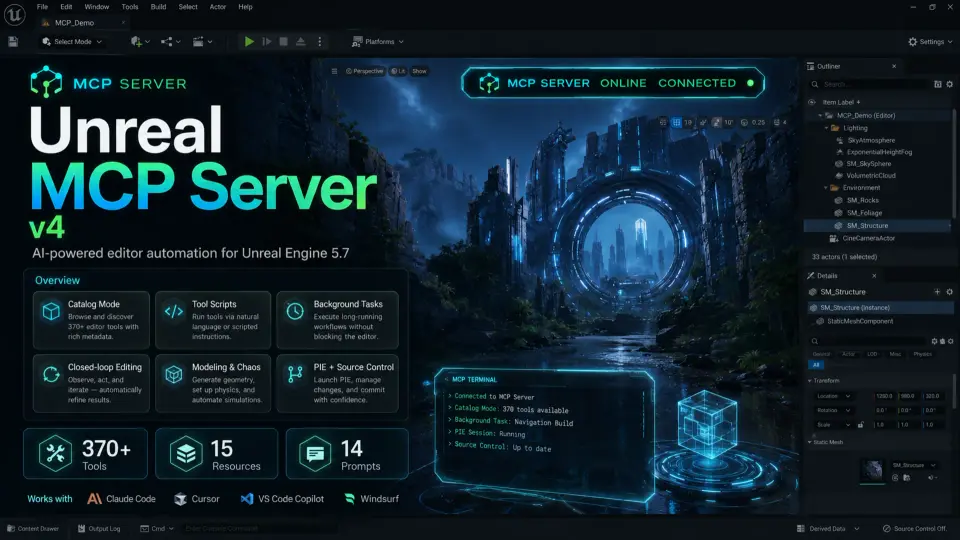
Bridging an AI coding assistant to a complex game engine often means juggling fragile scripts or burning through token limits just to enumerate available commands. Unreal MCP Server v4 attacks this friction head-on, connecting MCP-compatible agents directly to the Unreal Engine 5.7 Editor.
The server ships 378 editor tools across 54 categories alongside 15 context resources and 14 workflow prompts. It communicates via JSON-RPC 2.0 over Streamable HTTP, turning environments like Claude Code, Cursor, Windsurf, Claude Desktop, VS Code (Copilot), Antigravity, and OpenCode into functional co-developers for level building, gameplay scripting, cinematics, VFX, audio, networking, and animation.
Catalog Mode and AI Context Management
Passing the schemas for 378 tools to an AI model at startup consumes roughly 60,000 tokens. The v4 release defaults to Catalog mode, a progressive tool disclosure system that trims a fresh session's tool-definition cost by roughly 95%.
In Catalog mode, the tools/list endpoint returns four discovery meta-tools and around 30 core tools totaling about 3,000 tokens. Agents discover the remaining tools on demand using search_tools, list_tool_categories, and get_tool_schemas. Every tool remains callable despite not being loaded into the initial context. Developers can switch to the old behavior by setting ToolExposureMode to Full, or instantly manage AI context costs using five tool presets: Full, Scene Building, Gameplay, Minimal, and Catalog.
Batch Scene Building with run_tool_script
Executing batch operations in an engine historically requires multiple round-trips between the agent and the editor. The run_tool_script command eliminates this by running multi-step programs as a single, all-or-nothing editor transaction.
Scripts accept sequential tool calls with result references, such as save_as and $var.field, alongside foreach loops. If any step fails, the entire sequence rolls back automatically. A 24-Actor level blockout becomes a single call and requires a single Ctrl+Z to revert, solving the N-round-trip problem for batch work.
Closed-Loop Blueprint Topology Editing
Reading visual scripting state back to an AI agent normally takes dozens of queries to map pins and connections. The describe_graph function returns full Blueprint topology in one call, including nodes, pins, a deduplicated edge list, and compile status.
This gives the agent the ability to verify its own edits. The 60 Blueprint tools include components, variables, wiring nodes, setting properties, full graph read-back, and cleanup. Developers can trace execution paths, move or delete nodes, manage comments and reroutes, find orphaned nodes, list node types, and query Actor components or component info without leaving the AI prompt context.
Real-Time Modeling and Chaos Destruction
Previous schema stubs for modeling and physics are fully implemented in v4. The five modeling tools—polyextrude, polycut, boolean, uv_unwrap, and remesh—run via GeometryScript and report before and after triangle counts.
Chaos Destruction tools now execute for real. Developers can use chaos_create_geometry_collection and chaos_fracture with Voronoi, cluster, uniform, and planar settings. The chaos_apply_force command applies runtime impulses to generated geometry.
Background Tasks and Structured Agent Feedback
Long-running operations like lighting and navigation builds, fracture calculations, remeshing, PCG execution, fal.ai generation, and automation runs no longer block the editor. These tools return a task ID and a working status after a 3-second grace window. Agents poll get_task_status for progress, abort with cancel_task, and enumerate active jobs with list_tasks. This runs as standard tools, so every MCP client handles long operations without capability negotiation.
Every JSON-returning tool provides structuredContent alongside human-readable text. Structured errors return a machine-readable code, hint, and did_you_mean array. Agents switch on the error code for recovery flows instead of regexing strings, which cuts retry loops.
Engine Integration and Production Safety
The server works against any source control provider Unreal Engine supports, including Perforce, Git LFS, Plastic SCM, and Subversion. AI-powered image generation and text/image-to-3D generation route through fal.ai. An STDIO bridge handles non-HTTP clients like Claude Desktop.
Safety mechanics include bearer-token authentication, an origin allow-list defaulting to localhost-only, scope gating, rate limiting, and dry-run capabilities. The core rejects oversized request bodies with an HTTP 413 error before parsing, enforces tool-call timeouts, and uses exception guards to return structured internal errors instead of crashing the editor. Idle sessions trigger garbage collection, and DNS-rebinding defense validates Host headers.
Automated Testing for the Tool Registry
Quality control relies on MatrixSpec, which generates contract tests across the entire tool registry. New tools are covered the moment they register. During development, this system caught a v3 editor crash and five silent bugs. The export_tool_docs command regenerates the per-tool reference documentation from the live registry, ensuring docs never drift from the actual tool capabilities.
Every mutating operation runs inside its own named MCP editor transaction. Ctrl+Z behaves as expected, and multi-step scripts collapse into one undo step. A redesigned status bar includes a live indicator and one-click access to copy the Claude Code configuration.
Unreal MCP Server fits into production pipelines where artists and developers need autonomous agent execution without sacrificing engine stability or manual revision control.
 Engine Tools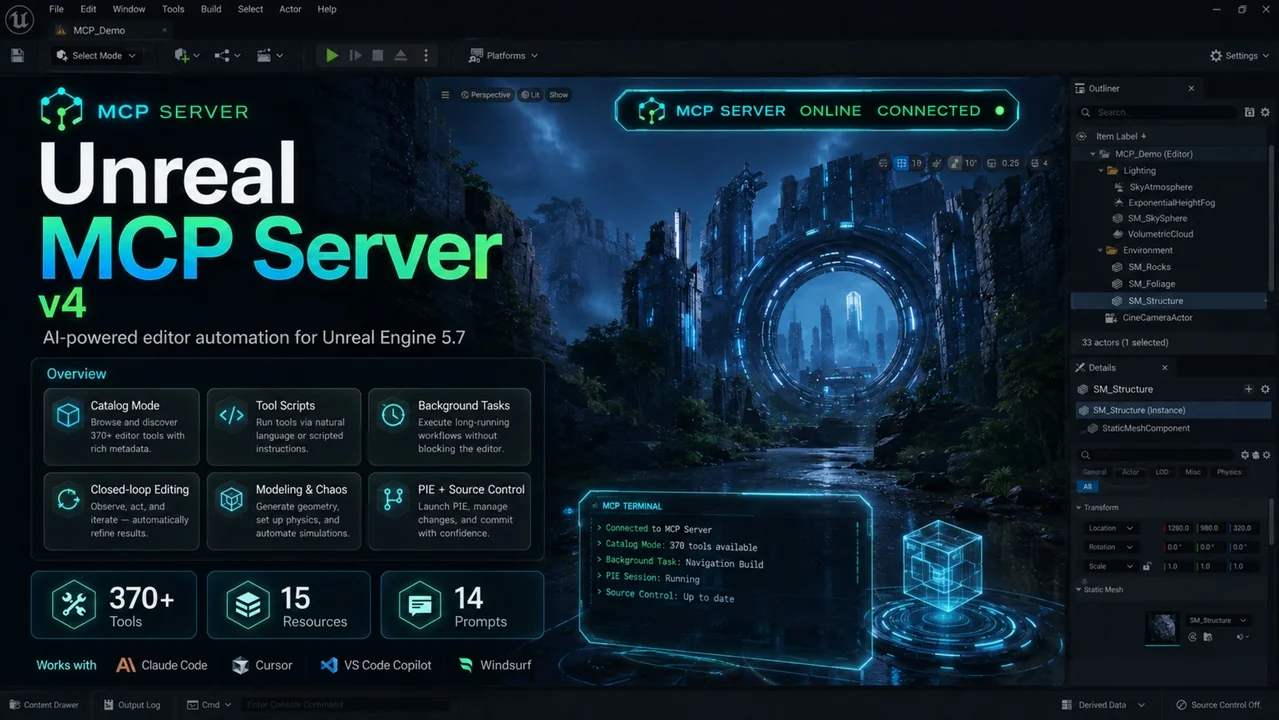
 Engine Tools
 Engine Tools
 Engine Tools