"a1b27a35aebef368"{"id":"1000275","slug":"neostack-ai","title":"NeoStack AI","category":"Engine Tools","engine":"5.5 - 5.7","assetVersion":"Asset Version: 1.0.74","engineVersion":"Engine Version: 5.5 - 5.7","tag":"Engine Tools","accent":"blue","visual":"mech","summary":"An integrated AI-powered Unreal Editor assistant supporting multiple engine systems, from core Blueprint logic and data structures to Niagara VFX and Motion Mat","platform":"Unreal Engine","publishedAt":"2026-07-02T18:00:45.818Z","updatedAt":"2026-07-02T18:00:45.818Z","sourceNotes":[],"fileContents":[],"compatibility":["Unreal Engine","Asset Version: 1.0.74","Engine Version: 5.5 - 5.7"],"featuredImage":{"alt":"NeoStack AI","src":"/wp-content/uploads/published/2026/07/c5ed0d4009ef-5dcddb82-e8d9-4052-9100-4fa2cefac084-1226fad1a3.webp"},"hasDownloadLink":true,"downloads":2,"terms":[{"taxonomy":"category","slug":"engine-tools-tools-and-plugins","name":"Engine Tools"}],"galleryImages":[{"src":"/wp-content/uploads/published/2026/07/53953a0c3d65-e7443b99-ca0e-4012-991b-470f6fd8aa68-09233da540.webp","alt":"NeoStack AI"},{"src":"/wp-content/uploads/published/2026/07/7fe0748bc06b-1f6dd8f5-7376-4bd8-a4d1-fce967cce0d8-cd5f92abd9.webp","alt":"NeoStack AI"},{"src":"/wp-content/uploads/published/2026/07/de0a2b84fad4-3ee09e4d-0327-4f62-83ac-515559c796ea-2343bd20d4.webp","alt":"NeoStack AI"},{"src":"/wp-content/uploads/published/2026/07/903e73dc819c-3a990363-05ac-4b53-a6af-e0b98473c74b-c84a34d468.webp","alt":"NeoStack AI"},{"src":"/wp-content/uploads/published/2026/07/d787d48c6e4a-99ae6335-6e6d-4790-a609-01c9ee5599a5-34e6ac168f.webp","alt":"NeoStack AI"},{"src":"/wp-content/uploads/published/2026/07/c652d15e708e-8dafc237-40fa-4a58-b0b8-bafc219507de-786a4e89c9.webp","alt":"NeoStack AI"},{"src":"/wp-content/uploads/published/2026/07/5360972601d8-703d6de6-753a-42a5-93f5-37a2118b6b6a-247ca53611.webp","alt":"NeoStack AI"},{"src":"/wp-content/uploads/published/2026/07/72e4d01ae363-eed0de7b-7d3b-495c-a0d3-8397a3ff70ab-97f56a1d32.webp","alt":"NeoStack AI"},{"src":"/wp-content/uploads/published/2026/07/9b7f5bdabbe5-2ed3fa7f-bea9-49ad-a02a-e414df689c7a-99577c998d.webp","alt":"NeoStack AI"},{"src":"/wp-content/uploads/published/2026/07/f8876a775ab6-f9059de3-743b-4714-991a-2f260a440495-d41f50d9bd.webp","alt":"NeoStack AI"}],"accessPanel":{"kind":"resource","title":"Download this resource","eyebrow":"Free Download","message":"Log in or create a free account to start your download.","fileName":"NeoStack AI.7z","safetyNote":"Resources are manually reviewed before listing to improve quality and reduce obvious risks.","actionLabel":"Download Free","resourceType":"Resource archive"},"contentHtml":"\u003ch2\u003eNavigating Editor Workflows with AI Assistance\u003c/h2\u003e\n\u003cp\u003eBuilding interactive environments and complex game mechanics within Unreal Engine requires navigating a dense ecosystem of specialized toolsets. Developers constantly switch contexts, moving from logic scripting to rendering setups, and then into animation graphs. NeoStack AI operates directly inside the Unreal Editor as an integrated assistant designed to streamline this exact process. Rather than limiting its scope to basic logic generation, the tool spans the engine's core infrastructure, providing AI-powered support for everything from procedural generation frameworks to foundational data management.\u003c/p\u003e \u003ch2\u003eBeyond Basic Scripts: Structuring Logic and Data Architecture\u003c/h2\u003e\n\u003cp\u003eGame development relies heavily on organized data and interconnected logic. NeoStack AI moves beyond standard Blueprint scripting to support the underlying data structures that drive complex game mechanics. The assistant integrates directly with Structs, Enums, and DataTables, allowing developers to manage expansive arrays of information such as inventory statistics, weapon attributes, or dialogue branching systems. Structuring this data effectively is critical for scalability, and having an assistant that understands these specific Unreal formats reduces friction during the architectural phase of a project.\u003c/p\u003e\n\u003cp\u003eAlongside foundational data architecture, the tool interacts with standard Blueprints and Enhanced Input systems, facilitating the setup of modern player controls and input bindings. The assistant also extends its capabilities to User Interface creation by supporting UMG (Unreal Motion Graphics), helping structure menu logic and HUD elements. For developers looking to optimize their own internal workflows, NeoStack AI interfaces with Editor Utilities, enabling the creation of custom editor tools tailored to specific project pipelines.\u003c/p\u003e \u003ch2\u003eAI Support Across the Animation Pipeline\u003c/h2\u003e\n\u003cp\u003eCharacter movement in Unreal Engine involves multiple overlapping systems, and NeoStack AI is built to assist across this entire animation pipeline. The tool supports traditional Animation Blueprints and Animation Montages, aiding in the complex logic required to blend different animations seamlessly based on active gameplay states. It also handles IK Rigs and Control Rig setups, which are essential components for procedural skeletal adjustments like realistic foot placement or dynamic aiming mechanics.\u003c/p\u003e\n\u003cp\u003eNotably, the assistant extends its capabilities to Motion Matching, Unreal Engine's modern, data-driven approach to character locomotion that relies on large animation databases rather than manual state transitions. Compatibility with the standard Epic Skeleton ensures that developers can immediately apply this AI assistance to standard humanoid rigs without requiring complex retargeting workarounds before the assistant can analyze the setup.\u003c/p\u003e \u003ch2\u003eDriving NPC Logic with State and Behaviour Trees\u003c/h2\u003e\n\u003cp\u003eCrafting believable artificial intelligence for non-player characters requires specialized logic flows that differ significantly from standard player character controllers. NeoStack AI supports both Behaviour Trees and State Trees, which serve as the two primary frameworks for NPC decision-making in the engine. By interacting with these dedicated AI systems, the assistant helps map out complex sequences of actions, fallback conditions, and sensory triggers. This allows developers to structure everything from simple enemy patrol routes to highly complex, multi-stage boss encounters while remaining entirely within the editor's native logic trees.\u003c/p\u003e \u003ch2\u003eProcedural Generation, Rendering, and Visual Effects\u003c/h2\u003e\n\u003cp\u003eCreating dynamic environments involves manipulating multiple visual systems simultaneously, and the assistant provides support across several key rendering and procedural frameworks. NeoStack AI integrates with Procedural Content Generation (PCG), helping developers build rule-based generation frameworks to populate massive environments efficiently. For visual fidelity, the assistant works with the engine's Material graph, encompassing material properties like Metallic and Transparent surfaces, while remaining fully compatible with modern rendering pipelines such as Nanite and Lumen.\u003c/p\u003e\n\u003cp\u003eOn top of that, the tool provides active support for Niagara VFX, Unreal’s primary particle and visual effects system. This enables developers to structure the mathematical logic and emitter behaviors behind complex environmental effects, magic spells, or weapon impacts. It also interacts with Level Sequences, assisting in the orchestration of cinematic moments, camera cuts, and timeline-based events for in-game cutscenes.\u003c/p\u003e\n\u003cp\u003eSound design is increasingly logic-driven in modern development, and the assistant supports MetaSounds, Unreal’s high-performance procedural audio rendering system. This allows developers to integrate AI assistance when building complex audio graphs, connecting gameplay variables directly to sound generation parameters for highly responsive audio environments.\u003c/p\u003e \u003ch2\u003eProvider Connectivity and Beta Implementation\u003c/h2\u003e\n\u003cp\u003eThe technical implementation of NeoStack AI depends directly on the external AI model chosen by the user. The tool functions as an integrated bridge, connecting the Unreal Editor to a user-selected provider. The underlying AI model heavily dictates the quality of the generated output, and Claude is explicitly noted as delivering the best results for this specific integration. Utilizing weaker models will inherently result in weaker output, which is a limitation of the chosen external provider rather than the editor tool itself.\u003c/p\u003e\n\u003cp\u003eCurrently operating in a Beta phase, the assistant is actively being updated, with new features and system support being added on a weekly basis. The development team prioritizes stability and iteration, having shipped over 100 crash fixes within days of the initial launch. Most reported issues are documented and resolved on the same day. For implementation hurdles, hands-on support is provided through a dedicated Discord community. This includes direct troubleshooting and even remote sessions to help developers properly configure their editor environment and connect their chosen AI providers for optimal performance.\u003c/p\u003e\n\n\u003ch2\u003eContinue Browsing Similar Packs\u003c/h2\u003e\n\u003cul\u003e\n\u003cli\u003e\u003ca href=\"https://3dcghub.com/blueprint-generator-ai-kibibyte-labs-engine-assistant/\" title=\"Blueprint Generator Ai - Kibibyte Labs (Engine Assistant)\"\u003eBlueprint Generator Ai - Kibibyte Labs (Engine Assistant)\u003c/a\u003e\u003c/li\u003e\n\u003cli\u003e\u003ca href=\"https://3dcghub.com/athena-ai-a-utility-ai-framework-v2/\" title=\"Athena AI: A Utility AI Framework - V2\"\u003eAthena AI: A Utility AI Framework - V2\u003c/a\u003e\u003c/li\u003e\n\u003cli\u003e\u003ca href=\"https://3dcghub.com/vibeue/\" title=\"VibeUE\"\u003eVibeUE\u003c/a\u003e\u003c/li\u003e\n\u003cli\u003e\u003ca href=\"https://3dcghub.com/runtime-speech-recognizer-real-time-offline-ai/\" title=\"Runtime Speech Recognizer (Real-Time, Offline, AI)\"\u003eRuntime Speech Recognizer (Real-Time, Offline, AI)\u003c/a\u003e\u003c/li\u003e\n\u003cli\u003e\u003ca href=\"https://3dcghub.com/dynamic-ai-system/\" title=\"Dynamic AI System\"\u003eDynamic AI System\u003c/a\u003e\u003c/li\u003e\n\u003c/ul\u003e","contentTextLength":6420,"navigation":{"current":1128,"total":3269,"previous":{"id":"1000277","slug":"abandoned-industrial-tunnel","title":"Abandoned Industrial Tunnel","category":"Abandoned","platform":"Unreal Engine","updatedAt":"2026-07-02T18:13:30.323Z"},"next":{"id":"1000274","slug":"anime-skybox-v1","title":"ANIME SKYBOX V1","category":"Nature \u0026 Plants","platform":"Unreal Engine","updatedAt":"2026-07-02T17:08:45.348Z"}},"relatedResources":[{"id":"13760","slug":"blueprint-generator-ai-kibibyte-labs-engine-assistant","title":"AI Engine Assistant - Kibibyte Labs (Blueprint Generator \u0026 More!)","category":"Engine Tools","engine":"0.1.4","assetVersion":"Engine version: 5.2 - 5.7","engineVersion":"Asset Version: 0.1.4","tag":"Engine Tools","accent":"blue","visual":"character","summary":"Blueprint Generator Ai - Kibibyte Labs (Engine Assistant) is a powerful tool designed to transform natural language into functional Unreal Engine Blueprints. It offers a suite of modules for generating logic, explaining complex nodes, and optimizing the dev...","platform":"Unreal Engine","publishedAt":"2026-03-11T09:58:02.000Z","updatedAt":"2026-07-09T21:24:04.089Z","sourceNotes":[],"fileContents":[],"compatibility":["Unreal Engine","Engine version: 5.2 - 5.7","Asset Version: 0.1.4"],"featuredImage":{"alt":"Blueprint Generator Ai - Kibibyte Labs (Engine Assistant)","src":"https://3dcghub.com/wp-content/uploads/2026/03/ff365004-07a8-4633-90ac-7c9a038cc81d.webp"},"hasDownloadLink":true,"downloads":2},{"id":"1000734","slug":"unreal-mcp-server-370-ai-tools-for-ue5-editor-automation-via-mcp","title":"Unreal MCP Server — 370+ AI Tools for UE5 Editor Automation via MCP","category":"Engine Tools","engine":"5.7","assetVersion":"Asset Version: 2.0.2","engineVersion":"Engine Version: 5.7","tag":"Engine Tools","accent":"blue","visual":"mech","summary":"Unreal MCP Server v4 connects AI agents like Claude Code and Cursor to Unreal Engine 5.7 via 378 tools. Features multi-step transactions, Blueprint editing, and","platform":"Unreal Engine","publishedAt":"2026-07-26T16:27:55.382Z","updatedAt":"2026-07-26T16:27:55.382Z","sourceNotes":[],"fileContents":[],"compatibility":["Unreal Engine","Asset Version: 2.0.2","Engine Version: 5.7"],"featuredImage":{"alt":"Unreal MCP Server — 370+ AI Tools for UE5 Editor Automation via MCP","src":"/wp-content/uploads/published/2026/07/329b4f864b95-dead06b5-972c-4ff4-be8e-bfa97f905c83-ae0e4f86af.webp"},"hasDownloadLink":true,"downloads":7},{"id":"1001044","slug":"ai-optimizer","title":"AI Optimizer","category":"Engine Tools","engine":"5.0 - 5.3","assetVersion":"Asset Version: 1.0","engineVersion":"Engine Version: 5.0 - 5.3","tag":"Engine Tools","accent":"blue","visual":"mech","summary":"Plugin for fast actor spawner setup and AI agent optimization in any world size. Includes docs, example project, and Souls-Like spawner tutorial.","platform":"Unreal Engine","publishedAt":"2026-08-27T14:42:21.040Z","updatedAt":"2026-08-27T14:42:21.040Z","sourceNotes":[],"fileContents":[],"compatibility":["Unreal Engine","Asset Version: 1.0","Engine Version: 5.0 - 5.3"],"featuredImage":{"alt":"AI Optimizer","src":"/wp-content/uploads/published/2026/08/4fcf26f0294d-60c1ee24-5897-4094-8d67-0f105ad9143c-ee39e12bef.webp"},"hasDownloadLink":true,"downloads":0}]}
Engine Tools
NeoStack AI
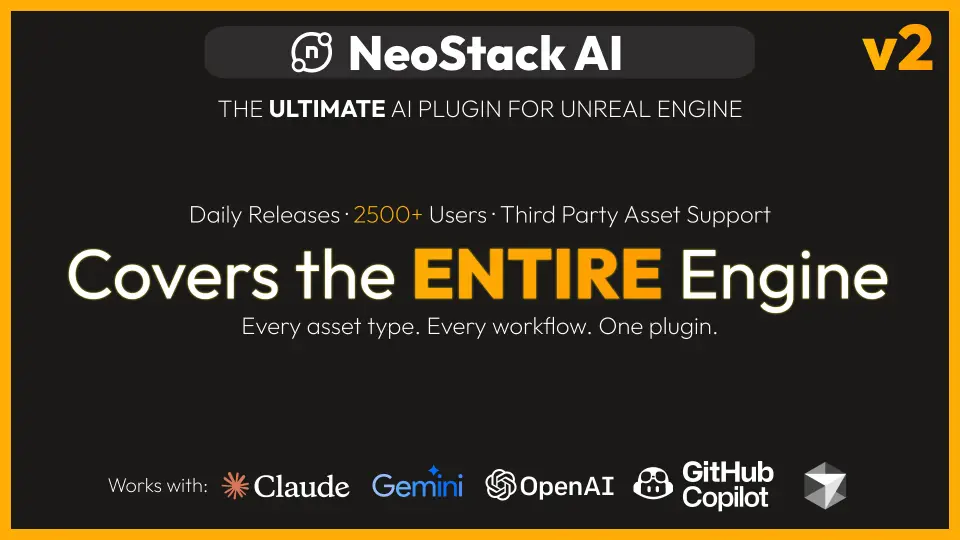
An integrated AI-powered Unreal Editor assistant supporting multiple engine systems, from core Blueprint logic and data structures to Niagara VFX and Motion Mat
Building interactive environments and complex game mechanics within Unreal Engine requires navigating a dense ecosystem of specialized toolsets. Developers constantly switch contexts, moving from logic scripting to rendering setups, and then into animation graphs. NeoStack AI operates directly inside the Unreal Editor as an integrated assistant designed to streamline this exact process. Rather than limiting its scope to basic logic generation, the tool spans the engine's core infrastructure, providing AI-powered support for everything from procedural generation frameworks to foundational data management.
Beyond Basic Scripts: Structuring Logic and Data Architecture
Game development relies heavily on organized data and interconnected logic. NeoStack AI moves beyond standard Blueprint scripting to support the underlying data structures that drive complex game mechanics. The assistant integrates directly with Structs, Enums, and DataTables, allowing developers to manage expansive arrays of information such as inventory statistics, weapon attributes, or dialogue branching systems. Structuring this data effectively is critical for scalability, and having an assistant that understands these specific Unreal formats reduces friction during the architectural phase of a project.
Alongside foundational data architecture, the tool interacts with standard Blueprints and Enhanced Input systems, facilitating the setup of modern player controls and input bindings. The assistant also extends its capabilities to User Interface creation by supporting UMG (Unreal Motion Graphics), helping structure menu logic and HUD elements. For developers looking to optimize their own internal workflows, NeoStack AI interfaces with Editor Utilities, enabling the creation of custom editor tools tailored to specific project pipelines.
AI Support Across the Animation Pipeline
Character movement in Unreal Engine involves multiple overlapping systems, and NeoStack AI is built to assist across this entire animation pipeline. The tool supports traditional Animation Blueprints and Animation Montages, aiding in the complex logic required to blend different animations seamlessly based on active gameplay states. It also handles IK Rigs and Control Rig setups, which are essential components for procedural skeletal adjustments like realistic foot placement or dynamic aiming mechanics.
Notably, the assistant extends its capabilities to Motion Matching, Unreal Engine's modern, data-driven approach to character locomotion that relies on large animation databases rather than manual state transitions. Compatibility with the standard Epic Skeleton ensures that developers can immediately apply this AI assistance to standard humanoid rigs without requiring complex retargeting workarounds before the assistant can analyze the setup.
Driving NPC Logic with State and Behaviour Trees
Crafting believable artificial intelligence for non-player characters requires specialized logic flows that differ significantly from standard player character controllers. NeoStack AI supports both Behaviour Trees and State Trees, which serve as the two primary frameworks for NPC decision-making in the engine. By interacting with these dedicated AI systems, the assistant helps map out complex sequences of actions, fallback conditions, and sensory triggers. This allows developers to structure everything from simple enemy patrol routes to highly complex, multi-stage boss encounters while remaining entirely within the editor's native logic trees.
Procedural Generation, Rendering, and Visual Effects
Creating dynamic environments involves manipulating multiple visual systems simultaneously, and the assistant provides support across several key rendering and procedural frameworks. NeoStack AI integrates with Procedural Content Generation (PCG), helping developers build rule-based generation frameworks to populate massive environments efficiently. For visual fidelity, the assistant works with the engine's Material graph, encompassing material properties like Metallic and Transparent surfaces, while remaining fully compatible with modern rendering pipelines such as Nanite and Lumen.
On top of that, the tool provides active support for Niagara VFX, Unreal’s primary particle and visual effects system. This enables developers to structure the mathematical logic and emitter behaviors behind complex environmental effects, magic spells, or weapon impacts. It also interacts with Level Sequences, assisting in the orchestration of cinematic moments, camera cuts, and timeline-based events for in-game cutscenes.
Sound design is increasingly logic-driven in modern development, and the assistant supports MetaSounds, Unreal’s high-performance procedural audio rendering system. This allows developers to integrate AI assistance when building complex audio graphs, connecting gameplay variables directly to sound generation parameters for highly responsive audio environments.
Provider Connectivity and Beta Implementation
The technical implementation of NeoStack AI depends directly on the external AI model chosen by the user. The tool functions as an integrated bridge, connecting the Unreal Editor to a user-selected provider. The underlying AI model heavily dictates the quality of the generated output, and Claude is explicitly noted as delivering the best results for this specific integration. Utilizing weaker models will inherently result in weaker output, which is a limitation of the chosen external provider rather than the editor tool itself.
Currently operating in a Beta phase, the assistant is actively being updated, with new features and system support being added on a weekly basis. The development team prioritizes stability and iteration, having shipped over 100 crash fixes within days of the initial launch. Most reported issues are documented and resolved on the same day. For implementation hurdles, hands-on support is provided through a dedicated Discord community. This includes direct troubleshooting and even remote sessions to help developers properly configure their editor environment and connect their chosen AI providers for optimal performance.
 Engine Tools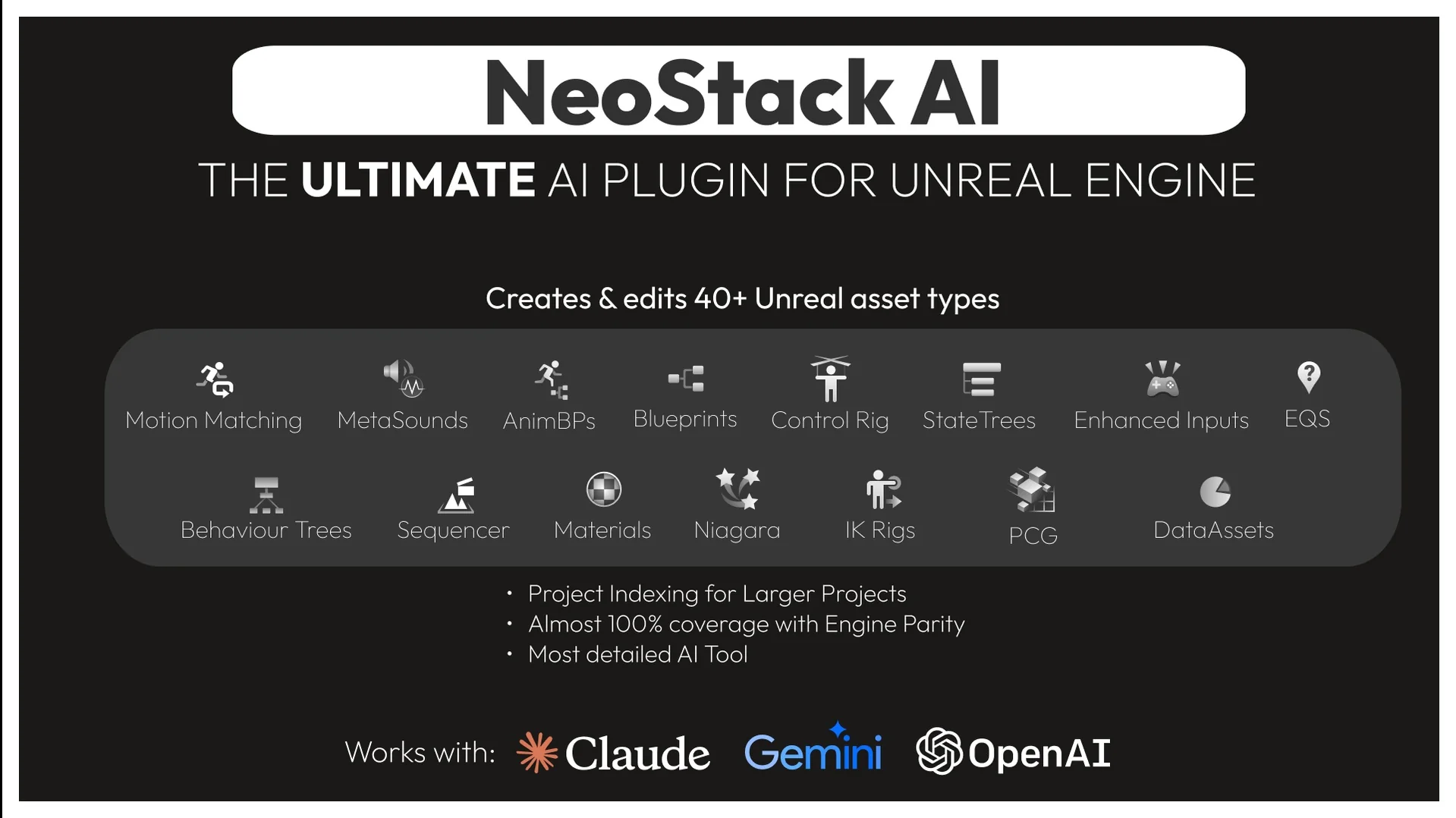
 Engine Tools
 Engine Tools
 Engine Tools