"7e6fc58c410f2894"{"id":"1001044","slug":"ai-optimizer","title":"AI Optimizer","category":"Engine Tools","engine":"5.0 - 5.3","assetVersion":"Asset Version: 1.0","engineVersion":"Engine Version: 5.0 - 5.3","tag":"Engine Tools","accent":"blue","visual":"mech","summary":"Plugin for fast actor spawner setup and AI agent optimization in any world size. Includes docs, example project, and Souls-Like spawner tutorial.","platform":"Unreal Engine","publishedAt":"2026-08-27T14:42:21.040Z","updatedAt":"2026-08-27T14:42:21.040Z","sourceNotes":[],"fileContents":[],"compatibility":["Unreal Engine","Asset Version: 1.0","Engine Version: 5.0 - 5.3"],"featuredImage":{"alt":"AI Optimizer","src":"/wp-content/uploads/published/2026/08/4fcf26f0294d-60c1ee24-5897-4094-8d67-0f105ad9143c-ee39e12bef.webp"},"hasDownloadLink":true,"downloads":0,"terms":[{"taxonomy":"category","slug":"engine-tools-tools-and-plugins","name":"Engine Tools"}],"galleryImages":[{"src":"/wp-content/uploads/published/2026/08/2ec4cac63330-bde06df4-c7b1-4901-a327-869837376783-b66067832f.webp","alt":"AI Optimizer"},{"src":"/wp-content/uploads/published/2026/08/a0fa002aacf9-9cf07cf6-68e0-4889-9576-023fa7d710b2-a44e7e34df.webp","alt":"AI Optimizer"},{"src":"/wp-content/uploads/published/2026/08/d148b9d58357-fabb4df3-6f7e-441d-bfcd-fbb9c8fa04d8-e08c545260.webp","alt":"AI Optimizer"},{"src":"/wp-content/uploads/published/2026/08/dabdc060c36f-407fc138-a903-4e9d-8e68-4bf1b7ed2e0b-8a684f73a7.webp","alt":"AI Optimizer"},{"src":"/wp-content/uploads/published/2026/08/cfa6089230ae-388d7aa9-0a8b-4b81-b3d8-4477233812b8-02902da411.webp","alt":"AI Optimizer"},{"src":"/wp-content/uploads/published/2026/08/8629ad56d9b5-e7e9f1bf-900e-47b3-ac96-0fd4a6e77ec0-d7628737eb.webp","alt":"AI Optimizer"},{"src":"/wp-content/uploads/published/2026/08/9d603009a177-4124173b-5e22-49ab-b577-8cd355b53f57-91249b2286.webp","alt":"AI Optimizer"},{"src":"/wp-content/uploads/published/2026/08/ef33643b2767-38548d06-8ac2-4234-bcdb-cd00ed087273-0567963b49.webp","alt":"AI Optimizer"},{"src":"/wp-content/uploads/published/2026/08/ea9d2c3f0904-7347727e-9348-4d46-867c-28f87151c55d-fa79b74360.webp","alt":"AI Optimizer"},{"src":"/wp-content/uploads/published/2026/08/2568d699eac8-633404c2-9324-46e4-b922-6ca7fbede245-8229e3fefa.webp","alt":"AI Optimizer"}],"accessPanel":{"kind":"resource","title":"Download this resource","eyebrow":"Free Download","message":"Log in or create a free account to start your download.","fileName":"AI Optimizer.7z","safetyNote":"Resources are manually reviewed before listing to improve quality and reduce obvious risks.","actionLabel":"Download Free","resourceType":"Resource archive"},"contentHtml":"\u003cp\u003eAI Optimizer is a plugin that focuses on two specific production tasks: getting spawners for your Actors up and running, and making sure those Actors don't drag the scene down. The plugin is built to work in both smaller and larger worlds, and while its main target is AI Agents, it does not restrict you to them. The name suggests optimization, but the larger goal is to make the whole spawner workflow more efficient.\u003c/p\u003e \u003ch2\u003eA Plugin structured through Spawner Setup and Optimization\u003c/h2\u003e\n\u003cp\u003eSetting up a spawner often means placing a volume or a point, configuring a spawn interval, and deciding what gets spawned. The AI Optimizer plugin is described as a way to quickly set up spawners for your Actors, so the emphasis is on speed. That speed is useful when you're iterating on encounter design or when you have a world full of spawn points that need to be tuned.\u003c/p\u003e\n\u003cp\u003eThe plugin also handles optimization in the same breath. This suggests the spawner setup is not just about popping actors into existence; it also includes the logic that keeps them from becoming a performance burden. For a developer, the practical benefit is having one tool that addresses both the \"where and when\" and the \"how much will it cost\" questions of spawning.\u003c/p\u003e \u003ch2\u003eLarger Worlds and Smaller Worlds\u003c/h2\u003e\n\u003cp\u003eThe plugin is usable for both smaller and larger worlds. In a smaller world, you might have one or two spawners operating in a contained space. In a larger world, the number of spawners can grow quickly, and managing their combined impact becomes more complex. Being suited to both scales means the workflow does not fall apart when you move from a test map to a full level.\u003c/p\u003e\n\u003cp\u003eThis dual focus also hints at the optimization side. A spawner that works fine in a small test area can cause frame drops when replicated across a large world, so the plugin's optimization features are likely to matter most in the latter case. The ability to scale from a small arena to an open world is not something every spawning tool offers.\u003c/p\u003e \u003ch2\u003eAI Agents as the Primary Target\u003c/h2\u003e\n\u003cp\u003eAI Agents are the main use case for the AI Optimizer. This means characters that carry behavior, such as enemies, NPCs, or simulated entities. The plugin is designed mainly to optimize these agents, which points to a focus on the kinds of actors that would normally cause performance issues when grouped together.\u003c/p\u003e\n\u003cp\u003eAt the same time, the plugin can be used with any other Actor. This widens its applicability beyond AI-driven characters. If a project needs to spawn props, effects, or other non-AI actors, the same spawner and optimization logic can be applied. The limitation is not on the Actor type; it is on the kind of problem you want to solve.\u003c/p\u003e \u003ch2\u003eWhat Comes with the Plugin\u003c/h2\u003e\n\u003cp\u003eAI Optimizer ships with a set of materials that cover both learning and implementation:\u003c/p\u003e\n\u003cul\u003e\n\u003cli\u003e\u003cstrong\u003ePreview Video\u003c/strong\u003e – a look at the plugin in action.\u003c/li\u003e\n\u003cli\u003e\u003cstrong\u003eImplementation Video\u003c/strong\u003e – a walkthrough of integrating the plugin into a project.\u003c/li\u003e\n\u003cli\u003e\u003cstrong\u003eDocumentation\u003c/strong\u003e – a written reference for setup and configuration.\u003c/li\u003e\n\u003cli\u003e\u003cstrong\u003eExample Project\u003c/strong\u003e – a ready-made scene or set of assets to learn from.\u003c/li\u003e\n\u003cli\u003e\u003cstrong\u003eSouls-Like Spawners Tutorial\u003c/strong\u003e – a genre-specific tutorial on building spawner patterns seen in Souls-like games.\u003c/li\u003e\n\u003cli\u003e\u003cstrong\u003eUpdates\u003c/strong\u003e – the plugin continues to receive maintenance.\u003c/li\u003e\n\u003cli\u003e\u003cstrong\u003eDiscord\u003c/strong\u003e – a channel for support and discussion.\u003c/li\u003e\n\u003c/ul\u003e\n\u003cp\u003eHaving both video and written reference makes it easier to get started, and the example project gives you a concrete place to see the spawner behavior before applying it to your own Actors. The Discord channel adds a community layer, which is useful when you run into edge cases while integrating the plugin.\u003c/p\u003e \u003ch2\u003eSouls-Like Spawners and the Dynamic Combat System Bundle\u003c/h2\u003e\n\u003cp\u003eThe Souls-Like Spawners Tutorial stands out because it points to a specific gameplay genre. Souls-like games are known for challenging combat and careful enemy placement, and spawners are often used to bring enemies back or to trigger encounters. The tutorial likely shows how to set up spawners that match that pattern.\u003c/p\u003e\n\u003cp\u003eThe compatibility note for the Dynamic Combat System - Bundle ties into the same direction. When a plugin is paired with a combat system bundle, the intended use case is usually to spawn enemies that then fight the player. The exact integration details are not stated, but the combination is straightforward: AI Optimizer handles when and where AI Agents appear, while the combat system handles what happens once they meet the player.\u003c/p\u003e \u003ch2\u003eAI, Code, and Simulation: How the Plugin Is Positioned\u003c/h2\u003e\n\u003cp\u003eLooking at the tags attached to the plugin gives another way to understand it. Spawn, System, AI, Intelligent, Optimized, Industrial, Artificial, Code, and Simulation all point to a systems-level tool rather than a content pack. \"Code\" and \"Industrial\" suggest that the plugin is built for production use, and \"Simulation\" aligns with its role in managing actors in a world.\u003c/p\u003e\n\u003cp\u003eThese tags also describe the plugin's place in a broader development pipeline. It is not trying to solve a single niche problem; it is a reusable system that can be applied across different projects and different kinds of Actors. The \"Intelligent\" tag, paired with \"AI,\" reinforces the idea that the optimization logic is not purely mechanical.\u003c/p\u003e \u003cp\u003eAI Optimizer is positioned as a practical tool for developers who need to control when and how Actors appear, and who want that control to come with optimization. Its included tutorial and example project make it approachable, and its compatibility with a combat system bundle suggests it is ready for games structured through enemies and encounters.\u003c/p\u003e\n\n\u003ch2\u003eContinue Browsing Similar Packs\u003c/h2\u003e\n\u003cul\u003e\n\u003cli\u003e\u003ca href=\"https://3dcghub.com/blueprint-generator-ai-kibibyte-labs-engine-assistant/\" title=\"AI Engine Assistant - Kibibyte Labs (Blueprint Generator \u0026amp; More!)\"\u003eAI Engine Assistant - Kibibyte Labs (Blueprint Generator \u0026amp; More!)\u003c/a\u003e\u003c/li\u003e\n\u003cli\u003e\u003ca href=\"https://3dcghub.com/unreal-mcp-server-370-ai-tools-for-ue5-editor-automation-via-mcp/\" title=\"Unreal MCP Server — 370+ AI Tools for UE5 Editor Automation via MCP\"\u003eUnreal MCP Server — 370+ AI Tools for UE5 Editor Automation via MCP\u003c/a\u003e\u003c/li\u003e\n\u003cli\u003e\u003ca href=\"https://3dcghub.com/neostack-ai/\" title=\"NeoStack AI\"\u003eNeoStack AI\u003c/a\u003e\u003c/li\u003e\n\u003cli\u003e\u003ca href=\"https://3dcghub.com/athena-ai-a-utility-ai-framework-v2/\" title=\"Athena AI: A Utility AI Framework - V2\"\u003eAthena AI: A Utility AI Framework - V2\u003c/a\u003e\u003c/li\u003e\n\u003cli\u003e\u003ca href=\"https://3dcghub.com/dynamic-ai-system/\" title=\"Dynamic AI System\"\u003eDynamic AI System\u003c/a\u003e\u003c/li\u003e\n\u003c/ul\u003e","contentTextLength":5737,"navigation":{"current":683,"total":3618,"previous":{"id":"1001045","slug":"airport-terminal-interior","title":"Airport Terminal Interior","category":"Apocalyptic / Post-apocalyptic","platform":"Unreal Engine","updatedAt":"2026-08-27T15:15:18.323Z"},"next":{"id":"1001043","slug":"advanced-turn-based-tile-toolkit","title":"Advanced Turn Based Tile Toolkit","category":"RPG","platform":"Unreal Engine","updatedAt":"2026-08-27T14:35:27.571Z"}},"relatedResources":[{"id":"1000734","slug":"unreal-mcp-server-370-ai-tools-for-ue5-editor-automation-via-mcp","title":"Unreal MCP Server — 370+ AI Tools for UE5 Editor Automation via MCP","category":"Engine Tools","engine":"5.7","assetVersion":"Asset Version: 2.0.2","engineVersion":"Engine Version: 5.7","tag":"Engine Tools","accent":"blue","visual":"mech","summary":"Unreal MCP Server v4 connects AI agents like Claude Code and Cursor to Unreal Engine 5.7 via 378 tools. Features multi-step transactions, Blueprint editing, and","platform":"Unreal Engine","publishedAt":"2026-07-26T16:27:55.382Z","updatedAt":"2026-07-26T16:27:55.382Z","sourceNotes":[],"fileContents":[],"compatibility":["Unreal Engine","Asset Version: 2.0.2","Engine Version: 5.7"],"featuredImage":{"alt":"Unreal MCP Server — 370+ AI Tools for UE5 Editor Automation via MCP","src":"/wp-content/uploads/published/2026/07/329b4f864b95-dead06b5-972c-4ff4-be8e-bfa97f905c83-ae0e4f86af.webp"},"hasDownloadLink":true,"downloads":8},{"id":"13760","slug":"blueprint-generator-ai-kibibyte-labs-engine-assistant","title":"AI Engine Assistant - Kibibyte Labs (Blueprint Generator \u0026 More!)","category":"Engine Tools","engine":"0.1.4","assetVersion":"Engine version: 5.2 - 5.7","engineVersion":"Asset Version: 0.1.4","tag":"Engine Tools","accent":"blue","visual":"character","summary":"Blueprint Generator Ai - Kibibyte Labs (Engine Assistant) is a powerful tool designed to transform natural language into functional Unreal Engine Blueprints. It offers a suite of modules for generating logic, explaining complex nodes, and optimizing the dev...","platform":"Unreal Engine","publishedAt":"2026-03-11T09:58:02.000Z","updatedAt":"2026-07-09T21:24:04.089Z","sourceNotes":[],"fileContents":[],"compatibility":["Unreal Engine","Engine version: 5.2 - 5.7","Asset Version: 0.1.4"],"featuredImage":{"alt":"Blueprint Generator Ai - Kibibyte Labs (Engine Assistant)","src":"https://3dcghub.com/wp-content/uploads/2026/03/ff365004-07a8-4633-90ac-7c9a038cc81d.webp"},"hasDownloadLink":true,"downloads":2},{"id":"1000275","slug":"neostack-ai","title":"NeoStack AI","category":"Engine Tools","engine":"5.5 - 5.7","assetVersion":"Asset Version: 1.0.74","engineVersion":"Engine Version: 5.5 - 5.7","tag":"Engine Tools","accent":"blue","visual":"mech","summary":"An integrated AI-powered Unreal Editor assistant supporting multiple engine systems, from core Blueprint logic and data structures to Niagara VFX and Motion Mat","platform":"Unreal Engine","publishedAt":"2026-07-02T18:00:45.818Z","updatedAt":"2026-07-02T18:00:45.818Z","sourceNotes":[],"fileContents":[],"compatibility":["Unreal Engine","Asset Version: 1.0.74","Engine Version: 5.5 - 5.7"],"featuredImage":{"alt":"NeoStack AI","src":"/wp-content/uploads/published/2026/07/c5ed0d4009ef-5dcddb82-e8d9-4052-9100-4fa2cefac084-1226fad1a3.webp"},"hasDownloadLink":true,"downloads":2}]}
Engine Tools
AI Optimizer
Plugin for fast actor spawner setup and AI agent optimization in any world size. Includes docs, example project, and Souls-Like spawner tutorial.
AI Optimizer is a plugin that focuses on two specific production tasks: getting spawners for your Actors up and running, and making sure those Actors don't drag the scene down. The plugin is built to work in both smaller and larger worlds, and while its main target is AI Agents, it does not restrict you to them. The name suggests optimization, but the larger goal is to make the whole spawner workflow more efficient.
A Plugin structured through Spawner Setup and Optimization
Setting up a spawner often means placing a volume or a point, configuring a spawn interval, and deciding what gets spawned. The AI Optimizer plugin is described as a way to quickly set up spawners for your Actors, so the emphasis is on speed. That speed is useful when you're iterating on encounter design or when you have a world full of spawn points that need to be tuned.
The plugin also handles optimization in the same breath. This suggests the spawner setup is not just about popping actors into existence; it also includes the logic that keeps them from becoming a performance burden. For a developer, the practical benefit is having one tool that addresses both the "where and when" and the "how much will it cost" questions of spawning.
Larger Worlds and Smaller Worlds
The plugin is usable for both smaller and larger worlds. In a smaller world, you might have one or two spawners operating in a contained space. In a larger world, the number of spawners can grow quickly, and managing their combined impact becomes more complex. Being suited to both scales means the workflow does not fall apart when you move from a test map to a full level.
This dual focus also hints at the optimization side. A spawner that works fine in a small test area can cause frame drops when replicated across a large world, so the plugin's optimization features are likely to matter most in the latter case. The ability to scale from a small arena to an open world is not something every spawning tool offers.
AI Agents as the Primary Target
AI Agents are the main use case for the AI Optimizer. This means characters that carry behavior, such as enemies, NPCs, or simulated entities. The plugin is designed mainly to optimize these agents, which points to a focus on the kinds of actors that would normally cause performance issues when grouped together.
At the same time, the plugin can be used with any other Actor. This widens its applicability beyond AI-driven characters. If a project needs to spawn props, effects, or other non-AI actors, the same spawner and optimization logic can be applied. The limitation is not on the Actor type; it is on the kind of problem you want to solve.
What Comes with the Plugin
AI Optimizer ships with a set of materials that cover both learning and implementation:
Preview Video – a look at the plugin in action.
Implementation Video – a walkthrough of integrating the plugin into a project.
Documentation – a written reference for setup and configuration.
Example Project – a ready-made scene or set of assets to learn from.
Souls-Like Spawners Tutorial – a genre-specific tutorial on building spawner patterns seen in Souls-like games.
Updates – the plugin continues to receive maintenance.
Discord – a channel for support and discussion.
Having both video and written reference makes it easier to get started, and the example project gives you a concrete place to see the spawner behavior before applying it to your own Actors. The Discord channel adds a community layer, which is useful when you run into edge cases while integrating the plugin.
Souls-Like Spawners and the Dynamic Combat System Bundle
The Souls-Like Spawners Tutorial stands out because it points to a specific gameplay genre. Souls-like games are known for challenging combat and careful enemy placement, and spawners are often used to bring enemies back or to trigger encounters. The tutorial likely shows how to set up spawners that match that pattern.
The compatibility note for the Dynamic Combat System - Bundle ties into the same direction. When a plugin is paired with a combat system bundle, the intended use case is usually to spawn enemies that then fight the player. The exact integration details are not stated, but the combination is straightforward: AI Optimizer handles when and where AI Agents appear, while the combat system handles what happens once they meet the player.
AI, Code, and Simulation: How the Plugin Is Positioned
Looking at the tags attached to the plugin gives another way to understand it. Spawn, System, AI, Intelligent, Optimized, Industrial, Artificial, Code, and Simulation all point to a systems-level tool rather than a content pack. "Code" and "Industrial" suggest that the plugin is built for production use, and "Simulation" aligns with its role in managing actors in a world.
These tags also describe the plugin's place in a broader development pipeline. It is not trying to solve a single niche problem; it is a reusable system that can be applied across different projects and different kinds of Actors. The "Intelligent" tag, paired with "AI," reinforces the idea that the optimization logic is not purely mechanical.
AI Optimizer is positioned as a practical tool for developers who need to control when and how Actors appear, and who want that control to come with optimization. Its included tutorial and example project make it approachable, and its compatibility with a combat system bundle suggests it is ready for games structured through enemies and encounters.
 Engine Tools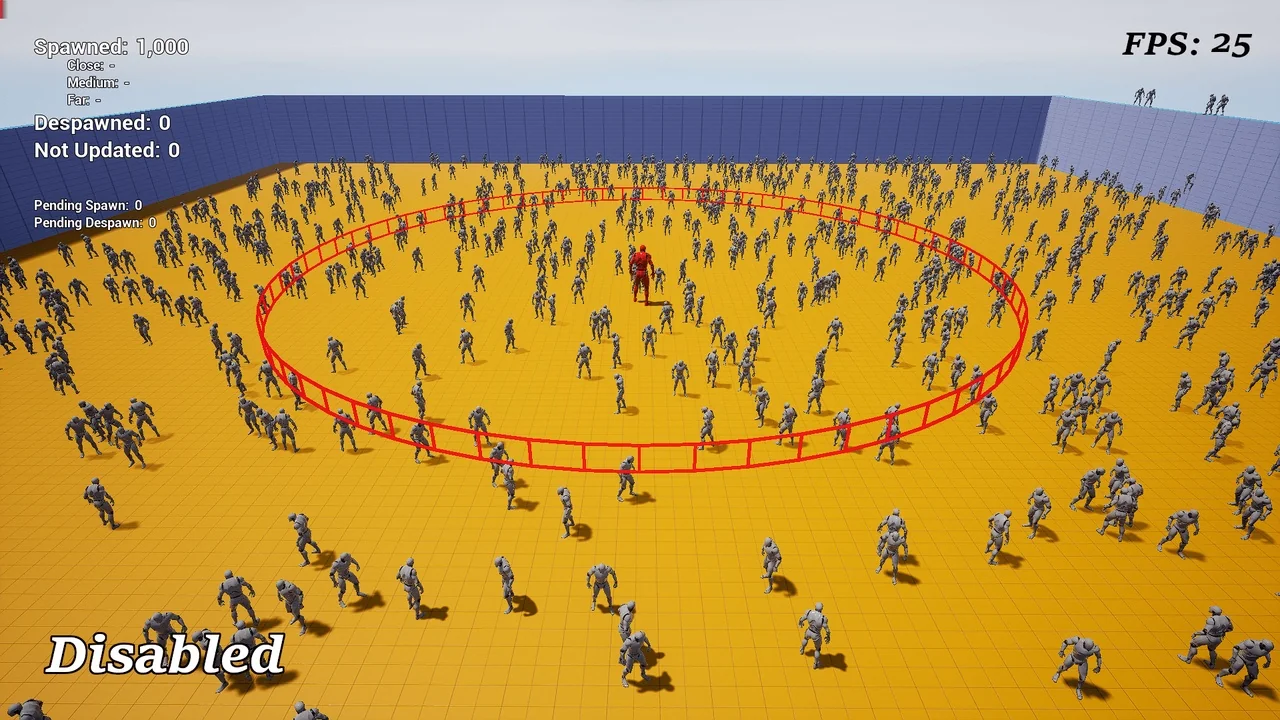
 Engine Tools
 Engine Tools
 Engine Tools