"7e6fc58c410f2894"{"id":"1001045","slug":"airport-terminal-interior","title":"Airport Terminal Interior","category":"Apocalyptic / Post-apocalyptic","engine":"5.1+","assetVersion":"","engineVersion":"Engine Version: 5.1+","tag":"Apocalyptic","accent":"blue","visual":"mech","summary":"An Unreal Engine 5 airport terminal environment featuring over 250 modular assets, advanced master materials, Lumen lighting, and blueprint-driven controls for","platform":"Unreal Engine","publishedAt":"2026-08-27T15:15:18.323Z","updatedAt":"2026-08-27T15:15:18.323Z","sourceNotes":[],"fileContents":[],"compatibility":["Unreal Engine","Engine Version: 5.1+"],"featuredImage":{"alt":"Airport Terminal Interior","src":"/wp-content/uploads/published/2026/08/40189474eb31-0b21dda8-4ad5-440c-89b8-46954fb7eb3a-71576db436.webp"},"hasDownloadLink":true,"downloads":0,"terms":[{"taxonomy":"category","slug":"apocalyptic-post-apocalyptic","name":"Apocalyptic / Post-apocalyptic"}],"galleryImages":[{"src":"/wp-content/uploads/published/2026/08/7302ee198f57-9dafd941-794b-4ec3-9a6d-a020762a7963-73279f2728.webp","alt":"Airport Terminal Interior"},{"src":"/wp-content/uploads/published/2026/08/3434c84a28eb-f7b3eb1c-fcc8-41b9-8f49-20b6490885ec-f3de9d0ba3.webp","alt":"Airport Terminal Interior"},{"src":"/wp-content/uploads/published/2026/08/3ad8ddce123a-6492eb43-56ba-4840-8d6b-d2cfc1f67b4d-decfaf4c1e.webp","alt":"Airport Terminal Interior"},{"src":"/wp-content/uploads/published/2026/08/51c68d0790f3-b4bced3d-277b-42dd-93f1-dbc96bd62aa7-8a25046b05.webp","alt":"Airport Terminal Interior"},{"src":"/wp-content/uploads/published/2026/08/560ef9fb1fa6-2b1cf99f-394e-466b-b225-6f711dc5fbaf-ce6f2ea226.webp","alt":"Airport Terminal Interior"},{"src":"/wp-content/uploads/published/2026/08/2fa536ff1814-a4251800-ba76-4ede-8f2d-9ede550e40c3-a3f5b545e8.webp","alt":"Airport Terminal Interior"},{"src":"/wp-content/uploads/published/2026/08/a94e802c466e-a9b37717-b447-4b1c-b3e8-7610a9d822fe-a34aef30ea.webp","alt":"Airport Terminal Interior"},{"src":"/wp-content/uploads/published/2026/08/461791332089-7f5da46e-e1c2-433f-b959-9d9af13caca5-832cf5bb8d.webp","alt":"Airport Terminal Interior"},{"src":"/wp-content/uploads/published/2026/08/ea4631b35705-70b3f877-a713-41e0-a989-baf73cfd2376-c6bbfac6d3.webp","alt":"Airport Terminal Interior"},{"src":"/wp-content/uploads/published/2026/08/9b1b0625b961-846395b2-fed4-45b4-af18-ab0cc2ed54b5-f508884e77.webp","alt":"Airport Terminal Interior"}],"accessPanel":{"kind":"resource","title":"Download this resource","eyebrow":"Free Download","message":"Log in or create a free account to start your download.","fileName":"Content.7z","safetyNote":"Resources are manually reviewed before listing to improve quality and reduce obvious risks.","actionLabel":"Download Free","resourceType":"Resource archive"},"contentHtml":"\u003cp\u003eBuilding a believable airport terminal from scratch means modeling hundreds of unique objects, aligning textures, and setting up lighting that holds up under several gameplay or cinematic conditions. This package—an entire terminal interior built in Unreal Engine 5—solves that problem directly by shipping over 250 high-quality assets plus a material and lighting system that reduces setup time.\u003c/p\u003e \u003ch2\u003eOver 250 Assets with Modular Flexibility\u003c/h2\u003e\n\u003cp\u003eThe environment includes more than 250 high-quality assets, not counting booleans or simple shapes. That count covers everything from structural pieces like pillars, posts, and railings to furniture and props such as seats, trash bins, luggage, bars, and restaurant fixtures. Having the full terminal in one pack means you can populate a scene without hunting for separate asset sets or juggling mismatched art styles.\u003c/p\u003e\n\u003cp\u003eMost of the environment is built from modular assets, so you can rearrange the terminal into any layout you need. The structural pieces work with a master shader that includes extra roughness control and optional world-space textures. Some assets also come with an additional material option that lets you change their color using a mask. This is useful for quickly swapping seat colors, signage, or decorative elements without breaking the material setup.\u003c/p\u003e \u003ch2\u003eMaster Shader, Roughness, and Dust Control\u003c/h2\u003e\n\u003cp\u003eRather than giving every asset its own unique material network, the package relies on an advanced master material that includes world-space dust control. This means the dust gathers consistently across surfaces in world space, so it feels like a real environmental layer instead of a repeating decal. For large interiors like a terminal, this keeps the scene cohesive and speeds up adjustments.\u003c/p\u003e\n\u003cp\u003eThe structural assets also support additional roughness control, giving you the freedom to dial in how shiny or flat a surface looks. Combined with world-space textures when needed, this material system allows the terminal to be adapted to different lighting moods and visual styles.\u003c/p\u003e \u003ch2\u003eLumen Lighting and Blueprint Setup\u003c/h2\u003e\n\u003cp\u003eThe scene makes full use of Lumen, Unreal Engine 5’s global illumination and reflection system. All assets were optimized to work with Lumen and follow Lumen’s technical validation documentation. Notably, the assets do not include traditional lightmap UVs, but you can auto-generate them if you ever need to. This approach keeps the geometry lightmap-free and lets Lumen handle the dynamic lighting behavior.\u003c/p\u003e\n\u003cp\u003eAll lights in the environment are set up using blueprints with simple on/off and color controls. That means you can change a terminal’s atmosphere quickly—turn off a row of lights, tint the main concourse, or adjust accent lights in the bar area—without digging into each light actor individually. The asset clusters are also set up using blueprints, which streamlines placing groups of props and lighting together.\u003c/p\u003e \u003ch2\u003eLevel Organization and Game-First Optimization\u003c/h2\u003e\n\u003cp\u003eProper scene organization is handled through Levels, meaning the environment is split into manageable sections. This keeps the editor responsive and lets you load only the parts you need while working. For a terminal that could span a large floor plan, this kind of structure is practical for both development and final packaging.\u003c/p\u003e\n\u003cp\u003eThe environment was created with games as the primary target. It uses optimized Nanite and LOD assets, 4K PBR textures downscaled in UE to sensible resolutions, and optimized lighting assets. That 4K source texture set ensures detail is available where it matters, while the engine-side downscaling keeps memory in check. Even so, the package is intended for higher-end systems and consoles. All images and videos were rendered at an average of 40–60 fps on cinematic quality using an RTX 3090, so expect this to be a demanding scene at full defaults.\u003c/p\u003e\n\u003cp\u003eBecause performance is heavy due to the project’s size and default settings, documentation is included in the project files. It explains how to run a more optimized version, which is useful if you need to hit lower-end hardware or tighter frame budgets.\u003c/p\u003e \u003ch2\u003eWhere It Fits in a Production\u003c/h2\u003e\n\u003cp\u003eWhile the environment is primarily intended for games, the asset quality also works for cinematic work. The modular layout lets you create custom terminal configurations for a story scene, while the blueprint-controlled lights let you quickly match a specific mood. The included tags—gate, post, pillar, restaurant, terminal, travel, bar, trash, luggage, airport, realistic, interior, urban, traveler, railing, seat—paint a clear picture of the props and areas covered.\u003c/p\u003e\n\u003cp\u003eFor teams working in Unreal Engine 5, this asset saves weeks of environment building. Whether you need a full level or a detailed backdrop, the collection of modular structures, props, lighting, and master materials gives you a strong foundation that can be reshaped to fit your project.\u003c/p\u003e\n\n\u003ch2\u003eRelated Resources Worth Checking\u003c/h2\u003e\n\u003cul\u003e\n\u003cli\u003e\u003ca href=\"https://3dcghub.com/cca-subway-train-terminal/\" title=\"CCA Subway Train Terminal\"\u003eCCA Subway Train Terminal\u003c/a\u003e\u003c/li\u003e\n\u003cli\u003e\u003ca href=\"https://3dcghub.com/post-apocalyptic-district/\" title=\"Post Apocalyptic District\"\u003ePost Apocalyptic District\u003c/a\u003e\u003c/li\u003e\n\u003cli\u003e\u003ca href=\"https://3dcghub.com/airport-set-vol2/\" title=\"Airport Set Vol2\"\u003eAirport Set Vol2\u003c/a\u003e\u003c/li\u003e\n\u003cli\u003e\u003ca href=\"https://3dcghub.com/airport-set-vol1/\" title=\"Airport Set Vol1\"\u003eAirport Set Vol1\u003c/a\u003e\u003c/li\u003e\n\u003cli\u003e\u003ca href=\"https://3dcghub.com/decay-oil-drums-district-rusty-industrial-slum/\" title=\"Decay: Oil Drums District - [Rusty Industrial Slum]\"\u003eDecay: Oil Drums District - [Rusty Industrial Slum]\u003c/a\u003e\u003c/li\u003e\n\u003c/ul\u003e","contentTextLength":5038,"navigation":{"current":682,"total":3618,"previous":{"id":"1001046","slug":"animal-behavior-kit-pro","title":"Animal Behavior Kit Pro","category":"Characters \u0026 Creatures","platform":"Unreal Engine","updatedAt":"2026-08-27T15:25:42.829Z"},"next":{"id":"1001044","slug":"ai-optimizer","title":"AI Optimizer","category":"Engine Tools","platform":"Unreal Engine","updatedAt":"2026-08-27T14:42:21.040Z"}},"relatedResources":[{"id":"1000360","slug":"cca-subway-train-terminal","title":"CCA Subway Train Terminal","category":"Interior","engine":"4.26+,5.0+","assetVersion":"","engineVersion":"Engine Version: 4.26+,5.0+","tag":"Interior","accent":"blue","visual":"mech","summary":"A modular Unreal Engine environment featuring 97 meshes, master materials, and RMA-packed textures for building realistic underground transit systems.","platform":"Unreal Engine","publishedAt":"2026-07-06T07:27:02.064Z","updatedAt":"2026-07-06T07:27:02.064Z","sourceNotes":[],"fileContents":[],"compatibility":["Unreal Engine","Engine Version: 4.26+,5.0+"],"featuredImage":{"alt":"CCA Subway Train Terminal","src":"/wp-content/uploads/published/2026/07/3afb5a39310d-aecfce65-da85-4688-840d-c0bddd8cdc77-589aa46564.webp"},"hasDownloadLink":true,"downloads":1},{"id":"1000477","slug":"post-apocalyptic-district","title":"Post Apocalyptic District","category":"Apocalyptic / Post-apocalyptic","engine":"5.0+","assetVersion":"","engineVersion":"Engine Version: 5.0+","tag":"Apocalyptic","accent":"blue","visual":"mech","summary":"Post Apocalyptic District is a 4.2 sq km Unreal Engine 5.1+ environment pack with interiors, drivable vehicles, spline blueprints, World Partition, Nanite and L","platform":"Unreal Engine","publishedAt":"2026-07-11T19:02:34.820Z","updatedAt":"2026-07-11T19:02:34.820Z","sourceNotes":[],"fileContents":[],"compatibility":["Unreal Engine","Engine Version: 5.0+"],"featuredImage":{"alt":"Post Apocalyptic District","src":"/wp-content/uploads/published/2026/07/a9c378352540-509e121b-ee71-409e-8054-6614d9a36324-deae50f4bf.webp"},"hasDownloadLink":true,"downloads":1},{"id":"1000419","slug":"airport-set-vol2","title":"Airport Set Vol2","category":"Office","engine":"5.1+","assetVersion":"","engineVersion":"Engine Version: 5.1+","tag":"Office","accent":"blue","visual":"mech","summary":"A modular airport pack featuring Nanite-supported facility assets, including security checkpoints, FIDS, terminal seating, and baggage claim props.","platform":"Unreal Engine","publishedAt":"2026-07-09T17:18:18.154Z","updatedAt":"2026-07-09T17:18:18.154Z","sourceNotes":[],"fileContents":[],"compatibility":["Unreal Engine","Engine Version: 5.1+"],"featuredImage":{"alt":"Airport Set Vol2","src":"/wp-content/uploads/published/2026/07/1c7f56ccdec4-c60f33d6-d446-4a19-bd8c-5394497ddf1b-65be55e217.webp"},"hasDownloadLink":true,"downloads":0}]}
Apocalyptic
Airport Terminal Interior
An Unreal Engine 5 airport terminal environment featuring over 250 modular assets, advanced master materials, Lumen lighting, and blueprint-driven controls for
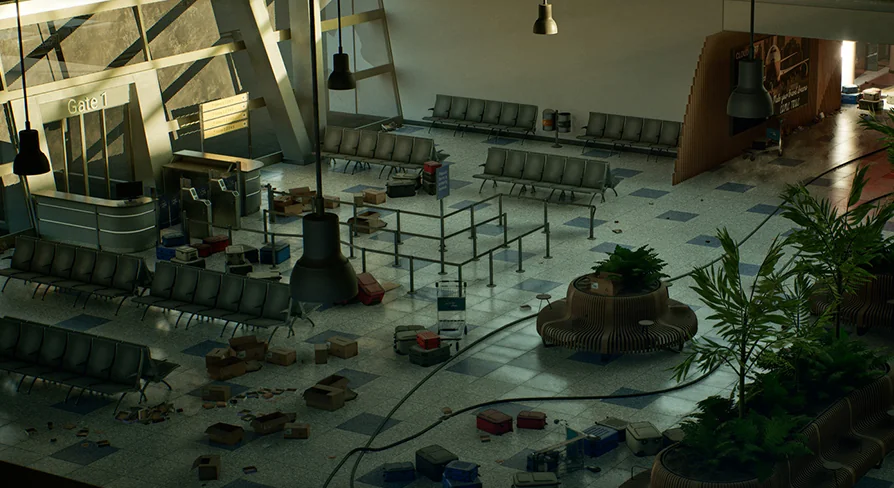
Building a believable airport terminal from scratch means modeling hundreds of unique objects, aligning textures, and setting up lighting that holds up under several gameplay or cinematic conditions. This package—an entire terminal interior built in Unreal Engine 5—solves that problem directly by shipping over 250 high-quality assets plus a material and lighting system that reduces setup time.
Over 250 Assets with Modular Flexibility
The environment includes more than 250 high-quality assets, not counting booleans or simple shapes. That count covers everything from structural pieces like pillars, posts, and railings to furniture and props such as seats, trash bins, luggage, bars, and restaurant fixtures. Having the full terminal in one pack means you can populate a scene without hunting for separate asset sets or juggling mismatched art styles.
Most of the environment is built from modular assets, so you can rearrange the terminal into any layout you need. The structural pieces work with a master shader that includes extra roughness control and optional world-space textures. Some assets also come with an additional material option that lets you change their color using a mask. This is useful for quickly swapping seat colors, signage, or decorative elements without breaking the material setup.
Master Shader, Roughness, and Dust Control
Rather than giving every asset its own unique material network, the package relies on an advanced master material that includes world-space dust control. This means the dust gathers consistently across surfaces in world space, so it feels like a real environmental layer instead of a repeating decal. For large interiors like a terminal, this keeps the scene cohesive and speeds up adjustments.
The structural assets also support additional roughness control, giving you the freedom to dial in how shiny or flat a surface looks. Combined with world-space textures when needed, this material system allows the terminal to be adapted to different lighting moods and visual styles.
Lumen Lighting and Blueprint Setup
The scene makes full use of Lumen, Unreal Engine 5’s global illumination and reflection system. All assets were optimized to work with Lumen and follow Lumen’s technical validation documentation. Notably, the assets do not include traditional lightmap UVs, but you can auto-generate them if you ever need to. This approach keeps the geometry lightmap-free and lets Lumen handle the dynamic lighting behavior.
All lights in the environment are set up using blueprints with simple on/off and color controls. That means you can change a terminal’s atmosphere quickly—turn off a row of lights, tint the main concourse, or adjust accent lights in the bar area—without digging into each light actor individually. The asset clusters are also set up using blueprints, which streamlines placing groups of props and lighting together.
Level Organization and Game-First Optimization
Proper scene organization is handled through Levels, meaning the environment is split into manageable sections. This keeps the editor responsive and lets you load only the parts you need while working. For a terminal that could span a large floor plan, this kind of structure is practical for both development and final packaging.
The environment was created with games as the primary target. It uses optimized Nanite and LOD assets, 4K PBR textures downscaled in UE to sensible resolutions, and optimized lighting assets. That 4K source texture set ensures detail is available where it matters, while the engine-side downscaling keeps memory in check. Even so, the package is intended for higher-end systems and consoles. All images and videos were rendered at an average of 40–60 fps on cinematic quality using an RTX 3090, so expect this to be a demanding scene at full defaults.
Because performance is heavy due to the project’s size and default settings, documentation is included in the project files. It explains how to run a more optimized version, which is useful if you need to hit lower-end hardware or tighter frame budgets.
Where It Fits in a Production
While the environment is primarily intended for games, the asset quality also works for cinematic work. The modular layout lets you create custom terminal configurations for a story scene, while the blueprint-controlled lights let you quickly match a specific mood. The included tags—gate, post, pillar, restaurant, terminal, travel, bar, trash, luggage, airport, realistic, interior, urban, traveler, railing, seat—paint a clear picture of the props and areas covered.
For teams working in Unreal Engine 5, this asset saves weeks of environment building. Whether you need a full level or a detailed backdrop, the collection of modular structures, props, lighting, and master materials gives you a strong foundation that can be reshaped to fit your project.
 Apocalyptic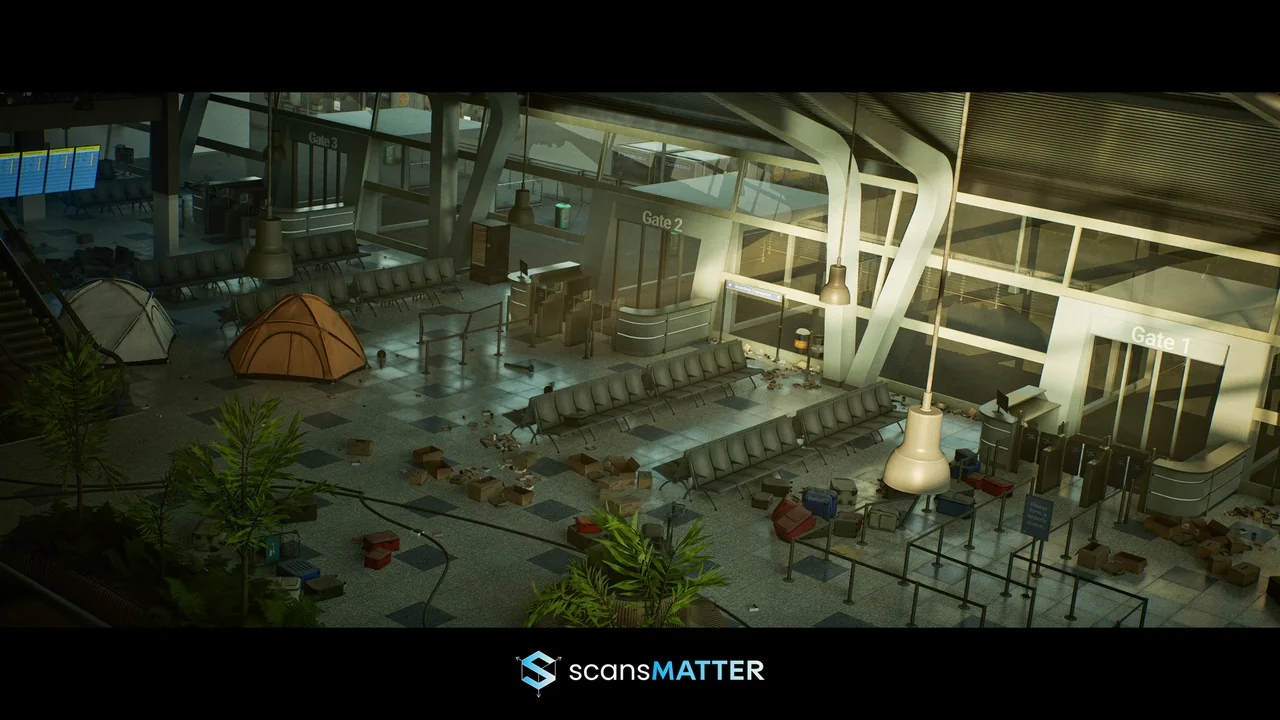
 Interior
 Apocalyptic
 Office