"c14ff6bd758dadb1"{"id":"1001056","slug":"logic-driver-pro-blueprint-editor-for-dialogue-quest-combat-and-fsm-systems","title":"Logic Driver Pro - Blueprint Editor for Dialogue, Quest, Combat \u0026 FSM Systems","category":"Engine Tools","engine":"5.3","assetVersion":"Asset Version: 2.8.1","engineVersion":"Engine Version: 5.3","tag":"Engine Tools","accent":"blue","visual":"mech","summary":"Logic Driver Pro is a node-based state machine editor for Unreal Engine. Build custom nodes in blueprints or C++, then author AI, dialogue, quests, and combat f","platform":"Unreal Engine","publishedAt":"2026-08-30T14:36:58.563Z","updatedAt":"2026-08-30T14:36:58.563Z","sourceNotes":[],"fileContents":[],"compatibility":["Unreal Engine","Asset Version: 2.8.1","Engine Version: 5.3"],"featuredImage":{"alt":"Logic Driver Pro - Blueprint Editor for Dialogue, Quest, Combat \u0026 FSM Systems","src":"/wp-content/uploads/published/2026/08/9c80a1e57566-a7733abf-eb2c-4a09-9e80-e6485475e449-f947997ebc.webp"},"hasDownloadLink":true,"downloads":1,"terms":[{"taxonomy":"category","slug":"engine-tools-tools-and-plugins","name":"Engine Tools"}],"galleryImages":[{"src":"/wp-content/uploads/published/2026/08/127778f9e41c-4d09d882-3172-4247-97d5-784d5b8ff70b-a6b102bda0.webp","alt":"Logic Driver Pro - Blueprint Editor for Dialogue, Quest, Combat \u0026 FSM Systems"},{"src":"/wp-content/uploads/published/2026/08/4fc3abf1525b-38c4bdba-8916-4e03-aa8f-2c5a93149398-de72bec523.webp","alt":"Logic Driver Pro - Blueprint Editor for Dialogue, Quest, Combat \u0026 FSM Systems"},{"src":"/wp-content/uploads/published/2026/08/0df72e59224e-57c9f683-8c17-4f78-ba27-6fc4262dec5f-28a12fbe14.webp","alt":"Logic Driver Pro - Blueprint Editor for Dialogue, Quest, Combat \u0026 FSM Systems"},{"src":"/wp-content/uploads/published/2026/08/8574da7caa23-8ced4d8c-9520-41b5-8fa2-1107d3842ad3-568924b2c1.webp","alt":"Logic Driver Pro - Blueprint Editor for Dialogue, Quest, Combat \u0026 FSM Systems"},{"src":"/wp-content/uploads/published/2026/08/5a9a29c72787-f570dafb-8052-4b11-a65f-ff11eadc7058-15b09595e3.webp","alt":"Logic Driver Pro - Blueprint Editor for Dialogue, Quest, Combat \u0026 FSM Systems"},{"src":"/wp-content/uploads/published/2026/08/3e2a5f33c5a3-7df487b0-138c-4cc0-b0eb-99f52f928ec2-82aa036036.webp","alt":"Logic Driver Pro - Blueprint Editor for Dialogue, Quest, Combat \u0026 FSM Systems"},{"src":"/wp-content/uploads/published/2026/08/6706f01712e5-6ff44779-32a0-41b9-9cca-98832c360059-c864ae1285.webp","alt":"Logic Driver Pro - Blueprint Editor for Dialogue, Quest, Combat \u0026 FSM Systems"},{"src":"/wp-content/uploads/published/2026/08/fddc66faf64d-10e70479-296f-458c-afd8-78231b9225b4-4d8c0b00a8.webp","alt":"Logic Driver Pro - Blueprint Editor for Dialogue, Quest, Combat \u0026 FSM Systems"},{"src":"/wp-content/uploads/published/2026/08/5245439d24fe-d33154af-bcfb-4b8e-aa3a-7b1cf7ab5386-b189b31f9f.webp","alt":"Logic Driver Pro - Blueprint Editor for Dialogue, Quest, Combat \u0026 FSM Systems"},{"src":"/wp-content/uploads/published/2026/08/a756be46229b-c184faaf-be5b-40bd-a7c2-92fc5767219d-b6b29b373b.webp","alt":"Logic Driver Pro - Blueprint Editor for Dialogue, Quest, Combat \u0026 FSM Systems"}],"accessPanel":{"kind":"resource","title":"Download this resource","eyebrow":"Free Download","message":"Log in or create a free account to start your download.","fileName":"5.3.7z","safetyNote":"Resources are manually reviewed before listing to improve quality and reduce obvious risks.","actionLabel":"Download Free","resourceType":"Resource archive"},"contentHtml":"\u003cp\u003eLogic Driver Pro is a dedicated blueprint editor built for node-based gameplay systems. Instead of forcing you into a fixed quest, dialogue, or AI framework, it gives you the authoring tools to build those systems yourself. The editor works inside Unreal Engine and lets you define custom nodes using either blueprints or C++, then connect them into state machines that drive narrative flows, combat states, UI transitions, tutorials, and any other gameplay logic where state matters.\u003c/p\u003e \u003ch2\u003eDefining Your Own Nodes in Blueprints or C++\u003c/h2\u003e\n\u003cp\u003eThe foundation of Logic Driver Pro is the ability to create custom nodes that encapsulate reusable logic. These nodes expose variables directly on the node, so designers can adjust values without touching the underlying implementation. Developers can write these nodes in either blueprints or C++, depending on how deeply they want to integrate with the project.\u003c/p\u003e\n\u003cp\u003eEach node can also include Editor Construction Scripts, which update node properties dynamically in response to designer input. That means the node can react as it is placed or edited, giving immediate visual feedback inside the graph. Node Validation adds another layer of safety: the system can show visual warnings or prevent compilation when certain conditions aren't met. Rule Behavior lets you enforce patterns and automate parts of the design process, which is useful when you want to restrict how states are connected or which transitions are possible.\u003c/p\u003e \u003ch2\u003eAuthoring with State Machine Blueprints\u003c/h2\u003e\n\u003cp\u003eDesigners work inside Logic Driver's state machine blueprints, which are the actual authored graph. Placing nodes is context-aware: when you add a node, rule behavior can limit the available state types or preselect transition options, so the graph stays clean and follows the project's intended structure. Exposed Properties can be assigned by typing defaults directly on the node or by connecting variables, functions, and expressions from elsewhere in the blueprint.\u003c/p\u003e\n\u003cp\u003eTwo tools make the authoring process noticeably smoother. Preview Mode lets you test the system directly in the state machine blueprint editor, without leaving the graph. Breakpoint Debugging goes further by letting you debug the system during Play In Editor (PIE) or even in Preview Mode. That combination means you can catch logic errors early, while still working inside the visual graph.\u003c/p\u003e \u003ch2\u003eAdvanced Capabilities: Stacks, Parallel States, and Output Variables\u003c/h2\u003e\n\u003cp\u003eBeyond simple state transitions, Logic Driver Pro includes several advanced features that handle more complex gameplay scenarios. State Stack lets you combine multiple states in a sequence, so you can execute several tasks in order while the system tracks the full stack. Transition Stack quickly generates transition expressions between different transition types, which reduces repetitive wiring when moving between many states.\u003c/p\u003e\n\u003cp\u003eOutput Variables organize data flow between states or back to the owning state machine blueprint. This keeps data moving cleanly when a state finishes its work. Parallel States are suited for systems where multiple conditions or behaviors need to run at the same time, such as an AI that is patrolling while also playing an idle animation or tracking a target. Text Graph Properties allow you to drag and drop variables directly onto text, with rich text and localization support built in. A Search Tool rounds out the feature set by letting you find and replace property values across the entire project, which is helpful when a variable name changes late in development.\u003c/p\u003e \u003ch2\u003eContent Samples, Documentation, and the Combat Template\u003c/h2\u003e\n\u003cp\u003eLogic Driver Pro does not ship as an empty shell. Content samples are included, with example setups and templates that can be added directly to your project. A Combat Template is now available, making it easier to start building combat-related state logic without building everything from scratch. These examples are practical starting points that show the system working in realistic configurations.\u003c/p\u003e\n\u003cp\u003eThe documentation is extensive, covering general use, advanced features, and a complete API reference. That documentation path is important because Logic Driver Pro is a tool meant to be adapted to your own design; the API reference lets programmers dig into the underlying behavior when custom nodes need to go beyond blueprint logic.\u003c/p\u003e \u003ch2\u003eUpgrade, Licensing, and Support\u003c/h2\u003e\n\u003cp\u003eIf you are currently using Logic Driver Lite, the free version of the core system, the upgrade path is straightforward. Make sure to uninstall the Lite version before installing Pro. Logic Driver Pro supports the latest official version of Unreal Engine, and advertised features apply to the most current release. For full engine compatibility, the support page lists the exact version details.\u003c/p\u003e\n\u003cp\u003eLicensing on FAB is per seat and is intended for individual developers or small teams. Studios that need project-based or multi-seat licensing have separate options. The additional resources include a website, release notes, docs, contact, and roadmap, which is useful for teams that want to track how the system evolves. The project itself has been awarded an Epic MegaGrant and is shipping in projects from solo indies to AAA studios, which says a lot about its production readiness.\u003c/p\u003e\n\u003cp\u003eLogic Driver Pro fits best when you want one cohesive authoring framework to anchor several gameplay systems. It does not impose a prescribed dialogue format or a built-in quest module; it asks you to provide the design and then gives you the tools to build it your way.\u003c/p\u003e\n\n\u003ch2\u003eMore From The Same Workflow\u003c/h2\u003e\n\u003cul\u003e\n\u003cli\u003e\u003ca href=\"https://3dcghub.com/unreal-mcp-server-370-ai-tools-for-ue5-editor-automation-via-mcp/\" title=\"Unreal MCP Server — 370+ AI Tools for UE5 Editor Automation via MCP\"\u003eUnreal MCP Server — 370+ AI Tools for UE5 Editor Automation via MCP\u003c/a\u003e\u003c/li\u003e\n\u003cli\u003e\u003ca href=\"https://3dcghub.com/narrative-tales-node-based-quests-and-dialogue/\" title=\"Narrative Tales - Node Based Quests and Dialogue\"\u003eNarrative Tales - Node Based Quests and Dialogue\u003c/a\u003e\u003c/li\u003e\n\u003cli\u003e\u003ca href=\"https://3dcghub.com/blueprint-generator-ai-kibibyte-labs-engine-assistant/\" title=\"AI Engine Assistant - Kibibyte Labs (Blueprint Generator \u0026amp; More!)\"\u003eAI Engine Assistant - Kibibyte Labs (Blueprint Generator \u0026amp; More!)\u003c/a\u003e\u003c/li\u003e\n\u003cli\u003e\u003ca href=\"https://3dcghub.com/advanced-control-flow/\" title=\"Advanced Control Flow\"\u003eAdvanced Control Flow\u003c/a\u003e\u003c/li\u003e\n\u003cli\u003e\u003ca href=\"https://3dcghub.com/advanced-arpg-combat-system/\" title=\"Advanced ARPG Combat System\"\u003eAdvanced ARPG Combat System\u003c/a\u003e\u003c/li\u003e\n\u003c/ul\u003e","contentTextLength":5770,"navigation":{"current":775,"total":3719,"previous":{"id":"1001057","slug":"medieval-tents-and-camping-props-pack","title":"Medieval Tents \u0026 Camping Props Pack","category":"Medieval","platform":"Unreal Engine","updatedAt":"2026-08-30T14:45:31.934Z"},"next":{"id":"1001055","slug":"leartes-office-environment-office-environment-leartes-office-3d-art","title":"Leartes Office Environment ( Office Environment Leartes Office 3D Art )","category":"Interior","platform":"Unreal Engine","updatedAt":"2026-08-30T14:31:54.019Z"}},"relatedResources":[{"id":"1000734","slug":"unreal-mcp-server-370-ai-tools-for-ue5-editor-automation-via-mcp","title":"Unreal MCP Server — 370+ AI Tools for UE5 Editor Automation via MCP","category":"Engine Tools","engine":"5.7","assetVersion":"Asset Version: 2.0.2","engineVersion":"Engine Version: 5.7","tag":"Engine Tools","accent":"blue","visual":"mech","summary":"Unreal MCP Server v4 connects AI agents like Claude Code and Cursor to Unreal Engine 5.7 via 378 tools. Features multi-step transactions, Blueprint editing, and","platform":"Unreal Engine","publishedAt":"2026-07-26T16:27:55.382Z","updatedAt":"2026-07-26T16:27:55.382Z","sourceNotes":[],"fileContents":[],"compatibility":["Unreal Engine","Asset Version: 2.0.2","Engine Version: 5.7"],"featuredImage":{"alt":"Unreal MCP Server — 370+ AI Tools for UE5 Editor Automation via MCP","src":"/wp-content/uploads/published/2026/07/329b4f864b95-dead06b5-972c-4ff4-be8e-bfa97f905c83-ae0e4f86af.webp"},"hasDownloadLink":true,"downloads":8},{"id":"14282","slug":"narrative-tales-node-based-quests-and-dialogue","title":"Narrative Tales - Node Based Quests and Dialogue","category":"Engine Tools","engine":"5.4 - 5.5","assetVersion":"Engine version: 5.4 - 5.5","engineVersion":"Asset Version:3.5 - 3.6","tag":"Engine Tools","accent":"blue","visual":"animation","summary":"Narrative Tales - Node Based Quests and Dialogue provides a professional, node-based solution for building complex story systems and cinematic interactions in Unreal Engine.","platform":"Unreal Engine","publishedAt":"2026-03-11T17:18:03.000Z","updatedAt":"2026-04-19T15:45:49.000Z","sourceNotes":[],"fileContents":[],"compatibility":["Unreal Engine","Engine version: 5.4 - 5.5","Asset Version: 3.5 - 3.6"],"featuredImage":{"alt":"Narrative Tales - Node Based Quests and Dialogue","src":"https://3dcghub.com/wp-content/uploads/2026/03/4704c395-9d69-4f9e-bb63-fc67d2198758.webp"},"hasDownloadLink":true,"downloads":2},{"id":"13760","slug":"blueprint-generator-ai-kibibyte-labs-engine-assistant","title":"AI Engine Assistant - Kibibyte Labs (Blueprint Generator \u0026 More!)","category":"Engine Tools","engine":"0.1.4","assetVersion":"Engine version: 5.2 - 5.7","engineVersion":"Asset Version: 0.1.4","tag":"Engine Tools","accent":"blue","visual":"character","summary":"Blueprint Generator Ai - Kibibyte Labs (Engine Assistant) is a powerful tool designed to transform natural language into functional Unreal Engine Blueprints. It offers a suite of modules for generating logic, explaining complex nodes, and optimizing the dev...","platform":"Unreal Engine","publishedAt":"2026-03-11T09:58:02.000Z","updatedAt":"2026-07-09T21:24:04.089Z","sourceNotes":[],"fileContents":[],"compatibility":["Unreal Engine","Engine version: 5.2 - 5.7","Asset Version: 0.1.4"],"featuredImage":{"alt":"Blueprint Generator Ai - Kibibyte Labs (Engine Assistant)","src":"https://3dcghub.com/wp-content/uploads/2026/03/ff365004-07a8-4633-90ac-7c9a038cc81d.webp"},"hasDownloadLink":true,"downloads":2}]}
Engine Tools
Logic Driver Pro - Blueprint Editor for Dialogue, Quest, Combat & FSM Systems
Logic Driver Pro is a node-based state machine editor for Unreal Engine. Build custom nodes in blueprints or C++, then author AI, dialogue, quests, and combat f
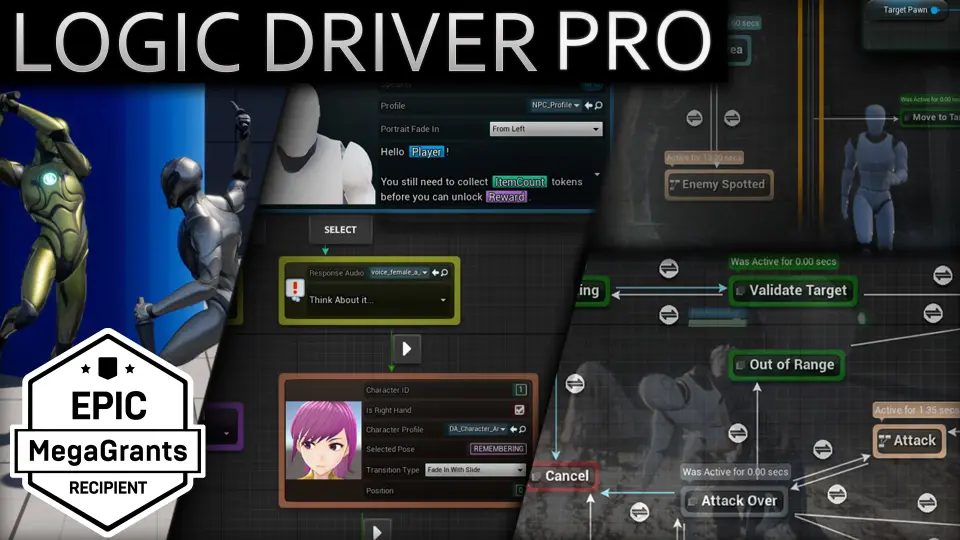
Logic Driver Pro is a dedicated blueprint editor built for node-based gameplay systems. Instead of forcing you into a fixed quest, dialogue, or AI framework, it gives you the authoring tools to build those systems yourself. The editor works inside Unreal Engine and lets you define custom nodes using either blueprints or C++, then connect them into state machines that drive narrative flows, combat states, UI transitions, tutorials, and any other gameplay logic where state matters.
Defining Your Own Nodes in Blueprints or C++
The foundation of Logic Driver Pro is the ability to create custom nodes that encapsulate reusable logic. These nodes expose variables directly on the node, so designers can adjust values without touching the underlying implementation. Developers can write these nodes in either blueprints or C++, depending on how deeply they want to integrate with the project.
Each node can also include Editor Construction Scripts, which update node properties dynamically in response to designer input. That means the node can react as it is placed or edited, giving immediate visual feedback inside the graph. Node Validation adds another layer of safety: the system can show visual warnings or prevent compilation when certain conditions aren't met. Rule Behavior lets you enforce patterns and automate parts of the design process, which is useful when you want to restrict how states are connected or which transitions are possible.
Authoring with State Machine Blueprints
Designers work inside Logic Driver's state machine blueprints, which are the actual authored graph. Placing nodes is context-aware: when you add a node, rule behavior can limit the available state types or preselect transition options, so the graph stays clean and follows the project's intended structure. Exposed Properties can be assigned by typing defaults directly on the node or by connecting variables, functions, and expressions from elsewhere in the blueprint.
Two tools make the authoring process noticeably smoother. Preview Mode lets you test the system directly in the state machine blueprint editor, without leaving the graph. Breakpoint Debugging goes further by letting you debug the system during Play In Editor (PIE) or even in Preview Mode. That combination means you can catch logic errors early, while still working inside the visual graph.
Advanced Capabilities: Stacks, Parallel States, and Output Variables
Beyond simple state transitions, Logic Driver Pro includes several advanced features that handle more complex gameplay scenarios. State Stack lets you combine multiple states in a sequence, so you can execute several tasks in order while the system tracks the full stack. Transition Stack quickly generates transition expressions between different transition types, which reduces repetitive wiring when moving between many states.
Output Variables organize data flow between states or back to the owning state machine blueprint. This keeps data moving cleanly when a state finishes its work. Parallel States are suited for systems where multiple conditions or behaviors need to run at the same time, such as an AI that is patrolling while also playing an idle animation or tracking a target. Text Graph Properties allow you to drag and drop variables directly onto text, with rich text and localization support built in. A Search Tool rounds out the feature set by letting you find and replace property values across the entire project, which is helpful when a variable name changes late in development.
Content Samples, Documentation, and the Combat Template
Logic Driver Pro does not ship as an empty shell. Content samples are included, with example setups and templates that can be added directly to your project. A Combat Template is now available, making it easier to start building combat-related state logic without building everything from scratch. These examples are practical starting points that show the system working in realistic configurations.
The documentation is extensive, covering general use, advanced features, and a complete API reference. That documentation path is important because Logic Driver Pro is a tool meant to be adapted to your own design; the API reference lets programmers dig into the underlying behavior when custom nodes need to go beyond blueprint logic.
Upgrade, Licensing, and Support
If you are currently using Logic Driver Lite, the free version of the core system, the upgrade path is straightforward. Make sure to uninstall the Lite version before installing Pro. Logic Driver Pro supports the latest official version of Unreal Engine, and advertised features apply to the most current release. For full engine compatibility, the support page lists the exact version details.
Licensing on FAB is per seat and is intended for individual developers or small teams. Studios that need project-based or multi-seat licensing have separate options. The additional resources include a website, release notes, docs, contact, and roadmap, which is useful for teams that want to track how the system evolves. The project itself has been awarded an Epic MegaGrant and is shipping in projects from solo indies to AAA studios, which says a lot about its production readiness.
Logic Driver Pro fits best when you want one cohesive authoring framework to anchor several gameplay systems. It does not impose a prescribed dialogue format or a built-in quest module; it asks you to provide the design and then gives you the tools to build it your way.
 Engine Tools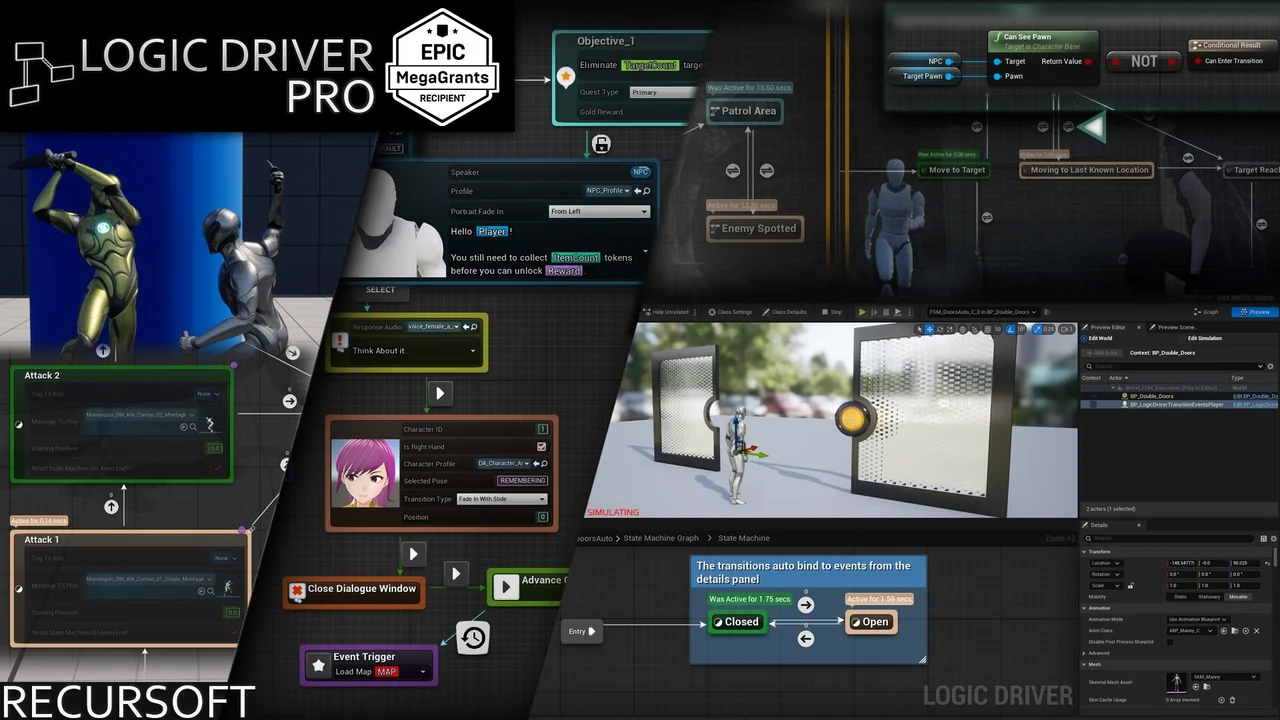
 Engine Tools
 Engine Tools
 Engine Tools