"1f00f67f9253451b"{"id":"1001271","slug":"simple-uobject-solution","title":"Simple UObject Solution","category":"Engine Tools","engine":"5.1 - 5.4","assetVersion":"Asset Version: 1.0","engineVersion":"Engine Version: 5.1 - 5.4","tag":"Engine Tools","accent":"blue","visual":"luts","summary":"Expose and handle replicated subobjects directly within Blueprints using the Simple UObject Solution plugin for multiplayer Unreal Engine projects.","platform":"Unreal Engine","publishedAt":"2026-09-30T05:57:48.352Z","updatedAt":"2026-09-30T05:57:48.352Z","sourceNotes":[],"fileContents":[],"compatibility":["Unreal Engine","Asset Version: 1.0","Engine Version: 5.1 - 5.4"],"featuredImage":{"alt":"Simple UObject Solution","src":"/wp-content/uploads/published/2026/09/eae647f7239f-805344f5-8964-4752-8ea8-3565fa2bf1ce-5f93ca5802.webp"},"hasDownloadLink":true,"downloads":0,"terms":[{"taxonomy":"category","slug":"engine-tools-tools-and-plugins","name":"Engine Tools"}],"galleryImages":[{"src":"/wp-content/uploads/published/2026/09/d4d371dc7d2f-13afc6d4-307e-4ee8-b42a-2e9e6a32b0f1-36fcfb52aa.webp","alt":"Simple UObject Solution"},{"src":"/wp-content/uploads/published/2026/09/50a44c6f9565-b9037dbc-89d2-4104-949f-3dacab8ad72e-5e375426ce.webp","alt":"Simple UObject Solution"}],"accessPanel":{"kind":"resource","title":"Download this resource","eyebrow":"Free Download","message":"Log in or create a free account to start your download.","fileName":"Simple UObject Solution.7z","safetyNote":"Resources are manually reviewed before listing to improve quality and reduce obvious risks.","actionLabel":"Download Free","resourceType":"Resource archive"},"contentHtml":"\u003ch2\u003eImplementing Replicated Subobjects Through Blueprints\u003c/h2\u003e\u003cp\u003eNetwork replication in Unreal Engine traditionally requires developers to step into C++ whenever non-Actor objects need to replicate properties across a client-server boundary. The Simple UObject Solution plugin targets this specific friction point by simplifying the process of exposing replicated subobjects directly inside Blueprints. Instead of writing custom network serialization logic or overriding subobject registration routines in C++ for every dynamic object, the plugin provides a structured code foundation that brings subobject replication into the visual scripting pipeline.\u003c/p\u003e\u003cp\u003eSubobjects derived from UObject are lightweight compared to standard Actors or Actor Components. When building complex game systems, relying exclusively on Actors for every piece of networked data creates unnecessary hierarchy and overhead. However, native Blueprint workflows lack native, straightforward exposure for registering and replicating standard UObjects across the network. Simple UObject Solution addresses this limitation by establishing the underlying plumbing necessary to register, replicate, and access these objects purely through Blueprints, allowing multiplayer projects to maintain lean data structures without abandoning visual scripting.\u003c/p\u003e\u003ch2\u003eConfiguring the Simple UObject Solution Code Architecture\u003c/h2\u003e\u003cp\u003eWorking with the plugin involves organizing networked state into modular UObject units rather than bloating player states or character blueprints. The code implementation included in Simple UObject Solution operates at the engine's core object level, handling the necessary registration pathways so the networking system recognizes subobjects when state synchronization occurs.\u003c/p\u003e\u003cp\u003eBy leveraging the plugin's code framework, developers establish the replication life cycle for subobjects within Blueprints. This setup removes the barrier of having to construct custom C++ network channels or manage manually registered subobject lists for standard gameplay tasks. Teams working primarily in visual scripting gain the ability to instantiate, manage, and synchronize subobjects dynamically during a live multiplayer match.\u003c/p\u003e\u003cp\u003eBecause subobjects can contain their own set of replicated variables and state machines, structuring gameplay code through UObjects enables cleaner encapsulation. Inventory items, complex skill instances, status effects, and numerical containers can live inside their own isolated classes rather than competing for variable space inside a central Actor. Simple UObject Solution ensures that when these subobjects are created or modified on the server, their state and identity propagate predictably to relevant client machines.\u003c/p\u003e\u003ch2\u003eMultiplayer System Compatibility and Modular Systems\u003c/h2\u003e\u003cp\u003eA primary advantage of implementing lightweight replicated subobjects is clean interoperability across separate gameplay modules. Simple UObject Solution is designed to operate seamlessly alongside complementary gameplay plugins, specifically the Advanced Health System and the Advanced Stats System. In complex multiplayer environments, health attributes, damage calculations, and dynamic statistics benefit directly from modular subobject distribution.\u003c/p\u003e\u003cp\u003eWhen combined with the Advanced Health System, the plugin provides the networking backbone needed to handle health pools, defensive layers, or shield states encapsulated within custom object logic. Rather than embedding every health calculation or temporary modifier directly inside the base character blueprint, subobjects can be networked individually, carrying specific data sets that synchronize automatically between the authority and remote proxies.\u003c/p\u003e\u003cp\u003eThe same logic applies to the Advanced Stats System. In games where characters, equipment, or environmental objects hold shifting stat configurations, encapsulating stat groups into replicated subobjects maintains project hygiene. Simple UObject Solution ensures that statistical modifiers or active buffs represented by subobjects remain synchronized across connected players, eliminating discrepancies between host and client game states.\u003c/p\u003e\u003ch2\u003eWorkflow Differences Between Actors and Blueprint Subobjects\u003c/h2\u003e\u003cp\u003eIn standard multiplayer development pipelines without the plugin, replication architecture generally forces a difficult choice: accept the performance and memory cost of spawning discrete Actors for small gameplay elements, or maintain an extensive C++ codebase solely to enable UObject network replication. Simple UObject Solution removes that dilemma by establishing a reliable middle ground.\u003c/p\u003e\u003cp\u003eBy using lightweight UObjects rather than full Actors, developers minimize network tick overhead and transform-related processing. A UObject does not possess spatial coordinates, collision primitives, or rendering components unless explicitly tethered to one, making it ideal for purely data-driven logic such as rulesets, modifier lists, and dynamic gameplay states. Exposing this functionality to Blueprints ensures that technical designers can configure replication properties, listen for state updates, and trigger visual or audio feedback directly in the visual editor without requesting custom C++ wrappers for every new object variation.\u003c/p\u003e\u003cp\u003eThis unified approach keeps gameplay projects agile. Systems can be prototyped, tested across dedicated server configurations, and iterated upon rapidly. Because the underlying code plugin manages the subobject registration rules required by the network driver, the risk of desynchronization or uninstantiated null pointers on client connections is substantially reduced.\u003c/p\u003e\u003ch2\u003eSupport, Documentation, and Maintenance Channels\u003c/h2\u003e\u003cp\u003eMaintaining a dependable multiplayer code plugin requires straightforward access to technical materials and direct communication channels. Simple UObject Solution provides developer support and operational guidance through dedicated documentation and an active Discord server.\u003c/p\u003e\u003cp\u003eThe documentation outlines the practical steps required to enable subobject replication, integrate the plugin into existing Blueprint classes, and link subobject logic with surrounding gameplay systems. When edge cases arise or developers require troubleshooting assistance regarding multiplayer network behavior, the Discord channel acts as a direct line for technical discussions, peer assistance, and workflow clarification.\u003c/p\u003e\u003cp\u003eFor developers building networked games that require modular code architecture without heavy C++ maintenance, Simple UObject Solution provides the exact tooling needed to unlock replicated subobjects in Blueprints, backed by ready compatibility with Advanced Health System and dedicated support resources.\u003c/p\u003e\n\n\u003ch2\u003eExplore Similar Assets\u003c/h2\u003e\n\u003cul\u003e\n\u003cli\u003e\u003ca href=\"https://3dcghub.com/simple-tree-generator/\" title=\"Simple Tree Generator\"\u003eSimple Tree Generator\u003c/a\u003e\u003c/li\u003e\n\u003cli\u003e\u003ca href=\"https://3dcghub.com/simple-procedural-walk/\" title=\"Simple Procedural Walk\"\u003eSimple Procedural Walk\u003c/a\u003e\u003c/li\u003e\n\u003cli\u003e\u003ca href=\"https://3dcghub.com/simple-instanced-spline-mesh/\" title=\"Simple Instanced Spline Mesh\"\u003eSimple Instanced Spline Mesh\u003c/a\u003e\u003c/li\u003e\n\u003cli\u003e\u003ca href=\"https://3dcghub.com/easy-multi-save/\" title=\"Easy Multi Save\"\u003eEasy Multi Save\u003c/a\u003e\u003c/li\u003e\n\u003cli\u003e\u003ca href=\"https://3dcghub.com/simple-screen-damage-indicator/\" title=\"Simple Screen Damage Indicator\"\u003eSimple Screen Damage Indicator\u003c/a\u003e\u003c/li\u003e\n\u003c/ul\u003e","contentTextLength":6789,"navigation":{"current":10,"total":3222,"previous":{"id":"1001272","slug":"unicode-handler","title":"Unicode Handler","category":"Engine Tools","platform":"Unreal Engine","updatedAt":"2026-09-30T05:59:50.499Z"},"next":{"id":"1001270","slug":"runtime-audio-importer","title":"Runtime Audio Importer","category":"Engine Tools","platform":"Unreal Engine","updatedAt":"2026-09-30T05:55:43.013Z"}},"relatedResources":[{"id":"14610","slug":"simple-tree-generator","title":"Simple Tree Generator","category":"Engine Tools","engine":"5.6 - 5.8","assetVersion":"Asset Version: 1.1","engineVersion":"Engine version: 5.6 - 5.8","tag":"Engine Tools","accent":"blue","visual":"audio","summary":"Simple Tree Generator is a powerful tool designed specifically for Unreal Engine 5. It enables developers to procedurally create diverse trees and bushes with just a few clicks.","platform":"Unreal Engine","publishedAt":"2026-03-11T18:36:43.000Z","updatedAt":"2026-09-17T02:13:52.813Z","sourceNotes":[],"fileContents":[],"compatibility":["Unreal Engine","Asset Version: 1.1","Engine version: 5.6 - 5.8"],"featuredImage":{"alt":"Simple Tree Generator","src":"https://3dcghub.com/wp-content/uploads/2026/03/4e3b784d-7198-46b5-a343-a73957e40875.webp"},"hasDownloadLink":true,"downloads":0},{"id":"25001","slug":"simple-procedural-walk","title":"Simple Procedural Walk","category":"Engine Tools","engine":"5.3","assetVersion":"Engine version: 5.3","engineVersion":"","tag":"Engine Tools","accent":"blue","visual":"animation","summary":"Simple Procedural Walk gives skeletal meshes a real-time walking cycle without relying on pre-recorded animation. It is strongest on robotic or insectoid characters, with mechs also supported, while organic characters are left to motion-capture style movement.","platform":"Unreal Engine","publishedAt":"2026-04-18T15:47:18.000Z","updatedAt":"2026-04-20T06:12:34.000Z","sourceNotes":[],"fileContents":[],"compatibility":["Unreal Engine","Engine version: 5.3"],"featuredImage":{"alt":"Simple Procedural Walk","src":"https://3dcghub.com/wp-content/uploads/2026/04/3f2c1025b72b_a9e4b4f7-6fe2-488e-872a-1cc50cd404eb.webp"},"hasDownloadLink":true,"downloads":0},{"id":"14597","slug":"simple-instanced-spline-mesh","title":"Simple Instanced Spline Mesh","category":"Engine Tools","engine":"5.3","assetVersion":"Engine version: 5.3","engineVersion":"4.26","tag":"Engine Tools","accent":"blue","visual":"mech","summary":"The Simple Instanced Spline Mesh plugin offers a robust way to create HISM structures using splines. Designed for efficiency, it helps level designers iterate faster with specialized tools.","platform":"Unreal Engine","publishedAt":"2026-03-11T18:36:35.000Z","updatedAt":"2026-04-19T15:45:43.000Z","sourceNotes":[],"fileContents":[],"compatibility":["Unreal Engine","Engine version: 5.3"],"featuredImage":{"alt":"Simple Instanced Spline Mesh","src":"https://3dcghub.com/wp-content/uploads/2026/03/f2221001-9630-4b63-90f9-bcc63655709e.webp"},"hasDownloadLink":true,"downloads":0}]}
Engine Tools
Simple UObject Solution
Expose and handle replicated subobjects directly within Blueprints using the Simple UObject Solution plugin for multiplayer Unreal Engine projects.
Implementing Replicated Subobjects Through Blueprints
Network replication in Unreal Engine traditionally requires developers to step into C++ whenever non-Actor objects need to replicate properties across a client-server boundary. The Simple UObject Solution plugin targets this specific friction point by simplifying the process of exposing replicated subobjects directly inside Blueprints. Instead of writing custom network serialization logic or overriding subobject registration routines in C++ for every dynamic object, the plugin provides a structured code foundation that brings subobject replication into the visual scripting pipeline.
Subobjects derived from UObject are lightweight compared to standard Actors or Actor Components. When building complex game systems, relying exclusively on Actors for every piece of networked data creates unnecessary hierarchy and overhead. However, native Blueprint workflows lack native, straightforward exposure for registering and replicating standard UObjects across the network. Simple UObject Solution addresses this limitation by establishing the underlying plumbing necessary to register, replicate, and access these objects purely through Blueprints, allowing multiplayer projects to maintain lean data structures without abandoning visual scripting.
Configuring the Simple UObject Solution Code Architecture
Working with the plugin involves organizing networked state into modular UObject units rather than bloating player states or character blueprints. The code implementation included in Simple UObject Solution operates at the engine's core object level, handling the necessary registration pathways so the networking system recognizes subobjects when state synchronization occurs.
By leveraging the plugin's code framework, developers establish the replication life cycle for subobjects within Blueprints. This setup removes the barrier of having to construct custom C++ network channels or manage manually registered subobject lists for standard gameplay tasks. Teams working primarily in visual scripting gain the ability to instantiate, manage, and synchronize subobjects dynamically during a live multiplayer match.
Because subobjects can contain their own set of replicated variables and state machines, structuring gameplay code through UObjects enables cleaner encapsulation. Inventory items, complex skill instances, status effects, and numerical containers can live inside their own isolated classes rather than competing for variable space inside a central Actor. Simple UObject Solution ensures that when these subobjects are created or modified on the server, their state and identity propagate predictably to relevant client machines.
Multiplayer System Compatibility and Modular Systems
A primary advantage of implementing lightweight replicated subobjects is clean interoperability across separate gameplay modules. Simple UObject Solution is designed to operate seamlessly alongside complementary gameplay plugins, specifically the Advanced Health System and the Advanced Stats System. In complex multiplayer environments, health attributes, damage calculations, and dynamic statistics benefit directly from modular subobject distribution.
When combined with the Advanced Health System, the plugin provides the networking backbone needed to handle health pools, defensive layers, or shield states encapsulated within custom object logic. Rather than embedding every health calculation or temporary modifier directly inside the base character blueprint, subobjects can be networked individually, carrying specific data sets that synchronize automatically between the authority and remote proxies.
The same logic applies to the Advanced Stats System. In games where characters, equipment, or environmental objects hold shifting stat configurations, encapsulating stat groups into replicated subobjects maintains project hygiene. Simple UObject Solution ensures that statistical modifiers or active buffs represented by subobjects remain synchronized across connected players, eliminating discrepancies between host and client game states.
Workflow Differences Between Actors and Blueprint Subobjects
In standard multiplayer development pipelines without the plugin, replication architecture generally forces a difficult choice: accept the performance and memory cost of spawning discrete Actors for small gameplay elements, or maintain an extensive C++ codebase solely to enable UObject network replication. Simple UObject Solution removes that dilemma by establishing a reliable middle ground.
By using lightweight UObjects rather than full Actors, developers minimize network tick overhead and transform-related processing. A UObject does not possess spatial coordinates, collision primitives, or rendering components unless explicitly tethered to one, making it ideal for purely data-driven logic such as rulesets, modifier lists, and dynamic gameplay states. Exposing this functionality to Blueprints ensures that technical designers can configure replication properties, listen for state updates, and trigger visual or audio feedback directly in the visual editor without requesting custom C++ wrappers for every new object variation.
This unified approach keeps gameplay projects agile. Systems can be prototyped, tested across dedicated server configurations, and iterated upon rapidly. Because the underlying code plugin manages the subobject registration rules required by the network driver, the risk of desynchronization or uninstantiated null pointers on client connections is substantially reduced.
Support, Documentation, and Maintenance Channels
Maintaining a dependable multiplayer code plugin requires straightforward access to technical materials and direct communication channels. Simple UObject Solution provides developer support and operational guidance through dedicated documentation and an active Discord server.
The documentation outlines the practical steps required to enable subobject replication, integrate the plugin into existing Blueprint classes, and link subobject logic with surrounding gameplay systems. When edge cases arise or developers require troubleshooting assistance regarding multiplayer network behavior, the Discord channel acts as a direct line for technical discussions, peer assistance, and workflow clarification.
For developers building networked games that require modular code architecture without heavy C++ maintenance, Simple UObject Solution provides the exact tooling needed to unlock replicated subobjects in Blueprints, backed by ready compatibility with Advanced Health System and dedicated support resources.
 Engine Tools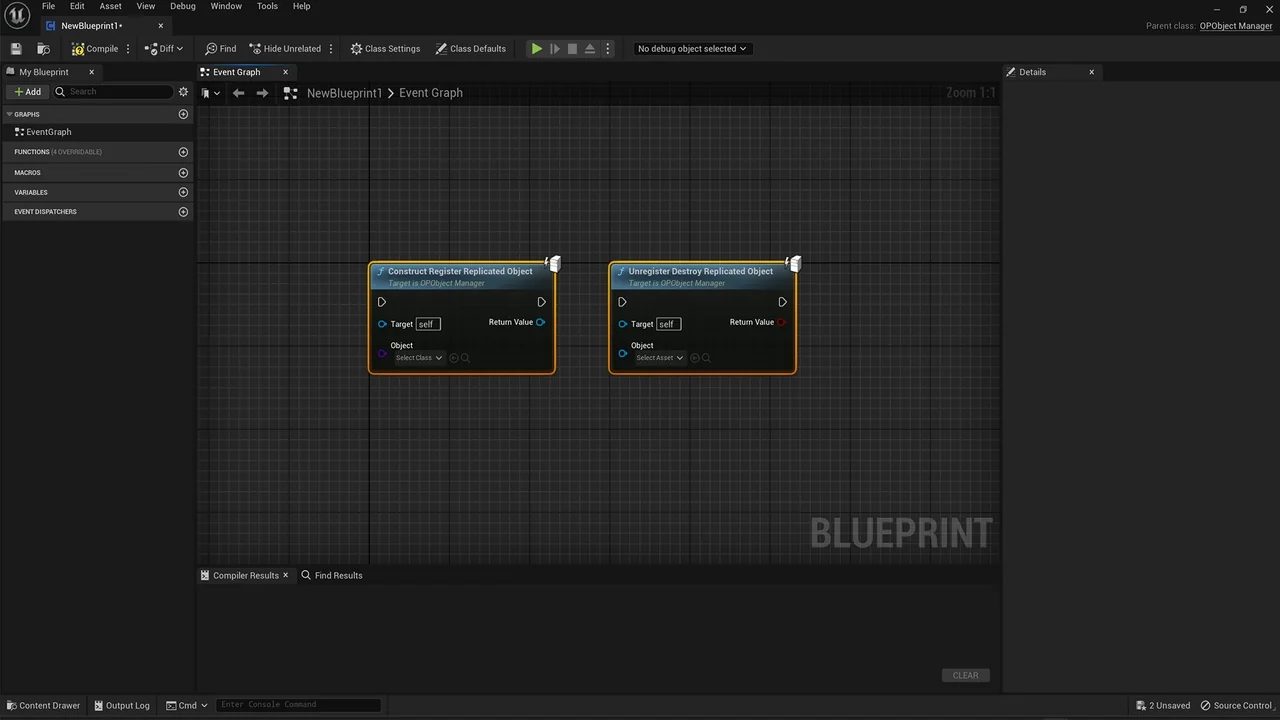
 Engine Tools
 Engine Tools
 Engine Tools