"1f00f67f9253451b"{"id":"1001272","slug":"unicode-handler","title":"Unicode Handler","category":"Engine Tools","engine":"5.1 - 5.3","assetVersion":"Asset Version: 1.0","engineVersion":"Engine Version: 5.1 - 5.3","tag":"Engine Tools","accent":"blue","visual":"mech","summary":"Convert Unicode inputs to characters using C++ and DataTables in Unreal Engine with the Unicode Handler plugin and its Unicode Convert node.","platform":"Unreal Engine","publishedAt":"2026-09-30T05:59:50.499Z","updatedAt":"2026-09-30T05:59:50.499Z","sourceNotes":[],"fileContents":[],"compatibility":["Unreal Engine","Asset Version: 1.0","Engine Version: 5.1 - 5.3"],"featuredImage":{"alt":"Unicode Handler","src":"/wp-content/uploads/published/2026/09/66d86d476b0c-d404f597-222a-45a6-9718-3d6aafa24382-536aed0bb5.webp"},"hasDownloadLink":true,"downloads":0,"terms":[{"taxonomy":"category","slug":"engine-tools-tools-and-plugins","name":"Engine Tools"}],"galleryImages":[{"src":"/wp-content/uploads/published/2026/09/3a08a8758c5f-3c6967b2-df41-4053-aed9-3e689cf14294-7ab1e68b4b.webp","alt":"Unicode Handler"},{"src":"/wp-content/uploads/published/2026/09/819f8d43f5bf-27d58b24-3139-4655-81a5-dceba3aecc4a-8d0b668655.webp","alt":"Unicode Handler"}],"accessPanel":{"kind":"resource","title":"Download this resource","eyebrow":"Free Download","message":"Log in or create a free account to start your download.","fileName":"Unicode Handler.7z","safetyNote":"Resources are manually reviewed before listing to improve quality and reduce obvious risks.","actionLabel":"Download Free","resourceType":"Resource archive"},"contentHtml":"\u003ch2\u003eCore Mechanics of Unicode Handler in C++\u003c/h2\u003e\n\u003cp\u003eUnicode Handler provides a specialized text utility developed natively in C++ for Unreal Engine projects. Handling encoding transformations within a game engine often creates bottlenecks when developers are forced to parse raw string data through complex custom scripts. This plugin provides a direct path to translate raw Unicode data into standard character representations. By anchoring its core routines directly in compiled C++, the tool ensures that string manipulations execute cleanly without the overhead that often accompanies complex visual scripting math or repeated character string operations.\u003c/p\u003e\n\u003cp\u003eThe system is specifically engineered to perform character conversion tasks that require absolute reliability. Rather than relying on hardcoded, opaque conversion dictionaries buried deep inside code libraries, the architecture exposes its mapping flow through accessible engine structures. This gives technical artists, gameplay programmers, and UI designers a standardized method to interpret, decode, and transform incoming Unicode sequences into characters ready for interface rendering, dialogue systems, or logging pipelines.\u003c/p\u003e \u003ch2\u003eConverting Unicode to Character Through DataTable Structures\u003c/h2\u003e\n\u003cp\u003eA central pillar of the plugin is its reliance on DataTables to facilitate the conversion process from Unicode to individual characters. Within Unreal Engine, DataTables function as structured, table-driven assets that hold key-value data arrays, allowing developers to inspect, modify, and manage relational information directly inside the editor interface. Unicode Handler uses this setup to anchor its character mapping logic, linking specific Unicode values directly to their respective character outputs.\u003c/p\u003e\n\u003cp\u003eUsing a DataTable for Unicode-to-character translation provides transparency and consistency across a project. Instead of wondering how a specific code point is resolved or encountering unexpected character drops during runtime text parsing, developers can reference the exact conversion definitions stored inside the table. This structural clarity simplifies debugging when diagnosing text rendering discrepancies, missing glyphs, or character encoding variations. When text streams pass through the conversion logic, the underlying system queries the DataTable to deliver the corresponding character without requiring secondary lookups or ambiguous algorithmic guesses.\u003c/p\u003e \u003ch2\u003eBlueprint Integration with the Unicode Convert Node\u003c/h2\u003e\n\u003cp\u003eWhile the internal engine of the plugin is written entirely in native C++, visual scripting access is fully prioritized. Developers working inside the Blueprint editor can access the conversion features instantly by searching for the term \"Unicode Convert\" within the node action list. This surfaces the dedicated translation node directly in the graph, making it simple to link Unicode data inputs into standard string and text flows across UI widgets, gameplay blueprints, and actor components.\u003c/p\u003e\n\u003cp\u003eSearching for and dropping the Unicode Convert node into a graph requires minimal setup. The node receives the incoming Unicode input, applies the conversion logic backed by the DataTable structure, and outputs the resulting character. Because the node operates as a lightweight bridge to the compiled C++ backend, it allows Blueprint scripters to handle text conversions safely during gameplay events, user input handling, or dynamic text generation without creating custom parsing macros or bloated visual subgraphs.\u003c/p\u003e \u003ch2\u003eNative C++ Execution and System Structure\u003c/h2\u003e\n\u003cp\u003eBeyond its Blueprint integration, the plugin functions as a native C++ resource. Teams operating primarily in code can bypass visual scripting graphs entirely, interfacing directly with the plugin's conversion functions within their own custom C++ classes, subsystems, or utility libraries. This dual-access structure ensures that technical programmers maintain the flexibility to include Unicode handling inside low-level networking, data-deserialization, or backend file-reading routines.\u003c/p\u003e\n\u003cp\u003eExecuting character conversions directly through C++ minimizes execution time across high-volume text operations. When an application needs to process large batches of text strings or handle real-time streaming inputs containing Unicode representations, running the logic directly in native code prevents unnecessary frame drops. The underlying C++ codebase manages the queries against the mapping data cleanly, returning characters back to the calling system with minimal computational cost.\u003c/p\u003e \u003ch2\u003eInteroperability with Json Brother and Pipeline Integration\u003c/h2\u003e\n\u003cp\u003eIn modern production environments, character translation frequently operates in tandem with data interchange formats. Unicode Handler lists compatibility with Json Brother, establishing a natural fit for workflows that involve importing, exporting, or parsing structured JSON payloads. External web services, localized data files, save systems, and external databases often deliver content packed with escaped Unicode sequences or specific character codes that need to resolve into readable game text.\u003c/p\u003e\n\u003cp\u003eWhen used alongside tools such as Json Brother, the plugin fits into the ingestion stage of external data. Incoming JSON structures can be unpacked, after which any embedded Unicode values pass directly through the DataTable-driven conversion system before reaching text blocks, user interfaces, or gameplay triggers. This seamless coordination ensures that external string data remains fully legible, properly formatted, and uniform across diverse data-handling pipelines within the project.\u003c/p\u003e \u003ch2\u003eDocumentation and Practical Deployment with UnicodeHandler_Guide\u003c/h2\u003e\n\u003cp\u003eSetting up and maintaining the plugin across varying project configurations is supported by the accompanying UnicodeHandler_Guide. This documentation outlines the operational principles of the plugin, providing developers with clear instructions on configuring DataTables, calling the appropriate functions, and placing the conversion logic inside broader production pipelines. Tagged under the Unicorn designation, the asset serves as a focused, singular utility rather than an overcomplicated framework.\u003c/p\u003e\n\u003cp\u003eThe package addresses a clear and specific technical need: parsing Unicode into usable characters predictably. By uniting a C++ processing core, a transparent DataTable reference method, direct Blueprint node availability via the Unicode Convert search command, and verified interoperability alongside tools like Json Brother, the plugin delivers a dependable text-translation solution tailored to structured engine workflows.\u003c/p\u003e\n\n\u003ch2\u003eContinue Browsing Similar Packs\u003c/h2\u003e\n\u003cul\u003e\n\u003cli\u003e\u003ca href=\"https://3dcghub.com/combo-graph/\" title=\"Combo Graph\"\u003eCombo Graph\u003c/a\u003e\u003c/li\u003e\n\u003cli\u003e\u003ca href=\"https://3dcghub.com/easy-pose/\" title=\"Easy Pose\"\u003eEasy Pose\u003c/a\u003e\u003c/li\u003e\n\u003cli\u003e\u003ca href=\"https://3dcghub.com/easy-localization-translation/\" title=\"Easy Localization Translation\"\u003eEasy Localization Translation\u003c/a\u003e\u003c/li\u003e\n\u003cli\u003e\u003ca href=\"https://3dcghub.com/narrative-pro-2-complete-game-framework/\" title=\"Narrative Pro 2 - Complete Game Framework\"\u003eNarrative Pro 2 - Complete Game Framework\u003c/a\u003e\u003c/li\u003e\n\u003cli\u003e\u003ca href=\"https://3dcghub.com/athena-ai-a-utility-ai-framework-v2/\" title=\"Athena AI: A Utility AI Framework - V2\"\u003eAthena AI: A Utility AI Framework - V2\u003c/a\u003e\u003c/li\u003e\n\u003c/ul\u003e","contentTextLength":6735,"navigation":{"current":9,"total":3222,"previous":{"id":"1001273","slug":"clarus-viewer-engine-helpers","title":"Clarus Viewer Engine Helpers","category":"Game Mechanics","platform":"Unreal Engine","updatedAt":"2026-09-30T06:01:27.282Z"},"next":{"id":"1001271","slug":"simple-uobject-solution","title":"Simple UObject Solution","category":"Engine Tools","platform":"Unreal Engine","updatedAt":"2026-09-30T05:57:48.352Z"}},"relatedResources":[{"id":"13825","slug":"combo-graph","title":"Combo Graph","category":"Engine Tools","engine":"5.1 - 5.8","assetVersion":"Asset Version:1.4.0 - 1.6.1","engineVersion":"Engine version: 5.1 - 5.8","tag":"Engine Tools","accent":"blue","visual":"luts","summary":"Streamline your combat design with Combo Graph, a GAS-based Unreal Engine plugin. Use its node-based editor to create complex melee strings with multiplayer support and rapid prototyping tools.","platform":"Unreal Engine","publishedAt":"2026-03-11T10:10:59.000Z","updatedAt":"2026-08-24T05:32:39.634Z","sourceNotes":[],"fileContents":[],"compatibility":["Unreal Engine","Asset Version:1.4.0 - 1.6.1","Engine version: 5.1 - 5.8"],"featuredImage":{"alt":"Combo Graph","src":"https://3dcghub.com/wp-content/uploads/2026/03/11f09f07-e4bd-4cc8-9924-40b122bd6f3a.webp"},"hasDownloadLink":true,"downloads":2},{"id":"13938","slug":"easy-pose","title":"Easy Pose","category":"Engine Tools","engine":"5.1 - 5.8","assetVersion":"Asset Version: 2.0.3","engineVersion":"Engine version: 5.1 - 5.8","tag":"Engine Tools","accent":"blue","visual":"audio","summary":"Easy Pose is a powerful tool designed to simplify animation retargeting through a one-click interface. It supports diverse bone structures and skeletal models, ensuring flawless results with minimal effort.","platform":"Unreal Engine","publishedAt":"2026-03-11T10:42:49.000Z","updatedAt":"2026-09-29T08:45:23.408Z","sourceNotes":[],"fileContents":[],"compatibility":["Unreal Engine","Asset Version: 2.0.3","Engine version: 5.1 - 5.8"],"featuredImage":{"alt":"Easy Pose","src":"https://3dcghub.com/wp-content/uploads/2026/03/5e2069bb-f3d3-4af9-8231-ad7018eafae3.webp"},"hasDownloadLink":true,"downloads":0},{"id":"13900","slug":"easy-localization-translation","title":"Easy Localization Translation","category":"Engine Tools","engine":"5.3 - 5.4","assetVersion":"Engine version: 5.3 - 5.4","engineVersion":"Asset Version:1.3","tag":"Engine Tools","accent":"blue","visual":"city","summary":"Streamline your development workflow with Easy Localization Translation. This editor-only plugin automates string translation using advanced AI without requiring external API setups.","platform":"Unreal Engine","publishedAt":"2026-03-11T10:37:29.000Z","updatedAt":"2026-04-19T15:46:19.000Z","sourceNotes":[],"fileContents":[],"compatibility":["Unreal Engine","Engine version: 5.3 - 5.4","Asset Version: 1.3"],"featuredImage":{"alt":"Easy Localization Translation","src":"https://3dcghub.com/wp-content/uploads/2026/03/ba888dea-e97d-4f22-a6f3-da4ec4639ad5.webp"},"hasDownloadLink":true,"downloads":0}]}
Engine Tools
Unicode Handler
Convert Unicode inputs to characters using C++ and DataTables in Unreal Engine with the Unicode Handler plugin and its Unicode Convert node.
Unicode Handler provides a specialized text utility developed natively in C++ for Unreal Engine projects. Handling encoding transformations within a game engine often creates bottlenecks when developers are forced to parse raw string data through complex custom scripts. This plugin provides a direct path to translate raw Unicode data into standard character representations. By anchoring its core routines directly in compiled C++, the tool ensures that string manipulations execute cleanly without the overhead that often accompanies complex visual scripting math or repeated character string operations.
The system is specifically engineered to perform character conversion tasks that require absolute reliability. Rather than relying on hardcoded, opaque conversion dictionaries buried deep inside code libraries, the architecture exposes its mapping flow through accessible engine structures. This gives technical artists, gameplay programmers, and UI designers a standardized method to interpret, decode, and transform incoming Unicode sequences into characters ready for interface rendering, dialogue systems, or logging pipelines.
Converting Unicode to Character Through DataTable Structures
A central pillar of the plugin is its reliance on DataTables to facilitate the conversion process from Unicode to individual characters. Within Unreal Engine, DataTables function as structured, table-driven assets that hold key-value data arrays, allowing developers to inspect, modify, and manage relational information directly inside the editor interface. Unicode Handler uses this setup to anchor its character mapping logic, linking specific Unicode values directly to their respective character outputs.
Using a DataTable for Unicode-to-character translation provides transparency and consistency across a project. Instead of wondering how a specific code point is resolved or encountering unexpected character drops during runtime text parsing, developers can reference the exact conversion definitions stored inside the table. This structural clarity simplifies debugging when diagnosing text rendering discrepancies, missing glyphs, or character encoding variations. When text streams pass through the conversion logic, the underlying system queries the DataTable to deliver the corresponding character without requiring secondary lookups or ambiguous algorithmic guesses.
Blueprint Integration with the Unicode Convert Node
While the internal engine of the plugin is written entirely in native C++, visual scripting access is fully prioritized. Developers working inside the Blueprint editor can access the conversion features instantly by searching for the term "Unicode Convert" within the node action list. This surfaces the dedicated translation node directly in the graph, making it simple to link Unicode data inputs into standard string and text flows across UI widgets, gameplay blueprints, and actor components.
Searching for and dropping the Unicode Convert node into a graph requires minimal setup. The node receives the incoming Unicode input, applies the conversion logic backed by the DataTable structure, and outputs the resulting character. Because the node operates as a lightweight bridge to the compiled C++ backend, it allows Blueprint scripters to handle text conversions safely during gameplay events, user input handling, or dynamic text generation without creating custom parsing macros or bloated visual subgraphs.
Native C++ Execution and System Structure
Beyond its Blueprint integration, the plugin functions as a native C++ resource. Teams operating primarily in code can bypass visual scripting graphs entirely, interfacing directly with the plugin's conversion functions within their own custom C++ classes, subsystems, or utility libraries. This dual-access structure ensures that technical programmers maintain the flexibility to include Unicode handling inside low-level networking, data-deserialization, or backend file-reading routines.
Executing character conversions directly through C++ minimizes execution time across high-volume text operations. When an application needs to process large batches of text strings or handle real-time streaming inputs containing Unicode representations, running the logic directly in native code prevents unnecessary frame drops. The underlying C++ codebase manages the queries against the mapping data cleanly, returning characters back to the calling system with minimal computational cost.
Interoperability with Json Brother and Pipeline Integration
In modern production environments, character translation frequently operates in tandem with data interchange formats. Unicode Handler lists compatibility with Json Brother, establishing a natural fit for workflows that involve importing, exporting, or parsing structured JSON payloads. External web services, localized data files, save systems, and external databases often deliver content packed with escaped Unicode sequences or specific character codes that need to resolve into readable game text.
When used alongside tools such as Json Brother, the plugin fits into the ingestion stage of external data. Incoming JSON structures can be unpacked, after which any embedded Unicode values pass directly through the DataTable-driven conversion system before reaching text blocks, user interfaces, or gameplay triggers. This seamless coordination ensures that external string data remains fully legible, properly formatted, and uniform across diverse data-handling pipelines within the project.
Documentation and Practical Deployment with UnicodeHandler_Guide
Setting up and maintaining the plugin across varying project configurations is supported by the accompanying UnicodeHandler_Guide. This documentation outlines the operational principles of the plugin, providing developers with clear instructions on configuring DataTables, calling the appropriate functions, and placing the conversion logic inside broader production pipelines. Tagged under the Unicorn designation, the asset serves as a focused, singular utility rather than an overcomplicated framework.
The package addresses a clear and specific technical need: parsing Unicode into usable characters predictably. By uniting a C++ processing core, a transparent DataTable reference method, direct Blueprint node availability via the Unicode Convert search command, and verified interoperability alongside tools like Json Brother, the plugin delivers a dependable text-translation solution tailored to structured engine workflows.
 Engine Tools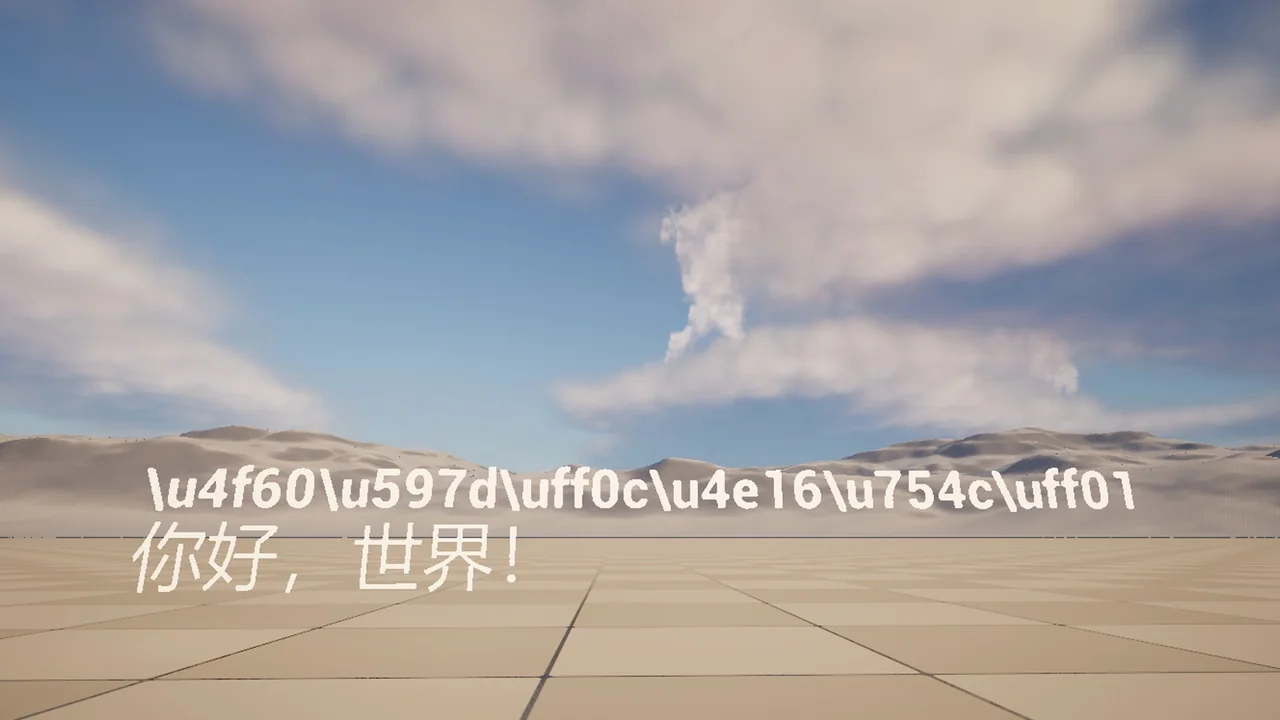
 Engine Tools
 Engine Tools
 Engine Tools