"7aa4acc705f0d80b"{"id":"1001951","slug":"anime-character-creator-plugin","title":"Anime Character Creator - Plugin","category":"Engine Tools","engine":"5.1+","assetVersion":"","engineVersion":"Engine Version: 5.1+","tag":"Engine Tools","accent":"blue","visual":"character","summary":"Examine the Anime Character Creator - Plugin featuring morphology controls, async data loading, spawn point randomization, and OOP architecture.","platform":"Unreal Engine","publishedAt":"2026-10-24T11:24:37.566Z","updatedAt":"2026-10-24T11:24:37.566Z","sourceNotes":[],"fileContents":[],"compatibility":["Unreal Engine","Engine Version: 5.1+"],"featuredImage":{"alt":"Anime Character Creator - Plugin","src":"/wp-content/uploads/published/2026/10/5dd9add74b26-d537e28e-4283-44a1-88e3-b5fb783c7d26-d5fd7c5c21.webp"},"hasDownloadLink":true,"downloads":1,"terms":[{"taxonomy":"category","slug":"engine-tools-tools-and-plugins","name":"Engine Tools"}],"galleryImages":[{"src":"/wp-content/uploads/published/2026/10/210ad1d22997-e2a02037-f2c6-4f4c-862f-292f9a929a94-d667af4915.webp","alt":"Anime Character Creator - Plugin"},{"src":"/wp-content/uploads/published/2026/10/df272374e301-7a48a7a3-7664-4cf6-8012-7b8b196f99d2-1fe7f53f05.webp","alt":"Anime Character Creator - Plugin"},{"src":"/wp-content/uploads/published/2026/10/ac7dbb8b787f-773348ee-d27f-48c5-822f-62078b5ecd95-7c8ab2d008.webp","alt":"Anime Character Creator - Plugin"},{"src":"/wp-content/uploads/published/2026/10/e8c7c22fbd3d-d5d030e2-656d-494d-88a9-a2d32b7fb611-a55de72083.webp","alt":"Anime Character Creator - Plugin"}],"accessPanel":{"kind":"resource","title":"Download this resource","eyebrow":"Free Download","message":"Log in or create a free account to start your download.","fileName":"Anime Character Creator - Plugin.7z","safetyNote":"Resources are manually reviewed before listing to improve quality and reduce obvious risks.","actionLabel":"Download Free","resourceType":"Resource archive"},"contentHtml":"\u003ch2\u003eSpawning Stylized Casts and Randomizing Morphologies\u003c/h2\u003e\n\u003cp\u003ePopulating a scene with diverse stylized figures requires more than placing static meshes into an environment. In the Anime Character Creator Template, procedural generation and deliberate authoring converge at the spawn point. The plugin provides dedicated mechanics to spawn characters dynamically across an environment, populating scenes with randomized character variations directly from placed spawn nodes. Rather than manually configuring every non-player actor or background bystander, the system processes randomization logic across available aesthetic variables, generating distinct variations on demand while letting artists retain control over specific archetypes.\u003c/p\u003e\n\u003cp\u003eThis random generation relies on an underlying structure capable of assembling distinct identities on the fly. Whether assembling background crowds in a manga-inspired town or establishing varied enemy units across an encounter area, the spawn system taps into the modular properties configured across the template. Because the generator functions directly from designated spawn points, developers can control density, distribution, and appearance profiles within targeted game sectors without rewriting the underlying spawning pipeline.\u003c/p\u003e \u003ch2\u003eSpecie, Maturity, and Aesthetic Customization Systems\u003c/h2\u003e\n\u003cp\u003eAt the center of the tool is a layered customization suite handling physical proportions, age profiles, and surface characteristics. The system organizes character definition into foundational tracks: a dedicated specie system, maturity and gender settings, body morphology controls, hair edition options, and eye customization.\u003c/p\u003e\n\u003cp\u003eThe specie system establishes the root categorization for characters, permitting structural divergences before individual aesthetic adjustments begin. Layered directly alongside this is the maturity and gender framework, which alters base character presentation to reflect different age brackets and gender presentations.\u003c/p\u003e\n\u003cp\u003ePhysical silhouettes rely heavily on the body morphology module. Here, adjustments do not rely on a single uniform scale. Instead, character bodies can be shaped around distinct physical traits, specifically muscle, fat, or slim profiles. These morphological states allow projects to field characters ranging from heavy builds to slender or athletic figures without requiring completely separate skeletal hierarchies.\u003c/p\u003e\n\u003cp\u003eFacial and silhouette detailing finish through focused cosmetic tracks. The eye customization controls give stylized anime characters their distinct focal points, addressing shape, coloration, and manga-style expression traits. Complementing the facial work is the hair edition system, structured to handle distinct anime-style hair meshes and modular configurations, ensuring that hairstyles integrate cleanly with different head shapes, maturities, and species.\u003c/p\u003e \u003ch2\u003eEquipment Handling and Async Data Loading Architecture\u003c/h2\u003e\n\u003cp\u003eCustom characters in stylized productions inevitably interact with external assets, gear, and apparel. The equipment system within the plugin is built to attach and manage modular equipment items, binding them to character rigs and updating visual states as gear changes. In a modular anime or stylized manga project, equipment needs to conform cleanly to morphological variations—such as muscle, fat, or slim frames—so that items rest properly on the underlying body geometry.\u003c/p\u003e\n\u003cp\u003eTo handle the resource overhead associated with multiple swappable meshes, materials, and configurations, the plugin utilizes Async Data Loading. Loading character assets synchronously can cause noticeable frame hitches, especially during runtime generation or when loading dense crowds from spawn points. By processing asset retrieval asynchronously, the framework streams in textures, meshes, and configuration data in the background, maintaining stable frame pacing during heavy scene transitions or spontaneous character generation.\u003c/p\u003e\n\u003cp\u003eFor level designers and technical artists configuring characters before hitting play, the Editor Preview feature exposes these updates inside the development environment. Instead of compiling or launching a standalone session to verify how a specific combination of eye customization, hair edition, and equipment looks on a slim or muscular body type, the editor preview visualizes adjustments directly within the viewport.\u003c/p\u003e \u003ch2\u003eObject-Oriented Logic and Project Integration Demands\u003c/h2\u003e\n\u003cp\u003eWhile the plugin supplies a robust set of default features out of the box, it functions as a modular framework rather than an automated, one-click asset that fits every proprietary game architecture without adjustment. The default systems handle core character creation and spawning, but incorporating these systems into an established custom project demands technical skill and a clear grasp of programming patterns.\u003c/p\u003e\n\u003cp\u003eThe asset codebase leverages Object-Oriented Programming (OOP) principles. Class hierarchies, inheritance, encapsulation, and modular component interaction underpin the code logic. Developers intending to extend character parameters, write bespoke spawning rules, or tie morphology sliders into gameplay mechanics—such as adjusting movement speeds based on slim versus muscle builds—will need to navigate and modify these object-oriented structures.\u003c/p\u003e\n\u003cp\u003eWithout an understanding of OOP principles, diagnosing data flows between the specie system, equipment sockets, and asynchronous loaders can introduce friction. The architecture favors clean, modular code, but it relies on the user to properly extend and integrate those patterns into their broader game framework.\u003c/p\u003e \u003ch2\u003eAnime Character Selector Compatibility and Version 3.0 Migration\u003c/h2\u003e\n\u003cp\u003eThe release of Version 3.0 marks a transition, operating as a replacement for the older Anime Character Creator asset. Projects transitioning from earlier implementations must account for structural refinements and architectural updates introduced in this version. The update packages the template into a formal plugin format, standardizing systems like Async Data Loading and modular equipment management into a unified setup.\u003c/p\u003e\n\u003cp\u003eIn production pipelines that require distinct interfaces for choosing versus authoring characters, the plugin maintains compatibility with the Anime Character Selector. This cross-compatibility allows teams to leverage the modular creation and morphological systems built here alongside dedicated selection screens, menus, or party configuration interfaces without rebuilding character data schemas from scratch.\u003c/p\u003e\n\u003cp\u003eDocumentation, executable demo projects, and dedicated making-of video playlists outline the baseline configuration and behavior of these components. For teams building stylized, manga-influenced games, Version 3.0 provides a structured, OOP-driven environment for generating, editing, and managing characters, giving technical artists a dependable foundation whenever they possess the engineering skills needed to adapt its object-oriented systems to their custom game logic.\u003c/p\u003e\n\n\u003ch2\u003eExplore Similar Assets\u003c/h2\u003e\n\u003cul\u003e\n\u003cli\u003e\u003ca href=\"https://3dcghub.com/xandra-character-creator/\" title=\"Xandra Character Creator\"\u003eXandra Character Creator\u003c/a\u003e\u003c/li\u003e\n\u003cli\u003e\u003ca href=\"https://3dcghub.com/sky-creator/\" title=\"Sky Creator\"\u003eSky Creator\u003c/a\u003e\u003c/li\u003e\n\u003cli\u003e\u003ca href=\"https://3dcghub.com/pak-creator-plugin/\" title=\"Pak Creator Plugin\"\u003ePak Creator Plugin\u003c/a\u003e\u003c/li\u003e\n\u003cli\u003e\u003ca href=\"https://3dcghub.com/easy-localization-translation/\" title=\"Easy Localization Translation\"\u003eEasy Localization Translation\u003c/a\u003e\u003c/li\u003e\n\u003cli\u003e\u003ca href=\"https://3dcghub.com/combo-graph/\" title=\"Combo Graph\"\u003eCombo Graph\u003c/a\u003e\u003c/li\u003e\n\u003c/ul\u003e","contentTextLength":7088,"navigation":{"current":39,"total":3925,"previous":{"id":"1001952","slug":"archvis-vr","title":"ArchVis VR","category":"Procedural Systems","platform":"Unreal Engine","updatedAt":"2026-10-24T11:31:25.633Z"},"next":{"id":"1001950","slug":"animated-medieval-bows","title":"Animated Medieval Bows","category":"Weapons \u0026 Combat","platform":"Unreal Engine","updatedAt":"2026-10-24T11:24:14.806Z"}},"relatedResources":[{"id":"1000353","slug":"xandra-character-creator","title":"Xandra Character Creator","category":"Engine Tools","engine":"5.5 - 5.7","assetVersion":"Asset Version: 3.6","engineVersion":"Engine Version: 5.5 - 5.7","tag":"Engine Tools","accent":"blue","visual":"character","summary":"Implement a runtime character creation system in Unreal Engine using a blend of C++ and Blueprints, featuring ARKit blendshapes and Metahuman compatibility.","platform":"Unreal Engine","publishedAt":"2026-07-05T10:12:13.471Z","updatedAt":"2026-07-05T10:12:13.471Z","sourceNotes":[],"fileContents":[],"compatibility":["Unreal Engine","Asset Version: 3.6","Engine Version: 5.5 - 5.7"],"featuredImage":{"alt":"Xandra Character Creator","src":"/wp-content/uploads/published/2026/07/4adf90c04a88-de6831db-caba-4c86-acfa-4ba67a03c988-69c24d3ae5.webp"},"hasDownloadLink":true,"downloads":11},{"id":"14638","slug":"sky-creator","title":"Sky Creator","category":"Engine Tools","engine":"5.0 -5.3,5.5","assetVersion":"Engine version: 5.0 -5.3,5.5","engineVersion":"Asset Version:1.31 - 1.41","tag":"Engine Tools","accent":"blue","visual":"animation","summary":"Sky Creator is a comprehensive tool for Unreal Engine that enables developers to manage dynamic weather, time of day, and realistic volumetric clouds through a robust preset system.","platform":"Unreal Engine","publishedAt":"2026-03-11T18:46:07.000Z","updatedAt":"2026-04-19T15:45:43.000Z","sourceNotes":[],"fileContents":[],"compatibility":["Unreal Engine","Engine version: 5.0 -5.3,5.5","Asset Version: 1.31 - 1.41"],"featuredImage":{"alt":"Sky Creator","src":"https://3dcghub.com/wp-content/uploads/2026/03/04c19279-88ca-4a50-8026-057300dbf683.webp"},"hasDownloadLink":true,"downloads":5},{"id":"14323","slug":"pak-creator-plugin","title":"Pak Creator Plugin","category":"Engine Tools","engine":"4.27,5.0 - 5.7","assetVersion":"Engine version: 4.27,5.0 - 5.7","engineVersion":"Asset Version:1.7.1","tag":"Engine Tools","accent":"blue","visual":"luts","summary":"The Pak Creator Plugin simplifies the process of creating independent .pak files from content plugins in Unreal Engine. It is an ideal solution for developers looking to distribute assets for modding or architectural visualization.","platform":"Unreal Engine","publishedAt":"2026-03-11T17:41:02.000Z","updatedAt":"2026-04-19T15:45:48.000Z","sourceNotes":[],"fileContents":[],"compatibility":["Unreal Engine","Engine version: 4.27,5.0 - 5.7","Asset Version: 1.7.1"],"featuredImage":{"alt":"Pak Creator Plugin","src":"https://3dcghub.com/wp-content/uploads/2026/03/791550ef-8520-4427-86de-d70ce899e2ee.webp"},"hasDownloadLink":true,"downloads":0}]}
Engine Tools
Anime Character Creator - Plugin
Examine the Anime Character Creator - Plugin featuring morphology controls, async data loading, spawn point randomization, and OOP architecture.
Category:Unreal Engine,Engine ToolsPlatform: Unreal EngineEngine Version: 5.1+Published: Oct 24, 2026
Engine Tools
Resource overview
Spawning Stylized Casts and Randomizing Morphologies
Populating a scene with diverse stylized figures requires more than placing static meshes into an environment. In the Anime Character Creator Template, procedural generation and deliberate authoring converge at the spawn point. The plugin provides dedicated mechanics to spawn characters dynamically across an environment, populating scenes with randomized character variations directly from placed spawn nodes. Rather than manually configuring every non-player actor or background bystander, the system processes randomization logic across available aesthetic variables, generating distinct variations on demand while letting artists retain control over specific archetypes.
This random generation relies on an underlying structure capable of assembling distinct identities on the fly. Whether assembling background crowds in a manga-inspired town or establishing varied enemy units across an encounter area, the spawn system taps into the modular properties configured across the template. Because the generator functions directly from designated spawn points, developers can control density, distribution, and appearance profiles within targeted game sectors without rewriting the underlying spawning pipeline.
Specie, Maturity, and Aesthetic Customization Systems
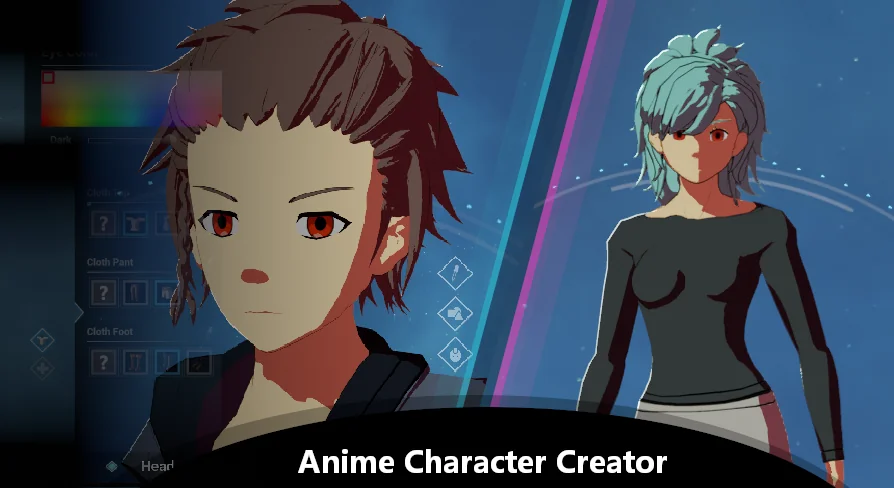
At the center of the tool is a layered customization suite handling physical proportions, age profiles, and surface characteristics. The system organizes character definition into foundational tracks: a dedicated specie system, maturity and gender settings, body morphology controls, hair edition options, and eye customization.
The specie system establishes the root categorization for characters, permitting structural divergences before individual aesthetic adjustments begin. Layered directly alongside this is the maturity and gender framework, which alters base character presentation to reflect different age brackets and gender presentations.
Physical silhouettes rely heavily on the body morphology module. Here, adjustments do not rely on a single uniform scale. Instead, character bodies can be shaped around distinct physical traits, specifically muscle, fat, or slim profiles. These morphological states allow projects to field characters ranging from heavy builds to slender or athletic figures without requiring completely separate skeletal hierarchies.
Facial and silhouette detailing finish through focused cosmetic tracks. The eye customization controls give stylized anime characters their distinct focal points, addressing shape, coloration, and manga-style expression traits. Complementing the facial work is the hair edition system, structured to handle distinct anime-style hair meshes and modular configurations, ensuring that hairstyles integrate cleanly with different head shapes, maturities, and species.
Equipment Handling and Async Data Loading Architecture
Custom characters in stylized productions inevitably interact with external assets, gear, and apparel. The equipment system within the plugin is built to attach and manage modular equipment items, binding them to character rigs and updating visual states as gear changes. In a modular anime or stylized manga project, equipment needs to conform cleanly to morphological variations—such as muscle, fat, or slim frames—so that items rest properly on the underlying body geometry.
To handle the resource overhead associated with multiple swappable meshes, materials, and configurations, the plugin utilizes Async Data Loading. Loading character assets synchronously can cause noticeable frame hitches, especially during runtime generation or when loading dense crowds from spawn points. By processing asset retrieval asynchronously, the framework streams in textures, meshes, and configuration data in the background, maintaining stable frame pacing during heavy scene transitions or spontaneous character generation.
For level designers and technical artists configuring characters before hitting play, the Editor Preview feature exposes these updates inside the development environment. Instead of compiling or launching a standalone session to verify how a specific combination of eye customization, hair edition, and equipment looks on a slim or muscular body type, the editor preview visualizes adjustments directly within the viewport.
Object-Oriented Logic and Project Integration Demands
While the plugin supplies a robust set of default features out of the box, it functions as a modular framework rather than an automated, one-click asset that fits every proprietary game architecture without adjustment. The default systems handle core character creation and spawning, but incorporating these systems into an established custom project demands technical skill and a clear grasp of programming patterns.
The asset codebase leverages Object-Oriented Programming (OOP) principles. Class hierarchies, inheritance, encapsulation, and modular component interaction underpin the code logic. Developers intending to extend character parameters, write bespoke spawning rules, or tie morphology sliders into gameplay mechanics—such as adjusting movement speeds based on slim versus muscle builds—will need to navigate and modify these object-oriented structures.
Without an understanding of OOP principles, diagnosing data flows between the specie system, equipment sockets, and asynchronous loaders can introduce friction. The architecture favors clean, modular code, but it relies on the user to properly extend and integrate those patterns into their broader game framework.
Anime Character Selector Compatibility and Version 3.0 Migration
The release of Version 3.0 marks a transition, operating as a replacement for the older Anime Character Creator asset. Projects transitioning from earlier implementations must account for structural refinements and architectural updates introduced in this version. The update packages the template into a formal plugin format, standardizing systems like Async Data Loading and modular equipment management into a unified setup.
In production pipelines that require distinct interfaces for choosing versus authoring characters, the plugin maintains compatibility with the Anime Character Selector. This cross-compatibility allows teams to leverage the modular creation and morphological systems built here alongside dedicated selection screens, menus, or party configuration interfaces without rebuilding character data schemas from scratch.
Documentation, executable demo projects, and dedicated making-of video playlists outline the baseline configuration and behavior of these components. For teams building stylized, manga-influenced games, Version 3.0 provides a structured, OOP-driven environment for generating, editing, and managing characters, giving technical artists a dependable foundation whenever they possess the engineering skills needed to adapt its object-oriented systems to their custom game logic.
 Engine Tools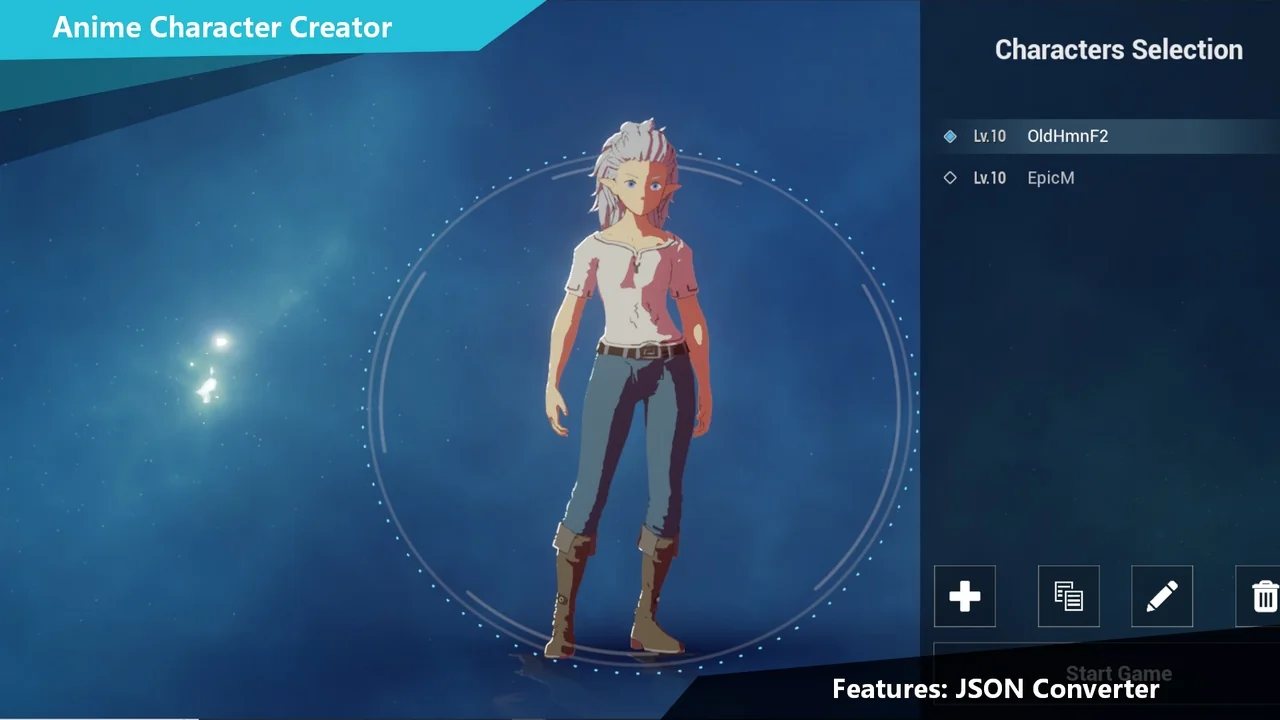
 Engine Tools
 Engine Tools
 Engine Tools